What this category covers
Productivity apps are the tools that help you capture, plan, and finish what matters. On Android that usually breaks down into a few familiar types: note-takers and second-brain apps for ideas and reference, calendars and planners for time, to-do and task managers for what needs doing, document and receipt scanners for paper you want to keep, and email clients that tame a busy inbox. Some apps try to do all of it; most do one job well. The right pick depends less on the longest feature list and more on the one workflow you repeat every single day.
What to look for
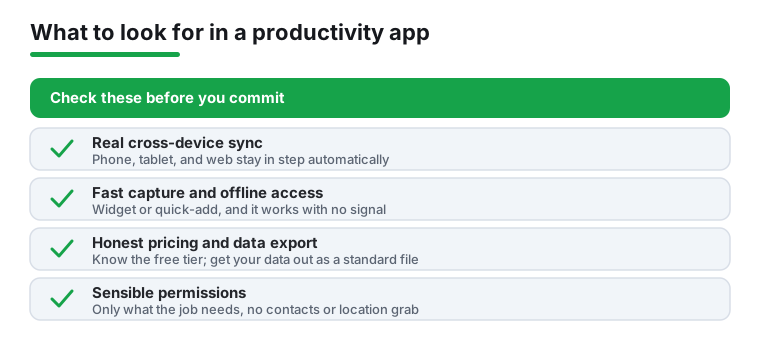
- Genuine cross-device sync. Your notes and tasks are only useful if they show up on your phone, your tablet, and the web. Check whether sync is automatic, how fast it is, and whether it works without a paid tier.
- Offline access. A planner that needs a connection is useless on a plane or a spotty commute. Look for full offline read and edit, with changes that merge cleanly when you reconnect.
- Fast capture. The whole point is friction-free input: a home-screen widget, a quick-add shortcut, voice entry, or a share-sheet button. If adding a task takes five taps, you will stop using it.
- Honest free tier and clear pricing. Many apps gate sync, reminders, or device count behind a subscription. Know what is free, what recurs, and whether a one-time purchase exists.
- Export and data ownership. Can you get your notes out as Markdown, PDF, or a standard file? Lock-in is the quiet cost of free apps; export is your exit ramp.
- Reasonable permissions. A to-do app does not need your contacts or location. Check what it requests and decline anything that does not match its job.
- Category-specific quality. For scanners, judge edge detection, OCR accuracy, and clean PDF output. For calendars, judge how natural-language entry and recurring events behave. For email, judge snooze, search speed, and how it handles multiple accounts.
Common mistakes to avoid
- App-hopping. Switching tools every month is itself the productivity drain. Pick something good enough and stick with it for a few weeks before judging.
- Over-configuring. Elaborate tag systems and nested folders feel productive but rarely survive a busy week. Start simple.
- Ignoring the lock-in. Free apps that hold your data hostage are expensive later. Confirm export before you invest hundreds of notes.
- Trusting ad-heavy free apps with sensitive scans. Receipts, IDs, and contracts deserve an app with a clear privacy policy, not one bankrolled by trackers.
- Chasing features you will never use. The best app is the one you actually open, not the one with the most settings.
How we pick
Every app in this category was installed on a real Android phone and used for everyday tasks, not judged from a spec sheet. We accept no paid placement and no sponsored rankings.