
Eleven Android apps across the jobs a phone is actually used for: notes, a task list, a calendar, focus, and the PDF paperwork that lands in between. The column that decides most choices is not the install price, which is free at the door on ten of the eleven, but where the free tier stops.
Google Keep is the pick, Microsoft To Do the free one, Todoist the choice for splitting a list into projects. Our answer, the free pick and the table ↓
Checked 3 September 2026: no pick changed since 20 August, when all eleven listings were re-read; nothing has moved since
Full logEleven Android productivity apps, compared on where the free tier stops, the ads label and whether the listing declares sharing with third parties.
Google Keep is our best overall because its Play listing, read 20 August 2026, shows 4.7 stars, no ads label, nothing sold.
Microsoft To Do is our best free pick because Microsoft's own page, read 20 August 2026, calls it free over a listing with no ads label, nothing sold.
Todoist is our niche pick for splitting a list into projects because its pricing page, read 20 August 2026, gives the free plan five personal projects, with no ads label and purchases to USD 149.99.
Data checked: 3 September 2026.
Every app here is checked against its own Google Play listing: rating and review count, the install band, price and the in-app purchase range, the Contains ads label and the full Data Safety section. A Play listing states what Play bills and not what a free plan allows, so the free tier column is read separately: at the developer's own pricing or product page for the seven apps that publish one, at the Play listing for the one that publishes the split itself, as absent for the one charged before it installs, and as unpublished for the two where no source we read names a limit. Every source is linked from the section it belongs to. Ratings are geography dependent, so every figure carries the date it was read. Nothing here rests on our own use of the apps. Any screenshot is our own capture and carries the date it was taken.
Four groupings decide most of the table above, and all four were read on 20 August 2026.
Growing a task list
Rating 4.6 from 303,824 reviews · Installs 10,000,000+ · Free to install, with in-app purchases from USD 0.99 to USD 149.99 per item · Developer Todoist Inc. · Data Safety: no data shared with third parties, and the app may collect data types · Listing updated 31 August 2026 · Contains ads: No · checked 1 September 2026
Google Play listing · 4.6 (303,824) · read 1 September 2026
Todoist is the pick for a reader who expects to outgrow one list, and the number that decides it is not on Play at all. It is free to install with no advertising label, and its own pricing page caps the free plan at five personal projects. That is the blunt part: five projects is a low ceiling for anyone running work and home in one place, and the way past it is in-app purchases that run USD 0.99 to USD 149.99 per item.
The cap is published by the developer rather than by the store. Todoist's own pricing page, read 20 August 2026, puts the free plan at five personal projects, three filter views, five people per personal project and one week of activity history. Its Play listing states none of that, which is the general rule on this page rather than a fault of this listing.
Free tier: 5 personal projects · read 20 August 2026
Skip this if. A single list already holds everything and the reminders are the only part that matters.
Choosing between them. Choose Todoist over Microsoft To Do when the list needs splitting into projects and five of them is enough, and Microsoft To Do over it when nothing should be sold inside the app at all.
Notes and tasks in one workspace
Rating 4.6 from 387,577 reviews · Installs 10,000,000+ · Free to install, with in-app purchases from USD 11.99 to USD 214.99 per item · Developer Notion Labs, Inc. · Data Safety: this app may share these data types with third parties, and the app may collect data types · Listing updated 31 August 2026 · Contains ads: No · checked 1 September 2026
Google Play listing · 4.6 (387,577) · read 1 September 2026
Notion is the workspace pick, free to install with no advertising label, and its free plan stops in two places its Play listing never mentions: file uploads are capped and page history is kept for seven days. Two things sit against it. Its Data Safety section says the app may share these data types with third parties, and its in-app purchases start at USD 11.99 per item, the highest entry price of the five listings here that sell anything inside.
Notion's own pricing page, read 20 August 2026, puts the free plan at uploads of up to 5 MB per file, seven days of page history and ten external guests, with blocks unlimited for a single person and limited once a workspace has more than one member. Its store title on its Play listing names notes, tasks and AI, and its developer entry reads Notion Labs, Inc., the same entry Notion Calendar carries further down this page.
Free tier: 5 MB uploads, 7 day history · read 20 August 2026
Skip this if. The job is a list of tasks and nothing else, because the setup a workspace asks for buys nothing in that case.
Choosing between them. Choose Notion over Microsoft OneNote for tasks and databases beside the notes, and OneNote over it for a Data Safety section that declares no sharing and a free tier measured in storage rather than in days of history.
Quick notes
Rating 4.7 from 2,546,512 reviews · Installs 1,000,000,000+ · Free, and the listing shows no in-app purchases · Developer Google LLC · Data Safety: no data shared with third parties, the app may collect data types, and the listing shows an independent security review · Listing updated 31 August 2026 · Contains ads: No · checked 1 September 2026
Google Play listing · 4.7 (2,546,512) · read 1 September 2026
Google Keep is the one to install first on the evidence available: rated 4.7 from 2,546,512 reviews, the highest score of the eleven here, free, with no advertising label and no in-app purchases at all on its store page. It is also the row where this page has the least to tell you, because no source we read publishes a note count, a storage cap or a paid tier for Keep. The blunt part is scope: its own store title calls it notes and lists.
Google's own storage page was read for a free tier limit on 20 August 2026 and does not name one: it says storage is shared across Drive, Gmail, WhatsApp backups and Photos, and it does not name Keep among them. That is a statement about what that one page publishes and not a promise that nothing is capped. For a note app with headings, attachments and long-form structure the comparison continues in the best notes apps for Android roundup. Keep's own store title, on its Play listing, is Google Keep - Notes and lists.
Free tier: No source we read states a cap · read 20 August 2026
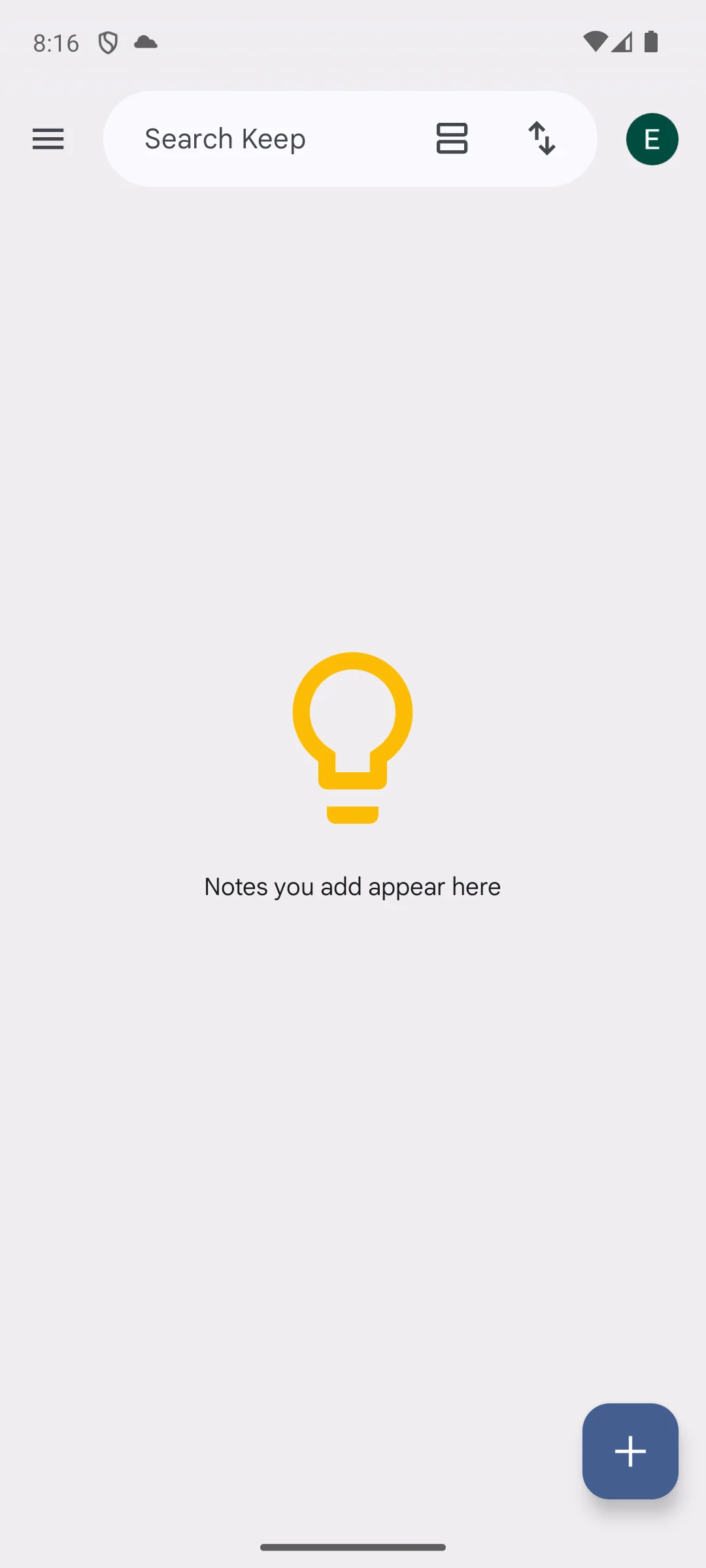
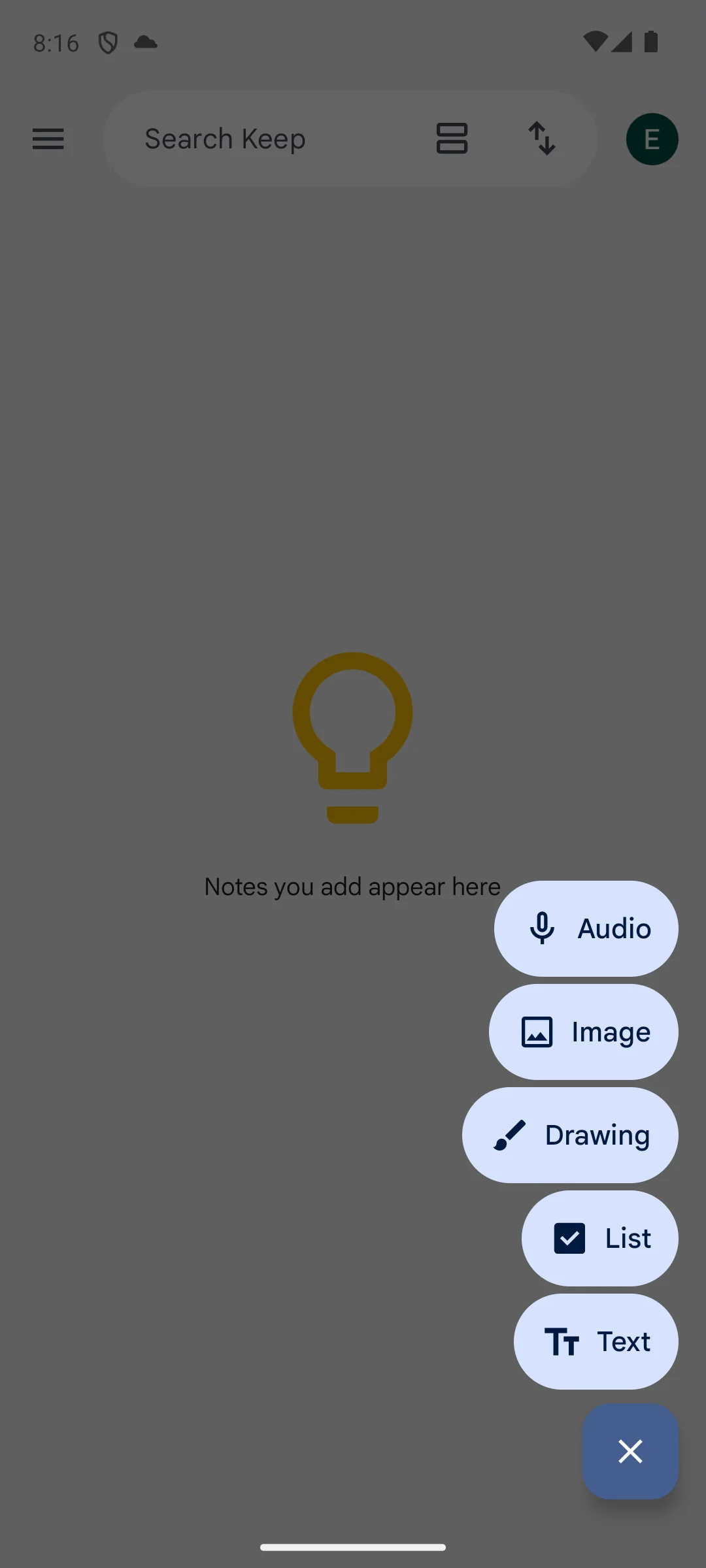
Skip this if. The notes being kept need headings, tables or attachments, because the store title promises notes and lists.
Choosing between them. Choose Google Keep over Microsoft OneNote for the higher rating and the shorter note, and OneNote over it for structure, length and a published storage figure.
Long form notes
Rating 4.6 from 1,492,496 reviews · Installs 1,000,000,000+ · Free, and the listing shows no in-app purchases · Developer Microsoft Corporation · Data Safety: no data shared with third parties, and the app may collect data types · Listing updated 30 August 2026 · Contains ads: No · checked 1 September 2026
Google Play listing · 4.6 (1,492,496) · read 1 September 2026
Microsoft OneNote is the long-form half of the notes answer: rated 4.6 from 1,492,496 reviews on an install band of 1,000,000,000+, free, with no in-app purchases on its listing and no advertising label. Its free tier is not unlimited and Microsoft says where it stops, just not on the Play listing. Notebooks sync to OneDrive, a Microsoft account without a subscription carries 5 GB of OneDrive storage, and a notebook stored there has a 2 GB file size limit.
Both figures come from Microsoft rather than from the store. Microsoft's own storage quota page, read 20 August 2026, says an account without a subscription gets 5 GB of free cloud storage for email attachments, files and photos in OneDrive, and its own OneNote quota error page, read the same day, says OneNote cannot sync notebooks once that space runs out and that notebooks stored in OneDrive have a file size limit of 2 GB, which is a limit on the notebook file in OneDrive rather than on the Android app, and is why that page lists desktop editions under Applies To. How it lines up against the other archive here is set out in the Evernote and OneNote comparison.
Free tier: 5 GB OneDrive, 2 GB a notebook · read 20 August 2026
Skip this if. The note being written is three lines long, because the structure OneNote offers costs a slower start.
Choosing between them. Choose OneNote over Evernote for a free tier measured in gigabytes rather than in fifty notes, and Evernote over it only if the archive is already there.
An archive, once you pay
Rating 3.5 from 1,847,719 reviews · Installs 100,000,000+ · Free to install, with in-app purchases from USD 1.00 to USD 254.89 per item · Developer Evernote by Bending Spoons · Data Safety: this app may share these data types with third parties, and the app may collect data types · Listing updated 31 August 2026 · Contains ads: Yes · checked 1 September 2026
Google Play listing · 3.5 (1,847,719) · read 1 September 2026
Evernote has the narrowest free tier on this page and its own plan comparison is where that shows: the free plan is fifty notes, one notebook and one device. Its listing carries the Contains ads label, one of three here that do, and its Data Safety section says the app may share these data types with third parties. It is rated 3.5 from 1,847,719 reviews, the second lowest score here on the fourth largest sample, which makes it a settled verdict rather than a bad month.
Read this first. The fifty note limit is not on the Play listing and it is not a rumour either. Evernote's own plan comparison, read 20 August 2026, puts the free plan at 50 notes, 1 notebook, 1 device, 1GB of storage and 20 tags. An earlier version of this page withdrew that limit on the grounds that no Play listing states it, which was true of the listing and wrong about the app.
Free tier: 50 notes, 1 device · read 20 August 2026
Skip this if. The archive is being started from nothing today, because fifty notes on one device is a wall rather than a trial.
Choosing between them. Choose Evernote over Microsoft OneNote only when the archive is already inside Evernote, and OneNote over it on the free tier, the rating and the absence of an advertising label.
A task list with nothing sold in it
Rating 4.6 from 479,597 reviews · Installs 10,000,000+ · Free, and the listing shows no in-app purchases · Developer Microsoft Corporation · Data Safety: no data shared with third parties, and the app may collect data types · Listing updated 14 July 2026 · Contains ads: No · checked 1 September 2026
Google Play listing · 4.6 (479,597) · read 1 September 2026
Microsoft To Do is the entry where the free tier question has the shortest answer: there is no paid tier to stop at. It is free, its listing shows no in-app purchases and carries no advertising label, its Data Safety section declares no data shared with third parties, and it is rated 4.6 from 479,597 reviews. The blunt part is the store page itself, updated 14 July 2026, the second oldest of the eleven here.
Microsoft says it in its own words on its own To Do page, read 20 August 2026: Use Microsoft To Do for free and sync your lists across the web and iOS, Android, and Windows devices
. That sentence is the reason this row says what it says, because a listing showing no in-app purchases proves only that Play bills nothing, and the two together are what settles it. The developer entry on its Play listing is Microsoft Corporation, the same developer as OneNote above.
Free tier: Nothing sold: developer says free · read 20 August 2026
Skip this if. The list needs projects, filters or collaborators, because there is no paid tier here to unlock them.
Choosing between them. Choose Microsoft To Do over Todoist when nothing should be sold inside the app, and Todoist over it when the list has to split into projects.
Automating the phone
Rating 4.0 from 56,039 reviews · Installs 1,000,000+ · Charged USD 4.49 on the listing before it will install, and no in-app purchases · Developer joaomgcd · Data Safety: this app may share these data types with third parties, and the app may collect data types · Listing updated 24 February 2026 · Contains ads: No · checked 1 September 2026
Google Play listing · 4.0 (56,039) · read 1 September 2026
Tasker is the exception to the free tier question on this page, because there is no free tier: its Play listing charges USD 4.49 before it will install, and then sells nothing inside. It is rated 4.0 from 56,039 reviews, the third lowest score of the eleven listings here on the second smallest sample, and its listing was updated 24 February 2026, roughly six months before this check and the oldest store page of the eleven. Its Data Safety section says the app may share these data types with third parties.
The trial is not on Play. The developer's own site, read 20 August 2026, offers a direct-download seven day trial beside the retail Play version, so the way to try it without paying is a download from the developer rather than anything on the store page. Its developer entry on its Play listing reads joaomgcd, and Play files it under Tools rather than Productivity.
Free tier: No free tier: USD 4.49 up front · read 20 August 2026
Skip this if. The phone is fine as it is, because this is a tool for building rules and not an app that does something on opening.
Choosing between them. Choose Tasker over Forest when a rule should fire without anyone starting a timer, and Forest over it when the phone needs leaving alone rather than reprogramming.
Focus timers
Rating 4.3 from 811,994 reviews · Installs 10,000,000+ · Free to install, with in-app purchases from USD 0.99 to USD 59.99 per item · Developer Seekrtech · Data Safety: this app may share these data types with third parties, and the app may collect data types · Listing updated 25 August 2026 · Contains ads: Yes · checked 1 September 2026
Google Play listing · 4.3 (811,994) · read 1 September 2026
Forest is the focus entry, free to install, with in-app purchases from USD 0.99 to USD 59.99 per item, the narrowest purchase range of the five listings here that sell anything inside. Its own site says where the free plan stops: Time Guard covers one app or site and Mindful Space offers one soundscape, with more of both behind the paid Plus tier. Two things sit against it. Its listing carries the Contains ads label, and its Data Safety section says the app may share these data types with third parties.
What it asks of the phone is stated on the listing itself, in the developer's own words on its Play listing, read 20 August 2026: Time Guard uses Android AccessibilityService API to detect which app is currently active on your device, so it can block apps you've added to your distraction list during focus sessions
. Read that sentence before granting the permission it describes. The developer's own site, read the same day, lists the free plan as the focus timer, deep focus mode, Time Guard for one app or site and one soundscape, and puts extra soundscapes, custom allowlists and multi-app Time Guard behind Plus.
Free tier: Time Guard 1 app, 1 soundscape · read 20 August 2026
Skip this if. An accessibility service is not something worth granting for a timer, because its own listing says that is what the blocking feature uses.
Choosing between them. Choose Forest over Tasker when the phone needs leaving alone rather than reprogramming, and Tasker over it when nothing should be advertised inside the app.
Everyday scheduling
Rating 4.6 from 4,767,291 reviews · Installs 10,000,000,000+ · Free, and the listing shows no in-app purchases · Developer Google LLC · Data Safety: no data shared with third parties, the app may collect data types, and the listing shows an independent security review · Listing updated 27 August 2026 · Contains ads: No · checked 1 September 2026
Google Play listing · 4.6 (4,767,291) · read 1 September 2026
Google Calendar is the calendar the rest of this page is measured against: rated 4.6 from 4,767,291 reviews, free, with no in-app purchases on the listing and no advertising label, and a Data Safety section that declares no data shared with third parties and shows an independent security review. Like Keep, it is a row where no source we read publishes a free tier limit, so this page states none. Its Downloads figure reads 10,000,000,000+, which is the store's own count and is not a count of people.
That install band was read twice before it was printed, because a figure that large is the shape of a parsing error: the listing's own Downloads stat reads 10B+ and the figure behind it reads 10,000,000,000+. Google's own storage page, read 20 August 2026, names Drive, Gmail, WhatsApp backups and Photos as sharing one account allowance and does not name Calendar, so nothing here says a limit exists or that none does. If a different calendar suits the week better, the best calendar apps for Android roundup compares them.
Free tier: No source we read states a cap · read 20 August 2026
Skip this if. The events being scheduled must live somewhere other than a Google account.
Choosing between them. Choose Google Calendar over Notion Calendar for the rating and the sample behind it, and Notion Calendar over it only when the calendar has to sit against a Notion workspace.
Filling and signing PDFs
Rating 4.5 from 7,921,305 reviews · Installs 500,000,000+ · Free to install, with in-app purchases from USD 0.99 to USD 299.99 per item · Developer Adobe · Data Safety: this app may share these data types with third parties, and the app may collect data types · Listing updated 30 August 2026 · Contains ads: Yes · checked 1 September 2026
Google Play listing · 4.5 (7,921,305) · read 1 September 2026
Adobe Acrobat Reader is the PDF entry, and it is the one app here whose own Play listing draws the free tier line for it. Filling and signing sit among the free features; editing, exporting, page reordering, compression and password protection sit under paid ones. It is rated 4.5 from 7,921,305 reviews, the largest sample on this page, its listing carries the Contains ads label, and its in-app purchases run from USD 0.99 to USD 299.99 per item, the highest ceiling of the eleven listings here.
Read this first. Its Play listing, read 20 August 2026, splits its own feature list into paid and free and offers a seven day free trial across the paid half. That split is the free tier for this row, and it is the only one of the eleven published on the store page itself rather than at the developer's own address.
For rearranging or trimming pages rather than filling a form, the best PDF editor apps for Android roundup covers the alternatives.
Free tier: Editing and exporting are paid · read 20 August 2026
Skip this if. The PDF work is rearranging or trimming pages, because its own listing files those under paid features.
Choosing between them. Choose Acrobat Reader over the rest of this page for a form that has to be filled and signed, and something from the PDF editor roundup over it for page surgery.
A calendar tied to Notion
Rating 3.3 from 17,468 reviews · Installs 1,000,000+ · Free, and the listing shows no in-app purchases · Developer Notion Labs, Inc. · Data Safety: this app may share these data types with third parties, and the app may collect data types · Listing updated 29 July 2026 · Contains ads: No · checked 1 September 2026
Google Play listing · 3.3 (17,468) · read 1 September 2026
Notion Calendar is the lowest rated listing on this page, at 3.3 from 17,468 reviews, and that is also the smallest sample of the eleven, so the score moves faster here than anywhere else. The calendar itself is free with nothing sold inside, but its free tier is not really its own: what it shows from a Notion workspace is bounded by the Notion plan behind it. Against it, its Data Safety section says the app may share these data types with third parties.
Notion's own calendar page, read 20 August 2026, offers it as Get Notion Calendar free
and describes it as fully integrated with a Notion workspace, and the same company's pricing page, read the same day, is where that workspace's own free limits are set. So the honest reading of this row is that nothing is charged for the calendar and the ceiling arrives from the workspace it is pointed at. Its developer entry on its Play listing reads Notion Labs, Inc., which is the entry Notion carries as well.
Free tier: Capped by the Notion plan · read 20 August 2026
Skip this if. The workspace it is meant to sit beside is not Notion, because that pairing is what its developer entry is offering.
Choosing between them. Choose Notion Calendar over Google Calendar only when the calendar has to sit against a Notion workspace, and Google Calendar over it on the rating and the sample.
Productivity is four jobs rather than one: keeping notes, running a list of tasks, holding a calendar, and protecting attention. A fifth job, the paperwork that arrives as a PDF, sits across all of them. The entries above split along those lines, so the fastest route through the table is to name the job first and read only that row.
Ten of the eleven listings are free to install. Tasker is the exception and is charged for before it installs. That makes the install price almost a constant, and a constant cannot help anyone choose. What separates these apps is the second price, the one that arrives when the free plan runs out, and Play does not publish it. Evernote stops at fifty notes on one device. Todoist stops at five personal projects. Notion keeps a week of page history and caps a file upload. Forest guards one app and plays one soundscape. Those four decide more real choices than any figure on a store page, and every one of them was read at the developer own address on 20 August 2026.
A Play listing settles five things: the price at the door, the range of in-app purchases, whether the Contains ads label is present, what the Data Safety section declares, and the date the store page was last rewritten. It does not settle how an app behaves on a particular phone, and it almost never settles where a free plan stops. Adobe Acrobat Reader is the single exception on this page, because its listing splits its own feature list into paid and free. For everyone else that answer lives on the developer own site, which is why this page reads both and says which one each figure came from.
This page said the opposite until today, and the correction is worth stating plainly because it is the easiest mistake in this category to make. An earlier version withdrew four free tier limits on the grounds that no Play listing states them. That was true about the listings and wrong about the apps: three of the four are published, in numbers, on the developer own pricing pages, and were read there on 20 August 2026. Where a limit genuinely could not be found, as with Google Keep and Google Calendar, the table says no source we read publishes one, which is a statement about the sources rather than a promise about the app.
Three listings carry the Contains ads label. Adobe Acrobat Reader is the one to pause on, because it carries that label on the largest sample of the eleven alongside the highest purchase ceiling on the page. Evernote is the other, and it pairs the label with the narrowest free plan here, which is the combination worth knowing before installing rather than after.
Evernote at 3.5 and Notion Calendar at 3.3 are the two lowest scores here, and they are not the same kind of number. Notion Calendar carries the smallest sample on the page, so its score can move quickly. Evernote carries the fourth largest sample here, so its score is a settled verdict rather than a bad month, and that is the harder fact of the two.
Five of the eleven listings declare no data shared with third parties, and six say the app may share these data types with third parties. Two listings also show an independent security review. All of this is what the developer has declared to the store, which is a useful floor and not a guarantee, and it is the reason each entry above prints the declaration rather than a verdict on it.
If the job is specifically planning a day or a week rather than productivity broadly, the best planner apps for Android comparison reads twelve listings the same way, against the same free tier question, and the five apps that appear on both pages carry the same free plan limits. For deeper notes there is the best notes apps roundup, for rearranging pages inside a PDF the best PDF editor apps, and for turning paper into files the best scanner apps. The wider Android productivity hub holds the rest of the category.
Google Keep, on the evidence available: rated 4.7, an install band of 1,000,000,000+, no advertising label, and no in-app purchases on its store page. Its Data Safety section declares no data shared with third parties. Two limits are worth knowing. Its own store title describes notes and lists, so it is not the app for a structured document, and no Google source we read publishes a free tier limit for it, so nothing here promises where it stops. Checked 20 August 2026.
Evernote. Its own plan comparison puts the free plan at 50 notes, 1 notebook and 1 device, which is the tightest ceiling of the eleven apps here, and its Play listing also carries the Contains ads label. Todoist is next at five personal projects on its own pricing page. Both limits are published by the developer rather than on the Play listing, which is why this page reads both. Checked 20 August 2026.
Because the price at the door barely varies: ten of these eleven apps are free to install, so a price column separates one row from ten and helps nobody choose. What actually differs is where the free plan runs out, and a Play listing does not publish that. It states what Play bills. The free tier column is read at each developer's own pricing or product page instead, and every source is linked in the app's own section. Checked 20 August 2026.
One. Tasker is charged USD 4.49 on its Play listing before it will install, and that listing shows no in-app purchases beyond it. Its developer offers a seven day trial as a direct download from its own site rather than through Play. The other ten listings are free to install, and five of those show no in-app purchases at all. Checked 20 August 2026.
Three of the eleven listings carry the Contains ads label: Evernote, Forest and Adobe Acrobat Reader. The label is a statement about the store listing rather than a promise about every screen in the app, and the other eight listings carry no such label. Evernote is the one worth pausing on, because it pairs the label with the narrowest free plan here. Checked 20 August 2026.
Five of the eleven listings sell something inside the app. The highest ceiling is Adobe Acrobat Reader at USD 299.99 per item, and the lowest is Forest. Notion has the highest entry price of the five. Everything is priced per item on the listing rather than as one plan figure, so a range is not an annual cost. Checked 20 August 2026.
For short notes the highest rated listing here is Google Keep. For longer notes with structure there is Microsoft OneNote, also free with no in-app purchases, whose free tier is Microsoft's 5 GB of OneDrive storage. For tasks, Todoist and Microsoft To Do share a rating, and the free tier splits them: Todoist caps at five personal projects and sells purchases, while Microsoft says To Do is free and its listing shows nothing sold inside. Checked 20 August 2026.
Almost everything that matters after the install. It states the price at the door, the in-app purchase range, whether the Contains ads label is present, what the Data Safety section declares and the date the store page was last updated. It does not state how many notes, projects or gigabytes a free plan allows. Only one listing on this page, Adobe Acrobat Reader, splits its own features into paid and free. For the rest, that answer is on the developer's own site. Checked 20 August 2026.
Checked 20 August 2026: all eleven Play listings were re-read and every rating, review count, install band, price, in-app purchase range, ads label, Data Safety line and listing date carries the date it was read. Review counts moved since the last pass: Todoist 302,929 to 303,203, Notion 382,961 to 384,469, Google Keep 2,518,225 to 2,526,359, Microsoft OneNote 1,489,196 to 1,490,340, Google Calendar 4,723,896 to 4,737,555, Adobe Acrobat Reader 7,824,227 to 7,867,711, Forest 811,162 to 811,450 and Notion Calendar 17,213 to 17,283. No app was added or removed. The decision table lost its Price column and gained the column this page existed to provide. The old column read a variant of "Free" in ten rows out of eleven, which is what Play bills and not what these apps cost to use, and it separated almost nothing at the moment of choosing. The in-app purchase range it carried is still printed in the fact line of every section that has one. The new column is where the free tier stops, and it holds ten distinct values across eleven rows. A withdrawal from the previous pass is itself withdrawn. That pass removed four free tier limits with the reason that no listing read that day states any of them, which was a true statement about Play listings published as a finding about the apps. Three of the four were read again at the developer's own source on 20 August 2026 and are restored with that source linked in the same sentence: Todoist's pricing page puts the free plan at five personal projects, Evernote's plan comparison puts it at fifty notes, one notebook and one device, and Notion's pricing page caps free uploads and keeps seven days of page history. The fourth, OneNote riding on a fixed storage allowance, is restored in a more exact form from Microsoft's own storage quota page and its own OneNote quota error page: an account without a subscription carries 5 GB of OneDrive storage and a notebook stored there has a 2 GB file size limit. Two further free tier facts are new rather than restored, read at the developers' own sites: Forest limits Time Guard to one app or site and Mindful Space to one soundscape on its free plan, and Microsoft states in its own words that To Do is free. Two rows now say plainly that no source we read publishes a free tier limit for Google Keep or Google Calendar, where the page previously implied by omission that nothing stops. Every claim of personal use is withdrawn. The How we verify box opened with a tier headed "Installed and examined" describing installing these apps on an emulator, opening them and taking the screenshots, which is a testing claim inside the box that exists to replace testing claims; that tier is gone and the box is rewritten around the sources this page actually reads. The Google Keep paragraph that described the app opening on an empty board is replaced by what Google does and does not publish about its limits. The two Google Keep screenshots are unchanged and still ours; their captions and alt text now describe what the screens show and the date of the capture, and nothing more. The rule here is verified, not tested. The seo title and the H1 now name the free tier question, which is what the page now answers, and the five apps this page shares with the planner comparison were checked against it on the same day and carry the same free plan limits in both places, each page printing the review counts it read on the day it was built.
 Best Calendar Apps for AndroidProductivity
 Best Notes Apps for AndroidProductivity