
Updated for 2026
Shopping and lifestyle apps are the ones that quietly make daily life run smoother, whether you are splitting a grocery run with a partner or keeping a wishlist before the next sale. We read each listing and the developer's own documentation, so you can see which apps are built for shared lists and what they ask for in return. Start with our shopping list pick below, then build the everyday kit that fits how you live.
Shopping and lifestyle apps sit between pure productivity and pure entertainment. They handle the small, recurring jobs of running a household and a budget: what to buy, when to buy it, who is bringing it home, and how to not overspend along the way. Rather than one app that does everything, the category breaks into a handful of distinct jobs.
Most people end up running two or three of these together, not one app that claims to cover the lot.
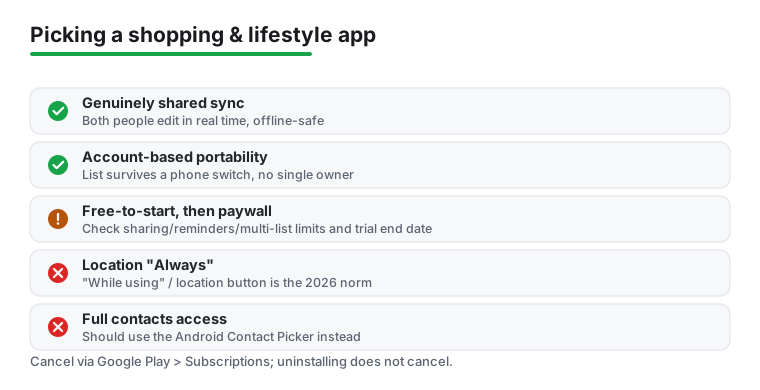
A grocery list, a wishlist, or a loyalty wallet looks like mundane data, but it quietly reveals where you shop, what you buy, and roughly when you are home. That is worth guarding. Two changes to Google Play's rules in April 2026 make the old advice concrete. An app that wants your contacts, for sharing or inviting, should now use the Android Contact Picker, which hands over only the people you tap rather than your whole address book; an app that still demands full contacts access has to file a developer declaration justifying it. For location, the recommended minimum is now the one-time "location button" or "While using" access, while continuous or background location needs a formal declaration that "nice to have" cases will not pass. So for nearby-store or deals features, "While using" is the 2026 norm, and an app asking for location "Always" should make you pause. Read the Play Store data-safety section, and treat an app whose real business is reselling your shopping habits as a cost, not a free app.
On money, the common pattern is free to start, then a paywall on sharing, reminders, or more than one list. The Google Play billing reality is worth knowing before you commit. Cancelling during a free trial keeps your access until the trial ends, with no charge, so there is no reason to wait it out. Uninstalling an app does not cancel its subscription; you have to cancel through Google Play, under Subscriptions, since cancelling inside the app does not always stop the Play billing. And if you are charged in error, Google Play lets you request a refund within 48 hours of purchase; approval is usually quick, but it is not automatic.
Every app here is checked against its store listing and the developer's own documentation, with attention to permissions, pricing and ads. We take no payment for placement or ranking, and we flag intrusive ads, pushy upsells, or data practices we would not accept ourselves.
Look for one where both people can edit in real time on the free tier without a paywall on sharing. The strongest free options sync within seconds, work offline and reconcile later, and let you sort items by aisle. Avoid apps that cap you at one shared list or that tie the list to a single account, since that becomes a problem if that person changes phones.
They can be, for big planned purchases like an appliance or electronics, where a genuine price history helps you buy at a real low rather than a fake sale. They are less useful for everyday items, where the alerts mostly create urgency to buy things you did not need. Set trackers only on items you have already decided to buy, and ignore the rest.
A shopping list, wishlist, or loyalty wallet rarely needs your contacts, microphone always-on, call log, or background location. Camera access is reasonable for barcode scanning, and "while using" location can make sense for nearby-store features. If an app demands more than its job requires, check the Play Store data-safety section and consider an alternative.
Note the trial end date the moment you start it, and cancel through Google Play under Subscriptions rather than only inside the app, since in-app cancellation does not always stop the Play billing. Cancelling still lets you use the paid features until the period ends, so there is no reason to wait.