
Updated for 2026
Keeping track of where your money goes should not feel like a second job, so we went through the budgeting, expense, and invoicing apps people actually keep on their home screen. We cared about the things that trip you up day to day, like how quickly you can log a purchase, what an app charges once you rely on it, and how painless it is to send a clean invoice or track mileage for tax time. Below you will find honest picks that help you watch your spending and stay organized on Android, so you can pick the one that fits how you handle your money.
Money apps on Android split into a few jobs, and picking the wrong job is how people waste an evening of setup before giving up. Budgeting apps are about the plan: you set limits by category, like groceries, rent, and the fun money, then watch yourself stay inside them. They suit a household trying to cap spending. Expense trackers are about the record: they capture what you actually spent, usually by scanning a receipt or importing transactions, so patterns show up later. They suit anyone who wants to see where it goes, and freelancers logging deductible costs. Invoicing and small-business apps create and send invoices, mark who has paid and who has not, and log mileage or billable hours. That is the solo trader and freelancer corner. Net-worth aggregators pull balances from your accounts into one dashboard so you can see the whole picture at a glance.
Here is the 2026 reality that changes how you shop. Since Mint closed in March 2024, and the Credit Karma app that Intuit moved everyone to does not do category budgets, monthly plans, or an upcoming-bills view, no single free app now does plan, track, bills, net worth, and credit all at once. The free do-everything tool that Mint stood for is effectively gone. Most people now pair a planner with a tracker, or pay for one all-in-one.
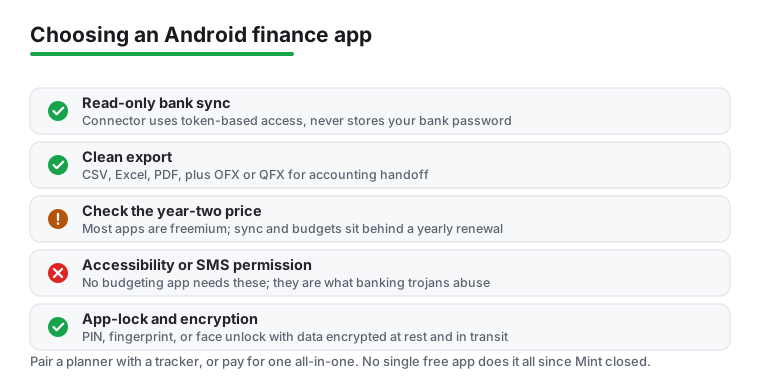
A budgeting app needs very little to do its job, so judge it by what it asks for. It has no reason to request Accessibility access, Device Admin, SMS reading, or permission to draw over other apps. Treat all four as red flags, because those are exactly the permissions that 2026 Android banking trojans abuse to read your screen and grab logins and one-time codes. That is why Android 17 and the Advanced Protection settings now warn on Accessibility and overlay abuse. App-lock and encryption are the baseline. Screenshot-blocking is a fair sign an app takes privacy seriously, though it does not stop a rogue Accessibility service, so the permission check still comes first. For sync, prefer a regulated aggregator with read-only access that never stores your banking password.
On cost, plan for a freemium model. Most apps are free to start, then charge a yearly subscription for bank sync, multiple budgets, or full history and reports. Read the paywall, and check the year-two renewal price, before you pour weeks of data in. A genuine free tier, a one-time purchase, or a manual-entry app with no bank link and nothing leaving your phone are all worth a look if you would rather skip a subscription. One caution: US open-banking rules are still unsettled in 2026, and big banks have started moving toward charging for data access, so free unlimited bank sync on US apps may get rarer over time. Regulatory timelines move, so treat that as a direction, not a date.
Every app here was checked against its Google Play listing and the developer's own documentation, judged on what those sources show about managing money day to day. No paid placements, no sponsored slots.
It depends on your discipline and comfort with access. Bank sync is effortless and great if you have many accounts, but it asks for read access to your finances and only works if your bank is supported in your country. Manual logging keeps everything private and offline, and many people find that typing each purchase actually makes them spend more mindfully. If you choose sync, make sure access is read-only and the connector is reputable.
Many are, but check how the app makes money. Free apps that show ads or sell anonymized spending data are a different deal than ones with a paid tier. Look for an app-lock, encryption, and a clear privacy policy that says your data is not sold. For anything touching your bank login, prefer apps that use a regulated aggregator and never store the password themselves.
You should always be able to. Before committing, confirm the app offers CSV, Excel, or PDF export. This matters most for invoicing and tax records, where you need a permanent copy. Avoid apps that lock your history behind their own format with no way out, because switching later becomes painful.
Picking an app that is too complex for their habits and abandoning it within a few weeks. The best budgeting app is the one you keep using, so favor fast logging and clear reports over a long feature list. The second most common mistake is trusting auto-categorization without reviewing it, which quietly makes your reports wrong.
For reputable apps, yes. Bank sync runs through a regulated third-party aggregator, not the app maker, and read-only access means the connector can see your transactions and balances but cannot move money or change anything. The good aggregators use token-based access and never receive or store your actual bank password, so the app never holds your login. Still check that the connector is a known name and that your bank is supported in your country before you link anything.