
Updated for 2026
Whether you want a clean music player for your morning commute, a podcast app that remembers where you left off, or a voice recorder that captures more than muffled noise, the right pick really does change how your phone sounds day to day. The picks below favor apps that keep playback smooth over Bluetooth and make it easy to find what you want without digging through menus. Below we have grouped our favorite music players, podcast apps, downloaders, equalizers, and voice recorders so you can jump straight to what you need.
It helps to stop thinking about "music and audio" as one thing and to see it as several separate jobs that people often lump together. Playing files you already own, streaming from a catalog, keeping up with podcasts, reshaping the sound of everything, and recording your own audio are all different problems. The app that is good at one is usually only average at the rest, so the first decision is which job you are actually trying to do. Most people end up with two or three apps here rather than one, and that is normal.
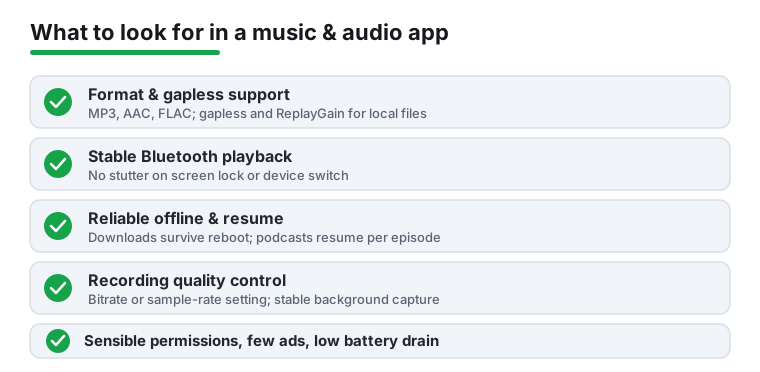
These play files that already live on your phone or SD card, with no internet needed. They are for people who own their music, ripped it from discs, or downloaded files they are allowed to keep. The real work in a local player is how it reads tags, builds a library, and handles formats, so this is where things like FLAC support and gapless playback matter most.
A streaming client is tied to a catalog service such as Spotify or YouTube Music, so it needs a subscription and a connection. Discovery is the strong point, since you get a huge library and recommendations without managing files. The weak point is anything you own: a streaming app plays your own files poorly, and its "downloads" are locked to that app rather than being real files you can move around.
Podcasts look like music but behave differently. The job is built around subscriptions, a queue you can reorder, per-episode resume, variable speed, and silence trimming. It runs on RSS feeds rather than a music catalog, which is why a music app that bolts on a podcast tab rarely handles the listening flow as well as an app built for it.
An equalizer does not play anything. It reshapes sound, ideally across the whole system rather than inside one player, so it works with whatever you are listening to. Think of it as a companion to your player that tunes output to your headphones or car, not a replacement for either.
Recorders capture your own audio: memos, interviews, lectures. What matters is the quality setting, whether it keeps recording steadily in the background, and how it stores files. Note that this is ordinary voice recording. Capturing phone calls is a separate matter covered further down, and a general recorder app does not do it.
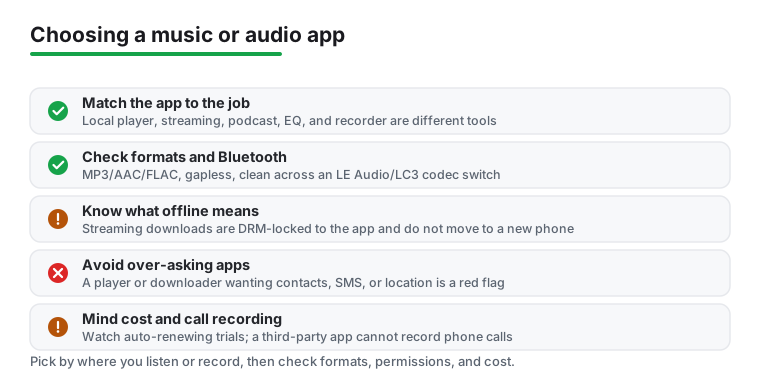
The single most useful question is how and where you actually listen or record. A commuter on patchy mobile data needs downloads that work offline. Someone at a desk with wired headphones cares more about format quality and a tidy library. Someone capturing interviews cares about microphone handling and reliable background recording. Match the tool to that habit rather than to whichever app has the longest feature list. Once you know the job, here is what to check:
Audio apps touch personal data, and this is a common corner for sketchy free apps to over-ask for access, so a few habits are worth keeping.
A player needs media or audio access. A recorder needs the microphone. Neither needs your contacts, your messages, or your location. On modern Android the relevant permission for a player is the granular audio one (READ_MEDIA_AUDIO, introduced in Android 13), which lets an app read your music through the system media store without a blanket grab at all your storage. A well-behaved player asks only for that. A player or "downloader" that wants contacts, location, or SMS is a red flag, so deny it and move on.
Downloads from a streaming or podcast catalog service are not the same as files you own. They are locked to the app that made them, they count against per-account device limits (a single streaming subscription often caps offline use at around five devices), and they expire if your subscription lapses or you miss a periodic renewal window, which can be roughly every 30 days. You cannot move them to another app or carry them to a new phone as real files. Local files you actually own carry none of these limits. Knowing the difference sets honest expectations and keeps you away from dodgy workarounds.
Free "music downloader" apps are the part of this category to treat with the most caution. Many pull from copyrighted sources, lean heavily on ads, and request far more access than a download tool needs. Using a streaming service's own offline downloads, or playing files you legitimately own, is safer for both your data and your device. If a downloader asks for permissions that have nothing to do with saving a file, that is your cue to skip it.
Plenty of capable apps are free for the basics and charge for the rest. Before you pay, find out what the free tier actually includes, and watch for trials that quietly convert into auto-renewing charges. For light use, a one-time unlock is usually better value than a recurring subscription. Some players and equalizers gate fairly ordinary features behind a subscription, so check what you are really getting before you commit.
Every app here is checked against its store listing and the developer's own documentation, including the formats and Bluetooth codecs it claims to support, before it earns a spot. We take no paid placement, and anything that nags, drains battery, or over-asks for permissions gets cut regardless of how popular it is.
A local music player plays files stored on your phone or SD card and needs no internet, which is ideal if you own your music or downloaded it. A streaming app pulls from a service catalog like Spotify or YouTube Music and usually needs a subscription and a connection. Some apps do both, but most are stronger at one job, so start from where your music actually lives.
A good system-wide equalizer can meaningfully tune sound to your headphones or car, especially if your earbuds are bass-light or harsh in the treble. The catch is that boosting too aggressively adds distortion rather than detail. Use small adjustments, confirm the EQ affects all audio and not just one player, and check it stays active after you swap headphones.
Be careful. Many free downloaders pull from copyrighted sources and tend to be heavy on ads or request broad permissions they do not need. If a downloader wants access to contacts, SMS, or location, skip it. Sticking to official streaming downloads for offline listening, or files you legitimately own, is far safer for both your data and your device.
Set a real recording quality before you start, ideally WAV or a high MP3 bitrate, since the default is often too low for clear speech. Test that the app keeps recording in the background when you open other apps, and place the phone closer to the speaker than to background noise. Do a 20-second test and play it back before anything important.