
Updated 26 August 2026 · Spotify, Audiomack and Bandcamp re-read from their own Google Play listings that day · the other nine entries carry their 7 August 2026 check.
Twelve apps that get music onto your phone for a flight or a dead zone, from subscription services with an offline switch to a player for files you already own. Price, the ads label, the tier that unlocks offline saving and the rating come from each app’s own store listing. For more, browse our Music and Audio apps hub.
Spotify is our best overall because on 26 August 2026 it is free to install with a Contains ads label, and its 7 August 2026 description puts downloads behind Premium.
Audiomack is our best free pick because on 26 August 2026 it is free with a Contains ads label and its free tier saves full tracks offline.
Bandcamp is our niche pick for music you own because on 26 August 2026 it is free with no ads label and no in-app purchases.
Data checked: 3 September 2026.
Best overall
4.3★ · 36.2M reviews · 1B+ installs · free to install, Contains ads label, in-app purchases $6.99 to $203.88 per item · developer Spotify AB · Play listing · checked 26 August 2026
Spotify is our best overall pick: it has 1B plus installs and a download switch on every playlist and album. It is free to install, but the listing carries a Contains ads label and its own description states that downloading for offline listening needs Spotify Premium. See our Spotify Premium guide for setup.
For: over 36 million reviews on 26 August 2026, the largest sample here · offline downloads for music, podcasts and audiobooks, per its own description · playback on mobile, tablet, desktop, Chromecast and TV. Against: Contains ads label · nothing saves offline without Premium · in-app purchases run to $203.88 per item. Skip it if you want offline saving without a subscription; Audiomack downloads on its free tier. Choose Spotify over Apple Music if you want podcasts and audiobooks saved beside your music; Apple Music’s listing names music only.
↑ Back to the comparisonBest for lossless
4.6★ · 747,891 reviews · 100M+ installs · free to install, no ads label, in-app purchases $5.99 to $199.99 per item · developer Apple · Play listing · checked 7 August 2026
Apple Music is the pick for lossless offline files: its own description names lossless audio up to 24-bit/192 kHz and a download button for your library. It carries no ads label, but nothing plays offline until you subscribe, and 747,891 reviews is a thin sample beside Spotify’s 36 million. Our Apple Music on Android walkthrough covers setup.
For: no Contains ads label · lossless audio up to 24-bit/192 kHz, per its own description · Spatial Audio and beat by beat lyrics on many songs. Against: no free tier at all, so offline saving always costs · in-app purchases to $199.99 per item · the listing names music only, no podcasts. Skip it if you want to try offline downloads without paying; Audiomack is free. Choose Apple Music over Spotify for lossless audio, which Spotify’s listing does not name anywhere.
↑ Back to the comparisonBest for rare uploads
4.5★ · 7,784,947 reviews · 5B+ installs · free to install, Contains ads label, in-app purchases $0.05 to $999.99 per item · developer Google LLC · Play listing · checked 7 August 2026
YouTube Music is the pick for live sets, remixes and covers that never reached a label: it is the only app here fed by YouTube uploads. It is free to install with a Contains ads label, and downloads, smart downloads included, arrive only with Music Premium, per its own description.
For: 5B plus installs, the widest reach on this page · smart downloads that refresh in the background · ad-free listening on Premium. Against: Contains ads label · no offline saving on the free tier · in-app purchases listed to $999.99 per item, the highest here. Skip it if you never go looking for a live version or a remix; Spotify’s catalog is tidier. Choose YouTube Music over Spotify if the recordings you want are uploads rather than releases.
↑ Back to the comparisonBest for Prime members
4.0★ · 3,391,666 reviews · 100M+ installs · free to install, no ads label, in-app purchases $12.99 per item · developer Amazon Mobile LLC · Play listing · checked 2 September 2026
Amazon Music earns its place mainly when Prime already covers part of it: its own description puts ad-free music inside Prime but offline listening inside the paid Unlimited plan. It is free to install with no ads label, and at 4.0 stars from 3,391,666 reviews it is among the lowest rated apps here.
For: ad-free music included with Prime, per its own description · offline listening and 100 million songs on Unlimited · downloads onto a Wear OS watch. Against: 4.0 stars, second lowest of the subscription services here, above only Pandora · offline saving needs Unlimited, not Prime · the listing names no hi-res or lossless tier. Skip it if you have no Prime membership, because the whole pitch leans on it. Choose Amazon Music over Spotify only when Prime already pays for part of your listening.
↑ Back to the comparisonBest value lossless
4.3★ · 3,613,905 reviews · 100M+ installs · free to install, Contains ads label, in-app purchases $2.49 to $218.99 per item · developer Deezer Music · Play listing · checked 7 August 2026
Deezer is the value pick for lossless: its own description puts HiFi sound and offline mode inside the same Premium plan, with no separate hi-res tier to buy. It is free to install with a Contains ads label, and that same description calls the free tier occasional ads and limited features, so saving offline costs money.
For: HiFi lossless listening on Premium, per its own description · offline mode for albums, playlists and podcasts · Duo, Family and Student plans. Against: Contains ads label · the free tier is explicitly limited · in-app purchases to $218.99 per item. Skip it if you want offline saving at no cost; Audiomack does that on its free tier. Choose Deezer over Tidal if you want lossless and podcasts in one app; Tidal’s listing names music only.
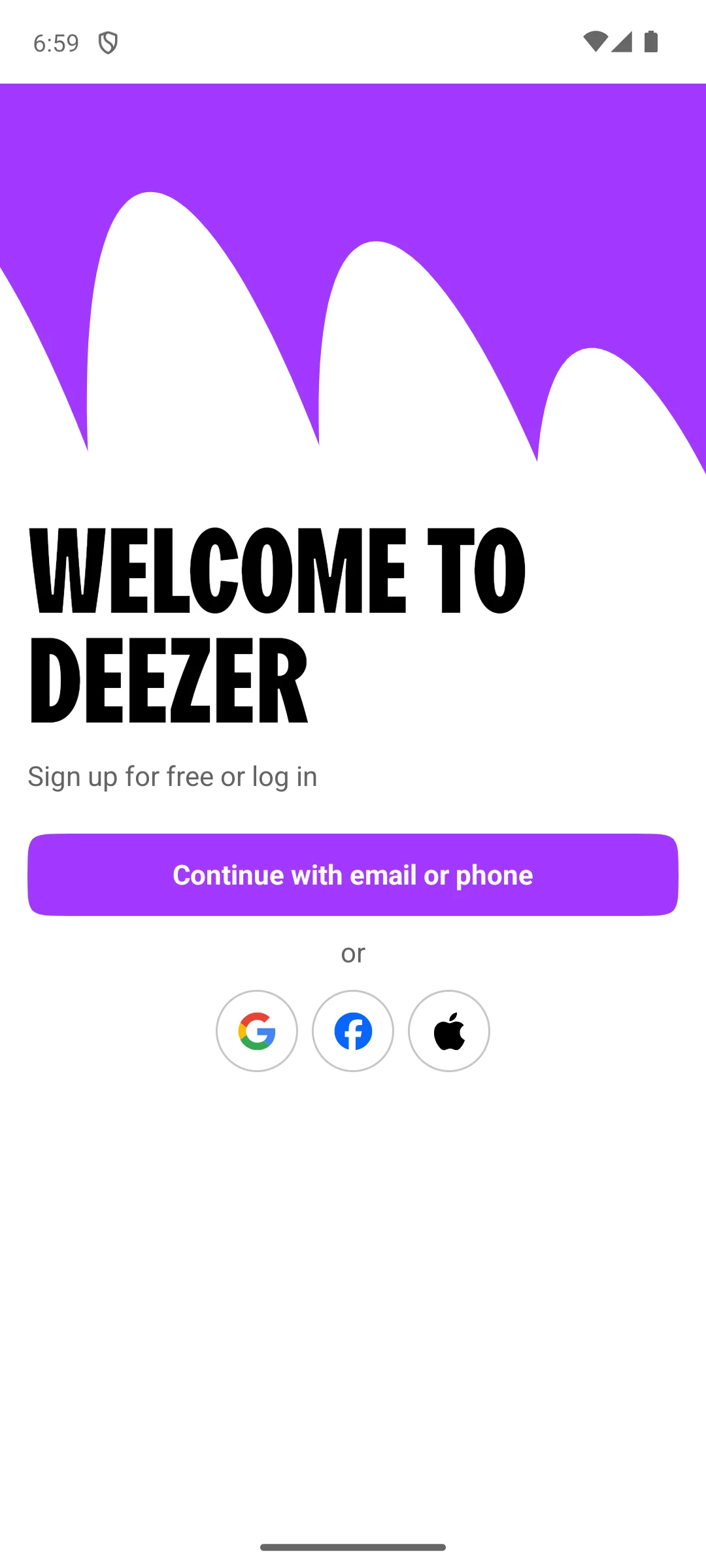
↑ Back to the comparisonDeezer, installed on our own Android emulator on 18 August 2026, opens on a welcome screen that reads sign up for free or log in, and offers exactly two routes: continue with an email address or phone number, or use a Google, Facebook or Apple account. There is no way to browse the catalogue first and no guest mode on that screen, so the free tier still begins with registering. The screenshot below is ours, taken on 18 August 2026.
Best hi-res
4.4★ · 381,609 reviews · 10M+ installs · free to install, no ads label, in-app purchases $0.99 to $35.50 per item · developer TIDAL · Play listing · checked 2 September 2026
Tidal is the hi-res pick: its own description names HiRes lossless up to 24-bit, 192 kHz and Dolby Atmos, plus an offline mode that stores files on the device. It carries no ads label, but its install band is 10M plus and nothing plays offline without a paid plan.
For: HiRes lossless up to 24-bit, 192 kHz and Dolby Atmos, per its own description · no Contains ads label · a 30 day free trial. Against: 10M plus installs · offline mode needs a paid plan · 381,609 reviews, a thin sample beside Spotify’s 36 million. Skip it if your headphones cannot resolve hi-res; the catalog alone will not justify it. Choose Tidal over Qobuz if you want to stream hi-res rather than buy albums one at a time.
↑ Back to the comparisonBest for underground music
4.7★ · 7,604,688 reviews · 100M+ installs · free to install, Contains ads label, in-app purchases $5.99 to $114.00 per item · developer SoundCloud · Play listing · checked 7 August 2026
SoundCloud is where the edits, deep cuts and DJ sets live: its own description claims 400M plus tracks from 30M plus artists. It is free to install with a Contains ads label, the free tier plays with ads and nothing else, and offline saving starts at SoundCloud Go.
For: 400M plus tracks from 30M plus artists, per its own description · 4.7 stars from 7,604,688 reviews, the second highest here · offline saving on both Go and Go+. Against: Contains ads label · the free tier has no offline saving at all · in-app purchases to $114.00 per item. Skip it if you only listen to label releases, which the big catalogs cover better. Choose SoundCloud over Audiomack if you want DJ sets and edits rather than trending releases.
↑ Back to the comparisonBest free
4.8★ · 8.85M reviews · 100M+ installs · free to install, Contains ads label, in-app purchases $0.59 to $79.99 per item · developer Audiomack Music Apps · Play listing · checked 3 September 2026
Audiomack is our best free pick and, at 4.8 stars on 26 August 2026, the highest rated app here: its own description offers full tracks offline and data free at no cost. Its developer describes the service as “an on-demand music streaming and audio discovery platform that allows artists and creators to upload limitless music and podcasts for listeners through its mobile apps and website” (About Audiomack, read 7 August 2026). It is free with a Contains ads label, and the catalog leans to hip hop, rap, R and B, EDM, Afropop and reggae rather than the majors.
For: downloads on the free tier, per its own description · 4.8 stars on 26 August 2026, the highest here · in-app purchases start at $0.59 per item. Against: Contains ads label · a genre led catalog rather than a full major label one · 100M plus installs, well behind Spotify’s 1B plus. Skip it if you want major label albums on demand; Spotify or Apple Music hold those. Choose Audiomack over Spotify if you will not pay a subscription just to save songs offline.
↑ Back to the comparisonNiche pick
3.2★ · 31.5K reviews · 1M+ installs · free to install, no ads label, no in-app purchases · developer Bandcamp · Play listing · checked 26 August 2026
Bandcamp is our niche pick for a collection that survives a cancelled subscription: its own description says the app plays the music you have purchased, online or offline. It is free with no ads label and no in-app purchases, and it holds the lowest rating here, 3.2 stars on 26 August 2026.
For: no ads label and no in-app purchases, which only VLC also manages here · purchases play offline in the app, per its own description · buying supports the artist directly. Against: 3.2 stars, the lowest rating on this page · 1M plus installs, a small audience · no streaming catalog at all, only what you buy. Skip it if you want a catalog to browse rather than a shelf to build. Choose Bandcamp over Qobuz if you want the purchase to reach the artist rather than buy a hi-res master.
↑ Back to the comparisonBest for stations
3.9★ · 3,315,079 reviews · 100M+ installs · free to install, Contains ads label, in-app purchases $0.99 to $12.99 per item · developer Pandora · Play listing · checked 7 August 2026
Pandora is the station pick: its own description saves up to four stations offline on Plus and downloads chosen music on Premium, and lists Plus at $5.99 a month and Premium at $10.99. It is free to install with a Contains ads label, and at 3.9 stars from 3,315,079 reviews it sits near the bottom here.
For: four stations saved offline on Plus, per its own description · downloads on Premium · the plan prices sit on the listing itself, $5.99 and $10.99 a month. Against: Contains ads label · 3.9 stars, near the lowest here · offline features may be limited by licensing, per its own description. Skip it if you pick every track yourself, because a station app is the wrong shape for that. Choose Pandora over Spotify only if you want a station running rather than a playlist chosen.
↑ Back to the comparisonBest for collectors
4.5★ · 82,538 reviews · 1M+ installs · free to install, Contains ads label, in-app purchases $15.29 per item · developer Qobuz · Play listing · checked 7 August 2026
Qobuz is the collector’s pick: its own description claims it is the only platform offering both streaming and downloads in hi-res, and sells albums in FLAC at 16-bit CD quality and 24-bit up to 192 kHz. It is free to install, but the listing carries a Contains ads label, in-app purchases sit at $15.29 per item, and 1M plus installs is one of the smallest audiences here.
For: streaming and hi-res purchases in one app, per its own description · over 100 million tracks in lossless · editorial features included free. Against: a Contains ads label on a paid hi-res service · 82,538 reviews, a thin sample · offline mode still needs a subscription. Skip it if you will not pay per album on top of a monthly plan. Choose Qobuz over Tidal if you want to keep the hi-res file rather than rent access to it.
↑ Back to the comparisonBest local player
4.0★ · 1,997,559 reviews · 500M+ installs · free, no ads label, no in-app purchases · developer Videolabs · Play listing · checked 7 August 2026
VLC is the endpoint for music already on the phone. VideoLAN says the app “can play any video and audio files, network streams and DVD ISOs, like the classic version of VLC” (VLC for Android, read 7 August 2026). It is free with no ads label and no in-app purchases, and it downloads nothing itself, so it only helps once the files are yours. For more players, see our best music player apps guide.
For: no ads label and no in-app purchases · plays FLAC, MP4, MKV and more with no separate codec downloads, per its own description · 500M plus installs and a built in equalizer. Against: it downloads no music at all · no cloud library and no sync · 4.0 stars from 1,997,559 reviews, mid table here. Skip it if you own no music files, because there is nothing for it to play. Choose VLC over the Bandcamp app when the files came from anywhere else, CD rips included.
↑ Back to the comparison"Downloading music" covers two different things. One is saving tracks for offline play inside a licensed app such as Spotify or YouTube Music, where the service holds the rights and your phone is only caching them. The other is pulling audio files off the open internet, for example ripping a song out of a YouTube video. That difference decides both the legality and the safety of what you end up with.
Downloading copyrighted music without permission, including ripping it out of a YouTube video or grabbing it from a download site, is in many cases not legal. The rights belong to the artist and the label, and licensed services pay for the right to let you save songs at all. An app that hands you any track you want, with no subscription and no purchase, is working around those rights rather than respecting them. Stay with the offline features of a service you pay for, or with music you have bought, and the question never comes up.
Search for a free music downloader and you will find dozens of apps, many outside Google Play as direct APK files. Most serve pirated content, which is the legal problem above. Beyond that they arrive packed with aggressive ads, pop ups and fake download buttons, they request permissions a music app has no use for, and a meaningful share of side loaded music apps have been found carrying malware. Installing an APK from an unknown site means trusting whoever built it with your phone. The temptation is real: they cost nothing and the songs play right away. The cost lands later, in background ads, in the data those ads burn, and in an app that can vanish from the store overnight and take your library with it. If something promises the whole catalog of a major service at no cost, that is the warning sign, not the feature.
Five routes cover almost everyone.
Higher fidelity sounds better but takes more space, so on a phone tight on storage a standard quality download setting for everyday listening, with lossless kept for the albums that deserve it, is the practical compromise.
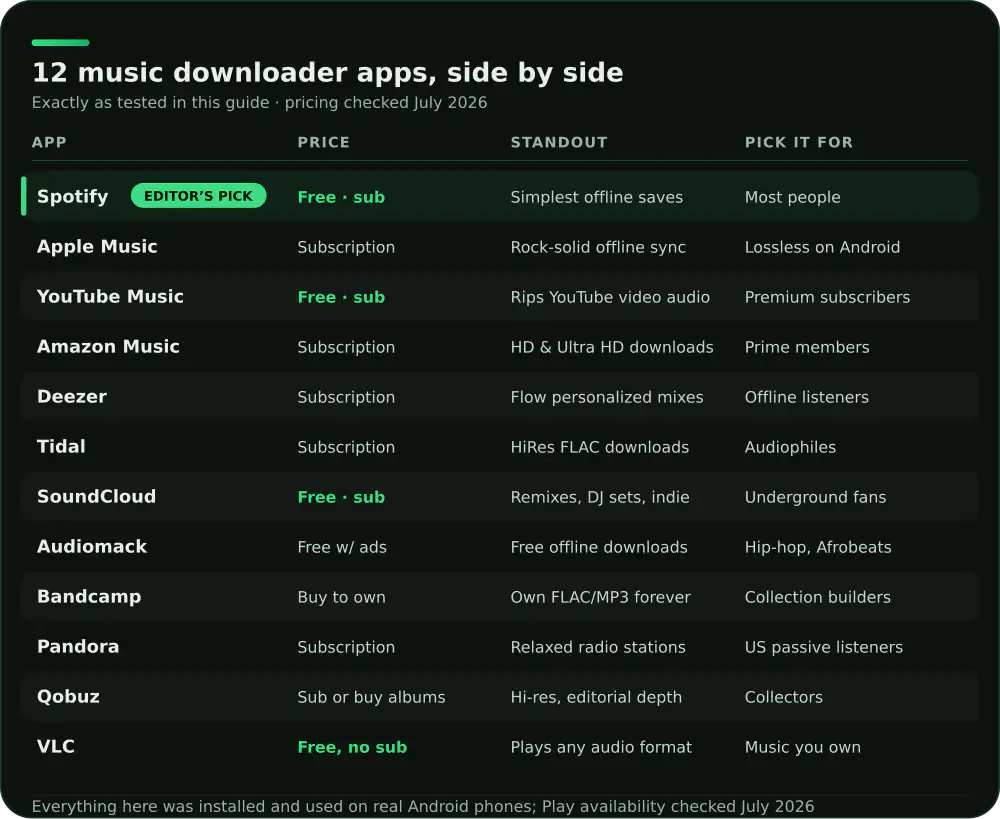
Stick to these routes and you get offline music without the ads, the malware or the legal gray area. The comparison table at the top of this page lines all 12 apps up on price, ads label and the tier that unlocks offline saving.
Pair it with: a dedicated music player app to organize the tracks you own and download, an equalizer app to tune how your offline songs sound on any headphones, and a podcast app if you also want to save spoken audio for offline listening.
It is legal when you use the offline features of licensed services like Spotify, Apple Music, or Tidal, or when you buy and download tracks from stores such as Bandcamp or Qobuz. Downloading copyrighted songs from random third party sites without permission is not legal in most places, so we stick to official apps and purchases.
Yes, a few apps offer genuinely free offline listening. Audiomack lets you download many tracks free with ads, and Bandcamp gives you full downloads of anything you purchase, including some free releases artists choose to share. Most mainstream services, though, require a paid subscription to unlock offline mode.
For streaming catalogs, Spotify and Apple Music both handle offline downloads beautifully once you subscribe. If you own your music as files, VLC plays them with no connection and no account needed. The right pick depends on whether you want a streaming library or a personal collection stored on your device.
It depends on the quality setting. Standard quality songs run a few megabytes each, while lossless or high resolution files from Tidal and Qobuz can be ten times larger. Most apps let you choose the download quality and store music on an SD card, so you can balance fidelity against the space you have free.
Usually not. Many of those apps serve pirated content, bury you in ads, and request permissions a music app has no reason to need, and some have been found carrying malware. We recommend installing from the Play Store, checking the developer and reviews, and treating any app that promises free access to paid catalogs as a warning sign.
In most cases, no. Ripping audio from YouTube videos generally goes against both copyright law and YouTube's own terms, even when a tool makes it look simple. The safe alternative is YouTube Music with a YouTube Premium subscription, which lets you save songs and video audio for offline play through an official, licensed feature.
Audiomack. Its Google Play listing, checked on 7 August 2026, is free to install and its own description offers full tracks offline and data free at no cost, with a Contains ads label and in-app purchases from $0.59 to $79.99 per item for the paid tier. Bandcamp also plays anything you have bought offline, with no ads label and no in-app purchases, and VLC plays music files you already own.
Checked on 7 August 2026: Spotify, YouTube Music, Deezer, SoundCloud, Audiomack, Pandora and Qobuz all carry a Contains ads label on their own Play listings. Apple Music, Amazon Music, Tidal, Bandcamp and VLC do not. The label describes the app rather than your plan, so a paid subscription can still sit behind an app that carries one.
For most of these apps, yes. On 7 August 2026 the store descriptions put offline saving behind Spotify Premium, an Apple Music subscription, YouTube Music Premium, Amazon Music Unlimited, Deezer Premium, a Tidal plan, SoundCloud Go or Go Plus, and Pandora Plus or Premium. The exceptions are Audiomack, which downloads on its free tier, Bandcamp, which plays what you have bought, and VLC, which plays files already on the phone.