
Updated for 2026
Updated: July 16, 2026. New: a step-by-step how-to section for this category.
Your phone lives or dies by how well it keeps you connected, so we went through the messaging, calling, and screening apps people reach for every day. We looked at the small things that matter, like how a chat app describes syncing across devices, what a spam blocker claims to block, and how a call recorder saves what you need. Below you will find honest picks for texting, caller ID, call blocking, and call recording on Android, so you can settle on the one that fits how you talk to the people who matter.
This category covers the apps that handle the two oldest jobs on your phone: talking and texting. On Android they fall into a few groups. Messaging apps carry one to one texts, group chats, voice notes, and increasingly voice and video calls. They range from plain SMS replacements to fully encrypted private messengers. Caller ID and spam blockers screen incoming calls, label unknown numbers, and silence robocalls before they ring. Call recorders capture conversations for notes, interviews, or your own records. Email apps sit alongside all of these for slower, more formal contact. Most people end up using two or three of these together rather than expecting one app to do everything.
Before comparing features, get clear on what you actually need, because the right app for a private conversation is rarely the same as the right app for a quick reminder to a family group.
A messenger only works if the other person answers it. The most capable, most private app in the world is useless if your contacts never open it. For everyday chatter, the practical choice is usually the app your circle already uses. Save the more deliberate choices for the conversations that warrant them.
Think in layers. A grocery list does not need the same protection as a conversation about your health, your finances, or anything you would not want a stranger reading. It is completely reasonable to keep one mainstream app for ordinary talk and a stricter one for the handful of conversations that matter more.
The most common daily frustration is not a missing feature, it is slow or unreliable sync. Test how a chat app behaves with a large group, how it handles photos and voice notes, and whether your history shows up cleanly on a second phone, a tablet, or the web. An app that drops messages or shows them out of order will wear on you long after the novelty of any one feature fades.
Privacy is where communication apps differ the most, and where marketing language is the least helpful. A few concrete distinctions will serve you better than any single brand name.
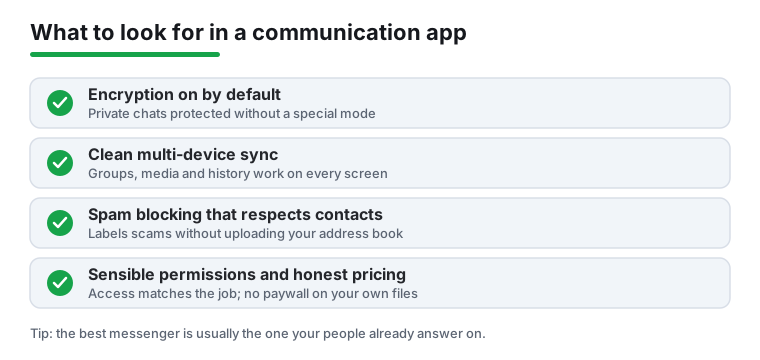
End to end encryption means only you and the person you are talking to can read the contents of a message. Not the company that makes the app, not your carrier, not someone intercepting the connection. Encryption in transit is weaker: the message is scrambled while it travels to the company's servers, but the company can read it once it arrives, which means it can be handed over, scanned, or exposed in a breach. Both are better than nothing, but only end to end encryption keeps the contents out of the provider's hands.
Two details decide how much that protection is worth in practice. First, is encryption on by default? If a chat is only protected when you switch on a special private or secret mode, then most of your real conversations, the ones you start without thinking, will not be protected. Second, does it cover everything? Some apps encrypt one to one chats but not large group chats, backups, or linked desktop sessions. A backup saved to a cloud account without encryption can quietly undo the protection you thought you had.
Even with strong end to end encryption, the contents of your messages are protected, but the metadata often is not. Metadata is the information about a message rather than the message itself: who you talked to, when, how often, for how long, your phone number, and sometimes your rough location or device details. This data can be revealing on its own. Knowing that someone messaged a clinic, a lawyer, and a family member within an hour can say a lot without anyone reading a single word. Apps differ sharply in how much metadata they collect and retain, so if this matters to you, look at what the app says it keeps, not just whether messages are encrypted.
It helps to be honest about the realistic answer, which varies by app:
There is no single most private app for everyone, because privacy is a property of a conversation, not of a download. If the people you need to reach are all on one encrypted app, that app is your private channel. If they are scattered, your sensitive conversations are only as protected as the weakest app any of them will actually use. Choosing well often means quietly persuading the few people you talk to about serious things to meet you on a better app, rather than chasing the theoretically perfect option alone.
Android already ships with capable tools, and they are worth considering before you add anything. The default Phone app on many devices offers call screening and spam labeling, the default Messages app supports RCS chats with end to end encryption that, as of May 2026, is on by default and works across platforms between iPhone and Android (it needs the latest Google Messages, iOS 26.5, and carriers on RCS Universal Profile 3.0), and the default email client handles most accounts. For a lot of people these cover the basics without installing a thing.
When you do reach for a third party app, remember that free is rarely free. Some apps are paid for with your data: a caller ID app may keep its spam database current by uploading the contact lists of its users, which means your friends' numbers can end up in a shared database because someone else installed the app. Others show ads, sell aggregated usage data, or paywall the part you actually need, like exporting a recording or removing ads from the dialer. None of this is automatically sinister, but you should know how an app pays its bills before you depend on it. A quick read of the permissions and the data practices tells you more than the feature list does. Among caller ID apps, Truecaller is the one most people are weighing, and it is worth knowing how it works before you grant it contact access: its spam list stays current from a large user base, and a browser opt-in called Enhanced Search will upload your phonebook if you turn it on, so review what you are agreeing to. If you would rather not hand a third party your contacts at all, the Pixel Phone app's Call Screen is a free, built-in option that uses Google's on-device AI to screen unknown callers, with the interactive screening limited to Pixel devices.
We name specific apps below so you have a starting point, but the right choice still depends on who you talk to and how sensitive the conversation is.
We read each app's store listing and the developer's own documentation, and check every permission it declares against the job the app does. Nothing here is paid placement. If an app annoyed us or asked for more access than its job required, we say so.
No. Standard SMS texts travel through your carrier in the clear and are not end-to-end encrypted. RCS chats in Google Messages add end-to-end encryption that, since May 2026, is on by default and works between iPhone and Android, but for anything truly sensitive use a dedicated private messenger where encryption is on by default for every conversation.
It depends on where you and the other person are. Some places allow recording if just one party consents, while others require everyone on the call to agree. The safe habit is to tell the other person you are recording at the start. Also note that recent Android versions and many phone makers restrict or block third-party call recording, so test any recorder before you rely on it.
Some do, which is how their spam databases stay current. Before granting contact access, check the app's data practices and prefer apps that identify scam numbers from a shared community list rather than continuously uploading your full address book. Truecaller, the app most people are evaluating, does not upload your phonebook by default, but it offers an opt-in browser feature, Enhanced Search, that does, so read what you agree to. If you would rather not share contacts at all, the Pixel Phone app's Call Screen is a free, built-in alternative. If an app is vague about what it collects, treat that as a warning sign.
Start with where your friends and family already are, since a messenger only works if the other person answers it. For private conversations, Signal turns end-to-end encryption on by default and collects little metadata. WhatsApp also encrypts by default and reaches more people but gathers more metadata, while Telegram only encrypts its manually started Secret Chats, not ordinary ones. Many people keep one mainstream app for everyday chats and a more private one for sensitive conversations.
Not quite. End-to-end encryption hides the contents of your messages from the provider, but it usually does not hide the metadata: who you talked to, when, how often, and sometimes your phone number or rough location. That information can be revealing on its own. If metadata matters to you, look at how much the app collects and retains, not just whether the messages are encrypted.
Yes, for RCS chats. As of May 2026, end-to-end encrypted RCS messaging rolled out between iPhone and Android and is on by default. It needs the latest Google Messages on Android, iOS 26.5 on the iPhone, and carriers on both ends supporting RCS Universal Profile 3.0. Plain SMS texts are still not encrypted, so the protection applies only when both sides are on RCS.
For many people, yes. The default Phone app on most devices can screen calls and label spam, the default Messages app supports RCS chats with end-to-end encryption that is on by default and, since May 2026, works across platforms between iPhone and Android, and the built-in email client handles common accounts. Try the built-in tools first, then add a third-party app only when it clearly does something you need that the defaults do not.