
Updated September 2026 · both apps now carry their own dated listing figures, and the built-in alternative has a section of its own
Truecaller puts a name to strange numbers and filters the worst of the spam, and it asks for a lot of access in return. This guide covers what to grant, what to refuse, what the free tier costs, and when the app already on your phone is enough.
Naming numbers nobody else can
4.4 stars from 29,346,850 reviews · 1,000,000,000+ installs · free to install · in-app purchases $0.99 to $449.00 per item · by Truecaller · Contains ads: Yes · checked 3 September 2026
Google Play listing · 4.4 (29,346,850) · read 3 September 2026
Truecaller is the app to install if unknown numbers ring all day and you want the best chance of a name against them. Its listing, free to install, carries the Contains ads label and in-app purchases from $0.99 to $449.00 per item, and it rates 4.4 from 29,346,850 reviews. The blunt con: the database that makes it work is fed by its users' contacts, so your number can be in it whether or not you ever install the app.
Truecaller states the job on its own Play listing: "Spam call blocker and caller ID. Block scam and robocalls. Screen unknown callers." Everything below is measured against that claim rather than against our own use of the app.
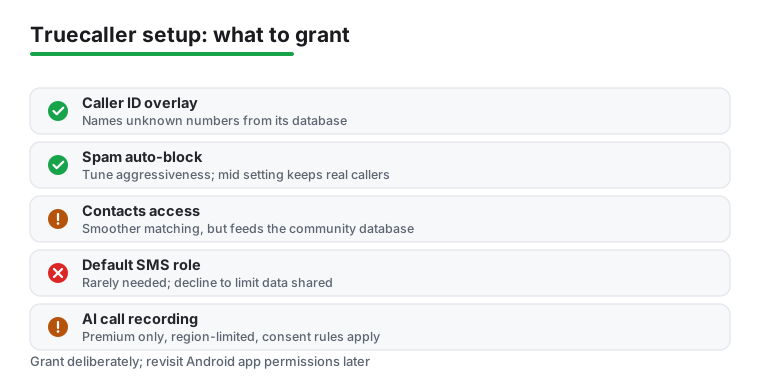
Installation is the easy part. Grab Truecaller from the Play Store, open it, and sign in with your phone number or a Google account. The app sends a verification code by SMS, then walks you through a short permission flow. This is the moment to slow down. Truecaller will ask to read your call log and contacts, and it will offer to become your default calling and SMS app. None of those requests are unusual for an app of this kind, but each one hands over a little more of how you use your phone, so it pays to read the screens instead of tapping through them.
You do not need to hand over everything to get the core benefit. If you only want caller identification and spam blocking, you can decline the SMS role and still see who is calling. Granting the phone and contacts access does make the live caller ID smoother, since the name pops up over the dialer the instant a call arrives. Skip the contacts permission and Truecaller still names numbers from its own database, but it will not match against the people already saved in your phone, so a few calls that it could have labelled will come through as plain numbers.
We suggest setting Truecaller as the default phone app only if you are comfortable routing all calls through it, and skipping that step otherwise. You can run it purely as an overlay that draws a small banner on top of your existing dialer when a call lands. That overlay needs the "display over other apps" permission, which Android keeps in a separate settings screen; the app will prompt you for it, and if the caller ID banner ever stops appearing, that toggle is the first thing to check.
Either way, take a minute in the app settings afterward to review what you turned on. Truecaller groups its options under headings like Caller ID, Block, and Privacy, and a quick pass through them lets you switch off anything you agreed to in the rush of setup. If you ever change your mind, Android's own Settings app, under Apps then Truecaller then Permissions, gives you a second place to revoke access without uninstalling. We treat that screen as the source of truth, because it shows exactly what the app can reach regardless of what you tapped during onboarding.
The headline feature is real-time caller identification. When an unknown number rings, Truecaller checks it against a large community-built database and shows a name, and often a business label, before you pick up. It is not perfect; a brand new spam number that nobody has flagged yet will still slip through as unknown, because the system only knows what its users have told it. Once a handful of people report that number, though, the next person it dials usually sees a warning.
Spam blocking is the other half. You can let the app auto-block numbers that the community has flagged as telemarketers or scams, and you can set the aggressiveness yourself. A middle setting silences obvious spam while genuine but unknown numbers, like a clinic calling back, still get through. Crank it to the most aggressive level and it will also block numbers that are not in your contacts and have no name attached, which cuts the noise hard but risks missing a real call from a number you have never saved. The block list is editable, so if it ever catches someone you wanted to hear from, you can whitelist them in a tap.
In 2026 the spam side has grown to handle a newer problem: AI-generated scam calls. Recent versions add a voice-screening layer that listens to the caller and tries to tell a human apart from a synthesised voice, aimed at the wave of voice-clone scams that pretend to be a relative or a bank. It is a reasonable extra net rather than a defence to rely on by itself. The plainer reporting tools still do most of the work: when a junk call gets through, you tap to mark it as spam, and that report feeds the same database that protects everyone else. For anyone drowning in nuisance calls, this give-and-take is the real reason to install the app.
Truecaller has grown well past simple caller ID. The search bar lets you type any number and look up who it belongs to, which is handy when a missed call leaves no voicemail. There is a call reason feature that shows why someone is ringing if they added a note, and presence indicators that tell you when a contact is active in the app. None of these are reasons on their own to install it, but they round out the experience once it is already catching your spam.
Call recording is worth a clear word, because its history confuses people. Google barred third-party apps from recording phone calls through the system back in 2022, and Truecaller pulled its old recording feature at that time to stay in the store. The feature came back in mid 2023, US first, in a different shape: it now runs as an AI-assisted recording tool that captures the call and can produce a written transcript and a short summary, and it sits inside the paid tier rather than the free app. Whether you can use it at all still depends on your device and your region, and recording a call without the other person's knowledge is illegal in plenty of places, so check your local consent rules before you rely on it.
The paid Premium tier is where most of the extras live. It removes ads, shows you who viewed your profile, adds a ghost mode that lets you check a profile without leaving a trace, and unlocks the recording and transcript tools mentioned above plus a set of advanced call and message filters. Pricing runs as a monthly or yearly subscription and varies by country, so look at the in-app price for your region rather than any figure you read online, since those go stale fast. The identification and blocking that matter most do not sit behind the paywall, so the free tier covers the core job. If your phone is buried in spam and you want the recording and filtering on top, the subscription is fair value; if you only want to know who is calling, the free tier already does that.
Here is the honest trade-off. Truecaller works so well partly because its database is fed by the contacts and call patterns of its users, which can include you. That community model is the engine behind the whole thing, but it means your number and the way you are saved in other people's phones may end up in the system even if you never installed the app yourself. If a friend with Truecaller has you saved as "Sam plumber," that label can surface for other people who look you up. If that bothers you, Truecaller offers an unlisting option on its website that removes your number from search, and it is worth bookmarking if you would rather not appear in the results. Unlisting does not require you to be a user, so you can opt out whether or not the app is on your phone.
The free app is also ad-supported, and the ads can feel intrusive after a busy day of calls, with full-screen promos appearing after some call screens. The app runs a background service to catch incoming numbers, so it does use some battery in the background. None of this is a dealbreaker, but it is the reason we recommend granting permissions deliberately rather than tapping accept on autopilot.
There is a data point worth naming too: Truecaller has had to handle large amounts of personal contact information for years, and a service that holds that much data is a target. We have not seen evidence of your call content being exposed, but the sensible posture is to treat the app as something that knows your number and your network, and to keep anything you would not want shared out of its reach. That mostly means declining the SMS role, since you rarely need it, and not setting it as your default dialer unless you have a reason to. If raw privacy is your top priority, pair careful Truecaller setup with a careful approach to the rest of your messaging, like the apps in our roundup of privacy-conscious Android SMS apps.
Occasional spam, minimal data given away
4.4 stars from 50,752,522 reviews · 5,000,000,000+ installs · free to install · no in-app purchases listed · by Google LLC · Contains ads: No · checked 3 September 2026
Google Play listing · 4.4 (50,752,522) · read 3 September 2026
Phone by Google is the answer for most people who only get the occasional junk call: caller ID and spam protection are on by default, it costs nothing, and it asks for no extra permissions because it is already your dialler. Its listing carries no Contains ads label and nothing is sold inside it. The blunt con: it leans on Google data rather than a crowd-sourced pool, so a brand new nuisance number is more likely to arrive unnamed.
Truecaller is not the only way to name an unknown caller. Google's own Phone app includes caller ID and spam protection on most Android phones running a recent version of the system, and it is switched on by default. It leans on Google's data rather than a crowd-sourced contact pool, which some people prefer for privacy, and on Pixel phones it adds Call Screen, which lets the Assistant pick up unknown calls and filter out robocalls before your phone even rings. For a lot of people that built-in option, costing nothing and asking for no extra permissions, is enough on its own.
Other dedicated caller ID and call-blocker tools sit between those two poles. Apps like Hiya and CallApp trade Truecaller's giant database for a lighter footprint or a different mix of features, and a phone carrier's own spam-blocking service, often free on the plan, can catch a good share of junk before it reaches you. We compare the stronger options side by side in our guide to the best caller ID apps for Android, and you can browse the wider category on our communication apps hub. If recording calls within the law is your main interest, the rules and the working app choices have shifted since Google's 2022 policy change, so it is worth reading up on current consent requirements before you pick anything.
Where does Truecaller land? If you get a high volume of unknown calls and you want the best chance of identifying them, its database is hard to match and the free tier covers the parts that matter. If you would rather keep your data footprint small and you only get the occasional spam call, the built-in Phone app may serve you just as well with less to set up and less to give away. For most people who came here because their phone will not stop buzzing, Truecaller is a sensible first install, as long as you set it up with your eyes open and revisit those permissions once the novelty wears off.
Free to install, with the Contains ads label on its own listing and in-app purchases from $0.99 to $449.00 per item, read 3 September 2026. Caller ID and spam blocking are in the free tier; the paid tier removes ads and adds extras. Checked 3 September 2026.
Not for the core job. Caller identification and spam blocking work if you decline the contacts, SMS and default dialler prompts. Granting contacts feeds the community database, which is how the app names numbers other services cannot. Checked 3 September 2026.
Yes, through the unlisting form on Truecaller's own website, and you do not need to be a user to do it. Unlisting removes the number from search, though a copy saved in someone else's phone is outside anyone's control. Checked 3 September 2026.
It blocks and labels a large share of known nuisance numbers, and a fresh number nobody has flagged yet will still get through as unknown. If your spam volume is low, the caller ID and spam protection already in Phone by Google may be enough on its own. Checked 3 September 2026.
Checked 3 September 2026: the review named Truecaller and the built-in Phone app and linked neither, with no rating, no install band, no price and no dated line. Both now carry a fact line read from their own listing, a store link, a decision table row and three pros and three cons. One editorial aside was withdrawn: "we think privacy-minded users should bookmark it". The figures that shape the advice: Truecaller and Phone by Google both rate 4.4, but Truecaller's listing carries the Contains ads label and in-app purchases to $449.00 per item, while the built-in app carries neither.
 The Best Free Messaging Apps for Android in 2026Communication
 Signs of Android Malware and How to Remove ItSecurity & Privacy