
Updated for 2026
The right health app is the one you still open three weeks in, not the one that nags you into deleting it. We verify the fitness trackers, sleep monitors and golf GPS apps below from their store listings and the developers' own documentation, so you can see what each one measures, what it asks for and what it costs before you commit. Whether you want to move more, sleep better, or shave a few strokes off your round, start here to find the one that fits how you live.
Health and fitness on Android is a wide tent, and the apps inside it pull in very different directions. Before you read a single review it helps to name the job you are hiring an app to do, because almost every regret in this category comes from picking for the wrong one. Here are the distinct jobs that live under the same shelf:
Most people only need one or two of these. Running four overlapping apps usually means four half-filled diaries and numbers that never line up.
Once you know the job, the choice narrows fast. If you just want to move more, start with the step counter already on your phone and add nothing until it stops being enough. If you are training for an event, weigh the quality and progression of the plans, not the size of the feature list. For running or cycling outdoors, test the GPS on a real route with patchy signal and check that it holds a fix without a data connection. For nutrition, the food database and barcode coverage decide everything; a clumsy logging flow gets abandoned in a week. For sleep, decide first whether a phone on the nightstand is good enough or whether you want a wearable doing the sensing. For meditation or mood work, the only test that matters is whether you will sit down and use it, so favor a short free trial over a long feature page. And for anything built around a watch, ring, or band, pick the app that pairs cleanly with the hardware you own or plan to buy, because a phone-only app you love today becomes a dead end the moment your wearable cannot feed it.
A few specifics matter more than the marketing in this category:
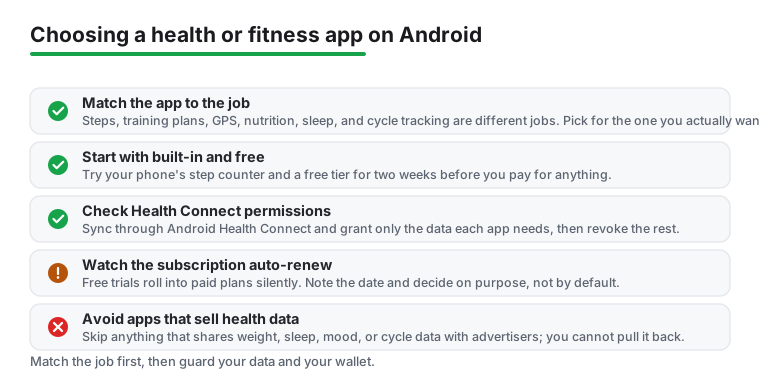
Health data is some of the most revealing information you carry. Your weight, your cycles, your mood, your sleep, your resting heart rate, and the map of where you run all live in these apps, and that map alone can show where you sleep and work. So treat this section as the one that actually protects you. Favor apps that store data on the device or in your own account, with a plain privacy policy that says they do not sell it. Be wary of anything that quietly shares health data with ad networks, because once it leaves, you cannot pull it back. For women's health especially, read the policy on whether cycle and pregnancy data can be handed to third parties, since that is the category where lax sharing does the most harm.
Health Connect helps here too, because every app that wants your data has to ask through the system permission screen, and you can see and revoke exactly what each one reads. Grant the narrowest set that makes the app work and turn the rest off.
The pricing pattern across the whole category is the same: free to install, then the parts you actually want sit behind a recurring subscription. Coaching plans, full history, advanced analytics, and the new AI coaches all tend to live on the paid tier, and the trap is the auto-renewing annual plan you buy on day one before you know whether the habit sticks. The 2026 wave of AI health coaching follows this exactly. Google Health Premium, which now includes a Gemini-powered Google Health Coach, runs about $9.99 a month or $99 a year and renews automatically after any trial. That is not a recommendation, just the shape to recognize so the upsell and the renewal do not surprise you. Set a reminder a day or two before any free trial ends, and check what "free" really unlocks before you build a routine on it.
If you do try an AI feature, check whether your data has to leave the device for it to work, and whether you can turn that off. Local processing is kinder to your privacy than sending everything to a server.
Every app here was checked against its Google Play listing and the developer's own documentation, with no paid placement and no sponsored slots. If something annoyed us or quietly leaked data, we say so. In this category we watch specific things: how much battery a sleep app drains overnight, whether a GPS sport app holds its fix on a real route with patchy signal, whether Health Connect sync round-trips so the same numbers show up elsewhere, what the app asks permission for, and whether the free tier is usable for a full two weeks rather than a teaser. If an app fails those, it does not make the list.
For steps, basic workouts, and run tracking with GPS, your phone alone is plenty. Where a watch or chest strap matters is heart rate, sleep stages, and calories burned, because phone-only estimates for those are educated guesses. If you mainly want to move more and see trends, start phone-only and add a wearable later if you want the accuracy.
Plenty of free apps cover step counting, workout logging, and GPS routes completely. Subscriptions usually unlock coaching plans, deeper analytics, and unlimited history. Use the free tier for at least two weeks first. The best app is the one you keep opening, and a paid plan does not fix an app you do not enjoy using.
It varies a lot. Weight, sleep, mood, and cycle data are sensitive, so read the privacy policy before you trust an app with them. Favor apps that store data locally or in your own account and avoid those that share health data with advertisers. Check the permissions too: a step counter has no reason to want your contacts or constant background location.
Look for export to GPX, TCX, or CSV, and support for Android Health Connect, which is the shared hub many Android apps now sync through. If an app offers neither, your runs and logs are effectively locked inside it. Set this up early, while you still have access, rather than at the moment you want to leave.