
Ten Android golf GPS apps, each read at its own Play listing and at its developer's own pricing page on 21 August 2026. This is one of our Health & Fitness guides.
18Birdies is the pick, Hole19 the fullest free rangefinder, Golf Pad the choice for a rules-compliant mode. Our answer, the free pick and the table ↓
Checked 3 September 2026: no pick changed since 21 August, when all ten listings were re-read; nothing has moved since
Full logTen Android golf GPS apps, compared on the course maps you get without paying, the cheapest full subscription, the in-app range on Play and the ads label.
18Birdies is our best overall because its description read 21 August 2026 puts the rangefinder and scorecard free on 45,000+ courses, no ads label, $99.99 Premium.
Hole19 is our best free because its listing read 21 August 2026 gives front, back and centre plus hazards on over 42,000 courses, with ads and EUR 69.99 Premium.
Golf Pad is our rules-first pick because its site read 21 August 2026 publishes a rules-compliant mode showing only conforming information, which Rule 4.3a allows, with ads, $29.99 Premium.
Data checked: 3 September 2026.
Read the second column first. "Free to install" is true of all ten and decides nothing. The third column is what a full subscription costs from the developer that charges it, and where a store range and a developer price disagree, both are printed in that app's section and neither is smoothed over. Ratings rest on samples running from a few thousand to a few tens of thousands of reviews, which is thin for a store average, so a tenth of a star between two of these is not a difference to decide on.
Every figure comes from one of three places, dated and linked. The first is the app's own Google Play listing, read on 21 August 2026: its rating, prices, ads label, Data Safety and the developer's own description. The second is that developer's own pricing page, same day. The third is the Rules of Golf, an authority no developer owns. Where two disagree, both are printed and neither is resolved. Where a source refused us, we say so. The two Golf Pad screens are our own emulator captures, described only by what is legible on them. No figure or verdict here rests on our use of these apps.
The distances on the flag are what Pro sells
Rating 4.4 from 16,263 reviews · Installs 1,000,000+ on the listing · Free to install · In-app purchases $1.99 to $59.99 per item · Developer Golf Genius Mobile · Contains ads: Yes · checked 21 August 2026
Google Play listing · read 21 August 2026
Golfshot publishes the clearest free versus paid split of the ten and the answer is blunt: the free tier gives you the centre of the green and nothing else on the flag. Its own subscriptions page, read 21 August 2026, puts Green Maps and the distances to the front and back of the green and to all hazards and targets in the paid columns. It is free to install, its listing carries the Contains ads label, and it is rated 4.4 from 16,263 reviews.
Version 2.11.19 · Requires Android 10 · On the store since 29 March 2014 · Listing updated 17 August 2026 · Data Safety: may share data types with third parties, may collect data types, data encrypted in transit, deletion can be requested
The split is published rather than guessed. Golfshot's own subscriptions page, read 21 August 2026, sets three columns beside each other, headed 100% Free, $79.99USD / Year and $99.99USD / Year, and it puts the digital scorecard, GPS Course Maps, the 3D flyover of every hole and "Distances to the center of green and basic hole information on 47K+ courses worldwide" in the free one. Green Maps, "Distances to front/center/back of the green, all hazards/targets", club recommendations, auto shot tracking and the handicap link are all below that line, and its own store description states that a Pro membership means access to premium features, exclusive member benefits and an ad-free experience, so the Pro subscription is what turns the advertising off. Two things on that page are worth reporting rather than smoothing over. It prints its own free course count twice and does not agree with itself: the upper table says 47K+ courses worldwide and the lower one says 40,000+ courses worldwide, on the same page on the same day. And its yearly price, $79.99, sits ABOVE the dearest single item its Play listing declares, $1.99 to $59.99 per item, read 21 August 2026. No source we read on 21 August 2026 reconciles those two numbers, so this page prints both and resolves neither.
When to skip it. Skip this if you want front and back numbers without a subscription, because its own pricing page puts them on the paid side.
Choosing between them. Choose it over SwingU when a published free versus paid table matters more than a big review sample, and SwingU over it when you want the cheaper of the two entry subscriptions.
Nothing to turn off, and the caddie maths is the paid half
Rating 4.9 from 62,966 reviews · Installs 1,000,000+ on the listing · Free to install · In-app purchases $2.99 to $99.99 per item · Developer 18Birdies LLC · Contains ads: No · checked 2 September 2026
Google Play listing · read 2 September 2026
18Birdies is our pick of the ten because it is the only listing here with no advertising label that also leaves the plain yardage work outside the paywall, and the blunt part rides with it: what it markets hardest costs $99.99 a year. Its own description on its Google Play listing, read 21 August 2026, states: Get free GPS yardages on 45,000+ golf courses
, and lists the rangefinder, the scorecard, the handicap tracker, shot tracking and Wear OS under a heading of free app features. It is free to install, and the paid half is where slope, wind, club recommendations and strokes gained live.
On the store since 24 February 2015 · Listing updated 11 August 2026 · Data Safety: no data shared with third parties, may collect data types, data encrypted in transit, deletion can be requested
Its own Premium page, read 21 August 2026, prices three plans and prints them plainly: $99.99 / Year, $19.99 / Month and $7.99 / Week, with a seven day free trial on the first two and none on the weekly one. The yearly figure is the same number its Play listing gives as the top of its in-app purchase range, $2.99 to $99.99 per item, read 21 August 2026, which is the cleanest agreement between a store range and a developer's own price on this page. What that money buys is named on the same page under the heading Premium Member Benefits: factoring slope, wind, rain, temperature and altitude into a shot, an AI swing analyser, advanced stats, 3D green maps, club recommendations, course strategy, pro tips and strokes gained scoring. That is the difference between a yardage and a caddie, and the yardage is the free half.
When to skip it. Skip this if you want elevation adjusted numbers without a subscription, because its own page puts slope and wind on the paid side.
Choosing between them. Choose it over Hole19 when the advertising label decides it, and Hole19 over it when you want the front and back of the green free rather than the greens and hazards its own description names.
The advertising is the free tier, and Premium turns it off
Rating 4.7 from 31,458 reviews · Installs 5,000,000+ on the listing · Free to install · In-app purchases $2.99 to $99.99 per item · Developer Hole19 · Contains ads: Yes · checked 21 August 2026
Google Play listing · read 21 August 2026
Hole19 has the most complete free rangefinder of the ten by its own account. Under a heading of free features, its description on its Google Play listing, read 21 August 2026, states: Accurate GPS Rangefinder: Accurately measure shot distances to the front, back, and center of the green and all key hazards and targets on over 42,000 golf courses worldwide.
It is free to install, it sits in one of the two widest install bands here at 5,000,000+, and the blunt part is on its own Premium page, where "No Ads" is itself a Premium feature, which is what the Contains ads label on the free install means in practice.
Version 5.56.0 · Requires Android 10 · On the store since 28 January 2015 · Listing updated 19 August 2026 · Data Safety: no data shared with third parties, may collect data types, data encrypted in transit, deletion can be requested
Hole19's own Premium page, read 21 August 2026, prices two plans, Yearly at EUR 69.99 and Monthly at EUR 14.99, both of them plainly displayed, and tags every feature it wants you to pay for with the word Premium. A 14 day free trial is named in that page's own markup, but the element carrying it is marked hidden with nothing to unhide it at any screen width, so a reader who follows the link finds the two prices and no trial, and this page prices no trial for Hole19 on that basis. Its own store description tags the same list: Plays Like Distances, maps on the watch, club recommendation, the handicap calculator, overall statistics, game modes, the shot tracker, auto change hole, distance arcs, highlights, notes and No Ads, every one of them a Premium row. Read that last row beside the Contains ads label on the listing and the two agree: the free tier is the advertising supported tier and the subscription is what turns the advertising off. So the split here is unusual and worth stating plainly. The distances are free and generous; the shot tracking, the statistics and the handicap that most rivals leave free are the parts Hole19 charges for. One thing this page will not repeat: its own Premium page quotes named users on accuracy and claims an average scoring gain, and neither is evidence, so no accuracy figure is printed here for any app.
When to skip it. Skip this if an advertising supported free tier is a dealbreaker, because turning the advertising off here is a subscription feature.
Choosing between them. Choose it over 18Birdies when you want the front and back of the green at no cost, and 18Birdies over it when you want a listing with no advertising label at all.
The cost is real and it is not on Play
Rating 4.4 from 6,473 reviews · Installs 100,000+ on the listing · Free to install · No in-app purchases listed · Developer Arccos Golf LLC · Contains ads: No · checked 2 September 2026
Google Play listing · read 2 September 2026
Arccos is the one listing here with no in-app purchase range and no advertising label, and reading that as the cheapest option on the page gets it exactly backwards. Its own product page, read 21 August 2026, states "Membership: 1st Year included, then $199.99/year" beside a $249.99 sensor set. It is free to install and it is the dearest app on this page. The Play listing declares no in-app purchases because the membership is not sold through Play billing.
On the store since 29 April 2016 · Listing updated 20 August 2026 · Data Safety: may share data types with third parties, may collect data types, data encrypted in transit, deletion can be requested
Read this first. The one listing here with no in-app purchase range is not the cheapest app on this page. It is the dearest, and the figure is published by the developer rather than by the store. Arccos's own product page, read 21 August 2026, prices the Smart Sensors at $249.99 and states beside them: Membership: 1st Year included, then $199.99/year
. The same page states: Game Tracking subscription renews at $16.67 per month billed annually.
and adds that the first year is for new members only and is not available to anyone who has subscribed within the previous six months. Its own app page, read the same day, puts it in one line: Your first year's membership is included with Air, Smart Sensors or Smart Laser.
An empty in-app purchase field on a store listing is a fact about Play billing, not a fact about what an app costs.
What the money is for is not simply a course database either. The description on its own Play listing, read 21 August 2026, states: Arccos provides the ability for golfers to capture their performance on more than 40,000 courses worldwide and track their game just like the pros.
and, in the same description: By simply pairing Arccos’ Smart Sensors with the Arccos App, golfers can automatically capture their on-course shots and receive personalized, tour-level data such as strokes gained analytics and smart club distances.
The same paragraph names an A.I. powered GPS rangefinder among its features. So the free install is the front end of a system whose sensors and membership are both bought elsewhere, the store page prices none of it, and the course coverage arrives with the membership rather than instead of it.
When to skip it. Skip this if you want a phone only app, because its own pages build everything around sensors and a membership bought on the developer's site.
Choosing between them. Choose it over V1 Golf when you want automatic tracking rather than swing video, and V1 Golf over it when you would rather pay less for a narrower job.
The advertising stops at its cheapest paid tier
Rating 4.6 from 54,430 reviews · Installs 1,000,000+ on the listing · Free to install · In-app purchases $3.99 to $199.99 per item · Developer Swing by Swing Golf, LLC · Contains ads: Yes · checked 21 August 2026
Google Play listing · read 21 August 2026
SwingU has the second largest review sample here, 54,430 reviews behind a 4.6, and it is one of the few that names what the download includes out loud. Under the heading WHAT YOU GET WHEN YOU DOWNLOAD, its description on its Google Play listing, read 21 August 2026, names a GPS rangefinder that works on every course in the world with distances to greens and hazards, a digital scorecard, a free handicap estimate and shot tracking. It is free to install, it carries the Contains ads label, and its store range reaches $199.99, twice the dearest plan its own site sells.
Requires Android 8.0 · On the store since 27 December 2010 · Listing updated 27 July 2026 · Data Safety: may share data types with third parties, may collect data types, data encrypted in transit, deletion can be requested
SwingU's own site, read 21 August 2026, lays out three tiers side by side: Basic at no cost, Plus at $4.99 a month or $59.99 billed annually, and Pro at $8.33 a month or $99.99 billed annually. Its own store description names what each upgrade adds, and the Plus list is the one that changes a decision on the tee: plays like yardages using live wind speed and elevation, club recommendations, green maps for over 20,000 courses, hole insights, hole notes, an enhanced scorecard and on-course games. Pro adds strokes gained analysis and the handicap breakdown on top. Its own comparison table, read 21 August 2026, also settles where the advertising stops. The row it labels No Ads In-App is a paid tier row: it is left blank in the Basic column, carrying the same grey dash the table uses for every feature a tier does not include, and it is ticked in the Plus and Pro columns, exactly as the six rows immediately above it are. So the advertising ends at the cheapest paid plan, $4.99 a month or $59.99 billed annually, and the Contains ads label on the listing is describing the free tier rather than the app. One number does not line up and this page will not pretend it does: the in-app purchase range on its listing, read 21 August 2026, tops out at $199.99 per item, which is double the $99.99 Pro plan its own site sells, and no source we read on 21 August 2026 publishes what the dearer item is.
When to skip it. Skip this if you want the maths on the tee without paying, because plays like distances and club recommendations are both in its paid tiers.
Choosing between them. Choose it over Golfshot when you want the cheaper entry subscription and a bigger review sample, and Golfshot over it when a published free versus paid table is what you want to read.
The one entry here we could not put a price on
Rating 4.7 from 23,944 reviews · Installs 1,000,000+ on the listing · Free to install · In-app purchases $9.99 to $99.99 per item · Developer Garmin · Contains ads: No · checked 2 September 2026
Google Play listing · read 2 September 2026
Garmin Golf is rated 4.7 from 23,944 reviews and its listing carries no advertising label, and it is the one app here whose paid tier this page cannot put a price on. Garmin's own web pages returned HTTP 403 to every request made on 21 August 2026, so the only figure this page can stand behind is the in-app purchase range on its listing, $9.99 to $99.99 per item. The other blunt part is hardware: its own description hangs the shot maps on pairing a Garmin device, so a phone on its own gets less of this app than of any other here.
Version 3.9 · Requires Android 9 · On the store since 31 May 2017 · Listing updated 16 July 2026 · Data Safety: may share data types with third parties, may collect data types, data encrypted in transit, deletion can be requested
Garmin draws its own paid line in its own words. The description on its Google Play listing, read 21 August 2026, states: With a paid Garmin Golf Membership, even more great features are available
, and the list under that sentence names Home Tee Hero, Green Contours and Swing Video Storage. The same description puts the free side plainly as well: You can track your rounds and compete with your friends and fellow golfers on weekly leaderboards at more than 43,000 courses around the world.
and it ties the shot maps of each hole to pairing a compatible Garmin device. What no source we read on 21 August 2026 publishes is what that membership costs: garmin.com refused every request made that day with HTTP 403, and the support pages requested returned 404. This page therefore prints the store range and no membership price, rather than carrying a number over from memory.
When to skip it. Skip this if there is no Garmin device in the bag, because its own description hangs several headline features on pairing one.
Choosing between them. Choose it over Arccos when you already own Garmin hardware, and Arccos over it when you want the subscription price published before you commit.
A handicap service first, a rangefinder second
Rating 4.5 from 5,467 reviews · Installs 1,000,000+ on the listing · Free to install · In-app purchases $0.99 to $197.99 per item · Developer Grint LLC · Contains ads: Yes · checked 2 September 2026
Google Play listing · read 2 September 2026
TheGrint publishes the most precise free versus paid table of the ten, and it is the one that best shows why "free course maps" is the wrong question on its own. Its own site, read 21 August 2026, states: Free GPS maps for more than 40k courses worldwide.
The same page's comparison table then gives Maps and Distances as Unlimited on the free tier and the front, back and centre distances as None on it. So the maps are free and the rangefinder is not. It is free to install and carries the Contains ads label.
On the store since 4 March 2013 · Listing updated 9 August 2026 · Data Safety: no data shared with third parties, may collect data types, data encrypted in transit, deletion can be requested
That comparison, read 21 August 2026, prices Pro at $14.99 a month or $59.99 a year and sets a free column against it with real values rather than ticks, which is why this page can be exact about it. Free gets Maps and Distances Unlimited, Shot Tracker Unlimited, watch distances Unlimited, live leaderboards Unlimited, unlimited scoring and basic stats, and friend ranking up to 20 friends. Pro adds the Swingman Rangefinder front, back and centre distances, relative pin position, advanced stats, insights and targets, watch scoring, the watch shot tracker and watch green maps, every one of them listed as None on the free side. Green maps sit in between: the same table gives free users 3 trials of the green maps its own tooltip says cover more than 13k mapped courses, and that page prints that coverage twice without agreeing with itself, 25k in one copy of the sentence and 13k in the other, on the same page on the same day, so this page uses the figure the comparison table itself carries, and Pro users unlimited access. One gap this page reports rather than fills: the in-app purchase range on its listing reaches $197.99 per item, which is more than three times the $59.99 yearly plan its own site sells, and no source we read on 21 August 2026 publishes what the dearer item is.
When to skip it. Skip this if you will not pay for the rangefinder, because its own table lists the front and back distances as unavailable without Pro.
Choosing between them. Choose it over Golf Pad when you want a published free tier described value by value, and Golf Pad over it when you want front and back distances without paying at all.
The cheapest way out of the free tier, and rules-compliant play
Rating 4.6 from 38,332 reviews · Installs 5,000,000+ on the listing · Free to install · In-app purchases $0.99 to $49.99 per item · Developer Golf Pad GPS · Contains ads: Yes · checked 21 August 2026
Google Play listing · read 21 August 2026
Golf Pad is the one app on this page that puts the distance most golfers actually want, front, middle and back of the green, in the free tier and charges least for the rest. Its own description on its Google Play listing, read 21 August 2026, states: Many features that cost money in competitor golf gps apps are included free in Golf Pad GPS. Like instant distance to front/middle/back of the green, detailed scorekeeping for up to 4 golfers, aerial maps with flyovers, tee-to-green shot & club tracking, and more.
It is free to install, its listing carries the Contains ads label, and its upgrade is the cheapest of the ten.
Version 22.6.2 · On the store since 21 June 2011 · Listing updated 21 August 2026 · Data Safety: no data shared with third parties, may collect data types, data encrypted in transit, deletion can be requested
Golf Pad's own site, read 21 August 2026, prices Golf Pad Premium at $29.99 - $49.99 / Year and gives its free GPS and flyover coverage as 40,000+ courses, with a two week trial of everything Premium. Premium is where the plays like distances adjusted for elevation and weather, the club recommendations, the smartwatch sync, the aerial maps on the watch, 3D green maps, downloadable course maps and strokes gained sit, and its own store description names the same list. That top figure, $49.99, is exactly the top of the in-app purchase range on its Play listing, read 21 August 2026, which is the only case on this page besides 18Birdies where a store range and a developer price agree. It is also the one entry here with a published tournament mode: its own site describes a rules compliant mode that shows only conforming information during a round, which matters for the reason set out further down this page. One caution about that same site: its comparison table also prints prices for three competitors, and a competitor's page is not a source for a rival's price, so every other price here was taken from the developer that charges it.
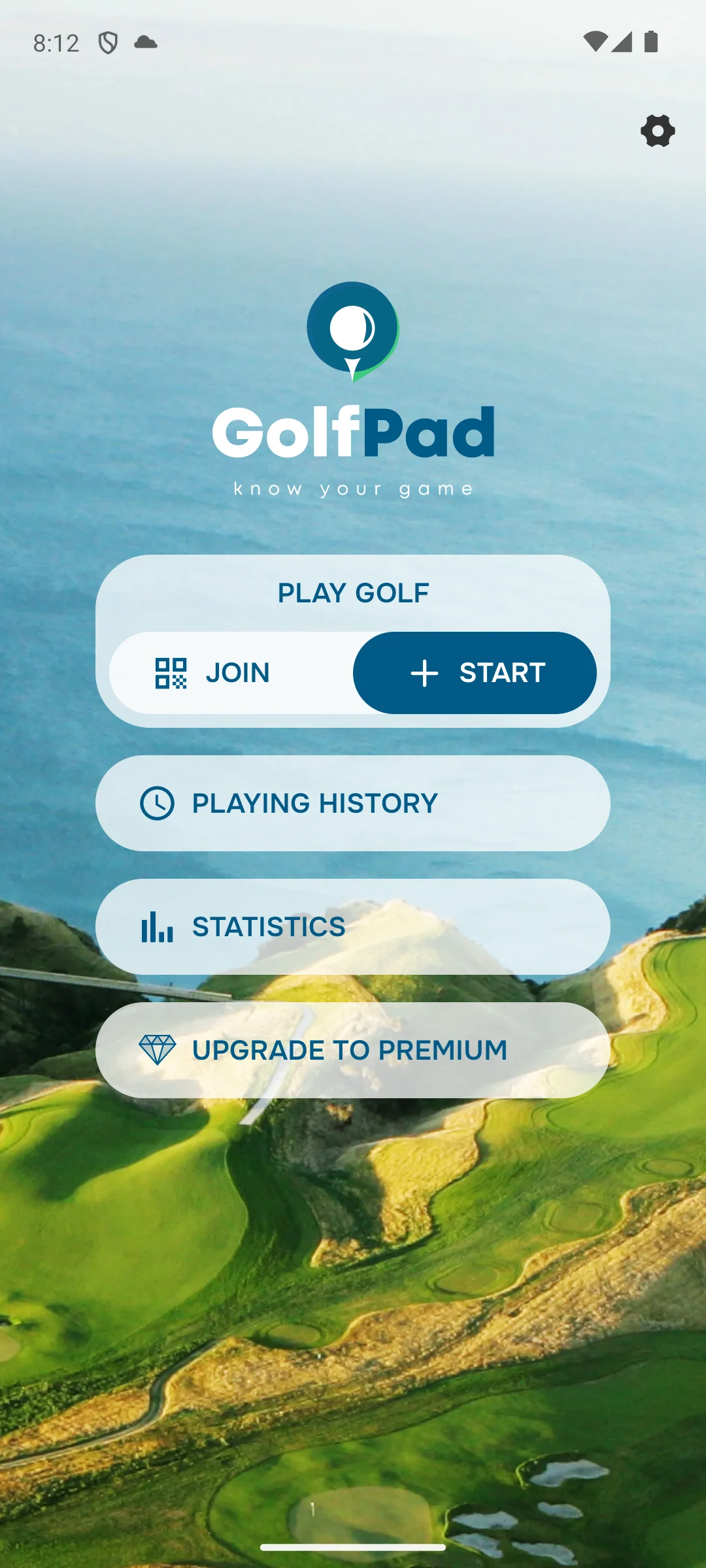
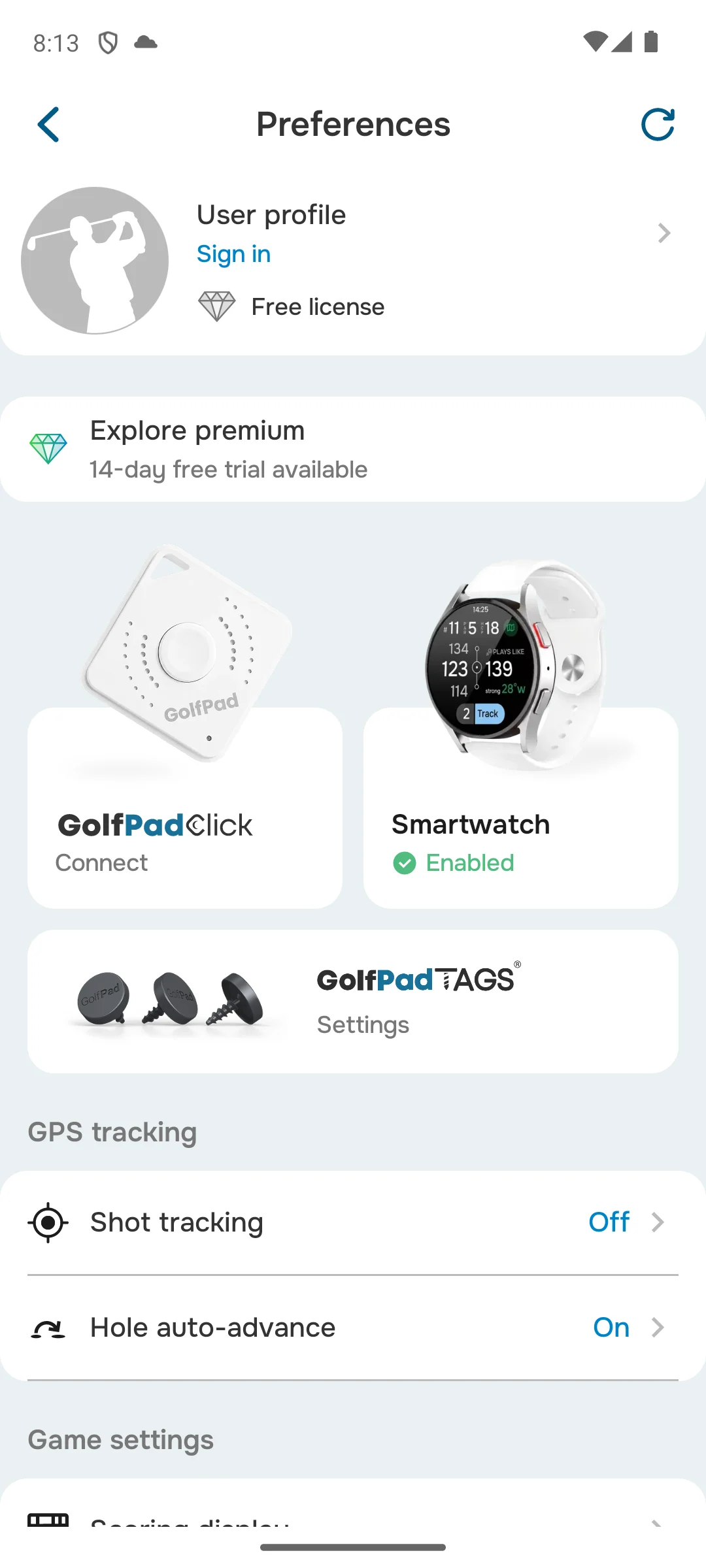
The two screens below are our own emulator captures, taken on 18 August 2026 and carried into this rebuild unchanged. The first shows the home screen the app opens on: a Play Golf entry offering Start or Join, beside Playing History, Statistics and an Upgrade to Premium entry. The second shows the Preferences screen, where the user profile line reads Sign in and the licence line reads Free license, with premium offered separately as a fourteen day trial, and where the GPS tracking, shot tracking and hole auto advance switches sit beside pairing entries for the maker's own Click button, a smartwatch and its TAGS. They are here because the free licence state this section describes is legible on the second one.
When to skip it. Skip this if the advertising label rules an app out for you, because this one carries it.
Choosing between them. Choose it over TheGrint when you want front and back distances at no cost, and TheGrint over it when you want a free tier documented value by value.
Here by category, and priced like a coach
Rating 3.9 from 4,839 reviews · Installs 1,000,000+ on the listing · Free to install · In-app purchases $9.99 to $249.99 per item · Developer V1 Sports · Contains ads: Yes · checked 21 August 2026
Google Play listing · read 21 August 2026
V1 Golf is on this page under a heading it does not really belong to, and saying so is more use than ranking it. It is a swing analyser: its own site, read 21 August 2026, is about frame by frame video, drawing tools, model swings and online coaching, and it names no course database, no rangefinder and no yardages anywhere. So the free tier question that decides every other row here does not apply, because there are no course maps to be free or paid. It also carries the lowest rating and the highest in-app ceiling on this page.
Version 5.11.0 · Requires Android 7.1 · On the store since 24 September 2010 · Listing updated 12 August 2026 · Data Safety: may share data types with third parties, may collect data types, data encrypted in transit, deletion can be requested
V1 Sports' own app page, read 21 August 2026, sells one upgrade and prices it plainly, under the heading Upgrade to Advanced V1sion: $119.99 a year, or $9.99 a month, with a seven day free trial, unlocking ball trace, the full model swing and drill library and a coach review. Everything on that page is about a swing, not a hole. The gap worth naming is at the top: the in-app purchase range on its Play listing, read 21 August 2026, reaches $249.99 per item, which is more than double the yearly subscription its own site sells, and the same page markets online lessons from real coaches, so the dearer items are plausibly coaching rather than software. No source we read on 21 August 2026 states that, so it is offered as the obvious reading and not as a fact.
When to skip it. Skip this if you came for yardages, because its own site is about recording and studying a swing and names no distances at all.
Choosing between them. Choose it over Arccos when you want video coaching rather than automatic tracking, and Arccos over it when you want shot data gathered for you.
The group play is the free half, and it is the point
Rating 4.3 from 6,602 reviews · Installs 500,000+ on the listing · Free to install · In-app purchases $19.99 to $59.99 per item · Developer GameBook Oy · Contains ads: Yes · checked 21 August 2026
Google Play listing · read 21 August 2026
Golf GameBook is the sharpest answer on this page to the question the whole page is about, and it is the one nobody expects: on this app the GPS itself is in the paid tier. Its own Gold Membership page, read 21 August 2026, lists what the membership unlocks and the second item is "Golf rangefinder and GPS". Its free side is the group play: stroke play scoring, live leaderboards, challenges, eclectic scorecards and joining other people's tournaments. It is free to install and carries the Contains ads label.
On the store since 13 April 2017 · Listing updated 17 August 2026 · Data Safety: may share data types with third parties, may collect data types, data encrypted in transit, deletion can be requested
GameBook's own Gold Membership page, read 21 August 2026, opens with a trial offer headed "Try Gold Membership 14 days for free" and lists what that trial covers: statistics, "Golf rangefinder and GPS", game formats, adding players and groups, creating tournaments and its Ryder Cup style team games. Its free versus Gold grid on the same page agrees with that list rather than contradicting it, statistics included: the rows for statistics, the GPS and range finder, measuring a shot, game formats, adding players and groups, creating tournaments, private games and turning the banner advertisement off all carry a Gold tick and no free tick, while stroke play scoring, live leaderboards, challenges, keeping every score in one place, played course history, eclectic scorecards, friends and the social features carry both. It then prices the membership in euro: 12 Months at 4.99 euro a month, billed 59.99 euro annually with the free trial, or 1 Month at 19.99 euro a month, which its own page works out at 239.88 euro annually with no free trial. Prices there may vary with local taxes, which the page states itself.
When to skip it. Skip this if you play mostly alone and want distances, because the distances are the part its own page puts inside the membership.
Choosing between them. Choose it over 18Birdies when a whole group needs live scoring and tournaments, and 18Birdies over it when you want the yardages without paying.
All ten of these listings show an Install button with no price on it. That is the least useful fact on this page, and it used to be the column this article leaned on hardest.
Golf GPS apps give the app away and charge for the course database, for the numbers that change a club selection, or for both. Read down the second column of the table and the ten split five ways. Six give you distances on a course without paying anything: Hole19 and Golf Pad to the front, back and centre of the green, 18Birdies and SwingU to greens and hazards, TheGrint the maps but not the front and back numbers, and Golfshot the centre of the green only. Golf GameBook puts the rangefinder and the GPS inside its paid membership outright, so on that one the distances are the product. Garmin Golf gives away round tracking on more than 43,000 courses and then hangs the shot maps of each hole on owning a compatible Garmin device. Arccos has no free tier to speak of, because it is the front end of a membership. And V1 Golf has no course maps at all, because it is a swing analyser that is here by category rather than by function.
The in-app purchase range is the figure the store itself will stand behind, and it is worth reading, but on five of these ten it disagrees with the developer's own price. Golfshot sells a $79.99 yearly plan on a listing whose dearest single item is $59.99. SwingU's listing reaches $199.99 where its own site sells nothing above $99.99 a year. TheGrint's reaches $197.99 against a $59.99 yearly plan on 5,455 reviews. V1 Golf's reaches $249.99 against a $119.99 subscription. And Arccos, the one listing with no in-app purchase range at all, is the most expensive app on this page. The lesson is narrow and worth stating plainly: an empty or low in-app field is a fact about Google Play billing, not a fact about what an app costs.
Seven of these ten listings carry the Contains ads label. On four of the seven, Golfshot, Hole19, Golf GameBook and SwingU, the developer's own pricing page or its own store description lists removing the advertising as one of the things the subscription buys. SwingU is the most explicit of the four about where the advertising stops: its own comparison table ticks No Ads In-App for Plus and for Pro and leaves the Basic column blank, so there it ends at the cheapest paid plan. So on those four the label is not describing a flaw in the app; it is describing the tier you are in while you have not paid. That is worth knowing before treating the Ads column as a quality signal.
This is the part no store field can tell you, and it inverts the shape of the page. Rule 4.3a of the Rules of Golf, read 21 August 2026, sets out what a player may use equipment for during a round. Under the heading Distance and Directional Information it lists as allowed: Getting information on distance or direction (such as from a distance-measuring device or compass).
Under Not Allowed on the same rule it lists Measuring elevation changes
and Interpreting distance or directional information (such as using a device to get a recommended line of play or club selection based on the location of the player’s ball)
. On wind the same rule splits the difference: getting weather information that is available from weather forecasts is allowed, and measuring wind speed at the course is not.
Now read that against the second and third columns of the table. The plain yardage, the thing the Rules allow, is what these developers give away. Elevation adjusted or plays like distances and club recommendations, the two things the rule lists as not allowed, are what almost every one of them sells: 18Birdies, Hole19, SwingU and Golf Pad each name both in their paid tier, and Golfshot names club recommendations in its. No source we read on 21 August 2026 says whether the wind figures any of them sells are taken from a forecast, which the rule allows, or measured at the course, which it does not. Rule 4.3a also notes that a committee may adopt a local rule prohibiting distance measuring devices altogether. Two things follow that the word awkward does not cover. The first is what a breach costs: the same rule, read 21 August 2026, states Penalty for first breach: General Penalty
and Penalty for second breach: Disqualification.
The second is what counts as the breach. The rule lists Common examples of uses of equipment that are allowed and not allowed during a player's round
, so it is using the elevation figure or the club recommendation during the round that breaches it, not owning the subscription that sells them. So the subscription is not only the expensive half, it is the half most likely to be the wrong tool in an organized event, and the free half is the half the Rules were written to allow. Which local rules are in force is for the committee running your event, and its notice to competitors is where that is written down. This is a reading of the published rule and not a rules ruling.
Six of the ten Data Safety sections state that the app may share data with third parties. Four state that no data is shared: 18Birdies, Hole19, TheGrint and Golf Pad. All ten state that data is collected, that it is encrypted in transit, and that deletion can be requested. These are declarations a developer writes on its own store page, not an audit. A golf app is worth reading them for, because what it collects is where you were, hole by hole, and the social and group features ask for more than the yardages do.
Every rating in the table rests on a few thousand to a few tens of thousands of reviews, which is thin for a store average. The widest install band here is Hole19's 5,000,000+ and the smallest is Arccos's 100,000+, and the ratings are not ordered by either. TheGrint's in-app items start at $0.99. Use the rating to spot the outlier rather than to rank the leaders, and let the free tier, the subscription price and the Data Safety line do the deciding.
One constraint sits underneath all ten and belongs to the platform rather than to any developer. Google's own Android permission reference, read 21 August 2026, defines two separate location permissions. Of ACCESS_FINE_LOCATION it states: Allows an app to access precise location.
Of ACCESS_COARSE_LOCATION it states: Allows an app to access approximate location.
A yardage needs the precise one. Which of the two an app actually gets is settled by a second Google document rather than by that reference, and this page cites it separately: Google's own Request location permissions guide, read 21 August 2026, states If the user grants the approximate location permission, your app only has access to approximate location, regardless of which location permissions your app declares.
Grant approximate location to a golf GPS app and it cannot do the one thing it is for, whatever the app asked for.
That is also why this page prints no accuracy figure for any of these apps. Several of these developers advertise precision on their own pages, and one of them quotes users saying the distances match a rangefinder. Those are marketing claims, and none of the developers we read on 21 August 2026 publishes a method behind them. Accuracy on a phone depends on the handset, the sky above the hole and the conditions, so treat any published yardage claim as the developer's own and not as a measurement. That is guidance rather than a store fact, and it is the reason a phone is not the same instrument as a laser.
Five of these ten listings state the oldest Android release they will run on, and each of those five prints it in its own fact line above, read on 21 August 2026: two ask for Android 10, one for Android 9, and two go older than that. For the other five, the store page opened on your own phone is the place to look, because Play answers that question for the device that is asking. One developer states it in words as well: Hole19's own description, read the same day, ends with the note that it no longer supports devices using Android 9 operating systems or below.
A listing that has gone more than 18 months without an update is called stale here, and the threshold is applied to all ten the same way. Not one of them is near it: the oldest update date on this page is 16 July 2026 and the newest is 21 August 2026, and every fact line above prints the date its own listing carries. Ratings and review counts move daily, which is why each figure here carries the day it was read rather than a month.
All ten install at no cost, and that is where free stops. What separates them is whether the course maps and the rangefinder are in the free tier, and that is published on each developer's own pricing page or in its own store description rather than in a store field. Hole19 and Golf Pad give front, back and centre green distances free. 18Birdies and SwingU give distances to greens and hazards. TheGrint gives the maps free but lists its front, back and centre distances as unavailable without Pro. Golfshot gives only the centre of the green. Golf GameBook puts the rangefinder and GPS inside its paid membership. Arccos has no free tier at all. Checked 21 August 2026.
Golf Pad, with Hole19 close behind. Golf Pad's own description puts front, middle and back green distances, aerial maps with flyovers and shot tracking in the free tier, and its listing carries the ads label. Hole19 matches it on distances and adds all key hazards and targets, but keeps shot tracking and statistics for Premium. 18Birdies is the one whose listing carries no ads label at all, which is why it is our overall pick. Avoid Golf GameBook and Arccos if you will not pay, because on those two the distances are the part you are paying for. Checked 21 August 2026.
Because the money is not taken through Google Play. Arccos sells a membership on its own site instead, and its own product page states that the first year is included with hardware and that it then costs $199.99 a year, renewing at $16.67 a month billed annually. The sensor set it is bundled with is priced on the same page and is quoted in the Arccos section above. An empty in-app purchase field on a store listing is a fact about Play billing, not a fact about what an app costs. Checked 21 August 2026.
Seven of the ten: Golfshot, Hole19, SwingU, TheGrint, Golf Pad, V1 Golf and Golf GameBook. The three without the label are 18Birdies, Arccos and Garmin Golf. On four of the seven, Golfshot, Hole19, Golf GameBook and SwingU, the developer's own pricing page or store description lists turning the advertising off as one of the things the subscription buys, so on those four the label describes the unpaid tier rather than the app. SwingU's own table ticks that row for Plus and Pro and leaves it blank for Basic. Checked 21 August 2026.
Six of the ten Data Safety sections state that the app may share data with third parties: Golfshot, Arccos, SwingU, Garmin Golf, V1 Golf and Golf GameBook. Four state that no data is shared: 18Birdies, Hole19, TheGrint and Golf Pad. All ten state that data is collected, that it is encrypted in transit, and that deletion can be requested. These are declarations each developer writes on its own store page, not an audit. Checked 21 August 2026.
Five of the ten listings state a minimum Android version, and each of those five prints it in its own fact line above beside its own store link: two ask for Android 10, one for Android 9, and two go older than that. For the other five, open the store page on the phone you actually play with, because Play answers that question for the device that is asking. One developer says it in words as well: Hole19's own description ends with a note that it no longer supports devices using Android 9 operating systems or below. Checked 21 August 2026.
This page prints no accuracy figure for any of them, and you should treat any that you meet elsewhere with care. Several of these developers advertise precision on their own pages and one quotes users comparing it to a rangefinder, but none of the developers we read publishes a method behind those claims. Accuracy on a phone depends on the handset, the conditions and the sky above the hole, which is guidance rather than a store fact. Google draws the underlying limit in two of its own documents, both read 21 August 2026 and both linked above: its permission reference defines precise location and approximate location as two separate permissions, and its Request location permissions guide states that an app granted the approximate permission has only approximate location regardless of what it declared. A yardage needs the precise one. Checked 21 August 2026.
18Birdies, at 4.9 from 62,228 reviews, which is also the largest review sample on the page. The lowest is V1 Golf at 3.9 from 4,839 reviews, and V1 Golf is a swing analyser rather than a rangefinder, so it is not really competing on the same ground. Those samples are small for store averages, so a tenth of a star between two of these apps is noise rather than a ranking. The free tier, the subscription price and the Data Safety line separate them far more reliably. Checked 21 August 2026.
Rule 4.3a of the Rules of Golf, read 21 August 2026 and linked above, allows getting information on distance or direction during a round. The same rule does not allow measuring elevation changes, interpreting that information into a recommended line of play or club selection, or measuring wind speed at the course, although it does allow weather information taken from a forecast, and it notes that a committee may adopt a local rule prohibiting distance measuring devices altogether. That is awkward for these apps, because plays like distances and club recommendations are exactly what most of them sell as the paid tier. The rule is about uses during a round rather than about what is installed on the phone, so it is using one of those features on the course that breaches it, not paying for it. The same rule sets the price of getting that wrong: the general penalty for a first breach and disqualification for a second. Which local rules apply is decided by the committee running your event, and the notice to competitors is where it says so. This is a reading of the published rule and not a rules ruling. Checked 21 August 2026.
Checked 21 August 2026: all ten Play packages this page links were re-read from their own listings at gl=US hl=en on 21 August 2026, and all ten answered ok, so every rating, review count, install band, install price, in-app purchase range, developer, ads label, Data Safety line, version and listing date now carries that date. Ten review counts moved and are corrected: Golfshot from 16,252 to 16,263, 18Birdies from 61,879 to 62,228, Hole19 from 31,416 to 31,458, Arccos from 6,425 to 6,439, SwingU from 54,425 to 54,430, Garmin Golf from 23,709 to 23,803, TheGrint from 5,447 to 5,455, Golf Pad from 38,307 to 38,332, V1 Golf from 4,837 to 4,839 and Golf GameBook from 6,564 to 6,602. One displayed rating moved with them: Arccos was shown as 4.5 and its listing reads 4.4 today, so the table and its fact line are corrected. One listing date moved during the run itself: Golf Pad's listing was updated again on 21 August 2026, hours after the first read of the day, which is why its fact line carries that date and why Arccos, updated 20 August 2026, is described here as the second most recent rather than the most recent of the ten. The decision table was rebuilt around the thing this category actually turns on. Its old second column was headed Best for, and its ten cells were word for word the same ten strings as the verdict line printed under each app heading, so it differentiated nothing at all; and its Price column opened every one of the ten rows with the word Free, which is true and decides nothing. Both are replaced. The table now leads with what the course maps and the rangefinder cost without paying, and with the cheapest full subscription each developer charges, and every cell in those two columns is sourced at that developer's own pricing page or its own store description, read on 21 August 2026 and linked inside the app's own section: golfshot.com, 18birdies.com, hole19golf.com, arccosgolf.com, swingu.com, thegrint.com, golfpadgps.com, v1sports.com and golfgamebook.com. The biggest correction on this page is a reversal of one of its own. An earlier pass on this page previously withdrew the claim that Arccos is a paid subscription, reasoning that its listing declares no in-app purchase range, and that withdrawal is still in this changelog, in the 15 August 2026 entry printed below this one, where it had come to look settled. Re-derived at the source on 21 August 2026, the withdrawn claim is true: Arccos's own product page states that membership is included for the first year and then costs $199.99 a year, and that the game tracking subscription renews at $16.67 per month billed annually, beside a $249.99 sensor set. Arccos is therefore the most expensive app on this page rather than the cheapest, and the row that read as its best feature was inverting the truth. It is reinstated with a price, a quote and a link. A second correction runs the other way, and it is the one where nothing came off the page. The five minimum Android versions this page prints were re-derived rather than trusted, because Google Play no longer puts that field in the server rendered markup of any of these ten listings. Read again on 21 August 2026, it is still present in the app data payload that ships inside each listing's own HTML, as an API level paired with its Android version string, for five of the ten: API 29 with Android 10 for Golfshot and Hole19, API 28 with Android 9 for Garmin Golf, API 26 with Android 8.0 for SwingU and API 25 with Android 7.1 for V1 Golf. Those are the same five values the page already carried, each API level corroborating its own version string, so all five stay and each is re-verified against its own listing. Cutting them would have deleted five true figures on the strength of a rendering change. Every testing claim on this page is gone, including the ones inside the box that exists to replace them. The How we verify box carried a tier headed Installed and examined whose opening sentence claimed emulator work with the apps; the Golf Pad section carried a paragraph narrating what happened when the app was opened, what it demanded before it would do anything and what its settings offered, and a bullet in the same section repeating that account. All three are removed and the box is rewritten around what is read rather than what was run. The two screenshots in that section stay exactly as they were, byte for byte, with their own dimensions, alt text and provenance caption unchanged, and the surrounding prose now describes what those screens show rather than an experience of using the app. An authority this page did not have is now on it. The Rules of Golf, Rule 4.3a, read 21 August 2026 at randa.org and linked in the section that quotes it, allows getting information on distance during a round and does not allow measuring elevation changes, interpreting that information into a club recommendation, or measuring wind speed at the course. The first two of those are exactly the features four of these developers sell as their paid tier, which means the free half of each of these apps is the half the rule was written to allow. The tournament paragraph that used to give that advice with no source behind it now quotes the rule and links it. A platform limit is stated for the first time, sourced to Google rather than to an app, and it is split across the two Google documents that each carry half of it rather than attributed wholly to one. The Android permission reference, read 21 August 2026, defines ACCESS_FINE_LOCATION as precise location and ACCESS_COARSE_LOCATION as approximate location, and a golf yardage needs the precise one. That reference says nothing about which of the two an app ends up with, so the runtime half is quoted from and linked to Google's Request location permissions guide, read the same day, which states that an app granted the approximate permission has access only to approximate location regardless of what it declares. A draft of this page attributed both halves to the reference alone, which put a sentence in Google's mouth that the cited page does not contain. Five disagreements between a store range and a developer's own price are now printed rather than smoothed over, at Golfshot, SwingU, TheGrint, V1 Golf and Arccos, and none is resolved, because no source we read on 21 August 2026 resolves them. Golfshot's own subscriptions page contradicts itself on its free course count, printing 47K+ in one table and 40,000+ in the other on the same day, which is reported as the developer's own inconsistency rather than picked between. Two claims were re-derived rather than trusted and both stand: seven of the ten listings carry the Contains ads label, re-counted on 21 August 2026, and four Data Safety sections declare that no data is shared with third parties. Four of those seven ads labels are now explained rather than merely listed, because Golfshot, Hole19, Golf GameBook and SwingU each sell removal of the advertising as part of a subscription. The fourth is a correction of this rebuild's own draft: that draft said no source we read named the tier that removes SwingU's in-app advertising, which was a claim of absence its own linked source refutes. SwingU's comparison table ticks No Ads In-App for Plus and for Pro and leaves the Basic column blank, in the same table whose six rows immediately above it carry that identical pattern, so the advertising there stops at the cheapest paid plan. Garmin Golf is the one entry this page cannot price: garmin.com returned HTTP 403 to every request made on 21 August 2026 and the support pages tried returned 404, so the page prints the store in-app range and states the refusal rather than carrying a number over. No accuracy figure is printed for any app on this page. The verdict capsule was relabelled from Verdict to Our answer and rewritten to the owner's ruling of 2026-08-18: one self contained sentence per pick joined by because, each carrying its own dated reason and the price and ads reality, closing with the date the data was checked. Each pick is now the app its own evidence names. A draft of this rebuild made Hole19 the rules-first pick on a reason that is true of all ten apps rather than of Hole19, while this page's own Golf Pad section names Golf Pad as the only entry here with a published rules-compliant mode; the rules pick moved to Golf Pad and Hole19 became the best free pick on the widest free distance coverage its own description states. The top pick no longer leads on its rating either, because this page tells readers three times not to decide on a tenth of a star. Four further corrections were made against the sources themselves rather than against an earlier draft. Golf GameBook's own free versus Gold grid marks Statistics as a Gold row, and a draft of this page had put statistics in its free tier three times while quoting the trial list that opens with it; the grid decides, and statistics now sits with the rangefinder, the shot measurement, the tournament creation and the advertising switch on the paid side. Hole19's own Premium page names a 14 day free trial only inside markup it hides at every screen width, so this page prints its two visible prices and prices no trial. TheGrint's own site prints its green map coverage as both 25k and 13k in two copies of the same sentence on the same day, and that is now disclosed exactly as Golfshot's own course count contradiction is, rather than quietly resolved. And Rule 4.3 is now quoted for what a breach costs, the general penalty for a first breach and disqualification for a second, and for the fact that it governs uses of equipment during a round, so it is using an elevation figure or a club recommendation on the course that breaches it and not paying for the tier that sells them. No app was cut: all ten listings answered on 21 August 2026, all ten keep a section, and no screenshot, image or figure was removed, with the related grid untouched. Four defects were caught in this rebuild's own draft before it shipped, and are recorded here so that a later pass does not put them back. A con on the Garmin Golf entry carried an unexpanded template placeholder where its date belonged. The review sample superlatives for TheGrint and V1 Golf were inverted against the facts file, which the live page had right. The SwingU advertising row was said to match seven rows above it where its own table shows six. And the Hole19 anchor and verdict pill had been moved to the end of the previous app's block, which would have printed Hole19's verdict inside the 18Birdies section, behind the related box and above its own heading. All four are fixed, and each now has a check in the build that stops the run rather than reaching a reader.
Checked 21 August 2026: all ten Play packages this page links were re-read from their own listings at gl=US hl=en, and all ten answered. Every entry now carries a rating with the review count behind it, an install band, the install price, the in-app purchase range, the developer, the Contains ads label, a Data Safety line and, where the listing states one, a minimum Android version, each with the date it was read. Six of those fields appeared nowhere on this page before: it printed no in-app purchase range, no Contains ads label, no Data Safety line, no install band, no developer and no minimum Android version. It did call several of these apps free in prose, and it never once printed what any of them can charge inside. Its star ratings sat in ten static blocks under a line that called them live and dated them to July 2026, and two of those static numbers no longer match the listing: V1 Golf was shown as 4.0 where its listing reads 3.9, and Garmin Golf was shown lower than its listing reads today. The review counts beside them were rounded and undated, and most of them no longer match the listing. A decision table with working jump links now sits in the top third of the page, in place of a picture that was doing a table's job: an image cannot be selected, searched, or read row by row by a screen reader, and its caption carried no date and no source. That picture also carried a testing claim and a July 2026 date inside its own artwork, where no check on the words of this page could reach them, and both go with it. Every claim that somebody here had played rounds with these apps is gone from the intro, from the app sections and from the FAQ, including "accurate to within a yard or two" and a battery drain range no listing supports; the standing rule is verified, not tested, and the dated How we verify box above replaces all of it. "our top free pick" is withdrawn with them, because all ten of these apps install at no cost and the phrase separated nothing. Two apps are now named as their own listings name them: Arccos, which this page had as Arccos Caddie, and SwingU. The claim that Arccos is a paid subscription is withdrawn as well: its listing shows no in-app purchase range at all, so this page prints no cost for it beyond the free install, and quotes its developer's own description instead. The mid article box linked the mileage tracker page under a title it no longer uses, one that named a testing claim in the link text, and now uses that page's current title. Two developer quotes were added, from the Arccos and Garmin Golf listings, each linked in the sentence that quotes it. No app was cut: all ten keep a section, and the ten blocks that held the static ratings now hold the skip line and the neighbor comparison for each app.