
Eleven apps, compared on the four things you can check before installing: what the free tier gives you, what the subscription costs, whether the listing carries advertising, and what its Data Safety section admits.
Strava is the pick for running and cycling, Nike Training Club the free one with nothing to buy, Down Dog the yoga choice. Our answer, the free pick and the table ↓
Checked 3 September 2026: no pick changed since 19 August; Strava and Nike Training Club re-read 3 September, Down Dog stands as read on 19 August
Full logEleven Android fitness apps that all install for nothing, compared on what the free tier actually gives you and what the subscription buys.
Strava is our best overall Android running and cycling app because its Play listing on 3 September 2026 showed 100,000,000+ installs, no advertising label and in-app purchases to $249.99.
Nike Training Club is our best free Android workout app because its Play listing on 3 September 2026 showed no in-app purchases and no advertising label.
Down Dog is our pick for yoga on Android because it was rated 4.9 on 19 August 2026, on a listing with no advertising label selling one subscription to $249.99.
Data checked: 3 September 2026.
Best for running and cycling
Rating 4.6 from 1,175,682 reviews · Installs 100,000,000+ · Free to install · In-app purchases $2.99 to $249.99 per item · Developer Strava Inc. · Listing updated 1 September 2026 · Contains ads: No · checked 1 September 2026
Google Play listing · 4.6 (1,175,682) · read 1 September 2026
Strava is the pick if you run or ride outdoors, because the people you train with are already on it and segment leaderboards only work when they are. Its listing carries no advertising label and says in its own words that Strava includes both a free version and a subscription version with premium features, with in-app purchases of $2.99 to $249.99 per item. The blunt catch is privacy: its Data Safety section declares that it may share your data with third parties.
What the subscription takes is set out on the listing itself. Strava groups route discovery, Live Segments, the training log and best efforts, goals and its AI insights under a heading that reads Get even more with a Strava subscription, so the analysis most runners want is the paid half of the app rather than a locked extra.
Skip this if. Skip it if you train indoors and want a lifting log.
Choosing between them. Choose Strava over adidas Running when the social layer is the point, and adidas Running over Strava when you would rather see advertising than declare your data to a third party.
Best free guided workouts
Rating 4.3 from 372,736 reviews · Installs 10,000,000+ · Free · No in-app purchases listed · Developer Nike, Inc. · Listing updated 27 April 2026 · Contains ads: No · checked 19 August 2026
Google Play listing · 4.3 (372,736) · read 19 August 2026
Nike Training Club is the most genuinely free guided training on this page: its listing showed no in-app purchases and no advertising label, and its Data Safety section declares no data shared with third parties, a combination only Google Fit also has here. The blunt catch is upkeep: the listing has not been updated since 27 April 2026, the oldest here, so treat the library as settled rather than growing. The price is a Nike account rather than money.
Nike sets the terms out on its own Play listing, where the description reads Nike Members get free access to the latest strength training, conditioning, yoga, pilates, recovery and mindfulness content.
Membership is the condition, and the listing names no paid tier above it.
Skip this if. Skip it if you want to build and log your own program rather than follow one.
Choosing between them. Choose Nike Training Club over Centr when cost decides it, because Centr sells a membership after a seven day trial and this asks for an account instead.
Best for logging lifts
Rating 4.3 from 42,690 reviews · Installs 1,000,000+ · Free to install · In-app purchases $0.99 to $99.99 per item · Developer Strong Fitness PTE. LTD. · Listing updated 10 August 2026 · Contains ads: No · checked 1 September 2026
Google Play listing · 4.3 (42,690) · read 1 September 2026
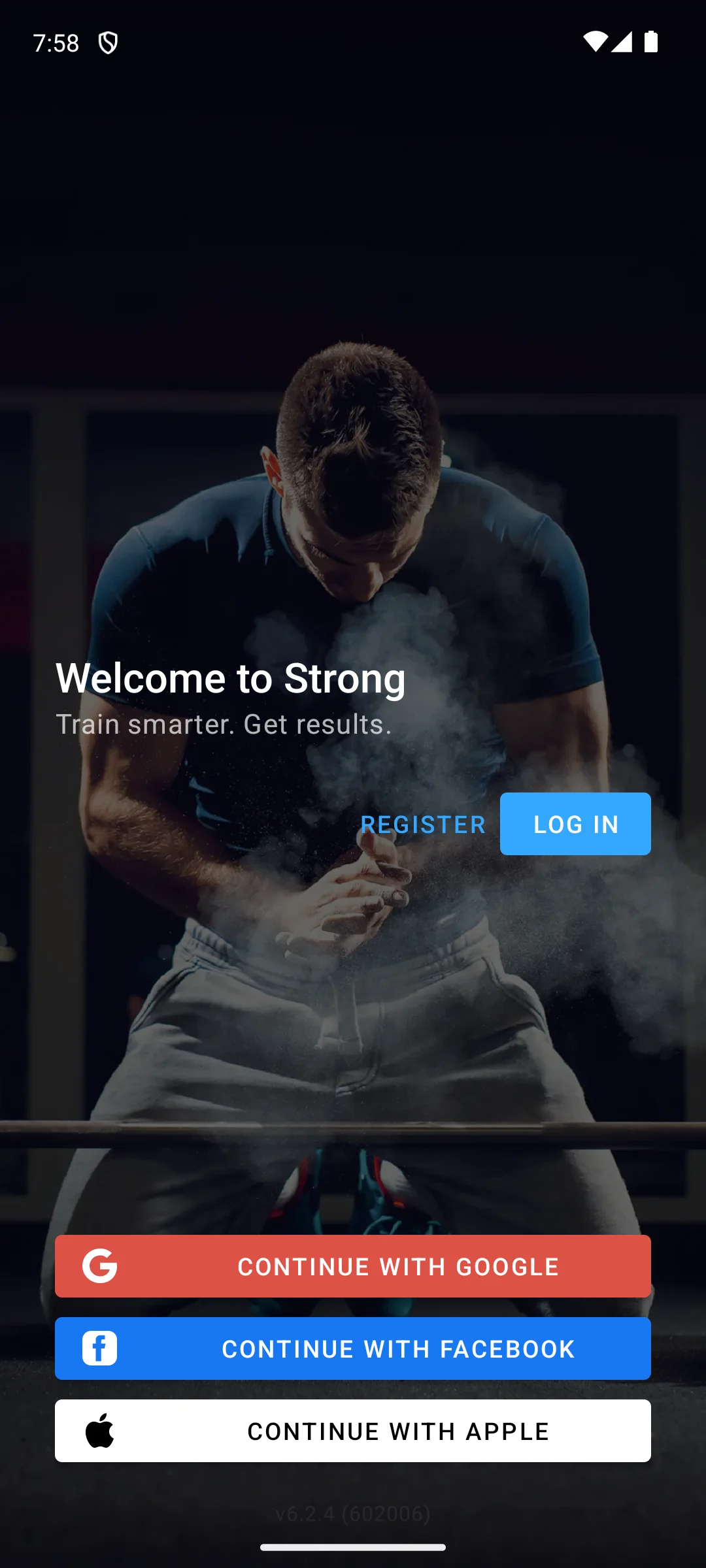
Strong does one job, recording sets, reps and weight without getting in the way, and it is the fastest thing here at it. The blunt catch is the front door: the app opens on an account wall, and its first screen offers no way to look around before registering. Its listing carries no advertising label, its Data Safety section declares no data shared with third parties, and in-app purchases run $0.99 to $99.99 per item.
The tiers are named on the developer’s own site rather than on the listing. Its home page says Strong accounts are free forever and puts best sets, max 1RM and body fat percentage under Strong PRO, and the help centre linked in that page’s footer sets out the rest: it says advanced features are reserved for paid users and lists what PRO buys as unlimited workout templates, body part measurements, access to all charts, the plate calculator, the warm up calculator and themes, on its Strong PRO page, read on 19 August 2026 and stamped there as last revised in 2021. Unlimited templates being the first thing PRO buys is the developer’s own way of saying the free version caps how many workout templates you can save, and that is the limit a gym logger meets first. The Play listing disagrees with both pages: it prints the body measurements tracker, the plate and warm up calculators, the progress graphs and the one rep max in one flat FEATURES list with no tier marked at all, which is why its in-app purchase range is the only price signal it publishes.
Skip this if. Skip it if you want a program written for you: Strong records, it does not coach.
Choosing between them. Choose Strong over Fitbod when you already know your program, and Fitbod over Strong when you want the session planned for you.
Best tracker with nothing listed to buy
Rating 4.6 from 1,728,016 reviews · Installs 50,000,000+ · Free · No in-app purchases listed · Developer adidas · Listing updated 19 August 2026 · Contains ads: Yes · checked 1 September 2026
Google Play listing · 4.6 (1,728,016) · read 1 September 2026
adidas Running, which many people still call Runtastic, carries the second largest review base on this page at 1,728,016, behind MyFitnessPal and its listing showed no in-app purchase range at all when it was read. Its Data Safety section declares no data shared with third parties, unlike Strava. The blunt trade is printed on the listing itself: it is one of only two entries here that carries advertising, so what you spend is attention rather than money.
Read the empty in-app purchase field carefully. It means the listing publishes no price, not that no paid tier exists anywhere, and adidas names none in its description either. What the listing does state is the advertising label, and that is the only funding this page can show you.
Skip this if. Skip it if advertising inside a workout breaks your concentration.
Choosing between them. Choose adidas Running over Strava when you would rather not have your data declared as shared with third parties, and accept the advertising in exchange.
Best for food logging
Rating 4.4 from 2,912,552 reviews · Installs 100,000,000+ · Free to install · In-app purchases $0.99 to $99.99 per item · Developer MyFitnessPal, Inc. · Listing updated 14 August 2026 · Contains ads: Yes · checked 1 September 2026
Google Play listing · 4.4 (2,912,552) · read 1 September 2026
MyFitnessPal has the food database the rest of the category quietly borrows from, and 2,912,552 reviews is the largest body of feedback on this page. It is free to install, with in-app purchases from $0.99 to $99.99 per item. Two things to know before you start logging: its listing carries advertising and its Data Safety section declares that it may share your data with third parties, the only entry here that does both.
What the subscription takes is printed on the listing under its own heading. The Premium block names barcode scan, meal scan and voice logging, custom macro goals, Net Carbs Mode, and ad-free logging is a Premium feature there too; Premium Plus adds meal planning and grocery delivery on top. The description also opens by inviting you to start a free Premium trial, so the first days are not what the free tier looks like.
Skip this if. Skip it if you want calorie logging without an account and without advertising.
Choosing between them. Choose MyFitnessPal over anything else here for food, because none of the other ten log meals at all.
Best for planned gym sessions
Rating 4.4 from 30,857 reviews · Installs 1,000,000+ · Free to install · In-app purchases $9.99 to $129.99 per item · Developer Fitbod · Listing updated 29 August 2026 · Contains ads: No · checked 1 September 2026
Google Play listing · 4.4 (30,857) · read 1 September 2026
Fitbod writes the session for you, picking lifts around what you trained recently and the equipment you say you have, which is genuinely useful if you would rather not plan. The blunt catch is that there is no free tier to settle into: its own FAQ names a seven day free trial and then a membership. Its listing carries no advertising label, its in-app purchases run $9.99 to $129.99 per item, the third highest floor here after Centr and Peloton, and its Data Safety section declares that it may share your data with third parties.
The listing names no free tier, and the developer’s own FAQ page, read on 19 August 2026, says why: it names a seven day free trial available worldwide and then monthly and annual memberships, so the free part is the trial rather than a tier you can stay on. That same page prices the memberships at $15.99 a month and $95.99 a year when they are bought on the developer’s own website, which is not what Google Play publishes: the listing’s in-app purchase range runs $9.99 to $129.99 per item. The two do not agree, and this page states both rather than choosing between them.
Skip this if. Skip it if you already follow a program, because the planning is what you are paying for.
Choosing between them. Choose Fitbod over JEFIT when you want the plan generated, and JEFIT over Fitbod when you want a library to pick from and a published price.
Best zero effort step tracking
Rating 3.4 from 684,552 reviews · Installs 100,000,000+ · Free · No in-app purchases listed · Developer Google LLC · Listing updated 23 August 2026 · Contains ads: No · checked 1 September 2026
Google Play listing · 3.4 (684,552) · read 1 September 2026
Google Fit is free in the plainest sense on this page: no in-app purchases, no advertising label, and a Data Safety section that declares no data shared with third parties and an independent security review, the only entry here that reports one. It also carries the lowest rating here by a wide margin, 3.4 from 684,552 reviews, while every other entry here sits at four stars or above. Take that seriously rather than dismissing it, because it is a very large sample.
The health claims on this entry are Google’s own, made on its own Play listing and read there on 19 August 2026, and this page repeats them as claims rather than as findings. Google states there that Heart Points came out of a collaboration with the World Health Organization and the American Heart Association, that one point is earned for each minute of moderate activity and double for more intense activity, and that the phone camera can measure heart rate and respiratory rate. None of that is presented by Google as a medical measurement, and nothing on this page checks it.
Skip this if. Skip it if you want to record training rather than count movement.
Choosing between them. Choose Google Fit over everything else here only when you want zero setup and zero cost, and nothing more.
Best all in one program, at a price
Rating 4.3 from 17,294 reviews · Installs 1,000,000+ · Free to install · In-app purchases $19.99 to $179.99 per item · Developer Centr · Listing updated 17 August 2026 · Contains ads: No · checked 1 September 2026
Google Play listing · 4.3 (17,294) · read 1 September 2026
Centr bundles training, meal plans and guided sessions into one program, and its listing carries no advertising label. The number that decides it is the price: the description opens by offering the app free for seven days and then sells memberships by the month, the quarter and the year, with in-app purchases from $19.99 to $179.99 per item, the highest floor on this page. There is no free tier underneath the trial by its own account.
Three entries here sell a trial rather than a free tier, and Centr is the one that says so on the store listing itself rather than on a support page: the first line of its own description offers seven days free and the last block explains that a membership renews automatically unless auto renewal is turned off. Read the in-app purchase floor as the real entry price.
Skip this if. Skip it unless you actually want the meal plans, which is most of what you are paying for.
Choosing between them. Choose Nike Training Club over Centr if guided sessions are all you want, since those cost nothing.
Best published subscription price
Rating 4.4 from 89,745 reviews · Installs 5,000,000+ · Free to install · In-app purchases $0.99 to $359.99 per item · Developer Jefit Inc. · Listing updated 24 August 2026 · Contains ads: No · checked 1 September 2026
Google Play listing · 4.4 (89,745) · read 1 September 2026
JEFIT is the only entry here that publishes its subscription price in plain sight: its own Play listing calls the app a free workout tracker and then prints JEFIT Elite at $12.99 a month or $69.99 a year. It carries no advertising label and declares no data shared with third parties. The blunt figure is the in-app purchase range on the same listing, $0.99 to $359.99 per item, the widest span and the highest ceiling on this page.
Elite is what the money buys, and its own Play listing names the parts: an adaptive AI coach, a premium analytics dashboard, an Elite routine library and what it calls pro training tools, priced in the same description at $12.99 a month or $69.99 a year. Read the rest of that description carefully before assuming the remainder is free. It calls JEFIT a free workout tracker and heads the block above Elite as its core features, but two of the four Elite items shadow things that block already lists, a routine library and progress charts, so the listing does not settle where the free version stops and Elite begins.
Skip this if. Skip it if you want the fastest possible logging, where Strong is cleaner.
Choosing between them. Choose JEFIT over Fitbod when you want to pick a routine yourself and see the subscription price before you install.
Best for yoga
Rating 4.9 from 377,829 reviews · Installs 5,000,000+ · Free to install · In-app purchases $2.99 to $249.99 per item · Developer Yoga Buddhi Co. · Listing updated 12 August 2026 · Contains ads: No · checked 1 September 2026
Google Play listing · 4.9 (377,829) · read 1 September 2026
Down Dog is rated 4.9 from 377,829 reviews, the highest score on this page and on a sample large enough to mean something. It builds a different class each time rather than replaying videos, carries no advertising label, and declares no data shared with third parties. The catch is the shape of the money: its listing says one subscription unlocks the full library of practice types, and in-app purchases run $2.99 to $249.99 per item.
The developer states the approach in one line on its own site: Every practice is generated just for you.
That is the difference from a fixed video library, and it is why a session here does not repeat. What the free part amounts to is set out on its own FAQ page, read on 1 September 2026: since it changed its pricing model in 2018 the app has given a brief free trial with full access to every feature, and after that a subscription is required. So the free access is complete while it lasts, and there is no reduced free tier underneath it.
Skip this if. Skip it if you want strength training, which it does not attempt.
Choosing between them. Choose Down Dog over Nike Training Club for yoga specifically, and Nike Training Club over Down Dog for general strength work at no cost.
Best instructor led classes
Rating 4.0 from 15,323 reviews · Installs 1,000,000+ · Free to install · In-app purchases $12.99 to $289.00 per item · Developer Peloton Interactive, Inc · Listing updated 25 August 2026 · Contains ads: No · checked 1 September 2026
Google Play listing · 4.0 (15,323) · read 1 September 2026
You do not need the bike: the Android app runs instructor led strength, running, yoga and Pilates classes on a phone, tablet or TV, and its listing carries no advertising label. Its own description sets out an App Membership charged monthly or annually until you cancel and names no free tier, with in-app purchases from $12.99 to $289.00 per item. It is also rated 4.0 from 15,323 reviews, the smallest sample on this page and the second lowest score, above only Google Fit.
The subscription terms are on the listing rather than in a review: it states that the membership renews automatically until cancelled, that auto renewal is turned off in your Play account settings, and that a cancellation part way through a month does not end that month. Read that before the first charge, not after.
Skip this if. Skip it if you will not pay a monthly fee, because its listing describes no free tier at all.
Choosing between them. Choose Peloton over Centr for the class library, and Centr over Peloton if you want the meal planning too.
Start with the money, because it separates these eleven more sharply than any feature does. Three list no in-app purchases at all: Nike Training Club, adidas Running and Google Fit. Two of those three carry no advertising label either; the third, adidas Running, carries one instead.
Everything else installs for nothing and sells a paid tier on top, and the in-app purchase range on each listing is the only figure that settles what that tier costs. It runs from $0.99 per item at the bottom up to $359.99 per item on JEFIT, and JEFIT is the only entry here that also prints a plain subscription price on its own listing. Three of the eight sell a trial rather than a tier, and each says so itself: Centr opens its own store description with seven days free, Fitbod names a seven day free trial in its own FAQ, and Down Dog says in its FAQ that a brief free trial with full access is followed by a required subscription.
Then privacy. Four of the eleven declare in their own Data Safety sections that they may share data with third parties: Strava, MyFitnessPal, Fitbod and Peloton. The other seven declare that they do not, and Google Fit reports an independent security review on top, the only entry here that does.
Ratings run from 4.9 down to 3.4 and the spread is informative rather than noise. Down Dog sits at the top on 377,829 reviews and Google Fit at the bottom on 684,552, so both are very large samples, and every other entry sits at 4.0 or above. A low score on a large sample is a finding, not an accident.
The practical route is to pick by what you do. Running or cycling outdoors leads to Strava for the social layer, or adidas Running if you would rather see advertising than have your data declared as shared. Lifting leads to Strong for logging or Fitbod for planning. A guided program at no cost leads to Nike Training Club. Yoga leads to Down Dog. Food leads to MyFitnessPal, because nothing else here logs meals at all.
Every app here is checked against its own Google Play listing: rating and review count, the install band, price and in-app purchase range, the Contains ads label, the Data Safety section, and what the developer’s description says is paid. Every figure carries the date it was read. Where the listing and the developer’s own site disagree, or where neither publishes an answer, this page says so rather than smoothing it away. One screenshot appears here, the first screen Strong shows, captured on our own Android emulator and dated in its caption. Nothing else here rests on anything but the listing, the Data Safety section and the developer’s own words.
Nike Training Club comes closest: its listing shows no in-app purchases and no advertising label, and Nike says on that listing that Members get free access to its workout content, so the price is an account. Google Fit also lists nothing to buy and carries no advertising label, but it counts movement rather than recording training. adidas Running lists no in-app purchases either, and its listing carries advertising instead. Everything else here installs for nothing with a paid tier on top. Checked 19 August 2026.
On this page it is the whole story. Eight of the eleven install for nothing and then sell something, and the in-app purchase range on the listing is the only figure that settles how much. Three of those eight sell a trial rather than a tier: Centr opens its store description with seven days free, Fitbod names a seven day free trial in its own FAQ, and Down Dog says in its FAQ that a brief free trial with full access is followed by a required subscription. Peloton describes no free tier at all on its listing. Strava, JEFIT and MyFitnessPal do have a usable free half and name the paid parts on their own listings. Strong has a free half too, but its listing names no tier at all, and only its help centre sets out what the paid PRO tier adds. Checked 19 August 2026.
Two of the eleven: adidas Running and MyFitnessPal. Their listings carry the Contains ads label. The other nine carry no advertising label: seven of them sell in-app purchases instead, and Nike Training Club and Google Fit list none at all. MyFitnessPal also sells removal of the advertising as part of its Premium block, by its own description. Checked 19 August 2026.
Four of the eleven declare in their own Data Safety sections that they may share data with third parties: Strava, MyFitnessPal, Fitbod and Peloton. The remaining seven declare that they do not, and Google Fit additionally reports an independent security review, the only entry here that does. This is what each developer states on its own listing, not an independent audit. Checked 19 August 2026.
Only JEFIT publishes a plain subscription price on its own listing, at $12.99 a month or $69.99 a year. The other seven that sell anything publish only an in-app purchase range: Centr from $19.99 per item, Fitbod from $9.99 to $129.99, Strava and Down Dog to $249.99, and Peloton to $289.00 per item, while JEFIT’s own range reaches $359.99. Nike Training Club, adidas Running and Google Fit list no in-app purchases at all. Prices are read from the United States listings. Checked 19 August 2026.
Only if you want passive step counting and nothing more. It is free, carries no advertising label, declares no third party sharing and reports an independent security review, but it is rated 3.4 from 684,552 reviews, the lowest on this page, and that comes from a very large sample rather than a handful of complaints. It does not log sets and reps at all. Checked 19 August 2026.
Usually yes. Nothing on this page does both well. Running and cycling point to Strava or adidas Running; gym work points to Strong for logging or Fitbod for planned sessions. Only MyFitnessPal covers food, and none of the others log meals. Nike Training Club is the one entry that spans guided strength, yoga and recovery at no cost, and it tracks no routes. Checked 19 August 2026.
Checked 19 August 2026: all eleven Play listings were re-read and every rating, review count, install band, price, in-app purchase range, advertising label and Data Safety section on this page now carries the date it was read. The page was rebuilt around one question, what the free tier actually gives you and what the subscription costs, because that is the question this category turns on. The comparison table used to print the word Free in eleven rows, which told a reader nothing; it now carries a sourced free versus paid column and the in-app purchase range exactly as each listing prints it. Ten claims did not survive the rebuild: three were assertions about a free tier that no source on this page could show you, one was a claim about what an app is for, three were dated claims that had gone stale in six days, and three were superlatives this page contradicted elsewhere on itself. Withdrawn from Down Dog: The free tier repeats a narrow band of difficulty until you subscribe. Its own FAQ page describes the opposite shape, a brief free trial with full access to every feature and a subscription required after it, so there is no reduced free tier there to repeat anything. Withdrawn from Peloton: that you should skip it because the free tier is a preview. Its own description sets out an App Membership charged until cancelled and names no free tier, which is the sourced version of the same warning. Withdrawn from adidas Running: that it lists no in-app purchases, so no paywall on the tracking itself. An empty in-app purchase field means the listing publishes no price, not that no paid tier exists, and the entry now says so. Withdrawn from Strava: Useless as a gym log. Strava’s own description says strength work shows up automatically when it is synced from a device or a strength app, so the honest version is that it does not record lifts itself. Two claims that stood on the page with nothing behind them are kept and sourced rather than cut, because the developer publishes both. Strong’s free version does cap how many workout templates you can save: its own help centre names unlimited workout templates as the first thing Strong PRO buys, and that help centre is linked from the footer of the developer’s home page. Fitbod’s free part is a trial: its own FAQ page names a seven day free trial and then memberships at $15.99 a month and $95.99 a year bought on its website, against a Play in-app purchase range of $9.99 to $129.99 per item, and the page now prints both figures instead of choosing. One claim contradicted another claim on the same page. adidas Running was called the best rated app on this page by review volume and credited with The largest review base on this page, while MyFitnessPal, four sections further down, was credited with the largest body of feedback on this page. MyFitnessPal has the larger base of the two and adidas Running is second, so the adidas entry now says second and names what it sits behind. The third superlative was Peloton’s, and it failed the same way. Peloton was credited with the lowest rating and the smallest sample of any app here bar Centr. The smallest sample is right, at 15,319 reviews; the lowest rating is not, because Google Fit is rated 3.4 against Peloton’s 4.0. Peloton is the second lowest, and the entry now says that instead. Three dated claims went stale in six days and are corrected. Google Fit was described as having a listing updated a month before every other actively maintained app here, and its listing was updated again on 19 August 2026. Down Dog was called the most recently maintained app on this page, and it no longer is. Strong was called one of the freshest on this page, and at 10 August 2026 it is now the oldest of the actively maintained entries. Nike Training Club still holds the other end, unchanged since 27 April 2026. Ten of the eleven review counts moved between 13 and 19 August 2026 and Nike Training Club’s did not, holding at 372,736 on a listing untouched since 27 April 2026, so all eleven fact lines, the table and the closing advice now carry the date they were re-read rather than last week’s. The How we verify box was replaced and moved. It described three tiers of evidence this page does not carry and framed the work as something done inside the apps, which is not how anything here was established. It now describes what was actually read, and it sits after the app sections rather than above them. The one screenshot on the page, of the first screen Strong shows, is dated in its own caption and is unchanged.