
Eleven apps compared on what a store page can prove: price and in-app purchase range, the ads label, whether the listing states offline lessons, and the rating with the date it was read. Where a claim rests on nothing the developer says, it is not made here.
AnkiDroid is the pick and the only free one, Duolingo the habit builder with ads, Pimsleur the choice for speaking. Our answer, the free pick and the table ↓
Checked 5 September 2026: no pick changed; all ten Play listings re-read 5 September, Clozemaster slipped to 4.6 stars and LingQ now starts at $4.99
Full logEleven language apps, compared on what a store page can prove: price and in-app range, the ads label, whether the listing states offline lessons, and the rating.
AnkiDroid is our pick and the only genuinely free app here because on 5 September 2026 its listing showed 4.8 stars from 164,347 reviews, no ads and no in-app purchases.
Duolingo is our pick for building the habit because on 5 September 2026 its listing showed 500M+ installs, though it carries ads and purchases up to $239.99, so it is not the free pick this page once called it.
Pimsleur is our pick for speaking because its lessons are audio first, its developer states they download for offline learning, and on 5 September 2026 its listing carried no ads label.
Five of the ten apps still on Google Play carried the Contains ads label on 5 September 2026.
Data checked: 5 September 2026.
Every app on this page sits in one of three tiers, and each entry says which one applies to it.
Vocabulary that sticks
4.8 stars from 163,884 reviews · 10M+ installs · free to install · no in-app purchases · no ads · by AnkiDroid Open Source Team · listing updated 4 May 2026 · Google Play listing · checked 8 August 2026
AnkiDroid is the strongest free claim on this page, and it is the only one that survives contact with the store listing.
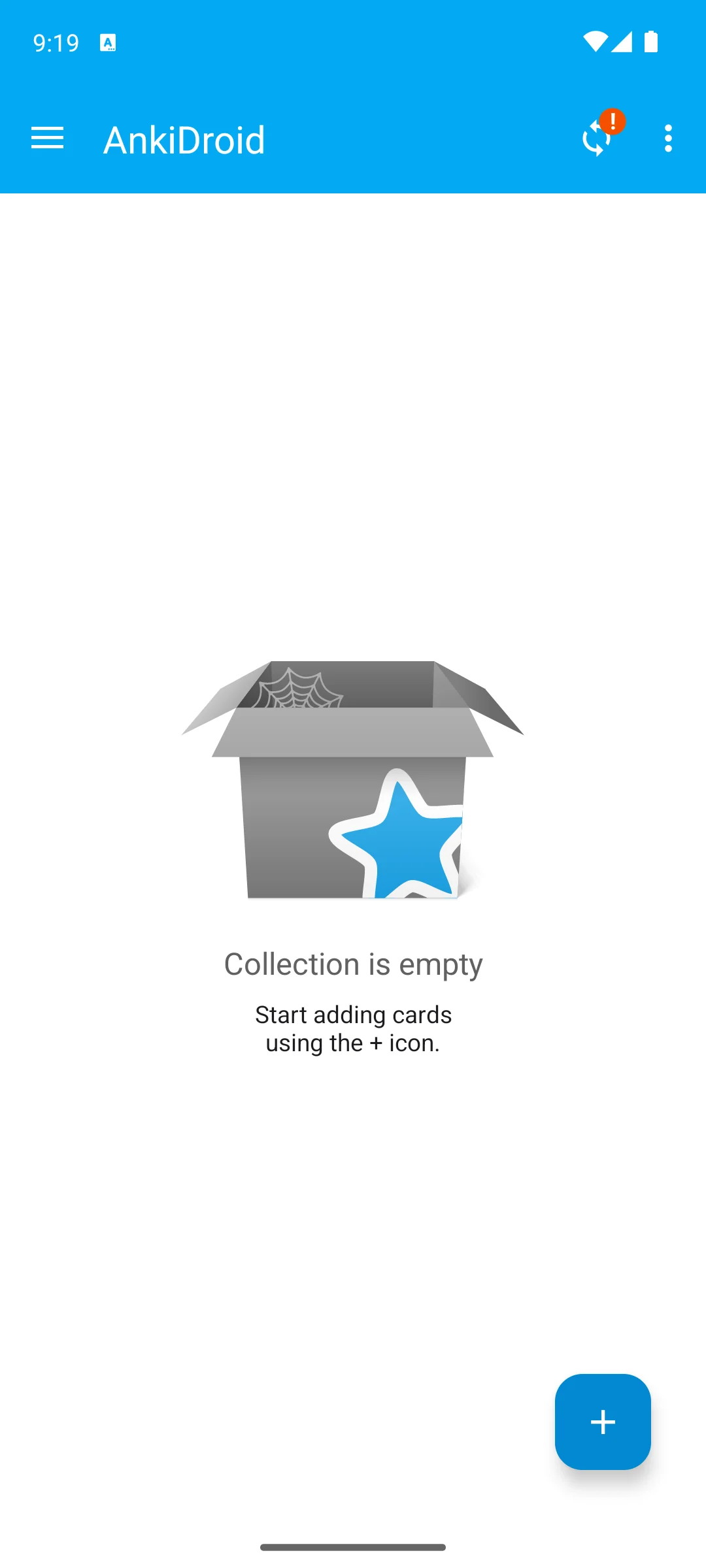
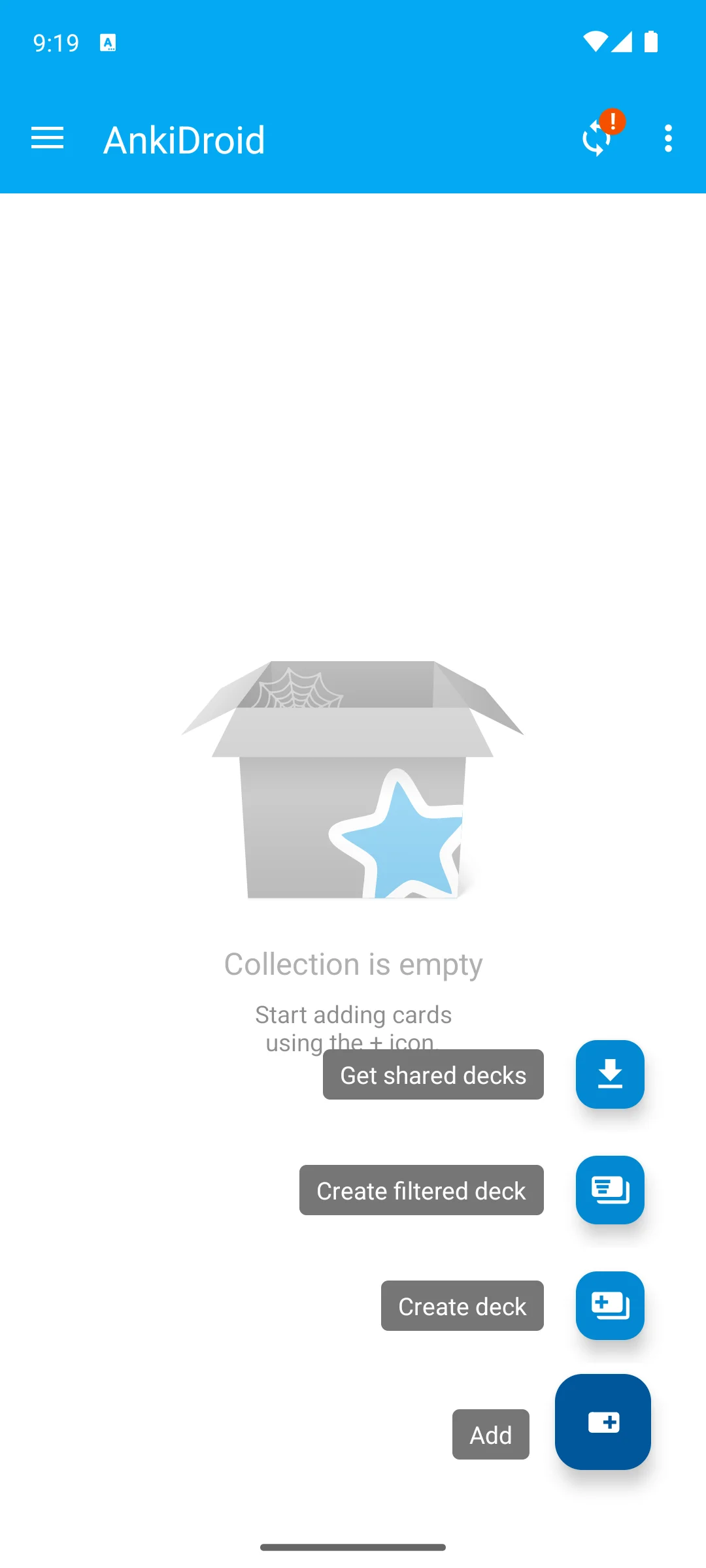
The screenshots here are our own captures from an Android emulator, taken on the date shown. No account was asked for, no consent dialog appeared and nothing was offered for sale on the way in. Opening that plus button shows what it can do from a standing start: add a card, create a deck, create a filtered deck, or get shared decks. The screenshots below are ours, taken on 18 August 2026.
Getting started daily
4.7 stars from 49,162,444 reviews · 500M+ installs · free to install · in-app purchases $0.99 to $239.99 per item · carries ads · by Duolingo · listing updated 31 August 2026 · Google Play listing · checked 3 September 2026
Duolingo is still the app that gets people to open something every day, which is most of the battle.
Read this first. Two corrections. Its listing carries the Contains ads label, so calling it the best free pick, as this page did, was wrong. And the detailed 2026 feature story this page told about Duolingo’s free tier and its paid AI features appears nowhere in the listing, which still advertises unlimited hearts as a paid perk and states that every language course is free. Those claims are gone rather than repeated without a source; the changelog at the foot of this page lists exactly what was dropped (checked 8 August 2026).
Structured lessons
4.6 stars from 1,129,454 reviews · 50M+ installs · free to install · in-app purchases $12.95 to $299.99 per item · no ads · by Babbel · listing updated 1 September 2026 · Google Play listing · checked 3 September 2026
Babbel is the closest thing here to a proper course, built around conversations you would actually have.
Speaking and listening
4.1 stars from 16,552 reviews · 1M+ installs · free to install · in-app purchases $0.49 to $399.99 per item · no ads · by Simon and Schuster · listing updated 13 August 2026 · Google Play listing · checked 3 September 2026
Pimsleur is the one you use with your hands full, because the lessons are audio and they play without a connection.
Human feedback
4.6 stars from 1,214,117 reviews · 50M+ installs · free to install · in-app purchases $0.99 to $169.99 per item · carries ads · by Busuu · listing updated 17 August 2026 · Google Play listing · checked 3 September 2026
Busuu pairs a structured course with feedback from other learners, which is rarer than it sounds.
Hearing real speech
4.4 stars from 1,571,765 reviews · 50M+ installs · free to install · in-app purchases $0.99 to $349.99 per item · carries ads · by Memrise · listing updated 1 September 2026 · Google Play listing · checked 3 September 2026
Memrise built its reputation on clips of real people speaking, which is still the reason to open it.
Visual vocabulary
4.3 stars from 317,231 reviews · 10M+ installs · free to install · in-app purchases $0.99 to $269.99 per item · carries ads · by Drops · listing updated 10 August 2026 · Google Play listing · checked 3 September 2026
Drops is the best-looking app here and the one most likely to survive a tired evening.
Read this first. A correction: this page said Drops is purely a vocabulary builder with no grammar. Its listing now states that grammar lessons are available for learners of English, Spanish, German and European Portuguese, so the old blunt con is simply out of date (checked 8 August 2026).
Learning from real texts
4.5 stars from 50,390 reviews · 1M+ installs · free to install · in-app purchases $4.99 to $269.99 per item · no ads · by LingQ · listing updated 30 August 2026 · Google Play listing · checked 5 September 2026
LingQ is for the point where textbooks stop helping and you want to read and listen to real material.
Real conversation
4.1 stars from 412,304 reviews · 10M+ installs · free to install · in-app purchases $1.49 to $180.00 per item · carries ads · by Tandem · listing updated 2 September 2026 · Google Play listing · checked 3 September 2026
Tandem is the shortcut past every simulated conversation: you talk to someone learning your language.
After the beginner stage
4.6 stars from 5,491 reviews · 500K+ installs · free to install · in-app purchases $12.99 to $79.99 per item · no ads · by Clozemaster · listing updated 26 August 2026 · Google Play listing · checked 5 September 2026
Clozemaster drills words inside real sentences, which is where vocabulary starts to become language.
Breadth of languages
4.5 stars from 926,769 reviews · 50M+ installs · free to install · in-app purchases $0.49 to $249.90 per item · no ads · by ATi Studios · listing updated 31 August 2026 · Google Play listing · checked 3 September 2026
Mondly is the one to check when the language you want is not in anybody else’s list.
Read this first. This page sold Mondly on two headline features that appear nowhere in its current description; the nearest things the developer does list are built-in speech recognition and over 100 native-speaker conversations. Both claims are gone, and the checkable figure the developer puts in its own store title is here instead: 41 languages (checked 8 August 2026).
Listing states it is only available to current Rosetta Stone Classic subscribers and to existing enterprise or education users · store title reads Rosetta Stone Classic (2024) · requires Android 11 · checked 8 August 2026
Rosetta Stone earned its reputation on immersion and speech recognition, and its listing still confirms both, along with study online or off and no advertising.
Why it is no longer a pick. The first line of the listing this page used to link reads that the app is only available for current Rosetta Stone Classic subscribers and existing enterprise or education users. A new reader following our recommendation could not buy it. The same description points to a replacement, Rosetta Stone Sapphire, but that app carries 404 reviews at 4.2 stars, which is far too thin a record for us to move a recommendation onto (checked 8 August 2026).
Instead: for speech work, Pimsleur is audio-first and works offline. For structured immersion, Babbel is the closest equivalent that anyone can still subscribe to.
There is no single best app, only the best app for your goal, your level, and the time you realistically have each day. Before you install anything, it helps to understand the few learning methods these apps are built on. Once you know what each method does well, matching an app to your situation gets a lot easier.
Spaced repetition is the quiet workhorse of language learning. The idea is simple: the app shows you a word just before you are likely to forget it, then stretches the gap a little longer each time you get it right. Over weeks this moves vocabulary into long term memory with surprisingly little effort. Apps built around this method are the most efficient way to remember words, and they tend to feel a bit dry, because efficiency is the whole point.
Immersion means meeting the language as it is really used, rather than as isolated rules. In an app this can look like learning through images instead of translation, reading real articles and podcasts with tap to translate, or filling in missing words in genuine sentences. Context teaches you not just what a word means but how it behaves, which preposition follows it and which words it keeps company with. It tends to suit learners who already know the basics and want to sound natural.
You cannot learn to speak without speaking, and you cannot understand fast speech without hearing a lot of it. Some apps put audio first and ask you to repeat out loud; others use speech recognition to give feedback on your pronunciation. The most direct option is talking with a real person through a language exchange, which is slower to set up but closest to the real thing. A newer middle path is AI conversation practice, which became the main story in 2026. Several apps here now advertise AI speaking practice on their own listings: Memrise promotes AI speaking partners, and Pimsleur lists AI-supported voice recognition, though its listing scopes that to Spanish learners. Where a store listing does not describe such a feature, this page no longer claims it. These do not replace a real person, but they let you rehearse out loud with no schedule and no stage fright. If your goal is travel or conversation, give this method real weight rather than treating it as an afterthought.
A structured course walks you through a language in a sensible order, building grammar and vocabulary step by step. This is reassuring if you like to understand why a sentence works, and it maps well onto goals like passing a course or preparing for work in another country. The trade off is that structure can feel slower and less playful than a game style app.
You can get genuinely far without paying. A free habit builder, a free spaced repetition tool, and a free language exchange together cover daily practice, vocabulary, and real conversation, which is most of what a beginner needs. Free apps usually pay for themselves with ads or by limiting how many lessons you can do in a day. Worth knowing before you rely on a free tier: five of the eleven apps here carry the Contains ads label on their own Play listings, and all but one sell something in-app. AnkiDroid is the single exception, with no ads and no in-app purchases at all (checked 8 August 2026).
Subscriptions tend to buy three things: a more carefully designed course, better speaking and pronunciation tools, and an experience without ads or daily limits. Whether that is worth it depends entirely on whether you will keep going. A reasonable approach is to start free, prove to yourself over a couple of weeks that you will actually open the app, and only then pay for the one that fits your goal. If you do consider a subscription, check the renewal terms before you commit, since annual plans are common and quietly renew.
If you plan to study on a plane, a train with patchy signal, or a daily commute underground, offline support matters more than any clever feature. Several apps let you download lessons in advance, and some audio first and flashcard style apps work fully offline once your content is set up. The habit is the same in every case: download what you need over Wi-Fi before you leave, so a dropped signal never becomes an excuse to skip a day. If you travel often, treat offline access as a requirement rather than a bonus.
It helps to name your goal in one sentence, then work backward to the method.
Most people end up using two or three apps together, and that is a feature, not a failure. A habit builder keeps you consistent, a spaced repetition deck holds your vocabulary, and a speaking tool turns all of it into something you can use.
An app is a supplement, not a substitute for real practice. It is very good at two things: building the habit of touching the language every day, and feeding you vocabulary in manageable doses. Those two things are genuinely valuable, and most people quit long before an app's limits matter. But fluency comes from using a language with other people, making mistakes, and slowly getting comfortable being misunderstood. No app fully replaces a conversation, a teacher who can answer your odd question, or the simple act of living among the language. Think of these apps as the scaffolding that keeps you in the habit and ready, so that when a real chance to speak arrives, you are not starting from nothing.
Run back up to the comparison table and read three columns: price, ads and offline. On this page those three separate eleven apps into two or three real choices faster than any amount of prose.
AnkiDroid, and it is not close. Its listing carries no ads and no in-app purchases at all, checked 8 August 2026. Every other app here sells something: five of the eleven also carry the Contains ads label, including Duolingo, which earlier versions of this page called the best free pick. Free to install and free to use are different things, and the store makes the difference visible.
Three state it on their listings: Pimsleur, whose description names offline hands-free lessons with no wi-fi required, Clozemaster, whose offline mode carries no conditions, and Mondly. Drops restricts offline practice to subscribers. Babbel’s listing does not mention offline at all, and neither does Duolingo’s or AnkiDroid’s, so this page no longer claims it for them. Checked 8 August 2026.
Duolingo, for the simple reason that it is the one people keep opening. Accept the trade: its listing carries ads, and gamification decides what you practise. If ads are a dealbreaker, Babbel is the structured alternative, though it needs a subscription to be useful at all, in the developer’s own words.
Pimsleur if you want to practise alone, because the lessons are audio and work offline, and it runs on Android 7.0 when most of this list wants 8 or higher. Tandem if you want to speak to an actual person, with the caveat that its listing carries ads and in-app purchases to $180.
Look at the range before you decide. On this page the entry prices run from $0.49 for Mondly to $14.99 for LingQ, and the ceilings from $79.99 for Clozemaster to $799.99 for Pimsleur, all read on 8 August 2026. Start with AnkiDroid and one free tier, find out whether you actually study daily, and only then pay for something.
Two works well, one for structure and one for vocabulary, and the pairing most people get value from is a course app plus AnkiDroid. Three is usually how a habit dies. Whatever you choose, the app matters far less than opening it at the same time every day.
Fifteen honest minutes a day beats an hour at the weekend, because the recall these apps train depends on frequency rather than duration. Drops is built around five to ten minute sessions, Pimsleur around half-hour audio lessons you can do while walking. Pick the shape that fits your day, not the one that sounds most serious.
Checked 8 August 2026: all twelve entries re-read, and the page now carries eleven. Rosetta Stone was removed as a pick: its listing states it is available only to existing Classic subscribers and to enterprise or education users, so the recommendation could not be acted on. Five apps carry the Contains ads label on their own listings, Duolingo, Busuu, Memrise, Drops and Tandem, and the capsule’s "best free" line and the FAQ’s "cost nothing" line have both been corrected; AnkiDroid is the only app here with no in-app purchases at all. Claims that appear in no listing were dropped rather than repeated: Duolingo’s energy system, three-lesson cap, Explain My Answer date and Max pricing, Mondly’s chatbot and augmented reality, and the claim that Babbel Speak is included at no extra charge. Drops is no longer described as having no grammar, because its listing now advertises grammar lessons for four languages. The offline roster was backwards and is rebuilt from the listings: Pimsleur, Clozemaster and Mondly state it, Drops restricts it to subscribers, Babbel never mentions it. Six review counts and one rating were refreshed, Tandem being 4.1 rather than 4.0. The comparison that used to be an image, whose footer made a testing claim of exactly the kind this site does not make, is now a real table.
 Offline Weather Apps on Android: Stay Informed Without InternetTools & Utilities