
Updated for 2026

The official social apps are not always the ones you want living on your home screen, so we looked at the alternatives that real people swear by and kept the ones that hold up. We cared about the things that wear on you over time, like a timeline you can quiet down, a reader you can theme until it finally feels like yours, and small tools that do the little jobs the main apps forget. One thing to know up front: outside apps only work where the network allows them, which today means the open networks like Mastodon and Bluesky plus a few special cases, not X or Instagram. Browse the guides below to find the app that fits how you actually scroll, post, and keep up with your people.
Social apps on Android sort into a few practical buckets, and knowing which one you actually need saves a lot of trial and error. There are third-party clients that put a lighter, calmer face on a network you already use. There are helper and utility tools that fix one specific annoyance the main app refuses to fix. And there are full social networks in their own right, including the privacy-first and decentralized ones.
The important thing to understand in 2026 is that third-party clients only survive where the network lets them. They are alive and genuinely good on open-protocol networks: Mastodon and the wider Fediverse run on ActivityPub, and Bluesky runs on the AT Protocol, and both welcome outside apps. A few readers still work on closed networks under narrow terms, like a Reddit app that is exempt from API fees because of an accessibility designation, or one that moved to a subscription to cover the cost. But on the big closed networks the door is shut. X cut off free API access in 2023 and now runs a paid, pay-per-use API, so the classic Twitter clients people remember are dead, and the official app is the only full client left. The one survivor is the read-only route: a maintained viewer like Squawker still covers reading without an account, with real caveats. It is genuinely maintained, with releases through June 2026 and breakages usually patched within days, but it is a scraper rather than an API client, so expect the occasional outage, and you install it from F-Droid rather than Google Play. Instagram is the same story: it closed its public API years ago and tightened the rest, so the so-called third-party Instagram apps you see are unofficial mods or scrapers that break the rules and can get you banned. If you are hunting for a lighter X or Instagram app, save yourself the search. It does not exist in a safe form.
Helper tools cover scheduling, posting, downloading your own content, and crossposting between networks. Bridging your Fediverse and Bluesky accounts so one post reaches both is a real thing you can do now, through services built for exactly that. And the full-network bucket reflects where a lot of people have been heading: away from X and toward Bluesky, which has passed forty million registered accounts, and Mastodon, which has under a million active users.
It helps to think about the actual job you are hiring an app for, because each job points at a different bucket.
A simple shortcut covers most cases. If you are on an open network, pick any well-maintained client by feel and trust your gut, since you can change your mind later at no cost. If you are on a closed network, use the official app and add only narrowly scoped helper tools on top.
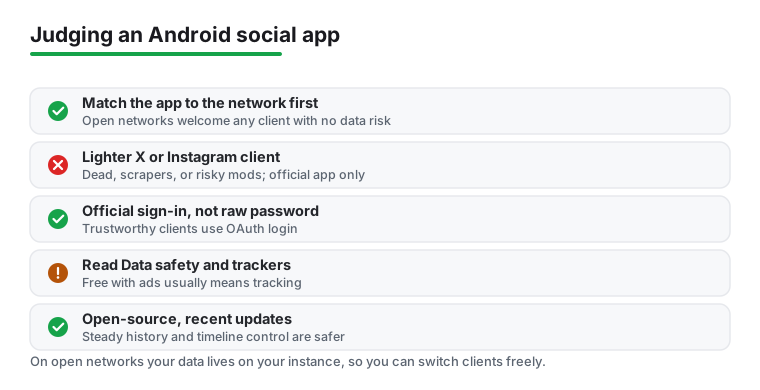
The privacy of a social app has a ceiling, and the ceiling is the network, not the app. A clean, well-behaved client cannot out-privacy the service it connects to. So the first question is always which network you are joining, and only then which app you point at it.
Cost in this category tracks API pricing more than most people realize. When a network charges developers to reach it, a free third-party client only exists if the network allows it for free, or if the app charges you a subscription to cover the bill. That is the pattern to watch: free with ads, a one-time purchase, a subscription, or a donation-funded open-source project, each tends to signal something. Free with ads usually means tracking pays the bills. A one-time fee or a subscription often buys you a cleaner relationship. Open-source and donation-funded projects tend to collect the least, though they can move slower.
Read the Play Store Data safety panel and the tracker count before you install anything, and weigh it against the network itself. Decentralized networks change the math in your favor, because your data sits on your own instance or server rather than in a company's vault. The AT Protocol is built around account portability, and Mastodon lets you migrate between instances and take your social graph with you. That is a kind of privacy and freedom you simply do not get on a closed network, no matter how polite the client looks.
We check each app against its store listing and the developer's own documentation before recommending it. We check permissions and data practices ourselves, and we take no paid placement; nobody can buy a spot on these lists. Each cycle we also re-check the API and network status, and we drop clients whose networks have cut off access, which is why this hub leans on open networks and steers clear of naming clients for services that no longer permit them.
The good ones are, as long as they use the network's official sign-in flow and you get them from the Play Store or F-Droid. The red flag is any app that asks for your real account password directly instead of sending you to the official login page. Open-source clients with a recent update history are the safest, because you (or the community) can see what they actually do with your data.
Read-only and quality-of-life clients almost never cause problems. What gets accounts suspended is automation that breaks platform rules: follower-boosters, mass-liking bots, and engagement-faking tools. Stick to apps that just let you browse and post like a normal person and you have little to worry about.
Some requests are legitimate (camera for posting photos, storage for downloads), but many are not. A reader app does not need your contacts, and a posting tool does not need your location. Deny anything that does not match what the app actually does; Android lets you grant permissions one at a time, and most apps keep working fine without the extras.
Sometimes. A few features, like certain live or shopping functions and some login or two-factor steps, only work in the first-party app. Many people keep the official app installed but disabled or tucked in a folder, and do their daily scrolling in the lighter client.
No, not in a safe form. X moved to a paid API, so the old Twitter apps you may remember no longer function. The official app is the only full client left, and the read-only viewer Squawker is the surviving exception for reading public posts. Instagram closed its public API and tightened the rest, so the third-party Instagram apps floating around are unofficial mods or scrapers that break the rules and can get your account banned. If you want a lighter experience on either one, the honest answer is to use the official app and turn off what you can, or move to an open network like Mastodon or Bluesky where good third-party clients are alive and welcome.