
Checked 27 September 2026
Open the Play Store and search messaging and you get about forty results. Most of them are noise. When someone asks which app to use, the answer is almost always one of three: WhatsApp, Signal, or Telegram. So that is what this is: the three people actually answer messages on, plus where the other seven fit, each checked against its live Play listing.
Jump to: All 10 with ratings · The big three in one look · Setup in two minutes · Features that decide it · Permissions and privacy · Beyond the big three · A free second number
WhatsApp is the pick, Signal the choice for privacy, Telegram the one for huge groups, and all three are free. Our answer and the reasons ↓
Checked 27 September 2026: no pick changed; all ten listings re-read, four ratings corrected · Full log
Ten free messaging apps for Android, compared on rating, encryption, whether the app wants your phone number and what each sells inside, with the big three settled first.
Read the ads, encryption and phone number columns first: they are where the ten split.
| App | Play rating (US, 27 Sep 2026) | Ads · purchases (Play, 27 Sep 2026) | Best for | Encrypted end to end by default? | Needs your phone number? | One-line verdict |
|---|---|---|---|---|---|---|
| 4.6★ | No ads label · $0.40 to $199.99 | Most people, family groups | Yes | Yes | The app your contacts already have; voice notes and groups just work. | |
| Signal | 4.5★ | No ads label · $1.99 to $2.99 | Privacy | Yes | Yes, but usernames (since 2024) let you hide it | Non-profit, open source, zero ads. |
| Telegram | 3.8★ | No ads label · $0.31 to $289.99 | Huge groups and channels | No, only Secret Chats | Yes, can be hidden behind a username | Feels like a platform: channels, bots, 2 GB file sharing free. |
| Google Messages | 4.5★ | No ads label · no purchases | Texting without installing anything | Yes, in RCS chats | Yes (it is your SMS app) | Default on most Androids; RCS reaches iPhones too. |
| Facebook Messenger | 4.7★ | No ads label · $0.05 to $7,909.99 | Reaching people in the US | Yes, on personal chats (default since 2023) | No, a Facebook account works | Biggest reach after WhatsApp. |
| Viber | 4.1★ | Contains ads · $0.99 to $99.99 | International calls, Eastern Europe | Yes | Yes | Rakuten-owned; messaging plus cheap calls to landlines. |
| Discord | 4.3★ | No ads label · $0.99 to $274.94 | Communities and gaming | No for text (voice and video calls are encrypted) | No, email signup | Servers and channels, not really a texting app. |
| Snapchat | 4.2★ | Contains ads · $0.49 to $399.99 | Disappearing photo chat | Snaps yes, text chats no | No, but asks for one | Messages vanish by design. |
| Beeper | 3.3★ | No ads label · $9.99 to $499.99 | One inbox for everything | Depends on the network bridged | Depends on networks you connect | Combines WhatsApp, Signal, SMS and more in one app. |
| Session | 4.7★ | No ads label · $4.49 to $35.99 | No phone number at all | Yes | No, none | Signup with a random ID; the pick when even Signal asks too much. |
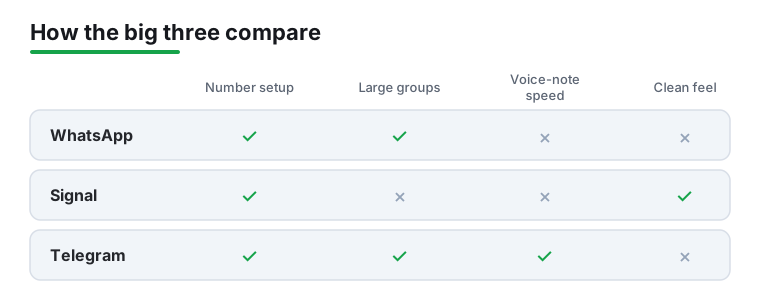
The best free messaging app is the one your contacts already use, and these are the three we would start with.
WhatsApp is our pick for most people because on 27 September 2026 its US Google Play listing showed 4.6 stars from 244,545,019 reviews, 10B+ installs and no ads label, with purchases from $0.40 to $199.99.
Signal is our pick for privacy because it is run by the Signal Foundation, a nonprofit, and on 27 September 2026 its US Google Play listing showed 4.5 stars from 2,922,612 reviews, no ads and purchases only from $1.99 to $2.99.
Telegram is our pick for huge groups because its developer states groups take up to 200,000 members, and on 27 September 2026 its US Google Play listing showed 3.8 stars from 17,265,313 reviews, no ads and purchases from $0.31 to $289.99.
Data checked: 27 September 2026.
For apps beyond these ten, checked app by app, see our complete messaging apps roundup.
Each app below was read from its own Google Play listing, US store, on 27 September 2026.
The ten apps sit in the table above; this short list shows where each of the big three fits.
All three are free, and all three handle everyday texting without complaint. WhatsApp is the all-rounder your family already has, and voice-note transcription has quietly become its most useful everyday extra. Signal keeps things clean, private and non-profit owned. Telegram wins on control, with huge groups and a voice-note speed slider that runs from 0.2x to 2.5x.
Where each of the big three fits; the right one is whichever your contacts answer on:
You may not need a new app at all. Google Messages talks to iPhones over RCS: typing indicators, full-quality photos, proper groups. What changed and what still will not work: RCS vs SMS on Android, explained.
Install Signal. It is end to end encrypted by default, run by a non-profit, and since 2024 usernames mean new contacts never see your number. If you also want your plain SMS locked down: privacy-focused SMS apps.
WhatsApp, no contest: it is what their phones already have, and calls over Wi-Fi cost nothing. Use it from your computer too: WhatsApp Web on Android, done right. Comparing call apps too: Free Video and Voice Calling Apps for Android.
Telegram handles groups that would choke any other app, plus channels and bots. Just know regular chats are not end to end encrypted by default, only Secret Chats are.
Keep SMS and change the skin: Customising Your Chats on Android With Textra, and What You Give Up.
Two free apps outside the ten give you one: TextNow, which carries the Contains ads label, and Google Voice, with no ads label, for personal Google Accounts in the US (Google Play, US store, read 27 September 2026). Figures and cons: a free second number.
Shrink it first: some compressor listings print a one-tap WhatsApp preset, compared in 13 Video Compressor Apps for Android: Typed Megabytes, a Resolution Ladder or a Quality Preset.
One thing up front. There is no single best messaging app, only the best one for how you and your contacts already talk. If your whole family lives on WhatsApp, that is where you belong, even if Signal has a cleaner feature list. If you want the longer shortlist, our best messaging apps for Android roundup goes deeper. A quick word on the other two names you will hear: Google Messages is worth keeping for RCS texting with people who have no chat app at all, and Viber still has a loyal following for cheap international calls. Neither displaces the main three for most people.
Setup is quick. For all three the flow is the same: install from the Play Store, open it, type your phone number, wait for the six-digit code, tap it in or let Android autofill it. Under two minutes from tap to first message.
A couple of small things help. Make sure the SIM you want tied to the account is active before you start, because changing your number later is fiddly. When the app offers to import contacts, that is what shows you which friends are already on it, so it is genuinely useful at this step. And if you are moving from an old phone, you have two routes for your history. The familiar one is restoring your chat backup from Google Drive during setup. The newer one is WhatsApp's device-to-device transfer, which moves your chats straight from the old phone to the new one over the same Wi-Fi, and since July 2022 it also works from Android to a new or reset iPhone through Apple's Move to iOS app, as 9to5Google reported on 21 July 2022. If both phones are in front of you, the direct transfer is faster and you skip the Drive restore entirely. Both routes, step by step: Carrying your WhatsApp chat history over to a new phone.
One more thing on older phones. Since 8 September 2026 WhatsApp no longer works on Android 5.0 or 5.1 and needs Android 6.0 or newer, as WABetaInfo reported that day (read 27 September 2026); WhatsApp keeps the official list on its supported devices page. If your spare phone is ancient, check its Android version before you rely on it. A Samsung on Android 9 is fine, but it is worth a thirty-second look in Settings.
And set a clear profile photo and name straight away. In a busy group, the people who skipped this are the mystery numbers nobody can place.
A handful of features stand out across all three. Voice notes top the list. Holding a button and rambling for twenty seconds beats typing while walking, and all three do this well. The thing people get wrong is thinking only Telegram lets you speed them up. WhatsApp has had 1x, 1.5x and 2x for years, and Signal can both speed up and slow down. Telegram's real edge is range: a slider from 0.2x to 2.5x, so a friend's two-minute saga can go quicker and a mumbled message can go slower. Handy, but not the gap it is often made out to be.
WhatsApp has a few newer features worth knowing about. Voice-message transcription turns an incoming voice note into readable text in the chat, which is a relief in a meeting or on a quiet train. Group message history, which WhatsApp's blog introduced on 19 February 2026, lets whoever adds you share from 25 up to 100 recent messages, so you are not dropped into a plan halfway through with no idea what was decided. Scheduled sending is less settled: WABetaInfo reported it under development in Android beta 2.26.8.11 on 26 February 2026, at that point not available even to beta testers, so check your own app before you count on it on a personal account. For plain texts, the scheduler in your SMS app does the job: How to Schedule a Text Message on Android, and What Google Actually Guarantees.
Group chats are where these pull ahead of plain texting. Pinned messages, polls, and replying to one specific message without derailing the thread keep a busy group readable. Telegram and WhatsApp both handle big groups gracefully. Signal stays cleaner if you want less going on.
Cross-device sync is easy to underrate. Starting a message on the phone and finishing it on a laptop is the kind of small thing you lean on daily. If you work at a desk, our guide to WhatsApp Web on Android covers getting that link running. There is also an EU wrinkle: under the Digital Markets Act, WhatsApp has to let users in the EU message people on certain other apps. The partner apps are small names, and Signal has chosen to stay out of it, but the walls between apps are slowly coming down.
A few habits make these apps easier to live with day to day. First, set up per-contact notifications. Give your partner or a key group a distinct sound and you know whether to grab the phone without looking. It also kills the reflex to check every buzz.
Second, learn the swipe gestures. In most apps a quick swipe on a message replies to it directly, and a swipe on a chat archives it. Archiving instead of deleting keeps your inbox tidy without losing the history, and it is a good way to quiet down chatty groups you do not want to leave outright.
Third, the formatting. You can bold a word by wrapping it in asterisks or italicise with underscores, useful when you want to be clear rather than shouty. Pin your most-used chat to the top so it is always one tap away. Small things, but you do them dozens of times a day.
Here is the part people skip. Messaging apps ask for a lot: contacts, microphone, camera, storage, sometimes location. Most of it is reasonable, since you cannot send a voice note without mic access. But be deliberate. On Android you can grant a permission only while using the app, and that is the sensible setting for camera and location rather than handing over blanket access.
The bigger trade-off is privacy. Signal is end-to-end encrypted by default and run by a non-profit, which is why privacy folks favour it. Its homepage puts it plainly: "Signal is an independent nonprofit. We're not tied to any major tech companies, and we can never be acquired by one either" (signal.org, read 27 September 2026). WhatsApp is also encrypted by default. Telegram encrypts one-to-one Secret Chats but not your ordinary cloud chats, which is a real distinction worth understanding before you assume everything is private. If you want your plain SMS private too, see Private Texting on Android: 4 Apps and What SMS Cannot Do. Only one of four big messaging listings declares on Google Play that it may collect your messages; which one, in Android messaging apps in 2026: what 4 listings say about your messages.
The old complaint about these apps was that you had to hand over your phone number and contact list just to use them. That is softening. Signal has had usernames since 2024, so you can give someone an @handle and chat without sharing your number. Meta said on 29 June 2026 that WhatsApp users could start reserving a username that week, with the feature itself launching later in 2026, country by country (Meta newsroom, read 27 September 2026). Worth a caveat: you still register with a phone number on both, and people who already have your number will still see it. Usernames hide it from strangers, they do not remove it.
Not everyone wants to live in the same apps as everyone else, and that is fair. If you mostly text people with no chat app, a better default SMS app can improve plain texting with scheduled messages, smarter search, and cleaner threads, and nobody you message has to install a thing. Google Messages is the obvious starting point here, since RCS gives you typing indicators and proper photo quality over standard SMS.
If you care about how it looks, there are apps built around themes, custom bubbles, fonts, and backgrounds; our piece on Customising Your Chats on Android With Textra, and What You Give Up walks through one of them. Viber is worth a look if you make a lot of international calls. And for the privacy-first crowd, the encrypted minimalist apps trade features for peace of mind.
If what you need is a separate number to text from, over Wi-Fi or to keep your own number private, two free apps outside the ten are built for exactly that.
TextNow · a free local number, with ads. Its Google Play listing (US store, read 27 September 2026) shows 4.6 stars from 1,656,495 reviews, 100M+ installs, free to install with in-app purchases of $0.29 to $99.99 per item and the Contains ads label, from TextNow, Inc. The listing offers "a free local phone number or keep your own for a private second line" and describes a free Wi-Fi calling and texting app. The blunt con: the free plan carries ads, and the listing names its Plus and Unlimited data plans as the ones with no ads. Skip it if you only need to reach contacts abroad; WhatsApp does that without a second number.
Google Voice · the ad-free number, for US personal accounts. Its Google Play listing (US store, read 27 September 2026) shows 4.2 stars from 372,163 reviews, 10M+ installs, free, with no ads label and no in-app purchases, from Google LLC. The listing says it "gives you a phone number for calling, text messaging, and voicemail" and "syncs across your devices". The blunt con, in the listing's own words: "Google Voice only works for personal Google Accounts in the US and Google Workspace accounts in select markets." Skip it if you live outside the US; choose it over TextNow if you want no ads at all.
The advice stays simple. Start with whatever your closest contacts use, then keep one alternative installed for the moments the main app does not cover.
Every number in this guide is read from the app's public Google Play listing, US store, on 27 September 2026: rating and review count from the listing's structured data, plus the install band, price, and the Contains ads and In-app purchases labels. Encryption and version-support claims come from developer documentation, linked where cited. Listings are re-checked quarterly; anything we cannot read from a listing or developer document does not appear here.
The one your friends and family already use, because a chat app is useless if nobody replies. WhatsApp, Signal and Telegram all handle everyday texting, voice notes and groups well, so the deciding factor is which one your contacts already use. If you have no idea, WhatsApp is the safe default in most of the world.
You can decline contact access and add people manually by phone number, it just takes more effort, since contact access is mainly there to show you who is already on the app. As for your number, that used to be unavoidable. Signal has had usernames since February 2024, so you can chat with someone there via a username without giving out your number, and Meta said on 29 June 2026 that WhatsApp users could start reserving a username that week, with the feature launching country by country. You still register your account with a phone number on both, and existing contacts who have your number will still see it, but it is no longer the open book it once was.
It depends on the app. Signal and WhatsApp are end-to-end encrypted by default, so not even the company can read your messages. Telegram encrypts its one-to-one Secret Chats but not ordinary cloud chats, which is a difference worth knowing. Whatever you pick, grant permissions like camera and location only while you are using the app, and check whether your chats are encrypted by default rather than assuming they are.
A little, since they sync in the background to deliver messages instantly, but none of the three is known for drain worth worrying about. If you do notice a problem, limit background data for the app in Settings, or switch off features you do not use like constant location sharing.
Telegram has it built in (long-press send). On WhatsApp, WABetaInfo reported scheduled sending under development in February 2026, so check your own app first, and for plain SMS your default app can do it. Full walkthrough for every method: see our guide to scheduling a text message on Android.
None of these apps work offline, but newer Android phones can text via satellite when you are off-grid. How it works and which phones support it: see our guide to satellite messaging on Android.
Microsoft retired Skype in May 2025 and pushed users to Teams. If you mostly used it for calls, see our roundup of the best free video and voice calling apps.
Session needs no number at all. Signal and Telegram still require one to sign up but can hide it behind a username. Discord and Snapchat work with just an account.{"q": "Which free messaging app has no ads?", "a": "Going by the Contains ads label on each Google Play listing (US store, read 27 September 2026), eight of the ten apps compared here carry no ads label; only Viber and Snapchat carry it, and Google Messages is the only one with neither ads nor in-app purchases. Outside the ten, Google Voice also shows no ads label and no in-app purchases on the same date. The label is what each developer declares on its own listing."}
No. Signal encrypts everything end to end by default; Telegram only does that in Secret Chats, and regular chats live on Telegram servers. For most people that is fine; for sensitive conversations use Signal.
Checked 27 September 2026: all ten Google Play listings re-read on the US store; Telegram's table rating corrected from 3.9 to 3.8, Google Messages moved to 4.5 stars, Beeper to 3.3, and Session's line shows 4.7 stars and its in-app purchases; an ads and purchases column added to the table; TextNow and Google Voice added for a free second number; the WhatsApp Android 6 minimum, username and scheduling notes re-dated to their sources.
Checked 5 September 2026: WhatsApp, Signal and Telegram re-read, no pick changed.
 RCS vs SMS on Android, ExplainedCommunication