
Signal is the pick and it is free, Threema the choice if no phone number is the point, WhatsApp the one everyone already has. Our answer, the free pick and the table ↓
Checked 3 September 2026: no pick changed since 21 August; WhatsApp re-read 3 September, Signal and Threema stand as read on 21 August
Full logTwelve Android messaging apps, compared on how each developer documents end to end encryption, what its Data safety page declares, price and ads, and installs.
Signal is our best overall and best free pick because its privacy policy, read 21 August 2026, says it cannot access message content; free, no ads label, $1.99 purchases.
Threema is our no-phone-number pick because its listing, read 21 August 2026, says a random Threema ID replaces phone number and email; 7.49 US dollars once, no ads label.
WhatsApp is our reach pick because its listing, read 3 September 2026, states personal messages and calls are end-to-end encrypted; free, no ads label, purchases from $0.40.
Data checked: 3 September 2026.
New this cohort: an August newcomer aimed at former Samsung Messages users, read in the best new apps guide.
Every figure here is read from that app's own Google Play listing on a stated date: rating and rating count, install band, price, the in-app purchase range, the Contains ads label, and the full Data safety page rather than the summary above it. Every encryption claim is quoted from the developer's own documentation and linked in the same sentence, scoped exactly as that developer scopes it. Where a listing and a developer document disagree, the disagreement is printed rather than smoothed away. Screenshots are our own captures and carry their capture date. Nothing here rests on our own use of these apps, and a declaration is not an audit.
Two columns in the table above answer two different questions, from two different sources, and running them together is how this category misleads people.
What the encryption column claims. It reports what the developer documents about the CONTENT of your messages, and how far that documentation reaches. Four distinctions do the work. End to end by default is a different claim from end to end inside a mode you switch on. A claim by an operator about what it cannot read is a different claim from a description of a protocol. Message content is a different claim from the record of who you talked to and when. And a backup can sit outside all of it: Google's own help page, read 21 August 2026, says of end-to-end encrypted messages received on your phone that they're also included in Android backup and accessible to apps you've granted SMS or notifications permissions to
, and the Electronic Frontier Foundation, writing 12 May 2026 and read again on 21 August 2026, adds that Google Messages end-to-end encrypts the text of messages in backups, but not the media.
What the data column claims. It reports what each app's own Play Data safety page declares under Data shared and Data collected, read in full. That is a declaration by the developer to the store, not a measurement and not an audit, and it answers a different question from the encryption column. The two can point in opposite directions on the same listing, and on this page they do: Google Messages carries the only Independent security review here beside the widest sharing declaration, and the previous generation Element client declares nine shared categories while its successor declares none.
What Android itself decides. One of these twelve is the phone's text messaging app and the other eleven carry their own traffic, and the platform decides that through a default handler you pick in Settings, not the developers. Google's own documentation for Android, read 21 August 2026, says Your app must ask to become a default handler before it requests the permissions associated with being that handler
, and gives the default SMS handler as its worked example. So no messenger here can become your text messaging app without asking you first. Being the default handler is not the only route to your messages, though, and the Google help page quoted just above says so on the same day: received end-to-end encrypted messages are also accessible to apps you have granted SMS or notifications permissions to. A permission you grant reaches message content without any app being the default.
The table gives you the map; the reviews below give you the territory. Every fact line was read from that app's own Play listing on 3 September 2026, and every encryption quote from the developer document linked beside it on the same day.
Privacy
Signal is what to install first when privacy is the point, and it is our best overall and best free pick. The bluntest con is reach: the other person has to install it too.
End-to-end encryption, scoped. All messages and calls, and the word Signal uses of it is always, not by default. The claim is made by the operator about itself rather than about a protocol. Its own privacy policy, read 21 August 2026, states Signal cannot decrypt or otherwise access the content of your messages or calls.
The same document is separate about what does sit on Signal servers: Additional technical information is stored on our servers, including randomly generated authentication tokens, keys, push tokens, and other material that is necessary to establish calls and transmit messages.
Those are two claims, and this page prints both.
What its Data safety page declares. Its Data safety page, read in full on 21 August 2026, is the narrowest of the twelve: no data shared with third parties, and exactly one collected category, Personal info. It declares that data is encrypted in transit and that deletion can be requested.
Pros
Cons
Skip this if your family will not install a second chat app.
Choose Signal over WhatsApp if you care more about how little the company can learn than about who is already there.
Google Play listing · 4.51 stars from 2,910,198 ratings · read 2 September 2026
↑ Back to the comparisonMost people
WhatsApp wins on reach and nothing here is close. The bluntest con is that the same company that cannot read your words still declares seven collected categories on its Data safety page, where Signal declares one.
End-to-end encryption, scoped. Personal messages and calls, and group chats, stated without conditions. Its own listing description, read 21 August 2026, states Your personal messages and calls to friends and family are end-to-end encrypted. No one outside of your chats, not even WhatsApp, can read or listen to them.
The same description extends it to groups: End-to-end encrypted group chats let you share messages, photos, videos and documents across mobile and desktop.
That is an operator claim about content, and it says nothing about metadata, which is the next paragraph and a different question.
What its Data safety page declares. Its Data safety page, read in full on 21 August 2026, declares no data shared with third parties, and seven collected categories: App info and performance, Personal info, Financial info, Device or other IDs, Contacts, Location and App activity. Read the two paragraphs together and the shape of the trade is visible: the words are sealed and the ring around them is wider than Signal declares.
Pros
Cons
Skip this if you want your number kept off a Meta service.
Choose WhatsApp over Telegram if you want every ordinary chat covered rather than only the ones inside a mode you start deliberately.
Google Play listing · 4.62 stars from 241,702,096 ratings · read 21 August 2026
↑ Back to the comparisonBig groups
Telegram is the pick when groups get large. The bluntest con is the one the company states itself: ordinary chats are not end to end encrypted, and a phone number is demanded first.
End-to-end encryption, scoped. Secret Chats only, and Telegram is explicit about it. Its own FAQ, read 21 August 2026, says Messages in Secret Chats use client-client encryption, while Cloud Chats use client-server/server-client encryption and are stored encrypted in the Telegram Cloud
, and, on the same page, Secret chats use end-to-end encryption, thanks to which we don't have any data to disclose.
Read the two together and the scope is exact: the protection you have to start deliberately is the protection that keeps Telegram out. The same FAQ adds the cost of it: All secret chats in Telegram are device-specific and are not part of the Telegram cloud
, and logging out loses them.
What its Data safety page declares. Its Data safety page, read in full on 21 August 2026, declares no data shared with third parties and seven collected categories, among them Messages and Contacts. That is the pairing worth pausing on: a listing can declare no third-party sharing and still declare that messages are collected, because the two describe different things.
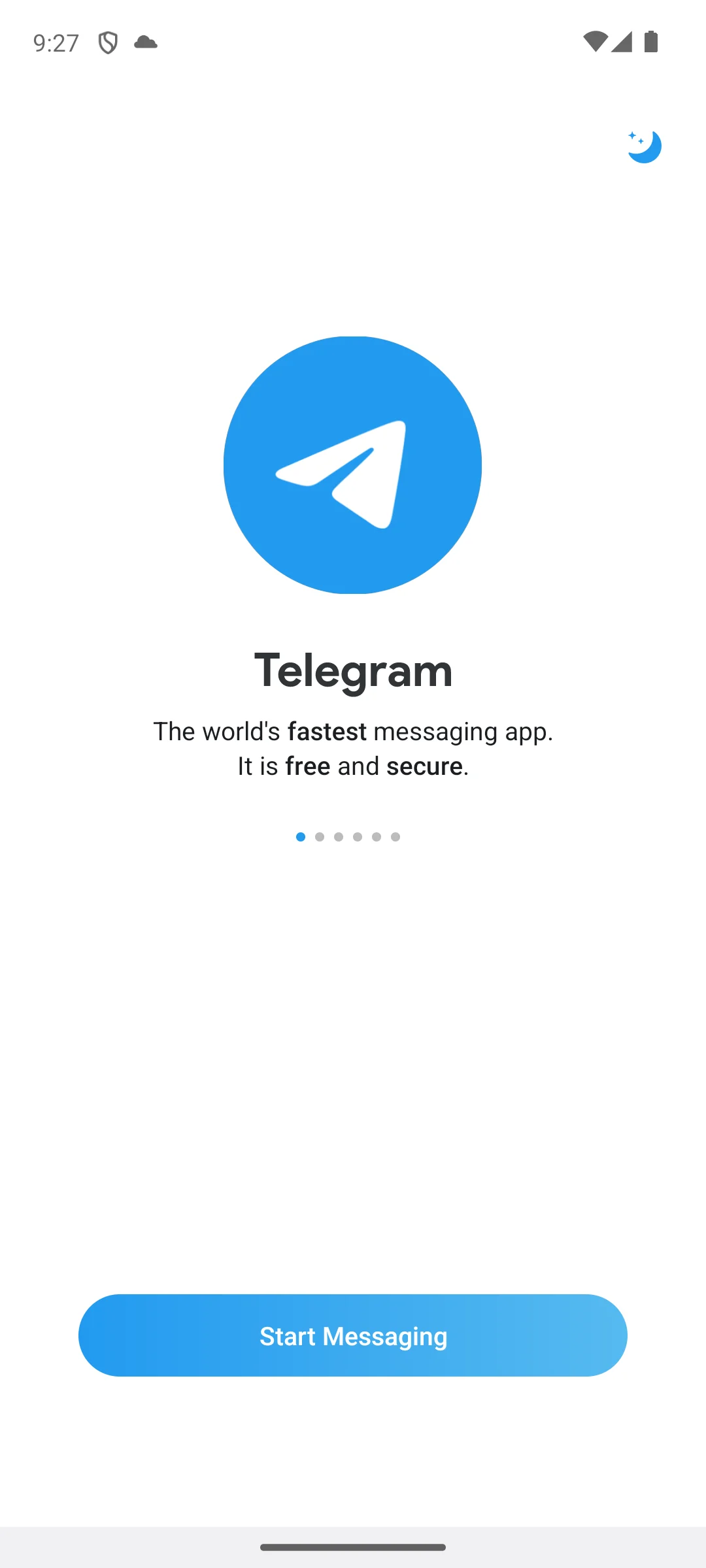
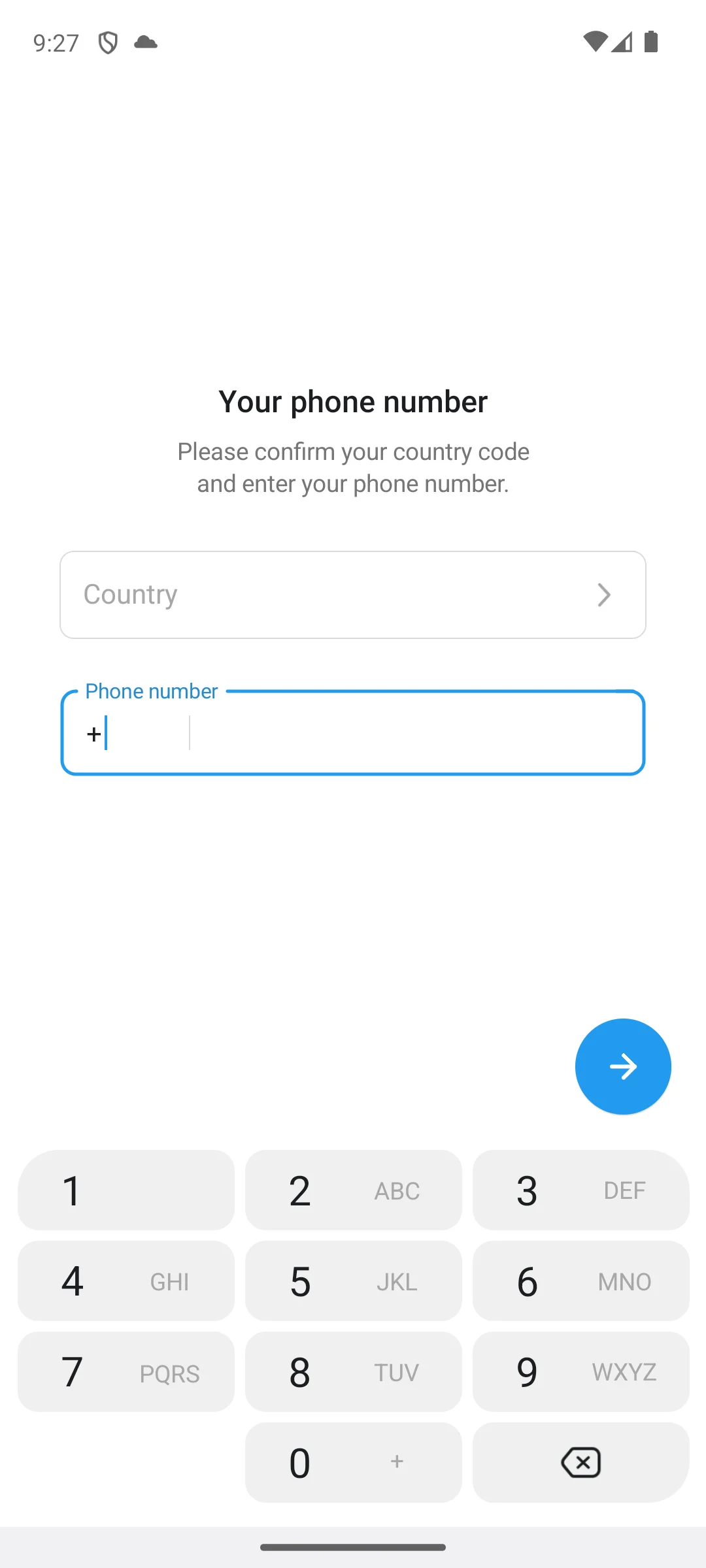
The two screenshots below are our own captures, taken on our own Android emulator on 18 August 2026. The first is the introduction the app opens on, which calls itself the world's fastest messaging app, free and secure. The second is the screen that follows it: a request to confirm a country code and enter a phone number, with a numeric keypad and nothing else offered. No phone number was entered and no account was created.
Pros
Cons
Skip this if you want encryption you never have to switch on.
Choose Telegram over Google Messages if your life happens in large groups and channels rather than in one to one texting.
Google Play listing · 3.83 stars from 17,196,669 ratings · read 2 September 2026
↑ Back to the comparisonAndroid default
Google Messages is the cleanest price on this page, with no in-app purchase label and no ads label at all. The bluntest con is scope: it drops to plain, unencrypted SMS whenever RCS is unavailable.
End-to-end encryption, scoped. Inside RCS, and there without asking: Google's own word for it is automatic, in eligible conversations. Google's own help page, read 21 August 2026, says Google Messages supports end-to-end encryption when messaging other users using Google Messages over Rich Communication Services (RCS)
and, on the same page, End-to-end encryption isn't available for SMS/MMS messages.
Two claims, not one: the protection is on inside that lane and absent outside it. On who may be at the other end, Google's own pages differ and this page prints both. The help page still says Currently only Google Messages supports end-to-end encrypted RCS
, while Google's own Android blog, read 21 August 2026, says encryption begins rolling out in beta for iPhone users running iOS 26.5
.
What its Data safety page declares. Its Data safety page, read in full on 21 August 2026, declares three shared categories, Personal info, Device or other IDs and Location, and ten collected ones, among them a Messages category covering SMS or MMS and other in-app messages. It is also the only one of the twelve declaring an Independent security review. Those two facts sit on the same page and neither cancels the other.
A third thing sits outside both, and Google states it on the same help page: When end-to-end encrypted messages are received on your phone, they're also included in Android backup and accessible to apps you've granted SMS or notifications permissions to.
The Electronic Frontier Foundation, writing on 12 May 2026 and read again on 21 August 2026, puts the same point about backups the other way round: Google Messages end-to-end encrypts the text of messages in backups, but not the media.
Pros
Cons
Skip this if the people you text are on apps rather than on phone numbers.
Choose Google Messages over Messenger if you would rather text phone numbers than run a social network account.
Google Play listing · 4.33 stars from 46,875,862 ratings · read 7 September 2026
↑ Back to the comparisonFacebook chats
Messenger earns its place because the installs are already out there. The bluntest con is the widest Data safety declaration on this page, fourteen collected categories, against one for Signal read the same day.
End-to-end encryption, scoped. Personal chats and calls, by default, and the source is Meta rather than the listing. Meta's own announcement, read 21 August 2026, says we are rolling out default end-to-end encryption for personal messages and calls on Messenger and Facebook
and nobody, including Meta, can see what's sent or said, unless you choose to report a message to us.
Its own listing description, read 21 August 2026, is thinner: it names end-to-end encrypted chats
once, in a line about disappearing messages, and states no default anywhere. The announcement is the claim; the listing does not repeat it.
What its Data safety page declares. Its Data safety page, read in full on 21 August 2026, is the widest of the twelve: two shared categories, Device or other IDs and Personal info, and fourteen collected ones, among them Health and fitness, Web browsing, Financial info, Calendar, Location and a Messages category. Encryption of content and collection around it are different claims, and Messenger is the clearest case on this page of both being true at once.
Pros
Cons
Skip this if your contacts are reachable by phone number instead.
Choose Messenger over Discord if you want to reach individual people you know rather than join standing communities.
Google Play listing · 4.71 stars from 113,578,676 ratings · read 21 August 2026
↑ Back to the comparisonCommunities
Discord suits communities that never stop talking. The bluntest con is written by Discord itself, that text messages on the service are not end to end encrypted.
End-to-end encryption, scoped. Audio and video, and nothing else, and Discord says so in the same sentence it announces the protocol in. Its own engineering post, read 21 August 2026, says While audio and video will be end-to-end encrypted, messages on Discord will continue to follow our
moderation approach and are not end-to-end encrypted.
On the part that is covered it is specific: During E2EE A/V calls, no one but the participants can access the contents of ongoing audio and video conversations. Outsiders, including Discord itself, never know the media encryption keys.
A voice room and a text channel on the same server are two different answers.
What its Data safety page declares. Its Data safety page, read in full on 21 August 2026, declares one shared category, Device or other IDs, and eleven collected ones, among them Messages, Location, Contacts and Financial info. The Messages entry lines up with the engineering post rather than contradicting it, which is rarer on this page than it sounds.
Pros
Cons
Skip this if you want a private one to one messenger.
Choose Discord over Viber if your people gather around interests and voice rooms rather than a phone book.
Google Play listing · 4.30 stars from 6,962,819 ratings · read 21 August 2026
↑ Back to the comparisonOverseas family
Viber is the practical choice for calling landlines and mobiles abroad through Viber Out. The bluntest con is that it is one of only two listings here carrying a Contains ads label.
End-to-end encryption, scoped. One to one chats, group chats and calls between Viber users, on by default. Its own security page, read 21 August 2026, says Not only are your communications protected by end-to-end encryption by default, but nothing you share is ever stored on Viber's servers once delivered
, and scopes it further up the same page: Viber can't read your personal chats (one-on-one chats and group chats) or listen in on your one-on-one audio or video calls.
Its own listing description, read 21 August 2026, repeats it: End-to-end encryption is on by default for one-to-one chats, group chats, voice calls, and video calls between Viber users.
Both scope it to Viber users, and neither covers a Viber Out call to an ordinary phone number.
What its Data safety page declares. Its Data safety page, read in full on 21 August 2026, declares four shared categories, Device or other IDs, Financial info, Location and Personal info, and ten collected ones, among them Messages and Web browsing. The security page says nothing about that, and the two do not answer the same question.
Pros
Cons
Skip this if nobody in your circle already uses it.
Choose Viber over Threema if you need to dial real phone numbers cheaply rather than to stay anonymous.
Google Play listing · 4.09 stars from 16,691,180 ratings · read 2 September 2026
↑ Back to the comparisonAnonymity
Threema is the one app here you buy outright, working from a random ID rather than a phone number. The bluntest con is the smallest network here, and the price is why.
End-to-end encryption, scoped. Chats, calls and files, stated without conditions, and the claim is unusually wide because it reaches past the message body. Its own security page, read 21 August 2026, says Threema not only provides end-to-end encryption for text and voice messages, media, and calls, but also for profile pictures, group names, and the list of group members.
That last clause is the part no other developer on this page makes: group membership is metadata, and Threema is claiming it as content. The registration claim this page leans on is the developer's too: its own listing description, read 21 August 2026, says Instead of a phone number or email address, a randomly generated Threema ID serves as a unique identifier
and lists Anonymous use possible: no phone number or email address required
under its own security heading.
What its Data safety page declares. Its Data safety page, read in full on 21 August 2026, is the only one of the twelve carrying two lines and nothing else under the headings: no data shared with third parties, and no data collected. It declares that data is encrypted in transit and that deletion can be requested. A declaration is not an audit, and this page does not treat it as one.
Pros
Cons
Skip this if you need to reach a wide circle, because paying up front blocks other people.
Choose Threema over Element if you want the encryption switched on for you rather than switched on per room.
Google Play listing · 3.79 stars from 75,569 ratings · read 7 September 2026
↑ Back to the comparisonDecentralization
Element X runs on the open Matrix network, so no single company owns the room your conversation lives in. The bluntest con is scope: Element says encryption here is a room setting rather than a default.
End-to-end encryption, scoped. Per room, and the scope matters more here than anywhere else on this page. Element's own help page, read 21 August 2026, asks Are all of my messages encrypted?
and answers No, messages are only encrypted in rooms with encryption enabled. You can enable encryption by going to Room Settings.
What the encryption does where it is on, the same page states plainly: End-to-end encryption means your messages and files are encrypted before they leave your device, and stay encrypted until they reach the other participants' devices.
Both sentences are Element's, and only the pair is the truth. One caveat on the source, because scope cuts both ways: that page answers for the Element apps as a family, naming Element X Android among the clients it supports, and no Element page we could reach on 21 August 2026 states a room default for Element X on its own. The Play description for Element X, read the same day, does not mention encryption at all. So this is Element's answer about Element, not a measurement of what this client does when it creates a room.
What its Data safety page declares. Its Data safety page, read in full on 21 August 2026, declares no data shared with third parties and six collected categories, among them Messages. The previous generation app is a sharper contrast than any of that: the Data safety page for Element Classic, read the same day, declares nine shared categories, Messages among them, where Element X declares none.
Which app you are looking at matters here. The package this page reviewed until today, im.vector.app, is listed as Element Classic, and its own description read 2 September 2026 says Element Classic is the previous-generation of Element mobile app
and that it will receive critical security updates but no further enhancements or new features.
It rates 3.31 from 7,584 ratings against 1M+ installs on that listing, read the same day. The reviewed entry above is the developer's current client, Element X.
Pros
Cons
Skip this if you want something that protects every conversation the moment you install it.
Choose Element over Microsoft Teams if you want to own the server your chats live on rather than borrow someone else's.
Google Play listing · 3.60 stars from 1,650 ratings · read 3 September 2026
↑ Back to the comparisonEx-Skype users
Teams is where consumer Skype users landed. The bluntest con is that end-to-end encryption here does not cover chat at all, and Microsoft documents the part it does cover for work and school accounts.
End-to-end encryption, scoped. Not for chat, and narrow even for calls. Microsoft's own documentation, read 21 August 2026, says With E2EE for unscheduled one-to-one calls, only the real-time media flow, that is, video and voice data, for one-to-one Teams calls are end-to-end encrypted. Both parties must turn on this setting to enable end-to-end encryption.
The same page states the default: The global, organization-wide, default policy specifies that end-to-end encryption is disabled.
Text chat is covered by something else entirely, which the page names as Microsoft 365 encryption rather than end-to-end encryption. Read the scope of the source as carefully as the scope of the claim: that page is written for tenants, telling the reader to make sure that your work or school account has been assigned the Teams or global administrator role
and to configure the setting in the Teams admin center or PowerShell. No Microsoft page we could reach on 21 August 2026 publishes an end-to-end encryption setting for a personal Teams account, so for a reader arriving from consumer Skype the honest answer is that the feature is documented for organisations and undocumented here.
What its Data safety page declares. Its Data safety page, read in full on 21 August 2026, declares one shared category, Personal info, and eleven collected ones, among them a Messages category covering SMS or MMS and other in-app messages. It is the only one of the twelve declaring a commitment to follow the Play Families Policy.
On Skype: skype.com serves Microsoft's Teams page when read on 21 August 2026, so consumer Skype no longer has a product page of its own. No Microsoft page we could reach today publishes the retirement date, so this page no longer prints one.
Pros
Cons
Skip this if what you miss about Skype is cheap calls to real numbers; Viber Out above is the closer match.
Choose Microsoft Teams over Beeper if you want one account that works out of the box rather than a hub you wire up yourself.
Google Play listing · 4.64 stars from 8,724,853 ratings · read 21 August 2026
↑ Back to the comparisonMulti-app inbox
Beeper pulls other chat networks into a single inbox. The bluntest con is that it adds no encryption of its own, so every thread is only as protected as the network it came from.
End-to-end encryption, scoped. Inherited from each network rather than added, and Beeper splits it in two. Its own FAQ, read 21 August 2026, says of the newer path With On-Device Connections, messages are sent directly from your device to the networks like WhatsApp and Signal, preserving end-to-end encryption (when supported by the network). The Beeper app works like the official app does. Messages never touch our servers.
Of the older path it says If your account is on Beeper Cloud, our older connection method, our cloud acts as a bridge between your device and the networks.
One line in the first quote is a claim about somebody else: The Beeper app works like the official app does
is Beeper describing how WhatsApp and Signal treat a client neither of them wrote. No WhatsApp or Signal document read for this page endorses third-party clients, and WhatsApp publishes a help article on unofficial apps whose body is loaded by script and so was not readable in the page source we fetched on 21 August 2026. Treat that sentence as Beeper's own, unconfirmed by the networks it names. A bridge in the middle is the opposite of end to end, whatever is done to the copy afterwards, and the same FAQ describes that copy as held under zero-access encryption.
What its Data safety page declares. Its Data safety page, read in full on 21 August 2026, declares no data shared with third parties and five collected categories: App activity, Personal info, Audio, App info and performance and Device or other IDs. Messages is not among them, which is consistent with the On-Device Connections description above.
Pros
Cons
Skip this if you only really use one or two chat apps.
Choose Beeper over KakaoTalk if your problem is too many messengers rather than reaching one country.
Google Play listing · 3.36 stars from 4,883 ratings · read 2 September 2026
↑ Back to the comparisonSouth Korea
KakaoTalk is close to compulsory if your life touches South Korea. The bluntest con is a Contains ads label and the lowest rating on this page, with no end-to-end claim in any source we read.
End-to-end encryption, scoped. No source read for this entry publishes one for ordinary chats, and that is a statement about the documentation read for this page rather than about the app. Its own listing description, read 21 August 2026, does not use the word encryption once. Kakao's own English privacy policy, read 21 August 2026, uses it three times and every time about storage or transmission: Users' personal information is transmitted through encrypted communication channels, and important information, including passwords, are encrypted when stored.
That describes the pipe and the disk, and says nothing about whether the operator can read what travels through them.
What its Data safety page declares. Its Data safety page, read in full on 21 August 2026, declares four shared categories, App info and performance, App activity, Location and Device or other IDs, and ten collected ones, among them Messages, Contacts and Financial info.
Pros
Cons
Skip this if your contacts are outside Korea.
Choose KakaoTalk over Beeper if the people you need are Korean, since no unified inbox replaces being on the network they use.
Google Play listing · 2.94 stars from 3,335,567 ratings · read 3 September 2026
↑ Back to the comparisonThree questions settle this faster than any feature list.
Reach and protection are different things, and most people end up keeping both: one mainstream app because that is where their contacts are, and one careful app for the handful of threads that deserve it.
Two ideas explain almost every argument in this category.
End to end encryption means only you and the recipient can read a message, and the company running the app cannot. What matters is the scope, because a protection you have to switch on is one you will sometimes forget. Read for the word each developer actually uses: Viber and Meta both write by default, Signal writes always, and WhatsApp and Threema state it of ordinary chats, calls and files without conditions and without naming a default. Google Messages covers RCS chats, automatic in eligible conversations, and states plainly that SMS and MMS are outside it. Telegram covers Secret Chats only. Element covers rooms where the setting is enabled rather than every room. Discord covers audio and video and says its messages are not covered. Microsoft Teams covers unscheduled one to one calls, in documentation written for work and school accounts, and not chat at all. Beeper inherits whatever the network behind a thread does. And no source we read publishes a claim for ordinary KakaoTalk chats. Plain SMS is not encrypted at all; treat it as a postcard.
Even with the words sealed, an app can still record who you talk to, when and how often. That is metadata, and it is where apps sharing the same encryption differ most. The Data safety column in the table is the closest thing to a public statement about it: Threema declares nothing collected, Signal declares one category, and Messenger declares fourteen, all three on listings read the same day. Ask two questions of any messenger. Is the content encrypted by default, or only in a mode you have to choose? And how much does the company declare it collects about who you talk to? The first is what is inside the envelope, the second is what is written on the outside, and they do not move together.
Messengers also ask for your contacts during setup, so read the permission prompts and grant only what the app needs. Signal explains its own approach at signal.org, and the EFF wrote on 12 May 2026 about end to end encrypted RCS arriving between Apple and Android chats, adding a caution this page repeats: Metadata will likely still be collected and stored for these conversations.
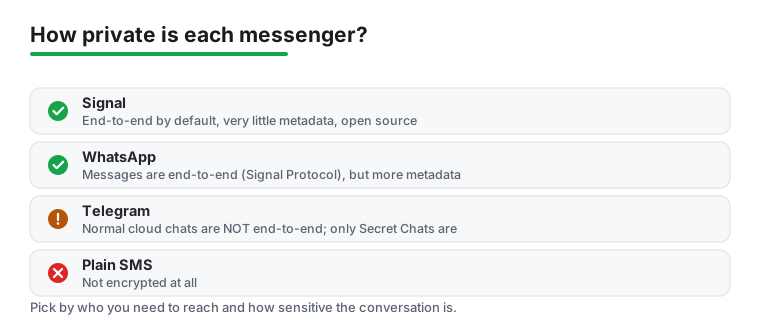
Match the tool to the sensitivity of the conversation. Keep a mainstream app for everyday reach and a privacy first app for the threads that deserve it, read what each one asks for during setup, and do not assume that encrypted and private mean the same thing.
Signal, on the documents read for this page. Its own privacy policy states that Signal cannot decrypt or otherwise access the content of your messages or calls, which is the only unscoped operator statement of the twelve, and its Data safety page declares no data shared and one collected category. It rates 4.52 from 2,904,808 ratings against 100M+ installs, free with no ads label and a $1.99 purchase item. Threema is the runner up if you also want to avoid handing over a phone number, and it is the only listing here declaring nothing collected and nothing shared. Checked 21 August 2026.
For many people Google Messages is plenty. With RCS turned on it gives you encrypted chats between Google Messages users, high quality media and typing indicators with no setup, and it carries no ads label and no in-app purchase label. Know the scope: Google states on its own help page that end-to-end encryption is not available for SMS or MMS messages, so the protection disappears whenever a thread falls back to plain texting. You mainly need a separate app when the people you talk to are already on one, or when you want encryption that does not depend on your carrier. Checked 21 August 2026.
Eleven of the twelve are free to install, including Signal, WhatsApp, Telegram, Messenger and Google Messages. Threema is the one you buy outright, at 7.49 US dollars once on Google Play. Free to install is not the same as free of purchases: WhatsApp lists items from $0.40 to $199.99, and most of the others list a range too. None of the core picks locks basic chatting behind a paywall. Checked 21 August 2026.
Telegram handles the biggest groups with the least friction, thanks to supergroups, channels and roomy file sharing. Go in knowing that Telegram states itself that those ordinary group chats are not end to end encrypted. Discord is the better fit if your group is really a community that hangs out long term with voice rooms, and Discord likewise states that its messages are not end to end encrypted. For a smaller family or friends group, WhatsApp stays simplest because everyone is already there. Checked 21 August 2026.
Only in Secret Chats. Telegram says on its own FAQ that messages in Secret Chats use client-client encryption, while Cloud Chats use client-server and server-client encryption and are stored encrypted in the Telegram Cloud. So ordinary chats are encrypted to Telegram rather than end to end, and a Secret Chat is a separate, deliberate step that lives on one device only. If you would rather not take a separate step, Signal or WhatsApp is the safer habit. Checked 21 August 2026.
No, and this is the most common mix up in the category. End to end encryption protects the content of your messages so only you and the recipient can read them. It does not stop an app from collecting metadata, which is the record of who you talk to, when and how often. Two apps can make the same encryption claim and declare very different amounts of collection: WhatsApp's listing and Signal's policy both put ordinary chats under end to end encryption, and their Data safety pages declare seven collected categories and one. A backup can also sit outside the encryption, which the EFF points out about media in Google Messages backups. Checked 21 August 2026.
Skype no longer has a product page of its own: skype.com serves Microsoft's Teams page when read today, and old Skype sign ins and contacts carried over to Teams. For free chat and video calls between people, Teams or Signal both work. For the thing Skype was best known for, cheap calls to landlines and mobile numbers, Teams will not dial regular phone numbers without a paid plan, so Viber Out is the closer match today. Checked 21 August 2026.
Two of the twelve do. Rakuten Viber Messenger and KakaoTalk both carry a Contains ads label on their Google Play listings. The other ten carry no ads label at all, although most of them do list in-app purchases, and one of the ten, Threema, lists neither ads nor purchases because you buy it once. Checked 21 August 2026.
Element split into two apps and the older one is now the previous generation. The package this page linked until today, im.vector.app, is listed as Element Classic and its own description says it will receive critical security updates but no further enhancements or new features. It rates 3.32 from 7,579 ratings against 1M+ installs. The same developer publishes Element X as its current client, rated 3.67 from 1,610 ratings against 500K+ installs, and that is the app reviewed above. One difference is worth knowing before you stay put: the Data safety page for Element Classic declares nine shared categories, and Element X declares none. Checked 21 August 2026.
Checked 21 August 2026: every figure on this page was re-read from source today, and the column this page leans on was rebuilt from the developers' own documentation for the first time. The largest single error the previous version carried was about Element: it listed Element among the apps that encrypt every chat that way out of the box, and its table said so in a column headed E2E by default. Element's own help page, read today, asks whether all messages are encrypted and answers No, adding that messages are only encrypted in rooms with encryption enabled. Both the sentence and that column heading are withdrawn. The Element entry now reviews Element X, the developer's current client, because the listing for im.vector.app describes itself today as the previous generation app, receiving critical security updates and no new features; Element Classic keeps its link, its figures and a paragraph of its own. Also corrected, each against the developer's own words read today: Microsoft Teams was carried as simply not end to end encrypted, where Microsoft scopes it to unscheduled one to one calls that are disabled in the default policy; Discord was carried as a flat No, where Discord states in writing that audio and video are covered and messages are not; Beeper was carried as varies by network, where its own FAQ separates On-Device Connections from Beeper Cloud; and KakaoTalk was carried as a flat No, which is now stated as what no source read for this page publishes rather than as a finding about the app. Superseded figures: Threema 3.87, Beeper 3.54, KakaoTalk 2.91, Element Classic 3.30, Element X 3.60 from 1,650 ratings, and the Messenger purchase ceiling of $739.99, whose listing publishes a higher figure today. The decision table is rebuilt. Its Checked column is withdrawn, because all twelve cells carried one identical date and a column that separates nothing looks verified without being useful; the date is now stated once in the lead. The single encryption column is replaced by two, because they answer different questions from different sources: what the developer documents about message content, and separately what each Data safety page declares, every one of the twelve read in full today rather than from the store summary. Two install claims are withdrawn, not one. The How we verify box opened its first evidence tier with an install claim about our own emulator, which is the one kind of claim that box exists to replace, and the paragraph introducing the Telegram screenshots opened the same way; it is now written as capture provenance. The two Telegram screenshots themselves are unchanged and still carry their own capture date, but they had been sitting after the Google Messages anchor and rendered under the wrong heading; they are now inside the Telegram section they depict. Three more claims about what encryption is on by default are withdrawn for want of a document that says so. WhatsApp was carried as encrypted by default with the Signal Protocol: no whatsapp.com page would load for this run, and neither phrase appears in the only WhatsApp document that did, its own listing, so the entry now reports what that listing states without conditions and names no protocol. Threema was carried the same way and is now reported as its listing states it. And the Google Messages quotation read on 7 August, that RCS chats between Google Messages users are end-to-end encrypted by default, is replaced rather than repeated: that sentence is not on the help page today, which words it as automatic in eligible conversations. By default stays exactly where a developer uses it, at Viber and at Meta, and Signal keeps its own word, always. The privacy diagram is unchanged as an image, because the file is owned by root on the server and this account cannot redraw it, but its caption and its alt text are corrected: they promised the main messengers on encryption and metadata, where the drawing holds four rows, three of the twelve plus plain SMS, no Threema, no source and no date. The caption now says what it shows, says it is our own drawing, dates it, and says its shorthand about metadata and protocol names is not sourced. The chooser under the table, headed Find your messenger in three taps and holding ten collapsible answers, is removed; the block headed How to choose a messaging app for Android now does that job in prose. In every app section the plain text store line moved from above the verdict to the foot of the section, and the verdicts no longer repeat the figures printed directly above them, so the bluntest con now falls inside the first eighty words in all twelve. The verdict capsule is rebuilt to the owner ruling of 2026-08-18: it was a run of bold fragments and it is now labelled Our answer, one self contained sentence per pick, closing with the date it was checked.
 How to Stop Spam Calls and Texts on AndroidCommunication