
Updated September 2026
Updated September 2026 · the two built-in filters now carry their own dated listing figures, and the four layers sit in one table
Most of the protection is already on the phone and switched half on. This turns both filters on, screens what still gets through, and is honest about what a paid blocker adds.
Spam calls, at no cost
4.4 stars from 50,762,034 reviews · 5,000,000,000+ installs · free to install · no in-app purchases listed · by Google LLC · Contains ads: No · checked 3 September 2026
Google Play listing · 4.4 (50,762,034) · read 3 September 2026
Caller ID and spam protection in the Google dialler is the switch that does the most work on this page, and it is already on most phones. It is free, sells nothing and carries no Contains ads label. The blunt con: it catches known nuisance numbers, so a brand new number, which is what most scam campaigns use, still rings through until enough people report it.
Switch on the spam filtering that ships with your phone first. It costs nothing and does the heavy lifting. The wording depends on who made your phone, so here are both paths.
On a Google Pixel (and most phones using the Phone by Google app):
On a Samsung Galaxy (One UI):
One quirk: on a brand-new Samsung this menu may not appear until the phone pulls down a "Security Provider" update. If you don't see Caller ID and spam protection, update your software (Settings, then Software update) and check again. To compare standalone caller-ID tools, our roundup of the best caller ID apps for Android goes deeper.
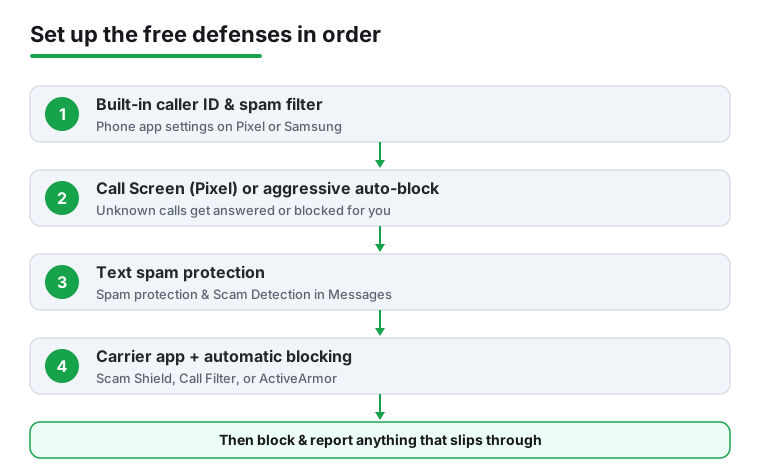
Call Screen is a Pixel feature where the Google Assistant answers an unknown call for you, asks who's calling and why, and shows a live transcript. You read it and decide whether to pick up. Scammers and robots tend to hang up the moment they hit it, which is the point. It isn't on by default, so turn it on:
If you get a lot of unwanted calls, start at Maximum for a week. If it catches the occasional real caller (a delivery driver from an unknown number, say), drop to Medium. On eligible Pixels you may also see real-time scam alerts: during a live call, if the conversation shows patterns common to scams, the phone quietly warns you. That analysis runs on the device, and Google says the call content isn't sent to its servers unless you share it.
Samsung phones don't have Call Screen in this form; the closest equivalent is the aggressive auto-block setting above.
Spam texts, which the call filter never sees
4.3 stars from 46,278,528 reviews · 10,000,000,000+ installs · free to install · no in-app purchases listed · by Google LLC · Contains ads: No · checked 3 September 2026
Google Play listing · 4.3 (46,278,528) · read 3 September 2026
Texts run on a different filter from calls, and this is the one people forget to turn on: spam protection inside Google Messages, which is off by default on some phones. It is free, sells nothing and carries no Contains ads label. The blunt con: it moves suspected spam into its own folder rather than deleting it, so a wrongly filtered message from a real sender sits there unread.
Calls are only half the problem. Google Messages, the default texting app on Pixel and many other Android phones, has its own filter that runs separately from the call settings.
This is usually on already, but confirm it. When active, the app uses on-device machine learning (pattern-matching that happens on your phone, not a server) to spot known spam. If a message contains a link, the app may send that single URL to Google to check it isn't malicious.
Since March 2025, Google Messages also includes Scam Detection, which watches for conversational scams that start friendly ("Hi, is this Sarah?") before steering toward a fake investment or a gift-card request. It targets crypto cons, fake toll and billing notices, package-redelivery fees, and tech-support tricks. It only looks at messages from people not in your contacts, and again the processing stays on your device. Its switch lives in the same Spam protection menu. Samsung Messages users get similar filtering through the carrier and Hiya tools instead.
Your phone company runs its own spam-blocking at the network level, often before a call reaches your handset, and the basic version is free. They catch things the phone's own filter can't, so install yours.
Because carrier blocking happens on the network, your screen may stay dark for the worst offenders. Turn on automatic blocking inside whichever app you have for a free second layer. If you'd rather use an independent tool, see our look at the best call blocker apps for Android.
No filter is perfect, so you'll still see the occasional unwanted call or text. Reporting it stops that sender reaching you again and feeds the shared databases that protect everyone else. It takes five seconds.
To block and report a call (Phone by Google):
To block and report a text (Google Messages):
Reporting a text in Google Messages sends the sender's number plus the last several incoming messages to Google to sharpen detection, then files the thread under "Spam & blocked." Samsung is nearly identical: open or long-press the message, then choose Block number and the report option.
One more free move works on any Android phone, regardless of carrier. Forward the spam text to 7726 (that spells SPAM on the keypad), which sends a copy straight to your carrier's fraud team. The GSMA, the global mobile industry body, reserved 7726 and made it toll-free, so it never counts against your plan. To do it: open the message, press and hold the text bubble, tap Forward, type 7726, and send. Verizon texts back asking for the originating number; reply with it. T-Mobile and AT&T usually confirm automatically. When enough people flag the same sender, carriers can label or block it network-wide.
Blocked your kid's new number by mistake? In the Phone app, open the call in your history, tap it, and choose Not spam or Unblock to undo it.
Here's the one that trips up almost everyone. A scam text ends with "Reply STOP to unsubscribe," and the instinct is to do it. Don't, at least not with senders you don't recognize.
Legitimate businesses you signed up with (your pharmacy, your bank, a store you bought from) do honor STOP, and replying is fine. But a scammer doesn't care about your wishes. To them, any reply is a gift: it confirms a real person reads this number, which makes you more valuable and usually brings more spam, not less. The FTC is blunt about this. With a suspicious text, don't reply at all; block and report it using the steps above, then delete it.
The same logic applies to calls. Don't press 1 "to be removed," and don't speak or say "yes" to a recording. Pressing a key or making a sound tells the system a human answered, and your number gets sold on. With an unknown call, the calm choices are: let it go to voicemail, screen it on a Pixel, or hang up without a word.
The National Do Not Call Registry is a free, permanent way to tell legitimate US telemarketers to leave you alone. It's worth doing, but understand what it can and can't do.
The catch: it is a list that law-abiding companies agree to honor, not a blocker, and it has no effect on scammers, who are already breaking the law by calling you. Charities, political groups, debt collectors, and companies you do business with can also still call. So think of it as a way to silence honest salespeople, while the phone settings and carrier tools above handle the dishonest ones. If a real telemarketer keeps calling after 31 days, file a complaint through the same site.
You'll see apps like Truecaller, Hiya, RoboKiller, and Nomorobo advertised as the answer, often $2 to $5 a month or roughly $30 to $50 a year. Worth it? For most people in 2026, no, not as a first step. The free combination of your phone's built-in filter plus your carrier's app catches the large majority of junk at no cost.
That said, a third-party app can help in a couple of cases: if you get heavy spam and want a much larger crowd-sourced caller-ID database, or you want features like RoboKiller's answer bots that waste a scammer's time. Weigh the trade-offs first. Many of these apps want your call log and contacts, and some have a history of uploading address books, a privacy cost worth taking seriously. Read the permissions before installing, and prefer a paid tier over a "free" one funded by selling data. Our guide to the Truecaller app and its key features walks through that balance, and you can compare options in our caller ID app guide. Set up the free tools first, and only pay if real spam still gets through after two weeks.
Settings handle the calls you already get. These habits slow down how many new ones start.
If your worry is broader than spam, our guides to the best antivirus apps for Android and the best app lock apps for Android cover the rest, and you'll find calmer texting options in our messaging app roundup.
The steps above were checked against official guidance: Google Pixel Help: spam & scam detection, Google Phone app Help: caller ID & spam protection, Google Messages Help: report spam, the FTC on recognizing and reporting spam texts, and the National Do Not Call Registry.
Because the filter works from reports, and a number nobody has flagged yet is invisible to it. Campaigns rotate numbers constantly for exactly that reason. Report each one and the next person is protected sooner. Checked 3 September 2026.
No. Answering confirms a live person is behind the number, which is the thing the caller is testing for. Let it ring out, then block and report it. Checked 3 September 2026.
Yes. It reports the message to your carrier's spam team, which feeds network level blocking that stops the sender before it reaches other phones. It is free and takes seconds. Checked 3 September 2026.
Only that number. Blocking is still worth doing, but the sender simply rotates, which is why the filter and the reporting matter more than the block list. Checked 3 September 2026.
For most people, no. The free filters here catch the bulk of it, and the paid apps want deep access to calls and contacts in return for the rest. If your volume is genuinely extreme, that trade may be worth it: it is a trade either way. Checked 3 September 2026.
Because the number is spoofed to match your area code, which raises the chance you answer. A local looking number from someone you do not know deserves the same treatment as any other unknown call. Checked 3 September 2026.
Checked 3 September 2026: 7261 words of advice with no store link, no rating, no install band and no dated line. The two apps the page actually tells you to switch on, Phone by Google and Google Messages, now carry a fact line read from their own listing, a store link, a decision table row and three pros and three cons, and the four layers of protection sit in one table. The paid blockers keep their honest-take section without figures, because this run verified the free tools the advice rests on rather than the products it declines to recommend.
 How to Find, Lock, or Erase a Lost Android PhoneSecurity & Privacy
 11 Best Caller ID Apps for AndroidCommunication