
Twelve Android security tools below. Ten have a Google Play listing, Bitdefender and Sophos read on 26 August 2026 and the other eight on 18 August 2026; Kaspersky has none, and Google Play Protect is built into the phone. What each costs, whether its listing carries an ads label, and what an independent lab has actually published about it.
Bitdefender Mobile Security is the pick, Sophos Intercept X the free one that sells nothing, Google Play Protect the one already on the phone. Our answer, the free pick and the table ↓
Checked 3 September 2026: no pick changed since 26 August, when Bitdefender and Sophos were re-read; the other eight stand as read on 18 August
Full logTwelve Android antivirus apps, compared on price, the ads label and the most recent independent lab result each one can point to.
Bitdefender Mobile Security is our best overall because it alone scored 100 percent at AV-Comparatives in May 2026, free to install on 26 August 2026 with no ads label.
Sophos Intercept X is our best free pick because AV-TEST certified it 6 of 6 in May 2026 and its listing sells nothing, no ads label, on 26 August 2026.
Google Play Protect is our built in pick because it scored 98.9 percent at AV-Comparatives in May 2026 and costs nothing.
Data checked: 3 September 2026.
Best overall
Every app on this page sits in one of three tiers, and each entry says which one applies to it.
4.7 stars, 510,472 reviews · 10,000,000+ installs · free to install · in-app purchases $1.36 to $159.99 per item · by Bitdefender · listing updated 11 August 2026 · Contains ads: No · checked 26 August 2026
Google Play listing · 4.7 (510,472) · read 26 August 2026
Bitdefender Mobile Security is the pick for most people, and it is the only entry here with the strongest possible result from both labs. It was the only product to stop 100 percent of samples, with 2 false positives, in the AV-Comparatives Mobile Security Review 2026 (test period May 2026), and it is certified at 6 of 6 for protection in the AV-TEST Android round of May 2026. Its listing carries no ads label. The blunt con: the free tier is on demand scanning only, and in-app purchases reach $159.99.
Bitdefender's own product page prices the mobile plan at $17.99 for the first year and states that the app includes up to 200 MB of VPN traffic a day, which is the cap to know before treating the bundled VPN as a real one. Read the Play in-app range and the vendor subscription price as two different things: the store sells per item, the vendor sells a year.
For: the only 100 percent protection rate in the current AV-Comparatives report, and 6 of 6 at AV-TEST; no ads label on the listing; Scam Alert and web protection once you pay. Against: scanning only until you pay; in-app purchases to $159.99; the bundled VPN is capped at 200 MB a day on the vendor's own figures.
Skip it if you will not renew after the cheap first year. Choose Bitdefender over Norton for a scanner rather than a full identity suite.
↑ Back to the comparisonOne subscription for all of it
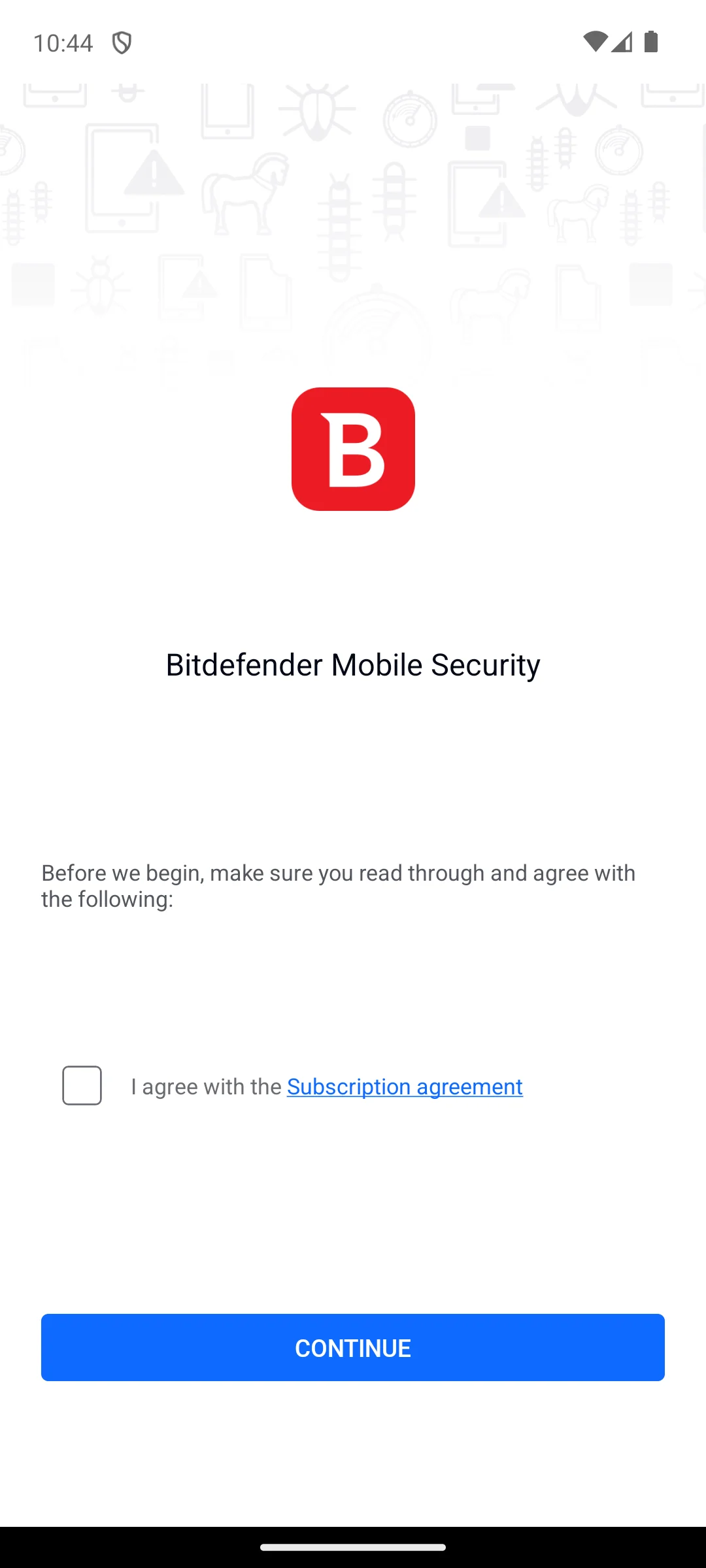
The screenshots here are our own captures from an Android emulator, taken on the date shown. Its first screen is a gate rather than a product: it says to read and agree before beginning, and offers a single unticked box, I agree with the Subscription agreement, above a Continue button. Nothing else is reachable from there. We do not accept agreements on a reader's behalf, so that screen is where we stopped, and it is worth knowing that a subscription agreement is the first thing this app asks you to accept. The screenshot below is ours, taken on 18 August 2026.
4.6 stars, 1,977,471 reviews · 100,000,000+ installs · free to install · in-app purchases $0.99 to $464.99 per item · by NortonMobile · listing updated 10 August 2026 · Contains ads: No · checked 18 August 2026
Google Play listing · 4.6 (1,977,471) · read 18 August 2026
Norton is the buy one thing option: scanning, Wi-Fi checks, a bundled VPN and dark web monitoring on a single subscription, with no ads label. The blunt con is the price ceiling, $464.99 per item, the widest range on this page, with the parts worth having on the paid side.
Its lab number needs care, because the two labs report it differently. The AV-Comparatives Mobile Security Review 2026 does not publish a Norton only figure. It prints one shared row reading 99.6 percent with 2 false positives for Avast, AVG and Norton together, and explains why in its own words: the three are Gen Digital products that use the Avast engine. Treat that as one engine result covering three apps, not as three measurements. At AV-TEST the picture is separate and current: Norton is certified at 6 of 6 for protection in the AV-TEST Android round of May 2026.
For: one bill for scanning, VPN and breach alerts; certified 6 of 6 for protection at AV-TEST in May 2026; no ads label, and 100,000,000+ installs. Against: in-app purchases to $464.99, the highest ceiling on this page; its AV-Comparatives figure is a shared engine result, not its own; a thin free tier.
Skip it if you only want a scanner. Choose Norton over Bitdefender when you want the VPN and identity monitoring on the same bill.
↑ Back to the comparisonCleaning up after a scare
4.4 stars, 669,491 reviews · 50,000,000+ installs · free to install · in-app purchases $1.49 to $139.99 per item · by Malwarebytes · listing updated 14 August 2026 · Contains ads: No · checked 2 September 2026
Google Play listing · 4.4 (669,491) · read 2 September 2026
Malwarebytes is the app to reach for when something already looks wrong, a popup that will not close or an app nobody remembers adding, and the vendor positions its free manual scan as an adware and unwanted program cleanup tool. The blunt con is that no independent lab publishes a current Android result for it, and real time protection sits inside a paid plan reaching $139.99.
Read this first. Watch for a claim that reads well and does not apply. Malwarebytes holds a current AV-TEST Top Product award, and it is for Windows. Its most recent AV-TEST Android certification is from July 2020, and it is absent from the AV-Comparatives Android review in both 2026 and 2025. A Windows award is not an Android result.
For: a free on demand scan with no ads label; the vendor positions it for adware and unwanted program cleanup; 50,000,000+ installs, so it is widely used as a second opinion scanner. Against: no current Android result from either lab, as with ESET and Trend Micro; real time protection is paid, up to $139.99; a 4.4 star average.
Skip it if you want always on cover for nothing. Choose Malwarebytes over Bitdefender only as a second opinion scanner on a phone already behaving oddly. If yours is already misbehaving, our guide to spotting and removing Android malware without paying sets out the free checks to run first.
↑ Back to the comparisonBiggest free tier
4.6 stars, 7,280,361 reviews · 100,000,000+ installs · free to install · in-app purchases $0.99 to $139.99 per item · by Avast Software · listing updated 6 August 2026 · Contains ads: Yes · checked 18 August 2026
Google Play listing · 4.6 (7,280,361) · read 18 August 2026
Avast One has the widest free feature set here: scanning, Wi-Fi checks, an app lock and a photo vault. The blunt con is on its own listing, which carries the Contains ads label, so a security app shows you adverts, alongside in-app purchases from $0.99 to $139.99. It is listed as Avast One: Antivirus, Security.
Its AV-Comparatives figure is shared rather than its own: the AV-Comparatives Mobile Security Review 2026 prints 99.6 percent with 2 false positives on one row covering Avast, AVG and Norton, because all three are Gen Digital products running the Avast engine. AV-TEST tests it separately and certifies it at 6 of 6 for protection in the AV-TEST Android round of May 2026, listed there under the older name Avast Antivirus and Security.
For: the widest free feature set on this page; certified 6 of 6 for protection at AV-TEST in May 2026; 100,000,000+ installs, joint largest here. Against: its listing carries the Contains ads label; in-app purchases to $139.99; its AV-Comparatives figure is a shared engine result covering three apps.
Skip it if adverts inside a security app are a dealbreaker. Choose Avast One over AVG for the fuller free toolkit; both run the same engine.
↑ Back to the comparisonA first antivirus
4.6 stars, 7,826,017 reviews · 100,000,000+ installs · free to install · in-app purchases $0.99 to $119.99 per item · by AVG Mobile · listing updated 26 June 2026 · Contains ads: Yes · checked 18 August 2026
Google Play listing · 4.6 (7,826,017) · read 18 August 2026
AVG is the pared back half of the pair: its listing describes one tap scanning and plain language threat reports, with a narrower free feature list than Avast One. The blunt con is the same one: the listing carries the Contains ads label, and in-app purchases run to $119.99.
It sits on the same shared AV-Comparatives row as Avast and Norton, 99.6 percent with 2 false positives in the AV-Comparatives Mobile Security Review 2026, which the report attributes to all three running the Avast engine under Gen Digital. AV-TEST certifies it separately at 6 of 6 for protection in the AV-TEST Android round of May 2026. Our step by step AVG setup guide covers the install.
For: certified 6 of 6 for protection at AV-TEST in May 2026; free scanning, app insights and photo vault on the listing; 100,000,000+ installs, joint largest here. Against: its listing carries the Contains ads label; the same engine and a narrower free feature list than Avast One; in-app purchases to $119.99.
Skip it if you already run Avast One, which is the same engine twice. Choose AVG over Avast One only if you want the narrower feature set.
↑ Back to the comparisonStrong detection, not on Play
No Google Play listing: the store page for com.kms.free returns not found · so there is no Play rating, install count or purchase range to quote · vendor download page live · by Kaspersky · no Play listing, so Google Play publishes no ads label for it · the vendor download page, read 18 August 2026
Kaspersky Premium for Android posts the second best protection rate of the products this page lists, 99.9 percent with a single false positive in the AV-Comparatives Mobile Security Review 2026. The blunt con: you cannot install it from Google Play at all, its store page returns not found, so there is no rating, install figure or purchase range, and United States restrictions on Kaspersky make it a poor default for readers there.
This entry is here for completeness rather than as a recommendation for most readers. An app you have to sideload is an app you also have to update yourself.
For: 99.9 percent protection with 1 false positive in the current AV-Comparatives report; call filtering and anti phishing in the vendor's own feature list; a capable free tier. Against: no Google Play listing at all, so no rating, installs or price to check; restricted in the United States; sideloading and updates are on you.
Skip it if you install only from the Play Store, which is most people. Choose Kaspersky over Bitdefender only if raw detection matters more than buying through Play.
↑ Back to the comparisonOlder, slower phones
4.7 stars, 1,048,796 reviews · 10,000,000+ installs · free to install · in-app purchases $1.49 to $99.99 per item · by ESET · listing updated 3 August 2026 · Contains ads: No · checked 18 August 2026
Google Play listing · 4.7 (1,048,796) · read 18 August 2026
ESET markets Mobile Security as a low resource scanner aimed at older hardware, and at 4.7 stars from 1,048,796 reviewers it is among the best rated entries here, with no ads label. The blunt con is that its lab cover has lapsed at both labs, and anti theft, app lock and payment protection all sit behind purchases of $1.49 to $99.99.
Neither lab has a current figure for it. It is absent from the AV-Comparatives Mobile Security Review 2026, and its last AV-Comparatives result is from the 2025 edition of the same review. At AV-TEST its most recent Android certification is July 2025, and it has been missing from every round since. Both figures were good when they were published; neither is current.
For: vendor stated low resource use, aimed at older hardware; free scanning with no ads label; joint highest rating on this page at 4.7. Against: no current result from either lab; anti theft, app lock and payment protection are paid; in-app purchases to $99.99.
Skip it if you want a published lab score behind your choice. Choose ESET over Avast One on a slow handset, where an ad supported suite costs most.
↑ Back to the comparisonIdentity and Wi-Fi extras
4.7 stars, 892,133 reviews · 50,000,000+ installs · free to install · in-app purchases $0.99 to $279.99 per item · by McAfee LLC · Contains ads: No · checked 18 August 2026
Google Play listing · 4.7 (892,133) · read 18 August 2026
McAfee Security is the guardrails everywhere option: the listing bundles a VPN, identity monitoring and a Wi-Fi check around the scanner, free to install, no ads label, 4.7 stars from 892,133 reviewers. Its detection does have a current independent number: it is certified at 6 of 6 for protection in the AV-TEST Android round of May 2026. The blunt con is the bundle itself, the widest here to configure, with purchases climbing to $279.99.
AV-Comparatives is the lab that does not cover it: McAfee is absent from the AV-Comparatives Mobile Security Review 2026 and from the 2025 edition. So it has one current lab result rather than two.
For: certified 6 of 6 for protection at AV-TEST in May 2026; the broadest privacy extras on this page; joint highest rating here at 4.7, across 50,000,000+ installs. Against: no AV-Comparatives Android result in the current review or the previous one; a wide bundle to set up; in-app purchases to $279.99.
Skip it if you want a scanner rather than a bundle. Choose McAfee over Norton for a lower purchase ceiling.
↑ Back to the comparisonScam texts and links
4.6 stars, 137,345 reviews · 5,000,000+ installs · free to install · in-app purchases $2.99 to $49.99 per item · by Trend Micro · listing updated 1 July 2026 · Contains ads: No · checked 18 August 2026
Google Play listing · 4.6 (137,345) · read 18 August 2026
Trend Micro is the niche pick, aimed at what actually reaches most people: scam texts, phishing links and dodgy sites, at the lowest purchase ceiling of the apps here that sell anything, $49.99. The blunt con is that Trend Micro places message filtering and web threat protection in the paid tier, so the free install is close to a trial.
Its lab cover lapsed recently rather than long ago. It is absent from the AV-Comparatives Mobile Security Review 2026, and at AV-TEST its most recent Android certification is January 2026, at 6 of 6, with no appearance in the two rounds since. A result from January is not a current one, and this page does not present it as one.
For: the clearest focus here on scam texts and links; the cheapest purchase ceiling of the apps here that sell anything, $49.99; parental controls in the listing's feature list. Against: no current result from either lab; message filtering and web threat protection are in the paid tier; an install base of 5,000,000+.
Skip it if you never get scam texts. Choose Trend Micro over McAfee when messages and links, not malware, are what worry you.
↑ Back to the comparisonBest free, nothing to buy
4.0 stars, 47,658 reviews · 1,000,000+ installs · free · no in-app purchases · by Sophos Limited · listing updated 21 May 2026 · Contains ads: No · checked 26 August 2026
Google Play listing · 4.0 (47,658) · read 26 August 2026
Sophos Intercept X for Mobile is the best free pick, and it is now free on both counts that matter. Its listing carries no ads label and no in-app purchase at all, so there is nothing to buy and nothing to dismiss. And its detection is not unmeasured: it is certified at 6 of 6 for protection in the AV-TEST Android round of May 2026. The blunt con is its 4.0 star average, the lowest on this page.
Its lab position needs both laboratories read together. Sophos is absent from the AV-Comparatives Mobile Security Review 2026, which has never tested it, while AV-TEST certified it at 6 of 6 for protection in its Android round of May 2026. One thing to know before choosing it: Sophos states in its own release notes that it will soon remove the Password Safe feature from Intercept X for Mobile, so do not adopt it for that. Its listing was last updated on 21 May 2026, and its Data Safety section declares that data cannot be deleted.
For: no ads label and no in-app purchases at all; certified 6 of 6 for protection at AV-TEST in May 2026; app lock and an authenticator in the listing's feature list. Against: the lowest rating on this page at 4.0, and the smallest install base at 1,000,000+; the vendor says the Password Safe feature will be removed; its Data Safety section declares that data cannot be deleted.
Skip it if a 4.0 average would nag at you, or you relied on its password feature. Choose Sophos over Avast One for protection with no adverts and no upsell path.
↑ Back to the comparisonFree privacy toolkit
4.7 stars, 733,197 reviews · 10,000,000+ installs · free to install · in-app purchases $0.99 to $104.99 per item · by AVIRA · listing updated 12 June 2026 · Contains ads: No · checked 18 August 2026
Google Play listing · 4.7 (733,197) · read 18 August 2026
Avira Security is a privacy toolkit that also scans: the listing bundles a data limited VPN, a leaked credentials check and a camera monitor, free to install, no ads label, 4.7 stars from 733,197 reviewers. It has a current lab number: certified at 6 of 6 for protection in the AV-TEST Android round of May 2026. The blunt con: Avira puts the unlimited VPN behind Avira Prime, with purchases to $104.99.
Its AV-Comparatives position is the same as ESET's. Avira is absent from the AV-Comparatives Mobile Security Review 2026, and its last figure there is from the 2025 edition, where it shared a row with Avast, AVG and Norton. Cite that only with its year attached, or not at all.
For: certified 6 of 6 for protection at AV-TEST in May 2026; the fullest free privacy toolkit here; joint highest rating on the page at 4.7, with no ads label. Against: no current AV-Comparatives Android result; the unlimited VPN needs Avira Prime; in-app purchases to $104.99.
Skip it if you want a scanner and nothing else. Choose Avira over McAfee for a comparable toolkit at a much lower purchase ceiling.
↑ Back to the comparisonAlready on your phone
Built into Google Play services · no separate Play listing, so no rating or install count · free · nothing to buy · by Google · tested as Google Play Protect and OS Features · no Play listing, so Google Play publishes no ads label for it · the AV-Comparatives report, read 18 August 2026
Google Play Protect already runs on your phone at no cost, and it is closer to the paid apps than most roundups admit. It stopped 98.9 percent of samples in the AV-Comparatives Mobile Security Review 2026 (test period May 2026) against 100 percent for Bitdefender, though with 8 false positives to Bitdefender's 2. The blunt con is exactly that false positive count, the highest of the results this page lists.
Google's own Play Protect developer documentation says it automatically scans all of the apps on Android phones and works to prevent the installation of harmful apps, making it the most widely deployed mobile threat protection service in the world
.
For: free, silent and already installed, with nothing to sign up for; 98.9 percent protection in the current AV-Comparatives report; it updates itself without an account. Against: the highest false positive count of the results this page lists, 8 against Bitdefender's 2; no web or SMS phishing filter; nothing to tune.
Skip it if you sideload often, or you tap a lot of links in messages. Choose Play Protect over everything above if you install only from the Play Store and keep Android updated.
↑ Back to the comparisonAndroid is not Windows. It sandboxes apps, limits what each one can touch and runs Play Protect on its own, so an antivirus app here is a supplement rather than the thing standing between you and disaster. Three questions decide it.
This is the signal worth more than any store page claim, and it thins the field fast. Two laboratories publish Android results. In the AV-Comparatives Mobile Security Review 2026, test period May 2026, the protection rates were Bitdefender 100 percent with 2 false positives, Kaspersky 99.9 with 1, Avast, AVG and Norton 99.6 with 2 on a single shared row, and Google Play Protect 98.9 with 8. That shared row is the report's own doing: it notes that the three are Gen Digital products using the Avast engine, so there is no separate figure for any one of them.
The AV-TEST Android round of May 2026 covers a different and wider set, certifying Bitdefender, Norton, Avast, AVG, McAfee, Sophos and Avira at 6 of 6 for protection. Put the two together and the picture is this: Bitdefender, Norton, Avast and AVG have a current result at both labs; McAfee, Sophos and Avira have one at AV-TEST only; ESET and Trend Micro have lapsed, their last certifications being July 2025 and January 2026; Malwarebytes has no current Android result at either lab, and its recent Top Product award is for Windows. Kaspersky sits outside all of this because it is not on Google Play at all.
Detection is similar across the tested names, so the surrounding tools decide it: web and link protection if you tap a lot of links, anti theft if you misplace your phone, app lock if you share the device, and a VPN for public Wi-Fi, though a standalone VPN app usually beats a bundled one. If you would not use a feature, do not pay for it.
Two of the twelve entries here, Avast One and AVG, carry the Contains ads label, and nine of the ten Play entries sell in-app purchases, seven of them into three figures. Sophos is the only listing here that sells nothing at all. A security app you mute or uninstall protects nothing, so weigh the upsell pressure as a real cost rather than an annoyance.
Often, no. Play Protect is already on every modern Android phone, scans apps from the Play Store and from elsewhere, updates itself, costs nothing, and stopped 98.9 percent of samples in the current AV-Comparatives round. If you install only from the Play Store, keep Android updated and slow down before tapping links, that is a complete setup. The threats that catch ordinary people are rarely classic viruses: they are messages imitating a bank or a courier, fake login pages, and apps asking for permissions they have no use for.
Add one if you sideload apps, spend a lot of time on public Wi-Fi, share the phone with family, or want anti theft and scam text filtering in one place. Then pick a vendor a lab still tests, and turn on only what you will use. If the worry is other people picking up your phone, an app lock solves that more directly than any scanner.
Often not. Google Play Protect is already on every modern Android phone, scans apps from the Play Store and from outside it, updates itself and costs nothing, and it stopped 98.9 percent of samples in AV-Comparatives' Mobile Security Review 2026. If you install only from the Play Store and keep Android updated, that is a complete setup. Add a dedicated app if you sideload, share the phone, or want scam text filtering and anti theft in one place. Checked 18 August 2026.
Bitdefender Mobile Security, on the current evidence. It was the only product to stop 100 percent of samples in AV-Comparatives' Mobile Security Review 2026, with 2 false positives, and it is also certified at 6 of 6 for protection by AV-TEST in May 2026. Kaspersky scored 99.9 percent with a single false positive in the same report but is not available on Google Play at all. Checked 18 August 2026.
Sophos Intercept X for Mobile. It is the only listing on this page that carries neither an ads label nor any in-app purchase, and AV-TEST certified it at 6 of 6 for protection in its May 2026 Android round. The trade-offs are a 4.0 star average, the lowest here, and the vendor's own notice that the Password Safe feature will be removed. Checked 18 August 2026.
Because AV-Comparatives publishes one result for all three. Its Mobile Security Review 2026 prints 99.6 percent with 2 false positives on a single shared row, and the report explains that Avast, AVG and Norton are Gen Digital products that use the Avast engine. Treat it as one engine result covering three apps rather than three separate measurements. AV-TEST tests them separately and certified all three at 6 of 6 in May 2026. Checked 18 August 2026.
Some do and most on this page do not. Two of the twelve entries carry Google Play's Contains ads label, Avast One and AVG. The more common cost is the in-app purchase: nine of the ten Play listings here sell one, seven of them into three figures, with Norton the highest at $464.99 for a single item. Sophos is the only listing that sells nothing at all. Checked 18 August 2026.
Checked 26 August 2026: the Bitdefender and Sophos Play listings were re-read at source. Both still show the same rating, install band, price, ads label and purchase range; only their review counts moved. The other eight listings were not re-read and keep their 18 August 2026 date, and neither laboratory was re-read, so every AV-Comparatives and AV-TEST figure keeps its published May 2026 round. The Our answer capsule was shortened and re-dated. Withdrawn as unsupported by this page's own table: Norton's largest install band here; Malwarebytes' claim to be the only entry without a current lab result and to hold the lowest rating of the commercial brands; Trend Micro's smallest install base of the commercial brands, and its lowest purchase ceiling on this page, now scoped to the apps here that sell anything; Sophos' least recently updated listing, and its claim to be the only one of the ten Play listings with neither an ads label nor a purchase; McAfee's widest bundle here to set up; Kaspersky's top detection verdict, which the 100 percent this page prints for Bitdefender contradicts; Kaspersky's cleanest false positive count of any product in that report and Google Play Protect's highest false positive count in it, both now scoped to the results this page lists; and the counts eight of the ten and four of them into three figures, which the table makes nine and seven. Corrected as wrong-source: Contains ads is a Google Play field, and neither Kaspersky nor Google Play Protect has a Play listing, so neither can carry one.
Checked 18 August 2026: all ten Play listings re-read at source, and a second independent laboratory added. The largest change: this page cited AV-Comparatives alone and told readers that six entries had no current independent protection rate. AV-TEST publishes its own Android round, and its May 2026 results certify McAfee, Sophos and Avira at 6 of 6 for protection, so the line no 2026 lab protection rate is retracted for those three and the claim that it is absent from the AV-Comparatives Mobile Security Review 2026 tested products list, so its detection has no current independent number no longer stands as written. Corrected: Norton's install band, printed as 50M+, reads 100,000,000+ today. Review counts move from 507K to 509,131 for Bitdefender, 660K to 664,290 for Malwarebytes, and 890K to 892,133 for McAfee. Every read date moves from 7 August to 18 August 2026. Corrected in kind rather than degree: the 99.6 percent figure was attached separately to Avast, AVG and Norton, and AV-Comparatives prints it once, on a shared row, because all three run the Avast engine under Gen Digital. It is now presented as one engine result covering three apps. App names brought back to what the listings say today: Norton360 Antivirus and Security, Malwarebytes Mobile Security, McAfee Security, Avira Security. Retracted as claims about using the apps rather than reading their listings: quiet, one screen for Bitdefender; heaviest app here for Norton; its free manual scan is unusually good on adware for Malwarebytes; easiest interface here for AVG; smallest footprint here for ESET; busy and keen to sell for McAfee; the dashboard surfaces everything at once for Avira. Also retracted: Free versions of Bitdefender, Malwarebytes, and especially Sophos Intercept X handle scanning well, and the advice to lean toward a lightweight scanner such as ESET or Sophos, both of which rank apps on qualities no source here measures. Added: an Our answer capsule under the H1, an independent lab column in the decision table, Sophos' own statement that it will soon remove the Password Safe feature, and the note that Malwarebytes' current Top Product award is a Windows result rather than an Android one.
 11 Best Caller ID Apps for AndroidCommunication
 Signs of Android Malware and How to Remove ItSecurity & Privacy