
Eight apps with a Play listing, compared on what a parent can check before installing anything: what the listing says the app does to the phone, the price, whether the listing carries advertising, what its Data Safety section admits, and how recently anyone maintained it.
Google Family Link is the pick and it is free, Qustodio the choice for web filtering, Bark the one that alerts on messages. Our answer, the free pick and the table ↓
Checked 3 September 2026: no pick changed since 19 August; Family Link, Qustodio and Bark re-read 1 September
Full logEight Android parental controls, compared on whether the listing describes stopping the child, telling the parent, or both, and on what each shares.
Google Family Link is our best overall and best free Android parental control because its Play listing, read 1 September 2026, carries no advertising label and nothing to buy.
Qustodio is our Android parental control pick for web filtering because its Play listing, read 1 September 2026, describes blocking websites and pornography, with no advertising label and purchases from $34.99.
Bark is our Android parental control pick for message alerts because its Play listing, read 1 September 2026, describes alerts when something looks wrong, no advertising label and purchases from $5.99.
Data checked: 3 September 2026.
Two names on this page are not in the table. Kaspersky Safe Kids has no Google Play listing to read, so no rating, price or advertising label can be quoted for it, and mSpy is not a parental control at all. Both are covered in their own sections below.
Every app here is checked against its own Google Play listing on the United States English storefront (gl=US, hl=en): rating and review count, the install band, price and the in-app purchase range, the advertising label, the full Data Safety section and the developer’s own description of what the app does. Ratings are geography dependent, so a figure read on another storefront will differ. Parental controls has no independent testing body this page can cite and re read, so the store listing is the source. Where a listing and the developer’s own documentation disagree, the disagreement is stated. Any screenshot here is our own capture, carrying the date it was taken and showing only what that screen displays.
Best overall and best free
4.6 stars, 5,339,377 reviews · 100,000,000+ installs · free to install · no in-app purchases listed on Play · by Google LLC · listing updated 31 August 2026 · Contains ads: No · checked 1 September 2026
Google Play listing · 4.6 (5,339,377) · read 1 September 2026
Family Link is where most families should start, because it costs nothing and there is nothing to buy: its listing shows no in-app purchases and no advertising label. Its Data Safety section is the strongest on this page, declaring no data shared with third parties plus an independent security review, which no other listing here carries. The blunt limit is scope. Its listing describes time limits, app blocking, filters on Google services and device location, and describes no message or social app monitoring at all, which is the whole reason the paid apps below exist.
Google sets the expectation on the listing itself: While Family Link provides tools to manage your child’s online experience and keep them safer online, it does not make the internet safe
(Google Play listing, read 19 August 2026). The same listing says its tools vary depending on the child’s device and that its controls need a supervised Google account, so this is an app you install rather than a switch already sitting in Android.
Skip this if. Skip it if the problem is what a child is saying and hearing, because its listing describes no message or social app monitoring.
Choosing between them. Choose Family Link first in every case, and add one paid app only when a specific gap is still open after a fortnight.
Best for web filtering
3.6 stars, 23,891 reviews · 5,000,000+ installs · free to install · in-app purchases $34.99 to $137.95 per item · by Qustodio LLC · listing updated 12 August 2026 · Contains ads: No · checked 1 September 2026
Google Play listing · 3.6 (23,891) · read 1 September 2026
Qustodio is the filtering pick, because its listing describes blocking games, websites, pornography and gambling and enforcing safe search rather than filtering one vendor’s own services. Read the price first: it is free to install and carries no advertising label, and its in-app purchases run from $34.99 to $137.95 per item, the highest entry price in the table. The blunt catch is on the listing too. Its Data Safety section declares that it may share your data with third parties, on an app whose whole job is watching a child.
Two things its listing states before you install anything. It uses the Device Administrator permission, which the listing says prevents a user from uninstalling the app without your knowledge, and it uses Accessibility services to work across screen time, web content and apps. The same listing says the basic plan reaches only some of the features and that full access needs the premium plan, so the figure in the fact line above is a floor rather than a price.
Skip this if. Skip it if third party data sharing is the line you will not cross, because its own listing declares it.
Choosing between them. Choose Qustodio over Norton Family for the wider filter, and read both Data Safety sections first, because they say the same thing.
Best for alerts on messages
3.9 stars, 11,517 reviews · 1,000,000+ installs · free to install · in-app purchases $5.99 to $99.99 per item · by Bark Technologies, Inc. · listing updated 19 August 2026 · Contains ads: No · checked 1 September 2026
Google Play listing · 3.9 (11,517) · read 1 September 2026
Bark leads with alerts rather than logs: its listing says parents receive alerts only when something potentially problematic occurs online, which fits an older child you do not want to read in full. It is free to install with no advertising label, and its in-app purchases run from $5.99 to $99.99 per item. The catch is on its own listing. Bark’s Data Safety section declares that it may share data with third parties, summarised there as Personal info, Financial info and three further categories, on an app whose job is reading a child’s messages.
Corrected on this update. This page used to send any parent who wanted hard limits away from Bark. That was wrong, and its own listing says so. Bark publishes a screen time section describing time limits and schedules for when a child’s device may connect over cell service and Wi-Fi, and a web filtering section describing a filter that selects which sites a child can reach, by individual site and by whole category. Alerting is where Bark puts its emphasis, not the only thing it does.
Skip this if. Skip it if you want a parent’s eye on every message, because its listing says you will not get full access to everything on the child’s phone.
Choosing between them. Choose Bark over MMGuardian when you want to be told rather than shown, and MMGuardian over Bark when the Data Safety answer decides it.
Best for school time and YouTube supervision
3.2 stars, 26,648 reviews · 1,000,000+ installs · free to install · no in-app purchases listed on Play · by NortonMobile · listing updated 31 August 2026 · Contains ads: No · checked 1 September 2026
Google Play listing · 3.2 (26,648) · read 1 September 2026
Norton Family suits a household already running Norton on its other devices. Its listing describes School Time, which manages access to categories and sites while lessons are on instead of pausing the internet, and Video Supervision, which lists the YouTube videos a child watches and shows a snippet of each. Two figures set expectations: it is rated 3.2 from 26,648 reviews, the second lowest here, and its Data Safety section declares it may share your data with third parties. Its Play listing sells nothing at all, which is not the same as free.
Its listing carries two limits worth reading before installing it. Norton states that the app uses the AccessibilityService API to collect data about websites viewed through browsers on the child’s device, and that the same API stops the child removing permissions without a parent’s authentication. Norton also states that location supervision features are not available in all countries.
Skip this if. Skip it if you want to know the price before you install, because the listing does not show one.
Choosing between them. Choose Norton Family over Qustodio when school hours and YouTube are the problem, and Qustodio over it when the filter is the point.
Best for message and chat alerts
4.3 stars, 26,773 reviews · 1,000,000+ installs · free to install · in-app purchases $1.99 to $99.99 per item · by MMGuardian.com · listing updated 17 August 2026 · Contains ads: No · checked 1 September 2026
Google Play listing · 4.3 (26,773) · read 1 September 2026
MMGuardian is the widest monitor here that runs in the open, and the blunt part is what it reads: its listing describes reporting the content of SMS and of chat messages from Facebook Messenger, WhatsApp, Snapchat, Instagram, Kik, TikTok and Discord, which is a long step beyond a screen time limit. It is free to install with no advertising label, sells in-app purchases from $1.99 to $99.99 per item, and is one of the four listings here declaring no data shared with third parties. Its listing also describes a parent app paired with a separate app on the child’s phone, plus screen time, app and web limits and location.
MMGuardian is the developer here that puts the conversation with the child most plainly, though it is not the only one to raise it: We encourage parents to discuss the reasons to use a parental control app with their children, which include helping to protect them from potential risks of their own actions and the actions of others, such as excessive screen time, cyberbullying and sexting
(Google Play listing, read 19 August 2026).
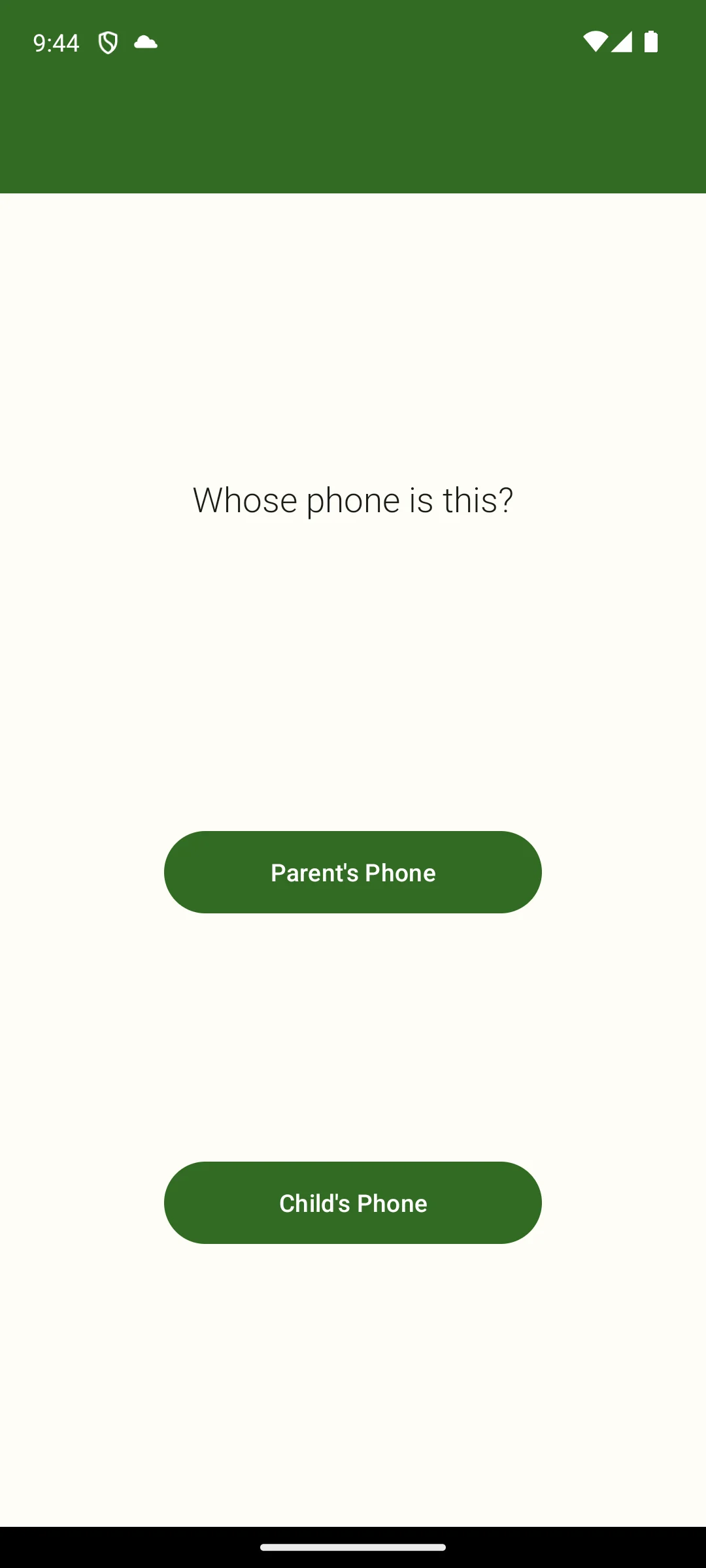
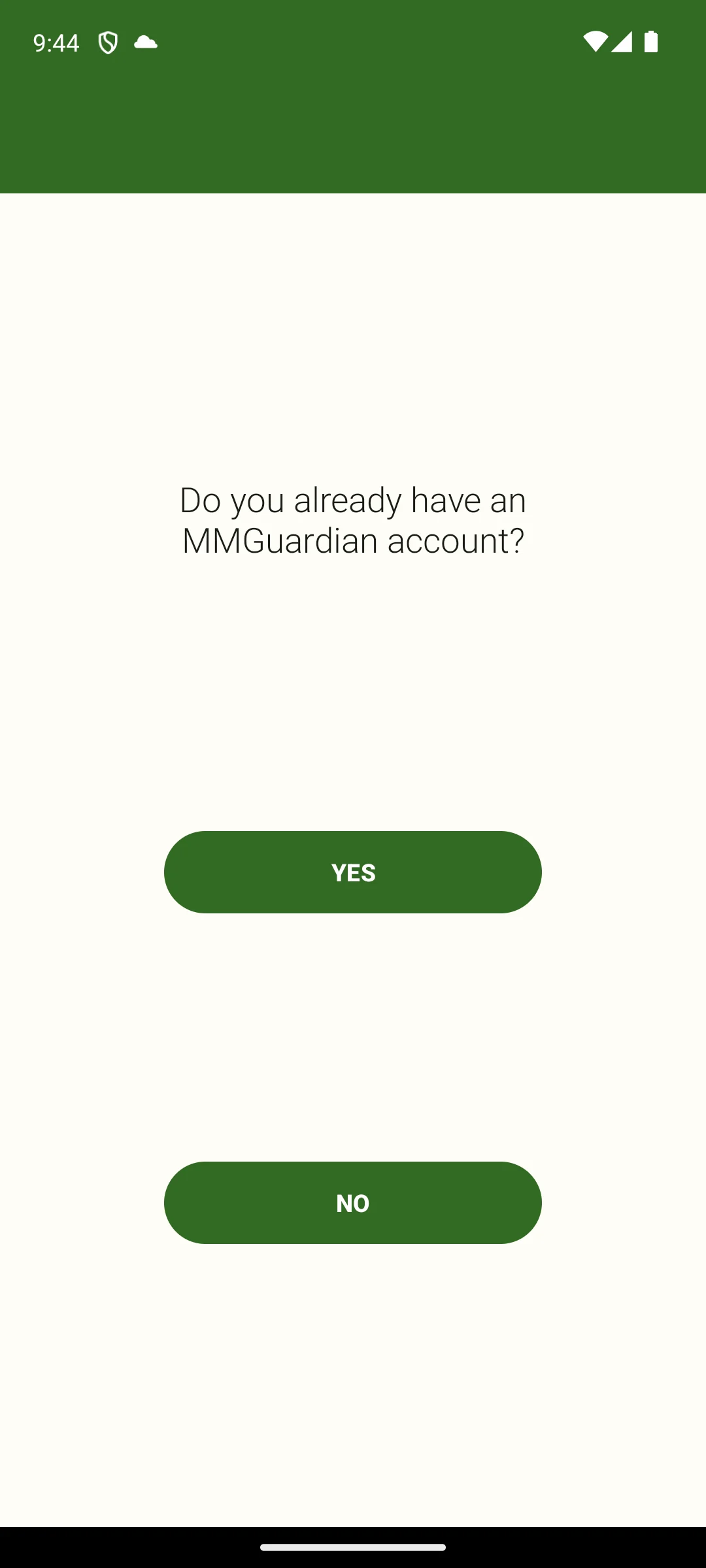
The two screenshots below are our own, taken on 18 August 2026 and unchanged since. They show the question the parent app opens on, whose phone is this, with one button for a parent and one for a child. The same product goes on both handsets and the role is picked at setup, which is worth knowing before you start, because the child side is the one that has to stay in place and permitted.
Skip this if. Skip it if reading a child’s messages is more than you actually want to do.
Choosing between them. Choose MMGuardian over Bark when you want blocking and monitoring in one product, and Bark over it when you only want to be told.
Kaspersky Safe Kids is not on Google Play. The store pages for com.kaspersky.safekids and for com.kms.free both return 404, checked 19 August 2026, so there is no Play rating, install count, price, in-app purchase range, advertising label or Data Safety section to quote, and this page gives none. That matches what the antivirus roundup on this site records for the same company, and it is why Safe Kids is not one of the eight entries in the table above.
What can be said is where it lives. The app is sold from the vendor’s own product page, read on 13 August 2026, which lists an Android version beside Windows, macOS and iOS. Why the Play pages went is not something this page can source from inside the store, so no reason is offered here; what is checkable is that they are gone, and that an Android copy therefore has to come from somewhere other than Play. The free version this page used to describe cannot be confirmed from a listing that does not exist, so it has been cut rather than repeated: read that page for what the app does and what it costs, and treat it as the only source for both.
Read this first. mSpy is not a parental control and it is not one of the eight picks above. It is monitoring software sold on the promise that the person being watched will not find out.
That is not a characterisation borrowed from a critic. mSpy’s own home page, read on 13 August 2026, answers the question of what separates it from apps a child can spot: mSpy, however, works in hidden mode, so they won’t know that you’re using it
(mspy.com). The same page advertises a keylogger, a screen recorder, live screen streaming and a call recorder that saves calls with no notification, lists physical access to the Android phone as a setup requirement, and closes with a disclaimer stating that the software is intended for legal use only and that the law generally requires the owners of the devices to be notified.
Set that against the test this site already publishes in its phone tracker roundup: software sold on the promise that the other person will not know is stalkerware, whatever the marketing calls it, and the tells are a hidden icon, no notification on the phone it runs on, physical access to set it up, and a bill that goes to the person doing the watching. Three of those tells are in mSpy’s own marketing, quoted above: hidden mode, calls recorded with no notification, and physical access to the Android phone. A guide that recommends software answering that description is the point at which a reader should close the page, which is why it is named here as a warning rather than listed as a pick. The change is recorded in the note at the foot of this page.
The honest use of this section is a warning rather than a purchase. If the worry is a teenager, the answer that keeps working is an app the teenager knows about, because covert monitoring ends the conversation you wanted to keep open. On the law, the firmest thing this page can point at is mSpy’s own disclaimer, read on 13 August 2026 and described above: the software is intended for legal use only, and the law generally requires the owners of the devices to be notified. Whether covert monitoring of another adult is also a criminal matter where you live is a question for a lawyer rather than for this page.
Best single dashboard
4.4 stars, 16,040 reviews · 5,000,000+ installs · free to install · in-app purchases $8.99 to $109.99 per item · by Shenzhen Wondershare Software Co., Ltd. · listing updated 27 August 2026 · Contains ads: No · checked 1 September 2026
Google Play listing · 4.4 (16,040) · read 1 September 2026
FamiSafe puts screen time, web and app blocking, location history and social monitoring under one dashboard, and it is rated 4.4 from 16,040 reviews. It is free to install with no advertising label, sells in-app purchases from $8.99 to $109.99 per item and declares no data shared with third parties. Then comes the line that decides it for a lot of parents, and it is on the listing rather than in any review.
Read this first. FamiSafe is the only app on this page whose own Data Safety section says Data isn’t encrypted. Every other listing here says data is encrypted in transit. Weigh that against a feature set the same listing describes as remotely capturing the child’s screen and listening to the child’s surroundings.
Skip this if. Skip it if remote screenshots and listening to a room are more than you want running on a child’s phone.
Choosing between them. Choose FamiSafe over MMGuardian for the single dashboard, and MMGuardian over it if the encryption declaration is what you weigh.
Best for pausing everything at once
2.6 stars, 2,040 reviews · 1,000,000+ installs · free to install · in-app purchases $1.99 to $99.99 per item · by Eturi Corp. · listing updated 25 June 2026 · Contains ads: No · checked 19 August 2026
Google Play listing · 2.6 (2,040) · read 19 August 2026
OurPact is built around one button: its listing describes blocking internet, texts and apps at a touch, plus block schedules, a daily screen time allowance, a website blocker for specific sites including adult content, and alerts when a new app appears. Read its rating first. It is 2.6 from 2,040 reviews, the lowest score on this page by a wide margin, on a listing last updated 25 June 2026, the second oldest here. It is free to install with no advertising label, sells in-app purchases from $1.99 to $99.99 per item, and its Data Safety section declares it may share your data with third parties.
One feature deserves naming rather than a bullet. Its listing describes a View function that takes automated periodic, on demand or gallery views of a child’s online activity. That is screenshotting, and it is the kind of thing to agree with a child before switching it on rather than after.
Skip this if. Skip it if you want to be told what a child is actually saying, because its listing describes blocking websites, texts and apps and alerting on new installs, and nothing about reading message content.
Choosing between them. Choose OurPact over Family Link only for the instant pause, and Family Link over it on every other count, including the rating.
Best content filter for a younger child
4.0 stars, 1,451 reviews · 100,000+ installs · free to install · in-app purchases $7.99 to $149.99 per item · by Canopy-app · listing updated 27 August 2026 · Contains ads: No · checked 2 September 2026
Google Play listing · 4.0 (1,451) · read 2 September 2026
Canopy strips what is on a page rather than blocking the page outright, which is the difference that matters when a teenager has to research something awkward for homework. It is rated 4.0 from 1,451 reviews, free to install with no advertising label, and sells in-app purchases from $7.99 to $149.99 per item, the highest ceiling in the table, and it declares no data shared with third parties. The blunt catch is reach and upkeep: 100,000+ installs, the smallest audience here, on a listing updated 27 August 2026.
The developer puts the idea in one sentence on its own site, read on 1 September 2026: Canopy is a content filtering app that removes explicit images, videos, and text from websites, social media, and AI chatbots, without needing to block them entirely.
That sentence is the vendor’s, and the word text is the vendor’s too: it does not appear on the Play listing. What the Play listing does describe, read 19 August 2026, is a system that inspects images, videos and websites before they appear on a device, plus the blocking this page used to leave out: a customised list of blocked or allowed websites, app blocking for distracting and inappropriate apps and games, and DownTime and screen time limits. The same listing describes a sexting alert that monitors the camera on the protected device, and a removal alert that tells a parent when a child tries to disable it. This app is the parent side, and the listing says a companion app has to go on the child’s device for any of it to work.
Skip this if. Skip it if you want alerts on a child’s messages or detailed activity reports, because its listing describes neither.
Choosing between them. Choose Canopy over Qustodio when the filter must be granular, and Qustodio over it when you want breadth and a bigger user base.
The right app follows from the child’s age and from the one problem you are actually trying to solve, not from a feature list. The questions below settle it faster than any review does.
This page used to sort these apps into blockers and watchers, and reading the eight listings against each other does not support it: every one of them describes blocking of some kind, whether that is time limits, app blocking or a web filter. The real split is what each listing says the app reads. Four describe reading messages or chats: Bark, MMGuardian, Qustodio and FamiSafe. Two describe capturing what is on the screen or in front of the camera without reading messages: OurPact takes periodic screenshots of online activity, and Canopy monitors the camera for its sexting alert. Two describe neither, and supervise sites, apps, videos and time instead: Google Family Link and Norton Family. That is the line worth deciding on, because it is the difference between a limit a child can live with and a record of their conversations.
Four of the eight listings in the table declare that the app may share data with third parties: Qustodio, Bark, Norton Family and OurPact. The other four declare that they do not: Google Family Link, MMGuardian, FamiSafe and Canopy. One entry stands further out. FamiSafe is the only app here whose Data Safety section says Data isn’t encrypted, which is worth weighing against a product whose own listing describes remote screen capture and listening to a child’s surroundings. These are the developers’ own declarations on their own listings, not an independent audit, and they are the single most useful thing on a store page for this category.
Every app in the table is free to install and six of the eight sell something inside the app, from $1.99 per item at the low end to $149.99 at the high end. Family Link lists nothing to buy at all, and neither does Norton Family, which is not the same thing: with nothing on the listing to buy, Play cannot tell you what Norton Family costs. Free tiers change without notice, so this page quotes only what each listing showed on the day it was read.
Family Link costs nothing and lists nothing to buy, and its own store description covers daily screen time limits, school time and downtime schedules, per app time limits, app blocking, content filters on Google services and device location. For a younger child that is often the entire answer. Add one paid app when a specific gap is still open a fortnight later, and add one rather than three: every extra app is another company holding a record of a child’s day.
The apps themselves take this seriously. MMGuardian’s listing asks parents to discuss the reasons for using a parental control app with their children. Bark’s says a parent will not get full access to everything on the phone, only the things they might need to know about. OurPact’s recommends using it to reinforce spoken or written agreements made with the child about screen time and device use. Canopy’s describes an alert that fires when a child tries to remove it, which only makes sense if the child knows it is there. Software sold on the opposite promise, that the person being watched will never find out, is a different category of product altogether, and the mSpy section above is on this page to say so rather than to recommend it.
Scores in the table run from 4.6 at the top down to 2.6 at the bottom, and that spread is a finding rather than noise. Read the sample beside each one, because a low score across tens of thousands of reviews carries more weight than a high score across a few hundred. The table above is the fastest way to compare them side by side.
For a younger child, usually yes. Google Family Link is free, lists no in-app purchases and carries no advertising label, and its Data Safety section declares no data shared with third parties. Its own store description covers screen time limits, school time and downtime schedules, app blocking, filters on Google services and device location. A paid app earns its place when you need filtering across browsers or alerts on messages, and that costs real money: Qustodio's in-app purchases start at $34.99 per item, the highest entry price in the table. Checked 19 August 2026.
Good ones make it awkward, and they say so on their listings. Qustodio states that it uses the Device Administrator permission, which prevents a user from uninstalling it without your knowledge. Canopy lists a removal alert that tells a parent when a child tries to remove or disable it. MMGuardian and Bark both run as a separate app on the child's phone rather than as a setting inside another app. No listing on this page claims to survive a factory reset, and none of the eight mentions one, which is why an agreement about why the app is there outlasts the software. Checked 19 August 2026.
All eight describe blocking of some kind on their own listings, whether that is time limits, app blocking or a web filter, so the question to ask is what each one reads instead. Four describe reading messages or chats: Bark, MMGuardian, Qustodio and FamiSafe. OurPact describes periodic screenshots and Canopy describes camera monitoring for its sexting alert. Family Link and Norton Family describe neither. Bark is the one this page used to get wrong: its listing carries a screen time section with limits and connection schedules and a web filter that allows or blocks individual sites and whole categories, alongside the alerts it is better known for. Checked 19 August 2026.
No Play listing on this page publishes a battery figure, so any specific comparison between these apps is not something a reader can check, and this page does not print one. What the listings do settle is how much work each app describes doing: MMGuardian promises reports on messages, app usage, web browsing and calls, FamiSafe adds remote screen capture and a one way audio function, and OurPact takes periodic screenshots, while Family Link describes limits, filters and location and no message monitoring at all. That is a difference in what the apps do rather than a battery measurement. Checked 19 August 2026.
Because Google shows a different average in every country. Every number on this page was read from the United States English Google Play storefront, gl=US and hl=en, on the date printed beside it. A gap of a few tenths of a star with a similar review count is a storefront difference rather than a real change. The German edition of this page, linked at the top, answers the same question for a German reader with a partly different line up and German storefront figures. Checked 19 August 2026.
Yes, and the alternative is a different category of software altogether. An app the child knows about is a parental control, and MMGuardian's own listing asks parents to discuss the reasons for using one with their children. Software sold on the promise that the person being watched will not find out is monitoring software, and mSpy, covered separately on this page, advertises exactly that on its own home page. Hidden monitoring of a teenager also tends to end the conversation you wanted to keep open. Checked 19 August 2026.
It depends on the app, and the listings differ more than the marketing does. Four of the eight in the table declare that they may share data with third parties: Qustodio, Bark, Norton Family and OurPact. Four declare that they do not: Google Family Link, MMGuardian, FamiSafe and Canopy. FamiSafe is also the only one whose Data Safety section says Data isn't encrypted, on an app whose listing describes remote screen capture. These are the developers' own declarations rather than an independent audit. Checked 19 August 2026.
Generally yes, because they watch different things: a parental control app watches the child's activity, antivirus watches the device. If you are choosing both, the antivirus roundup on this site reads the same listings the same way, including the Data Safety section of each one. Checked 19 August 2026.
Checked 19 August 2026: every figure on this page was re read from the app’s own Play listing on the United States English storefront, and the page now says so, which it never did before: it is reached from the German edition by the language link at the top, where several ratings legitimately differ. Every one of the eight review counts had moved. MMGuardian’s displayed rating moved from 4.2 to 4.3 and its listing date from 21 July 2026 to 17 August 2026. Qustodio’s listing date was printed here as 17 July 2026 and the listing now reads 12 August 2026, a date that predated this page’s own stated read date; corrected. Kaspersky Safe Kids: both Play pages re checked and both still answer 404. The biggest correction is to Bark, and it reverses advice. This page told a parent who wanted hard limits to look elsewhere: the heading read alerts instead of blocks, a con read blocking is not what it is for, and the skip line read built to tell you rather than to stop them. Bark’s own listing describes screen time limits, schedules for when a child’s device may connect, and a web filter that allows or blocks individual sites and whole categories. All four channels are rewritten, and the buying guide no longer sorts Bark onto a watching side at all: reading the eight listings against each other, every one of them describes blocking of some kind, and what actually separates them is what each one says it reads. Two more rows carried the same defect and both are corrected here. OurPact’s skip line read pausing is nearly all it does, and sent away a reader who wanted filtering or alerts; its own listing publishes a website blocker for specific sites including adult content, and alerts when a new app is installed, so the line now names the gap that is really there: nothing on its listing describes reading message content. Canopy’s row was worse. Its lead said it filters images and text as a page loads, a pro read removes explicit images and text from a page instead of blocking the site, and its skip line read because filtering is what it does. The word text is the vendor’s, from its own site, and does not appear on the Play listing at all: the cell and the pro now use the listing’s own words, images and video, and the vendor sentence stays where it belongs, in quotation marks with its 13 August 2026 read date. The cell, the heading and the skip line also gained the blocking the listing describes and this page had withheld: a customised list of blocked or allowed websites, app blocking for distracting and inappropriate apps and games, and DownTime and screen time limits. Narrowed on Bark as well: the lead said its Data Safety section may share your data with third parties and that the material in question is a child’s private messages. Play summarises the shared categories as Personal info, Financial info and three further ones and does not show that message content is among them, so the sentence now says what the listing shows and stops there. MMGuardian gains the developer line asking parents to discuss the app with the child, quoted from its listing. It is put here as the plainest statement of that kind on this page rather than the only one, because OurPact’s listing also asks parents to use it to reinforce spoken or written agreements with their child, and OurPact’s line joins it in the buying guide. That section also opened on three positive sentences and held its bluntest point back past the eightieth word, so the lead now opens on what the app reads. Retracted from Google Family Link: it reads nothing inside messages, and bullying and contact risks are outside what it can see. Google documents the controls the app offers, not the absences, so both are replaced by what its listing does describe. Retracted with them: the free default, built into Android, which this page’s own fact line refuted on the same screen, since an app with an install count, a rating and an update date is something you install. Retracted from Norton Family: Best for plain language activity reports, from the table cell and the verdict line, and in plain language rather than as raw logs, from a pro, with the same framing in the body. Norton’s listing never draws that contrast, and the same wording had already been removed from a sibling page. In its place, two things Norton does document: School Time manages category access while lessons are on, and Video Supervision lists the YouTube videos a child watched with a snippet of each. Retracted from the buying guide: that Android’s Digital Wellbeing adds app timers, a focus mode and a bedtime schedule as a built in system feature. It carried no source and sat between dated store figures. Google’s Android documentation is outside the network surface this run may read, so the sentence is cut rather than given a date it never had, and the same advice now rests on Family Link’s own store description. Three more sentences failed that same test and are gone with it. Following the United States restrictions on Kaspersky sales was offered as the reason the Safe Kids Play pages are missing; nothing this run may read can source it, so the 404s stay, checked today, and the page now says plainly that it cannot source the reason. From the mSpy section: that on an adult’s phone, installing it without consent is a criminal offence in many places. What replaces it is the vendor’s own disclaimer, which this page already reports: the software is intended for legal use only, and the law generally requires the owners of the devices to be notified. And from the FAQ: Nothing survives a determined teenager with a factory reset, replaced by what is checkable, that no listing here claims to survive one and none of the eight mentions one. Retracted from the How we verify box: its first tier, headed Installed and examined, together with the paragraph that stood above the MMGuardian screenshots. Both asserted personal use of the apps, and the standing rule here is verified, not tested. The two screenshots themselves stay exactly as they were, with their caption and their 18 August 2026 date, because they are our own material; the box now states what a screenshot on this page is, our own capture, carrying the date it was taken and showing only what that screen displays. The battery answer swapped an inference about what a monitor costs a phone for what the listings actually describe each app doing. Two questions are new: which of these actually block, and why a rating read in another country differs from the one printed here. The second names the German edition, which covers nine apps, five of which are not on this page, so it says a partly different line up rather than the same apps. Added from the listings, because a parent should meet them before installing rather than after: OurPact’s View function takes automated periodic screenshots, FamiSafe’s listing describes remote screen capture and a one way audio function that listens to the child’s surroundings, Canopy’s sexting alert monitors the camera on the protected device, Qustodio uses the Device Administrator permission so the app cannot be removed without the parent knowing, and Norton uses the AccessibilityService API to collect data about websites viewed on the child’s device. The comparison table gained the column this page was really about, what each listing says the app does to the phone, and lost the advertising column, which said No in all eight rows; the table lead now states that once, with the date. Two developer quotations join the one the page already carried: Google on the limits of Family Link, and MMGuardian asking parents to discuss the app with the child. Canopy’s stays on the vendor sentence it always quoted, with its own read date, and its Play listing is now cited beside it for the functions the listing itself describes. mSpy keeps its section, because a reader who searches that name needs to meet the warning rather than silence, and its quotation keeps its 13 August 2026 read date rather than borrowing today’s. The footer under it no longer reads like a purchase route and no longer carries a second link to the vendor; the attribution link inside the quotation stays, so the quote is still checkable.
 10 Phone Tracker Apps for Android: What Each One SharesNavigation & Auto