
Checked 5 September 2026
A phone tracker is one of those tools you hope you never need and then need urgently. This page compares ten of them on what a store page can prove: the price and the in-app purchase range, the Contains ads label, what each Data Safety section declares about sharing with third parties, and the rating with the date it was read. Everything here works with the consent of the person being located, and the section on the line you should not cross explains why the alternative is not an option worth having.
If you are setting up a phone from scratch, the navigation and auto apps guide covers the rest of what belongs on it.
Google Find Hub is the pick and it is free, Family Link the choice for a child's phone, Samsung Find the only one that collects nothing. Our answer, the free pick and the table ↓
Checked 5 September 2026: no pick changed; all ten Play listings re-read 5 September, Findmykids now declares third-party sharing
Full logTen phone trackers for Android, compared on price and in-app range, the Contains ads label, what each Data safety section declares about third-party sharing, and the rating.
Google Find Hub is our pick for a phone you have lost because on 5 September 2026 its listing showed no ads, nothing to buy and a Data safety section declaring no data shared with third parties.
Google Family Link is our pick for a child’s phone and Google Maps for adults because on 5 September 2026 both listings showed nothing to buy, though Maps carries ads.
Life360 is still the most capable family app and no longer our pick because on 5 September 2026 its Data safety section still said Location and Health and fitness may be shared with third parties.
On 5 September 2026 four of the ten carried ads and four declared third-party sharing, Findmykids newly among them; only Samsung Find declares no data collected.
Data checked: 5 September 2026.
Every app on this page is checked against the sources named below, and where a source cannot be reached the entry says so.
A phone you lost
1B+ installs · free to install · no in-app purchases · no ads · by Google LLC · listing updated 21 July 2026 · checked 2 September 2026
Google Play listing · 4.2 stars from 1,670,558 reviews · read 2 September 2026
This is the app for the problem most people actually have, which is a phone that is somewhere in the flat or was left on a counter. It ships on Android, it costs nothing, and it is the only entry here with no price, no ads and no third-party sharing at once.
One listing covers both jobs. Its own description says it finds your devices and items on mobile and on supported Wear OS devices, so a watch needs nothing installed separately and nothing set up twice.
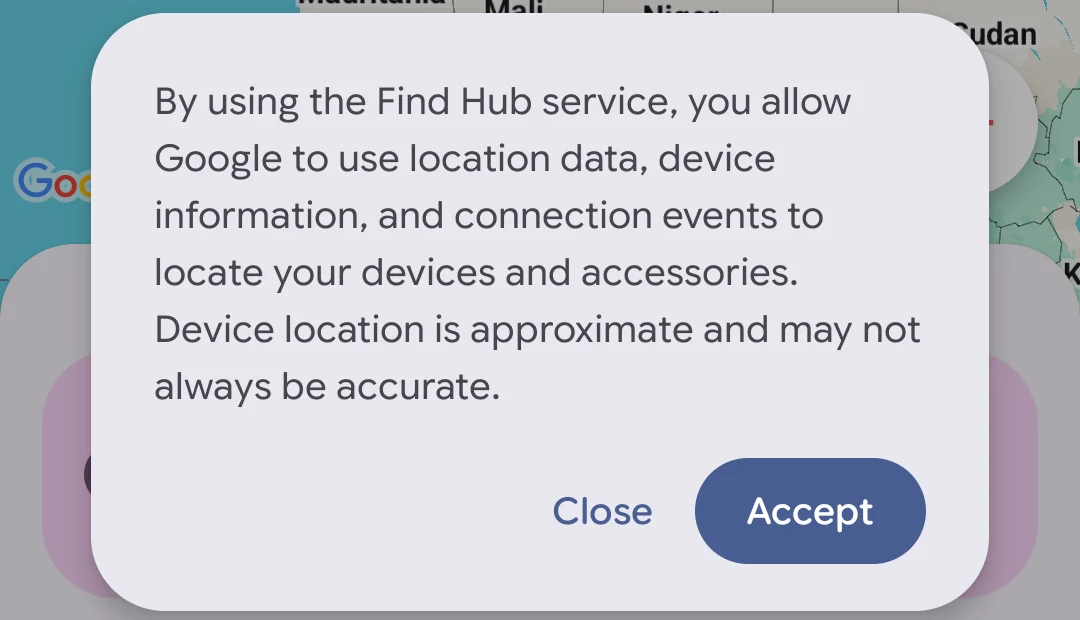
The capture below is of the consent notice it puts up before it lists anything, taken on our own Android emulator on 18 August 2026. That notice is the honest thing to show: using Find Hub means allowing Google to use location data, device information and connection events to locate your devices and accessories, and it states plainly that device location is approximate and may not always be accurate. It is cropped to the notice itself, because the screen behind it lists the devices on the signed-in account, which are not yours and not ours to publish.
Sharing without an app
10B+ installs · free to install · no in-app purchases · carries ads · by Google LLC · listing updated 7 August 2026 · checked 10 August 2026
Google Play listing · 3.2 stars from 19,513,260 reviews · read 10 August 2026
The lightest way to let someone see where you are, because it needs nothing installed on either side and the sharing can be set to expire by itself.
Worth knowing before you go looking: the Play listing carries the Contains ads label, and its description does not mention location sharing at all. The feature is real and documented in Google’s own Maps Help, but nothing on the store page confirms it, which is why this entry sits on the Help documentation rather than on the listing text.
Samsung owners
10M+ installs · free to install · no in-app purchases · no ads · by Samsung Electronics Co., Ltd. · listing updated 2 July 2026 · checked 2 September 2026
Google Play listing · 3.8 stars from 5,108 reviews · read 7 September 2026
If the phone is a Galaxy, this is the counterpart to Find Hub, and it reaches Samsung hardware that Google’s app does not, such as earbuds and watches signed into the same account.
It is the only app on this page whose data safety section declares no data collected at all, and its listing also carries a commitment to the Play Families Policy. On a page about tracking people, that is worth more than the rating.
A child’s phone
100M+ installs · free to install · no in-app purchases · no ads · by Google LLC · listing updated 3 August 2026 · checked 2 September 2026
Google Play listing · 4.6 stars from 5,341,882 reviews · read 2 September 2026
The supervision tools that Android has built in, which is a different thing from a tracker bolted on top: the child’s phone knows it is supervised, and the arrangement is visible on both sides.
One-off sharing
5M+ installs · free to install · in-app purchases $1.49 to $199.99 per item · carries ads · by Glympse Inc. · listing updated 30 June 2026 · checked 10 August 2026
Google Play listing · 4.1 stars from 114,651 reviews · read 10 August 2026
The idea is still the good one on this page: send someone a link that shows where you are for the next twenty minutes and then stops on its own, with nothing for them to install.
Read this first. This page said Glympse "is free with no upsell", and the comparison image said "Free, no upsell". Its own listing carries the Contains ads label, sells in-app purchases from $1.49 to $199.99 per item, opens a bullet with the words free to use with powerful upgrades, and carries a headed Premium Features block. The claim was wrong on all three counts and has been removed. So has "no friend list to manage": the same description advertises Glympse Favorites and Glympse Private Groups.
Families that want alerts
100M+ installs · free to install · in-app purchases $1.49 to $249.99 per item · carries ads · by Life360 · listing updated 4 August 2026 · checked 2 September 2026
Google Play listing · 4.6 stars from 2,321,645 reviews · read 2 September 2026
The most feature-complete family app here, and the reason it was this page’s editor’s pick: arrival and departure alerts, place notifications and driving detail that nothing else on the list matches.
Read this first. It is no longer the pick, for a reason that has nothing to do with how well it works. Its Play data safety section states that Location and Health and fitness may be shared with third parties, and lists Personal info, Messages and five other categories as collected. Of the ten apps here, four declared third-party sharing on 5 September 2026, and this one and Phone Tracker by Number both list Location among the shared categories. The listing also carries the Contains ads label, which this page did not say.
Parents who accept the trade
50M+ installs · free to install · in-app purchases $0.39 to $999.99 per item · no ads · by Find My Kids · listing updated 1 September 2026 · checked 5 September 2026
Google Play listing · 4.6 stars from 2,042,296 reviews · read 5 September 2026
Popular, well rated and much more invasive than this page previously admitted, which is the whole reason it needs its own warning rather than a line about battery level.
Read this first. Its own listing advertises live listening to the sound around the child, meaning remote ambient audio from the child’s phone. It also monitors which apps are used and for how long, and it asks for an accessibility service grant on the child’s device. This page described battery level and a loud sound. Whether that trade is acceptable is a decision for the family, not something to discover after installing, and the caution this page already applied to AirDroid applies here at least as much.
Supervision, not location
10M+ installs · free to install · in-app purchases $5.99 to $89.99 per item · no ads · by SAND STUDIO · listing updated 2 July 2026 · checked 2 September 2026
Google Play listing · 4.3 stars from 154,769 reviews · read 2 September 2026
A supervision app that happens to include location, rather than a location app with extras, and this page was right to be careful about it. It was not specific enough about why.
Read this first. "App usage insights" understates it. Its declared permissions cover live mirroring of the child’s screen and syncing of Facebook, Instagram and Messenger notifications to the parent’s phone. That is a monitoring tool. It is legitimate software, sold openly, and it is also the most far-reaching thing on this page.
A Life360 alternative
10M+ installs · free to install · in-app purchases $2.99 to $89.99 per item · no ads · by GeoZilla Inc · listing updated 22 July 2026 · checked 2 September 2026
Google Play listing · 4.2 stars from 741,842 reviews · read 2 September 2026
The closest thing to Life360 on the list, with zones and arrival alerts, and it is where people usually land after deciding Life360 costs too much.
Read this first. Its data safety section declares that Personal info, Financial info and five other categories may be shared with third parties. Financial info is a category no other app on this page declares as shared, and that belongs in the decision alongside the price.
Friend groups
50M+ installs · free to install · in-app purchases $1.99 to $14.99 per item · carries ads · by One Locator · listing updated 29 July 2026 · checked 10 August 2026
Google Play listing · 4.3 stars from 1,015,204 reviews · read 10 August 2026
The name is misleading and worth clearing up first: it does not find a phone from a number. Both people install it and agree to share, exactly like everything else on this page. The developer’s own site brands it One Locator.
Read this first. Its data safety section declares that Location, App activity and two further categories may be shared with third parties. On a page about location apps, an app that shares location is the one to read twice, and this page said nothing about it.
The ten split into three jobs, and picking the wrong job is the most common mistake on this subject.
Then read the sharing column. Four of the ten declared on 5 September 2026 that data may go to third parties: Life360 shares Location and Health and fitness, GeoZilla shares Personal info and Financial info among seven categories, Phone Tracker by Number shares Location and App activity, and Findmykids, whose section read no sharing on 10 August, now declares sharing too. That is not a reason to rule them out, but it is the trade being made, and a family app that shares your location is a different proposition from one that does not.
Battery is the other question people ask. No listing on this page publishes a battery figure, so anyone quoting one for these apps, this page included until today, is quoting something they cannot show you. What is safe to say is structural: an app reporting a position continuously costs more than one that answers a request, which is why an expiring share is cheaper than a permanent one.
Everything on this page requires the other person to install something, or to agree, or both. That is not a limitation. It is the whole category boundary, and it is worth being plain about what sits on the other side of it.
The pattern to recognise. Software sold on the promise that the other person will not know is stalkerware, whatever the marketing calls it. The tells are consistent: it hides its own icon after installation, it shows no persistent notification on the phone it runs on, it needs physical access to that phone to be set up, and it is billed monthly to the person doing the watching. None of the ten apps here does any of that. If a guide recommends one that does, that is the point to close the page.
Installing that kind of tool on an adult’s phone without their knowledge is a criminal offence in many jurisdictions, and it is not a grey area in most of them. On a child’s phone the law is usually more permissive and the argument is a different one: Family Link and the supervision tools work because the child knows, and covert monitoring reliably ends the conversation you wanted to keep open.
There is also the practical point. Covert tools are the ones that get pulled from stores, break on Android updates and leak the data they collect. The apps on this page are ordinary, maintained software, and every claim about them above can be checked against a public listing in the time it takes to open it.
Google Find Hub, if the job is finding a device you have lost. It is free to install, sells nothing, carries no ads and declares no data shared with third parties, which no other app on this page manages at once. For sharing your location with family rather than finding hardware, Google Family Link on a child's phone and Google Maps for adults are both free with nothing to buy, though Maps carries ads. Checked 10 August 2026.
Not with anything on this page, and that is deliberate. All ten need the other person to install the app or accept a share, and the phone being located shows it. Software sold on the promise that the other person will not know is stalkerware: it hides its icon, shows no notification, and needs physical access to the phone to set up. Installing it on an adult's phone without consent is a criminal offence in many places. Checked 10 August 2026.
Continuous sharing costs more than a one-off request, which is the honest structural answer. No Play listing on this page publishes a battery figure, so any specific comparison between these apps, including the one this page used to print, is not something the reader can check. If battery is the concern, prefer an expiring share such as Glympse over a permanent one. Checked 10 August 2026.
Open Find Hub from any browser or another Android device signed into the same Google account, or Samsung Find if it is a Galaxy. Both can ring the phone at full volume even when it is silenced, show its last known position and lock or erase it remotely. This only works if the phone was signed in and had location on, so the useful moment to set it up is now rather than later. Checked 10 August 2026.
Three of the ten declare it in their own Play Data Safety sections. Life360 says Location and Health and fitness may be shared. GeoZilla says Personal info and Financial info among seven categories. Phone Tracker by Number says Location and App activity among four. Samsung Find declares no data collected at all, and the rest declare no third-party sharing. Checked 10 August 2026.
In most jurisdictions a parent may supervise a minor child's device, and the tools built for it, such as Family Link, are designed around that. The rules change as the child gets older and vary by country, so treat this as a starting point rather than advice. The practical guidance is steadier than the legal position: supervision the child knows about works, and covert monitoring tends to end the trust it was meant to protect. Checked 10 August 2026.
Checked 10 August 2026: a column for third-party data sharing was added, read from each app’s own Play Data Safety section, and it changed the recommendation. Life360, which this page presented as the editor’s pick, declares that Location and Health and fitness may be shared with third parties, alongside collection of Personal info, Messages and five other categories; Find Hub is now the pick, being the only entry that is free, sells nothing, carries no ads and declares no third-party sharing at once. GeoZilla declares sharing of Personal info and Financial info among seven categories, and Phone Tracker by Number declares sharing of Location and App activity; neither was stated before. Ads were undisclosed on three apps and are now labelled: Life360, Google Maps and Glympse all carry the Contains ads label. Glympse was described as free with no upsell, in the prose and in the comparison image; its listing carries ads, sells in-app purchases from $1.49 to $199.99 per item and has a headed Premium Features block, so the claim is gone, along with "no friend list to manage", which its own Favorites and Private Groups features contradict. Find Hub, called the number-one pick with no store link and no rating, now has both; the separate "Find Hub (Wear OS)" entry has been removed because it was the same package listed twice, which is also why the page counted eleven apps and showed ten. Find My Kids is now described as it describes itself, including remote listening to the sound around the child, app-usage monitoring and an accessibility grant on the child’s device; AirDroid’s "app usage insights" is now stated as live screen mirroring and notification syncing. What Life360’s paid tier buys was corrected to emergency dispatch, identity theft protection, roadside assistance and stolen-fund reimbursement. Ratings were refreshed: Life360 4.6 from 2,321,645 reviews rather than 4.4 from 2.24M, Samsung Find 3.9 from 4,880 rather than 3.8 from 4.66K, Family Link 5,271,565 reviews rather than 5.21M, GeoZilla 724,183 rather than 704K, AirDroid 151,862 rather than 149K. The comparison that used to be a PNG, which also served as the social preview, is now a real table, and the battery comparison in the FAQ was removed because no listing here publishes such a figure. The guidance on choosing and the section on covert tracking, both previously buried inside the last app entry, are now sections of their own.
 How to Block Ads on Android Without Rooting (2026)Security & Privacy
 How to Find, Lock, or Erase a Lost Android PhoneSecurity & Privacy