
Updated August 2026 · all 11 entries verified against their own Google Play listings on 7 August 2026, with Google Maps, Organic Maps and OsmAnd re-read on 26 August 2026.
Eleven navigation apps, from traffic aware mainstream picks to fully offline open source maps, with the price, ads label and rating on each one read from its own store listing. For more on this category, browse our full Navigation & Auto hub.
Google Maps is our best overall because its description pairs live traffic rerouting with offline downloads on 10B plus installs, free on 26 August 2026 with a Contains ads label.
Organic Maps is our best free pick because its listing reports offline navigation with no data collected, free on 26 August 2026, no ads label or in-app purchases.
OsmAnd is our off grid pick because its listing sells contour detail, free on 26 August 2026, no ads label, paid tiers.
Data checked: 3 September 2026.
Best overall
3.2★ · 19.5M reviews · 10B+ installs · free, Contains ads label, no in-app purchases · developer Google LLC · Play listing · checked 26 August 2026
Google Maps is the best overall pick for everyday driving: its own description pairs rerouting on live traffic with offline map downloads. It is free, but its Play listing carries a Contains ads label, and at 3.2 stars it holds the lowest rating in this table.
For: rerouting on live traffic, incidents and road closures, per its own description · offline map downloads for weak signal areas · Android Auto. Against: Contains ads label · 3.2 stars from 19.5M reviews, the lowest here · live traffic and search both need a connection. Skip it if you want a map that sells you nothing; Organic Maps carries neither badge. Choose Google Maps over Waze for offline downloads, which Waze's listing does not offer.
↑ Back to the comparisonBest for commuters
4.3★ · 8,901,923 reviews · 500M+ installs · free, Contains ads label, no in-app purchases · developer Waze · Play listing · checked 7 August 2026
Waze is the commuter pick: its own description names real time alerts for accidents, roadworks and speed cameras, reported by other drivers. It is free to install, but its Play listing carries a Contains ads label, and its own description names no offline mode at all, so a dead zone leaves you with nothing.
For: real time alerts for accidents, roadworks and speed cameras, per its own description · automatic rerouting on live traffic · 500M plus installs, so the report network is dense. Against: Contains ads label · no offline maps anywhere in its listing · an alert heavy screen while you drive. Skip it if coverage drops on your route; HERE WeGo downloads a whole country. Choose Waze over Google Maps if your commute is about hazards, not places.
↑ Back to the comparisonBest free
3.9★ · 21.9K reviews · 5M+ installs · free, no ads label, no in-app purchases · developer Organic Maps · Play listing · checked 3 September 2026
Organic Maps is the best free pick and carries neither an ads label nor in-app purchases: it runs entirely offline on OpenStreetMap data. The blunt trade off is no live traffic at all, which makes it a poor city commuter. Its privacy policy states that "Unlike most other applications, in Organic Maps there is no tracking, no ads, no spyware: no collection of location or statistical or personal data from your device whatsoever" (Organic Maps privacy policy, read 7 August 2026).
For: fully offline search and navigation, per its own description · no ads label and no in-app purchases · unlimited map downloads, refreshed twice a month. Against: no live traffic · a small review base, about 21.7K · business listings limited to what OpenStreetMap carries. Skip it if you need live rerouting in traffic. Choose Organic Maps over Maps.me for the same map data with no in-app purchases.
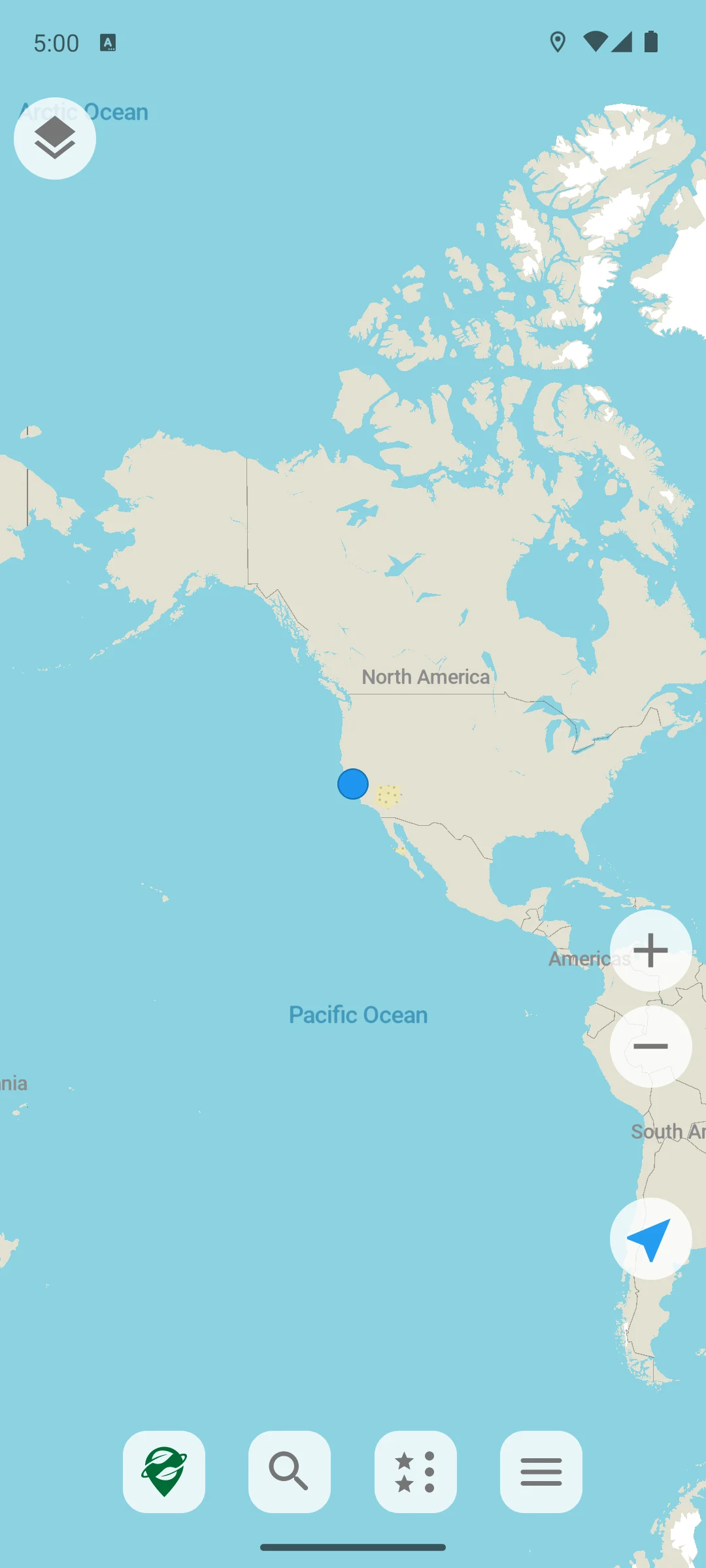
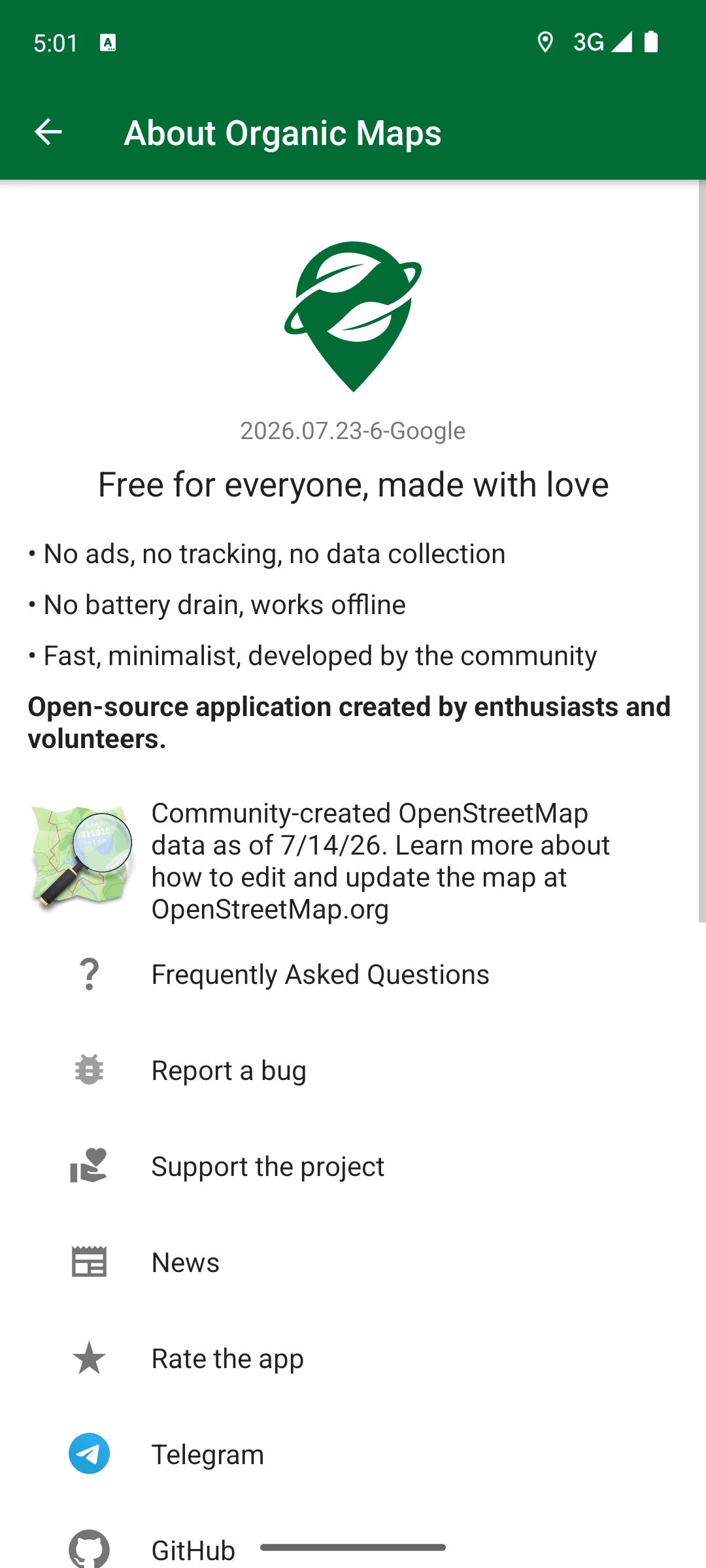
↑ Back to the comparisonInstalled on our own Android emulator on 18 August 2026, it drew a world map straight away, with no account to create, no consent dialog and no advertisement in front of it. Its own About screen reports the build as 2026.07.23-6-Google and says the OpenStreetMap data behind it is from 14 July 2026. The same screen carries the project's own claims, in its words rather than ours: free for everyone, made with love, no ads, no tracking, no data collection, no battery drain, works offline, and an open source application created by enthusiasts and volunteers. We did not measure battery or offline behaviour and make no claim about either. The screenshots below are ours, taken on 18 August 2026.
Best offline transit
3.2★ · 501,060 reviews · 10M+ installs · free, no ads label, no in-app purchases · developer HERE Europe B.V. · Play listing · checked 2 September 2026
HERE WeGo is the traveller pick for offline transit: free, with no ads label and no in-app purchases, and its own description promises you can download a region, country or continent and finish the journey totally offline. Its 3.2 star average ties Google Maps for the lowest on this page, so expect rough edges.
For: offline download by region, country or continent · transit directions in more than 1,900 cities, per its listing · no ads label, no in-app purchases. Against: 3.2 stars from 501,060 reviews · no live traffic named in its own description · transit is city by city, so smaller towns fall outside those 1,900. Skip it if you need live rerouting; Sygic has both. Choose HERE WeGo over Organic Maps if you travel by bus and train.
↑ Back to the comparisonOffline plus live traffic
4.2★ · 1,893,445 reviews · 50M+ installs · free with in-app purchases from $0.99 to $89.99 per item, no ads label · developer Sygic. · Play listing · checked 7 August 2026
Sygic is the pick when you want offline maps and live traffic in one app: 3D offline maps of every country sit on the phone, and its description pairs them with live traffic and speed camera alerts. It is free to install with no ads label, but the parts you actually want sit behind in-app purchases running to $89.99 per item.
For: 3D offline maps of all countries, per its own description · live traffic and speed camera alerts · no ads label. Against: in-app purchases up to $89.99 per item · a free tier that funnels to a Premium+ trial, pitched in the description itself · 4.2 stars, below OsmAnd at 4.5. Skip it if you will not pay; Organic Maps stays free. Choose Sygic over HERE WeGo for live traffic on top of offline maps.
↑ Back to the comparisonDevice companion
3.9★ · 23,597 reviews · 1M+ installs · free, no ads label, no in-app purchases · developer Garmin · Play listing · checked 7 August 2026
Garmin Drive is not a phone navigator at all: its own description calls it a companion for Garmin automotive navigators and dash cams, feeding them traffic, parking and weather while the device does the guiding. It is free with no ads label and no in-app purchases, and useless without Garmin hardware. More detail in our Garmin Android GPS guide.
For: free, no ads label, no in-app purchases · pushes real time traffic, parking and weather to a paired navigator · dash cam controls for up to four cameras, per its listing. Against: it does not navigate on the phone · worthless without Garmin hardware · 3.9 stars from only 23,597 reviews. Skip it if you own no Garmin device; every other entry works on the phone alone. Choose Garmin Drive over Sygic only when a Garmin unit is doing the guiding.
↑ Back to the comparisonTruck routing
3.6★ · 275,739 reviews · 10M+ installs · free with in-app purchases from $1.99 to $129.99 per item, no ads label · developer TomTom International BV · Play listing · checked 7 August 2026
This listing is no longer a consumer sat nav: on 7 August 2026 the package this section links to is published as TomTom GO Expert: Truck GPS by TomTom International BV, and its description opens with truck navigation, multi-drop planning and truck points of interest. It is free to install, then in-app purchases run to $129.99 per item, and if you drive a car it is the wrong app.
For: routing by vehicle dimensions, dangerous cargo and truck rest stops, per its own description · offline maps plus real time traffic and speed alerts · Android Auto. Against: in-app purchases up to $129.99 per item · 3.6 stars · no consumer car app on this package any more. Skip it if you drive a car; Sygic has a lower ceiling. Choose TomTom GO Expert over Sygic if your vehicle has dimensions a car router ignores.
↑ Back to the comparisonOffline backup
4.1★ · 1,281,670 reviews · 50M+ installs · free with in-app purchases from $0.99 to $32.99 per item, no ads label · developer Maps_Me · Play listing · checked 7 August 2026
Maps.me is the light offline backup: entirely offline maps with turn by turn navigation and offline search, on OpenStreetMap data. On 7 August 2026 its Play listing carries no Contains ads label, but it is free to install with in-app purchases to $32.99 per item and the driving guidance is its weakest part.
For: entirely offline maps and offline search, per its own description · OpenStreetMap data updated daily · no ads label when this page read it on 7 August 2026. Against: in-app purchases to $32.99 per item · no live traffic named in the listing · 4.1 stars, on the same map data as Organic Maps. Skip it if you want a primary car navigator. Choose Maps.me over Organic Maps for the built in travel guides.
↑ Back to the comparisonDormant listing
4.1★ · 87,883 reviews · 100M+ installs · free, no ads label, no in-app purchases · developer Petal Maps Team · last store update 19 July 2023 · Play listing · checked 7 August 2026
Petal Maps is the one entry here we would steer you away from: its Google Play listing was last updated on 19 July 2023, more than three years ago, for an app whose whole job is current maps and live traffic. It is free with no ads label and no in-app purchases, and none of that offsets a dormant listing.
For: free, no ads label, no in-app purchases · real time traffic and lane level guidance claimed in its description · offline map downloads. Against: no Play update since 19 July 2023 · map and traffic data age badly without releases · its 160 country claim dates from that same 2023 listing. Skip it if you need current maps, which is everyone. Choose Petal Maps over OsmAnd only if it is already on your Huawei device.
↑ Back to the comparisonBest off grid
4.5★ · 248K reviews · 10M+ installs · free with in-app purchases from $1.63 to $69.99 per item, no ads label · developer OsmAnd · Play listing · checked 26 August 2026
OsmAnd is the niche pick for off grid detail, rated 4.5 stars on Google Play on 26 August 2026: its own user guide says it "provides global offline map browsing and offline navigation with many special tools for Android and iOS" (OsmAnd user guide, read 7 August 2026). It is free with no ads label, but the paid tiers reach $69.99 per item.
For: contour lines, terrain and offline Wikipedia in the paid tiers, per its listing · routing by vehicle dimensions and inclines · 4.5 stars from about 248K reviews on 26 August 2026. Against: in-app purchases to $69.99 per item · the free version limits map downloads, per its own description. Skip it if you just want directions to a restaurant. Choose OsmAnd over Komoot if you need offline routing for driving as well as trails. Off grid? Keep a compass app as backup.
↑ Back to the comparisonBest for cycling and hiking
4.3★ · 423,927 reviews · 10M+ installs · free with in-app purchases from $0.99 to $124.99 per item, no ads label · developer komoot GmbH · listed under Health and Fitness, not Maps · Play listing · checked 2 September 2026
Komoot is not a car app, and that is the point: it plans cycling, hiking and running routes with turn by turn voice guidance and offline topographic maps. Its own description says your first region is free forever, and everything past that is an in-app purchase running to $124.99 per item. It carries no ads label.
For: community routes with surface, difficulty, distance and elevation detail · offline trail maps once a region is unlocked · turn by turn voice guidance for bikes and hikes. Against: in-app purchases to $124.99 per item · only the first region is free · filed under Health and Fitness, not Maps, and it will not route a car. Skip it if you want a driving navigator. Choose Komoot over OsmAnd for other people's routes rather than raw map detail.
↑ Back to the comparisonChoose on three things rather than on how the map looks: whether the app works without a signal, how much data it uses, and what it keeps about where you have been. Offline maps that you download in advance work without a signal and share less data while travelling, which is why the table above carries an offline column. Live traffic is the opposite trade off: it needs a connection and it needs to know where you are. Cost is a third setting: our guide to avoiding toll roads in Google Maps and Waze covers the one trip and always on options in both apps.
Android splits location into foreground and background access, and into precise or approximate accuracy. If you grant an app approximate location only, it gets only approximate location whichever permission it declares (Android developer documentation, read 7 August 2026). For turn by turn driving, keep precise location on while you navigate and limit the app to "while using the app". Both settings are reversible later in Android app permissions, so grant the minimum first.
Location history is a separate decision. Google's own Timeline help page says Timeline is off by default for a Google Account and only runs if you opt in, and that you can turn it off or delete all of it in My Google Activity at any time (Google Maps Help, read 7 August 2026). The OpenStreetMap based apps above build no comparable timeline, and Organic Maps says as much in its privacy policy. Check whichever app you settle on rather than assuming.
Checked 26 August 2026: we re-read three Google Play listings, Google Maps, Organic Maps and OsmAnd. Organic Maps now shows 4.3 stars, down from the 4.3 recorded on 7 August 2026, and its review base has grown since then; Google Maps holds 3.2 and OsmAnd holds 4.5. Price, the Contains ads label and in-app purchases were unchanged on all three. The other eight listings keep their 7 August 2026 figures and dates. Claims withdrawn in this pass, because the page cannot show them: that Organic Maps was the only entry with neither an ads label nor in-app purchases, when HERE WeGo, Garmin Drive and Petal Maps carry neither either; that nothing else paired live traffic rerouting and lane guidance with the depth of places in Google Maps; that Waze carried the fastest hazard warning here; that OsmAnd was the highest rated app on this page, had the busiest interface and the steepest learning curve; that Organic Maps had the smallest review base and far fewer business listings than Google Maps; that Maps.me sat below Organic Maps on rating; and that each entry names its verification tier. An earlier version of this page reported a Contains ads label on the Maps.me listing; that listing carried no such label on 7 August 2026.
For driving without a signal, Organic Maps and HERE WeGo are the strongest picks: both download whole regions and navigate with voice guidance offline. Sygic adds live traffic on top of offline maps, if you pay for it. For hiking and trails, OsmAnd and Komoot are hard to beat. Download your maps over Wi Fi before you leave home.
Google Maps gives you cleaner directions, deeper place information and offline downloads, so it suits most people. Waze is stronger if your goal is dodging traffic, since its crowd sourced alerts often find faster routes at rush hour. Both are free, both are owned by the same company, and both listings carried a Contains ads label on Google Play on 7 August 2026.
Navigation is demanding: the screen stays on and the GPS radio runs constantly. Apps that work fully offline are not streaming map tiles as you move, and Organic Maps says on its own site that this saves battery. Sensible screen brightness and a car charger on longer trips make the drain a non issue for almost everyone.
Yes, several of them. Google Maps and Waze have full Android Auto support, Sygic works with it, and TomTom GO Expert names Android Auto in its own Play description. That TomTom listing is now aimed at truck drivers rather than cars, and Petal Maps has had no Play update since 19 July 2023. Coverage changes, so check the current listing if Android Auto is a must have for you.
On modern Android you control this from the location permission prompt and from the app's entry in your phone settings. The two settings that matter are letting the app reach your location only "while using the app" rather than all the time, and choosing precise or approximate location. For turn by turn driving, keep precise location on while you navigate and limit background access. You can change either setting whenever you like.
Usually, yes. Many map providers keep a history of where you have been, often shown as a location timeline, and in most cases you can review it and turn it off. Google says its Maps Timeline is off by default for a Google Account and only runs if you opt in, and that you can delete it at any time. The OpenStreetMap based apps in our list generally collect less and usually build no personal timeline, so check each one rather than assuming.
On 7 August 2026 only two of the eleven Play listings on this page carried a Contains ads label: Google Maps and Waze. The other nine carried no ads label that day. Five of them do sell in-app purchases, which is a different thing from ads. Labels change, so check the listing before you install.
No. Every app on this page was free to install on 7 August 2026. Google Maps, Waze, Organic Maps, HERE WeGo, Garmin Drive and Petal Maps showed no in-app purchases at all. Sygic, TomTom GO Expert, Maps.me, OsmAnd and Komoot are free to install and then sell in-app purchases, the dearest single item on those listings being 129.99 US dollars. Paying mostly buys offline map bundles, live traffic and speed camera alerts.
 How to Download Offline Maps on AndroidNavigation & Auto