
Updated for 2026
Updated September 2026 · Verified against the Play Store listings on 3 September 2026
Digital Compass is our best overall pick because on 28 August 2026 its listing showed 4.66 from 612,583 ratings, free but carrying a Contains ads label.
Compass Galaxy is our best free pick because on 28 August 2026 its listing showed 4.42, a Contains ads label and nothing at all to buy.
Smart Compass Pro is our camera sighting pick because on 28 August 2026 it cost $3.50 once, with no ads label and nothing further to buy.
Data checked: 3 September 2026.
Each entry below carries the same fact line, a one sentence verdict, three pros, three cons, a reason to skip it and what to pick instead. Every figure was read from that app's own Google Play listing on 7 August 2026; ratings drift.
Delisted · checked 2 September 2026: a Google Play search on 7 August 2026 found no compass app from Snapp Mobile, and the developer catalogue lists none, so there is nothing to install and nothing to link.
It was a plain offline dial: heading in degrees, latitude and longitude, nothing else. Pick instead: Digital Compass by Axiomatic Inc., free and rated 4.66 from 613,930 ratings on its Play listing (checked 2 September 2026). That listing does carry a Contains ads label, so it is not an ad free swap; for no ads label at all, see Pixel Compass below.
↑ Back to the comparisonThe facts: 4.66 from 613,930 ratings · 10M+ installs · free · in-app purchases $3.99 to $9.99 per item · Contains ads · by Axiomatic Inc. · Play listing · checked 2 September 2026.
Digital Compass is the pick for most people: the largest rating base here, a true heading toggle and a full screen map, but its listing carries a Contains ads label and only a purchase removes them.
The developer sets out the same feature list on its own site: "It supports true and magnetic north, provides integrated map and location information such as longitude, latitude, and address" (Axiomatic Inc., Apps for Android).
Pros: Free, 10M+ installs · True and magnetic heading, full screen map, magnetic strength, slope level · 613,930 ratings, the largest base here
Cons: Contains ads · Ad removal is an in-app purchase, $3.99 to $9.99 per item · No camera sighting view, whatever this page said before: that is Smart Compass Pro
Skip this if you want no ads without paying, because on this listing only the purchase removes them.
Choose Digital Compass over Compass Steel 3D for the map and the rating base; choose Compass Steel 3D when the dial itself is the point.
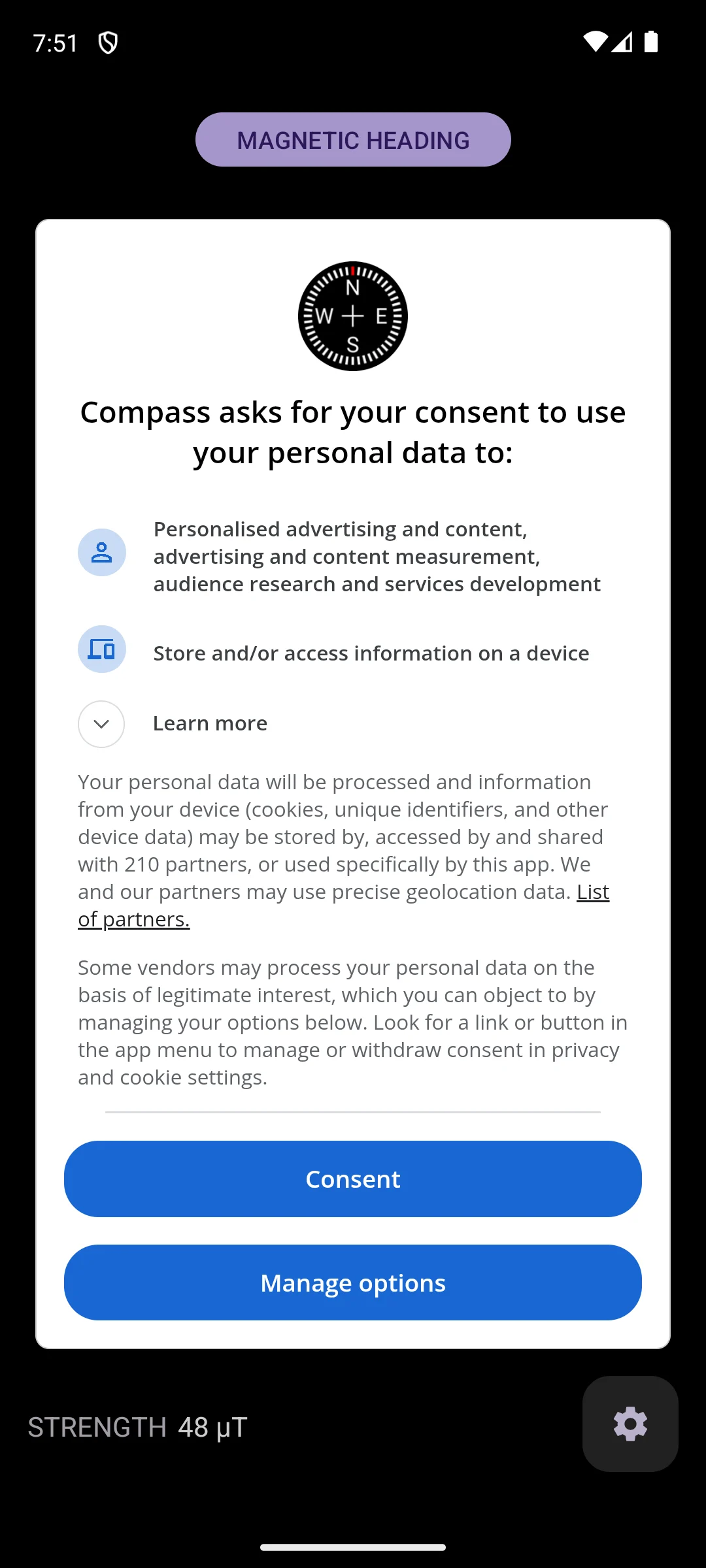
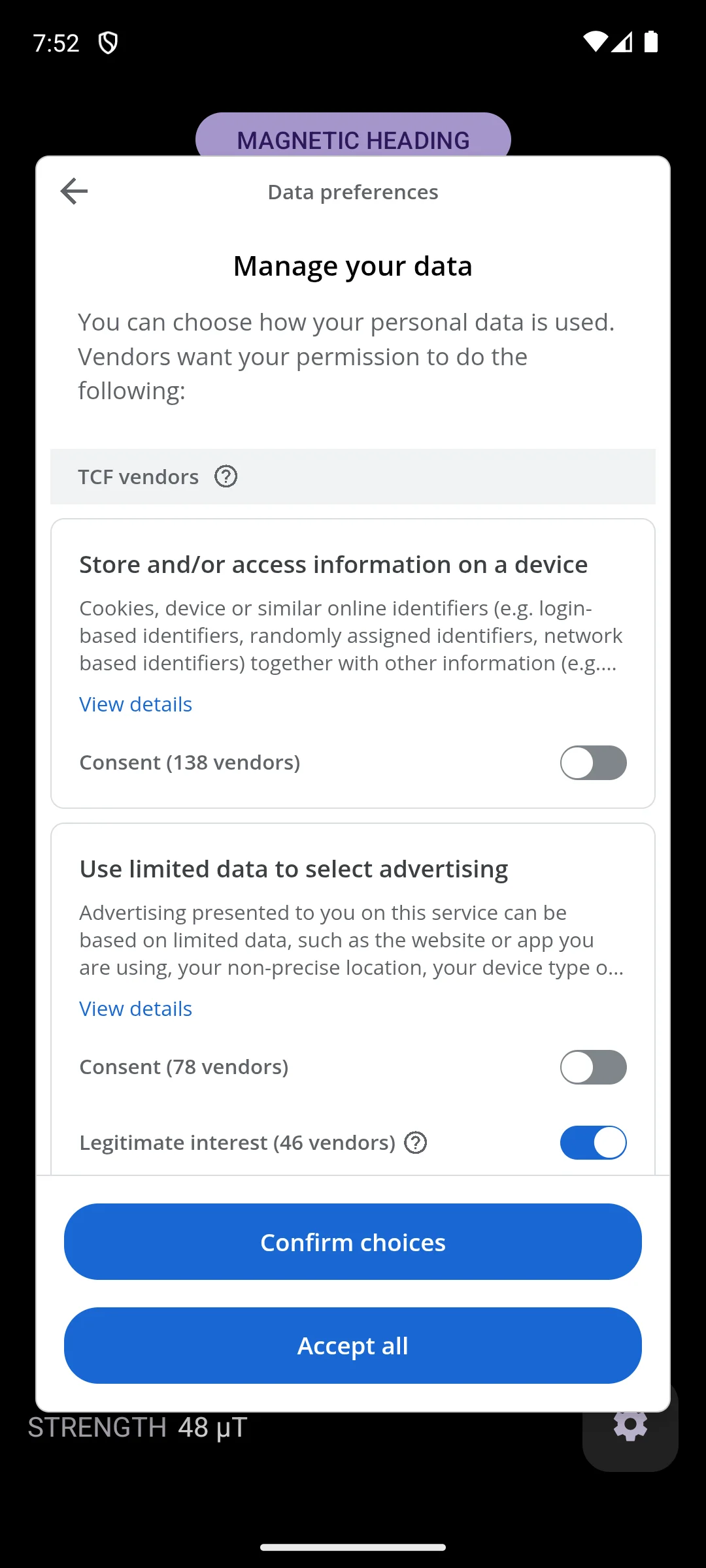
↑ Back to the comparisonInstalled on our own Android emulator on 18 August 2026. The compass itself starts working immediately, the heading and a field strength reading of 48 microtesla are already drawn behind it, but a consent dialog sits on top asking to use personal data for personalised advertising and content, advertising and content measurement, audience research and services development. It states that data may be shared with 210 partners and that precise geolocation may be used, and it offers only Consent or Manage options, with no plain refusal. Behind Manage options is a vendor list where two consent switches start off and a third, legitimate interest covering 46 vendors, starts on. That is a lot of machinery for an app whose whole job is to point north. We accepted nothing. The screenshots below are ours, taken on 18 August 2026.
Delisted · checked 7 August 2026: the classic Compass 360 Pro is gone from Google Play and survives only on third party APK mirrors. It was a military style sighting dial with large numerals, built for orienteering off a paper map.
Careful with the name. A different app titled Compass 360 Pro is live today: $0.99, by The Droid Dev, rated 3.57 from 21 ratings, 1K+ installs, store update dated 1 June 2015 (checked 7 August 2026). It is not the app reviewed here and we do not link it as one. Pick instead: Smart Compass Pro at $3.50 for the sighting dial and camera view, or the free Digital Compass above.
↑ Back to the comparisonThe facts: 4.71 from 6,140 ratings · 100K+ installs · paid, $3.50 as a one time payment · no in-app purchase badge · no ads label · by Smart Tools co. · Play listing · checked 7 August 2026.
Smart Compass Pro is the one to buy if you sight landmarks through the camera: the highest rating here, and a listing with neither ads nor in-app purchases on it. The $3.50 up front is the whole objection.
Pros: Highest rating on this page, 4.71 · No ads label, no in-app purchase badge · Camera view, GPS and map, and a metal detector that doubles as a sensor check
Cons: $3.50 before you can try it, with no free tier on this listing · 6,140 ratings against the top pick's 606,066 · Renamed from Smart Compass, so the old name no longer finds it, and its listing says the internet permission is for downloading map tiles
Skip this if you will not pay up front, because there is no free version to fall back on.
Choose Smart Compass Pro over Digital Compass when you want a screen with no ads at any price; choose Digital Compass when you would rather not pay.
↑ Back to the comparisonThe facts: 3.92 from 6,541 ratings · 1M+ installs · free · in-app purchases $4.99 per item · Contains ads · by Evgeni Ganchev · Play listing · checked 2 September 2026.
GPS Compass Navigator is a waypoint navigator with a compass on the front, so install it when getting back to a saved spot matters more than the needle. At 3.88 it holds the lowest rating on this page.
Pros: Saves a spot and walks you back with a guiding arrow, plus GPX import and export and a route recorder · The listing states it works fully offline, even on devices with no compass sensor · Store listing updated 6 August 2026
Cons: Lowest rating here, 3.88 · Contains ads, with in-app purchases at $4.99 per item on top · 6,541 ratings behind 1M+ installs is a thin base for a feature list this long
Skip this if you only want a needle, because waypoints and routes are the point of this one.
Choose GPS Compass Navigator over Compass and GPS tools when you need to find your way back; choose Compass and GPS tools for satellite accuracy readouts.
↑ Back to the comparisonThe facts: 4.67 from 92,185 ratings · 5M+ installs · free · in-app purchases $0.99 to $12.99 per item · Contains ads · by SimplyWerx · Play listing · checked 2 September 2026.
Compass Steel 3D is the best looking dial here and a serious compass under it, with a true north and magnetic north switch and sun and moon tracking, but the listing carries a Contains ads label and the widest purchase range on this page.
Pros: 4.67 from 92,185 ratings, the third largest base here · True north and magnetic north switch, altitude above sea level, target direction tracking · Picture in picture keeps the dial visible in another app
Cons: Contains ads · In-app purchases up to $12.99 per item, the widest range here · Store listing last updated 18 June 2026, older than the top pick's 28 July 2026
Skip this if you want the fewest things on screen, because the 3D view and the sun and moon panels are what you are choosing.
Choose Compass Steel 3D over Compass Galaxy for the true north switch and the sun and moon data; choose Compass Galaxy when a plain free dial is enough.
↑ Back to the comparisonThe facts: 4.55 from 770 ratings · 50K+ installs · free · in-app purchases $1.29 to $10.99 per item · no ads label · by fertwbr · Play listing · checked 7 August 2026.
Pixel Compass: Nav and Level is the only free app here whose listing carries no ads label, which is the reason to pick it, but with 684 ratings it also has the thinnest track record on this page.
Pros: No ads label on the listing · Switches between true geographic north and magnetic north, and shows coordinates as decimal degrees, DMS, DDM or NATO mils · A bubble level, an offline mode and a Wear OS app come with it
Cons: 684 ratings, the smallest rated base here · In-app purchases $1.29 to $10.99 per item · Not the minimalist this page once called it: the listing now advertises weather cards, a barometer and UV alerts
Skip this if a large public track record is what reassures you, because 684 ratings is a small sample.
Choose Pixel Compass over Digital Compass when a screen with no ads label matters most; choose Digital Compass for the weight of 614,146 ratings.
↑ Back to the comparisonThe facts: 4.63 from 1,483 ratings · 100K+ installs · free · one in-app purchase at $0.99 per item, which the listing describes as the ad free upgrade · Contains ads · by Lakshman · Play listing · checked 7 August 2026.
Compass and GPS tools is the pick when you want to know how good your position fix actually is, because it puts satellite accuracy next to the needle, and the ads come off for $0.99.
Pros: Compass plus course, speed, altitude, latitude and longitude on one screen · Satellite accuracy, signal, almanac, ephemeris, azimuth and GPS time, which nothing else here shows · Cheapest ad removal here, $0.99, and the listing was updated 7 August 2026
Cons: Contains ads until you pay · 1,483 ratings behind 100K+ installs is a thin base · Not the camping multitool this page described: the listing has no spirit level, ruler, flashlight or unit converter
Skip this if satellite diagnostics mean nothing to you, because the compass itself is plain.
Choose Compass and GPS tools over GPS Compass Navigator for accuracy readouts and a $0.99 way off the ads; choose GPS Compass Navigator for waypoints and routes.
↑ Back to the comparisonThe facts: not rated on Google Play, the listing carries no rating and no rating count · 5K+ installs · free · no in-app purchase badge · Contains ads · by Devsig Technologies Private Limited · Play listing · checked 7 August 2026.
Gyro Compass leans on the gyroscope as well as the magnetometer, a real answer to a twitchy needle, but its listing shows no rating at all and only 5K+ installs, so nothing public backs it up yet.
Pros: Free, with no in-app purchase badge · Uses the gyroscope alongside the magnetic sensor, with a true north and magnetic north choice · The listing states no internet connection is required
Cons: No rating and no rating count on its listing, so the 4.5 star this page used to print had no source and has been removed · 5K+ installs, the smallest base here by a wide margin · Contains ads, and the store update is dated 11 December 2025
Skip this if you want a public track record before you trust a bearing, because this listing has none yet.
Choose Gyro Compass over Compass Galaxy only when a jumping needle is your specific complaint; choose Compass Galaxy for the 103,923 ratings behind it.
↑ Back to the comparisonThe facts: 4.42 from 103,923 ratings · 5M+ installs · free · no in-app purchase badge · Contains ads · by Szymon Dyja · Play listing · checked 7 August 2026.
Compass Galaxy is the best free pick because there is nothing to buy in it: a plain dial with a built in flashlight, funded by ads, with 103,923 ratings behind it and no upsell waiting.
Pros: Free with no in-app purchase badge, so nothing nags you to upgrade · 103,923 ratings and 5M+ installs · A flashlight in one tap and, per the listing, no unnecessary permissions
Cons: Contains ads, and with nothing to buy there is no way to remove them · 4.42 is the second lowest rating here · Store listing last updated 8 October 2025, the oldest of the live picks
Skip this if you want an ad free screen, because this listing sells nothing that would take the ads away.
Choose Compass Galaxy over Digital Compass when you want no purchases in the app at all; choose Digital Compass for the map, the slope level and the far bigger rating base.
↑ Back to the comparisonDelisted · checked 7 August 2026: a Google Play search on 7 August 2026 returned no app under the exact name Sailing Compass, and no official source for it.
It showed heading, course over ground and speed in numerals sized for a moving boat. Pick instead: Compass Galaxy, free and rated 4.42 from 103,923 ratings, for the plainest large readout, or GPS Compass Navigator for speed and a waypoint you can steer back to. For dedicated hardware, see our Garmin Android GPS guide.
↑ Back to the comparisonEvery app here reads the same hardware, the magnetometer, so none can be more accurate than the sensor underneath. Android's own documentation states the mechanism: "By computing a device's orientation, you can monitor the position of the device relative to the earth's frame of reference (specifically, the magnetic north pole)" (Android sensor documentation). That work happens on the sensor, not over the network, so the compass keeps working with no signal. Three things separate the apps.
The magnetometer drifts and gets confused near anything magnetic, so it needs resetting. The fix is the figure eight: hold the phone in front of you and trace the number eight in the air a few times, rotating your wrist, so the sensor samples the field from several angles. Axiomatic prints the same instruction on the Digital Compass listing, with a warning not to use the app with magnetic covers. That is the usual culprit when an app keeps nagging: a magnetic clasp or card slot in the case, a car mount, steel railings, rebar, speakers, a charger. Step away from metal, take the phone out of the case, run the figure eight again.
Magnetic north is where the needle points, following the magnetic field, and it is what the sensor reports (Android sensor documentation). True north is the geographic pole that printed maps and grid references are drawn around. The angle between them is called declination and it changes with where you stand, which is why a bearing off a phone and one off a chart can disagree. Around town it rarely matters; for map work it matters a lot, so pick an app whose listing states a true north and magnetic north switch, and set it before you start. On 7 August 2026 that switch was named on the listings for Digital Compass, Compass Steel 3D, Pixel Compass: Nav and Level and Gyro Compass.
Judge a compass app on the compass. Battery savers and cleaners bolted onto one are filler, because the sensor draws almost nothing to begin with. For more in this space, browse our full Navigation and Auto hub.
They can be, as long as your phone has a magnetometer and you calibrate it. Most phones from the last several years include the sensor, and a quick figure eight wave of the device resets the reading. Stay away from cars, speakers and metal railings while you check, since they throw the needle off more than any app flaw.
Calibration drifts whenever the phone passes near magnetic interference, so anything from a magnetic case to a steel desk can trigger the prompt. The fix is the same figure eight motion, tracing the shape a few times in the air to let the sensor remap. If it never settles, a case or a nearby magnet is usually the culprit, and removing a magnetic phone mount often fixes it instantly.
Magnetic north is where the compass needle points, and it shifts based on the planet's magnetic field. True north is the actual geographic North Pole that maps are drawn around. The gap between them is called declination, and it varies by location. Good compass apps let you toggle to true north and correct for declination automatically using your GPS position, which is the setting you want when reading a real map.
The compass itself works completely offline, since it reads the phone's built in magnetic sensor rather than the network. That makes a compass app a sensible thing to install before you head somewhere remote. Features that lean on map tiles may want a signal, though GPS positioning works offline too once satellites are acquired. Pair one with an offline map before you go, because a compass gives you direction and nothing about the terrain.
Often you do not. Many Android phones include a basic compass somewhere in the camera, clock, or maps screen, and for occasional use that is enough. Reach for a separate app only when you want something more readable, a true north toggle with declination correction, or extras like GPS coordinates and a camera sighting view for hiking. Try the built in option first, then decide whether you actually need more.
Not really. The compass sensor draws almost no power on its own, so a bundled battery saver or cleaner is mostly placebo rather than a meaningful benefit. These add ons tend to be filler that crowds the screen. Judge a compass app on how quickly it calibrates, how steady the needle is, and how clearly it reads in sunlight, and ignore the extras stapled on around it.
Because a different app now uses that name. The classic Compass 360 Pro reviewed on this page is gone from the store. On 7 August 2026 a separate listing titled Compass 360 Pro was live from another developer, The Droid Dev, priced at 99 cents, rated 3.57 from 21 ratings, with 1000 plus installs and a store update dated June 2015. It is not the same app, so check the developer name on the listing before you buy.
 Best Car Launcher Apps for AndroidNavigation & Auto
 Offline Weather Apps on Android: Stay Informed Without InternetTools & Utilities