
Checked 27 September 2026
Most people need no cleaner at all; Files by Google is the pick if you want one, SD Maid 2/SE the deep clean for app leftovers. Our answer, the free pick and the table ↓
Checked 27 September 2026: no pick changed since 18 August; six of ten listings carry the ads label; SD Maid 2/SE rates 4.7 on Play
Full logTen Android storage cleaners, weighed against what the platform still lets an app do. The limits below come from Google rather than from us.
Most people need no cleaner app at all, because Android already reclaims the space one would target: its own documentation says that when the device is low on internal storage, Android may delete cached files to recover space, and since Android 11 no third party app can reach another app's cache directory anyway.
Files by Google is our pick if you want one installed because it is the only one of the ten listings here that carries no advertising label and sells nothing at all, and it shows you what it proposes to delete before deleting it. Proofed 27 September 2026
SD Maid 2/SE is our pick for app leftovers because its developer's own FAQ says every tool scans for free before you decide to upgrade, and its code is open source under GPL v3, with the upgrade sold as either a one-time purchase or a subscription. Proofed 27 September 2026
Data checked: 27 September 2026.
runs on the premise that free memory is wasted memoryand that
the system keeps apps in memory after they have been closed so the user can quickly switch back to them. A booster throws that away and the system reloads the apps anyway. What does speed a phone up is in how to speed up a slow or laggy Android phone.
Most people
4.5 stars, 9,054,453 reviews · 5,000,000,000+ installs · free to install · no in-app purchases · by Google LLC · Contains ads: No · checked 27 September 2026
Google Play listing · 4.5 (9,054,453) · read 27 September 2026
Files by Google is the cleaner to install if you install only one. It is the only listing of the ten here that carries no advertising label and sells nothing at all, it deletes nothing you have not confirmed, and it doubles as a full file manager. The blunt con: it is shallow by design, and it will not find folders left behind by apps you uninstalled.
It is also the entry that makes the honest case for this whole category. Most of what it suggests you delete, Android would reclaim on its own: Android's app storage documentation states that When the device is low on internal storage space, Android may delete these cache files to recover space.
What Files adds is a review step and a list of duplicates and large files, which is a different and more useful job than cache clearing.
For: no advertising label and nothing to buy, unique among the ten here; review first: it shows you what it proposes to delete before anything goes; the largest install base of any app on this page, and a full file manager besides. Against: no hunting for folders left by uninstalled apps; few settings to tune, by design; its Data Safety section, read on its US listing on 27 September 2026, says collected data cannot be deleted.
Skip it if you want deep cleaning under the hood. Choose Files by Google over SD Maid 2/SE for zero setup and zero surprises.
↑ Back to the comparisonPower users
4.7 stars, 10,148 reviews · 1,000,000+ installs · free to install · in-app purchases $3.99 to $7.99 per item · by darken · Contains ads: No · checked 27 September 2026
Google Play listing · 4.7 (10,148) · read 27 September 2026
SD Maid 2/SE is the power user pick: it digs out folders left behind by apps uninstalled months ago and explains every item before it deletes anything. Its developer is direct on the project site: SD Maid has no ads and doesn't sell your data.
The blunt con: setup is fiddly, and clearing other apps' caches is a paid feature, since the developer's FAQ lists AppCleaner, its cache tool, under upgrade required.
What is genuinely unusual here is the scanning model: the FAQ states that all tools scan for free, so you can see exactly what would be cleaned before deciding to upgrade. On the licence, be precise: the code is open source on GitHub under GPL v3, and the project excludes its icons, logos, mascots and marketing assets from that licence, which is why F-Droid flags the package for non-free assets. Its listing, read 27 September 2026, says optional features use the Accessibility service to click buttons for you across apps, for example to delete caches. Play also shows an older listing, SD Maid 1, last updated on 23 December 2023 according to that listing read 27 September 2026; the SD Maid 2/SE listing calls itself the successor to SD Maid 1/Legacy.
For: every tool scans for free, so you see what would be deleted before paying anything; its CorpseFinder tool scans for and deletes remnants of uninstalled apps for free, by its developer's FAQ; the code is open source under GPL v3, and the listing carries no advertising label. Against: the upgrade is sold as a one-time purchase or a subscription, not a one-time unlock only; 10,148 reviews on its US listing on 27 September 2026, the second smallest base here after Zero Cleaner; permission setup is fiddly, and scheduling needs the paid tier.
Skip it if you want one tap and no questions. Choose SD Maid 2/SE over Files by Google when you want the leftovers Files never shows. For what SD Maid 2/SE asks for next to a newer rival, see what 2 cleaner apps delete, and what they ask for.
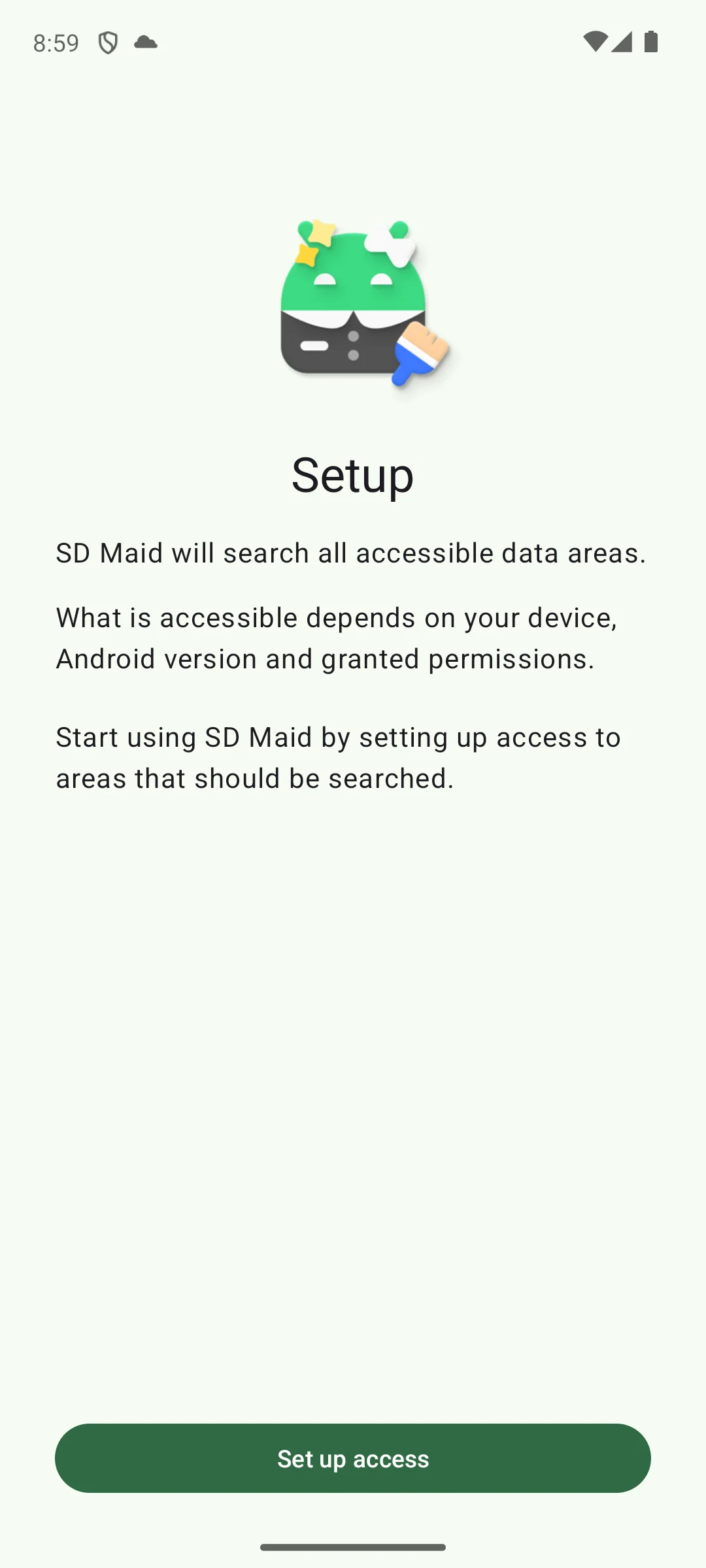
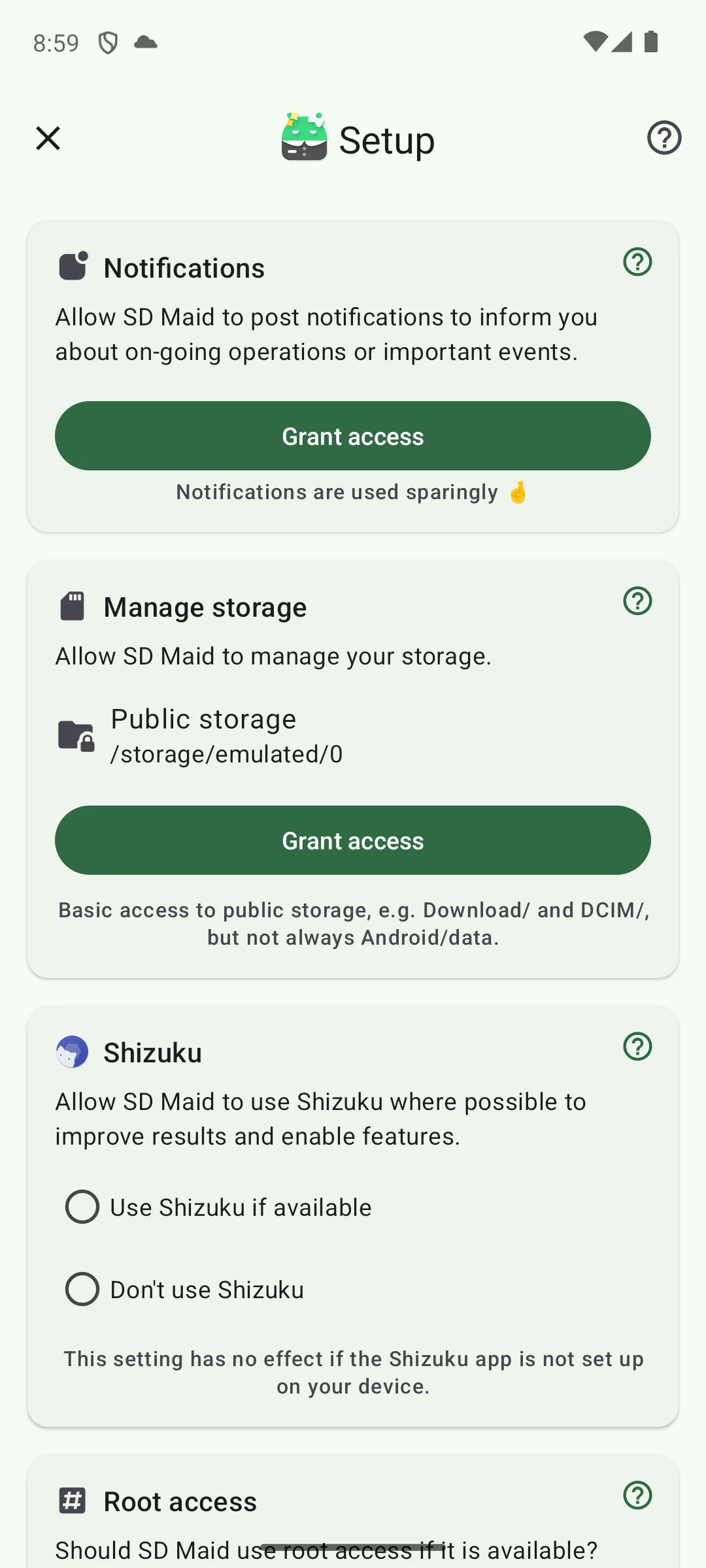
Screenshots of SD Maid 2/SE, captured on our own emulator on 18 August 2026.
Brand loyalists
4.5 stars, 3,082,613 reviews · 100,000,000+ installs · free to install · in-app purchases $1.39 to $39.99 per item · by Piriform · Contains ads: Yes · checked 27 September 2026
Google Play listing · 4.5 (3,082,613) · read 27 September 2026
CCleaner earns its slot on familiarity, and its storage analyser is genuinely useful for seeing where the space went. The blunt con is the advertising label on its listing, plus the Pro upsell. The larger caveat applies to this app and most others here: on Android 11 and newer it cannot reach another app's cache itself.
It is one of five apps on this page owned by Gen Digital, alongside Avast Cleanup, AVG Cleaner, Avira and Norton Cleaner.
For: a storage analyser that shows where space actually went; a familiar interface for anyone who used it on a desktop; a large install base and a solid rating. Against: the listing carries the Contains ads label; it cannot clear other apps' caches itself on Android 11 or newer; the Pro upsell is persistent.
Skip it if upsell screens wear you down. Choose CCleaner over Avast Cleanup for the desktop style sweep; both belong to Gen Digital.
↑ Back to the comparisonNon-techies
4.6 stars, 1,520,701 reviews · 50,000,000+ installs · free to install · in-app purchases $0.99 to $59.99 per item · by Avast Software · Contains ads: Yes · checked 27 September 2026
Google Play listing · 4.6 (1,520,701) · read 27 September 2026
Avast Cleanup is the hand holding option: the clearest visual map here of what is eating your storage, aimed at someone who does not want jargon. The blunt con is that its listing carries the advertising label, and the automation sits behind a paid plan.
Also one of the five Gen Digital entries here, and its engine overlaps almost entirely with AVG Cleaner.
For: the clearest storage breakdown on this page; a photo optimiser that shrinks large images rather than deleting them; a guided flow with no jargon. Against: the listing carries the Contains ads label; automation and the deep scan are paywalled; it cannot clear other apps' caches itself on Android 11 or newer.
Skip it if you refuse subscriptions. Choose Avast Cleanup over AVG Cleaner for the interface; the engine is near identical.
↑ Back to the comparisonSimple, no ads
4.6 stars, 261,938 reviews · 5,000,000+ installs · free to install · in-app purchases $2.99 to $69.99 per item · by NortonMobile · Contains ads: No · checked 27 September 2026
Google Play listing · 4.6 (261,938) · read 27 September 2026
Norton Cleaner, listed on Google Play as Norton Cleaner and formerly Norton Clean, is the quiet big brand pick: no advertising label, and a feature list that has grown well past the app this page used to describe. The blunt con is what the free install actually is: its own listing opens by calling it the mobile version of Norton Utilities Ultimate
, and the in-app purchases run into three figures.
Norton's own support page lists Quick Clean, Media Overview, Apps Overview, Deep Clean, Auto Cleaning, Browser Cleaner, Sleep Mode, Photo Optimizer and Cloud Transfers for Android, and the listing, read 27 September 2026, advertises finding duplicate and similar photos and cleaning residual cache files often left by uninstalled apps.
Norton's own listing, read 27 September 2026, says the app uses the Accessibility permission to stop all background apps with one tap, which is the booster behaviour the safety check above warns against. The CCleaner, Avast Cleanup and AVG Cleaner listings print the same line, and 1Tap Cleaner, SD Maid 2/SE, Zero Cleaner and Avira Security also declare an Accessibility service on their listings.
For: no advertising label on the listing; a documented feature set the vendor still publishes and updates; if you already subscribe to Norton Utilities Ultimate, signing in unlocks it at no extra cost. Against: the free install is the front end of a paid product, with purchases into three figures; it uses the Accessibility service, by its own listing; it cannot clear other apps' caches itself on Android 11 or newer.
Skip it if you want a small tool rather than the mobile client of a desktop suite. Choose Norton Cleaner over CCleaner when the absence of adverts matters more than familiarity.
↑ Back to the comparisonMinimalists
4.6 stars, 201,393 reviews · 10,000,000+ installs · free to install · one in-app purchase priced at $3.99 · by AZSoft Technology Inc. · Contains ads: Yes · checked 27 September 2026
Google Play listing · 4.6 (201,393) · read 27 September 2026
1Tap Cleaner does what its name promises and little else: app cache and default-app settings from a home screen shortcut, with a cheap one time unlock. The blunt con: the interface looks its age, the listing carries the advertising label, and the cache clearing it is named for is the part Android 11 and newer no longer let any app do by itself; its listing says an optional Accessibility service taps through it instead.
For: the cheapest unlock on this page; tiny and focused, with a home screen shortcut; lists the apps you set as defaults and clears the ones you pick, by its own listing. Against: the listing carries the Contains ads label; it cannot clear other apps' caches itself on Android 11 or newer; a dated interface and no storage analysis.
Skip it if you want guidance on what is safe to delete. Choose 1Tap Cleaner over Zero Cleaner for broader clearing and a far stronger rating.
↑ Back to the comparisonSecurity users
4.7 stars, 734,529 reviews · 10,000,000+ installs · free to install · in-app purchases $0.99 to $104.99 per item · by AVIRA · Contains ads: No · checked 27 September 2026
Google Play listing · 4.7 (734,529) · read 27 September 2026
Avira Security, listed on Google Play as Avira Security Antivirus and VPN, is a security suite with a junk cleaner attached, and it shares this page's top rating with SD Maid 2/SE. The blunt con: the cleaning tools are basic, and the paid plans stretch far past what a cleaner is worth on its own.
If you are weighing it for the protection rather than the cleaning, our antivirus guide has the full protection evidence. The one figure this page needs: AV-TEST's Android round of July 2026, read 27 September 2026, scores Avira 6 of 6 for protection. It is also one of the five Gen Digital brands on this page.
For: antivirus and cleanup in one app, with a 6 of 6 AV-TEST protection score from July 2026; a 4.7 rating on its US listing (27 September 2026), level with SD Maid 2/SE for the top spot here; no advertising label on the listing. Against: the storage tools are basic next to a dedicated cleaner; paid plans stretch well past cleaner money; it cannot clear other apps' caches itself on Android 11 or newer.
Skip it if you only want storage work. Choose Avira over Norton Cleaner if you want a scanner and a cleaner in one app; Norton Cleaner does storage only.
↑ Back to the comparisonAVG users
4.6 stars, 1,973,003 reviews · 100,000,000+ installs · free to install · in-app purchases $1.49 to $39.99 per item · by AVG Mobile · Contains ads: Yes · checked 27 September 2026
Google Play listing · 4.6 (1,973,003) · read 27 September 2026
AVG Cleaner is Avast Cleanup in different clothes, and its duplicate and blurry photo finder clears more real clutter than any cache tool on this page ever will. That is the useful half. The blunt con: the photo features and the automation need the paid tier, and the listing carries the advertising label.
Photos are where the space actually is on most full phones, so a duplicate finder is doing more valuable work than a cache cleaner. Check yours under Settings, Storage, where Android breaks usage down by type. Also one of the five Gen Digital entries here, sharing an engine with Avast Cleanup.
For: duplicate and blurry photo detection, which addresses the category that usually fills a phone; a very large install base; the same engine as Avast Cleanup, in a different interface. Against: the listing carries the Contains ads label; the photo tools and automation are paywalled; redundant if you already run Avast Cleanup.
Skip it if you already use its Avast twin. Choose AVG Cleaner over Avast Cleanup if you already live in the AVG ecosystem.
↑ Back to the comparisonFull control
4.5 stars, 158,566 reviews · 10,000,000+ installs · free to install · in-app purchases $0.99 to $22.99 per item · by NeatBytes · Contains ads: Yes · checked 27 September 2026
Google Play listing · 4.5 (158,566) · read 27 September 2026
Solid Explorer is not a cleaner at all but a dual pane file manager, and on a platform where no app may clear another app's cache, seeing every folder and deciding yourself is a more honest answer than most of this list. The blunt con: no junk detection whatsoever, and the listing carries both the advertising label and in-app purchases.
Two things to know before installing. The developer documents no free trial anywhere, not on its site, not in its FAQ and not on the listing, so budget for the unlock rather than a free period. And its Data Safety section declares that data may be shared with third parties, that app activity and device identifiers may be collected, and that collected data cannot be deleted.
For: full manual control, with a dual pane design built for moving files; cloud storage connections built in; it does the one thing Android 11 and newer still let any app do without help: show you your own files. Against: no junk detection and no suggestions at all; the listing carries the Contains ads label and sells an unlock the developer never prices; its Data Safety section declares that collected data cannot be deleted.
Skip it if you want an app to find junk for you. Choose Solid Explorer over Files by Google to hunt big folders by hand; other manual options are in the file manager list.
↑ Back to the comparisonApp cache only
3.8 stars, 6,639 reviews · 1,000,000+ installs · free to install · one in-app purchase priced at $4.49 · by Red Soft · Contains ads: Yes · checked 27 September 2026
Google Play listing · 3.8 (6,639) · read 27 September 2026
Zero Cleaner is honestly narrow: its own listing feature list is cache and nothing else, with an optional automatic routine and no dashboard theatre. It is also the lowest rated entry here. The blunt con is what its listing declares about data.
Its Data Safety section, read 27 September 2026, declares that location, app activity and two other data types may be both collected and shared with third parties, and that collected data cannot be deleted. Red Soft's own privacy policy attributes the advertising data to Google AdMob, which it says may collect advertising identifiers, device information and approximate location to serve ads. The developer discloses all of this, which is more than several better known entries here do, but a reader choosing a minimalist tool deserves to see it.
On the accessibility question, be precise: the listing says the service is used to automate the clear cache function, and offers manual clearing as well, so it is not strictly required.
For: single purpose, with a feature list that is entirely cache scoped; an optional automatic routine, and a feature list free of the dashboard theatre this category is known for; the developer completed Data Safety and publishes a policy naming its ad provider. Against: its Data Safety declares data may be shared with third parties and cannot be deleted; the lowest rating on this page, 3.8 from the smallest review base here, 6,639 reviews on its US listing on 27 September 2026; the listing carries the Contains ads label, in a tool whose selling point is minimalism.
Skip it if you are not comfortable with the data declarations above. Choose Zero Cleaner over 1Tap Cleaner only when cache is literally all you want cleared.
↑ Back to the comparisonThe single most useful thing on this page is a limit Google published and most cleaner listings have not caught up with. Android 11's storage changes page states that On Android 11, apps can no longer access files in any other app's dedicated, app-specific directory within external storage
, and the All files access documentation says that even that permission, the broadest storage permission Android has, still cannot reach the app-specific directories that belong to other apps
. App caches live in exactly those directories.
So when a cleaner offers to clear every app's cache, an ordinary phone leaves it two routes, and both end at Android's own controls. It can ask the system to, through an intent that shows you a confirmation dialog, or it can use an Accessibility service to open each app's settings and tap Clear cache for you, which is what SD Maid's FAQ says it does and what the 1Tap Cleaner and Zero Cleaner listings describe; the same FAQ names root and the ADB helper Shizuku as faster routes for phones set up for them. Google attaches its own warning to the dialog route, saying the bulk clear action can substantially affect device battery life and might remove a large number of files from the device
. That is the opposite of the promise on most of these listings.
Meanwhile the system does the job unprompted. Android's app storage documentation says that When the device is low on internal storage space, Android may delete these cache files to recover space
, and the platform even counts reclaimable cache as space it can hand back on request. Clearing a single app's cache by hand is still worth doing when that one app misbehaves. Doing it on a schedule, across every app, is work the platform already does better.
What genuinely frees space is duller and larger: uninstall what you never open, deal with photos and videos, and empty your downloads and the bins, step by step in how to actually free up storage on Android. Clips you want to keep can be shrunk instead of deleted; 13 video compressor apps for Android are compared on their own page. Open Settings, then Storage, and Android will break your own usage down by type, which is a more reliable answer than any percentage a roundup could quote you.
Every rating, review count, install figure, price, purchase range and advertising label on this page was read on 27 September 2026 from each app's own Google Play listing in the United States storefront, reached through that app's own store link, along with its Data Safety section. Claims about what an app does or costs come from the developer's own site or help centre first and the listing description second. Claims about what Android permits come from Google's own developer documentation, quoted and linked in the sentence that uses them, because that is the only source that can settle them. Where a developer documents nothing, this page says so rather than guessing. We re-check quarterly.
Storage sorted, so what actually keeps private apps private?
Our answer there: the built-in private space on Android 15 or newer, because Google documents that apps inside it are hidden from the launcher, recent views and Settings when locked, which no third party locker on that page can do, data checked 18 August 2026.
See it against 6 rivalsUsually not. Android's own developer documentation says that when the device is low on internal storage space, Android may delete cached files to recover space, so the main job a cleaner advertises is one the platform already does. Since Android 11 a third party app cannot even reach another app's cache directory; without root or ADB access, what remains is a system dialog you confirm, or an Accessibility service that taps each app's Clear cache button for you. What still helps is uninstalling apps you never open and dealing with photos and videos. Checked 27 September 2026.
Not by itself, not on Android 11 or newer. Google's storage documentation says apps can no longer access files in any other app's app-specific directory, and that even All files access, the broadest storage permission Android offers, still cannot reach those directories. An app can invoke a system action that asks you to confirm clearing caches across the device, and Google warns that this can substantially affect battery life. SD Maid 2/SE, 1Tap Cleaner and Zero Cleaner say on their listings that they use an Accessibility service to automate cache clearing, which SD Maid's FAQ describes as tapping each app's Clear cache button for you, one app at a time. Checked 27 September 2026.
No, and Google explains why. Android's memory documentation states that the platform runs on the premise that free memory is wasted memory, and that the system keeps apps in memory after they are closed so you can switch back quickly. A booster discards that cache, the system reloads the apps, and you are back where you started with less to show for it. Checked 27 September 2026.
Files by Google, and it is the only one of the ten here with no ads label and nothing to buy. Six of the ten carry Google Play's Contains ads label, read on the US listings on 27 September 2026: CCleaner, Avast Cleanup, 1Tap Cleaner, AVG Cleaner, Solid Explorer and Zero Cleaner. Of the other four, SD Maid 2/SE, Norton Cleaner, Avira Security and Files by Google, only Files sells nothing inside the app at all.
Five of the ten are not. CCleaner, Avast Cleanup, AVG Cleaner, Avira and Norton Cleaner all belong to Gen Digital: Avira, AVG and CCleaner each say on their own sites that they are part of Gen, and Gen's own brands page names Norton and Avast. If you already pay for one of them, use the cleaner you already own rather than installing a second. Checked 27 September 2026.
Google's Android Help page on freeing up storage says you can usually clear an app's cache in your phone's Settings app, though settings vary by phone, and that clearing cache deletes temporary data, so some apps may be slow the next time you open them. On Samsung Galaxy phones, Samsung's US support page gives the route: Settings, then Apps, then the app, then Storage, then Clear cache. Checked 27 September 2026.
Usually not. Samsung's US support page on freeing up storage, read 27 September 2026, sends Galaxy owners to Settings, then Device care, then Storage, where files can be reviewed and deleted by category such as Images, Videos, Audio files and Documents. The same page says the Memory option, Clean now, stops background apps, which is the booster behaviour Android's own memory documentation argues against.
Check the listing first. On 27 September 2026, seven of the ten US Google Play listings here declared in their Data Safety section that the app may share data with third parties; Files by Google, SD Maid 2/SE and 1Tap Cleaner declared no data shared, and SD Maid 2/SE also declared no data collected. Walk away from any cleaner that asks for contacts, SMS or call logs, promises to boost RAM, or reached you through a pop-up ad.
Usually not. Google's Streaming Help page for Chromecast with Google TV and Google TV Streamer gives a built in route that clears cached data for every app at once, under Settings, System, Storage, Internal shared storage, Cached data, and says you stay signed in to your apps. Other TV boxes vary by maker. A tablet on Android 11 or newer has the same storage limits as a phone, so the advice on this page applies unchanged. Checked 27 September 2026.
Checked 27 September 2026: all ten US Google Play listings re-read on 27 September 2026; no pick changed, and none is gone or stale. SD Maid 2/SE rates 4.7 from 10,148 reviews, level with Avira Security, and the table's 4.1 for SD Maid 2/SE and 4.4 for Solid Explorer are corrected to 4.7 and 4.5. Corrected: six of the ten listings carry the Contains ads label, not five, since Zero Cleaner carries it too; Zero Cleaner, not SD Maid 2/SE, has the smallest review base; the line that the most any app can do about other apps' caches is show a system dialog, since SD Maid 2/SE, 1Tap Cleaner and Zero Cleaner document an Accessibility service that automates it; the claim that no store-bought cleaner here removes leftovers of uninstalled apps, since the Norton Cleaner listing advertises it; the Gen Digital brand list; and Avira's AV-TEST round, July 2026 rather than May. Retracted: call logs and browser history on 1Tap Cleaner, since its listing does not mention call logs and Android 6.0 removed the browser history permissions its listing names; and the Smart Storage line on Files by Google, which no source read that day states. The social card, which still described the July version of this page, was replaced. Added: questions on clearing cache without an app, Samsung phones, cleaner app safety, and TV and tablets.
Checked 18 August 2026: the page was rebuilt around what Android actually permits, and six claims did not survive the check. The largest addition is a limit Google published and this page argued around rather than citing: since Android 11 no third party app can reach another app's cache directory, even with All files access, so most of the apps here can only ask the system to clear caches through a dialog you confirm. Android also deletes cached files itself when storage runs low. Both are now quoted from Google's own documentation, and the table has a column saying which apps can do what. Retracted: that SD Maid 2/SE offers a one-time unlock, no subscription. Its developer's own FAQ says the upgrade is sold as a one-time purchase or a subscription. Retracted: the SD Maid price range printed on this page, which no source publishes; the listing gives a per item floor and ceiling across everything the app sells, which is not the same as the unlock's price. Retracted: the description of Norton as the app with the fewest features in this group and no duplicate photo tools, and the claim that it does the least of any big-brand pick here. Norton's own support page lists nine Android features including Auto Cleaning, Photo Optimizer and Deep Clean. Its price cell also read free with no ads while its listing sells into three figures, and its own listing calls it the mobile version of Norton Utilities Ultimate. Retracted: that photos and videos usually take 60-80% of used storage, a figure no Google or Android source publishes, replaced by pointing you at your own Settings, Storage breakdown. Retracted: that one button in Google Photos routinely recovers more gigabytes than every cleaner on this list combined, which nothing measures. Retracted from Solid Explorer: the free trial with ads and the line about what happens after the trial it wants an unlock. The developer documents no trial anywhere. Retracted from the safety checklist: A storage tool needs storage access and nothing else, which is now stated more usefully, since even the broadest storage permission Android offers cannot reach another app cache directory. Retracted from Zero Cleaner: no scare screens, which no source can establish. Added in its place, from its own listing, that its Data Safety declares data may be shared with third parties and cannot be deleted. Added: an advertising column, since five of the ten listings carry the label and the table showed it for four; the Accessibility service dependency on Norton, which this page held against Zero Cleaner while omitting it there; Solid Explorer's own declaration that collected data cannot be deleted; and Avira's current independent protection result, cross referenced to our antivirus guide rather than asserted here. App names brought back to what the listings say: Norton Cleaner, formerly Norton Clean, and Avira Security.
 How to Recover Deleted Photos on AndroidPhoto & Video