
Checked 3 September 2026
Six apps with a Play listing, compared on the one question the category avoids: what each can actually do on a current phone that has not been rooted. If a slow phone is part of the same problem, a cleaner app sits alongside these.
AccuBattery is the pick because it measures rather than promises, Greenify the free one with no ads, Brevent the way to stop apps without root. Our answer, the free pick and the table ↓
Checked 3 September 2026: no pick changed since 20 August, when every figure was re-read; the three picks re-read again on 3 September
Full logSix Android battery apps. None adds capacity to a battery; what separates them is whether the app measures, hibernates, stops or automates, and what the phone must allow first.
AccuBattery is our best overall Android battery app because its listing, read 3 September 2026, describes measuring capacity in mAh and charge wear, not saving power, free with ads and purchases to $24.99.
Greenify is our best free Android battery app because its listing, read 3 September 2026, carries no advertising label and no in-app purchases, though its description sells a separate $2.99 add-on.
Brevent is our Android pick for stopping apps without root because its listing, read 3 September 2026, says it force stops named apps when debugging is on, a privilege Google’s permission reference shows no ordinary app has, free with no ads and purchases to $3.99.
Data checked: 3 September 2026.
Every app on this page sits in one of three tiers, and each entry says which one applies to it.
Best for battery health
Rating 4.7 from 601,791 reviews · Installs 10,000,000+ · Free to install · In-app purchases $1.19 to $24.99 per item · Developer Digibites · Listing updated 6 November 2025 · Contains ads: Yes · checked 1 September 2026
Google Play listing · 4.7 (601,791) · read 1 September 2026
AccuBattery measures the battery instead of promising to change it, and it changes nothing: the permission list on its own listing asks for nothing that could close or stop another app. What it reports is capacity in mAh, discharge speed per app, and the wear each charge session causes. It is free to install and its listing carries the Contains ads label. Its Data Safety section says it may share data with third parties and may collect data, with deletion only on request, and its in-app purchases reach $24.99 per item, the highest ceiling on this page.
Two statements by the same developer, on the same listing, do not quite agree. Its description says the app does not require access to privacy sensitive information. Its Data Safety section says it may share data with third parties and may collect data. Both were read on 1 September 2026, and this page reports the gap rather than choosing the flattering half.
Skip this if. Skip it if you want something that changes how apps behave rather than something that tells you what they did.
Choosing between them. Choose AccuBattery over Battery Guru for the far larger review sample and for its stated method behind the per app figure, and Battery Guru over AccuBattery for temperature history, a wakelock monitor and a listing maintained this month. Both describe capacity in mAh and wear per charge, so that is not what separates them.
Best free · no computer needed
Rating 3.5 from 320,203 reviews · Installs 10,000,000+ · Free to install · No in-app purchases listed · Developer Oasis Feng · Listing updated 31 August 2024 · Contains ads: No · checked 1 September 2026
Google Play listing · 3.5 (320,203) · read 1 September 2026
Greenify hibernates the apps you name so they stop waking the phone, through the Android accessibility service on a phone without root, and nobody has updated its listing since 31 August 2024. That listing carries no advertising label and no in-app purchases, which is not the same as nothing to buy: its description sells extra features through a separate donation package, a second Play app of its own priced at $2.99, read 20 August 2026.
What Greenify adds on a current phone is narrower than the category suggests, and its own description says so. It leads on Aggressive Doze and Doze on the Go, and Doze is Google’s own feature, not Greenify’s: the Android documentation on Doze and App Standby, last updated 18 August 2026 and re read on 20 August 2026, describes Doze as deferring background CPU and network activity when a device is unused. Greenify brings that on sooner for apps you choose. It does not do something the system cannot.
Skip this if. Skip it if you need instant notifications from the apps you would hibernate, which its own listing tells you not to hibernate at all.
Choosing between them. Choose Greenify over Brevent when you will not connect the phone to a computer, and Brevent over Greenify when you want a listing that was maintained this year.
Best charging and temperature detail
Rating 4.5 from 34,464 reviews · Installs 1,000,000+ · Free to install · In-app purchases $0.99 to $12.99 per item · Developer Paget96 · Listing updated 18 August 2026 · Contains ads: Yes · checked 2 September 2026
Google Play listing · 4.5 (34,464) · read 2 September 2026
Battery Guru, which Play lists as Battery Guru: Battery Health, is the most detailed monitor here and the most recently maintained, and by its own developer it changes nothing about the battery. Its description covers actual capacity in mAh against the original design capacity, wear per charging cycle, live charging current in mA, voltage, a temperature history, deep sleep and awake time, and a wakelock monitor. It is free to install and its listing carries the Contains ads label. Its Data Safety section says it may share data with third parties and that data cannot be deleted, and in-app purchases run $0.99 to $12.99 per item.
The clearest statement of what this whole category can and cannot do is written by this app’s own developer, on the app’s own Google Play listing, read 2 September 2026: "Battery Guru reads data directly from your device battery system. It measures and displays accurate values only. It does not claim to modify your battery, speed up charging or extend battery life in any way."
Skip this if. Skip it if a permanent readout and a stream of alerts are more than you want from a battery app.
Choosing between them. Choose Battery Guru over Wakelock Detector for a wakelock monitor that is still maintained, and over AccuBattery for temperature history, alarms and an always on readout. Choose AccuBattery over it for the far larger review sample.
Best plain wakelock list
Rating 2.9 from 960 reviews · Installs 100,000+ · Free to install · In-app purchases $0.99 to $1.49 per item · Developer Gomsak Apps · Listing updated 2 April 2017 · Contains ads: Yes · checked 1 September 2026
Google Play listing · 2.9 (960) · read 1 September 2026
Wakelock Detector does one job, listing per app which apps have held a CPU or screen wakelock since the last boot, and it shows nothing at all until a computer has granted it a permission over adb. Its listing has not been updated since 2 April 2017 and its Data Safety section reads No information available. It is free to install, its listing carries the Contains ads label, and in-app purchases run $0.99 to $1.49 per item.
Read this first. The LITE build runs without root, but not without a computer, and not once. Its listing says setup steps are needed and links a presentation for them, read 20 August 2026, which is where the terms are: the phone goes on a USB cable to a computer, you must have access to adb on command line, and the workaround holds "only once unless you reboot your phone". Its own FAQ slide is blunter, answering yes to whether the steps repeat after a reboot, because Android resets adb on restart. It offers two commands and they are not equivalent. Prefer the one that grants the app the BATTERY_STATS permission: the other is what Google’s adb documentation, last updated 18 June 2026 and re read on 20 August 2026, describes as setting the device to listen for a TCP/IP connection over the network, with its own warning that not every access point suits that.
How much a wakelock list still tells you has narrowed since this listing was written. Google’s Doze and App Standby documentation, last updated 18 August 2026 and re read on 20 August 2026, lists ignoring wake locks among the restrictions the system applies while a device is in Doze. A wakelock that would once have kept a phone awake all night is deferred by the system now, so the list earns its keep for the hours a phone is in a pocket and not yet idle, not for the night.
Skip this if. Skip it unless a plain wakelock list is exactly the missing piece and you are willing to redo the setup after every reboot: everything else here is maintained and this is not.
Choosing between them. Choose Battery Guru over Wakelock Detector for the same kind of information from a listing that was updated this month.
Best for automating power settings
Rating 4.4 from 94,067 reviews · Installs 10,000,000+ · Free to install · In-app purchases $1.49 to $10.00 per item · Developer ArloSoft · Listing updated 15 August 2026 · Contains ads: Yes · checked 1 September 2026
Google Play listing · 4.4 (94,067) · read 1 September 2026
MacroDroid is not a battery app, it is the only entry here that will change a setting on a trigger you write, and it cannot stop another app: a rule can dim the screen or switch a radio off at a battery level you pick, and that is where its reach ends. It is free to install, its listing carries the Contains ads label, its own description calls the free version ad supported and caps it at five macros, and in-app purchases run $1.49 to $10.00 per item.
Read this first. Its own listing asks for more than the store will give it. The permission list on the app’s own Google Play listing, read 20 August 2026, names close other apps, force stop other apps and modify battery statistics. What those are worth to an app installed from the store is settled by Android’s own permission reference, last updated 14 August 2026 and re read on 1 September 2026: the call behind closing other apps "is no longer available to third party applications" from the release Google numbers API level 34, and what it kills instead is the calling app’s own background processes. Declaring a permission and being granted it are different things.
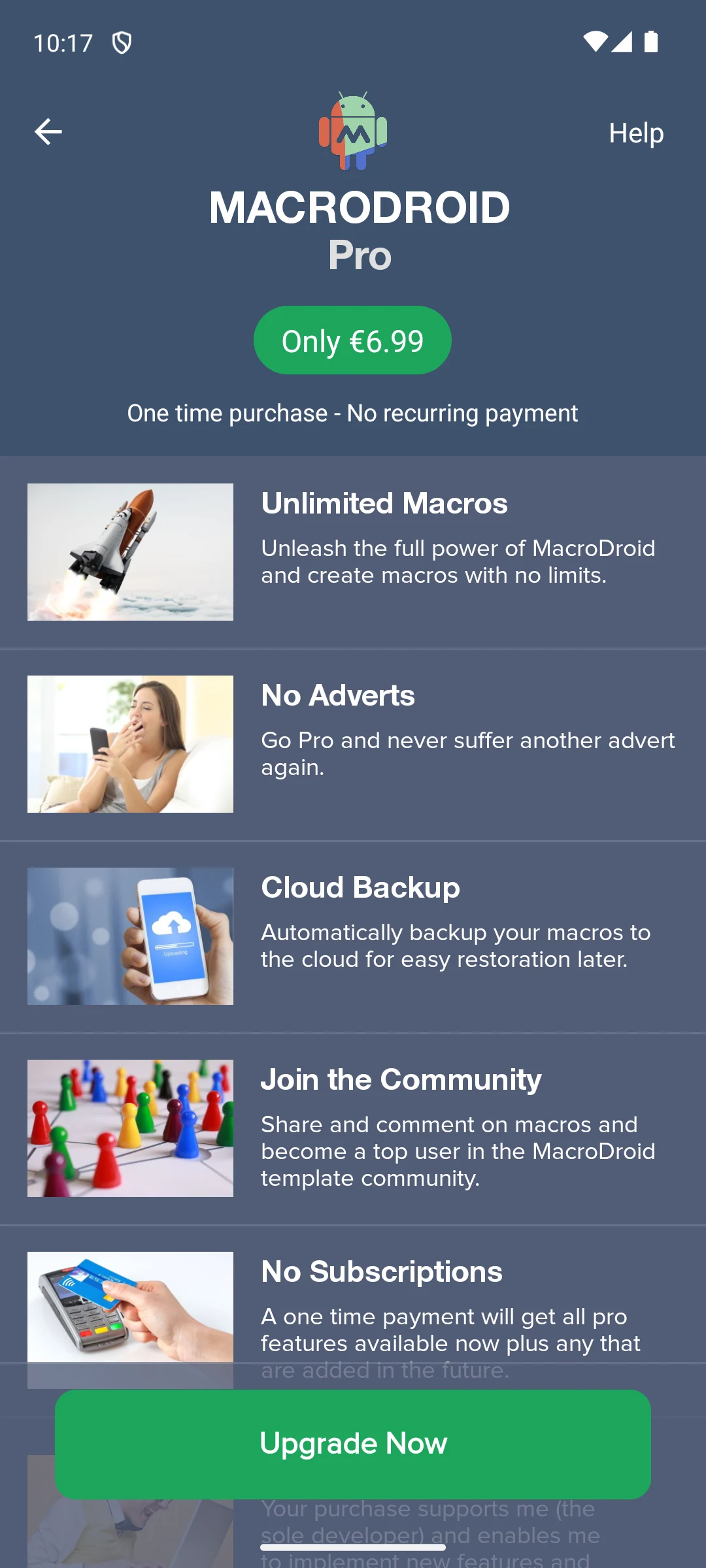
The screen below is the app’s own upgrade page, and it is the plainest description of the free build there is: the paid unlock is offered as the way to remove the adverts and the macro limit, which means the free build carries both. The developer’s description on the app’s own Google Play listing, read 20 August 2026, says the same in words: the free version is ad supported and lets you create up to five macros.
Skip this if. Skip it if you want a readout rather than a rule: its own description offers battery as something a rule can start from, not as anything it will show you.
Choosing between them. Choose MacroDroid over everything else here only when the answer you want is an automatic setting change, not a number. If you want a named app stopped, that is Brevent.
Best for stopping apps without root
Rating 4.1 from 16,808 reviews · Installs 10,000,000+ · Free to install · In-app purchases $0.99 to $3.99 per item · Developer Jianyu Studio · Listing updated 1 July 2026 · Contains ads: No · checked 3 September 2026
Google Play listing · 4.1 (16,808) · read 3 September 2026
Brevent puts named apps into standby or force stops them, the only entry here whose own description says it force stops apps without root, and it will not start until you have opened developer options and attached the phone to a computer. That is not a one off inconvenience either: the developer states it needs USB or wireless debugging switched on, so the debugging switch stays part of the arrangement. It is free to install, its listing carries no advertising label, and in-app purchases run $0.99 to $3.99 per item.
The developer sets out the requirement on the app’s own Google Play listing, read 20 August 2026, which states that Brevent supports Android 6 to Android 17 and requires USB debugging, or wireless debugging from Android 11 on, in developer options. That is the whole reason it can force stop an app on a phone without root: the privilege comes from the debugging bridge, not from the app, and its own permission list asks for no stopping permission at all. The same listing points at the developer’s own activation page, read 20 August 2026, which publishes an adb command that starts a Brevent server process on the phone, typed at a command line or sent from Chrome or Edge over WebUSB.
Skip this if. Skip it if you will not open developer options, because the setup does not work without it.
Choosing between them. Choose Brevent over Greenify for a maintained listing and no data collection, and Greenify over Brevent when no computer is available.
No app adds capacity to a battery, and on a current phone without root an installed app cannot close another app by itself either. The second half is not our opinion: Android’s own permission reference, last updated 14 August 2026 and re read on 20 August 2026, says the call an app would use to close another app’s background processes "is no longer available to third party applications", and that "the background processes of the caller’s own package will still be killed" instead. So what the six do is narrower than the category promises: three measure and report, two stop or hibernate apps you name through a privilege you grant them, and one builds rules that change a setting. Anything advertising hours of extra life from a single tap is selling the promise rather than the result.
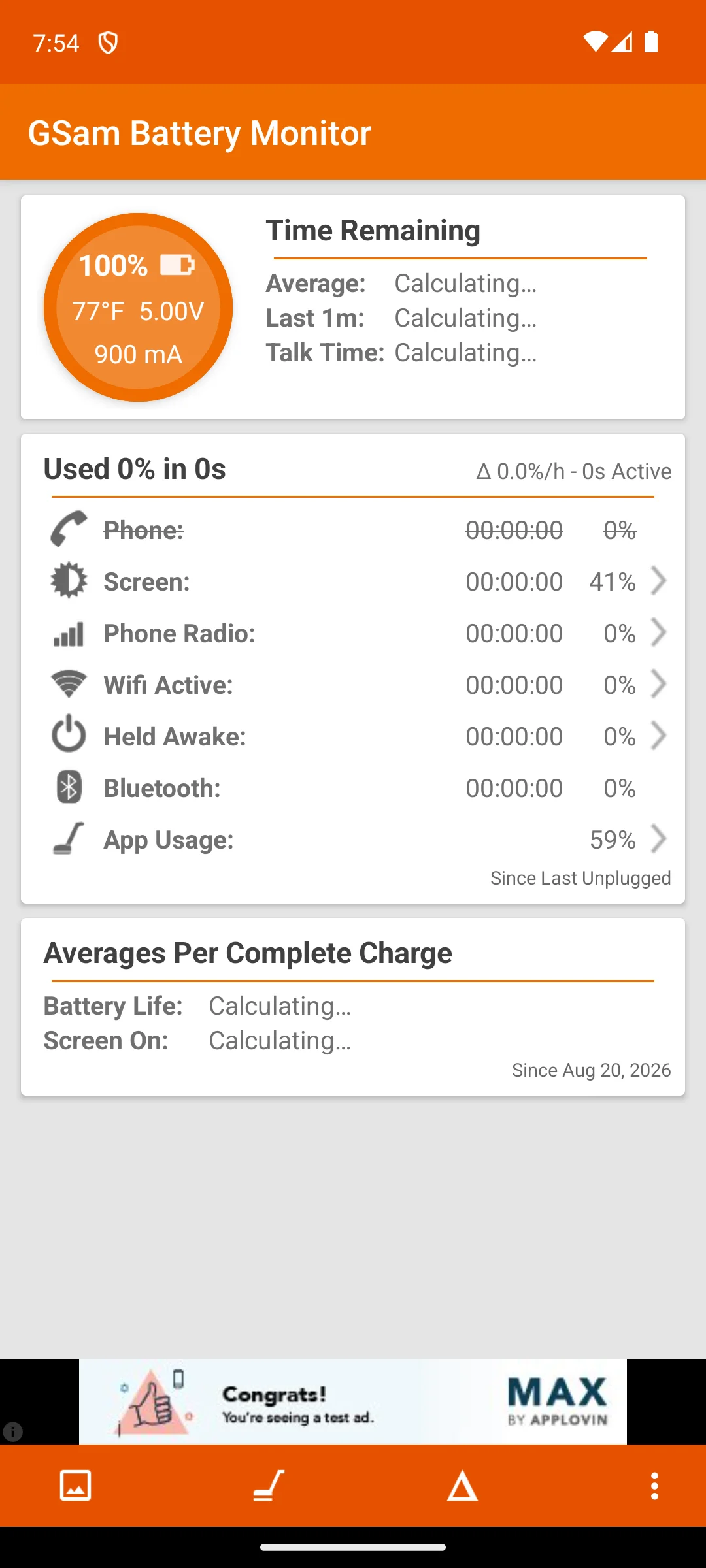
The screenshots here are our own captures from an Android emulator, taken on the date shown. An advertising banner sits along the bottom of that same screen, which is what the free build looks like. On our emulator the banner reads as a test placeholder rather than a real advert, because no ad network serves a real one there. The screenshot below is ours, taken on 18 August 2026.
The permission lists on the six listings, read 20 August 2026, say something the feature lists do not. AccuBattery and Battery Guru ask for no permission that could close or stop another app, which is what measuring only looks like on a listing. Wakelock Detector [LITE] asks for read battery statistics and nothing that stops anything, which is exactly the permission its setup has adb grant. Greenify asks for close other apps and force stop other apps, and works through the Android accessibility service. MacroDroid asks for both of those too. Brevent, the one entry whose own description says it force stops apps, asks for neither: its privilege comes from the debugging bridge rather than from anything the store handed it.
Most of what a booster advertises is already running, with no app installed and no permission granted. Google’s documentation on background execution limits, last updated 3 March 2026 and re read on 20 August 2026, states that when an app goes into the background it gets a window of several minutes, and that at the end of it "the system stops the app’s background services". The Doze and App Standby documentation, last updated 18 August 2026 and re read on 20 August 2026, describes Doze as deferring background CPU and network activity when a device is unused, and lists ignoring wake locks among the restrictions it applies. App Standby Buckets, last updated 14 August 2026 and re read on 20 August 2026, sorts every app into priority buckets that decide how often it may run, and the lowest of them is named Restricted. A task killer is claiming to do the job the system is already doing.
The controls are already on the phone, under Settings. These are settings screens rather than documented interfaces, so the wording moves between manufacturers and your own device is where to confirm each one:
On most phones the display sits at or near the top of that usage list, which is something to check on your own phone rather than take from us, so the two changes worth making first are free. Lower the brightness, or leave automatic brightness on so it drops indoors, and shorten the screen timeout so the display is not lit on a table. A dark theme and an adaptive rather than fixed refresh rate are worth trying too, with the caveat this page owes you: how much either saves depends on the screen in your phone, and no source here puts a number on it, so none is given. Google’s own dark theme guidance, last updated 14 August 2026 and read on 20 August 2026, gives the path: Settings, then Display, then Theme.
When a phone drains far faster than usual, the cause is usually one app rather than general wear. Open the battery usage screen in Settings and look at the top of the list. If something you barely opened is up there, restrict it, update it or remove it. That is where a monitor earns its place: it names the process keeping the phone awake when the built in screen stops short of saying which one it is.
Four of the six listings carry the Contains ads label: AccuBattery, Battery Guru, Wakelock Detector [LITE] and MacroDroid. Greenify and Brevent do not. Five of the six are free to install with in-app purchases on top, and Greenify is the only one whose listing carries no purchase range at all. That is narrower than it sounds: Greenify’s own description sells a donation package that is a separate app with its own price, so an empty purchase field is not the same as nothing to buy. Three of the four ad supported listings also sell an upgrade whose own description names removing the advertising as part of what the money buys. Every figure was read on 20 August 2026, and the ranges are in the table above and in each section.
The Data Safety sections diverge more than the feature lists do. Brevent declares no data collected at all. Greenify declares no data shared with third parties, and also that data cannot be deleted. AccuBattery, Battery Guru and MacroDroid each declare that they may share data with third parties, and of those only AccuBattery and MacroDroid say deletion can be requested. Wakelock Detector [LITE] publishes no Data Safety information whatever. Each line is the developer’s own declaration on its listing, not an audit.
To understand the battery, open one monitor and stop there. AccuBattery and Battery Guru both describe capacity in mAh and wear per charge, so pick on the rest: AccuBattery for the far larger review sample, Battery Guru for temperature history and an always on readout on a listing kept current. Neither will change anything, and by Battery Guru’s own developer that is the point. To change what other apps do, choose by what you will set up: Brevent if you will open developer options and attach the phone to a computer, Greenify if you will not. MacroDroid is worth adding only when the answer you want is an automatic setting change, and Wakelock Detector [LITE] only when a plain wakelock list is the missing piece and you will redo its setup after every reboot.
Not the way the advertising claims. No app adds capacity to a battery, and on a current phone without root an installed app cannot close another app by itself: Google's own Android permission reference says the call it would use is no longer available to third party applications. The useful ones either show what is draining the charge, so the cause can be fixed, or stop named apps after you have granted them a privilege the system does not hand out freely. Checked 20 August 2026.
Four of the six. AccuBattery, Battery Guru, Wakelock Detector [LITE] and MacroDroid all carry the Contains ads label on their Google Play listings. Greenify and Brevent do not. Three of the four also sell an upgrade that their own descriptions say removes the advertising. Greenify carries no advertising label and no in-app purchase range, though its description sells a separate paid add-on app. Checked 20 August 2026.
Brevent, and Greenify in a narrower way. Brevent force stops or standbys named apps, and its developer states that it needs USB or wireless debugging turned on in developer options, so a computer is involved in getting it running. Greenify hibernates named apps through the Android accessibility service and drives the system's own Doze earlier. The other four do not stop apps: three measure or list, and MacroDroid changes settings by rule. MacroDroid's listing does declare a close other apps permission, and Android's own permission reference says that call is no longer available to third party applications. Checked 20 August 2026.
AccuBattery, with Battery Guru close behind, and they overlap more than the marketing suggests. Both descriptions claim actual capacity in mAh and the wear each charge causes, and both describe an alarm that tells you when to unplug. AccuBattery has the far larger review sample and sets out how it arrives at the per app figure; Battery Guru adds temperature history, an always on readout and a listing updated this month. Checked 20 August 2026.
For two of them, yes, and for one of those it is not a one off. Brevent needs USB or wireless debugging enabled in developer options, which its own listing states, and the developer's activation page publishes an adb command. Wakelock Detector [LITE] needs a computer to grant it a battery statistics permission over adb, and its own setup presentation says the steps have to be repeated after every reboot, because Android resets adb on restart. The other four need nothing but an install. Checked 20 August 2026.
That is normal on Android, and fighting it usually wastes power. Apps restart to listen for messages or to sync, so each forced close costs a small burst of energy. Google's documentation on background execution limits says the system already stops an app's background services once it has been in the background for a few minutes. If one app misbehaves, restrict it in the battery section of Settings rather than closing it over and over. Checked 20 August 2026.
Both monitors here point the other way. The AccuBattery description covers a charge alarm to remind you to unplug the charger, and the Battery Guru description covers a full charge alarm so the charger comes off at the right time. Neither names a percentage. If your phone has a built in charge limit setting, it does the same job with no extra app. Checked 20 August 2026.
Checked 20 August 2026: every rating, review count, install band, price, in-app purchase range, advertising label, permission list and Data Safety section was re read from each listing, and every figure on the page had moved or was confirmed. AccuBattery now reads 4.7 from 600,167 reviews, Battery Guru 4.5 from 34,256 with its listing updated 18 August 2026, MacroDroid 4.4 from 93,714 with its listing updated 15 August 2026, Brevent 4.1 from 16,626, Greenify 3.5 from 320,260 and Wakelock Detector [LITE] 2.9 from 961. The verdict block was rebuilt as the Our answer capsule the owner ruled for on 18 August 2026, so each pick is one sentence that survives being quoted on its own. The comparison table gained the column the page actually turns on, what each app can do on a phone without root, and its price column was split to carry the purchase range, because the old column read Free to install in five rows out of six and separated nothing. The How we verify box lost its first tier, headed Installed and examined, which described examining apps on an emulator: the standing rule here is verified, not tested, and that rule has no exception for a verification box. The paragraph beside the MacroDroid screenshot was rewritten for the same reason, and the euro upgrade price it quoted from that screen was dropped, because this page reads the United States storefront and the listing’s own purchase range already covers it. Five claims were withdrawn or narrowed rather than removed. Greenify was described as having nothing to buy, in the capsule, the table and the prose: its listing carries no in-app purchase range, but its own description sells a donation package that is a separate priced app, so the page now says that instead. MacroDroid was described as stopping no other app, which its own permission list contradicts; the permission reference settles it, so both the source and the wording changed. Wakelock Detector [LITE] was described as needing a computer once, and its own setup presentation says the workaround is repeated after every reboot; that presentation, cited three times and linked nowhere, is now linked. AccuBattery was credited with measuring capacity and wear that nothing else here claims, and the Battery Guru listing on this same page claims both, so the exclusivity came out and the Battery Guru summary gained the two lines it was missing. The claim that no app can stop another on an unrooted phone was repeated four times with no source and now cites the reference that states it. Three more absolutes went the same way: MacroDroid was the only entry that could change a setting by itself, which Greenify’s own description about turning off and dimming the screen contradicts; Brevent was the only entry that stopped apps without root, which now says what its description actually says; and the claim that the screen is the largest single drain on almost every phone, with black pixels drawing almost no power, had no source at all and has been replaced by what a reader can check on their own battery usage screen. Greenify keeps its place, with two findings added: the developer link printed on its listing now lands on a Google blog post about Currents closing, and its own knowledge base link returns a 404. No app was removed: all six listings answered on the day of this check.
 Best App Store Apps for AndroidTools & Utilities