
If you just want to see your mum's face or talk to a friend overseas without paying a cent, you have plenty of free options on Android. The catch is that no single app wins on everything. Some have group limits, some cut you off after an hour, and a few only work if the other person installs the same thing. Below I go through five free apps, read from their store listings and the developers' own documentation, and I tell you exactly where each one stops being free or useful. The honest summary up front: free group calls usually have a cap on people or time, and quality on a weak signal is hit and miss no matter which app you pick.
WhatsApp is our best overall pick because its listing on 28 August 2026 showed 4.6 stars and no ads.
Google Meet is our best free pick because its listing on 28 August 2026 showed no ads and no purchases.
Signal is our privacy pick because its listing on 28 August 2026 showed no third-party data sharing and no ads.
Jitsi Meet is our guest pick because its listing on 28 August 2026 showed no ads and no purchases.
Data checked: 3 September 2026.
The one your contacts already have
Ratings, review counts, purchase ranges, the advertising label and the Data Safety section come from each app's Google Play listing, read 28 August 2026 on the United States storefront. Participant caps, time limits, encryption and hourly data use come separately from the developers' documentation. When a listing is gone, as the retired Skype package is, the page records the 404 rather than reuse an older figure. Nothing rests on installing or running the apps; silence in a source is reported, not filled.
WhatsApp is the default in a lot of countries because the people you call are already on it. You can start a group voice or video call with up to 32 people, all of them with video on if they want it; the layout simply spotlights the most active speakers. Both callers need the app and a phone number tied to an account. Calls are end-to-end encrypted by default, including group calls, so WhatsApp cannot listen in.
To start a call, open a chat and tap the phone or video icon at the top, or open the Calls tab and tap the new call button. For a group, tap the new call icon and pick several contacts. Video runs around 300 MB an hour, closer to 480 MB if the connection is strong enough to push HD. On a shaky network WhatsApp drops to audio gracefully, which is one of its better habits.
The big room with a clock on it
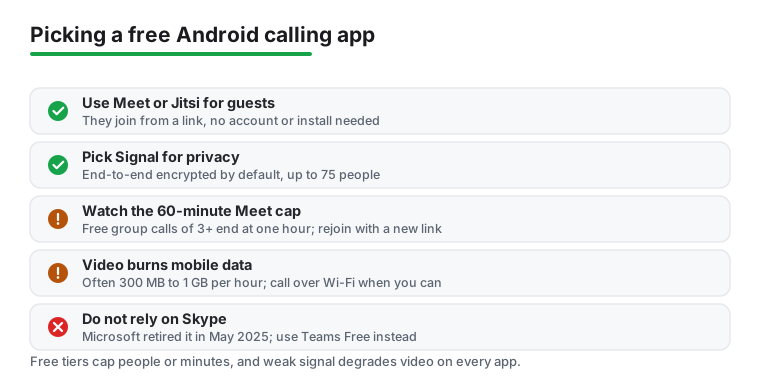
Google Meet works in a browser or through the Android app, and the person you invite does not strictly need an account to join from a link. A free Google account lets you host up to 100 people, which is far more than the others here. The limit that bites is time: any call with three or more people is capped at 60 minutes on a free account, and you get a warning around the 55 minute mark. One-on-one calls can run up to 24 hours.
So Meet is the pick when you want a family quiz night with a dozen relatives, as long as everyone is fine rejoining with a fresh link after an hour. Open the app, tap New, and either start an instant meeting or share a link in advance. Data use sits roughly between 400 MB and 1 GB an hour depending on quality.
The private line
Signal is the app I recommend when privacy matters more than reach. Voice and video calls use the same end-to-end encryption as its messages, and Signal connects you peer-to-peer where it can rather than routing everything through a server. As of February 2026 the group call limit jumped to 75 participants on all platforms, so it is no longer just a one-to-one tool.
Both sides need Signal and it is tied to a phone number, though you can hide that number behind a username now. Start a call from inside a chat with the video or phone icon, or tap into a group and hit the call button. The trade-off is reach: fewer of your contacts will have it installed compared with WhatsApp. If you also care about keeping a record of important calls, note that Signal does not record for you, and our guide to the call recorder apps for Android covers what is and is not possible on the platform.
No clock on the call, but the listing carries ads
Viber, now branded Rakuten Viber, gives unlimited free Viber-to-Viber audio and video calls with no time limit, and supports up to 60 people on a group call. It is the only app on this page whose Play listing carries the Contains ads label, checked on 28 August 2026, and that listing also declares in-app purchases from $0.99 to $99.99 per item and says the app may share data with third parties. One-to-one calls and chats are end-to-end encrypted by default. Like WhatsApp it ties your account to your phone number, and the other person needs Viber installed for the free calls.
It also sells a paid Viber Out service for calling regular phone numbers and landlines, which is separate from the free app-to-app calling and is the part that costs money. To call, open a chat and tap the call or video icon, or use the Calls tab. Viber is worth a look if your circle already uses it, common in parts of Eastern Europe and Asia, but in regions where nobody has it the app sits unused.
A link is all a guest needs
Jitsi Meet is the odd one out and genuinely handy for that reason. The public server at meet.jit.si now asks the meeting creator to sign in with a Google, GitHub, or Facebook account before a room opens; guests still join from a browser without installing anything. You can use the Android app to host, then send a plain link, and your less technical relatives just tap it and they are in. Calls are encrypted by default on the public instance.
The public server can hold around 75 people, but video quality holds up best under about 35. Because it is a shared free service run by volunteers and a sponsor, busy times can mean slower performance, so it is better for a quick informal call than a scheduled event you cannot afford to have stutter. Open the app, type any meeting name, and share the resulting link. Two things on the Play listing, checked on 28 August 2026, are worth knowing before you lean on it: the Data Safety section states that data cannot be deleted, and the rating of 3.7 from 53,078 ratings is the lowest of the five apps here.
If someone tells you to use Skype, it is gone. Microsoft retired consumer Skype on 5 May 2025 and pushed everyone toward Microsoft Teams Free, which carries the same kind of free video and voice calling. You could sign into Teams Free with old Skype credentials and your contacts moved across. Data export from the old Skype history was available through 15 June 2026. So do not waste time hunting for Skype on Google Play for new calls; treat Teams Free as its replacement if you want a Microsoft option. Checked on 28 August 2026, the old Skype package on Google Play returns a 404, while the Microsoft Teams listing showed 4.6 stars from 8,733,776 ratings, no ads, and in-app purchases from $9.99 to $129.99 per item.
Pick by who you are calling and what you need. For everyday calls to people who are already reachable, WhatsApp or Viber make sense because your contacts have them. For a larger family or group call, Google Meet handles the most people but stops at 60 minutes, while Signal allows 75 and Viber 60 with no time cap. For privacy, Signal leads. For guests who refuse to install anything, Jitsi Meet wins because a link is all they need.
The honest limits are worth repeating. Free group calls cap either people or minutes, and most apps need the other person on the same service. On a weak mobile signal every one of these will blur, freeze, or fall back to audio, and video burns through mobile data fast, often several hundred megabytes an hour. If your need is mostly texting rather than calling, the choices differ, so see our roundup of messaging apps for Android. For the wider picture of staying in touch on your phone, the communication apps hub ties the calling, texting, and recording guides together.
Usually yes. WhatsApp, Signal, and Viber only do free calls between accounts on the same app. Google Meet and Jitsi Meet are the exceptions: a guest can join a Meet or Jitsi call from a shared link in a browser without an account, which makes them the easiest when the other person will not install anything.
Google Meet allows up to 100 people on a free account, but caps group calls at 60 minutes. Signal allows 75 with no time limit, and Viber allows 60 with no time limit. WhatsApp lets you start a group call with up to 32 people.
Signal encrypts every call end-to-end by default and avoids routing through its servers where possible, so it is the strongest. WhatsApp also encrypts calls end-to-end, including groups. Viber encrypts one-to-one calls by default. Jitsi Meet on the public server is encrypted by default. Google Meet encrypts calls in transit but is built more for convenience than the strict privacy guarantees Signal offers.
Roughly 300 MB an hour for WhatsApp, up to about 480 MB in HD, and somewhere between 400 MB and 1 GB an hour for Google Meet depending on quality. Audio-only calls are far lighter, often well under 30 MB an hour. If you are on a limited data plan, switch off video or call over Wi-Fi.
Microsoft retired consumer Skype on 5 May 2025 and moved users to Microsoft Teams Free, which offers similar free calling. You could sign into Teams Free with your old Skype login, and Skype history could be exported until 15 June 2026. There is no point starting new calls on Skype now.
Quality varies and none of them are magic on a poor network. WhatsApp and Signal tend to fall back to audio gracefully when the signal drops. On a very weak connection, expect freezing or pixelated video on any of these apps, so an audio-only call is the more reliable choice when bars are low.
 The Best Free Messaging Apps for Android in 2026Communication