
Updated for 2026

Whether you are powering through a stack of PDFs, picking up a new language on the bus, or just keeping up with the morning headlines, the right app makes it much easier. We compared these on the things that really matter, like whether a reader handles a big file and whether a lesson fits into five minutes. Below are our honest favorites for PDF readers, language learning, news, and dictionaries on Android, so you can find the one that fits how you read and learn.
Books, news and education apps are the tools you reach for when you want to take something in, not just kill time. In practice they fall into four buckets: readers (ebooks, PDFs and document viewers), language learning (lesson-based courses and flashcard apps), news (aggregators, single-publisher apps and RSS readers), and reference (dictionaries, thesauruses and translators). A few apps blur the lines, an ereader that also handles PDFs, or a news app with a built-in save-for-later list, but knowing which bucket you actually need stops you from downloading five things that half-overlap.
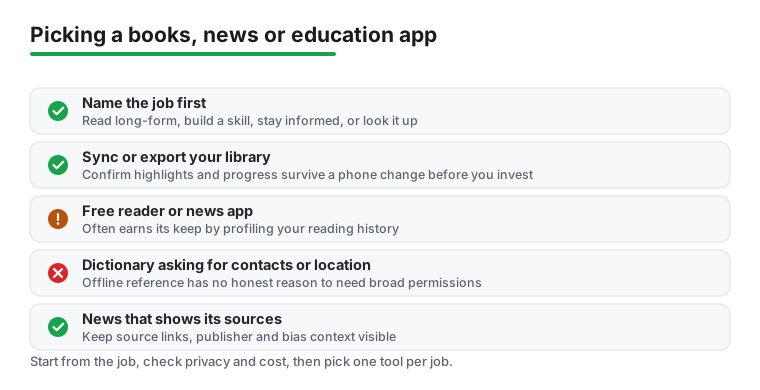
It helps to think less about the bucket and more about the job you are hiring an app to do. There are really four jobs here: read long-form and get through documents or books, build a skill over weeks like a language or a study habit, stay informed without drowning in noise, and look something up fast. Name the job and the bucket picks itself, because the best pick for one job is rarely the best for another. Each area has also moved on a bit. Readers increasingly narrate text aloud, and some platforms now auto-narrate ebooks that never had an audiobook, so you can listen to a title that was text-only a year ago. News has shifted toward aggregators that summarise one story across many outlets while keeping the source links visible, instead of stacking a dozen near-identical headlines. And language apps now offer real speaking practice and grammar feedback, not just tapping word tiles. Knowing what is on offer makes it easier to tell a tool that fits your job from one that just looks busy.
Start from the job, not the app, and keep one tool per job. For readers, the split is between a light viewer that opens a file instantly with no account and a fuller reader that syncs across devices and exports annotations. If you annotate, you want the second kind; if you just need to read a PDF and close it, the first is less friction. For a language, pick by whether it has genuine speaking and listening practice plus spaced repetition, and judge it by holding a short conversation after a few weeks, not by your streak count. Streak-gamified apps are strong for beginners and through roughly the first year, and weaker once you reach intermediate, so treat one as a daily habit rather than your only tool.
For news, decide what you actually want before you install anything. A single-publisher app gives you one voice you trust, an aggregator gives you a balanced cross-source view, and an RSS reader gives you full control over exactly which feeds you see. RSS readers are still around and still matter for that control. For reference, confirm there is a full offline dictionary you can download, with pronunciation audio, so it works on a plane or underground. One check cuts across all four: before you put hours into a library, a course or a folder of highlights, confirm it syncs to an account or exports to a file. That is the difference between a phone change being a couple of taps and an evening of rebuilding.
It helps to know how an app in this category makes its money, because that tells you how it treats you. The common models are free with ads, freemium with a one-time pro unlock, subscription (normal for serious language courses), and free open-source readers and RSS apps funded by donations. Each points the incentives somewhere. A one-time pro unlock is usually the healthiest pattern, since the developer gets paid without holding your reading hostage. The thing to watch is the paywall that only appears after you have built a streak or annotated half a book, when walking away costs you something. Check that the free tier is genuinely usable before you commit.
What each type can see is worth a thought too. Readers and news apps know exactly what you read and what you are interested in, which is a profile worth selling to advertisers. Dictionaries and offline readers have no honest reason to want your contacts, your location, or broad permissions, so be suspicious when one asks. News aggregators that hide the publisher or bury the source make it hard to judge what you are actually reading, so prefer ones that keep source links visible and, better still, show who owns and how an outlet leans. That transparency is a real trend now: some aggregators tag every story with bias and reliability context drawn from independent raters and show how coverage splits across the political spectrum.
To stay on the safer side, prefer apps that are clear about what they collect, that work fully offline, and that do not force you to create an account. Weigh a one-time purchase against an open-ended subscription, since paying once can be cheaper and cleaner over a couple of years than a monthly fee that never ends. The rule of thumb: a free reading or news app usually earns its keep from your attention and your reading history, so the price you do not pay in cash you may pay in profiling.
Every app here was checked against its Google Play listing and the developer's own documentation, not a quick glance at a marketing page. We are not paid for placement, and an app earns its spot by being genuinely pleasant to come back to, not by buying it. We also re-check our picks as platforms add AI features like read-aloud, story summaries and speaking tutors, so a recommendation never quietly points you at something that has been superseded.
For casual reading, news and quick reference, free apps are genuinely fine. Paying tends to be worth it for serious language learning, where the structured courses and offline lessons matter, and for power readers who want cross-device sync and clean annotation export. Check that the free tier is actually usable and that the paywall is not hidden until after you have invested time.
Look for a viewer that opens a big or scanned PDF without lag, supports text reflow so you are not pinch-zooming every line, and lets you highlight and export notes. Lightweight viewers open quickly with no account, while fuller readers add sync and annotation. Match the tool to the job rather than defaulting to the heaviest option.
They work best as daily practice you actually keep up, not as a single magic course. The newer ones add real speaking and listening practice and even AI grammar feedback, which is a genuine step up from tapping tiles. Look for spaced repetition and offline lessons too. Streaks help with habit, but judge an app by whether you can hold a short conversation after a few weeks, not the badge count. These apps are strong for beginners and weaker at intermediate level, so plan to pair one with real conversation as you progress.
Before you commit, confirm the app syncs to an account or lets you export your library and annotations to a file. Apps that store everything only on the device can lose your work in a phone change. A quick test: highlight something, sign in on a second device or export it, and make sure it shows up.
Prefer apps that keep the source links visible, show who published each story, and ideally tell you how an outlet leans or who owns it. A multi-source or full-coverage view, where one story is gathered from many outlets, makes it far easier to spot what is missing. Be wary of a single algorithmic feed that buries the publisher, since those tend to skew toward whatever drives engagement rather than a balanced picture. Cross-check anything that matters against the original report.