
Updated September 2026 · all ten apps now carry their own dated listing figures, and four claims on this page were corrected by the listings
You want to read the news on your phone without a wall of ads in your face, and without paying for five separate subscriptions. That is a reasonable goal, and most of it is doable with apps you already have or can install for free. What this guide will not do is teach you to slip past a paywall. Paywalls are how a lot of newsrooms keep the lights on, and getting around them breaks the outlet's terms. So everything below is about legal free access and cutting down the ad noise, not circumvention. Let's go through the routes that actually work.
Several solid news apps are free to use and never put their reporting behind a wall. The Associated Press app (AP News: World & Local on Google Play) is the clearest example. It is free, carries straight wire reporting, and shows ads to pay for it. Reuters used to run the same way, but it now asks for registration and has been moving its website behind a paywall, so treat it as only partly free. NPR's app is free with no in-app purchases and carries the Contains ads label on its listing, and the audio is the main draw there. Google News pulls headlines from many sources into one feed at no cost, though tapping through to a paywalled outlet still lands you on that outlet's wall.
So the honest split is this: ad-supported free apps give you the content for free in exchange for ads, while subscription outlets give you fewer ads in exchange for money. You can lean hard on the first group and lose very little day to day. If you also want news you can read on a plane or a subway with no signal, look at our roundup of offline reading apps for Android news, since several of these let you cache stories ahead of time.
Straight wire reporting with no paywall
4.3 stars from 145,498 reviews · 1,000,000+ installs · free · no in-app purchases · updated 4 September 2026 · by The Associated Press · Contains ads: Yes · checked 5 September 2026
Google Play listing · 4.3 (145,498) · read 5 September 2026
The clearest case of the free, ad-supported model this page recommends. Free with no in-app purchases, on a listing read 5 September 2026 that carries the Contains ads label, at 4.3 stars from 145,498 reviews and 1,000,000+ installs, with a store update dated 4 September 2026. The blunt con sits on its data safety card, which says data may be shared with third parties and that data is not encrypted.
Wire reporting, with a paid tier on top
4.6 stars from 22,480 reviews · 1,000,000+ installs · free to install · in-app purchases $0.99 to $209.99 per item · updated 19 August 2026 · by Thomson Reuters · Contains ads: Yes · checked 5 September 2026
Google Play listing · 4.6 (22,480) · read 5 September 2026
The caution above holds up on its listing, read 5 September 2026: free to install, but it sells in-app purchases of $0.99 to $209.99 per item, and it carries the Contains ads label as well. The rating is strong, 4.6 stars from 22,480 reviews on 1,000,000+ installs, and the store update is dated 19 August 2026. Treat it as an ad-supported app with a paid tier on top rather than as a free one.
Free reporting and audio, with ads
4.8 stars from 38,000 reviews · 5,000,000+ installs · free · no in-app purchases · updated 3 September 2026 · by NPR · Contains ads: Yes · checked 5 September 2026
Google Play listing · 4.8 (38,000) · read 5 September 2026
Free, no in-app purchases, and the Contains ads label on a listing read 5 September 2026, at 4.8 stars from 38,000 reviews and 5,000,000+ installs, the top rating among the four news apps on this page. The store update is dated 3 September 2026. The audio side is the draw, and nothing on the listing asks for money; its data safety card does say data may be shared with third parties.
Headlines from many outlets in one free feed
4.0 stars from 1,962,455 reviews · 1,000,000,000+ installs · free · no in-app purchases · updated 26 August 2026 · by Google LLC · Contains ads: Yes · checked 5 September 2026
Google Play listing · 4.0 (1,962,455) · read 5 September 2026
Free, no in-app purchases, and the Contains ads label, read 5 September 2026, on 1,000,000,000+ installs. The rating is the surprise: 4.0 stars from 1,962,455 reviews, the lowest of the four news apps on this page. Its data safety card is the cleanest of those four, declaring no data shared with third parties. Tapping through to a paywalled outlet still lands on that outlet's wall, which the feed cannot change.
An RSS reader is the closest thing to a quiet newspaper on your phone. You add the feeds you care about, and the app pulls new articles into one list with no autoplay video. Whether the reader itself shows adverts depends on the app: Feedly's Play listing carries the Contains ads label and Inoreader's does not, read 5 September 2026. You still see whatever the publisher allows in their feed, but the reading surface stays calm.
Two apps lead here on Android. Feedly's free tier lets you follow up to 100 sources across 3 folders, with native Android and iOS apps; search and AI features are paid. Inoreader's free tier is more generous on feeds: 150 RSS subscriptions against Feedly's 100. The newsletter feeds, rules and content filters are not part of it, though. Those sit in Pro, sold on its listing as in-app purchases of $8.99 to $89.99 per item read 5 September 2026, which also lifts the feed ceiling and adds offline reading, scheduled digests, and the heavier automation (free-plan limits as published on each developer's own plan page, checked July 2026). For most people, Inoreader Free has more room before you hit a limit.
To add a feed, open the app, tap the add or plus button, paste a site's URL or its /feed or /rss address, and confirm. Group your feeds into folders like World, Tech, or Local so the firehose stays manageable.
A simple RSS reader if you follow fewer sites
4.4 stars from 316,794 reviews · 5,000,000+ installs · free to install · in-app purchases $7.99 to $69.99 per item · updated 10 August 2026 · by Feedly Team · Contains ads: Yes · checked 5 September 2026
Google Play listing · 4.4 (316,794) · read 5 September 2026
This is the correction that matters in the RSS section: Feedly's own listing, read 5 September 2026, carries the Contains ads label, so the reader itself is not the quiet surface this page used to imply. It is free to install and sells in-app purchases of $7.99 to $69.99 per item for its paid plans, at 4.4 stars from 316,794 reviews on 5,000,000+ installs, with a store update dated 10 August 2026. Its data safety card says data may be shared with third parties.
The roomier free RSS plan, with no ads label
2.8 stars from 9,609 reviews · 500,000+ installs · free to install · in-app purchases $8.99 to $89.99 per item · updated 4 August 2026 · by Innologica · Contains ads: No · checked 5 September 2026
Google Play listing · 2.8 (9,609) · read 5 September 2026
The RSS reader whose listing, read 5 September 2026, carries no Contains ads label and whose data safety card declares no data shared with third parties. The monthly price this page used to quote for Pro is withdrawn: what the listing publishes is in-app purchases of $8.99 to $89.99 per item. The blunt con is the rating, 2.8 stars from 9,609 reviews, the lowest on this page by a wide margin, on 500,000+ installs and a store update dated 4 August 2026.
Plenty of paywalled outlets still hand out a free allotment. Many give you a few free articles a month if you register a free account, and that registration is legitimate; you are using the door they built. Email newsletters are the other quiet path. A newsroom will often send its best daily summary free to your inbox, with the full piece linked. You read the summary with no ads in the email, and you only hit the wall if you click through past your free quota.
The smart move is to point those newsletters at an RSS or read-later setup so they all land in one place. Inoreader's newsletter feeds (on the Pro plan) exist for exactly this: you get an address to subscribe with, and the newsletters show up alongside your other feeds instead of cluttering your regular mail.
This is the route people forget, and it is the strongest one. Your public library likely pays for services that hand you full newspapers and magazines at no cost to you, legally, because the library footed the bill.
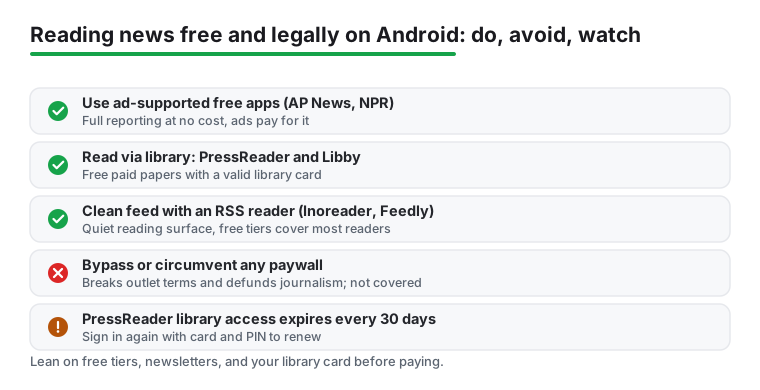
PressReader is the big one. The PressReader app on Google Play is free to install, sells in-app purchases of $0.49 to $209.00 per item to readers without a library, read 5 September 2026, and opens its full newspaper and magazine catalog once a library sponsors your account. You can also download papers for offline reading. Libby (from OverDrive) is the companion you probably know for library e-books and audiobooks; depending on your library it also carries magazines and, in some systems, newspaper access. Both are free on Android with a valid card.
One honest caveat on PressReader: library access runs in windows, usually 30 days. When it lapses, you just sign in again with your library card number and PIN to renew it. It is a minor chore, not a real barrier. If you are already borrowing books through the library, the same card unlocks all of this, and our books, news, and education hub has more on getting set up with library apps.
Full newspapers and magazines, free through a library
4.7 stars from 43,613 reviews · 10,000,000+ installs · free to install · in-app purchases $0.49 to $209.00 per item · updated 31 July 2026 · by PressReader Inc. · Contains ads: No · checked 5 September 2026
Google Play listing · 4.7 (43,613) · read 5 September 2026
Free to install with no Contains ads label, on a listing read 5 September 2026 that sells in-app purchases of $0.49 to $209.00 per item: that band is what the catalog costs without a library, and a sponsoring library is what makes it free. 4.7 stars from 43,613 reviews on 10,000,000+ installs, with a store update dated 31 July 2026. Its data safety card says data may be shared with third parties.
Library magazines and e-books, with newspapers in some systems
4.8 stars from 735,442 reviews · 10,000,000+ installs · free · no in-app purchases · updated 26 August 2026 · by OverDrive, Inc. · Contains ads: No · checked 5 September 2026
Google Play listing · 4.8 (735,442) · read 5 September 2026
Free, no in-app purchases, no Contains ads label, and a data safety card that declares no data shared with third parties, all read 5 September 2026. At 4.8 stars from 735,442 reviews on 10,000,000+ installs, with a store update dated 26 August 2026, it is one of only two listings on this page, Firefox being the other, with nothing to buy, no ads label and no data shared with third parties. The catch is not on the listing: what it carries depends on your library, and newspaper access is far from universal.
The flow is short. Install PressReader from Google Play and open it. Tap the account or sign-in area, choose to sign in, then look for the option to add or apply library or group access (some versions label it Libraries or Find your library). Search for your library by name, select it, and enter your library card barcode and PIN when prompted. Once it confirms, the sponsored badge appears and the full catalog opens.
If your library uses a different sign-in flow, check the library's own PressReader page; many post step-by-step instructions because the exact wording shifts between regions. The 30-day timer starts when you authenticate, so set a reminder if you do not want a surprise when access pauses.
For the times you read an article in your browser, Android gives you a couple of clean, allowed tools. Chrome and most browsers have a Reading mode or simplified view that strips a page down to text and the main image; on a supported article you will see a Reader prompt, or you can find Simplified view in the page menu. It removes clutter without breaking the publisher's wall, so it is the legitimate kind of cleanup.
Switching to a privacy-focused browser like Firefox or Brave on Android also reduces tracking, though what each blocks differs: Brave lists ad and tracker blocking as on by default, while Firefox blocks trackers by default and leaves ad blocking to an extension you add yourself. Only Firefox's own Play listing is free of the Contains ads label; Brave's carries it, read 5 September 2026. None of this defeats a paywall, and that is the point: you are tidying the reading surface, not taking content you have not been given access to.
A browser for news pages, with no ads label on its own listing
4.6 stars from 6,531,118 reviews · 500,000,000+ installs · free · no in-app purchases · updated 4 September 2026 · by Mozilla · Contains ads: No · checked 5 September 2026
Google Play listing · 4.6 (6,531,118) · read 5 September 2026
Of the two privacy browsers named above, this is the one whose listing, read 5 September 2026, carries no Contains ads label and no in-app purchases, with a data safety card that declares no data shared with third parties. 4.6 stars from 6,531,118 reviews on 500,000,000+ installs, updated on the store 4 September 2026. It does not open a paywall, and nothing on this page should suggest it does.
Ad and tracker blocking, with a caveat on its own listing
4.8 stars from 3,758,343 reviews · 100,000,000+ installs · free to install · in-app purchases $9.99 to $149.99 per item · updated 4 September 2026 · by Brave Software · Contains ads: Yes · checked 5 September 2026
Google Play listing · 4.8 (3,758,343) · read 5 September 2026
The correction the browser section needed: Brave's own listing, read 5 September 2026, carries the Contains ads label and sells in-app purchases of $9.99 to $149.99 per item, on a listing whose store name itself advertises a VPN. The rating is high, 4.8 stars from 3,758,343 reviews on 100,000,000+ installs, the store update is dated 4 September 2026, and its data safety card declares no data shared with third parties. Recommending it for fewer ads is fair only with that label stated.
Put the pieces together and you barely touch a paid wall. Start your morning in an RSS reader for headlines from feeds you trust. Open ad-supported apps like AP News or NPR for the free reporting. Pull deeper features from your library through PressReader when you want a full paper. Let newsletters carry the rest into one inbox or feed. That stack is free, legal, and light on ads, and it covers most of what a casual or even a fairly serious reader needs.
If your reading time tends to be on the move, pair this with offline caching so a dropped signal does not stop you, and if you like learning something new alongside the news, our piece on language learning apps for Android pairs well with a morning reading habit.
Yes. Everything here uses access the publisher or your library has chosen to give: free apps, free tiers, newsletters, and library-sponsored services like PressReader. None of it bypasses a paywall, which would break an outlet's terms.
Paywalls fund the reporting you are reading. Getting around them violates the outlet's terms of service and undercuts the newsroom, so this guide does not cover it. The legal free routes above already give you a lot.
If you want the most room on a free plan, Inoreader's free tier carries 150 subscriptions against Feedly Free's 100 sources and 3 folders. Be aware that newsletter feeds, rules and content filters are Pro-only on Inoreader, so if those are what you are after, neither free plan will get you there. Feedly's app is clean and simple if you follow fewer sites and do not need filters. On Play, read 5 September 2026, Feedly's listing carries the Contains ads label and sits at 4.4 stars from 316,794 reviews; Inoreader's carries no ads label and sits at 2.8 stars from 9,609 reviews.
For free full access, yes. PressReader itself is free to install, but the large newspaper catalog opens when a library sponsors your account using your card number and PIN. Without a card the catalog is paid: its listing sells in-app purchases of $0.49 to $209.00 per item, read 5 September 2026.
Library access usually runs in 30-day windows. When it expires you simply sign out and sign back in with your library card and PIN to renew it. Nothing is lost; it just needs reauthenticating.
No. Reading or simplified view only strips clutter from a page you already have access to. It does not unlock paywalled articles, and it is not meant to.
Read 5 September 2026: AP News, Reuters, NPR, Google News, Feedly and Brave carry the Contains ads label on Google Play. Inoreader, PressReader, Libby and Firefox do not. Libby and Firefox are also the only two of the ten that combine no ads label, no in-app purchases and a data safety card declaring no data shared with third parties.
Checked 5 September 2026: the guide named ten apps and linked none, with no ratings, no ads labels, no table and no dated line. All ten now carry fact lines read today, and four claims were corrected by the listings. Feedly's listing carries the Contains ads label, so the line no banner ads from the reader itself is withdrawn. Inoreader's listing publishes in-app purchases of $8.99 to $89.99 per item and no monthly price, so around 7.50 USD per month billed annually is withdrawn, together with the Pro feed ceiling of 2,500 and the count of 20 newsletter feeds, which no source read today publishes. PressReader's listing sells in-app purchases of $0.49 to $209.00 per item and publishes no catalog size, so more than 8,000 newspapers and magazines from over 120 countries is withdrawn, and the FAQ line Without a card you get only limited free reading is replaced by that purchase band. Brave's listing carries the Contains ads label, which the browser section now states. Three FAQ questions moved to the second person, and one was added on which listings carry the ads label.