
Checked 27 September 2026
Xodo is the pick, MuPDF mini the free one with nothing to buy, Librera the choice for heavy readers who accept ads. Our answer, the free pick and the table ↓
Checked 27 September 2026: no pick changed since 25 August; five ratings moved, ReadEra and Files by Google added, Copilot renamed
Full logA reader app is for what Chrome and the Drive preview cannot do, and every reader below is weighed on what its free tier takes away.
Read the fourth column first: what the free tier really limits is where the readers split.
| App | Best for | Ads label | What the free tier really limits | Rating, 27 September 2026 |
|---|---|---|---|---|
| Xodo · free markup | Most people | No | A watermark on files, and Office export | 4.2★ |
| Acrobat · Liquid Mode | Safe default | Yes | Editing text and Office export are paid | 4.5★ |
| Librera · twenty formats | Heavy readers | Yes | Nothing, but it shows ads and shares data | 4.0★ |
| ReadEra · PDF books, no ads | Reading PDF books and long documents | No | Nothing, but no form filling or signing | 4.9★ |
| Drive preview · zero install | Marking up with nothing installed | No | Offline needs the file saved in advance | 4.3★ |
| Files by Google · open and mark up | Opening and marking up a download | No | Marked-up copies save to Google Drive | 4.5★ |
| Foxit · sign without an account | Signing without an account | No | Editing and conversion need a subscription | 3.9★ |
| Microsoft Copilot · not a reader | No longer a PDF reader | Yes | Everything: upload and ask is all it does with a PDF | 4.5★ |
| WPS Office · suite plus reader | One app for everything | Yes | Getting content out of a PDF needs Pro+ | 4.3★ |
| KDAN PDF · stylus notes | Handwriting with a stylus | Yes | Night mode, read aloud and slideshow are paid | 3.8★ |
| MuPDF mini · asks for nothing | Reading with nothing attached | No | Nothing, because it does less by design | 4.1★ |
| My Files · already on a Galaxy | Galaxy owners | No | It hands the PDF to another app | 4.1★ |
| Smallpdf · one task a day | One-off file surgery | No | One tool task per day, on their servers | 4.4★ |
| MobiOffice · sign and convert | Signing inside a suite | Yes | Conversion is Premium and needs a connection | 4.5★ |
Xodo is our best overall Android PDF reader because Google Play US on 27 September 2026 showed no advertising label and a free install with in-app purchases from $2.99. Proofed 27 September 2026
MuPDF mini is our best free pick for plain reading because Play showed no advertising label, no in-app purchases and no data collected on 27 September 2026. Proofed 27 September 2026
Librera is our pick for heavy readers because Google Play US showed no in-app purchases on 27 September 2026, with ads and data sharing as the price. Proofed 27 September 2026
Data checked: 27 September 2026.
Most people
4.2 stars, 475,690 reviews · 10,000,000+ installs · free to install · in-app purchases $2.99 to $109.99 per item · by Apryse Software Inc. · Contains ads: No · checked 27 September 2026 · Captured, not reviewed
Google Play listing · 4.2 (475,690) · read 27 September 2026
Xodo, listed on Play as PDF Reader and Editor: Xodo by Apryse, is the best overall pick because the things a reader does all day are the things it does not charge for. Annotation, form filling and signing are free, and its listing carried no advertising label on Google Play US on 27 September 2026. The limits land on getting a file back out again: its own Free versus Pro screen puts No Watermark on Files in the Pro column.
Saving is not capped: the Xodo Actions article, read 27 September 2026, scopes the daily limit to converting from PDF, converting to PDF, editing, managing pages and converting from Office, and saving a file you have marked up is not one of them. The same Free versus Pro screen puts PDF to Office in the Pro column, and the Xodo mobile subscription article licenses free view and annotate for personal use only, so business use needs the subscription whatever you are doing with it.
The captures below, taken on our own Android emulator on 18 August 2026, are of the subscription screen it opens on before the reader, with a dialog on top saying the app collects data for essential functionality as well as marketing, personalization and analytics, and offering Accept or Deny. The screen behind it compares Free against Pro across nine rows and ticks only one of them for Free, View and Edit. No Watermark on Files sits in the Pro column, shown by the app itself. There is a Skip for Now link, so the screen can be passed. The screenshots below are ours.
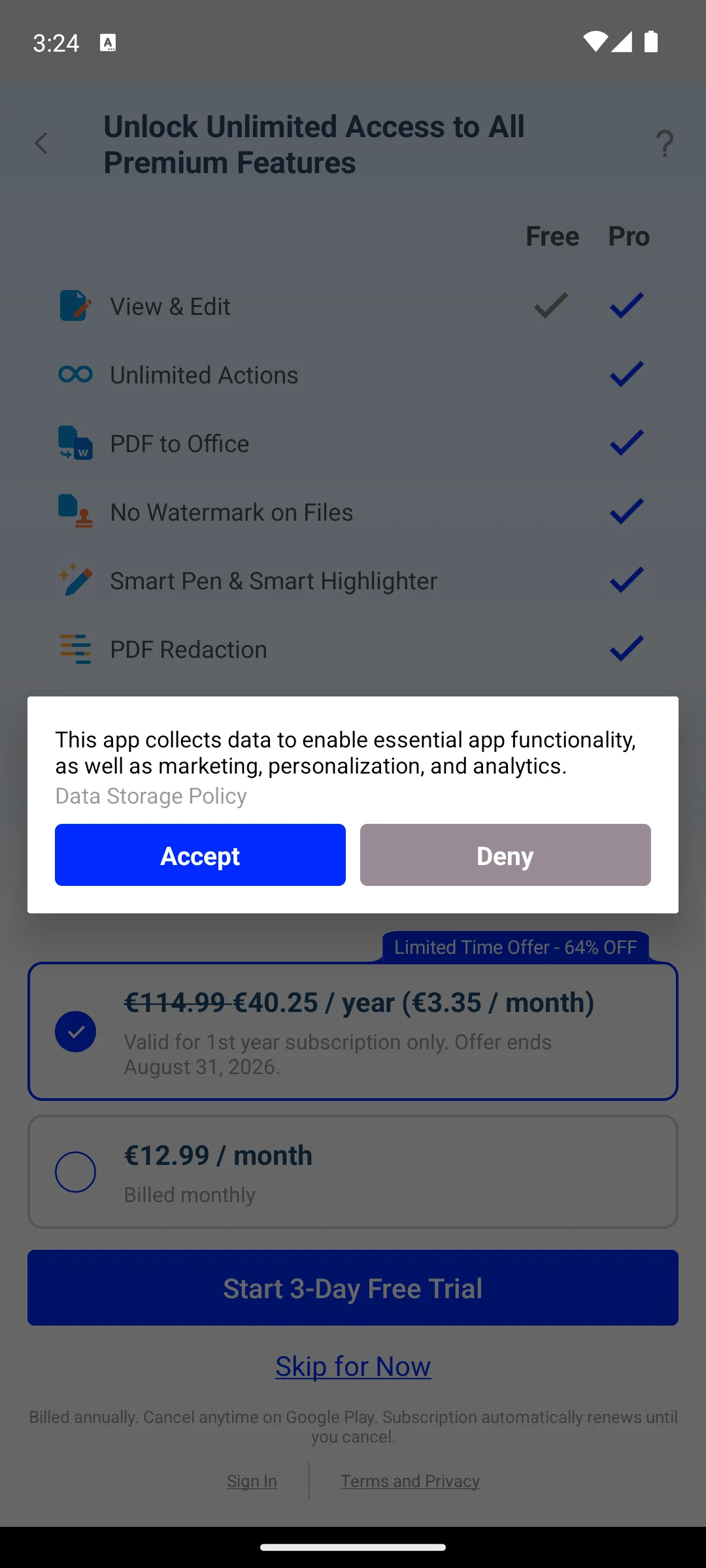
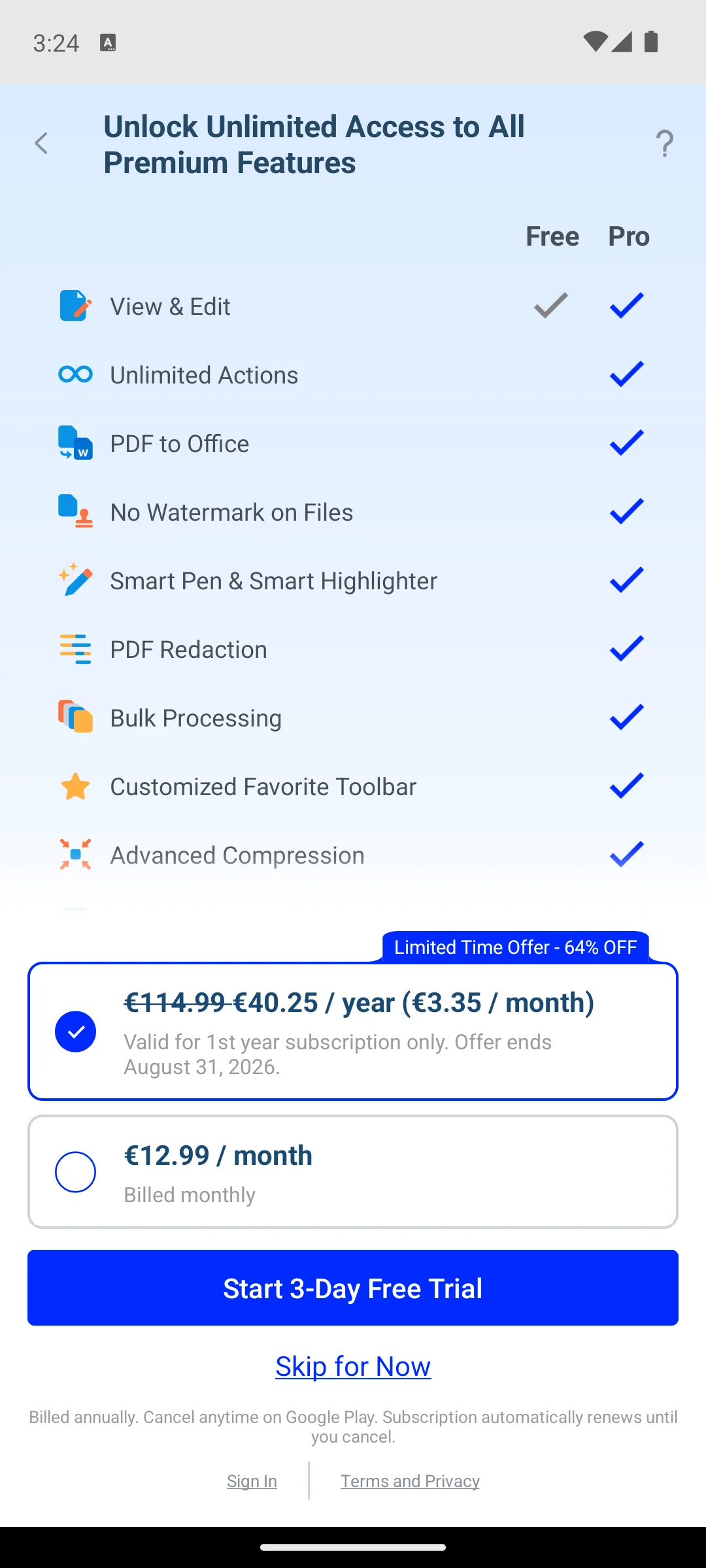
For: annotating, form filling and signing are free, and saving a marked-up file is not rate limited; no advertising label on its Play listing; the same listing, read 27 September 2026, says its form filler can detect form fields automatically. Against: the app’s own Free versus Pro screen puts No Watermark on Files in the Pro column; converting and exporting to Word, PowerPoint, Excel or HTML is premium; free use is licensed for personal use only.
Skip it if you convert or export PDFs regularly, because that is where every one of its limits lands. Choose Xodo over Adobe Acrobat when you mark up more than you read. For converting and editing, 8 Free Android PDF Editors · Where Each One Stops Being Free shows where that work stays free.
↑ Back to the comparisonSafe default
4.5 stars, 7,995,920 reviews · 500,000,000+ installs · free to install · in-app purchases $0.99 to $299.99 per item · by Adobe · Contains ads: Yes · checked 27 September 2026 · Listing verified
Google Play listing · 4.5 (7,995,920) · read 27 September 2026
Acrobat is the safe default: Liquid Mode, which reflows a dense page to fit a phone screen, still sits in the free block of Adobe’s own listing, read on Google Play US on 27 September 2026, beside Fill and Sign and annotation. Its listing carries the advertising label, and editing text or exporting to Office formats is paid.
On the advertising label, this page can only go as far as Adobe does, which is not far. Adobe’s description, read 27 September 2026, never mentions advertising at all: it has an explicit paid features block naming AI Assistant (which Adobe labels free for a limited time), editing text and images, OCR, merging and organising, Office export, compression and password protection, and an explicit free features block naming Liquid Mode, Fill and Sign and annotation. Nowhere does Adobe say what the advertising is, or whether any paid plan removes it. If you have seen otherwise in the app, that is your evidence and not ours.
For: Liquid Mode reflow is documented as a free feature; annotation and Fill and Sign are in the free block of the listing; a seven day free trial of every feature, by the same listing read 27 September 2026. Against: the listing carries the advertising label and Adobe documents nothing about what the ads are; editing text and exporting to Office formats are paid; its Data Safety says it may share data with third parties, on Google Play US on 27 September 2026.
Skip it if you want a small quiet viewer rather than a suite. Choose Acrobat over Xodo when dense pages need reflowing to fit a phone screen.
↑ Back to the comparisonHeavy readers
4.0 stars, 137,687 reviews · 10,000,000+ installs · free to install · no in-app purchases · by Librera · Contains ads: Yes · checked 27 September 2026 · Listing verified
Google Play listing · 4.0 (137,687) · read 27 September 2026
Librera is the heavy reader’s pick, and it is the app on this page whose free tier takes nothing away: there are no in-app purchases at all, and every reading feature is present. What it takes instead is advertising space and data.
Its Play listing, read 27 September 2026, names about twenty formats, among them EPUB3, FB2.ZIP, ODT, XPS, TIFF, PDB, MHT and OPDS catalogues. It is open source, GPL v3 by its own repository, which also documents a build carrying no advertising on F-Droid; the paid Librera PRO listing sells for $5.99 on Google Play US, read 27 September 2026.
The trade is in its data declaration. Librera’s Data Safety section declares personal information, approximate location, app activity and device identifiers as shared with third parties for purposes including advertising and marketing, and its manifest requests internet and network state access. That is the opposite end of this page from MuPDF mini, which requests nothing at all. One precision on reading aloud, too: Librera uses whatever text to speech engine your device has, so whether it works offline depends on your Android voices rather than on Librera. If a scanned PDF will not read aloud at all, Text-to-Speech Apps to Read Articles Aloud on Android, and What Is Already Built In explains the OCR step it needs.
For: about twenty document and ebook formats by its own listing, the widest here; no in-app purchases at all, and a build carrying no advertising exists on F-Droid; open source under GPL v3, and it remembers your place per book. Against: advertising in the Play build, which is the trade for everything being free; its Data Safety declares sharing of personal information and approximate location for advertising; PDF markup is basic next to Xodo.
Skip it if you mostly annotate work PDFs rather than read long-form. Choose Librera over MuPDF mini for a library you live in.
↑ Back to the comparisonReading PDF books and long documents
4.9 stars, 1,586,385 reviews · 50,000,000+ installs · free to install · no in-app purchases · by READERA LLC · Contains ads: No · checked 27 September 2026 · Listing verified
Google Play listing · 4.9 (1,586,385) · read 27 September 2026
ReadEra is the reader for PDF books and long documents when you want no ads at all: its Google Play US listing, read 27 September 2026, carries no advertising label and no in-app purchases, and its description says it neither contains ads nor imposes internal purchases. The catch is forms: the listing names no form filling and no signing.
For PDFs, the listing names margin cropping, a single-column mode that splits a double-page spread from a scanned book into two pages, zoom, and opening large documents. The same app reads EPUB, MOBI, AZW3, DJVU, FB2, DOC, DOCX, RTF, ODT, TXT and CHM, detects books and documents on the phone into one library, groups them by author and series, and keeps your reading page even when a file is moved. Its Data Safety declares no data shared with third parties, but says data it collects cannot be deleted.
For: no advertising label and no in-app purchases on Google Play US, 27 September 2026; margin cropping and a single-column mode for scanned PDF books, by its listing; one library for PDF, EPUB, Kindle formats, DJVU and Word files. Against: its listing names no form filling or signing, so a form still needs another app; its Data Safety says collected data cannot be deleted; converting, compressing or merging a PDF is not in its listing.
Skip it if you fill or sign PDFs, because its listing names neither. Choose ReadEra over Librera when you want no ads at all rather than twenty formats. For books rather than documents, Best Free Ebook Reader Apps for Android: 6 Compared weighs it against Google Play Books and Moon+ Reader.
↑ Back to the comparisonMarking up with nothing installed
4.3 stars, 10,835,037 reviews · 10,000,000,000+ installs · free to install · in-app purchases $0.99 to $1,024.00 per item · by Google LLC · Contains ads: No · checked 27 September 2026 · Listing verified
Google Play listing · 4.3 (10,835,037) · read 27 September 2026
If Drive is already on your phone, its preview is a real annotating reader rather than a fallback: Google documents pen, highlighter and form filling for it on Android. It will not open a file offline unless you marked it available offline beforehand.
Google documents form filling in the Drive Android app: you tap Edit, then Form Filling, with Google’s own caveat that if you do not see the option then that PDF may not be fillable. Google also documents freehand pen and highlighter annotation on Android. Signatures are the gap: Google’s eSignature is a Workspace feature on paid plans, and Google does not name Android among the surfaces it works on, so this page does not claim it there.
There is no Google product called the Google Drive PDF Viewer; the reader is the preview built into the Drive app. Google documents preloading as a choice each manufacturer makes, so Drive is preinstalled on many phones and a free download on the rest. Offline is the real limit: a file has to be marked available offline in advance before you lose signal.
For: freehand pen and highlighter annotation, documented by Google for Android; PDF form filling, documented by Google for the Android app; no advertising label on the Drive listing, and nothing to install if you already have it. Against: a file must be marked available offline in advance or it will not open without signal; no binding signature: eSignature is a paid Workspace feature and Google does not name Android for it; it is a storage app first, so the reading tools stop where Google chose to stop them.
Skip it if PDFs are part of your job, because a dedicated reader earns its install within a week. Choose the Drive preview over installing anything when you annotate occasionally.
↑ Back to the comparisonOpening and marking up a download
4.5 stars, 9,054,449 reviews · 5,000,000,000+ installs · free to install · no in-app purchases · by Google LLC · Contains ads: No · checked 27 September 2026 · Listing verified
Google Play listing · 4.5 (9,054,449) · read 27 September 2026
Files by Google opens a PDF, searches inside it and takes pen and highlighter marks, by Google’s own help page read 27 September 2026, and its Google Play US listing showed no advertising label and no in-app purchases the same day. The catch is where the marks go: Google says Save copy uploads the annotated PDF to your Google Drive, and the original on the phone stays unmarked.
The same help page lists zoom by pinch or double tap, Find in file for searching the text, printing, and moving a PDF into Safe folder behind a PIN or pattern. It documents no form filling and no signing, which is where the Drive preview, with its Edit then Form Filling option, takes over. The Play description never mentions PDF; the PDF tools are documented in Google’s help centre.
For: opens, zooms, searches and prints a PDF, by Google’s help page; pen and highlighter annotation with a finger or a stylus; no advertising label and no in-app purchases on Google Play US, 27 September 2026. Against: an annotated PDF is saved as a copy uploaded to Google Drive, not back to the phone; no form filling or signing in Google’s help page; its Data Safety says collected data cannot be deleted.
Skip it if you fill in forms, because Google documents that for the Drive preview and not for Files. Choose Files by Google over the Drive preview when the PDF is a download on the phone and all you need is to read it or mark it.
↑ Back to the comparisonSigning without an account
3.9 stars, 211,724 reviews · 10,000,000+ installs · free to install · in-app purchases $0.99 to $139.99 per item · by Foxit Software Inc. · Contains ads: No · checked 27 September 2026 · Listing verified
Google Play listing · 3.9 (211,724) · read 27 September 2026
Foxit is the one app on this page whose account position is documented rather than assumed, and it is the good kind. Its listing marks paid features with an asterisk and states the rule plainly: you create a Foxit account to activate those, which means signing and filling forms do not need one. Its listing carried no advertising label on Google Play US on 27 September 2026.
Its rating, 3.9 on Google Play US on 27 September 2026, is the second lowest here after KDAN, and its listing asks for Android 9 or later. Neither is disqualifying for a reader, but both are worth knowing before you make it your daily app.
For: handwritten signing and form filling with no account, stated in Foxit’s own asterisk key; no advertising label on the listing; reading a PDF out loud is listed without the asterisk that marks paid features. Against: its rating trails the other big names here; editing and conversion need the subscription; it needs Android 9 or later, by its Play listing read 27 September 2026.
Skip it if you already carry Acrobat or Xodo, because Foxit largely duplicates them. Choose Foxit over Acrobat when you want to sign something without creating an account.
↑ Back to the comparisonNo longer a PDF reader
4.5 stars, 9,235,813 reviews · 1,000,000,000+ installs · free to install · in-app purchases $0.49 to $199.99 per item · by Microsoft Corporation · Contains ads: Yes · checked 27 September 2026 · Listing verified
Google Play listing · 4.5 (9,235,813) · read 27 September 2026
This row is kept in the table so that nobody looking for the old Office app concludes we simply forgot it, and so the answer is visible at a glance rather than buried. It is here to be ruled out, not compared.
The package that was Office, then Microsoft 365, then Microsoft 365 Copilot, is listed on Google Play US as Microsoft Copilot on 27 September 2026, and its description opens by calling it the AI built for work. It mentions PDF once, to say you can upload a PDF along with Word, Excel, PowerPoint or images to ask questions and generate summaries. It is an AI assistant rather than a document viewer, so it is not the app to open a PDF with.
The word free appears nowhere in Microsoft’s description, which says instead that availability of Microsoft Copilot features may vary and that some capabilities require specific licenses or may be disabled by an administrator. The install is free, the listing carries the advertising label, and it sells in-app.
For: still the right app if what you want is to ask questions about a document; connects Word, Excel, PowerPoint, Outlook and Teams in one place; free to install. Against: it is not a PDF reader: uploading a PDF to ask questions about it is the only PDF capability documented; the listing carries the advertising label and sells in-app; Microsoft states that feature availability varies and can be disabled by an administrator.
Skip it if you came here to read PDFs, which is every reader of this page. Choose anything else on this page over it for reading a PDF.
↑ Back to the comparisonOne app for everything
4.3 stars, 5,992,954 reviews · 500,000,000+ installs · free to install · in-app purchases $0.05 to $264.99 per item · by WPS SOFTWARE PTE. LTD. · Contains ads: Yes · checked 27 September 2026 · Listing verified
Google Play listing · 4.3 (5,992,954) · read 27 September 2026
WPS bundles a genuinely good free PDF reader inside a full office suite, and its night mode is documented by WPS in its own Academy article on reading a PDF in a dark environment. It converts documents to PDF on the phone for free. Going the other way is where it charges.
WPS’s own pricing page, read 27 September 2026, names the paid tier Pro+ at $5.83 per month, billed $69.99 per year, and states that those prices apply to PC and Android. The same page lists No advertising as a Pro+ benefit alongside full PDF editing and conversion tools, so the advertising and the conversion wall are lifted by one subscription rather than two.
The wall is not only PDF to Word. Extracting content out of a PDF at all, to Word, Excel, PowerPoint or an image, is what Pro+ unlocks, while converting into PDF stays free. That is the line to remember when deciding whether it matters to you.
For: a capable free PDF reader with a documented night mode for dark rooms; converts documents and scans into PDF on the phone without paying; one app covering documents, spreadsheets, slides and PDFs. Against: advertising in the free version, removed only by the paid tier; extracting content out of a PDF needs Pro+; you install four components when a reader is all you wanted.
Skip it if you only read PDFs, because a dedicated viewer is quieter. Choose WPS over MobiOffice when you want the suite as much as the reader. The suites themselves are compared in Office Suite Apps for Android: What Is Actually Free.
↑ Back to the comparisonHandwriting with a stylus
3.8 stars, 125,643 reviews · 10,000,000+ installs · free to install · in-app purchases $0.99 to $69.99 per item · by Kdan Mobile Software Ltd. · Contains ads: Yes · checked 27 September 2026 · Listing verified
Google Play listing · 3.8 (125,643) · read 27 September 2026
KDAN is the stylus pick: handwriting with a finger or a stylus is documented for the Android app, and KDAN puts free handwriting in its Basic plan on its own pricing page. It also holds the lowest rating on this page, and its free tier holds back features that matter for reading.
KDAN’s own pricing page, read 27 September 2026, marks read aloud and slideshow mode as absent from the Basic plan, and its Play listing, read the same day, puts night viewing mode under Document 365. Those are reading features, not editing features, on a page about reading. Document 365, USD 59.99 a year on that pricing page, also gates text editing, conversion, OCR, page management and password protection.
What that adds up to is an app worth installing for one specific job, handwritten annotation on a tablet, and a poor choice for long reading sessions, because the comfort features other apps give away are the ones KDAN sells.
For: handwriting with a finger or stylus, in the free tier by KDAN’s own pricing page; jump to page, text search and bookmark, outline and thumbnail lists, by its Play listing; one Document 365 plan unlocks it on Android, iOS, Windows and Mac, by the same listing. Against: night viewing, read aloud and slideshow are paid, by its Play listing and pricing page; the lowest rating on this page, and advertising in the free tier; editing, conversion, OCR and page management all sit behind Document 365.
Skip it if you read on a phone without a stylus, because its whole advantage disappears. Choose KDAN over Xodo only for pen notes on a tablet.
↑ Back to the comparisonReading with nothing attached
4.1 stars, 242 reviews · 100,000+ installs · free to install · no in-app purchases · by Artifex Software LLC · Contains ads: No · checked 27 September 2026 · Listing verified
Google Play listing · 4.1 (242) · read 27 September 2026
MuPDF mini is the minimalist pick. Its manifest declares no permissions whatsoever, so it holds no internet access, and its listing carried neither an advertising label nor any in-app purchase on Google Play US on 27 September 2026. Its Data Safety declares no data collected and none shared. It cannot annotate or fill forms.
Artifex’s listing, read 27 September 2026, names a toolbar with search, a text size control for EPUB and FB2, a zoom control that toggles fit page and fit width for PDFs, a table of contents button and a scrubber for moving through the document. What it does not do, in Artifex’s own words, is support editing annotations or filling out forms, and it offers no user bookmarks.
Two more things to know. Its ebook support is for unprotected EPUB only, so a DRM-protected store purchase will not open in it. And open source here means dual licensed: MuPDF is AGPL v3 or a paid commercial licence from Artifex, per the Artifex licensing page. Its rating rests on a few hundred reviews against hundreds of thousands elsewhere on this page, so treat the score as thin evidence and the permission list as the real reason to install it.
For: no permissions at all in its manifest, so it cannot reach the network; no advertising, no in-app purchases, and no data collected or shared by its own declaration; search, table of contents, zoom modes and a text size control for EPUB and FB2. Against: no annotation and no form filling, both stated by Artifex; no user bookmarks, and unprotected EPUB only, so DRM purchases will not open; a very small review base next to everything else here.
Skip it if you ever highlight or sign, because it is read-only by design. Choose MuPDF mini over Librera when you want nothing running but a reader.
↑ Back to the comparisonGalaxy owners
4.1 stars, 550,339 reviews · 5,000,000,000+ installs · free to install · no in-app purchases · by Samsung Electronics Co., Ltd. · Contains ads: No · checked 27 September 2026 · Listing verified
Google Play listing · 4.1 (550,339) · read 27 September 2026
On a Galaxy, My Files opens the occasional PDF with nothing to install, and it is one of the cleanest entries on this page: no advertising label and no in-app purchases at all.
Samsung says My Files is on most Galaxy devices, not all of them, and it is a free download where it is missing.
It is a file manager that hands the PDF to a viewer rather than a reader in its own right. The app Samsung documents for actually writing on a PDF is Samsung Notes, which is preinstalled on Galaxy phones, supports S Pen annotation, and carried no advertising label and no in-app purchases on Google Play US on 27 September 2026. If you own a Galaxy and want to mark up a PDF without installing anything, that is the app to open.
For: already on most Galaxy phones, with no advertising label and no in-app purchases; keeps documents beside everything else in your storage; free, and a free download on the Galaxy devices that lack it. Against: it is a file manager: it hands the PDF to another app rather than rendering it as its own feature; no markup of its own; the S Pen annotation people expect lives in Samsung Notes.
Skip it if you annotate anything, because that is a different app even on a Galaxy. Choose Samsung Notes over My Files the moment you want to write on the page. Samsung Notes is weighed against other pen apps in The 12 Best Handwriting Apps for Android.
↑ Back to the comparisonOne-off file surgery
4.4 stars, 124,373 reviews · 5,000,000+ installs · free to install · in-app purchases $7.99 to $119.99 per item · by Smallpdf AG · Contains ads: No · checked 27 September 2026 · Listing verified
Google Play listing · 4.4 (124,373) · read 27 September 2026
Smallpdf is for the read-then-fix job: compress, merge, convert or sign a file straight after opening it. Its listing carried no advertising label on Google Play US on 27 September 2026. Two things about how it works change who should install it: one free task a day by its own listing, and the file leaves your phone.
Smallpdf publishes the free limit, and it is one: its own listing, read 27 September 2026, says Smallpdf is free to use with one daily tool task per day, and its pricing page marks free mobile app access with a daily task limit. A cap of one is a different product from a cap, and a reader deciding between apps should see the number.
The second thing is where the work happens. Smallpdf processes tasks on its own servers: its listing states that all uploaded files are deleted one hour after processing, and its help pages describe securing file transfers in transit. So the file leaves your phone, and nothing works without a connection. On a contract or a medical record that is a decision, not a detail. One qualifier on the advertising column too: Play shows no advertising label, though Smallpdf lists zero ads among the things a subscription unlocks on its own help pages.
For: compress, merge, convert and sign in one clean interface; no advertising label on its Play listing; Pro can be tried free for seven days, by its Play listing read 27 September 2026. Against: one free tool task per day, by Smallpdf’s own listing; tasks run on Smallpdf servers, so your file is uploaded and nothing works offline; in-app prices start at $7.99 per item.
Skip it if you only ever read, because the toolbox is the entire point of it. Choose Smallpdf over Xodo for occasional file surgery rather than daily reading.
↑ Back to the comparisonSigning inside a suite
4.5 stars, 1,495,049 reviews · 100,000,000+ installs · free to install · in-app purchases $1.49 to $149.99 per item · by MobiSystems · Contains ads: Yes · checked 27 September 2026 · Listing verified
Google Play listing · 4.5 (1,495,049) · read 27 September 2026
MobiOffice reads, annotates and signs inside one suite, and the reader works free. MobiSystems publishes its own step-by-step guide for signing a PDF on Android. Conversion is Premium and needs a connection, and the free version carries advertising.
MobiSystems’ own help centre says OfficeSuite was renamed MobiOffice, so MobiOffice is the name in use and OfficeSuite the historical one.
Two qualifiers the vendor supplies itself. Conversion is a Premium feature and needs an internet connection, by MobiSystems’ own conversion guide, so it is neither free nor offline. And the thing that removes the advertising is MobiOffice Premium, which the listing sells as covering two mobile devices and one Windows PC alongside cloud storage and unlimited PDF conversion.
For: signing a PDF is documented step by step by the vendor, and the reader works free; annotate, sign and convert without leaving the suite; rated 4.5 on Google Play US on 27 September 2026, among the highest here. Against: conversion is Premium and needs a connection, by the vendor’s own guide; advertising in the free version, removed only by Premium; you install a full office suite to read a PDF.
Skip it if you want a reader rather than a suite, because that is what you are installing. Choose MobiOffice over WPS when signing matters more than converting.
↑ Back to the comparisonReading is handled; which scanner app turns paper into clean PDFs?
Our answer there: Adobe Scan, it syncs scans into Acrobat and is free to install with no ads badge, listing read 26 August 2026.
See it against 8 rivalsMatch the app to the job, because the free tiers on this page differ far more than the readers do. Every app here renders a PDF competently. What separates them is the fourth column of the table above.
Privacy is not only about uploads. The Google Play policy for the All files access permission names the permitted uses for the broadest storage permission there is, and document management apps are on that list, so a PDF reader asking for it is not automatically suspect. What is worth reading is the Data Safety section beside it. On this page it separates the entries more sharply than any feature does: MuPDF mini declares no data collected and no data shared and requests no permissions, while Librera, the other free-and-open pick, declares personal information and approximate location shared with third parties for advertising. Both are open source and both are honest about it; they are simply different bargains.
Every entry on this page carries its tier on its own fact line, so you can see which applies without taking our word for the page as a whole.
For most people, Xodo: annotating, form filling and signing are free, saving a marked-up file is not rate limited, and its Google Play US listing carried no advertising label on 27 September 2026. The catch is that its own Free versus Pro screen, captured 18 August 2026, puts No Watermark on Files and PDF to Office in the Pro column, so exporting is where you pay. If you want the smallest and most private option instead, MuPDF mini requests no permissions at all and has no ads and no in-app purchases, but it cannot annotate or fill forms. Checked 27 September 2026.
Usually yes, and this is the answer most people need. Google documents that from Android 12 onward Chrome opens a PDF from a website in the browser itself, with no download and no PDF reader needed, and you can scroll, zoom, select text and search in it. For a file already on your phone, the Google Drive app previews it and additionally supports freehand annotation and form filling. Where Files by Google is on the phone, Google documents that it opens a PDF, searches inside it and takes pen and highlighter marks. On a Galaxy, Samsung Notes opens and annotates PDFs and is already installed. Checked 27 September 2026.
Eight apps on this page carried no advertising label on their Google Play US listings on 27 September 2026: Xodo, Google Drive, Files by Google, Foxit PDF Editor, MuPDF mini, Samsung My Files, Smallpdf and ReadEra. Of those, MuPDF mini, Samsung My Files, Files by Google and ReadEra also sell nothing in-app, and MuPDF mini declares no data collected and none shared. Librera sells nothing either, but its Play build carries advertising and its Data Safety declares sharing with third parties; its own repository documents a build without ads on F-Droid. Checked 27 September 2026.
Some do and some cannot. Smallpdf processes tasks on its own servers and states that all uploaded files are deleted one hour after processing, so nothing works offline. Google Drive is cloud storage by design, and a file has to be marked available offline before you lose signal. Files by Google opens a PDF on the phone, but Google says a marked-up copy is saved by uploading it to Google Drive. At the other end, MuPDF mini requests no permissions at all, so it has no internet access whatsoever. If the document is a contract or a medical record, that difference is worth a pause. Checked 27 September 2026.
Reading, annotating, form filling and signing are, and saving a file you have marked up is not capped, by Xodo’s own Actions article read 27 September 2026. What is not free: the app’s own Free versus Pro screen, captured 18 August 2026, lists No Watermark on Files, Unlimited Actions and PDF to Office in the Pro column, and Xodo licenses free view and annotate for personal use only. For reading and markup it remains genuinely free; for getting a clean file back out, it is a paid job. Checked 27 September 2026.
Because readers still arrive looking for the Office app it replaced. The package that was Office, then Microsoft 365, then Microsoft 365 Copilot, is listed on Google Play US as Microsoft Copilot on 27 September 2026, and its description mentions PDF once, to say you can upload one and ask questions about it. Its row and entry stay so anyone looking for it finds out what happened; it is ranked for nothing. Checked 27 September 2026.
A reader displays a document and lets you annotate, fill forms and sign. An editor changes the document itself: rewriting text, deleting or rearranging pages, merging files, running OCR on a scan. Every reader on this page opens and displays PDFs, and the paywalls almost all sit on the editor side of that line. For real editing, see our guide Best PDF Editor Apps for Android in 2026. Checked 27 September 2026.
Yes, in several apps on this page. Librera reads aloud using whatever text to speech engine your device has, so whether it works offline depends on your Android voices rather than on Librera itself. Foxit’s Play listing, read 27 September 2026, names reading a PDF out loud without the asterisk it uses for paid features. Acrobat’s listing, read the same day, puts read aloud among its paid features but offers a choice of free voices. KDAN’s own pricing page, read the same day, marks read aloud as absent from its free plan. Android’s built-in TalkBack can also speak text on screen. Checked 27 September 2026.
It depends on the phone. Chrome opens a PDF from a website on Android 12 and up, and a PDF saved on the phone opens in the app set as its default, or the phone asks which app to use. To change it on a Pixel, Google’s help says to open Settings, tap Apps, tap the app that opens your PDFs, then Open by default and Clear default preferences; the next PDF you open asks which app to use. Google notes that some of those steps only work on Android 14 and up. Checked 27 September 2026.
For writing on PDFs with a finger or a stylus, KDAN PDF, because KDAN’s own pricing page, read 27 September 2026, puts free handwriting in its Basic plan, though read aloud and slideshow mode are paid there and its Play listing puts night viewing under Document 365. On a Galaxy tablet, Samsung Notes takes S Pen annotation, per Samsung’s support page. Foxit’s Play listing names a tabbed document interface for tablets only. For plain reading, the phone picks carry over: Xodo, MuPDF mini and Librera. Checked 27 September 2026.
Two on this page. MuPDF mini is licensed AGPL v3 or under a paid commercial licence, per the Artifex licensing page, and its Play listing showed no advertising label and no in-app purchases on 27 September 2026. Librera is GPL v3 by its own GitHub repository, which also documents a build without ads on F-Droid. Checked 27 September 2026.
Checked 27 September 2026: every rating, review count, install band, advertising label and in-app purchase range re-read on Google Play US. On Google Play US on 27 September 2026, ratings moved for MuPDF mini (4.1), Librera (4.0), Foxit (3.9), WPS (4.3) and MobiOffice (4.5), and the table cells for Smallpdf and KDAN are corrected to match their entries (4.4 and 3.8). Added: ReadEra, whose listing shows no advertising label and sells nothing, and Files by Google, which Google documents opening and marking up PDFs. The Office package is listed as Microsoft Copilot, and its entry is renamed. Corrected: the 18 August entry below said the Copilot row was removed from the table; it was kept, marked not a reader. Removed: Xodo’s euro promotion, which ended 31 August 2026; Foxit’s update-gap con, since its listing was updated on 28 August 2026; Smallpdf’s claim to share the top rating with Acrobat; unsourced lines on Xodo’s large-file handling, Acrobat’s rendering fidelity, Foxit’s rendering on older phones and KDAN’s navigation; and the label Installed and examined on Xodo’s fact line, replaced by the tier this page uses, Captured, not reviewed. KDAN’s pricing page moved to pdf-reader.kdandoc.com and no longer lists night viewing, which its Play listing still puts under Document 365; read aloud and slideshow stay marked paid on that pricing page. The in-section correction notes are folded into the entries; the retractions stay recorded below. The social preview image is the page hero until a current comparison card is made.
Checked 25 August 2026: the answer box was shortened to three picks, Xodo, MuPDF mini and Librera, each re-read on Google Play US that day, and links to the sign, fill and OCR guides were added before the table.
Checked 18 August 2026: the page was rebuilt around a single question, what each free tier actually takes away, and fourteen claims did not survive the rebuild. The finding that matters most is one that was nearly removed in error. An audit of Xodo’s help centre and website found no Android document supporting this page’s claim that free exports carry a watermark, traced the only documented watermark to Xodo PDF Studio on the desktop, and recommended withdrawing the caveat; a second adversarial check agreed. Both were wrong, and the evidence was already on this page: the emulator capture shows Xodo’s own Free versus Pro screen listing No Watermark on Files in the Pro column. The caveat stays, regrounded on that screenshot and reworded to match the app, which says files rather than exports. Retracted: daily save and export caps, and the body sentence that daily save and export actions are capped. Xodo’s Actions article scopes the daily limit to converting, editing and managing pages; saving a marked-up file is not an Action. Added in their place, from the same in-app screen, that PDF to Office is premium and that free use is licensed for personal use only. Retracted from the Google Drive entry: no form filling; no real signatures. Google documents form filling in the Drive Android app under Edit, then Form Filling, so the first half was wrong; the second half is narrowed rather than dropped, because eSignature is a paid Workspace feature Google does not name Android for. Also corrected, the name: there is no Google product called the Google Drive PDF Viewer, only the preview built into Drive. And preinstalled on most Android devices is withdrawn, because Google publishes no such figure and documents preloading as a manufacturer choice. Retracted: that MuPDF mini has no extras at all. Artifex documents search, a table of contents, zoom modes and a text size control for EPUB and FB2. What it does not do, in the vendor’s words, is annotation or form filling, and its EPUB support is for unprotected files only. Added: it requests no permissions at all, which is the strongest privacy statement any entry on this page can make, and its licence is AGPL v3 or a paid commercial licence rather than open source unqualified. Retracted: lighter than Adobe, from Foxit’s table cell, heading and body. Foxit publishes no size figure and no comparison with Acrobat; the entry now leads on what Foxit does document, signing and form filling without an account. Retracted from Microsoft 365 Copilot: one app for Word, Excel and PDF, photo to PDF, and free sign and annotate, all of which described the app before it was renamed and repositioned as an AI assistant. It is removed from the comparison table and its entry now explains why, because readers arrive looking for the Office app. Retracted from MobiOffice: the comfortable tablet reader and clean tablet layout, since the word tablet appears nowhere in MobiSystems’ own description; and the rename direction in the table is corrected, since MobiSystems states that OfficeSuite is now MobiOffice. Retracted from the FAQ: the advice that for a clean export without a stamp, Adobe Acrobat Reader does it at no cost. Adobe puts Office export in its own paid features block, so the free tier is not the answer to that question and this page should not have sent anyone there. Retracted from Librera: has slipped from 4.2 to 4.1 stars, a trend sentence that rots twice over, since both halves of it go stale; live ratings sit in the dated table instead. Retracted: small 231-review base on Play, a figure that had already moved by the time this update ran. Corrected in the apps’ favour: Samsung My Files and Google Drive both printed n/a for rating and in-app purchases, and both have full Play listings, now read; Librera is open source under GPL v3 with an ad-free F-Droid build, which this page had credited only to MuPDF mini; and KDAN’s stylus handwriting is in its free tier by KDAN’s own pricing page. Added, and it reverses a recommendation: KDAN’s own feature matrix marks night viewing mode, read aloud and slideshow as absent from the free plan, which are reading features on a page about reading. Added too: the zero-install route this page never gave, that Chrome opens web PDFs on Android 12 and up with nothing installed, and that Samsung Notes rather than My Files is what writes on a PDF on a Galaxy. One layout fix: the emulator paragraph and screenshots added to this page earlier on 18 August 2026 sat after the Adobe anchor, so they rendered under Adobe’s verdict line and the Adobe jump link landed on Xodo’s screenshots. They are moved back inside the Xodo entry, carried across unchanged.
 8 Free Android PDF Editors · Where Each One Stops Being FreeProductivity
 Office Suite Apps for Android: What Is Actually FreeProductivity