
Updated August 2026 · the Play listing and Google's own Messages documentation both re-read on 21 August 2026, and the table rebuilt around the question the page turns on: which path a message takes once the data is off
This is a how to about one phone capability, not a roundup of apps. One Play listing is read here, and it is named. Everything about carrier behavior, Android screens, charges and message limits is either sourced to Google’s own Messages documentation or labeled as guidance that varies by carrier, device and Android version.
Google Messages is our best overall route with data and Wi-Fi off because Google's RCS FAQ, read 21 August 2026, says messages send as SMS, priced zero with no ads label.
Google Messages is our best free pick too because its listing, read 3 September 2026, prices it zero, no ads label.
Automatically resend as text is our patchy data pick because Google's RCS FAQ, read 21 August 2026, names it the fallback, at your SMS rate in a free, no ads label app.
Data checked: 3 September 2026.
Google Messages is the one app this page links: free to install with no Contains ads label on its listing, and the thing to weigh before trusting it with anything sensitive is its Data Safety declaration rather than its rating.
Guidance, not a store fact. Nothing in this section comes from an app listing. It describes how the mobile network behaves, and it is the reason the rest of the page works.
An SMS is not an internet message. It travels on the control channel of the mobile network, the low bandwidth signaling path a phone uses to tell the network it exists and to set up calls. That channel is there wherever there is usable signal, whether or not there is a data allowance, whether or not data is switched on, and whether or not any Wi-Fi is in range.
The practical consequence: switch mobile data off, disconnect from Wi-Fi, and a text still sends. A message in an internet messenger, in the same conditions, does not.
Google draws the same line in its own documentation, and it is worth having in Google’s words rather than ours. Asked what happens if you have no data, the RCS chats by Google FAQ answers: "Google Messages can still be sent as SMS or MMS" (read 21 August 2026). The same page puts RCS on the other side of the line, saying that with RCS chats "your messages are sent with the Rich Communication Services (RCS) protocol over Wi-Fi and mobile data". Two protocols, one app, and only one of them needs the internet.
There is a tension inside Google’s own writing that is useful to see. The Play listing description calls RCS "the industry standard for texting that replaces SMS and MMS" (Google Play listing, read 21 August 2026), while the help page above keeps SMS as the thing that still carries the message when the replacement has nothing to run on. Both are true at once, and the second is the one that matters at the edge of coverage.
That is what makes SMS the fallback worth knowing. It tends to keep working in conditions where data services have already stopped, which is why banks send verification codes over it and why it survives in places where data does not.
Install band 10,000,000,000+ · Free to install · No in-app purchase range printed · Developer Google LLC · Contains ads: No · checked 2 September 2026
Google Play listing · 4.3 (46,012,047) · read 2 September 2026
That listing shows a free install, no in-app purchase price range and no Contains ads label. The blunt part sits in the same listing: its Data Safety section declares that the app may share these data types with third parties, so free of charge is not the same as free of data collection.
Read this first. Read the Data Safety rows for what they are. They are declarations the developer made to the store, and Google Play prints its own caution above them: "Data practices may vary based on your app version, use, region, and age." So the section describes what was declared as permitted, not a record of what happened on any phone, and it is a separate matter from SMS traveling unencrypted across the carrier network.
The store page gives 20 August 2026 as the date the developer last updated it, so the listing behind this section is one day older than this read. Skip this section if the default messaging app on your phone came from the phone maker instead: this listing describes Google Messages and nothing else, and the steps further down are written for whichever app holds the default.
Guidance, not a store fact. Menu names and screen order move between Android versions and manufacturer skins, so read the paths below as the shape of the job rather than as an exact route on your phone. The screenshots below show one version of these screens; they are files this site already hosted and this pass cannot date them.
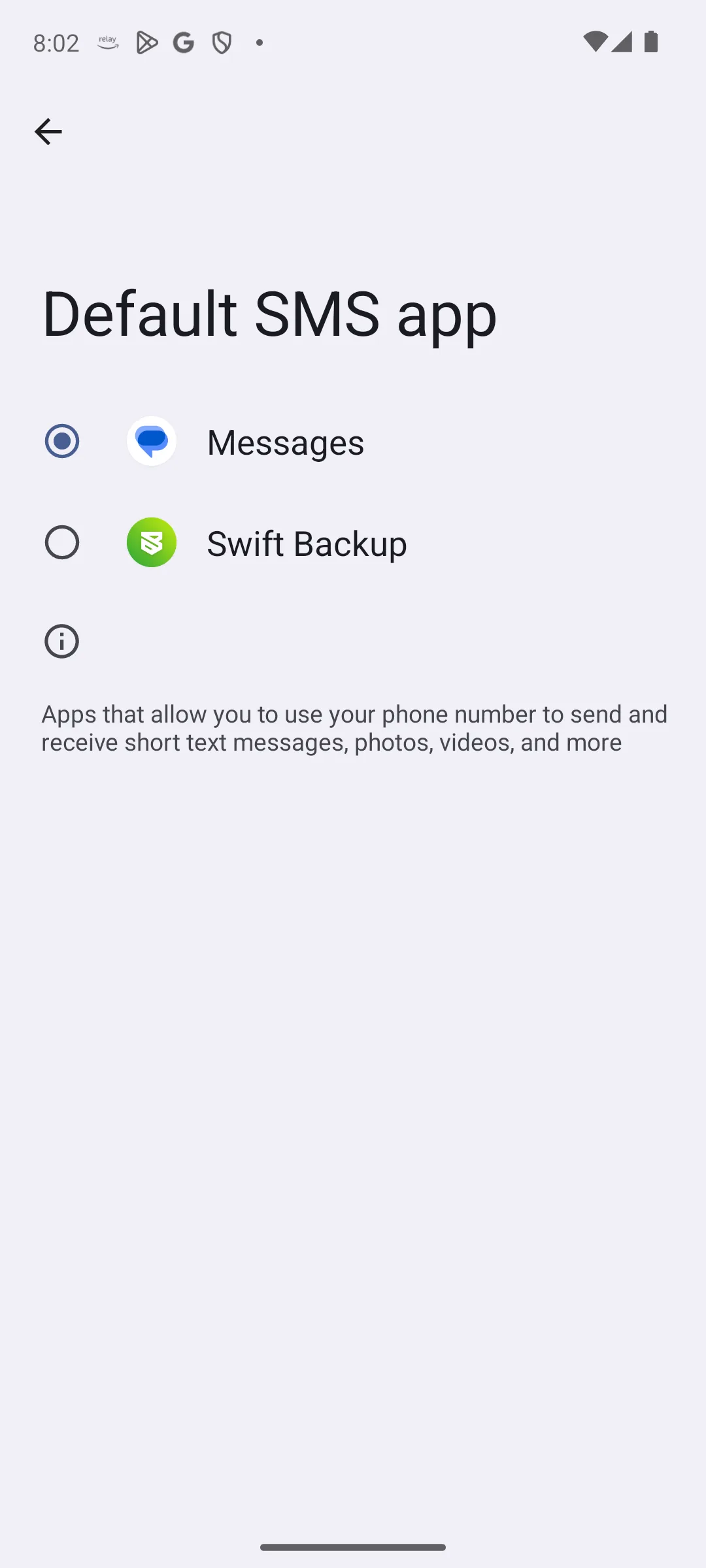
Nothing needs installing. Whichever app currently holds the default SMS role can do this, and Android keeps that setting in one place: the default apps screen in Settings.
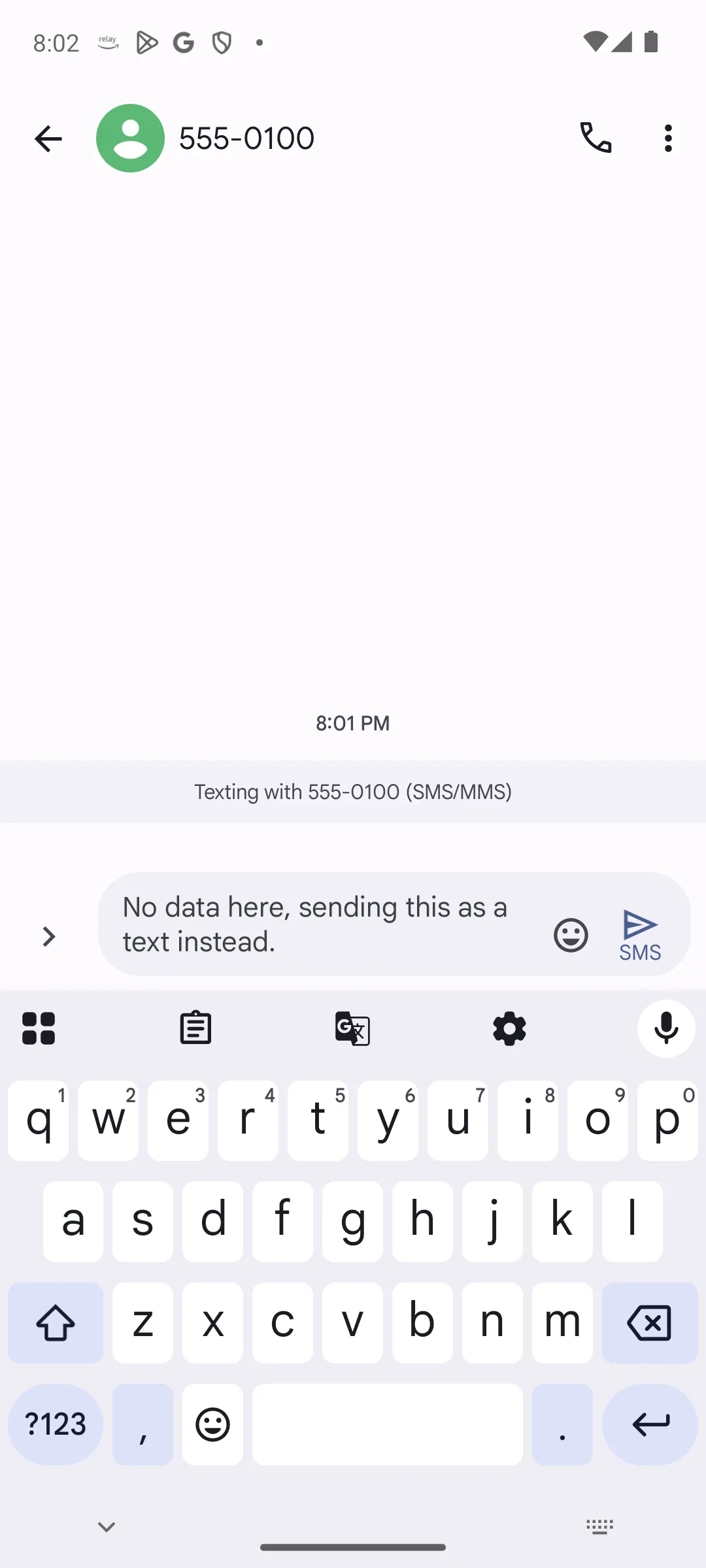
That last line is not a rule of thumb. Google documents the compose bar as the place the app tells you which path it will use: "The Send icon in the compose bar displays the method your message will be sent", and it lists exactly three possibilities, Send by Wi-Fi or mobile data, Send by SMS and Send by MMS (Turn on RCS chats in Google Messages, read 21 August 2026). The third screenshot below is that state: a thread labeled Texting with SMS MMS, and a send button marked SMS.
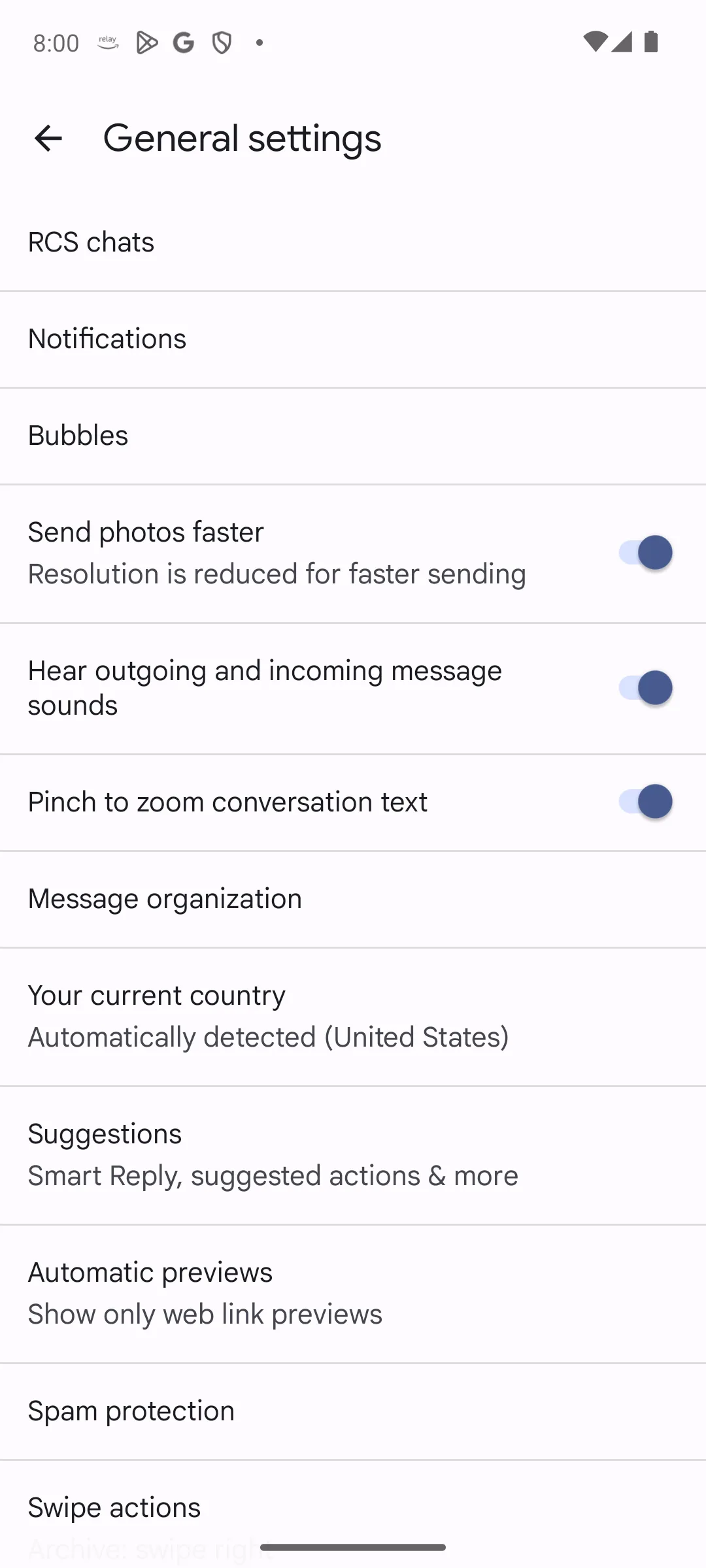
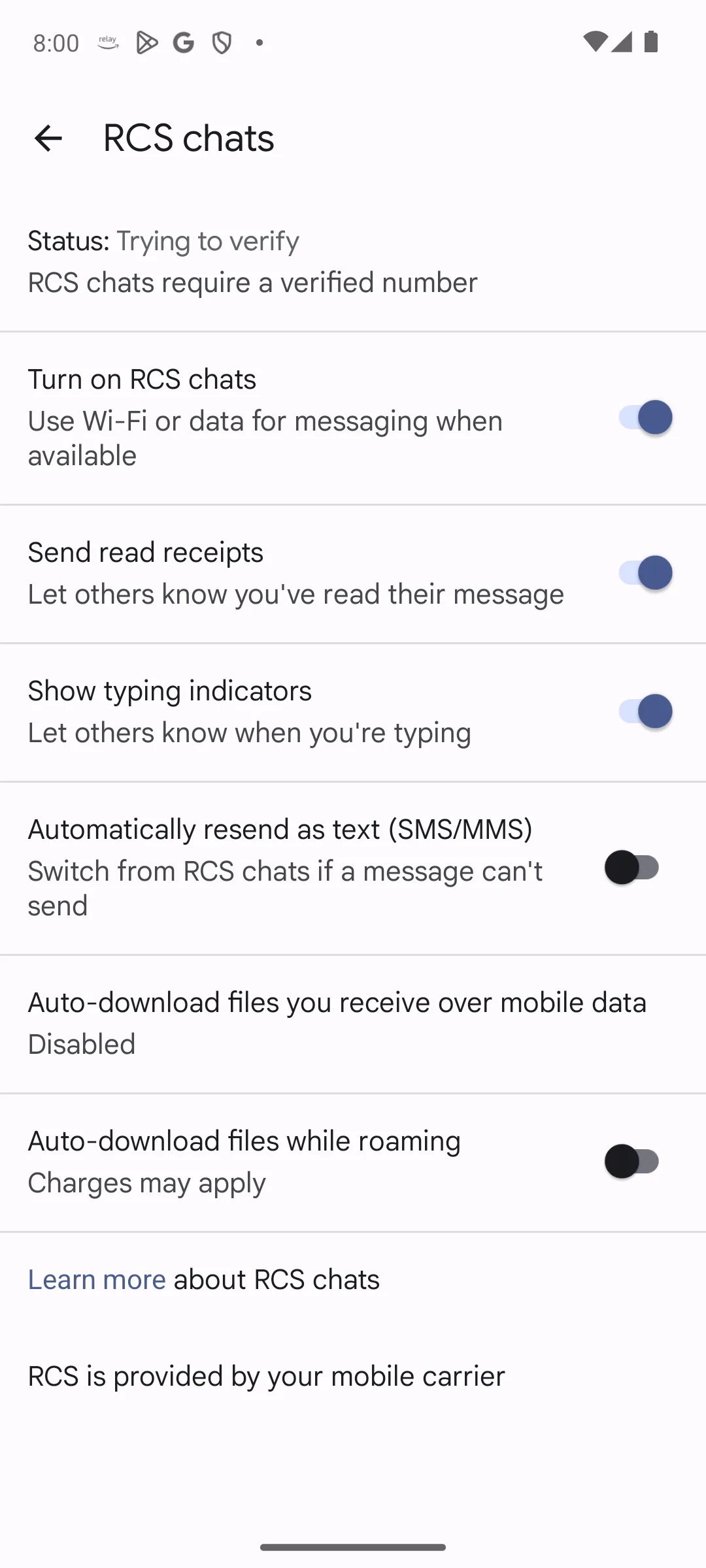
RCS is the richer chat protocol behind typing indicators, read receipts and full quality images. Google states the dependency in the app description on the listing itself: "Availability of RCS varies by region and carrier and a data plan may be required" (Google Messages on Google Play, read 21 August 2026). That is the developer naming a dependency plain SMS does not have, and it is why RCS is the wrong thing to lean on once the data is gone. The app will usually drop back to SMS on its own, sometimes after a pause while it tries. To force it:
The trade is real. With RCS off, read receipts and typing indicators go, the end to end encryption RCS chats can carry between users of the same app goes with them, and pictures fall back to low resolution MMS. Google also notes that the delivery icons only exist on the RCS side: the timer, single check, double check and filled double check "won’t show on SMS or MMS messages" (RCS chats by Google FAQ, read 21 August 2026). Sending as SMS means giving up the confirmation that it arrived.
Guidance, not a store fact. Prices here are carrier prices, not app prices. They vary by plan and by country, and the only authority on yours is your own tariff. The character limits below are not app facts either: they are properties of the SMS encodings themselves, and they are cited to Android’s own reference for them rather than to any listing.
The app is free to install. The message may not be.
On a contract with unlimited texts, sending costs nothing whatever the volume. On pay as you go or an older tariff, each message is charged, and the charge is per message rather than per conversation, which is what turns the next paragraph into a billing matter. Texting a number abroad is usually charged at an international rate, and receiving while roaming can be chargeable as well.
Sending a photo turns the message into an MMS, which is charged differently again and is often expensive for what it is. If there is any data at all, send pictures another way.
This is the half of the question a chat app answers differently. A message over RCS or over any internet messenger carries no carrier message charge at all; it spends data allowance instead. So neither path is simply free and neither is simply cheaper: one bills per message and the other bills per megabyte, and which one costs you less depends entirely on what your plan includes. On a plan with unlimited texts and a small data bundle, SMS is the cheap one. On an unlimited data plan with metered texts, it is the other way round.
One SMS on its own carries 160 characters of plain Latin text. A longer message is split into parts and reassembled by the receiving phone, so the recipient usually sees one message while the bill counts several, and the parts are shorter than a message sent alone: each one gives up room to the header that joins them back together. Android publishes both numbers as constants, 160 characters per message and 153 once that header is present (android.telephony.SmsMessage, read 21 August 2026).
One character can change that arithmetic. An emoji or certain accented characters switch the message to the wider encoding, where the same reference gives the payload as 140 bytes on its own and 134 per part; at two bytes per character that is 70 characters alone and 67 per part (android.telephony.SmsMessage, read 21 August 2026). So a short message with one emoji can cost more than a longer message without one. If messages are charged one by one, turn on the character counter in the messaging app settings and watch it.
Guidance, not a store fact. These are the usual causes in the order worth checking them, not a diagnosis. Names of settings differ between phones.
One more, and it is the one that catches people who have just turned RCS on. Google’s troubleshooting entry for a status of Not supported is blunt about where the problem lies: "You can’t use RCS chats. Check your internet connection" (Turn on RCS chats in Google Messages, read 21 August 2026). If the status line is complaining, that is an RCS problem and not an SMS problem, and a plain text message should still leave the phone.
Guidance, not a store fact. The protocol paragraph below describes SMS and the carrier network, and no app listing can confirm it. Only the quoted Data Safety lines come from the listing.
Two separate things are true here, and they are easy to mash together. Keep them apart.
One · the protocol. SMS has no end to end encryption. A message passes through the carrier in a form the carrier can read, and it is retained according to carrier policy. That is a property of the carrier network rather than of any app, so no row in the table above bears on it, and the honest analogy is a postcard.
Two · the app. The Data Safety section of the Google Messages listing declares, in the store wording: "This app may share these data types with third parties" and "This app may collect these data types" (Data Safety section of the listing, read 21 August 2026). That is a declaration the developer made to the store about the app. It is not proof that any message was shared, and it is not the reason SMS is unencrypted. The two facts sit side by side and neither one is evidence for the other.
There is a third thing worth separating out, because turning RCS off costs something here too. Where both people are using Google Messages with RCS on, that conversation carries end to end encryption and the SMS fallback does not. Choosing SMS for reach is choosing the less private of the two paths, knowingly.
The consequence worth acting on is about second factors. A texted code is a weak second factor, because a SIM swap moves the number to another phone. Where an account offers an authenticator app or a passkey instead of texted codes, take it.
When data is available, an encrypted messenger is the better choice for anything sensitive. SMS earns its place as the thing that still works when nothing else does, not as the thing to reach for by default.
Yes. SMS travels on the mobile network signaling channel rather than the internet, so it needs only usable signal. Turn data off entirely, disconnect Wi-Fi, and a text still sends where an internet messenger will not. Google says the same thing in its RCS chats FAQ: asked what happens when you have no data, it answers that Google Messages can still be sent as SMS or MMS. Checked 21 August 2026.
The send button tells you. Google documents the compose bar as the place the app shows which method it will use, and it lists three: Send by Wi-Fi or mobile data, Send by SMS, and Send by MMS. If the button says SMS, the message is going over the carrier channel. A banner above the thread often repeats it, reading Texting with the number in brackets SMS MMS. Checked 21 August 2026.
Whichever app holds the default SMS role on the phone, which Android sets in one place and shows in the default apps screen. Google Messages is the app this page links, and whether it already holds that role on a given phone depends on the phone maker. Switching to another messaging app is a question of interface and of extras such as scheduling or blocking, not of whether a text will go.
Nothing to install and nothing printed for advertising: the listing shows a price of zero, no purchase range beside it and no Contains ads label. What the messages themselves cost is a carrier matter that no app listing covers, so the only authority on that is your own tariff. Read on 21 August 2026.
That depends entirely on your plan, and neither one is simply free. A text is billed per message by your carrier unless your plan includes unlimited texts. A message over RCS or over any internet messenger carries no carrier message charge but spends your data allowance. On a plan with unlimited texts and a small data bundle the text is cheaper; on an unlimited data plan with metered texts it is the other way round.
The reliable way is to remove internet access: turn mobile data off and disconnect Wi-Fi, and the app falls back to SMS. To set it deliberately, Google names the setting in its own FAQ: open Messages settings, then RCS chats, then turn Automatically resend as text (SMS/MMS) on. To make it permanent, turn off RCS or chat features altogether, accepting the loss of read receipts, delivery icons, end to end encryption between Messages users and full quality images. Checked 21 August 2026.
One SMS on its own holds 160 characters of plain text, or 70 once an emoji or some accented characters switch it to the wider encoding. Longer messages are split and reassembled by the receiving phone, but the bill can count each part, and each part gives up room to the header that joins them, so the parts hold 153 characters, or 67 in the wider encoding. Android publishes 160 and 153 as constants in its own SmsMessage reference, next to the 140 and 134 byte payloads that give 70 and 67 at two bytes per character in the wider encoding, read 21 August 2026.
No. There is no end to end encryption, and messages pass through the carrier in readable form. An RCS chat between two people who both use Google Messages does carry end to end encryption, which is one thing you give up by forcing SMS. Use an encrypted messenger for anything sensitive, and prefer an authenticator app or a passkey over texted codes for account security.
Signal, then airplane mode, then the number format including the country code, then credit on pay as you go. If all of those are fine, check in Android settings which messaging app currently holds the default SMS role, because that role decides where an outgoing text goes.
Checked 21 August 2026: the Google Messages listing, its Data Safety section and its developer description were re-opened on the United States storefront and read again. Google’s own Messages documentation was read for this page for the first time, and Android’s own SmsMessage reference was read for the SMS length constants. Two store figures moved between this read and the one on 16 August 2026, and both are retired here: the rating this page printed, 4.3, now reads 4.2 on the same storefront, and the count behind that average, 45,062,308, now reads 45,260,187. The listing update date the page gave, 12 August 2026, now reads 20 August 2026, so the store page itself was rewritten between the two reads and the rating change is drift on a live listing rather than a difference between storefronts.
The table changed job entirely. It used to be a record of the fields of one Play listing, twelve rows of one app’s metadata that compared nothing and helped nobody choose anything, while the actual decision on this page sat scattered through the prose. It is now a decision table of the four paths a message can take. The data dependency and the compose bar label are quoted from Google’s own Messages documentation for the SMS, MMS and RCS rows only; the internet messenger row appears in neither Google page and is labelled guidance. An earlier version of this pass claimed Google for every row, which is more than either page supports. Where Google’s FAQ and this table disagree about MMS, both now appear side by side instead of one of them being left to win by silence.
Three corrections follow, and all three reverse something this same pass had already done. First: Precise location is the single entry under data that may be shared was wrong. The section declares six data types as shareable, Name, Email address, User IDs, Phone number, Precise location and Device or other IDs, and the page names all six again. Second: the Optional marker was struck off the collected Messages row, and the sentence saying that this read does not establish that marker against that row is withdrawn, because the marker is printed on that row and it is back on the page. Third, in the cost section and in the FAQ alike, the page said an emoji would drop the limit to 70 characters per part. 160 and 70 are the limits for a message sent on its own; a split message gives up part of each segment to the header that reassembles it, so the parts hold 153 and 67. Android publishes all four as constants and the page cites it for them. Each of the three was settled by re-opening the source, not by reading the changelog, because a withdrawal sitting in a changelog is not evidence.
The cost section gained the half of the question it was missing. It priced SMS and said nothing about what the alternative costs, which left free reading as though it meant free. Neither path is free, they are billed in different units, and the page now says so. Three claims withdrawn by the 16 August pass were re-examined rather than trusted, and all three withdrawals stand: this page still does not call Google Messages the default messaging app on Pixel, Samsung, Xiaomi and Motorola phones, still does not say the screenshots were captured on an Android 14 device, and still does not say that only the default can send. The four screenshots are untouched. All four were confirmed to answer on the public site on 21 August 2026, their alt text was checked against the images themselves the same day and each describes the screen it shows, and no advertising appears in any of the four. Nothing on the page claims that anyone installed, ran or used the app.
 How to Stop Spam Calls and Texts on AndroidCommunication