
Pocket Casts is the pick, AntennaPod the free one that sells nothing and collects nothing, Podcast Guru the choice for private feeds. Our answer, the free pick and the table ↓
Checked 3 September 2026: no pick changed since 26 August, when the three picks were re-read twice; nothing has moved since
Full logEleven Android podcast apps, compared on the question a store page does not answer: whether the app is a player that will accept any feed you give it and write your subscriptions back out as an OPML file, or a catalogue that keeps the list. That answer decides whether you can ever leave.
Eleven Android podcast apps, compared on whether they take any RSS feed, whether they export OPML, the ads label and what each sells.
Pocket Casts is our best overall because its 26 August 2026 listing has no ads label and purchases to $99.99, with OPML export documented 21 August 2026.
AntennaPod is our best free pick because its 26 August 2026 listing sells nothing, carries no ads label and declares no data collected.
Podcast Guru is our private-feed pick because its 26 August 2026 listing has no ads label, caps purchases at $14.99, and its FAQ documented private feeds 21 August 2026.
Data checked: 3 September 2026.
Released in August: Fabled, serialized audio fiction from the Pocket FM company, read in the best new apps guide.
Every store field named in an entry is read off the app's own Play listing on a stated date. The feed and OPML columns come from a second document, the developer's own, read on 21 August 2026 and linked in the sentence that uses it. Where a developer's own site cannot be reached directly, the help article is read through a search engine cache instead. Where a developer publishes no answer, the cell reads Not documented rather than No. Nothing here rests on our own use of the apps, and the screenshots are our own emulator captures of opening screens. Pocket Casts, AntennaPod and Podcast Guru were re-read on 26 August 2026.
The best all-rounder, and one of the few catalogue-grade players that still takes a raw feed.
1M+ installs · free to install · in-app purchases $3.99 to $99.99 per item · Automattic, Inc · listing updated 14 August 2026 · Contains ads: No · checked 26 August 2026
Google Play listing · 4.8 (123,732) · read 26 August 2026
The blunt cost first: folders, bookmarks and cloud storage are not in the free tier at all, and sync requires an account, so a server keeps your listening history. Against that, Pocket Casts is our pick if you want a polished player that still lets you walk away with your list. Its listing carries no ads label and purchases run to $99.99 per item, and its OPML export guide sets out the route: Profile, Settings, Import and Export OPML, then Send email or Save file.
Its Data Safety section, read on the same listing, says the app may share data with third parties and may collect data, that data is encrypted in transit and that deletion can be requested. That is the trade for the sync the free players do not have.
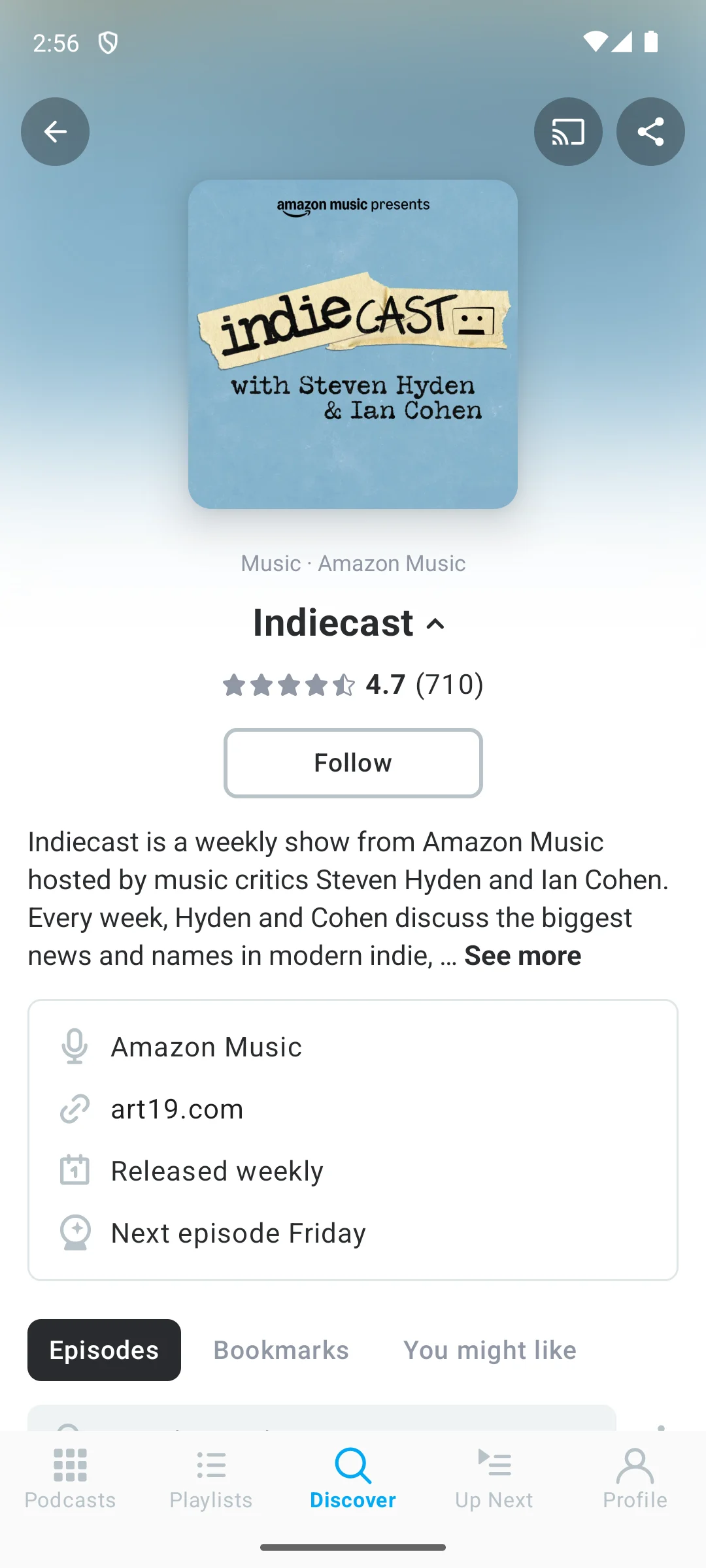
The screenshot below is our own capture of a show page in Pocket Casts, made on our Android emulator on 18 August 2026. It shows the elements the app puts on a show: cover art, the rating, a Follow button, the description, the network behind the show and the show's own website link, how often it is released and when the next episode is due, then tabs for episodes, bookmarks and a You might like list. The cover art belongs to the show, not to the app.
No in-app purchases at all, and a Data Safety section that declares no data collected.
1M+ installs · free to install · no in-app purchases · AntennaPod Open Source Team · listing updated 3 August 2026 · Contains ads: No · checked 26 August 2026
Google Play listing · 4.8 (97,224) · read 26 August 2026
The blunt cost first: discovery is a search box rather than a front page, and sync depends on a server the project does not run. What you get for it is a listing that asks for nothing: AntennaPod carries no ads label and not a single in-app purchase, read on 26 August 2026, so the free tier costs nothing in money and nothing in attention. BBC Sounds also sells nothing and carries no ads label on its listing as read on 21 August 2026. AntennaPod's own Data Safety section, read on 26 August 2026, declares no data shared with third parties and no data collected at all.
Sync is real but it is not built in the way a commercial player builds it. The project documents two routes in its own synchronisation page: the free public gpodder.net server, or Nextcloud with the gPodder Sync app. That same page warns that gpodder.net "is often overloaded, leading to errors in AntennaPod" and steers anyone who can towards self hosting.
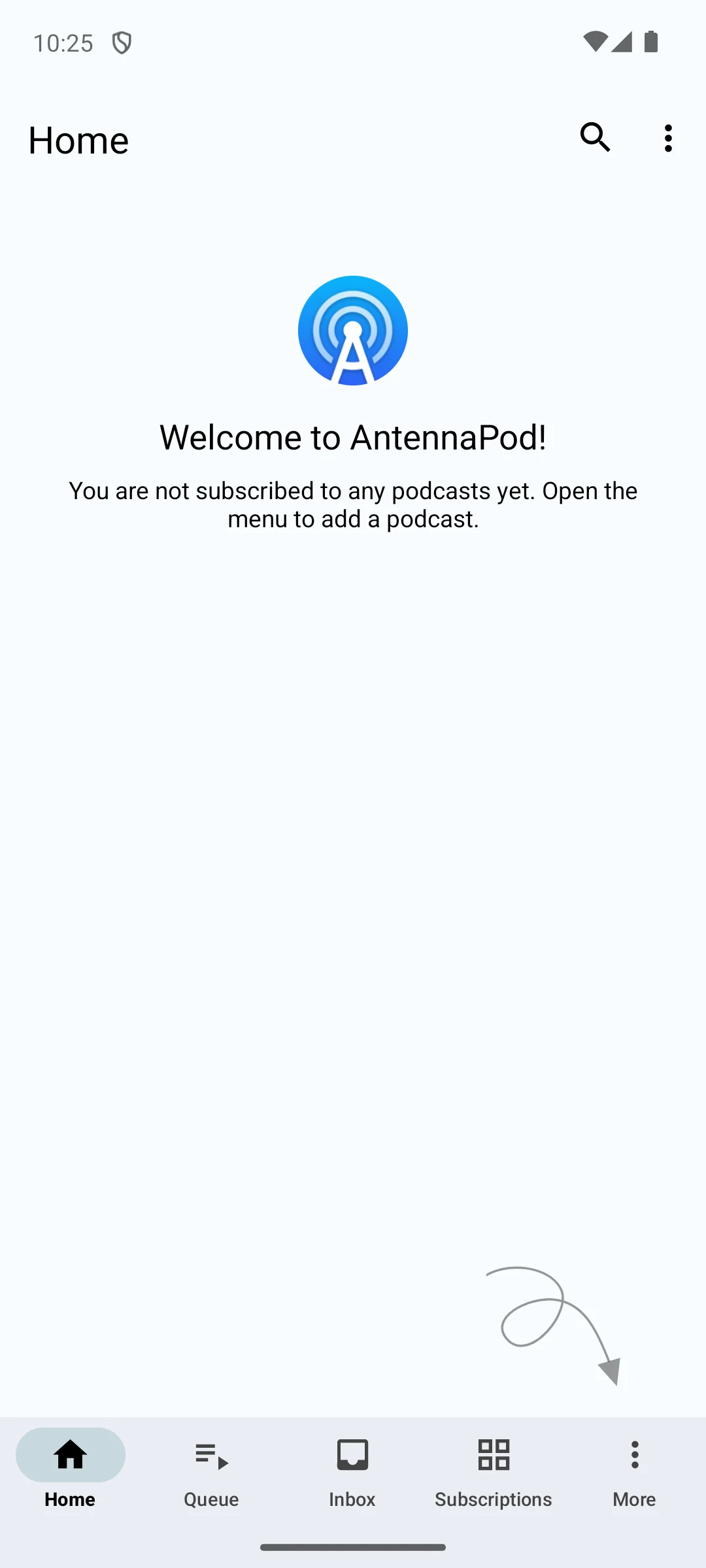
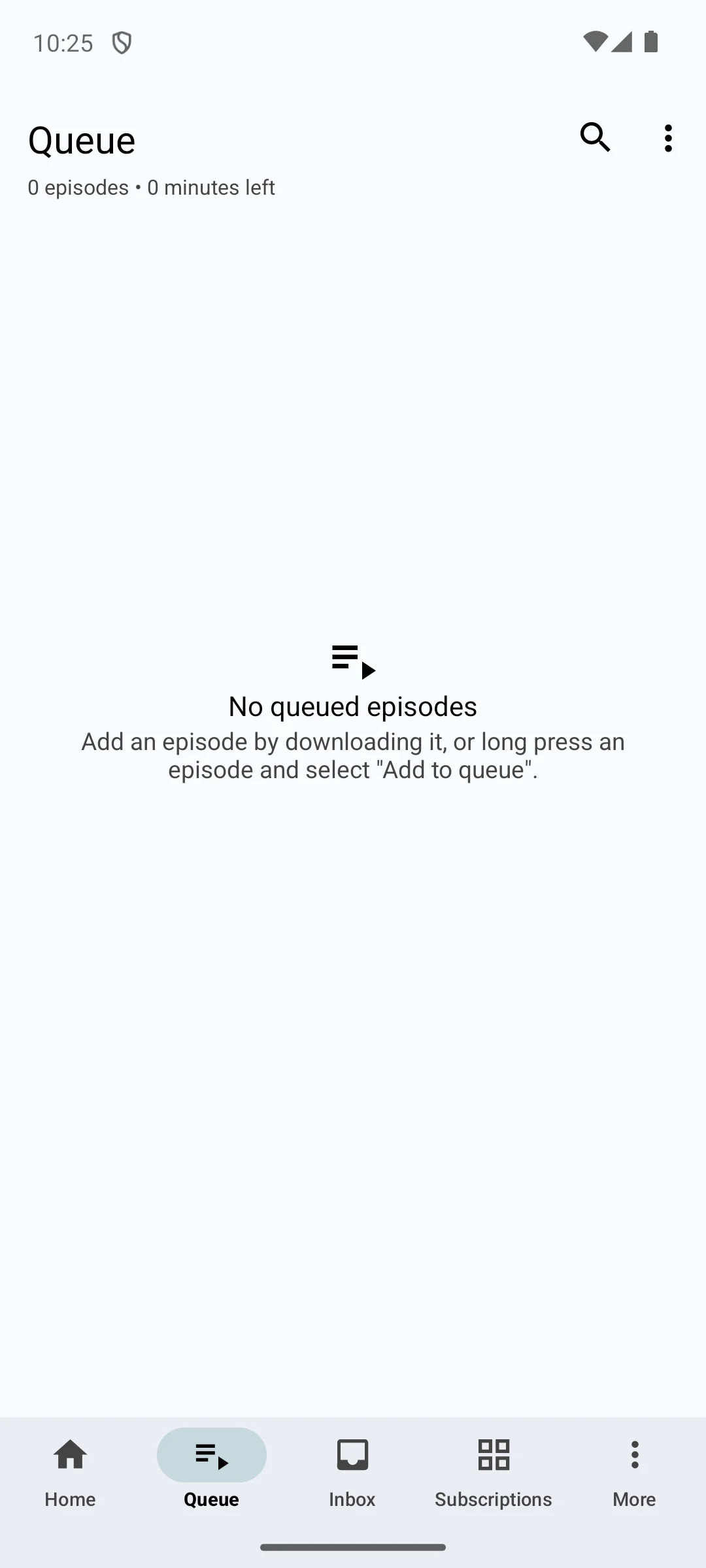
The two screenshots below are our own captures of AntennaPod on our Android emulator, made on 18 August 2026, with no podcasts added. They show what a listing with no ads and no in-app purchases looks like from the inside: a Home screen whose message reads "You are not subscribed to any podcasts yet", a bottom bar of Home, Queue, Inbox, Subscriptions and More, and a Queue that reports no queued episodes. That is also the shape of the trade named above, since nothing arrives until a feed is added.
One app for music and shows, provided every show you follow is already in the catalogue.
1B+ installs · free to install · in-app purchases $6.99 to $203.88 per item · Spotify AB · listing updated 18 August 2026 · Contains ads: Yes · checked 21 August 2026
Google Play listing · 4.3 (36,162,083) · read 21 August 2026
Spotify makes sense only when the shows you follow are in its catalogue and you already pay for Premium: its listing declares ads and purchases reach $203.88 per item. The blunt cost is that it is a catalogue and not a player. The listener help pages we read describe finding shows under Search and saving them with Follow, and publish no way to add a podcast by its RSS address and no way to export what you follow.
That matters more than it sounds. A show that publishes only to an open feed, including the private subscriber feeds sold by many independent podcasters, has no route in that we could find published, and neither has the list of shows you have built, which no documented export will carry to another app as a file.
The video podcast route, and the only big catalogue app here that accepts an RSS address.
5B+ installs · free to install · in-app purchases $0.05 to $999.99 per item · Google LLC · listing updated 20 August 2026 · Contains ads: Yes · checked 21 August 2026
Google Play listing · 4.5 (7,766,179) · read 21 August 2026
YouTube Music is the easiest way to watch a video podcast and then keep listening with the screen off, and its listing declares ads with purchases reaching $999.99 per item. The surprise is the feed question: Google documents adding a podcast to your library by RSS feed from Library, Podcast, Add podcast, "Add a podcast by RSS feed". Grouping it with the closed catalogues would be wrong.
The same Google page sets out what an RSS-added show loses, and the list is long: you cannot "switch between audio and video", "like or dislike content", "share shows or episodes", "see the podcast's channel page", "report shows or episodes" or "view captions". So the feed is accepted and then held at arm's length. No OPML export appears in the help we read, either.
The deepest settings tree here, with the ad removal sold as a subscription.
10M+ installs · free to install · in-app purchases $0.99 to $109.99 per item · Xavier Guillemane · listing updated 17 August 2026 · Contains ads: Yes · checked 21 August 2026
Google Play listing · 4.6 (594,822) · read 21 August 2026
Podcast Addict holds podcasts, audiobooks, video channels and live radio in one library with more settings than anything else here, and its listing declares ads. What the free tier costs you is a banner and a recurring bill to remove it: its own Podcast Addict Premium page sells it at $0.99 per month or $10.99 per year, and the developer has stated that a one-time lifetime unlock is not offered because it is not sustainable. On portability it is generous, taking any feed and writing an OPML file back out.
Its Data Safety section carries the bluntest line on this page: alongside sharing with third parties and collection, it says data is not encrypted. Nine of the other ten listings declare encryption in transit, and the eleventh, AntennaPod, declares no data collected at all, so the question does not arise there.
In-audio keyword search, with the free tier capped at 100 subscriptions.
10M+ installs · free to install · in-app purchases $0.99 to $99.99 per item · Castbox.FM · listing updated 15 July 2026 · Contains ads: Yes · checked 21 August 2026
Google Play listing · 4.7 (363,970) · read 21 August 2026
Castbox earns its place on in-audio search, which finds spoken keywords inside episodes, and its listing declares ads. The free tier costs you two things beyond the banner. Castbox's own Premium page says "Free users are limited to subscribe to 100 channels only", and the home feed pushes recommendations hard. Portability is fine: any feed goes in, and an OPML file comes back out.
Castbox is also the clearest place to separate two different things that both get called ads. Its help centre article on audio ads after going Premium says "all audio content, including the audio ads, is made and provided by the podcasters, thus we cannot remove such audio ads", and that what Premium removes is the graphical and text advertising inside the app. The Contains ads label on a Play listing is about that second kind and says nothing about the first.
Podcasting 2.0 chapters and transcripts free, on a store page that has not moved since 2024.
10K+ installs · free to install · in-app purchases $9.99 to $99.99 per item · Podverse · listing updated 1 September 2024, not been updated for 23 months · Contains ads: No · checked 3 September 2026
Google Play listing · 4.4 (1,149) · read 3 September 2026
Podverse gives you Podcasting 2.0 chapters, transcripts and cross-app comments without paying, on a listing that carries no ads label. The blunt cost is not money but momentum: its Play listing has not been updated since 1 September 2024, which is 23 months before this check, and 1,149 ratings is a small enough sample that problems surface slowly. Custom RSS feeds and OPML import and export are all in the free mobile app.
It is open source under the AGPLv3 and draws the paid line on its own site: "Features that require updating our servers are available only with a Premium membership" (podverse.fm/about). Its tutorials page lists "Add custom RSS feed", "Export OPML" and "Import OPML" as separate walkthroughs, and notes those need the mobile app rather than the web player.
The simplest listing here with no ads label, searching the open Podcast Index without a login.
100K+ installs · free to install · in-app purchases $0.99 to $14.99 per item · Really Bad Apps LLC · listing updated 25 June 2026 · Contains ads: No · checked 26 August 2026
Google Play listing · 4.4 (6,835) · read 26 August 2026
The blunt cost first, and it is unusual: this is the one listing on the page whose Data Safety section says data can not be deleted. Against that, Podcast Guru's listing carries no ads label, and its purchases stop at $14.99, the lowest ceiling of any app on this page that sells a range at all. It searches the open Podcast Index without a login, and its Android FAQ says that "if you know the RSS feed URL for your podcast of choice you can import it into Podcast Guru (this includes private Patreon feeds!)" and that the app "imports and exports subscribed podcasts in the OPML format".
Two more things a store page shows only if you look. The version on the listing is 2.3.2-beta2, so the current public release is labelled a beta by the developer, and the listing sets Android 9 as the minimum. That is the highest floor among the six listings on this page that print a minimum at all; the other five did not print one on the store pages we read on 21 August 2026.
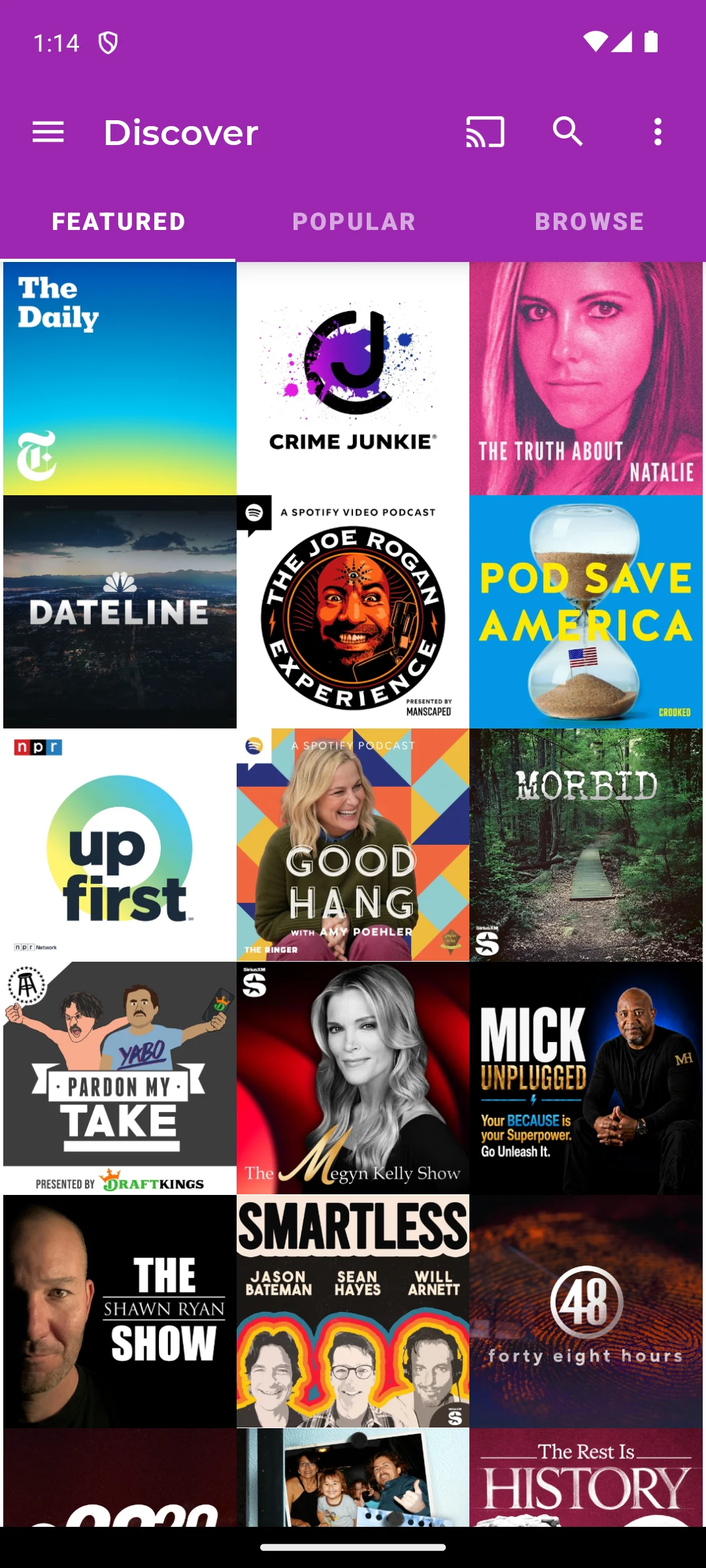
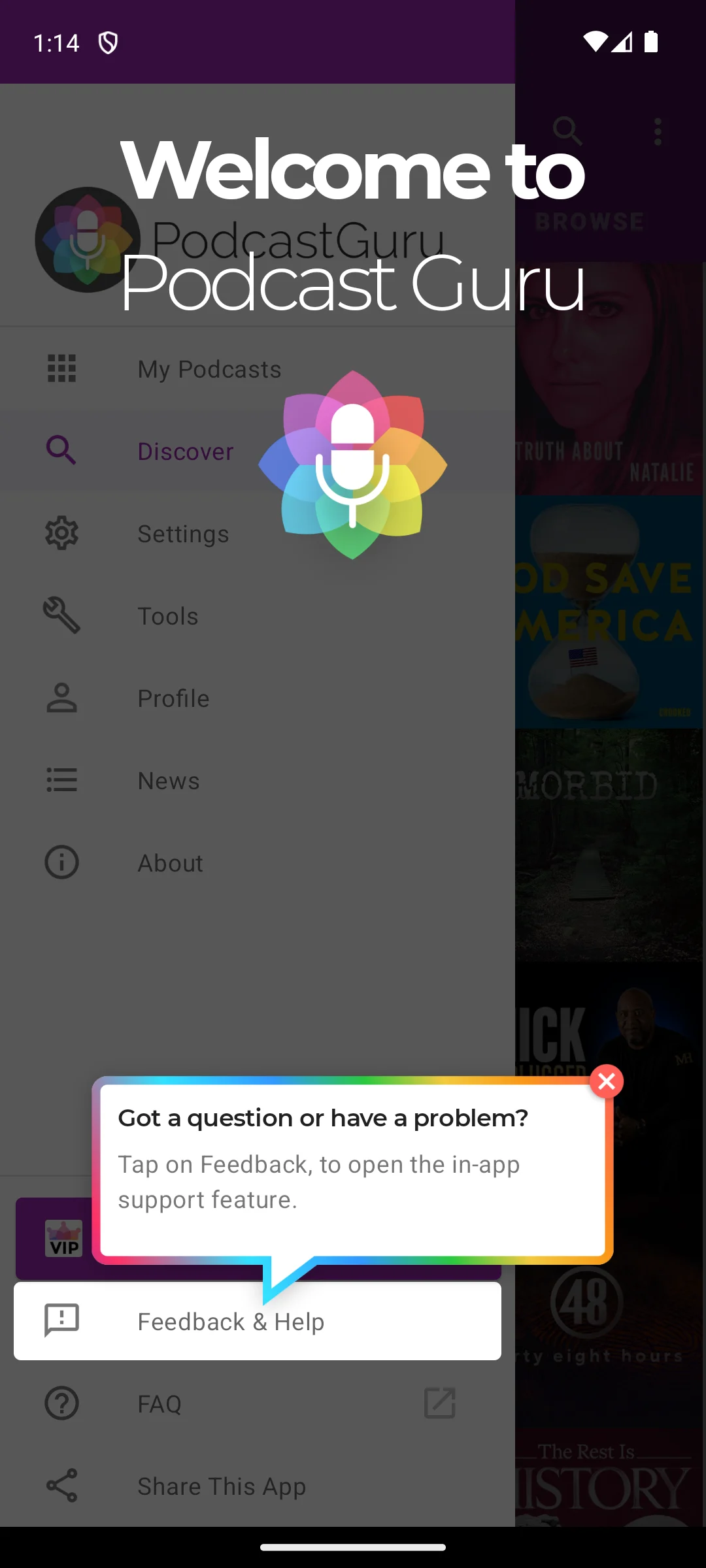
The two screenshots below are our own captures of Podcast Guru on our Android emulator, made on 18 August 2026. The first shows the Discover screen with its Featured, Popular and Browse tabs and a grid of show artwork; the second shows the side menu over it, listing My Podcasts, Discover, Settings, Tools, Profile, News and About, with the app's own welcome panel and support prompt on top. No advertisement appears in either capture. The cover art belongs to the shows, not to the app.
A free extra if you already pay for Prime, and nothing more than that.
100M+ installs · free to install · a single in-app purchase at $12.99 · Amazon Mobile LLC · listing updated 18 August 2026 · Contains ads: No · checked 2 September 2026
Google Play listing · 4.0 (3,391,666) · read 2 September 2026
Amazon Music is a free extra if you already pay for Prime, and at 4.0 stars from 3,391,666 ratings it shares the lowest rating on this page. Its listing carries no ads label, and Amazon's own plan comparison page describes Amazon Music Free as including ads, which is worth holding in one hand: the Play label is a statement about advertising inside the app, not a promise about the service behind it. On portability there is nothing to report in Amazon's favour.
The RSS route Amazon documents is for podcasters submitting a show to the directory, not for a listener adding a feed to the app, and no OPML export appears in the help we read. The shows you follow stay in the Amazon account.
Offline catch-up done for you, with the way out running through your account.
10M+ installs · free to install · in-app purchases $0.99 to $119.88 per item · Maple Media · listing updated 26 May 2026 · Contains ads: Yes · checked 21 August 2026
Google Play listing · 3.9 (107,089) · read 21 August 2026
Player FM is built around offline listening and a queue that drops episodes you ignore, and its listing declares ads with 3.9 stars from 107,089 ratings. The free tier costs you the ads and the sync, both of which sit behind Premium. Portability is real but conditional: any feed can be imported from Settings, Import OPML or RSS, and the export runs through your Player FM account rather than out of the app on its own.
That conditional matters for the question this page is built on. Player FM's own help article on exporting your subscriptions puts the OPML file at a per-account web address you have to be signed in to reach, and offers a download in the app at Settings, Connection, Export subscriptions. So the list is retrievable, but only through the service that holds it. AntennaPod, Podcast Addict, Podcast Guru, Podverse and Castbox all write the file from the phone.
The route to BBC radio, for readers who live in the UK and nobody else.
10M+ installs · free to install · no in-app purchases · British Broadcasting Corporation · listing updated 21 August 2026 · Contains ads: No · checked 21 August 2026
Google Play listing · 4.6 (97,944) · read 21 August 2026
BBC Sounds is still the best route to BBC radio and BBC podcasts, and it costs nothing at all: no ads label and no in-app purchases, the only entry here besides AntennaPod that sells nothing. It is also useless to most readers of this page, because the BBC closed it to listeners based outside the UK on 21 July 2025. It is a BBC catalogue, not a player: the listing describes subscribing to "BBC podcasts, mixes and programmes" and nothing else.
Read this first. If you do not live in the UK, this entry is here for completeness and nothing else. The app will not play BBC Sounds content to you.
The BBC's own help page states: "We can now confirm that BBC Sounds has closed for listeners based outside the UK", and that "Anyone who lives in the UK can still use the BBC Sounds app when they go on holiday abroad for around a month" (BBC Sounds help). Listeners outside the UK are pointed to the audio section of the BBC app instead.
Eleven listings were read on 21 August 2026. Three of the five questions below are answered on a store page. The other two are not on one at all, and they are the pair that decides whether today's choice can be undone.
Overcast is not an option at all: its own site describes it as a "podcast player for iPhone, iPad, and Apple Watch", so no entry here is a substitute for it in the sense readers usually mean. Google Podcasts is the other absence. YouTube's own announcement said it would be "discontinuing Google Podcasts in the US as early as April 2024" and shipped a tool that could export subscriptions as an OPML file, which is why an app that began as a music player is on a podcast page at all. Both were read again on 21 August 2026. Any app above can rebuild a list by searching show names, and the seven with OPML import can do it from a file in one step if you saved one.
AntennaPod, on the plain reading of the listings. Checked 21 August 2026, it is the only app on this page that combines no ads label, no in-app purchases at all and a Data Safety section declaring no data collected. BBC Sounds also sells nothing and carries no ads label, but its Data Safety section declares collection and sharing, and it plays nothing at all outside the UK. Pocket Casts is the better everyday app and its core is free, but folders, bookmarks and cloud storage sit in the paid Plus tier.
Checked 21 August 2026: Pocket Casts, AntennaPod, Podcast Addict, Castbox, Podverse, Podcast Guru and Player FM all document it, and so does YouTube Music, which is the surprise on this page. Spotify, Amazon Music and BBC Sounds publish no listener route to do it in the help pages we read. This matters for private subscriber feeds, which many independent podcasters sell as a plain feed address and nothing else.
Usually, through a file called OPML. Checked 21 August 2026, Pocket Casts, AntennaPod, Podcast Addict, Castbox, Podverse and Podcast Guru all export one from the phone, and Player FM exports one through your account on its website. For Spotify, YouTube Music, Amazon Music and BBC Sounds no export appears in the help we read, so plan to rebuild the list by searching show names.
Checked 21 August 2026, the Play listings for AntennaPod, Pocket Casts, Podverse, Podcast Guru, Amazon Music and BBC Sounds carry no Contains ads label. The listings for Spotify, YouTube Music, Podcast Addict, Castbox and Player FM do declare ads. AntennaPod goes furthest: no ads label and no in-app purchases either.
No, and the developers say so themselves. Castbox states that all audio content including the audio ads is made and provided by the podcasters, so it cannot remove them, and that what Premium removes is the graphical and text advertising in the app. Podcast Addict says the same thing in its own FAQ on why audio ads appear in podcasts. The Contains ads label on a Play listing is a statement about advertising inside the app, never about advertising inside a show.
Not everywhere, and the exceptions are the ones that cost money. Checked 21 August 2026: the seven dedicated players all download episodes for offline play, and nothing in the listings or help pages we read puts plain downloading behind a paywall, although Player FM sells unlimited downloads and sync as Premium. Google says podcasts can be downloaded in YouTube Music regardless of membership status, and Spotify says you may need Premium to download some shows. Amazon's own plan comparison lists offline playback as No for both Amazon Music Free and Amazon Music Prime. BBC Sounds plays nothing at all to listeners based outside the UK.
It depends on where your shows are. If everything you follow is in the Spotify catalogue, the convenience is hard to beat. If any of it publishes only to an open feed, nothing in the Spotify help we read gives you a way to add it, and no export is published to fall back on later. Many listeners run both.
No. Overcast describes itself on its own site as a podcast player for iPhone, iPad and Apple Watch, and that site names no Android version at all, checked 21 August 2026. The closest ground is covered by Pocket Casts, whose Trim Silence and Volume Boost do the same job, and by AntennaPod if the open, no-account approach is the appeal.
YouTube announced that Google Podcasts would be discontinued in the US as early as April 2024, that podcast listening was moving into YouTube Music, and that the migration tool could also export your subscriptions as an OPML file. That announcement is linked in the section above. Any app here can rebuild your list by searching show names, and the seven with OPML import can restore it from a file if you saved one. Checked 21 August 2026.
Podverse and Podcast Guru, both free for it, because both support the open Podcasting 2.0 tags that carry chapters and transcripts when a show publishes them. Checked 21 August 2026, Podverse rates 4.4 from 1,143 ratings but its Play listing has not been updated since 1 September 2024, while Podcast Guru rates 4.4 from 6,835 ratings on a listing updated in June 2026.
No. The BBC says on its own help pages that BBC Sounds has closed for listeners based outside the UK, which took effect on 21 July 2025, and it points international listeners to the audio section of the BBC app instead. If you live in the UK you can keep using the app on holiday abroad for around a month before it locks you out.
Checked 26 August 2026: the Play listings for Pocket Casts, AntennaPod and Podcast Guru were re-read twice each. Ratings, ads labels, purchase ranges and listing-updated dates are unchanged on all three; the two rating counts that had moved were refreshed, and Podcast Guru had not moved at all. The other eight listings were not re-read and keep their 21 August 2026 date, and so do every developer document, the feed and OPML columns. The quick answer was rebuilt on those three listings alone. Its AntennaPod arm no longer says that no other listing here combines the three properties, because that is a claim about eleven listings and only three were read; the plain single-app fact is given instead, and the AntennaPod verdict line was narrowed the same way. The broader counts in How to choose and in the FAQ still rest on the 21 August 2026 pass and are dated to it. The jump list called Amazon Music the lowest rating here, which this page's own table and two of its own sentences give as joint lowest with Player FM; it now reads joint lowest. Two sentences that described our own fetching rather than the apps were taken out of the first screenful: the How we verify box now states the rule in plain terms, and the fact behind it belongs here, that Podcast Addict and Player FM refused our requests on 21 August 2026, so their help articles were read through a search engine. Two link boxes promised what their targets refute. The audiobook box claimed a dedicated player handles chapters and bookmarks better than a podcast queue does, and that page makes no such comparison; it says instead that a podcast app can double as an audiobook player. The radio box offered live listening without touching your allowance, and that page's own answer is that none of its apps plays without a connection and only a hardware FM tuner uses no data. Both were rewritten from what the targets actually say. A where-next box after the table hoists the audiobook and radio guides, which. Three unsourced rankings were withdrawn and replaced with the plain fact: the cleanest listing here, the lightest player here, and the one to install. No app was added or removed, no slug, URL or canonical was changed, and the link to the German version of this page is carried forward unchanged.
Checked 21 August 2026: all eleven Play listings re-read and every figure refreshed. The comparison table was rebuilt: the Account column was dropped, because it printed Yes, No or Optional for eleven apps with no source behind a single value, and it was replaced by two sourced columns, whether the app accepts an arbitrary RSS feed and whether it exports OPML, each read from the developer's own documentation and linked in the entry that uses it. A checked-date column was restored alongside them. Where a developer publishes no answer the cell now reads Not documented rather than No, which changed three cells: Spotify, Amazon Music and BBC Sounds. A withdrawn claim: this page previously said AntennaPod has "no sync unless you host it yourself", which its own synchronisation page contradicts, since gpodder.net is a free public server anyone can sign up for; the honest version of that con is the warning on the same page that gpodder.net is often overloaded. A second withdrawal, in the FAQ: this page called AntennaPod "the only listing here with no ads and no in-app purchases". BBC Sounds carries neither either, read on the same day, so the claim is now narrowed to the one thing AntennaPod alone declares, no data collected. A third, and the one that could have cost a reader money: the FAQ answered that "Every app on this list downloads episodes over Wi-Fi to play later without data", undated and unsourced. Amazon publishes offline playback as unavailable on both Amazon Music Free and Amazon Music Prime, and BBC Sounds plays nothing outside the UK, so that answer was replaced with a dated one that names the exceptions. The Overcast answer also said the developer had "no plans for one", which nothing we read supports; it now cites Overcast's own description of its platforms instead. Two stale figures were replaced: AntennaPod read 96,380 ratings and Amazon Music read 3,378,961, both from 6 August 2026. The How we verify box was rewritten: the previous one described installing apps and opening them, which the owner rule verificat, nu testat does not allow in any channel, and it was published twice in a row, so the duplicate block was collapsed into one. Three paragraphs introducing the screenshots were rewritten for the same reason. All five photographs are carried forward unchanged, and all three galleries keep the same images, figures and layout, with alt text and captions rewritten to describe the screen rather than how it was reached. One caption named a feed address on a Pocket Casts show page; the row on that screen is the show's website link, and all three places that said otherwise were corrected. The link to the German version of this page is carried forward unchanged. No app was added or removed.
 Best Music Player Apps for AndroidMusic & Audio