
Checked 3 September 2026
Thirteen Android voice recorders for lectures, interviews and quick memos. Every rating, install badge, ad label and price below is read from the app’s own Google Play listing. Two picks install on one brand of phone only, and the table says so. Most sit in the wider Music and Audio category.
Easy Voice Recorder is the pick, Audio Recorder the free one with no ads, Otter the choice for live transcripts. Our answer, the free pick and the table ↓
Checked 3 September 2026: no pick changed; Easy Voice Recorder, Audio Recorder and Otter re-read 26 August, the other ten stand as read on 8 August
Thirteen Android voice recorders, compared on rating, installs, the ads label and what the money buys, with Google Recorder limited to Pixel phones.
Easy Voice Recorder is our best overall because presets cover notes, meetings and music, and on 26 August 2026 it was free with ads, Pro from $1.49. Proofed 3 September 2026
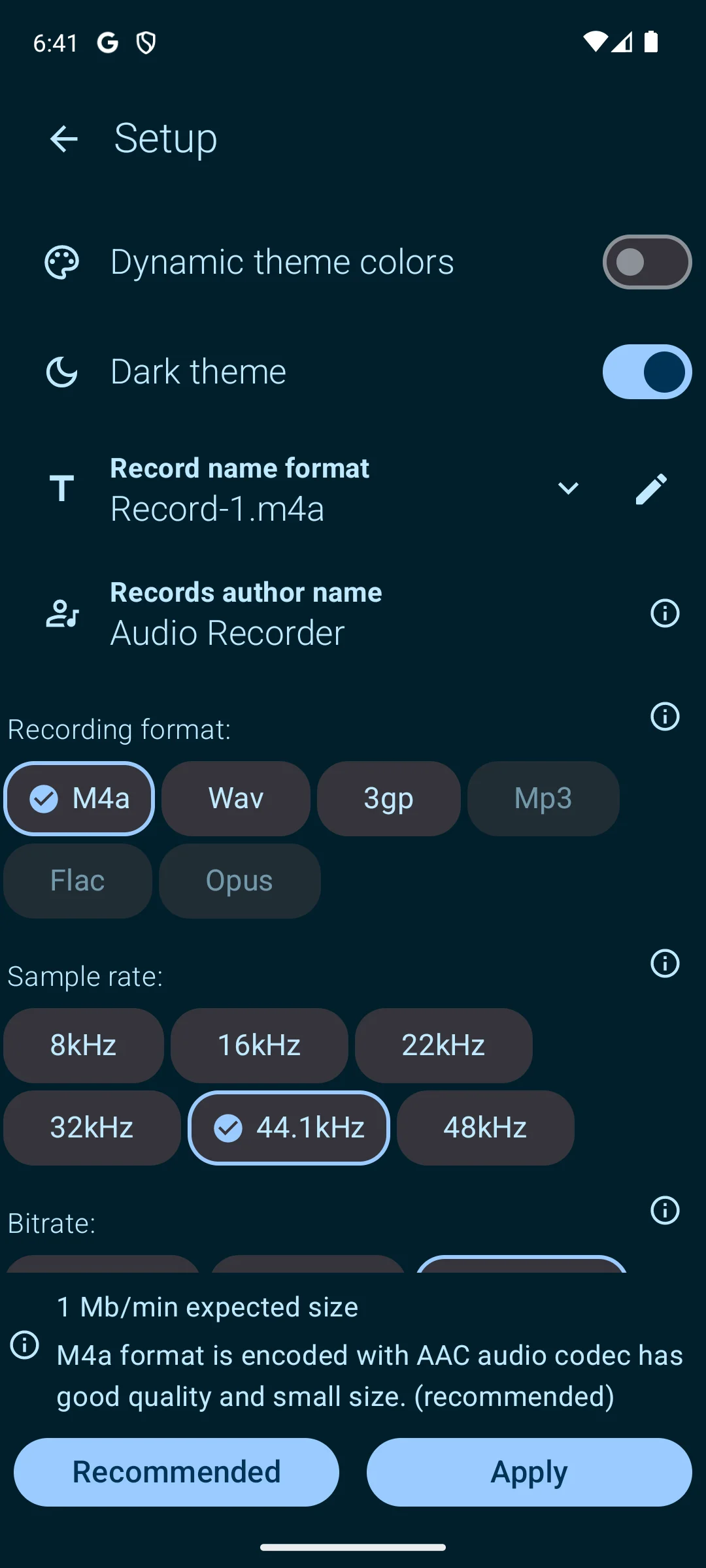
Audio Recorder is our best free pick because recording and sharing are unrestricted, and on 26 August 2026 it was free with no ads, trim tools from $0.99. Proofed 3 September 2026
Otter is our transcripts pick because it captions speakers live, and on 26 August 2026 it was free with no ads, Pro from $12.99. Proofed 3 September 2026
Data checked: 3 September 2026.
Everyday memos
4.7 stars from more than 622,000 ratings · 50M+ installs · free to install, in-app purchases $1.49 to $4.99 per item · contains ads · by Digipom · Play listing updated 15 July 2026 · checked 26 August 2026
Easy Voice Recorder is our default pick: a 50M+ install badge, 4.7 stars on 26 August 2026, and presets for voice notes, meetings and music. The free build shows ads and cannot make an MP3 at all. MP3, FLAC and AAC, Drive and Dropbox upload, trimming, folders and stereo are all Pro.
Skip it if you need MP3 without paying. Choose it over Smart Voice Recorder for cloud upload, trimming and a watch tile.
↑ Back to the comparisonLong sessions
4.6 stars from 484,895 ratings · 10M+ installs · free to install, one in-app item at $1.99 · contains ads · by SmartMob · Play listing updated 30 October 2025 · checked 8 August 2026
Smart Voice Recorder suits long unattended takes, because it drops silence while it records rather than afterwards. It is free with ads, and the listing never says what the single $1.99 item buys. The blunt limit is format: WAV and PCM only, no MP3 anywhere, with a stated 2 GB ceiling per file.
Skip it if you need MP3 or a file above 2 GB. Choose it over Easy Voice Recorder for overnight length and dead air trimming. It doubles for capturing outdoor sounds.
Searchable transcripts
4.8 stars from more than 41,000 ratings · 5M+ installs · free to install, in-app purchases $12.99 to $99.99 per item · no ads · by Otter.ai, listed as OtterAI Transcribe Voice Notes · Play listing updated 18 August 2026 · checked 26 August 2026
Otter is the pick when the words matter more than the audio: live transcription, speaker labels, slide capture on Zoom, Meet and Teams. No ads, and the free Basic plan lists 300 monthly transcription minutes, capped at 30 minutes per conversation. Its own requirements are blunt: an account and an internet connection are mandatory, English, Spanish and French only.
Skip it if the conversation is confidential or in another language. Choose it over Rev for capturing one meeting on Zoom, Meet or Teams, since Rev is the one built for analysis across several recordings.
↑ Back to the comparisonPixel only
3.3 stars from 15,764 ratings · Pixel phones only, so the Play install badge is not an adoption figure · free, no in-app purchases · no ads · by Google LLC, listed as Recorder · Play listing updated 10 July 2026 · checked 2 September 2026
Google Recorder is our pick for transcribing without uploading, and it costs nothing, with no ads and no purchases. It also carries a low rating, 3.3 stars from 15,764 ratings, checked 2 September 2026. The reason is reach: the listing will not install on a non-Pixel phone.
Skip it if you do not own a Pixel. Choose it over Otter when the audio must not leave the phone.
↑ Back to the comparison
Galaxy only
4.0 stars from 291,698 ratings · 1B+ installs · free, no in-app purchases · no ads · Data safety reports no data collected · by Samsung Electronics · Play listing updated 27 August 2025 · checked 8 August 2026
Samsung Voice Recorder is already on the phone if you own a Galaxy. It costs nothing, carries no ads and no purchases, and its Data safety section reports no data collected. The limit is its own summary line: this is a recorder for the Galaxy series. Interview mode records two people on the top and bottom microphones as separate waveforms.
Skip it if you do not own a Galaxy. Choose it over Easy Voice Recorder for a two microphone interview with no install and no ads.
↑ Back to the comparison
Music and ideas
4.1 stars from 25,567 ratings · 5M+ installs · free, no in-app purchases · no ads · by Dolby Laboratories · Play listing updated 12 June 2026 · checked 2 September 2026
Dolby On is free in every sense: no ads, no purchases, nothing gated. It masters every take automatically, with noise reduction, de-essing, dynamic EQ, compression and limiting, and no settings to get wrong. It is also the wrong tool for notes. Its description never mentions transcription, formats or gain, and Data safety says data cannot be deleted.
Skip it if you need a searchable memo. Choose it over RecForge II for a good sounding take with no settings, next to podcast apps if you publish.
↑ Back to the comparisonStale listing
4.3 stars from 3,607 ratings · 1M+ installs · free, no in-app purchases · contains ads · by Newkline · Play listing last updated 21 July 2024 · checked 8 August 2026
Awesome Voice Recorder records straight to MP3, WAV or M4A, sorts takes into folders and trims and converts them in the app. Read the date first. The listing has not been updated since 21 July 2024, twenty five months ago, and it is ad supported with nothing sold that removes the ads.
Skip it if you would be unhappy to lose a recording to an unmaintained app. Choose it over Voice Recorder by Splend Apps only for folder categories and in-app converting.
↑ Back to the comparisonListing changed hands
4.5 stars from 12,275 ratings · 1M+ installs · free to install, in-app purchases $0.99 to $149.99 per item · contains ads · by One Music Player · Play listing updated 6 May 2025 · checked 2 September 2026
Parrot Voice Recorder is not the app older roundups describe. The listing is published by One Music Player now, not Searing Media, and it has been rewritten around call recording, which modern Android blocks. It is free with ads, its items reach $149.99, and the listing’s permissions note puts scheduled recording in Parrot Pro. The What’s new field is empty.
Skip it if you came for the calm memo recorder Parrot used to be. Choose it over Audio Recorder only when a scheduled start is the one feature you cannot do without.
↑ Back to the comparisonFree formats
4.7 stars from 362,679 ratings · 10M+ installs · free to install, one in-app item at $1.99 · contains ads · by Splend Apps · Play listing updated 22 June 2026 · checked 8 August 2026
This is a simple recorder with a wide free format range: MP3, PCM, AAC and AMR, 8 to 44 kHz, 32 to 320 kbps, all free. It carries ads, and the listing never says what the single $1.99 item unlocks. Its selectable audio source line mentions phone calls, then the same page says it is not a dedicated call recorder.
Skip it if you want a listing with no ads. Choose it over Easy Voice Recorder when you want MP3 without paying.
↑ Back to the comparisonPaid transcripts
4.1 stars from 3,128 ratings · 500K+ installs · free to install, in-app purchases $1.99 to $149.99 per item · no ads · by Rev.com · Play listing updated 24 June 2026 · checked 2 September 2026
Rev is the specialist. It runs analysis across several recordings at once and surfaces quotes and contradictions with citations back to the audio. Recording is free with no ads, but human review is paid, from $1.99 to $149.99. Its reach is modest: a 500K+ install badge and 3,125 ratings, checked 2 September 2026.
Skip it if you only need a recorder. Choose it over Otter when you have several interviews to compare rather than one meeting to caption.
↑ Back to the comparisonSensitive recordings
4.2 stars from more than 5,800 ratings · 1M+ installs · free to install, in-app purchases $0.99 to $2.49 per item · no ads · Data safety reports no data collected · by Dmytro Ponomarenko · Play listing updated 5 August 2026 · checked 26 August 2026
Audio Recorder is the pick for anything sensitive: no ads, no data collected, and source on GitHub. Trimming and cutting are the Pro features named on the listing. The blunt limit is format: M4A, WAV and 3GP only, no MP3. Broken Record Recovery restores a take after a crash, a feature the listing names.
Skip it if you need MP3 files. Choose it over Voice Recorder by Splend Apps for no ads, no data collection and a published source tree.
↑ Back to the comparisonManual gain
3.0 stars from 18,060 ratings · 5M+ installs · free, no in-app purchases · contains ads · by Dje073 · Play listing updated 3 August 2026 · checked 3 September 2026
RecForge II lets you switch Automatic Gain Control off and set the level by hand, though its own listing cautions that AGC control and manual gain are not available on every device, and every codec is free and ad supported. Print the rating beside that: 3.0 stars from 18,060 ratings, checked 3 September 2026, the lowest figure this page prints. Its own release note for the 3 August 2026 build says the record button did nothing on Android 11 and 12.
Skip it if you want a long clean track record. Choose it over Dolby On when you set input levels yourself, alongside multitrack recording or an equalizer app.
↑ Back to the comparisonCloud upload
4.5 stars from 60,531 ratings · 5M+ installs · free to install, in-app purchases $2.49 to $9.99 per item · contains ads · by NLL APPS · Play listing updated 30 March 2026 · checked 8 August 2026
ASR Voice Recorder is the pick when a recording has to exist somewhere other than the phone: Drive, Dropbox, OneDrive, Box, Yandex Disk, FTP, WebDav and auto email, plus device to device transfer over local WiFi. That headline feature is marked Pro in the app’s own feature list, so the free build is an ordinary recorder with ads.
Skip it if you will not pay for the upload. Choose it over Easy Voice Recorder for upload targets beyond Drive and Dropbox.
↑ Back to the comparisonRecording captured, which video editor cuts it into a clean export with no watermark?
Our answer there: YouCut, free, ad supported, buying to $59.99, and its Play listing says it never adds a watermark, listing read 20 August 2026.
See it against 11 rivalsFour things decide whether a recorder still suits you in a year: what it records, where the files go, where any transcription happens, and what you are allowed to record.
Two settings shape the sound: sample rate, usually 44.1 kHz or 48 kHz, and bitrate, where higher means more detail and bigger files. Speech is happy at a modest bitrate. Singing is not.
Format is what catches people out. Android’s own supported media formats table lists built in encoders for AAC, AMR, FLAC, Opus and PCM or WAVE, but not for MP3, which is decode only. That is why WAV and M4A are near universal here while AMR is not, why recording straight to MP3 means the developer ships an encoder, and why Easy Voice Recorder sells MP3 as a Pro feature while Splend Apps gives it away with ads.
After a few months the problem is finding one file among two hundred. Look for renaming, sorting and bookmarks you can drop mid-recording. Then check where the audio actually lives, because that differs by app: RecForge II saves into the Music folder, Voice Recorder by Splend Apps and ASR Voice Recorder both let you set the recordings folder, and Digipom’s help page names an EasyVoiceRecorder folder, while apps that keep their recordings in app private storage leave you nothing to browse to. Android’s scoped storage rules restrict what an app may touch, and developers have adapted. Dmytro Ponomarenko, who publishes the source of Audio Recorder, explains the consequence in the project’s own README: “There is no plans to add feature where user can change recording directory. Newer versions of Android added restrictions on ability to interact with device file system. There is no simple way how to implement the feature. So all records are stored in app's private dir. Anyway, all record files available for user to download from app's private dir to a public dir.” That is platform behavior, not a bug in one app, and it is why an export button matters more than a folder picker.
Transcription is the feature people upgrade for, and the question is where it runs. Cloud transcription uploads your audio to a company server. For a shopping list that is irrelevant. For a medical note or a source interview it is a decision, not a detail.
On-device transcription keeps the audio on the phone. Google is specific in Pixel Phone Help: “Recorder sends audio to an on-device Google service or app to transcribe it. After the audio is transcribed, the Google service or app discards the audio.” The same help center adds a caveat to re-transcribing: “Re-transcribe may process audio files on Google servers.” Both sentences belong together. Recent Galaxy phones can also transcribe, though the Samsung listing mentions only editing transcribed text and never says whether that transcription runs on the phone. Otter and Rev are cloud services by design. If a recording is sensitive, transcribe on the device, or keep a plain file and use our guide to transcribing a voice recording on Android later.
A recorder needs the microphone and storage. It does not need contacts or location. Since Android 14, an app that keeps capturing with the screen off must declare a microphone foreground service, which is why a notification sits in the shade during a long take, and why battery optimization can cut short an app that skips it.
Consent is the other half, and the rules vary by place. In many US states and other countries you may record a conversation you are part of, which is called one party consent. Several US states require every participant to agree. Secretly recording a private conversation you are not part of is widely prohibited. Parrot Voice Recorder advertises call recording as its headline feature, and Voice Recorder by Splend Apps offers a call audio source then says on the same page that it is not a dedicated call recorder, while RecForge II states plainly that it does not record calls. The other two are qualified: Easy Voice Recorder’s page says it is “not a call recorder and can’t record phone calls on most phones”, and Smart Voice Recorder’s says the app “is not designed explicitly for recording phone calls” and that “recordings will be paused during phone calls by default”. The safe habit: record your own notes freely, and ask before recording other people. Recording a phone call is a separate job with its own rules, and our guide to recording Android calls legally covers what still works. This is general information, not legal advice.
Pair it with: a podcast app if you publish episodes, an equalizer app for playback, and a music player app for longer captures.
Every figure on this page is read from the app’s own Google Play listing, and each entry prints the date it was read.
Changelog. 26 August 2026: the Google Play listings for Easy Voice Recorder, Audio Recorder and Otter were re-read. Otter moves to 4.7 stars with its listing updated 18 August 2026; Audio Recorder moves to 4.1 stars with its listing updated 5 August 2026; Easy Voice Recorder is unchanged. The other ten listings keep their 8 August 2026 figures, and the 300 free minutes a month for Otter keeps its 8 August 2026 date because otter.ai publishes it, not Google Play. 8 August 2026: ratings, install badges, ad labels and purchase ranges re-read on all 13 listings. Rev corrected to 4.1 stars. Smart Recorder renamed to its store name. A paid unlock the entry should never have carried was removed from RecForge II, which sells nothing. Awesome Voice Recorder flagged as 25 months without an update.
We re-verify this category monthly. Get the monthly diff by email (form below the questions)
Format and microphone placement decide that more than the app does. Recording to WAV or PCM avoids compression entirely: Voice Recorder by Splend Apps offers PCM up to 44 kHz in its free build, and Audio Recorder offers WAV with no ads. RecForge II is the only app here that lets you switch Automatic Gain Control off and set the level by hand, though its own listing says AGC control and manual gain are not available on every device, and it sits at 2.9 stars from 17,956 ratings, checked 8 August 2026. Keep the phone microphone pointed at the speaker and away from rustling hands or pockets.
Six of the thirteen carry no Contains ads label on their own Play listing, checked 8 August 2026: Otter, Google Recorder, Samsung Voice Recorder, Dolby On, Rev and Audio Recorder. The other seven are ad supported. Only Dolby On, Google Recorder and Samsung Voice Recorder have neither ads nor in-app purchases, and two of those three install on one brand of phone only. All thirteen are free to install.
Five of them can. Otter transcribes live while it records, and Rev advertises live transcription on its own listing too, so the difference between them is meeting capture against analysis across several files, not live against ordered later. Google Recorder transcribes on the device, but its listing installs only on Pixel phones. Recent Galaxy phones can transcribe with the built in Samsung recorder, though that listing warns supported features vary by device. ASR Voice Recorder transcribes by uploading to OpenAI Whisper, which its product page lists under cloud upload, so that is cloud transcription and the upload is a Pro feature. The other eight, Easy Voice Recorder, Smart Voice Recorder, Dolby On, Awesome Voice Recorder, Parrot Voice Recorder, Voice Recorder by Splend Apps, Audio Recorder and RecForge II, are audio only, so you would export the file and run it through a transcription service separately.
Often, yes. Cloud transcription sends the audio to a company server and returns the text, which is a real concern for confidential conversations. Google states that Recorder transcribes on the device and then discards the audio, although the same help pages add that re-transcribing a file may process it on Google servers. If a recording is sensitive, prefer on device transcription, or keep a plain local file with no transcription at all.
Yes on the eight listings that state it: Easy Voice Recorder, Smart Voice Recorder, Voice Recorder by Splend Apps, Awesome Voice Recorder, ASR Voice Recorder, RecForge II, Audio Recorder and Google Recorder all advertise recording in the background with the display off. Since Android 14, an app that records with the screen off has to declare a microphone foreground service, which is why a persistent notification appears during a long take. If long sessions keep stopping, allow the app to ignore battery optimization in Android settings.
Treat that as no. Modern Android blocks ordinary apps from capturing call audio, and the listings reflect it. Easy Voice Recorder states on its own page that it is not a call recorder and cannot record phone calls on most phones. Voice Recorder by Splend Apps offers a call audio source, then says on the same page that it is not a dedicated call recorder. Parrot Voice Recorder advertises call recording as its headline feature and sells it behind a paid tier, which is one reason to be careful with that entry.
It depends on where you are. In many US states and other countries you may record a conversation you are part of (one party consent), but several US states require every person to consent (two party or all party consent), and secretly recording a private conversation can be illegal. Recording your own voice notes is fine. The safe habit is to get consent before recording other people. This is general information, not legal advice.