
Updated September 2026
Updated September 2026 · every listing re-read on 5 September 2026; all eight apps with a live listing now carry their own dated fact line, and MixPad's listing is flagged as not updated since January 2025
Skip the studio approach if you record one source at a time; a voice recorder app is lighter and simpler.
Data checked: 5 September 2026. Verified against the Play Store listings on 5 September 2026 · full breakdown below.
The full field, in our order; prices and details below.
Most free multitrack recorders are free right up until the moment it matters: an extra track, or the export button. The table above carries the price, the ads label and the rating; the free-tier detail behind each of the four main picks is here, with the store figures read 5 September 2026.
BandLab, checked 5 September 2026: 4.5 stars from 827,739 reviews, 100,000,000+ installs, free to install with the Contains ads label and in-app purchases of $2.00 to $350.00 per item, by BandLab Technologies (Google Play).
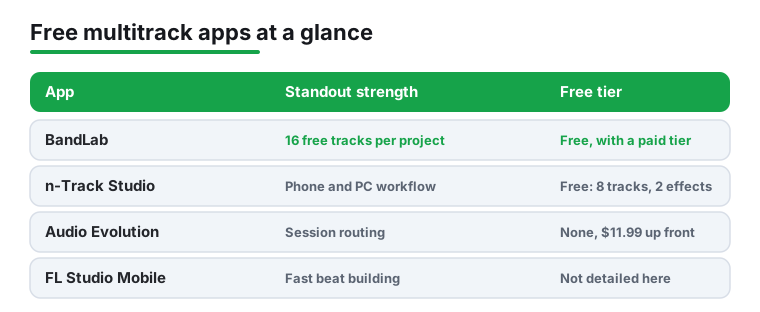
The free tier gives you 16 tracks per project, a per track mixer, non destructive editing, and cloud saving, and it exports without asking for a card; a paid Membership raises the cap to 32 tracks. The blunt limits: every project stops at 15 minutes, on paid tiers too, the listing carries ads, and your work lives on BandLab servers unless you export it. For a free app that combination is genuinely rare, and it is why BandLab sits at the top of this list. If you are coming from a voice memo tool and want real layering, this is the easiest jump.
Free layering, cloud backup and a demo you can export without a card
4.5 stars from 827,739 reviews · 100,000,000+ installs · free to install · in-app purchases $2.00 to $350.00 per item · listing updated 3 September 2026 · by BandLab Technologies · Contains ads: Yes · checked 5 September 2026
Google Play listing · 4.5 (827,739) · read 5 September 2026
The best rated app on this page at 4.5 stars from 827,739 reviews, free to install, and our free pick because its free tier records 16 tracks per project and exports without asking for a card. Its listing, read 5 September 2026, carries the Contains ads label and sells in-app purchases of $2.00 to $350.00 per item, so the free tier is the ad supported one; the bluntest con is the 15 minute project cap, which the paid Membership does not lift. The data safety card says the app may share data types with third parties.
Install BandLab from the Play Store, create a free account with email or Google, no payment details needed, then tap the create button and choose the multitrack editor rather than the simpler single take mode.
Set the tempo and turn on the metronome before anything else, because nothing wastes more time than a second track that drifts. Arm a track, record, and add a new track for each layer. Record a ten second test clip first; it catches echo and volume problems before you commit a full take.
The per track mixer lets you balance levels so your vocal does not get buried under a loud guitar, and panning left or right gives a busy mix some space. Non destructive editing means you can trim, split, and move clips without losing the original take.
The built in loops and simple effects earn their keep: a touch of reverb on vocals and a light compressor on the mix go a long way, and while the free effects are not studio grade, for demos they are plenty. When a part is finished, you bounce the whole thing to a single audio file and share it from the app.
The biggest quality win is not the app, it is the capture: record in the quietest room you have, and even a cheap clip on mic or USB interface beats the built in mic for vocals and acoustic instruments. Set an input level loud enough to be clear but with headroom so it never clips, and monitor on wired headphones, never Bluetooth. If a take still lands late, nudge the clip a few milliseconds earlier in the editor; the full fixes are in the latency section below.
On first launch the app asks for microphone access, which it genuinely needs, and storage access so it can save and export your projects. Grant both. It does not need your contacts or location, so if a recording app ever asks for those, that is worth a second look. You can keep projects private and ignore the social feed entirely.
The free trade offs: the Play listing carries Contains ads and In-app purchases labels, cloud sync wants a data connection, heavy projects can warm up an older phone, and your projects live on BandLab servers unless you export and back them up yourself.
BandLab is our default, but the right pick depends on what you are recording. If your focus is guitar, an amp and effects modeller like AmpliTube pairs well with any multitrack app and can turn a dry signal into a finished tone. The three closest rivals, checked 5 September 2026:
Of these four, only BandLab and n-Track are free to install, so try those first; the paid pair sell a specific strength, not a lower price. If you mostly capture single source audio, a dedicated recorder is simpler and lighter; compare the field in our best voice recorder apps for Android roundup, or browse the Music and Audio hub.
A desktop style DAW layout on a phone, with no ads label
4.1 stars from 66,435 reviews · 10,000,000+ installs · free to install · in-app purchases $0.99 to $34.99 per item · listing updated 28 August 2026 · by n-Track · Contains ads: No · checked 5 September 2026
Google Play listing · 4.1 (66,435) · read 5 September 2026
Free to install with no Contains ads label on a listing read 5 September 2026, and the closest thing on this page to a desktop DAW. The full studio sits behind in-app purchases of $0.99 to $34.99 per item, which is the blunt con: the free version is a way in, not the whole tool. It rates 4.1 stars from 66,435 reviews on 10,000,000+ installs, and its data safety card says no data is shared with third parties.
USB interface tracking with no ads label, for $11.99 one time
4.3 stars from 10,407 reviews · 100,000+ installs · $11.99 one time · in-app purchases $1.14 to $17.99 per item · listing updated 21 August 2026 · by eXtream Software Development · Contains ads: No · checked 5 September 2026
Google Play listing · 4.3 (10,407) · read 5 September 2026
The pick for anyone plugging in a USB interface, and the one with no free version: $11.99 up front on a listing read 5 September 2026, with no Contains ads label, and add-on plugins sold as in-app purchases of $1.14 to $17.99 per item. It rates 4.3 stars from 10,407 reviews on 100,000+ installs, the smallest install band of the four main picks, and the blunt con on its data safety card is that data cannot be deleted.
Pattern based beat production, with no ads label
4.0 stars from 42,036 reviews · 1,000,000+ installs · $14.99 one time · in-app purchases $0.99 to $29.99 per item · listing updated 5 August 2026 · by Image-Line · Contains ads: No · checked 5 September 2026
Google Play listing · 4.0 (42,036) · read 5 September 2026
The beat maker of the group, and the most expensive way in: $14.99 up front on a listing read 5 September 2026, with no Contains ads label and extra content sold as in-app purchases of $0.99 to $29.99 per item. Its 4.0 stars from 42,036 reviews is the lowest rating of the four main picks, on 1,000,000+ installs, and its data safety card says no data is shared with third parties.
Checking a name a friend or an AI suggested? Here is the rest of the field, checked name by name against the US Play store on 5 September 2026, and why the pick above still stands. The four with a live listing each get a full card below.
Mixing tracks you already have, if a listing last touched in early 2025 does not bother you
4.3 stars from 8,189 reviews · 1,000,000+ installs · free to install · in-app purchases $0.99 to $99.99 per item · listing last updated 27 January 2025 · by NCH Software · Contains ads: Yes · checked 5 September 2026
Google Play listing · 4.3 (8,189) · read 5 September 2026
Free to install and rated 4.3 stars from 8,189 reviews, but read the date first: its Play listing was last updated on 27 January 2025, more than eighteen months before this check on 5 September 2026, the oldest listing on this page by a wide margin. It carries the Contains ads label and sells in-app purchases of $0.99 to $99.99 per item, and its data safety card says data is not encrypted and cannot be deleted.
A clean single take with automatic cleanup, free
4.1 stars from 25,595 reviews · 5,000,000+ installs · free · no in-app purchases · listing updated 12 June 2026 · by Dolby Laboratories Inc. · Contains ads: No · checked 5 September 2026
Google Play listing · 4.1 (25,595) · read 5 September 2026
The only free app on this page whose listing, read 5 September 2026, shows no Contains ads label and no in-app purchase at all: 4.1 stars from 25,595 reviews on 5,000,000+ installs. The blunt con is the reason it is not higher up: it records one track at a time, so it is a capture tool that feeds a multitrack app, not a studio.
Four tracks and nothing else, for $3.49
4.3 stars from 2,306 reviews · 50,000+ installs · $3.49 one time · no in-app purchases · listing updated 27 August 2026 · by Jaytronix · Contains ads: No · checked 5 September 2026
Google Play listing · 4.3 (2,306) · read 5 September 2026
A veteran four track recorder at $3.49 one time on a listing read 5 September 2026, with no Contains ads label, no in-app purchases, and a data safety card that says no data collected and none shared, the cleanest card on this page. The blunt con is scale: four tracks against the sixteen BandLab gives away, and 50,000+ installs with 2,306 reviews, the smallest audience here.
Sketching with on-screen instruments, not demos you keep
3.9 stars from 632,007 reviews · 100,000,000+ installs · free to install · in-app purchase $5.99 per item · listing updated 4 August 2026 · by Revontulet Soft · Contains ads: Yes · checked 5 September 2026
Google Play listing · 3.9 (632,007) · read 5 September 2026
Huge and free to install, on 100,000,000+ installs, but the lowest rated app on this page at 3.9 stars from 632,007 reviews, on a listing read 5 September 2026 that carries the Contains ads label and sells an in-app purchase of $5.99 per item. It is a sandbox of on-screen instruments with a recorder attached, which is why it sits near the bottom of this list.
Five things decide whether a free multitrack app will actually work for you.
Track count. Some free apps still cap you at four or eight tracks, then ask for money the moment you add a ninth. BandLab's 16 free tracks fit drums, bass, two guitars, a vocal, and harmonies without forcing you to rebuild the song elsewhere; just remember the 15 minute project cap, which applies on paid tiers too.
Latency. This is the gap between playing a note and hearing it back, and it is the single biggest thing that makes recording on a phone feel either fine or frustrating. The next section covers how to cut it; when you test an app, record a clap against the metronome and see how far off it lands.
USB audio interface support over USB-C. If you plan to plug in a proper mic or a guitar interface, Android has supported class-compliant USB audio peripherals since version 5.0, per the Android Open Source Project, and in practice an interface usually just works once you connect it through a USB-C cable or adapter. Check that the app lets you select the external input rather than forcing the built in mic.
Export formats. A demo you cannot get out of the app is not much use. Look for at least WAV or a high quality M4A bounce. BandLab exports mixdowns as M4A or 16-bit WAV, though on Android individual track exports come out as M4A; if you need separate WAV stems to hand to a mixing engineer, the BandLab Help Center notes the web version is the cleaner route. The same help page is plain about the model, "BandLab saves your projects to the cloud, but you can download your tracks to your device, too!", and just as plain about one hard limit: "Exporting segments or sections of a project is currently unsupported." For tweaking the final sound after export, an equalizer app can help before you share it.
Latency on Android has come a long way, but it is still worth understanding. Years ago the round trip delay on a typical phone was over 100 milliseconds, enough to throw off any performance. It is far lower now: the Android Open Source Project has measured well tuned devices at about 18 milliseconds round trip, and Android compatibility rules ask every device to stay at or under 50 milliseconds. The catch is that the figure varies a lot between phones, so two devices running the same app can feel very different.
Here is what actually helps. Use wired headphones, never Bluetooth, because Bluetooth adds a delay you can hear and is the most common cause of tracks landing late. Close other apps so the system can keep the audio buffer small. A USB audio interface is often a tighter path than the built in mic and gives you direct monitoring with almost no lag. And when a take still lands a few milliseconds behind, nudge the clip earlier in the editor; non destructive editing keeps the original safe.
One more thing worth knowing: a small, fixed delay is easy to nudge away, but an inconsistent, jittery delay usually means the phone is struggling. Lighten the project, bounce finished parts down, and keep track counts modest on older devices.
A free app like BandLab is genuinely enough to write, layer, mix, and share a complete demo. Where paid tools pull ahead is deeper effects, more virtual instruments, finer mixing control, and offline reliability. If you find yourself fighting the free tier rather than making music, that is the signal to consider paying, not before.
A 2026 producer guide from Isolate Audio rates n-Track Studio and Audio Evolution Mobile Studio highly for serious recording work, with Audio Evolution leaning toward session routing and recording control, and n-Track suiting people who move between a phone and a computer. FL Studio Mobile remains the pick for fast beat building. GarageBand still does not exist on Android, so do not waste time looking for it.
What changed recently is mostly polish rather than headlines: Android keeps tightening its low latency audio framework, the free experience is better than it has ever been, and the gap to paid is about depth rather than basic capability. The hardware in your hand still matters more than any app badge.
Yes. You can record up to 16 tracks per project on the free tier, mix them, and export a finished file without paying or entering card details. A paid BandLab Membership raises the limit to 32 tracks, and every project, free or paid, is capped at 15 minutes long. It is a cloud service, so you sign in with a free account, but the core multitrack features are not locked behind a paywall.
Use wired headphones instead of Bluetooth, since Bluetooth adds a clear delay. Recording with an external USB interface helps too. If a take still lands slightly late, you can nudge that track a few milliseconds earlier in the editor to line it up with the rest.
Not to get started. The built in mic is fine for sketching ideas. For vocals or acoustic instruments, though, even an inexpensive clip on or USB mic gives a noticeably cleaner result than the phone mic, mostly because it captures less room noise.
You can record while offline, but BandLab syncs projects to the cloud, so you will want a connection to save and back them up reliably. If a fully offline, local only workflow matters to you, a dedicated voice recorder app is the simpler choice.
On most modern phones, yes. Android works with class-compliant USB audio interfaces, so a standard interface usually works once you connect it through USB-C, often with a USB-C to USB adapter if the interface uses a different plug. Inside the app, make sure you select the external interface as the input rather than the phone mic. The hardware path is also often lower latency than the built in mic and gives you cleaner sound, especially for vocals and acoustic instruments.
The big ones are easy to avoid. Recording over Bluetooth headphones is the most common, and it makes every track land late, so always use wired headphones. Skipping the metronome is another, since without a steady tempo your layers drift apart and never sit right. People also set the input level too hot, which clips and distorts the take, when a level loud enough to be clear but with headroom is better. Finally, many beginners record one long take and never test playback first; a quick ten second test clip catches echo, noise, and volume problems before you commit a full performance.
Five of the eight with a live US Play listing, read 5 September 2026. BandLab is free to install with the Contains ads label and in-app purchases of $2.00 to $350.00 per item. n-Track Studio is free to install with no ads label and in-app purchases of $0.99 to $34.99 per item. MixPad is free to install with ads and in-app purchases of $0.99 to $99.99 per item, on a listing last updated in January 2025. Dolby On is free with no ads label and no in-app purchases, but it records one track at a time. Walk Band is free to install with ads and an in-app purchase of $5.99 per item. The other three are paid up front: J4T Multitrack Recorder at $3.49, Audio Evolution Mobile Studio at $11.99 and FL Studio Mobile at $14.99. MuLab and Zentracker had no live US listing on 5 September 2026.
Checked 5 September 2026: every rating, review count, install band, price, in-app purchase band and ads label on this page was re-read from the eight live US Play listings, and the four apps from the rest of the top 10, MixPad, Dolby On, J4T Multitrack Recorder and Walk Band, now carry their own store links and dated fact lines instead of a one line mention. The decision table moved into the head of the page with the Our answer capsule directly below it, rebuilt to one because sentence per pick; the free tier detail the table used to hold sits under its own heading as a list. Two corrections came from the listings: MixPad's listing has not been updated since 27 January 2025, which this page did not say, and BandLab's in-app purchase band is now printed as the listing prints it, $2.00 to $350.00 per item, in place of $2 to $350. Rounded review counts such as 827K are replaced by the full counts. n-Track's unlock is now described from its listing, in-app purchases of $0.99 to $34.99 per item, so the line one time purchase or subscription opens everything is withdrawn, as is free for non commercial use for MixPad, which no listing field states. MuLab and Zentracker were searched on the US store again today, three queries each, and no listing came back, so both stay on the page as a warning only, and the line We could not find a live US Play Store listing on 1 September 2026 is withdrawn in favour of a dated one. The line We cover how to cut it in the next section is withdrawn. Four FAQ questions moved to the second person and one was added on which of the ten are free to install. The Get these apps on Google Play list and its second How we verify box were removed, since every app now carries its own link and the box sits under the table.