
Updated September 2026 · both recorders now carry their own dated listing figures, and one install claim on this page turned out to be wrong by an order of magnitude
There is a quiet thrill in pressing record at dawn and catching a chorus of birds before the world wakes up. This is a guide to capturing nature sounds on Android with Smart Voice Recorder, including the small tricks that keep wind and handling noise out of a clip.
Plenty of recorder apps look fine on a kitchen table, but the outdoors is unforgiving. Wind, distance, and battery drain all conspire against you. The app most people call Smart Recorder is listed on Google Play as Smart Voice Recorder, made by the developer andrwq, and it has been on the store since 2012, and its listing publishes 10,000,000+ installs, read 4 September 2026, along with the Contains ads label. We mention the full name because there are a dozen apps with similar titles, and you want the one with the orange microphone icon, not one of the screen recorders or video tools that share part of the name.
It won us over because it shows a live audio spectrum and waveform while you record, so you can actually watch a bird call land instead of guessing whether anything reached the mic. It keeps recording in the background with the screen off, which is the single most useful trait for nature work, because you can set the phone down, back away, and let the place go quiet again. It survives long sittings without crashing, and it saves plain files that drop straight into any editor later.
The app is free and supported by ads, and none of the core recording functions are locked behind a paywall. There is a paid version that removes ads, but you do not need it to capture clean audio. If you are still weighing options, our full roundup of the best voice recorder apps for Android compares it against transcription tools and studio leaning recorders, but for pure field capture this one earns its place. The reason is simple: it does a small number of things well and stays out of your way, which is exactly what you want when your hands are cold and a deer just walked into the clearing.
Long unattended dawn recordings
4.6 stars from 484,840 reviews · 10,000,000+ installs · free to install · in-app purchase $1.99 per item · last updated 30 October 2025 · by SmartMob · Contains ads: Yes · checked 4 September 2026
Google Play listing · 4.6 (484,840) · read 4 September 2026
The app this page is built around, and reading its listing on 4 September 2026 corrects two things. It carries the Contains ads label, with a single in-app purchase of $1.99 per item, and its install band is 10,000,000+ rather than the fifty million this page previously claimed. It was last updated on 30 October 2025, so it is stable rather than actively developed. What it does well is unchanged: it records WAV, it skips silence, and it survives being left alone.
Grab Smart Voice Recorder from the Play Store, open it once at home, and do your fiddling there rather than in the field with cold fingers. The first stop is the settings screen. Push the sample rate up to its highest option, which is 44 kHz on this app, and that gives you the headroom to capture the delicate high frequencies in birdsong and running water. The app records in WAV or raw PCM, both uncompressed, which is what you want for nature audio. Be aware it does not export MP3 or MP4, so if you later need a small shareable file you will convert it on a computer or with a separate tool. That is a fair trade, because uncompressed audio keeps the texture that heavy compression smears away.
Next, decide where files are saved. On older phones you could point the app straight at an SD card, but Android changed how apps reach external storage, so on most recent phones recordings live in the app's own folder in internal storage by default. Check how much free space you have, because a mono 44 kHz WAV eats roughly five megabytes a minute, and the app caps a single file at two gigabytes, which lands around six or seven hours. Plan a long dawn session around those numbers so you are not caught out when a file stops or your storage fills.
Then turn off the skip silence feature for nature work. It is genuinely handy for meetings, where it trims dead air, but a forest is full of meaningful quiet, and you do not want the app cutting the pause between an owl call and the rustle that answers it. The setting lives in the app's options, and it ships with a sensitivity control, so even if you leave it on you can dial it down, but the safer habit outdoors is to switch it off entirely. Finally, run a thirty second test recording in your garden and play it back through headphones, not the phone speaker. That tiny habit catches a loose phone case rattle before it ruins a real session, and it tells you whether the gain is sitting in a sensible place.
A few things separate a usable field recorder from a frustrating one. The live waveform and spectrum view is the one that matters most, because it lets you set levels by eye so a sudden gust does not slam the meter into distortion. If you see the trace pinning to the top edge, the recording is clipping, and clipped audio cannot be repaired later, so you back the gain off before it happens rather than after. Watching that display is the difference between a clean file and one you delete on the drive home.
The background recording is dependable. You can lock the screen, slip the phone into a chest pocket or prop it on a log, and let it run while you stay still and quiet. There is also a microphone gain calibration tool that samples the surrounding level and helps the app sit at a sensible starting point, which is worth running once when you arrive at a new spot. The automatic setting suits general ambience, while a faint, distant sound may need the gain nudged up by hand, at the cost of a little more hiss.
File handling is plain and quick. Recordings land in a tidy list you can rename on the spot, which beats scrolling through a wall of timestamped files when you get home. You can pause, resume, and cancel a take without leaving the app, and there is a one tap launcher shortcut so you can start a recording the moment you hear something worth keeping. Because the output is standard WAV or PCM, the clips slot neatly into a laptop editing session, and they also pair well with a good equalizer app on the phone when you want to gently lift the birdsong and tame low rumble before you share a clip. None of this is flashy, and that is the point. The app gives you the controls that change the recording and skips the ones that just clutter the screen.
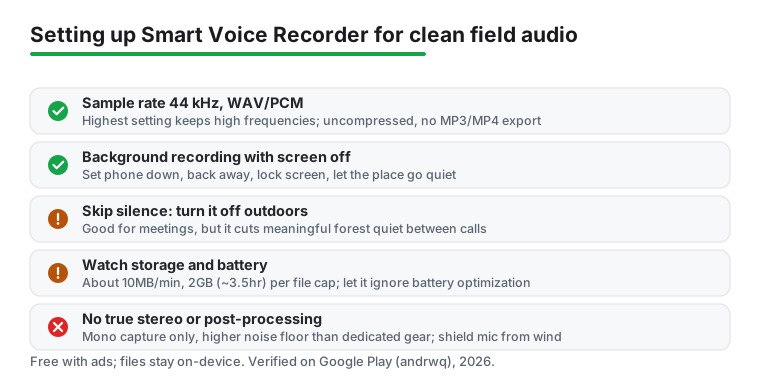
One feature it does not have is stereo capture from a single phone mic, and that is a hardware limit as much as a software one. Most phones mix down to mono or a narrow stereo image that does not hold up as a true field stereo recording. If a wide, immersive soundscape is your goal, you will eventually want a dedicated recorder or an external stereo mic, but for documenting a place and gathering raw material the mono capture is perfectly usable.
The app only gets you halfway. The rest is technique, and a little care here is the difference between a postcard and a blurry snapshot. Get the microphone close to the source. Phone mics are tiny, so two steps nearer a babbling section of creek does more than any setting you can change. Find where the mic port actually is on your phone, because it is easy to muffle it with a finger or a case, and aim that edge at what you want to capture rather than pointing the screen at it out of habit.
Hold the phone still or, better, brace it against a rock, a fence post, or a fallen branch, because handling noise is the silent killer of outdoor audio. Every shift of your grip and every brush of fabric reads as a thud or a scrape that you cannot remove later. We carry a cheap flexible tripod and a small beanbag for exactly this reason, but a forked stick and a bit of patience work too. Once the phone is steady, step back a pace or two and stop moving, because your own clothing and breathing are louder to the mic than you think.
Wind is your main enemy. We learned to cup a hand loosely around the mic port as a makeshift shield, and on breezy days a scrap of fleecy fabric stretched over it cut the rumble noticeably. A proper foam or fur windscreen sized for a phone costs very little and does the job better, so it is worth keeping one in the bag. Record longer than you think you need, since the moments worth keeping arrive when you have stopped expecting them, and storage is cheap compared with a wasted trip. Leave thirty seconds of room tone at the start and end of each take, because that quiet stretch gives an editor something to work with when you trim or loop the clip later.
And go early. The hour after sunrise gave us the richest dawn chorus and the least human noise from roads and aircraft, which is half the battle when you are chasing clean nature sounds. Check the forecast and avoid the windiest part of the day. Listen before you record, with the phone already running, so you learn what the place sounds like and can position yourself before the good material starts. A few minutes of scouting saved us more failed recordings than any single app setting ever did.
On first launch the app asks for microphone access, which is non negotiable for any recorder, and on older Android versions it asks for storage access so it can save your files. On recent Android the app saves into its own folder and does not need broad storage permission, which is the safer arrangement from a privacy point of view. You can review and revoke what it has anytime under the Android app settings, and it is reasonable to do so, since the app does not need your contacts, location, or camera and should not be asking for them.
To stop long sessions cutting out, dig into the battery settings and allow Smart Voice Recorder to ignore battery optimization, otherwise the system may quietly pause it during a two hour sit. This is the most common reason people report a recording stopping early, and it is a one time toggle. Keep the screen off to save power, and bring a small power bank for any session over an hour, because continuous recording with the mic active does steady, predictable drain even if it is not severe.
It is only fair to flag the limits. This is a phone, not a dedicated field recorder, so the noise floor is higher than a pro device and very quiet scenes pick up a faint electronic hiss from the phone's own circuitry. The free version shows ads. There is no stereo widening or built in post processing, so dramatic spatial recordings are off the table, and the two gigabyte file cap means very long unattended sessions need splitting up. On the privacy side, the recording stays on your device unless you choose to share it, which is reassuring, but you are still responsible for what you capture, so be mindful about recording in places where other people are talking. For most hikers and hobbyists, the trade is worth it for a tool that is always in your pocket and costs nothing to start.
Smart Voice Recorder is our everyday outdoor pick, but it is not the only tool worth knowing. If you want to layer a stream bed under a separate bird track, or build a richer soundscape from several takes, a multitrack tool gives you room to work. Our guide to the free multitrack recording apps covers the main options for stacking layers without paying a fortune, and they accept the WAV files this recorder produces with no conversion fuss.
For anyone leaning toward singing, instruments, or narration over your nature beds, a recorder with automatic cleanup can save time on removing hum and hiss. And if you simply enjoy ambient audio on the go, the wider set of music and audio apps we cover has streaming and playback tools that pair nicely with the clips you gather. There is also a case for moving up in hardware rather than software once you are serious. A small dedicated recorder with real stereo mics, or a clip on external mic for your phone, jumps the quality further than any app can, and it frees your phone for navigation and photos. The right answer depends on whether you want to capture a moment or compose with it, and for most people starting out, the free app and a bit of field craft will take you a lot further than the price suggests.
A recorder that is still being updated
4.7 stars from 622,581 reviews · 50,000,000+ installs · free to install · in-app purchases $1.49 to $4.99 per item · last updated 15 July 2026 · by Digipom · Contains ads: Yes · checked 4 September 2026
Google Play listing · 4.7 (622,581) · read 4 September 2026
If the first app's age bothers you, this is the one to compare it against: better rated at 4.7 stars from 622,581 reviews, five times the installs at 50,000,000+, and updated on 15 July 2026 rather than in October 2025. It carries the Contains ads label too, with in-app purchases from $1.49 to $4.99 per item. Read 4 September 2026.
Yes, within reason. A modern phone running Smart Voice Recorder at 44 kHz WAV captures birdsong, rain, and flowing water surprisingly well, especially in the quiet of early morning. It will not match a dedicated field recorder for very faint or distant sounds, and it records in mono rather than true stereo, but for hikes, gardens, and hobby projects the results are genuinely good once you get the mic close and shield it from wind.
Wind hitting the bare mic port creates that low booming rumble that swamps everything else. Loosely cupping a hand around the port helps, a small piece of fleecy fabric draped over it works better, and a cheap foam or fur windscreen sized for a phone works best of all. Recording slightly sheltered, behind a tree or a rock, also makes a real difference on gusty days.
It does. The app keeps capturing with the screen off or when you switch apps, which is exactly what you want when you sit still and wait. Just allow it to ignore battery optimization in Android settings so the system does not pause a long session.
Use WAV at 44 kHz if storage allows, which is what this app records in. Nature sounds carry delicate high frequencies that heavy compression smears, so uncompressed WAV preserves the sparkle in birdsong and the texture of water. The files are large, around ten megabytes a minute, so keep an eye on free space and convert a finished clip to a smaller format later only when you need to share it.
Yes. Smart Voice Recorder carries the Contains ads label on its Play listing, read 4 September 2026, with a single in-app purchase of $1.99 per item. It sits at 4.6 stars from 484,840 reviews across 10,000,000+ installs and was last updated on 30 October 2025. Easy Voice Recorder is ad supported too, but better rated at 4.7 from 622,581 reviews and more recently updated, on 15 July 2026.
Checked 4 September 2026: the page had no store link, no rating, no ads label, no table and no dated line, and one claim in it was simply wrong. The withdrawn line is this one: it has been around since 2012 with more than fifty million installs. Its listing publishes 10,000,000+, so the real band is on the page instead. Two more facts the page never mentioned: it carries the Contains ads label, and it was last updated on 30 October 2025. Easy Voice Recorder is added as the maintained comparison at 4.7 stars from 622,581 reviews, updated 15 July 2026. One claim about our own session is withdrawn: That tiny habit caught a loose phone case rattle for us before it ruined a real session.