
Updated September 2026 · every app listing re-read on 1 September 2026, refreshing 2 review counts and 1 listing date
Two dash cam apps compared on their store listings and their developers’ own documentation: price, the ads label, Data Safety, what the loop does when the card fills, and what recording costs in heat and battery. Neither is a reliability pick: each developer publishes an answer about Android stopping background recording (Droid Dashcam, DailyRoads Voyager), read 20 August 2026.
Droid Dashcam is our overall pick because it writes the overlay into the video file on the phone, not on a server, per its listing read 20 August 2026, free with ads.
DailyRoads Voyager is our pick for keeping old clips because its developer’s storage documentation, read 20 August 2026, lets the loop stop instead of overwriting, free with ads.
DailyRoads Voyager is our pick for an old handset because its listing, read 3 September 2026, sets the Android floor at 4.4, against Droid Dashcam’s 6.0, free with ads.
Data checked: 3 September 2026.
Best where the overlay must be written into the video file
Rating 4.3 from 19,718 reviews · Installs 1,000,000+ · Free to install, with in-app purchases from $0.99 to $7.99 per item · Contains ads: Yes · Developer DroidCoolApps · Requires Android 6.0 or newer (Play listing) · Version 1.1.35 (Play listing) · Data Safety: may share data types with third parties, may collect data types, data encrypted in transit, data cannot be deleted · Listing updated 22 August 2026 · checked 1 September 2026
Google Play listing · 4.3 (19,718) · read 1 September 2026
Droid Dashcam is the one to install first of the two, and the trade sits in the same sentence: it is rated 4.3 from 19,718 reviews across 1,000,000+ installs, its listing was updated 22 August 2026, and it is free to install with the Contains ads label on that same listing and in-app purchases from $0.99 to $7.99 per item. The bluntest con is its Data Safety section, which declares that data may be shared with third parties and that data cannot be deleted.
Its own listing text and its Data Safety section do not say the same thing. On its Play listing the developer writes All your recorded videos will be saved only on your local device
, and the Data Safety section on that same listing declares that the app may share data types with third parties and may collect data types. A video file and a data type are not the same claim, and the listing never reconciles the two.
Hardcoded (embedded) Subtitleswritten
directly on Recording Video file, and it names what that overlay can carry: timestamp, location address, GPS coordinates, speed from GPS data and a vehicle registration plate
All these components consume significant battery power when all enabled and can cause the device to heat up, adds that
Recording + charging at the same time generates extra heat, and answers the heat question by recommending a cooling car mount rather than a setting
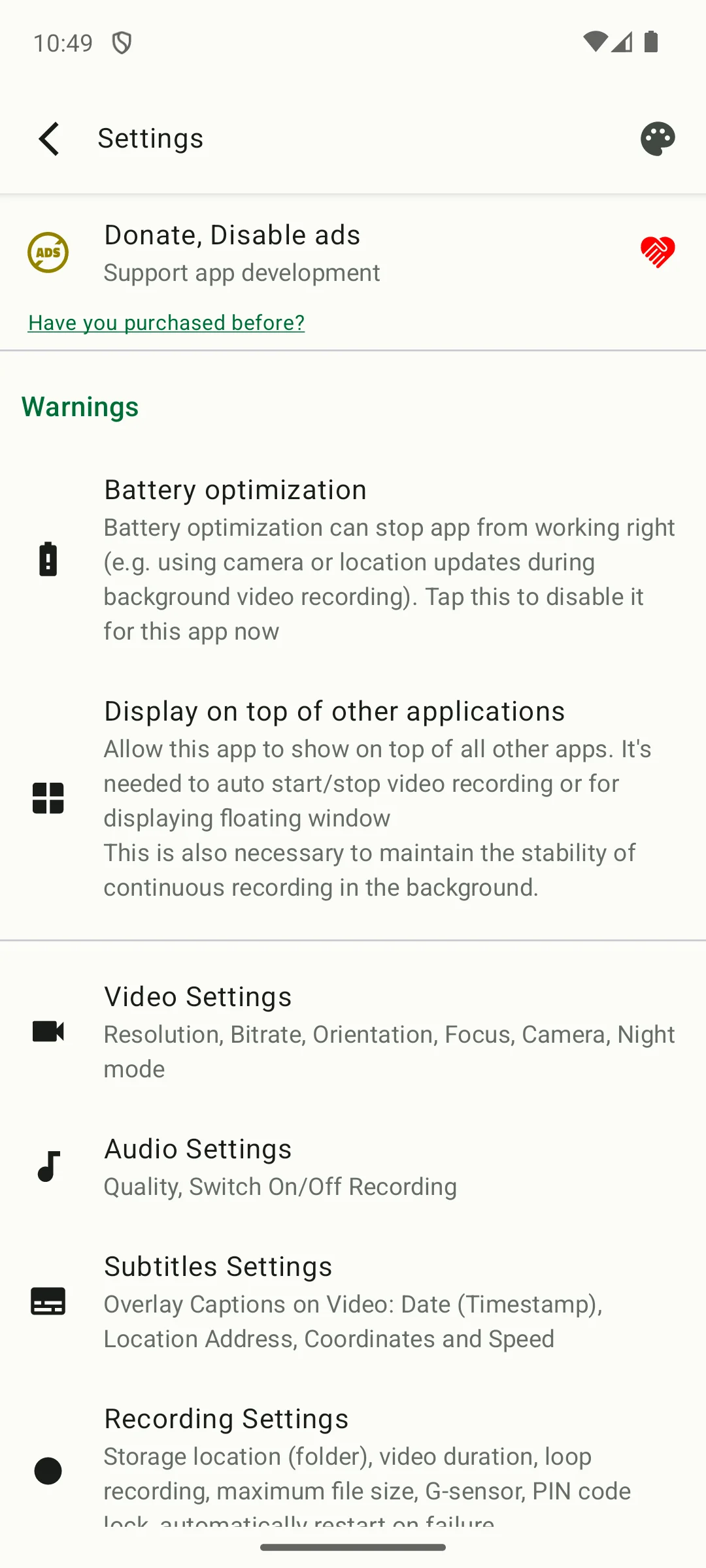
The settings screen is the useful one to show, because it names what a dash cam app needs from a phone before it can keep recording at all. A warnings section sits near the top of it: turn off battery optimisation, which the screen says can stop the camera and location updates during background recording, and allow display over other applications, which it says is needed to start and stop recording automatically and to keep continuous recording stable. Below the warnings the same screen carries what can be written into the video, namely timestamp, location address, coordinates and speed, alongside loop recording, maximum file size, the G sensor and a PIN lock. There is no camera view here on purpose: the picture a dash cam records is the road, and no still of a camera preview would tell you anything about the app.
Skip this if. Skip it if a Data Safety section that declares sharing with third parties and no route to deletion is the thing you came here to check, or if you would rather the loop stopped than quietly deleted your oldest clip.
Choosing between them. Choose Droid Dashcam over DailyRoads Voyager for the overlay written into the video file on the phone, for the rear or front camera choice in its free feature list, for the autostart options its listing names including recording on charging, and for the listing its developer updated 22 August 2026, and DailyRoads Voyager over it for a loop that can be told to stop rather than overwrite and for the lower Android floor.
Best where the loop must stop rather than overwrite
Rating 3.8 from 33,598 reviews · Installs 1,000,000+ · Free to install, with in-app purchases from $0.99 to $7.00 per item · Contains ads: Yes · Developer DailyRoads · Requires Android 4.4 or newer (Play listing) · Version 8.1.1 (Play listing) · Data Safety: may share data types with third parties, may collect data types, data is not encrypted, deletion can be requested · Listing last updated 11 January 2024, which is 31 months before this check · checked 1 September 2026
Google Play listing · 3.8 (33,598) · read 1 September 2026
DailyRoads Voyager is the second pick here, and the date on its listing is the first fact to read: it was last updated 11 January 2024, 31 months before this check, at version 8.1.1, on a store page that still shows 1,000,000+ installs. It is rated 3.8 from 33,598 reviews, the lower of the two scores here, it carries the Contains ads label with in-app purchases from $0.99 to $7.00 per item, and its Data Safety section declares that data is not encrypted.
Read this first. A listing that has not been updated since 11 January 2024 is not the same thing as an app that has stopped recording, and neither store page on this page says which it is. What the date does settle is that nothing on that store page has been rewritten since, the Data Safety section and the feature list included. The developer’s own site is the livelier source and is where the storage behaviour below was read.
The developer states the price and the advertising in one sentence, on its own Play listing: This is a free application with some ads, but they are disabled after any purchase within the app.
The same listing dates the project to 2009 and describes what the app is meant to be: a car blackbox, dash cam or auto DVR.
When a limit is reached, capturing can stop to preserve old files, or the automatic cleanup is triggered and the oldest tempvideo/photo files are deleted, to make room for new ones
into a safe zone, away from automatic cleanup
There is no support to overlay text data on videos within the standard Android development frameworkand that
We chose to use standard subtitles or a server route, and that server route is metered: the Pro page sells overlay credits
Skip this if. Skip it if you need the time and speed written into the video file itself, because this developer says the Android framework offers no way to do that and sells the server route that works around it.
Choosing between them. Choose DailyRoads Voyager over Droid Dashcam for a loop that can be set to stop and keep your old files, for the g-force threshold you set yourself and for the lower Android floor, and Droid Dashcam over it for the overlay in the file, for the rear or front camera choice it does not charge for, for a charger trigger its own listing still names, and for the more recently updated store page.
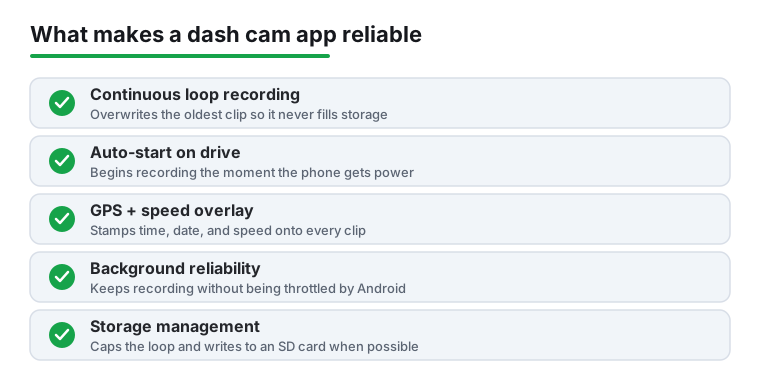
never fills storage: DailyRoads Voyager can be set to stop recording instead of overwriting, and Droid Dashcam’s own FAQ tells you not to let the app fill the card and warns that some cards mishandle continuous deletion. The autostart row says recording begins the moment the phone gets power, and DailyRoads Voyager’s own FAQ states that starting with Android 8.0 the app no longer starts when the charger is connected in the build published on Play, and that only the versions on the developer’s own site still have it. The overlay row says the detail is stamped onto every clip, and only one of the two writes it into the video file on the phone, the other doing it on a server; the paragraphs below set out both routes. The background row is the one the drawing gets furthest wrong, and both developers are the ones who say so: each publishes an answer about Android stopping the app in the background, and each sends readers to the same third-party guide to device settings. Storage management is the row the sources leave standing, and even there the two disagree: one recommends an external card, the other recommends recording to internal storage instead. The figures are in the table above.
What both listings describe. Continuous loop recording, an overlay of time, speed and location detail and recording in the background appear on both listings read on 20 August 2026: Droid Dashcam and DailyRoads Voyager. Where the overlay ends up is not the same on the two, and the developers themselves are what settles it. Droid Dashcam’s listing calls its captions hardcoded and embedded directly on the recorded video file, and sets out what they can carry: timestamp, location address, GPS coordinates, speed from GPS data and a vehicle registration plate. DailyRoads Voyager’s developer answers the same question the other way: the framework has no way to write text into a video, so the app uses standard subtitles, or uploads the clip to the developer’s own server for conversion, and that server pass is sold in credits on its Pro page.
What separates them. DailyRoads Voyager’s listing names things the other does not: automatic photo capture at set intervals for time lapse, a map view of where files were recorded, a title, description or bookmark added to a file, overheating protection and uploads to the developer’s own site. Droid Dashcam’s names things this one does not: the overlay written into the file, a vehicle registration plate among the overlay fields, an automatic switch between day and night recording modes, and a store page its developer updated on 22 August 2026. Camera choice is a real dividing line and a paid one, within limits the first listing sets itself: choosing the rear or the front camera sits in Droid Dashcam’s free feature list, which adds that only some devices allow a wide-angle lens to be chosen and names multiple cameras and a wide lens camera among the things the app does not offer, while DailyRoads Voyager’s Pro page places camera selection behind the purchase, and its FAQ adds that the choice is made once, right after installing, and cannot be switched afterwards.
What neither developer claims. Neither names a parking mode. Neither states a guaranteed recording time, a minimum video quality on a given handset, or anything about what a clip is worth afterwards. Both are explicit in the other direction about the background: Droid Dashcam’s FAQ and DailyRoads Voyager’s each publish an answer about Android stopping the app while it records, each names an exemption from battery optimisation among the fixes, and each sends readers to the same third-party guide to device-specific settings, dontkillmyapp.com. What is on offer on both store pages is a recorder with a loop and an overlay, and everything past that is the phone, the mount and the power cable.
Storage is the setting both developers spell out, and the only one either of them quantifies is a cap you set. Droid Dashcam’s listing describes loop recording that deletes old video files when there is not enough space for new ones, a maximum space setting covering all videos, and recording either into the shared Movies folder or into app-owned folders on internal or SD card storage. DailyRoads Voyager’s own storage documentation, read on 20 August 2026, goes further and is the reason that column exists: a limit can be set on space or on total recorded duration, and when it is reached the app can either stop capturing to preserve the old files or run the automatic cleanup and delete the oldest ones. The same page recommends an external card over internal memory for constant write and delete cycles, and that recommendation is app-specific rather than general: Droid Dashcam’s FAQ answers the opposite way, describing cards and phones that handle continuous loop recording and frequent deletion badly, with files no longer deleted or no files visible while the memory reads full, and listing recording to the phone’s internal storage instead of the card among its fixes, alongside a cap on the space videos may use and not letting the app fill the whole card.
Power and heat are named by both developers, and measured by neither of them nor by us. Droid Dashcam’s FAQ, read on 20 August 2026, is the more detailed: it lists the GPS module, the mobile data used to turn coordinates into an address, the camera, the microphone and an encoder that draws subtitles onto every frame, says those together drain the battery and heat the device, and recommends lowering the resolution and the frame rate, disabling the address lookup, recording with the screen off, and using a cooling mount. It also notes that charging while recording adds heat of its own. DailyRoads Voyager’s FAQ answers the same two questions more briefly, suggesting a lower video quality, a dimmer screen, recording with the screen off and a charger above 2A, and its listing names overheating protection and an option to disable GPS. Neither says how long a particular phone will keep recording, and neither does this page.
Keeping the clip that matters. Both apps protect a clip on impact and neither charges for it. Droid Dashcam’s listing describes a G-shock sensor that locks videos against being overwritten. DailyRoads Voyager’s video documentation describes the same idea with the threshold exposed as a g-force value you set, and says the protected clip is moved into a safe zone away from the automatic cleanup. The accelerometer trigger is the one that asks nothing of the driver; the manual alternative that developer documents is a touch of the screen during recording, which means handling the phone, and the same page adds a caveat worth knowing before you rely on either: it recommends protecting at least the latest two files, because the newest one may have run only a few seconds when recording stopped. Neither app's impact lock should be read as a safety feature: it is a rule about which file the loop is allowed to delete, and nothing more.
What a dash cam app will not do. It records the road, and each of these two describes an overlay of time, speed and location detail over the picture. It does not read the car. For live engine data or a fault code that is a different tool on a different port, covered in OBD2 apps that unlock hidden car features. For a large speed readout on the screen rather than written into a video, there are the free speedometer apps. For routing, a GPS navigation app. For the screen the car shows while any of this runs, the Android car launchers compared. The wider Navigation and Auto hub holds the rest of the in-car categories.
The spare phone question. Both are free to install, so the cost of finding out is a mount and a cable. What no store page settles is the part that decides it: whether one particular handset, on a windscreen, in summer, is still recording at the end of the drive. Both developers take the question up on their own sites rather than on their store pages, and the section above quotes what each of them says. Read on 20 August 2026.
Both listings were read on 1 September 2026. Ratings and review counts drift, so each figure carries the date it was read.
Droid Dashcam, the more recently updated of the two store pages: the overlay is written into the video file on the phone, and its Data Safety section declares sharing with third parties, with data encrypted in transit and no route to deletion.
DailyRoads Voyager, the older store page: the loop can be told to stop instead of overwriting, its Data Safety section declares sharing with third parties as well and adds that data is not encrypted, though deletion can be requested, and nothing on that page has been rewritten since January 2024.
Both listings here are written for one. DailyRoads Voyager's listing sets its floor at Android 4.4 or newer and Droid Dashcam's at Android 6.0 or newer, so an old handset is inside the range of both, and both are free to install. What no listing tells you is whether one particular phone stays cool enough to still be recording at the end of a long drive, and both developers treat that as an open question rather than a solved one. Checked 20 August 2026.
That is the clearest difference between the two. Droid Dashcam deletes the oldest video files to make room, under a maximum space setting you choose. DailyRoads Voyager lets you decide: its developer's storage documentation says that when a limit is reached, capturing can either stop, so the old files survive, or trigger the cleanup that deletes the oldest ones. Droid Dashcam's developer also warns against letting the app fill an entire card, and says some cards and phones handle continuous loop recording and frequent deletion badly. Checked 20 August 2026.
Neither developer publishes a figure for it, so this page does not print one. What both publish instead is a cap you set yourself, in space rather than in hours, and DailyRoads Voyager's documentation also allows a cap in total recorded duration. Checked 20 August 2026.
No, in both apps, and in both cases the developer settles it rather than the store page. Droid Dashcam lists loop recording and its G-shock impact lock among its free features. DailyRoads Voyager's own Pro page lists what a purchase adds, and neither cyclic recording nor the g-force protection is on it; what Pro buys there is the removal of ads, camera selection, uploads, autostart after boot and Bluetooth triggers. Checked 20 August 2026.
Both listings carry the Contains ads label. DailyRoads Voyager's states it plainly, in the developer's own words, as a free application with some ads that are disabled after any purchase within the app. Droid Dashcam's listing carries the label without saying what a purchase removes, but its developer's own FAQ answers a question about ads still appearing after a purchase, which settles that a purchase is meant to remove them. Checked 20 August 2026.
Neither listing names a parking mode, and neither developer promises unattended recording over days. Both describe recording in the background while other apps are used, and both also publish an answer about Android stopping that background recording, with instructions about battery optimisation and permissions. Treat background recording as something each developer says needs setting up on your own phone, not as something that simply works. Checked 20 August 2026.
Droid Dashcam. Its listing was updated on 22 August 2026, at version 1.1.35. DailyRoads Voyager's was last updated on 11 January 2024, at version 8.1.1, which is 31 months before this check. That developer's own site is more current than its store page, and is where the storage and pricing detail here came from. A listing date says when the store page changed, not whether the app still records. Checked 20 August 2026.
Only what the two Play listings state, what their Data Safety sections declare, and what each developer publishes on its own site at an address you can open. That covers the ads label, the purchase range, the minimum Android version, the listing date, what the loop does when storage fills, where the overlay ends up, and which features sit behind a purchase. It does not settle reliability, which is why neither app here is called the reliable one. Checked 20 August 2026.
Checked 20 August 2026: both Play listings were re-read and both review counts had moved since the previous pass, Droid Dashcam from 19,589 to 19,637 and DailyRoads Voyager from 33,607 to 33,603; both ratings, install bands, purchase ranges, ads labels, Data Safety lines, minimum Android versions and listing dates are re-dated to today, and both version numbers are now printed. The bigger change is the source. The previous version of this page read only the two store blurbs, and what a dash cam page leans on is exactly what a store blurb does not answer, so both developers’ own sites were read this time and the decision table was rebuilt around them: two columns were added, one for what the loop does when storage fills and one for what a purchase buys, and each of those cells names the source that settled it, because that source is not the same in both rows. Three statements the page made about what the listings do not say were withdrawn, each because the developer does say it somewhere this page can link. The claim that on background reliability, neither says anything about Android throttling a background app was wrong in both directions: each developer devotes a published answer to Android stopping the app in the background, and each sends readers to the same third-party guide about it, which this page now names and links. The claim that DailyRoads Voyager says nothing about writing them into the file was withdrawn for that developer’s own answer, which is that the Android framework offers no way to write text into a video and that standard subtitles or a metered server pass are used instead. The claim that for Droid Dashcam, its listing text does not say what a purchase removes was withdrawn because the developer’s own published answers settle it. One fact is new here and was on no earlier version of this page: DailyRoads Voyager’s developer states that starting with Android 8.0 the app no longer starts when the charger is connected in the build published on Play, which is the trigger the drawing on this page assumes every dash cam app has. A storage-per-hour column was considered and deliberately left out: neither developer publishes such a figure anywhere, so the column would have read the same in both rows and settled nothing, and the table lead says so in words instead. The How we verify box was rewritten: its first tier carried a claim of use, which this site does not make, inside the one box whose whole purpose is to replace such claims, and the same claim was taken out of the paragraph above the screenshot and out of that screenshot’s caption. The alt text never carried it and was rewritten only to describe the screen. The screenshot itself is kept, unchanged, in the section it depicts, and its caption now names the app, its developer, what the screen shows and where the picture came from, which is not the store page. The five-trait drawing is kept unchanged as well, and its caption now corrects four of its five rows: the loop row joins the overlay, autostart and background rows that the previous caption already qualified. The headline and the search title were rebuilt around storage, battery and ads. The words expert picks and most reliable stay out of both: this page reads store listings and developer documentation, neither of which can establish that anything is reliable, and on this category the best sources say the opposite, setting out the conditions under which recording stops. The address is unchanged. No app was added and none was removed.
 GPS Speedometer: The Best Free Speed App for AndroidNavigation & Auto
 Best Car Launcher Apps for AndroidNavigation & Auto