
Updated September 2026 · both streaming apps now carry their own dated listing figures, and the four routes sit in one table
Two different jobs hide behind one word: files you own have to be copied, and playlists have to be rebuilt on the new service. This covers both, and says what will not survive either way.
Before you plug anything in, sort your collection into two piles. The first is local files: MP3s, FLAC, M4A, or WAV sitting on an old phone, an SD card, or your computer. These are yours to copy freely. The second is streaming content: playlists and saved albums inside Spotify, YouTube Music, Apple Music, Tidal, and so on. You do not own those audio files, so you move the list of songs rather than the songs themselves.
Most people have both. A music collection from the 2000s tends to be loose files, while anything added in the last few years is usually streaming. Knowing the split tells you which sections below apply to you. If you mostly stream, you can skip ahead to the playlist part. If you have a folder of files you have been carrying since forever, start with the USB method.
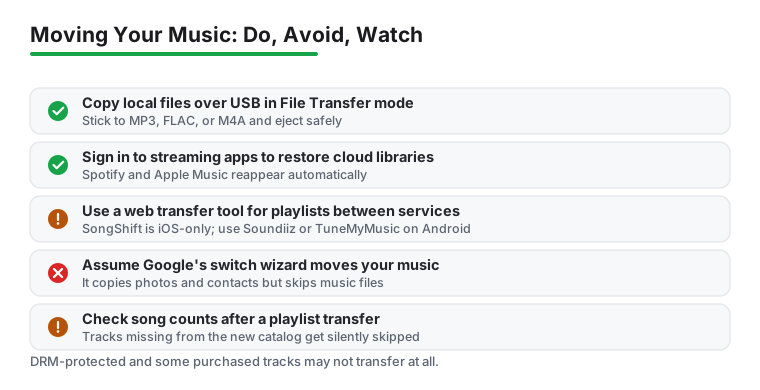
This is the most reliable way to move files, and it is free. Connect your Android phone to a Windows PC or a Mac with a USB-C cable. On the phone, a notification appears about the USB connection. Tap it and choose File Transfer (on some phones this is labeled MTP). The phone now shows up as a drive.
On Windows, open File Explorer, click the phone under This PC, open Internal storage, and find or create a Music folder. Drag your files in. On a Mac you need a helper app because macOS will not see the phone by itself, and Google's old Android File Transfer utility is gone (Google stopped offering it in 2024), so grab the free, open source OpenMTP instead. Once the copy finishes, eject the phone properly before unplugging it so you do not corrupt anything mid-write.
Stick to standard formats like MP3, FLAC, or M4A. Once the files land, a music app needs to scan them to build a library. A good local player makes that painless, and we walk through the strong options in our roundup of the best music player apps for Android. Most will index the Music folder automatically on first launch.
If both phones are Android and you are setting up the new one, Google's built-in setup wizard copies a lot during the first boot, but it often skips music and other media. Do not assume your tracks came across just because contacts and apps did. Check the Music folder before you wipe the old phone.
For a direct phone-to-phone move, an app like Files by Google has a Nearby Share style transfer that sends files over a local connection without using mobile data. Open Files on both phones, pick the audio files on the old one, and send them across. It is slower than USB for a large collection, but it needs no cable and no PC. A USB-C flash drive or an SD card reader works too if you would rather move files in bulk by hand.
Importing playlists without a browser
4.3 stars from 36,235,316 reviews · 1,000,000,000+ installs · free to install · in-app purchases $6.99 to $203.88 per item · by Spotify AB · Contains ads: Yes · checked 3 September 2026
Google Play listing · 4.3 (36,235,316) · read 3 September 2026
Spotify is the easiest destination for playlists because the import tool now lives inside the Android app: Your Library, then Import your music, and it rebuilds what you point it at. It is free to install, and its listing carries the Contains ads label with in-app purchases from $6.99 to $203.88 per item. The blunt con: matching is by song title, so a rare pressing or a regional release quietly fails to come across.
If you are leaving one streaming service for another, you are moving playlists, not audio. A transfer tool reads your playlists on the old service and recreates them on the new one by matching song titles. The two most common are TuneMyMusic and Soundiiz, both of which work in a phone browser or, in some cases, an app.
As of late 2025, Spotify built TuneMyMusic directly into its mobile app. On Android, open Spotify, go to Your Library, scroll to the bottom, and tap Import your music. You connect the service you are leaving, pick the playlists, and Spotify rebuilds them. TuneMyMusic's free tier covers a limited number of tracks per transfer (around 500 at the time of writing), and you pay if your library is larger. Soundiiz and FreeYourMusic offer similar free-then-paid models. Note that SongShift, which older guides mention, is iOS-only, so on Android reach for one of the web-based tools instead.
These tools are handy if you also grab tracks for offline use. If that is your goal, our guide to the best music downloader apps for Android covers what is allowed and what is not.
Coming from an iPhone
4.6 stars from 748,271 reviews · 100,000,000+ installs · free to install · in-app purchases $5.99 to $199.99 per item · by Apple · Contains ads: No · checked 3 September 2026
Google Play listing · 4.6 (748,271) · read 3 September 2026
Apple Music has a full Android app, so a library built on an iPhone follows the Apple ID rather than needing a transfer at all: install, sign in, and the playlists are there. It is free to install with no Contains ads label, and its subscriptions run $5.99 to $199.99 per item on the listing. The blunt con: this only covers what lives in Apple Music, so purchased tracks sitting in iTunes on a computer still need the cable route.
If your music lives in Apple Music, the move is genuinely simple. Apple Music has a full Android app on Google Play. Install it, sign in with the same Apple ID, and your entire library, including playlists and saved albums, syncs down automatically because it already lives in the cloud. Nothing to transfer by hand. We cover the day-to-day experience in our look at Apple Music on Android.
If instead you have loose music files on an iPhone, those are trickier. The cleanest path is to copy them from your iTunes or Apple Music library on a computer first, then move that folder to Android over USB as described above. Google's official iPhone-to-Android switch tool moves photos, contacts, and messages but leaves music for you to handle manually, so do not count on it for your tracks.
Two things trip people up. First, purchased and DRM-protected tracks may refuse to move. Older purchases from some stores, and anything still wrapped in copy protection, will not simply copy as a playable file. If a song will not play on the new phone, DRM is the usual reason, and there is no clean fix beyond re-buying or streaming it.
Second, playlist transfers are matches, not perfect copies. The tool searches the new service for each song by title and artist. If a track is not in the new service's catalog, a live version, a regional release, or an obscure remix, it gets silently skipped. After any transfer, compare the song counts. A playlist of 200 that arrives with 188 lost a dozen songs to mismatches. The tools usually show you which ones failed, so check that list before you cancel the old subscription.
For most people the order goes like this. Move local files first over USB while you still have the old phone in hand. Install your streaming apps and sign in, since cloud libraries reappear on their own. Run a playlist transfer only for services you are actually changing, and verify the song counts afterward. Keep the old phone or a backup folder untouched until you have confirmed everything arrived.
Once the library is settled, the rest is about playback. If you want tighter control over how it all sounds and is organized on the new phone, the broader music and audio section walks through players, equalizers, and the tools that make a fresh library feel like home.
Unprotected files copy over a cable like any other file. Older purchases still wrapped in copy protection will not, and no transfer tool unlocks them: you either re-buy or keep them where they play. Checked 3 September 2026.
No. Playlists live in the account, not the phone, so signing in on the new device brings them back. What needs moving is a library on a different service. Checked 3 September 2026.
If it is Apple Music, install the Android app and sign in with the same Apple ID: the library and playlists appear. Files bought in iTunes long ago still need a cable and a computer. Checked 3 September 2026.
Up to a point. Its free tier covers a limited number of tracks per transfer, around 500 by its own pricing page, and larger libraries need the paid plan. Spotify also has the same tool built into its Android app. Checked 3 September 2026.
Because transfer works by matching titles between catalogues. A track that is not licensed on the new service, a live version, or a regional release will not match, and the tool skips it rather than guessing. Checked 3 September 2026.
A USB cable to a computer, then a second cable to the new phone. Wireless transfer of tens of gigabytes is slower and more fragile than the cable, and it is the route that does not depend on any account. Checked 3 September 2026.
Checked 3 September 2026: the guide named the apps involved and linked none of them, with no rating, no install band, no price and no dated line. Spotify and Apple Music now carry a fact line read from their own listing, a store link, a decision table row and three pros and three cons, and the routes that have no Android listing, the cable and the playlist transfer services, are marked as such rather than given figures. The difference worth knowing: Spotify carries the Contains ads label on its listing and Apple Music does not, while Apple Music is the higher rated of the two at 4.6 stars against 4.3.