
Checked 3 September 2026
Updated 7 August 2026: every rating, review count, install band, price and store badge below was re-read from the listings that day.
Google Keep is the pick, Microsoft OneNote the free one with nothing to buy, Standard Notes the choice for end to end encryption. Our answer, the free pick and the table ↓
Checked 3 September 2026: no pick changed; Google Keep, OneNote and Standard Notes re-read 28 August, the other eight stand as read on 7 August
Eleven Android notes apps, compared on price, the ads badge, end to end encryption, offline use and handwriting, each taken from the listing or the developer's own description.
Google Keep is our best overall pick because on 28 August 2026 its Play listing showed 4.71 stars, no Contains ads badge and nothing at all to buy.
Microsoft OneNote is our best free pick because on 28 August 2026 its listing still carried no ads badge and no in-app purchases at all.
Standard Notes is our private notes pick because on 28 August 2026 it was free with no ads badge and its listing describes end to end encryption.
Data checked: 3 September 2026.
Ratings, review counts, install bands, prices and store badges below were read from Google Play on 7 August 2026 and drift over time.
Most people
Every app on this page sits in one of three tiers, and each entry says which one applies to it.
Google Keep is the safe default: free on 7 August 2026 with no Contains ads badge and no in-app purchases badge, opening straight onto a blank card. The blunt limit is depth, because there are no notebooks or nested folders, only labels and colors, and Keep's own store description names no handwriting and no end to end encryption, so Google holds the keys to whatever you write.
Skip it if you need real notebooks or private encryption. Choose it over Microsoft OneNote if you want the shortest path from thought to saved note and no account beyond the Google one you already have.
↑ Back to the comparisonBig notebooks
Microsoft OneNote is the free ink canvas: on 7 August 2026 its listing carries no Contains ads badge and no in-app purchases badge at all, and its own description promises notes captured in ink behind a pen button. The blunt part is the account, because that same listing states a free Microsoft account is required before you can write anything, and the extra storage a fat notebook eventually needs comes with Microsoft 365 Personal at 9.99 USD a month on microsoft.com, read 2 September 2026.
Skip it if you will not sign in to a Microsoft account. Choose it over Notion if you want a roomy page you can write on by hand rather than a database to configure first. Our OneNote tablet showdown covers the bigger screens.
↑ Back to the comparisonWorkspace
Notion is a workspace rather than a notepad, and it is the entry whose money is plainest on the store: free to download on 7 August 2026 with no Contains ads badge, but in-app purchases running from 11.99 to 214.99 USD. Its own description now leads with AI. The blunt part is setup, because a blank Notion page asks you to build a system before it will hold a thought.
Skip it if you only want somewhere to drop a grocery list. Choose it over Evernote if you would rather build your own structure than inherit one, and note that Notion carries no ads badge while Evernote now does.
↑ Back to the comparisonOwn your files
Obsidian keeps every note as a plain text Markdown file in a folder on your phone, the strongest ownership story here, and the app itself is free on 7 August 2026 with no Contains ads badge and no in-app purchases badge at all. The costs live off Play: Sync is 4 USD per user per month and Publish 8 USD per site per month, both billed annually on obsidian.md, read 7 August 2026. The blunt number is 4.15 from only 18,400 ratings.
Skip it if you want sync included in the free app. Choose it over Joplin if you want the polish and the graph view more than open source and your own server.
↑ Back to the comparisonClip and search
Evernote is still the best clipper and searcher here, and it is the entry whose listing changed most: on 7 August 2026 it carries a Contains ads badge and in-app purchases from 1.00 to 254.89 USD, neither of which this page mentioned before. The blunt number is 3.51 from 1,848,044 ratings, the second lowest average on this page despite 100M plus installs.
Skip it if ads or a 254.89 USD ceiling are a dealbreaker. Choose it over Microsoft OneNote if clipping and finding old material matters more than writing new pages. Our Evernote comparison puts the two side by side.
↑ Back to the comparisonGalaxy and S Pen
Samsung Notes has the largest review count on this page, 4.78 from 14,923,259 ratings, and it is free on 7 August 2026 with no Contains ads badge and no in-app purchases badge. It is the handwriting pick, and its own description covers handwritten notes plus S Pen annotation on PDFs. The blunt part is age, because the store listing has not been updated since 23 September 2025.
Skip it if you do not own a Galaxy device. Choose it over Microsoft OneNote if you write by hand with an S Pen and want the notes app Samsung already ships.
↑ Back to the comparisonMinimalists
Simplenote does one thing: plain text notes that sync everywhere for free, with no Contains ads badge and no in-app purchases badge on 7 August 2026. Tags, pins, instant search, Markdown formatting and sharing are all named in its own description. The blunt number is 3.54 from 18,244 ratings, the lowest average on this page, which is what happens when an app refuses to grow.
Skip it if you will ever want to paste a photo into a note. Choose it over ColorNote if you want plain text with nothing to buy rather than widgets with in-app purchases attached.
↑ Back to the comparisonPrivate journals
Standard Notes is the privacy pick: free on Play on 7 August 2026 with no Contains ads badge and no in-app purchases badge, and its own description states that notes are end to end encrypted so that even the company cannot read them. The blunt part is reach, at 500K plus installs and 8,295 ratings, among the smallest audiences on this page, and standardnotes.com/pricing returned a 404 on 7 August 2026, so no subscription price is quoted here.
Skip it if you want rich formatting without paying. Choose it over Joplin if you want encryption switched on by default instead of enabled by hand.
↑ Back to the comparisonSelf hosters
Joplin is the open source notebook you can point at your own cloud, free on 7 August 2026 with no Contains ads badge and no in-app purchases badge, and its own documentation states that end to end encryption covers all the applications. Its listing also claims offline-first access and handwriting on a tablet. The blunt number is 3.92 from just 7,058 ratings, the smallest review count here, and the setup asks more of you than anything else on this page.
Skip it if you want to be writing within a minute of installing. Choose it over Obsidian if you want the sync bill to be zero and the source open.
↑ Back to the comparisonQuick lists
ColorNote has the highest average on this page, 4.88 from 3,958,246 ratings, and it is the fastest way to get a list onto a home screen widget. It is free to download on 7 August 2026 with no Contains ads badge, but it is not flatly free: the listing carries in-app purchases from 1.99 to 15.99 USD. The blunt limit is scope, because it offers two formats, a lined note or a checklist, and nothing more.
Skip it if you want notebooks, ink or attachments. Choose it over Google Keep if home screen sticky widgets and a reminder calendar are the whole job.
↑ Back to the comparisonSwitchers
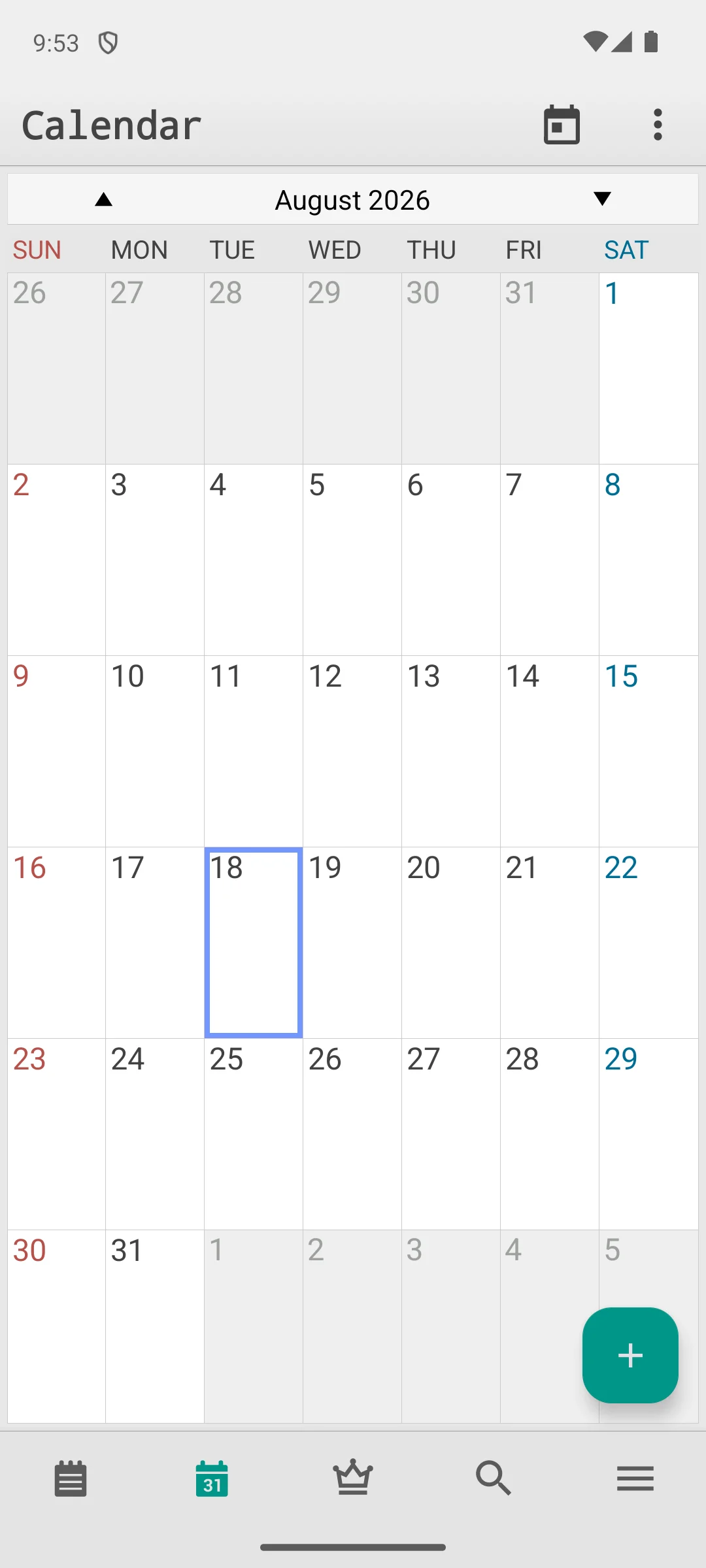
The screenshots here are our own captures from an Android emulator, taken on the date shown. The bottom bar carries a calendar tab that lays the same notes out by date, which is the part of this app the listing figures cannot show you. The screenshots below are ours, taken on 18 August 2026.
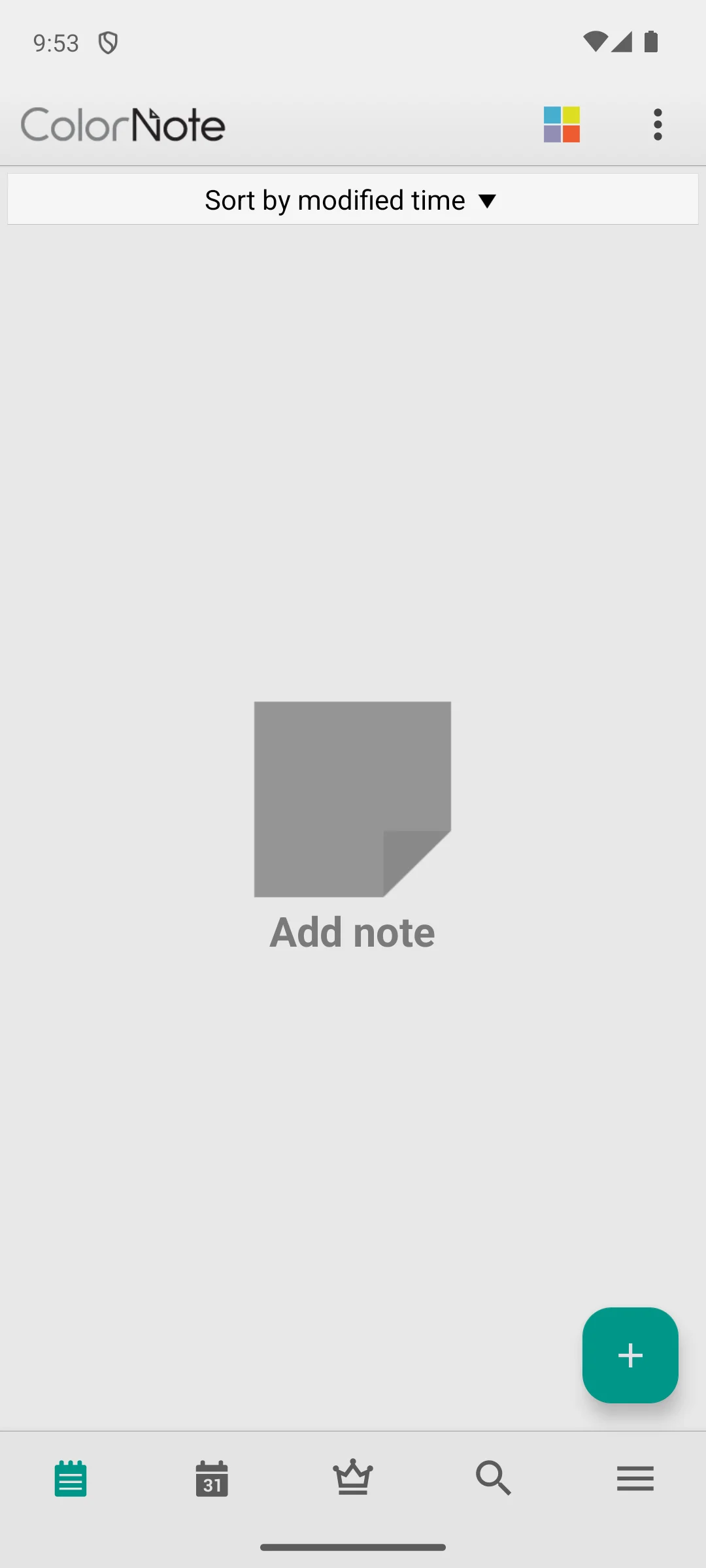
Apple Notes is not an Android app and has no Play listing to check, so it is here for one reason: switching from an iPhone should not mean losing years of notes. icloud.com/notes answered with HTTP 200 on 7 August 2026, so you can read and edit in a mobile browser while you move things across. There is no price, no ads badge and no rating, and the blunt part is that a browser tab is not a notes app.
Skip it if you have already moved your notes across. Choose it over Google Keep only while you are still mid migration. Our guide to migrating Apple Notes walks through moving everything cleanly.
↑ Back to the comparisonStart with capture speed. If a thought takes more than a couple of seconds to get down it escapes, so look for a home screen widget or a quick capture tile: Google Keep and ColorNote are built around that, while OneNote and Notion take more taps to reach a blank line. Then decide where the notes live. Cloud sync across a phone, tablet and computer is worth having, but check you can export the whole library to a plain file, because an app you can leave is an app you can trust. Finally match the format to your habit: cards and checklists in Keep and ColorNote, a roomy canvas in OneNote and Notion, ink on a Galaxy in Samsung Notes, and plain Markdown files in Obsidian, Joplin or Simplenote. Search matters more than filing over time, and Evernote and Joplin both add a web clipper if you save a lot of articles. Our wider Productivity guides cover the rest of the stack, and the table at the top of this page sorts all eleven entries on price, ads, encryption, offline and handwriting, every cell read 7 August 2026.
Notes hold passwords, health details, journals and half formed business ideas, so it is worth knowing how they are stored. Most cloud notes apps, Google Keep included, are encrypted in transit and at rest: scrambled on the way to the servers and on disk there, but with the provider holding the keys, so the company can technically read them and can be compelled to hand them over. For a grocery list that is fine. For a journal it may not be.
If you want notes only you can read, look for end to end encryption or local only storage. Standard Notes works that way by default, and its own site is blunt about it: "Only you have access to the keys required to decrypt your data." (standardnotes.com, read 7 August 2026). Joplin's own documentation is just as plain: "Joplin supports end-to-end encryption (E2EE) on all the applications." (joplinapp.org, read 7 August 2026), though on Joplin you switch it on yourself. Obsidian takes the third route, keeping notes as plain Markdown files in a folder on your phone, with end to end encryption listed as part of the paid Sync add-on on obsidian.md.
One thing gets confused constantly. A PIN, pattern or fingerprint lock on the app is not encryption. It stops a person holding your unlocked phone from opening the app, which is useful, and it does nothing about how your notes sit on a company server. If some of your notes are genuinely sensitive, run two apps: a fast one for lists and an encrypted one for the rest. Plenty of people do exactly that.
For most people Google Keep is the easiest free choice. It opens instantly, syncs with your Google account, and handles lists, voice notes, and photo text capture without ever asking for a subscription. If you want more structure, OneNote and Notion both offer generous free plans worth trying alongside it.
On a Samsung Galaxy device, Samsung Notes paired with the S Pen is hard to beat for natural handwriting and sketching. For everyone else, OneNote offers the most flexible inking canvas and works well with any active stylus on a larger Android tablet.
It depends on the app. Standard Notes and Joplin encrypt your notes end to end, meaning no one but you can read them. Mainstream apps like Keep and OneNote secure data in transit and at rest but can technically access it, so choose an encrypted option if privacy is your priority.
Yes. You can read iCloud notes through a browser on Android, then copy them into an app like Keep or OneNote, or use an export tool to bring everything over at once. Our migration guide covers the smoothest path so nothing gets left behind.
Not in the way most people think. An app lock stops someone holding your unlocked phone from opening the app, but it is not encryption. Your notes can still be stored in a form the provider can read on its servers. For real privacy, choose an app with end to end encryption or local only storage rather than relying on the lock alone.
Encryption in transit and at rest, which most cloud apps use, scrambles your notes while they travel and while they sit on the company servers, but the provider holds the keys and could technically read them. End to end encryption scrambles notes with a key only you hold, so the provider stores data it cannot read. Choose end to end if your notes are sensitive.
Notion leans hardest on it: on 7 August 2026 its Play listing is titled Notion: Notes, Tasks, AI and its own description covers AI meeting notes and asking Notion AI about your pages. Microsoft OneNote mentions voice transcription and AI studying in its listing description on the same date. Google Keep's Play description does not mention AI at all that day, so treat AI claims about Keep as belonging to a separate paid Google plan rather than to the notes app itself. None of this is needed to take ordinary notes.
On 7 August 2026 only Evernote carries a Contains ads badge on Google Play. Three apps carry an in-app purchases badge: Evernote at 1.00 to 254.89 USD, Notion at 11.99 to 214.99 USD and ColorNote at 1.99 to 15.99 USD. Google Keep, Microsoft OneNote, Obsidian, Samsung Notes, Simplenote, Standard Notes and Joplin carried neither badge that day. Costs can still sit outside the store, such as Obsidian Sync at 4 USD per user per month billed annually on obsidian.md.
Samsung ships it preinstalled on Galaxy phones and tablets, and its Play description talks about mobile, tablet and PC. We could not find any statement on the Play listing on 7 August 2026 that installation is limited to Samsung hardware, so treat that widely repeated claim as unconfirmed rather than as a fact of the listing.
 The 12 Best Handwriting Apps for AndroidProductivity