
Updated for 2026
Twelve editors, terminals and Python IDEs for writing real code on an Android phone, each checked against its own store listing. To round out your setup, our productivity apps hub is a good next stop.
Updated 6 August 2026: every rating, price, purchase range and availability claim re-checked against the live US Play listings; the three delisted editors now share one archive note.
Acode is our best overall pick because its listing, read 3 September 2026, pairs a terminal and plugins with 3.3 stars, free with ads.
Termux is our best free pick because the F-Droid build this page links, checked 6 August 2026, is free with no ads and nothing to buy.
Pydroid 3 is our Python pick because its listing, read 3 September 2026, rates 4.4 stars, free with ads and extras to $29.99.
Data checked: 3 September 2026.
Remote editing
Acode: 3.3 stars from 14,236 ratings, 1M+ installs, free with ads, in-app purchases $0.29 to $114.99, by Foxbiz Software Pvt. Ltd., on Google Play; checked 3 September 2026.
Acode is still the strongest all-round editor here, and the honest part comes first: 3.3 stars, the lowest of the maintained picks, and ads in the free build. In return: SFTP editing straight off a server, an Alpine Linux terminal with no root, a plugin store with language servers, and on-device AI agents including Claude Code. The core stays open source; the developer's readme calls it "a powerful and versatile code editing tool designed specifically for Android devices".
Pros: editor, terminal and plugins in one app; SFTP and Git built in; open source core. Cons: 3.3 star rating; ads in the free build; extras run up to $114.99.
Skip it if you want one lean tool that only edits text. Choose Acode over Termux when you want touch-first editing with the terminal as a sidekick rather than the main event.
↑ Back to the comparisonCLI power users
Termux: free and open source, no ads, no in-app purchases; skip the lagging Play build and install from F-Droid or GitHub releases; checked 6 August 2026.
Termux is the anchor of the category and the best free pick, with one blunt caveat: everything happens in a shell, and newcomers to the command line will find the first week hostile. The project's own site says "Termux is an Android terminal emulator and Linux environment app that works directly with no rooting or setup required", and that is what it delivers: install Python, Node, Git, Vim and compilers with its package manager and the phone becomes a pocket workstation. The Play build is an experimental branch missing functionality; use the F-Droid one.
Pros: a full Linux userland without root; thousands of packages including git, ssh and compilers; zero ads or purchases. Cons: steep learning curve; the Play build lags the real one; no graphical editor included.
Skip it if a terminal is not how you want to work. Choose Termux over Acode when the shell is the point and the editor is whatever you install in it.
↑ Back to the comparison
Web projects
Spck Editor: 4.1 stars from 13,986 ratings, 1M+ installs, free, no ads, in-app purchases $1.99 to $4.99, by Leaf Stack Studio, on Google Play; checked 2 September 2026.
Spck Editor is the closest thing to VS Code that runs natively on Android, free with no ads and cheap unlocks, and its sharpest catch is printed in its own listing: back up projects before uninstalling, or you will likely lose the data. It pairs live preview for HTML, CSS and JavaScript with a git client, a diff viewer, and TypeScript-aware autocompletion.
Pros: live preview pane; real git flow with commits, push and diffs; no ads and the cheapest extras on this page. Cons: projects live inside the app, so uninstalling can destroy them; web-focused rather than general purpose; private repos need app tokens.
Skip it if you edit arbitrary server files over SFTP rather than git projects. Choose Spck Editor over Acode when the work is a git-backed web project and preview speed beats plugins.
↑ Back to the comparisonPR reviews
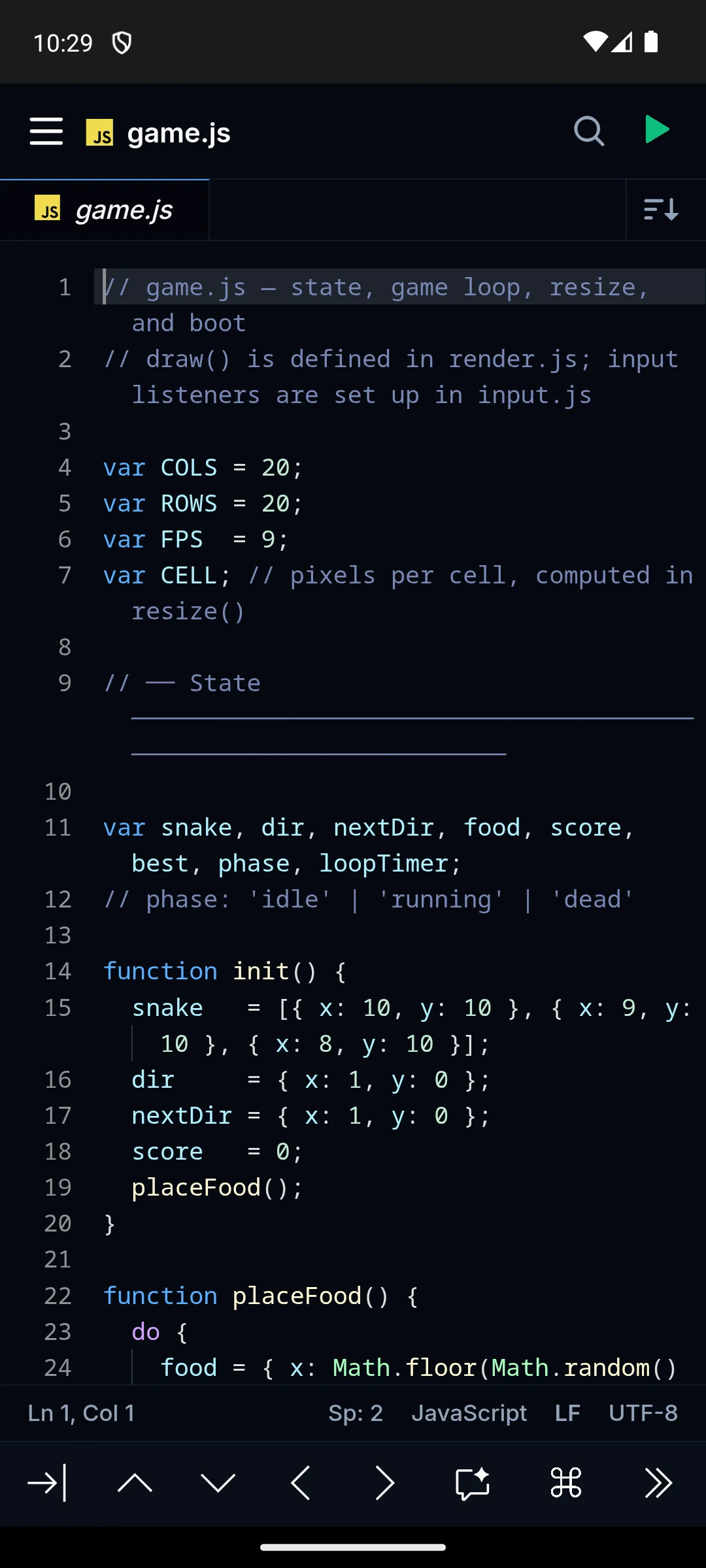
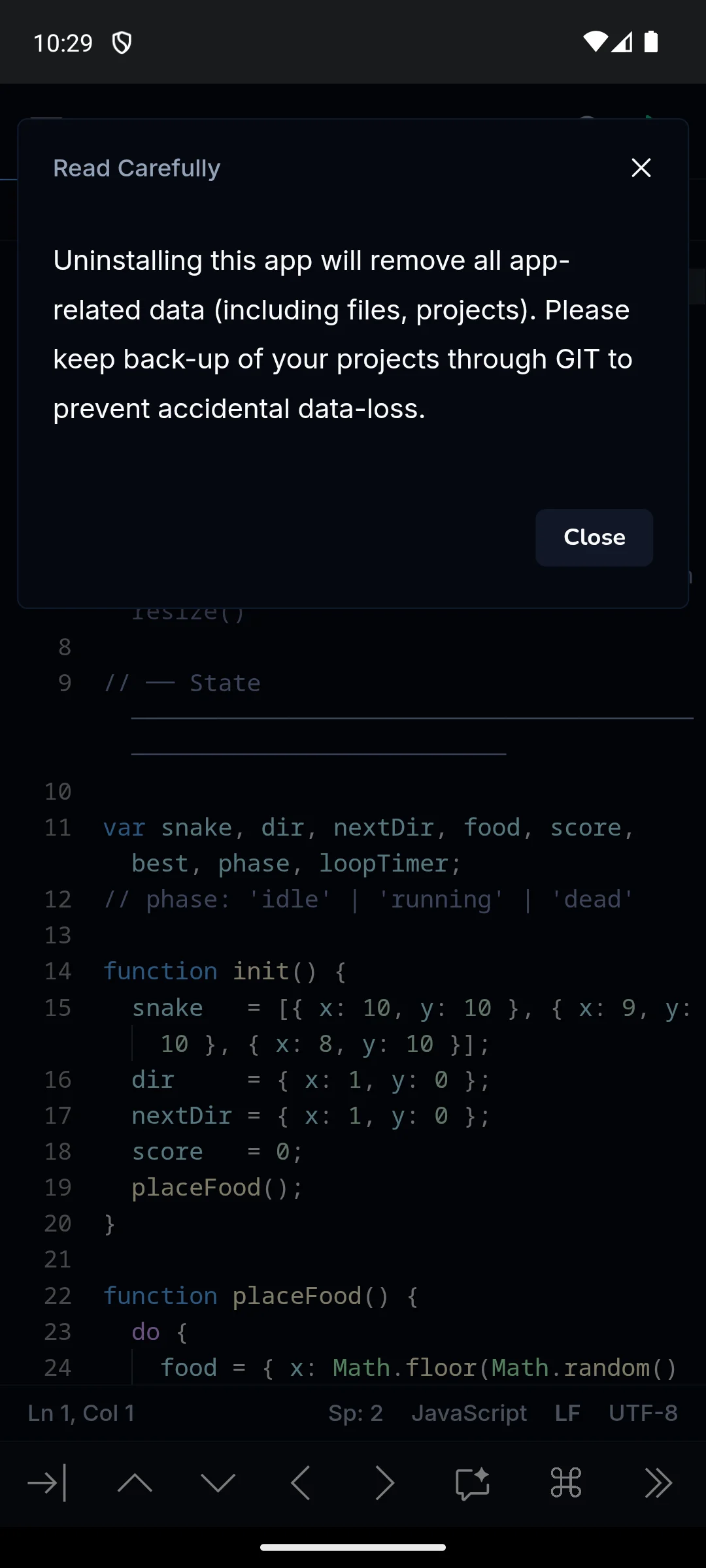
Installed on our own Android emulator on 18 August 2026, it opened into a working editor with a sample JavaScript project, syntax colouring, tabs, a run button and a status bar reporting line and column, indent width, language, line endings and encoding. It also puts up a notice worth repeating here: uninstalling the app removes all app related data, including files and projects, and it advises keeping a backup through Git. That is a real risk for anyone who writes code on a phone and does not push it anywhere. The screenshots below are ours, taken on 18 August 2026.
GitHub Mobile: 4.8 stars from 181,548 ratings, 10M+ installs, free, no ads, subscriptions $9.99 to $99.99 in-app, by GitHub, on Google Play; checked 6 August 2026.
GitHub Mobile is the highest rated app on this page at 4.8 stars, free without ads, and the blunt limit is that it is barely an editor: it exists to keep repositories moving. Browse code, review and merge pull requests, triage issues, and make small single-file edits; Copilot assistance sits behind subscriptions sold in-app from $9.99 up.
Pros: the best PR review flow on mobile; notification triage that actually works; free with no ads. Cons: not a real editor for multi-file work; useless without a GitHub account; AI help is a paid subscription.
Skip it if your code does not live on GitHub. Choose GitHub Mobile over Spck Editor when reviewing other people's code matters more than writing your own.
↑ Back to the comparisonLearning Python
Pydroid 3: 4.4 stars from 87,953 ratings, 10M+ installs, free with ads, in-app purchases $0.99 to $29.99, by Lider Soft KZ, on Google Play; checked 2 September 2026.
Pydroid 3 is the easiest way to run real Python on a phone, and the trade sits on its listing: ads in the free build, extras up to $29.99. It ships a full offline interpreter, pip with prebuilt wheels for NumPy, Matplotlib and scikit-learn, and a one tap run button, no setup required. The listing now names Lider Soft KZ as the developer, last update 18 May 2026.
Pros: works fully offline; the scientific stack installs without pain; gentle enough for a first program. Cons: ads in the free build; the useful extras are paid; Python only.
Skip it if you need any language other than Python. Choose Pydroid 3 over Termux when you want Python with zero setup instead of a shell to configure.
↑ Back to the comparisonPhone automation
QPython: 3.6 stars from 4,645 ratings, 1M+ installs, free, no ads label on the listing, by QPythonLab, on Google Play; last listing update 9 November 2025, checked 6 August 2026.
QPython leans toward tinkering and automation, and the con to weigh first is momentum: 3.6 stars and no update since November 2025. The listing now pitches on-device AI, with an integrated Ollama framework for local models, alongside the QEdit editor, a console, pip, and Jupyter notebooks through QNotebook. For small scripts that poke at the phone itself it remains handy.
Pros: phone automation scripts; runs Jupyter notebooks on the device; free with no ads label. Cons: 3.6 star rating; roughly nine months without an update at last check; rougher around the edges than Pydroid 3.
Skip it if you want a polished, actively updated Python IDE. Choose QPython over Pydroid 3 only when its automation hooks or notebook support are the actual job.
↑ Back to the comparisonWeb tinkerers
Code Editor by Rhino: 4.0 stars from 12,566 ratings, 1M+ installs, free with ads, in-app purchase $3.99, by Rhythm Software, on Google Play; checked 2 September 2026.
Rhino's Code Editor is the friendly pick for quick tinkering, free with ads and a single $3.99 unlock, and its main limit is that compile-and-run uses an online compiler, so running code needs a connection. Editing is local and instant: highlighting for over 110 languages, tabs, regex search and replace, and an in-app HTML preview.
Pros: highlights over 110 languages; compiles and runs over 30 of them via its online compiler; one cheap lifetime unlock. Cons: ads until you pay; running code requires internet; geared to snippets and single files, not project management.
Skip it if you need offline execution or project-level tools. Choose Code Editor by Rhino over Spck Editor for one-off snippets and instant HTML preview; go the other way when the work lives in git.
↑ Back to the comparisonCoding beginners
Sketchware Pro: free and open source, no ads, no purchases; community project distributed through GitHub releases, latest release v7.0.0 on 10 October 2025; checked 6 August 2026.
Sketchware Pro is the one pick that builds installable Android apps on the phone, free with no ads, and the honest scope comes first: it is for beginners and hobbyists, not production work, and it has never been on Google Play, so you sideload it. Visual blocks snap into app logic, and the generated Java is real code you can open and edit.
Pros: builds real APKs on the device; blocks teach logic, then show you the Java; free, open source, no ads. Cons: sideload only; roughly ten months since the last release at last check; not meant for professional projects.
Skip it if you want a store-distributed, professionally supported toolchain. Choose Sketchware Pro over Replit when you want an installable APK built locally rather than a project living in the cloud.
↑ Back to the comparison
Cloud coding
Replit: 4.5 stars from 48,366 ratings, 5M+ installs, free, no ads, in-app purchases $19.99 to $219.99, by Replit, on Google Play; checked 2 September 2026.
Replit's app has quietly changed audience: the listing now titles it Replit: Vibe Code with AI Fast and pitches describing apps in plain language over writing code, with the steepest purchases here, $19.99 to $219.99. It still picks up a cloud project from your laptop and runs it in Python, JavaScript and more, but the direction is AI app building, and heavier use pushes toward a paid plan.
Pros: full cloud environments with nothing to install; projects sync between phone and laptop; AI builds, tests and hosts for you. Cons: needs an account and a connection; the priciest subscriptions here; drifting from code editor toward no-code builder.
Skip it if you want your code and toolchain on the device. Choose Replit over Termux when zero setup and collaboration beat local control.
↑ Back to the comparisonThree editors this page once recommended are gone from Google Play; all three listings still returned nothing when re-checked on 6 August 2026. AIDE, which built Android apps on-device, was removed on 13 January 2024; Sketchware Pro and AndroidIDE cover that niche now. DroidEdit, the classic SFTP editor, is unlisted and unmaintained; Acode over SFTP does the same quick server fix. Quoda was unpublished on 5 December 2021 and survives only on APK mirrors, which sometimes repackage apps; do not install any of the three from a mirror.
↑ Back to the comparisonA phone is a great place to fix a config file, run a small script, review a pull request, or SSH into a server; it is a poor place for heavy refactoring and long builds. Pick by job: a fast editor with SFTP and live preview for web edits, an offline interpreter with a one tap run button for learning, a terminal with SSH for server admin. A real terminal is the biggest single upgrade, an extra key row or a cheap Bluetooth keyboard is the second, and with AI features, check whether the app bundles a free model, wants your own API key, or charges a subscription. Keep projects in git so phone fixes flow back to your laptop, save often, and when a change sprawls across many files, wait for a real keyboard.
Yes, and it works better than you might expect. Apps like Pydroid 3 run Python completely offline, while Termux gives you a full Linux shell with Git and compilers. For heavier work we still prefer a real keyboard, so pairing your phone with a Bluetooth keyboard makes longer coding sessions far more comfortable.
For general editing we would start with Acode, which is free, open source, and supports remote files over SFTP. If you specifically want Python, Pydroid 3 is excellent and free to use. Termux is also free and the most capable option, though it asks more of you since everything happens through the command line. One thing to know: install Termux from F-Droid or GitHub rather than the Play Store, since the Play build is no longer maintained and lags behind.
No. Every app on this list works on a standard, unrooted Android device. Termux in particular is designed to give you a Linux environment without root access. Rooting can unlock a few extra abilities, but it is never required just to write, edit, or run code with these editors. To jot down ideas alongside your projects, a good app from our best notes apps roundup pairs well here.
If you are brand new, Pydroid 3 makes learning Python painless with its one tap run button and offline interpreter. For app building, Sketchware Pro uses visual blocks that teach logic gently before you touch raw code. Both let you experiment freely without setting up a complicated environment first. When you need to read or annotate documentation on the move, our best PDF editor apps guide can help.
If you code on your phone more than occasionally, yes. The on screen keyboard hides many of the symbols programmers use and takes up half the screen. A small Bluetooth keyboard gives you real keys, proper shortcuts, and the full display for your code, which makes longer sessions far less tiring. For one off quick edits it is not necessary, and the extra key rows built into apps like Acode and Termux cover you in a pinch.
For 2026 the standout is Acode, which can run on-device AI assistants including Claude Code, Codex, and OpenCode alongside its editor and terminal. Replit is also built around AI and works well if you want chat-to-code and a hosted environment. Spck Editor adds an AI chat scoped to your current project, which is handy for web work. Check how each one is priced, since some use a free built in model, some ask for your own API key, and some charge for the feature.
Yes. Acode supports SFTP, so you can connect to a server, open a file, edit it, and save it straight back without copying it locally first. DroidEdit and Quoda, which we once named here as well, have since left Google Play, so do not go hunting for those. If you prefer the command line, Termux can SSH into the same server and let you edit with Vim or Nano. Fixing one line on a live server from anywhere is a real convenience.
Since August 2023 Google removes or hides apps that do not target a recent Android version. Hobbyist developer tools were hit hardest: AIDE, DroidEdit and Quoda fell out when their maintainers stopped updating, and QPython came close before an update landed in late 2025, while actively developed apps like Acode simply moved distribution to their own site and F-Droid. The apps did not break; the install path changed.
Yes, if you stick to three sources: the developer's official site, F-Droid, or the official GitHub releases page. Avoid APK mirror sites; they lag behind on versions and sometimes repackage apps. Android will ask you once to allow installs from your browser or from F-Droid, and you can revoke that permission afterwards.
The core editor is free and open source, and the Google Play build shows ads. Optional extras are sold as in-app purchases ranging from 0.29 to 114.99 dollars on the US listing, checked on 6 August 2026. Nothing essential for everyday editing sits behind those purchases.
 Best PDF Editor Apps for AndroidProductivity
 Best Gallery Apps for AndroidPhoto & Video