
Updated for 2026
Updated August 2026 · every entry re-verified against its own Google Play or F-Droid listing on 7 August 2026.
Eleven gallery apps compared on what actually decides it: price, ads, whether the app works offline, and whether its private folder encrypts your photos or only hides them. For more in this category, browse our full Photo & Video guides.
Google Photos is our best overall because its Locked Folder sits behind the screen lock and its listing, read 3 September 2026, shows free, no ads label, nothing to buy.
Fossify Gallery is our best free because its listing, read 3 September 2026, shows 4.0, free, no ads label, nothing to buy.
1Gallery is our niche pick because it encrypts hidden files, not merely hides them, and its listing, read 3 September 2026, shows free with ads and purchases from USD 1.49.
Data checked: 3 September 2026.
Legacy pick
4.5★ · 159,448 reviews · 1M+ installs · USD 2.99 one time, no ads label, no in-app purchases · by Simple Mobile Tool · Play listing · last store update 9 October 2023 · checked 7 August 2026
Simple Gallery Pro is the app this page used to lead with and is now the one to think twice about: USD 2.99, no ads and no in-app purchases, but the blunt con is a listing whose last store update was 9 October 2023. After the Simple Mobile Tools suite was sold to ZipoApps at the end of 2023, maintenance moved to the Fossify fork.
For: one-time USD 2.99, no ads label, no in-app purchases · folder-first browsing that mirrors your storage · 4.5 stars from 159,448 reviews. Against: no store update since 9 October 2023 · its hidden gallery hides files, it does not encrypt them · you pay for a build nobody is developing. Skip it if you want an app that still gets fixes; Fossify Gallery is the same idea, free, updated 17 February 2026. Choose it over Fossify Gallery only if you already bought it and it still behaves on your phone.
↑ Back to the comparisonBest overall
4.4★ · 53,905,462 reviews · 10B+ installs · free, no ads label, no in-app-purchases label · by Google LLC · Play listing · updated 4 August 2026 · checked 7 August 2026
Google Photos is the best gallery for most people: free, no ads label, no in-app-purchases label, updated 4 August 2026, and the only app here that advertises searching your library in plain language. The blunt con: its own listing quotes 15 GB free, shared with Gmail and Drive, so a big library ends at a paywall and every backed-up photo leaves the phone.
For: natural-language search of your own library · Locked Folder behind the device screen lock · automatic backup across devices. Against: 15 GB free storage shared with the rest of your Google account · photos leave the device by design · storage is sold through a separate Google subscription. Skip it if nothing may leave the phone; Fossify Gallery never uploads. Choose it over OneDrive if you want search and editing rather than file sync.
Best for power users
4.0★ · 19,929 reviews · 1M+ installs · free with a Contains ads label and in-app purchases from USD 0.99 to USD 19.99 per item · by Seelye Engineering · Play listing · updated 8 July 2026 · checked 7 August 2026
F-Stop is the power-user pick, now listed as Fast Photo Gallery Pro: F-Stop by Seelye Engineering, so search that name if the old one turns up nothing. It reads and writes photo metadata, so tags, ratings and smart albums behave like a desktop catalogue. The blunt con: free with a Contains ads label and in-app purchases from USD 0.99 to USD 19.99 per item, so you meet advertising before the paid tier.
For: tags, ratings and smart albums built on real photo metadata · tags travel with the file to a PC · vault locked by password or biometrics, per its listing. Against: Contains ads label · in-app purchases from USD 0.99 to USD 19.99 per item · a real learning curve before tagging pays back. Skip it if you will never tag a photo; Gallery by Google browses with no ads label at all. Choose it over Piktures if you want keyword search you control rather than automatic sorting.
↑ Back to the comparisonBest open source
F-Droid only · version 1.14.9 added 28 July 2026 · BSD 3-Clause licence · free, no ads, no in-app purchases · by Thibault Deckers · F-Droid listing · checked 7 August 2026
Aves Libre is the open-source pick when a plain gallery feels too thin: free, no ads, no in-app purchases, BSD 3-Clause licensed, with EXIF and GPS on a built-in map. The blunt con: the libre build is not on Google Play, so you install and update it from F-Droid yourself.
For: handles motion photos, panoramas, 360° videos and GeoTIFF files · EXIF and GPS on a built-in map · BSD 3-Clause source you can read and rebuild. Against: F-Droid only, so no Play auto-updates · no vault, hidden album or lock of any kind · the Play flavour is a different package under a different name. Skip it if you need a private folder; 1Gallery encrypts files instead of hiding them. Choose it over Fossify Gallery if metadata and maps matter more than a hidden album.
↑ Back to the comparison
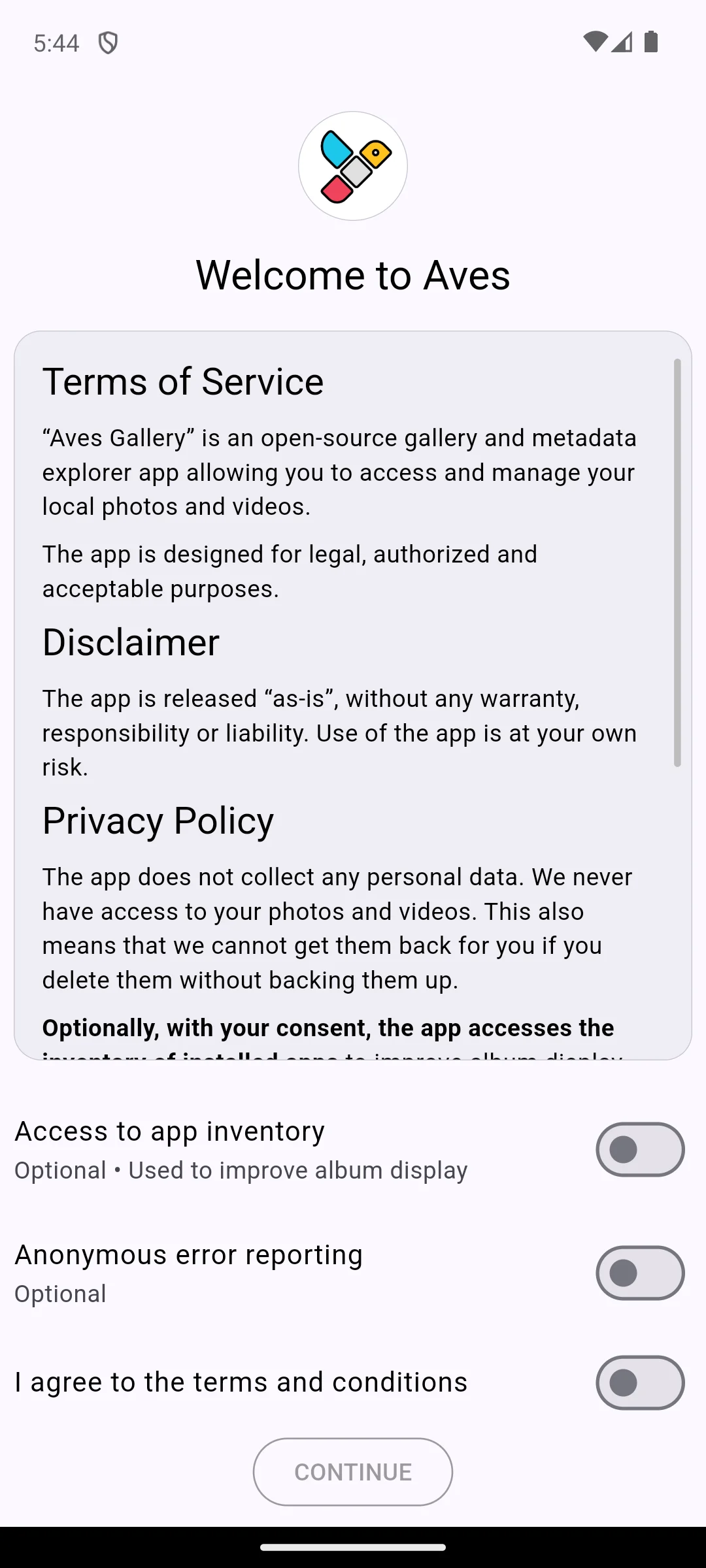
The capture below is of its first screen, taken on our own Android emulator on 18 August 2026. The terms, a disclaimer and the privacy policy are printed on the screen itself rather than hidden behind links, and the policy states that the app collects no personal data and never has access to your photos and videos, adding the honest consequence that it therefore cannot recover them if you delete them without a backup. Below that sit three separate switches, all off to begin with: access to the list of installed apps, marked optional and used to improve album display, anonymous error reporting, also marked optional, and agreement to the terms. Continue stays inactive until you choose.
Lightest
Lightest
4.2★ · 632,506 reviews · 1B+ installs · free, no ads label, no in-app purchases · by Google LLC · Play listing (com.google.android.apps.photosgo) · updated 24 June 2026 · checked 7 August 2026
Gallery is a standalone Google app, not the viewer inside the Files app, and it is the lightest way here to browse photos with no internet: free, no ads label, no in-app purchases, updated 24 June 2026. The blunt con: no vault, no hidden album and no lock of any kind, so anyone who unlocks the phone sees everything.
For: built to work offline, per its own listing · small install size across 1B+ installs · nightly grouping into People, Selfies, Nature, Animals, Documents and Videos. Against: no private folder, vault or lock · no tag or metadata search · face grouping is not available in every country, per the listing's own footnote. Skip it if anything sensitive lives on the phone; 1Gallery or OneDrive give you a vault. Choose it over Google Photos if you want the browsing and one-tap edits with nothing uploaded.
↑ Back to the comparisonMiddle ground
4.0★ · 53,650 reviews · 1M+ installs · free with a Contains ads label and in-app purchases from USD 0.99 to USD 10.00 per item · by DIUNE · Play listing · updated 7 August 2026 · checked 2 September 2026
Piktures is the middle ground: a tidy timeline, automatic screenshot and selfie sorting, and device, SD card, USB, SMB, Google Drive and OneDrive browsing in one app, updated 7 August 2026. The blunt con: it carries a Contains ads label plus in-app purchases from USD 0.99 to USD 10.00 per item, and its listing calls the vault secure without ever claiming encryption.
For: reads device, SD card, USB, SMB shares, Google Drive and OneDrive in one gallery · sorts screenshots and selfies automatically · built-in photo and video editors. Against: Contains ads label · in-app purchases from USD 0.99 to USD 10.00 per item · the vault is described as secure but never as encrypted. Skip it if you want an ad-free app; Fossify Gallery has no ads label and no in-app purchases. Choose it over F-Stop if you want the app to sort your library instead of tagging it yourself.
↑ Back to the comparisonBest cloud vault
4.6★ · 7,270,213 reviews · 5B+ installs · free with in-app purchases from USD 0.99 to USD 129.99 per item, no ads label · by Microsoft Corporation · Play listing · updated 25 July 2026 · checked 2 September 2026
OneDrive holds the highest rating here and the most serious vault: 4.6 stars from 7,270,213 reviews, free with no ads label, updated 25 July 2026. Microsoft's support documentation says "Personal Vault automatically locks after a period of inactivity and then you need to unlock it to get to your files again" (Microsoft Support, read 2 September 2026). The blunt con: its listing starts you at 5 GB free, so it only makes sense once you pay.
For: Personal Vault behind a second identity check · listing states files are encrypted at rest and in transit · 1 TB per user on Microsoft 365 Personal or Family. Against: 5 GB free storage · in-app purchases from USD 0.99 to USD 129.99 per item · Personal Vault needs a Basic, Personal or Family subscription, per Microsoft's documentation. Skip it if you want a purely local gallery; Fossify Gallery never contacts a server. Choose it over Google Photos if you already pay Microsoft and want a vault rather than photo search.
↑ Back to the comparisonBest free
4.1★ · 6,446 reviews · 500K+ installs · free, no ads label, no in-app purchases · by Fossify · Play listing · updated 17 February 2026 · checked 2 September 2026
Fossify Gallery is the best free pick and the community continuation of the original Simple Gallery: no ads label, no in-app purchases, and the project's own site promises "No advertising libraries or tracking in any app." (fossify.org, read 7 August 2026). The blunt con: 4.1 stars from just 6,446 reviews is a small sample next to its 500K+ installs, and its last store update was 17 February 2026.
For: no ads label, no in-app purchases · strips EXIF metadata including GPS coordinates and camera details, per its listing · recycle bin plus PIN, pattern or fingerprint locking. Against: 4.1 from just 6,446 reviews, a small sample · last store update 17 February 2026 · a locked album is a lock, not encryption. Skip it if you need encrypted storage; 1Gallery encrypts hidden files with AES. Choose it over Simple Gallery Pro because it is free and was updated in 2026 rather than 2023.
↑ Back to the comparisonNiche pick
4.1★ · 12,037 reviews · 500K+ installs · free with a Contains ads label and in-app purchases from USD 1.49 to USD 3.79 per item · by todayweather.co · Play listing · updated 17 July 2026 · checked 7 August 2026
1Gallery is the only app here whose listing claims encryption rather than hiding: it states hidden files are encrypted with AES encryption, with PIN, pattern, fingerprint or calculator lock modes, updated 17 July 2026. The blunt con: it is free with a Contains ads label, so the app guarding your private photos shows you advertising until you buy one of its USD 1.49 to USD 3.79 items.
For: AES encryption of hidden files, per its listing · PIN, pattern, fingerprint or calculator locks · encrypted backup and restore through Google Drive. Against: Contains ads label on a privacy app · in-app purchases from USD 1.49 to USD 3.79 per item · 500K+ installs, the smallest audience of the encrypted options here. Skip it if you will not run an ad-supported app over private photos; OneDrive carries no ads label. Choose it over Fossify Gallery if you need files encrypted rather than merely locked away.
↑ Back to the comparisonDelisted
Delisted. com.memoria.photos.gallery returns a Google Play 404 in both the US and German stores; re-checked 25 August 2026.
Memoria kept the timeline and memories view entirely on the device, with a private vault and local face grouping. The entry stays because readers still search the name, but there is nothing to install and no rating, install count or price to quote. Use 1Gallery for the vault, or Fossify Gallery for local browsing with no ads.
↑ Back to the comparisonUnverified
No store listing · no verifiable publisher · unverified as of 7 August 2026
QuickPic was famous for being feather light, and community builds still circulate under the name. We cannot stand behind them: the only source this entry has ever cited, an xdaforums thread, returned HTTP 403 to us on 7 August 2026, so there is no store listing, no named publisher and no dated version to show you. The entry stays as a pointer to the history, not a recommendation.
Against: no store listing · no verifiable publisher · our only source returns HTTP 403. Skip it and install Fossify Gallery instead, free with no ads label and updated 17 February 2026. Choose a maintained gallery over a mod whenever you cannot see who built the file you are installing.
↑ Back to the comparison
Four questions settle it. Does it stay smooth when you scroll from your oldest photo back to today. Does it organise the way you think, by folder, by timeline, or by tags you set yourself. Should it stay on the phone or sync to a server, because mixing those by accident is the usual regret. And does it have a recycle bin, the tie-breaker when two apps are otherwise equal.
A gallery app sees some of the most personal data on your phone, so three things are worth a minute before you grant it access.
You do not have to hand over the whole library. Android's developer documentation says the photo picker "provides a safe, built-in way for users to grant your app access to only selected images and videos, instead of their entire media library" (Android developer documentation, read 7 August 2026).
Most apps that advertise a private folder hide photos rather than encrypt them. A hidden file usually stays on your storage in readable form, where a file manager or a connected computer can open it. That is fine for keeping a surprise out of casual sight. It is not a secure vault. Of the eleven here, only 1Gallery states AES encryption of hidden files, and only OneDrive puts its vault behind a second identity check.
Photos carry EXIF metadata, and if location was on when you took the shot, that includes the GPS coordinates of where you stood. Android exposes it through ExifInterface, described in Google's reference as "a class for reading and writing Exif tags in various image file formats" (Android developer reference, read 7 August 2026), which is also how a gallery strips it. Check your share flow before posting anything sensitive.
Be honest about two things: how you find photos, and how private they need to be. If you keep sensitive images, choose real encryption over a hidden folder, and strip location data before you share. The comparison table above sorts all eleven on exactly those points.
Not strictly, but most stock galleries are average. If your default constantly pushes cloud upsells, struggles with a large library, or lacks a proper private folder, switching to something like Fossify Gallery or Aves Libre is a noticeable upgrade. It is a five minute change you usually feel within a day.
For real privacy, look for on device encryption rather than just hidden folders. 1Gallery says on its Play listing that hidden files are encrypted with AES encryption, and the Personal Vault in Microsoft OneDrive adds a second identity check. Memoria, which this page once recommended, no longer has a Google Play listing at all; the page returned a 404 when we checked on 7 August 2026. A hidden album only moves photos out of view, while encryption protects them if someone digs through your storage.
Yes. Aves Libre and Fossify Gallery search on the device, using folders, dates and EXIF data, with nothing leaving your phone. They will not match the natural language search that Google Photos advertises, but for date, location and folder searches they are quick and completely private.
No. Gallery apps read the photos already stored on your phone, so installing a new one does not duplicate or remove anything. You can run several side by side and uninstall the ones you do not like. Just be careful with the delete or recycle bin features, which do remove the actual files. If you also edit your shots, pair your gallery with one of our picks for photo editor apps or photo filter apps.
Hiding a photo just moves it out of the normal gallery view. The file usually stays on your storage in readable form, so a file manager or a connected computer can still open it. Encryption actually scrambles the file so it cannot be read without the right key or PIN. Many gallery apps that advertise a private folder only hide photos, so read the description carefully and do not treat a hidden album as a secure vault.
Photos carry EXIF metadata, and if location was on when you took the shot, that includes the GPS coordinates of where you stood. Sharing the photo can pass that data along. Before sharing something sensitive, check whether your gallery or the share flow can strip metadata, and remove the location data if it is there. Some galleries can show you the EXIF and GPS details directly, which is a quick way to see what a photo is carrying.
On this page, two. 1Gallery states on its Play listing that hidden files are encrypted with AES encryption. Microsoft OneDrive keeps Personal Vault behind a second identity check and its listing says files are encrypted at rest and in transit. Everything else here offers a hidden album or a PIN lock, which is not the same thing. Both listings were read on 7 August 2026.
Probably not. It still costs USD 2.99 with no ads and no in app purchases, and it still works, but its Play listing has had no store update since 9 October 2023, which we confirmed on 7 August 2026. Fossify Gallery is the community continuation of the same app, is free, and was last updated on 17 February 2026. Buy Simple Gallery Pro only if you already know it runs well on your phone.
 Best App Lock Apps for AndroidTools & Utilities
 How to Actually Free Up Storage on AndroidTools & Utilities