
Checked 3 September 2026
Eleven habit trackers with a Play listing, compared on what you can check before installing anything: where the free tier stops, what the in-app purchases cost, whether the listing carries advertising, what the Data Safety section declares, and how recently anyone maintained it. For more ways to get organised, browse our Productivity guides.
HabitNow is the pick, Loop Habit Tracker the free one with nothing to buy, Habitify the choice for several devices. Our answer, the free pick and the table ↓
Checked 3 September 2026: no pick changed since 20 August, when all eleven listings were re-read; nothing has moved since
Full logEleven Android habit trackers that all install for nothing, compared on where the free tier stops and what it costs when you reach that point.
HabitNow is our best overall Android habit tracker because its Play listing, read 20 August 2026, carries no advertising label and purchases from $0.99.
Loop Habit Tracker is our best free Android habit tracker because its Play listing, read 20 August 2026, carries no advertising label and nothing to buy.
Habitify is our Android habit tracker pick for several devices because its own pricing page, read 20 August 2026, puts cross platform sync on the free plan, capped at three habits, with no advertising label.
Data checked: 3 September 2026.
Every app on this page is checked against the sources named below, and where a source cannot be reached the entry says so.
A tracker with no paid tier
Rating 4.7 from 63,142 reviews · Installs 5,000,000+ · Free to install, and its listing publishes no in-app purchases · Developer Álinson S Xavier · Listing updated 15 September 2025 · Contains ads: No · checked 1 September 2026
Google Play listing · 4.7 (63,142) · read 1 September 2026
Loop Habit Tracker sells nothing at all: no in-app purchases on its listing, and no advertising label. The blunt part is age, because that listing has not changed since 15 September 2025. Its Data Safety section is the only one here declaring both no data shared with third parties and no data collected, and it is rated 4.7 from 63,142 reviews across 5,000,000+ installs.
Its own Play description states that the app has no advertisements, no annoying notifications and no intrusive permissions, and that this will not change. Its own site, read on 1 September 2026, describes it as completely free and open source under the GPLv3 (loophabits.org). The listing bears both out: nothing to buy, no advertising label, and a Data Safety section that declares nothing is collected.
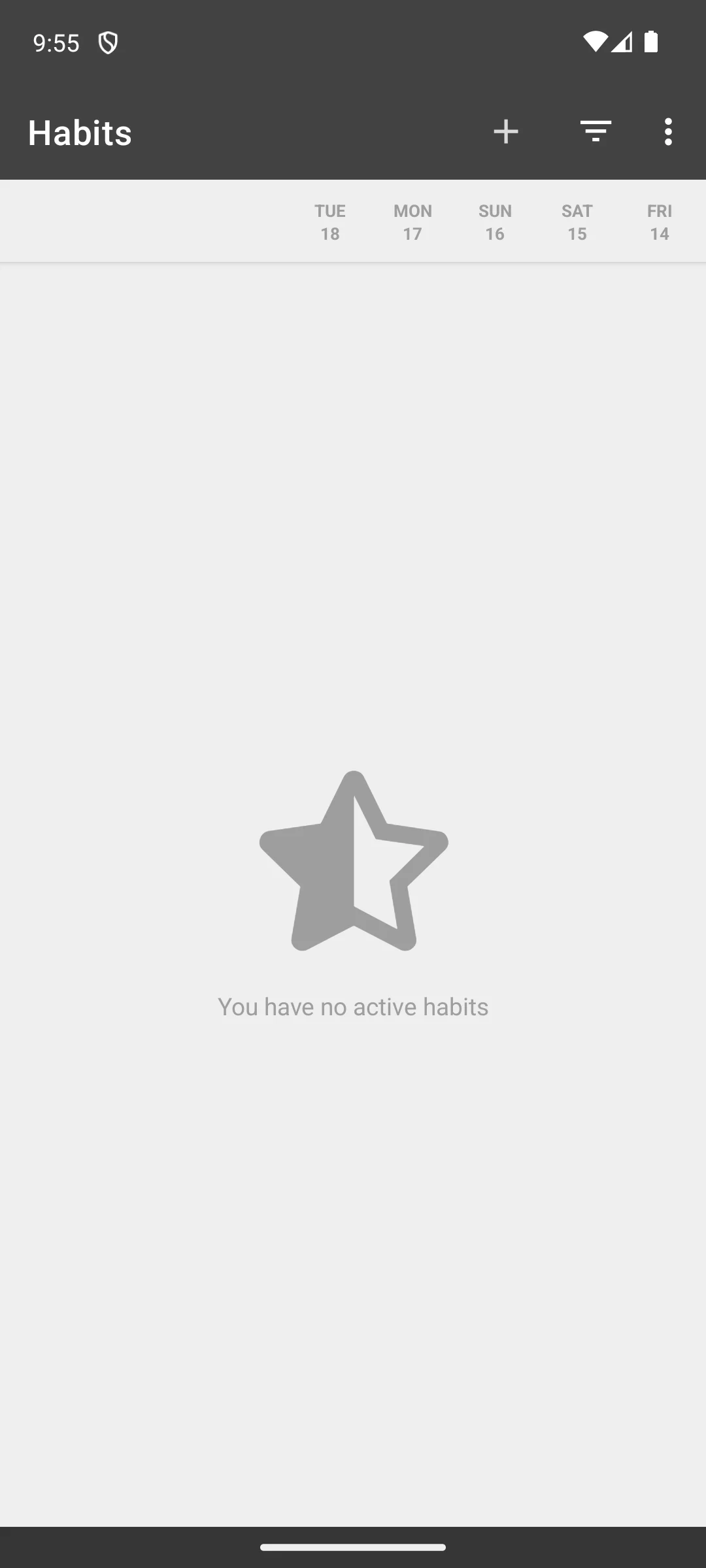
The screenshot below is our own, taken on 18 August 2026 and unchanged since. It shows the habit list as the app presents it before anything is added: an empty list, with the last five days already ruled off as columns.
Skip this if. Skip it if you want sync across devices or a reward system, because neither is on its listing.
Choosing between them. Choose Loop over HabitNow when privacy decides it, and HabitNow over Loop when you want a calendar and timers in the same app.
Habits, tasks and a calendar in one app
Rating 4.7 from 92,280 reviews · Installs 5,000,000+ · Free to install, in-app purchases $0.99 to $11.99 per item · Developer HabitNow Apps · Listing updated 27 July 2026 · Contains ads: No · checked 1 September 2026
Google Play listing · 4.7 (92,280) · read 1 September 2026
HabitNow is our best overall pick: free to install, no advertising label, purchases $0.99 to $11.99 per item. The blunt part is what the money buys, because cloud backup is the premium feature. On the free tier your history lives on one phone and nowhere else, and the developer says so in its own words. That range is also a narrow one by the standards of this table.
The developer’s own privacy policy, read on 1 September 2026, is unusually direct about both halves of that. It says HabitNow offers a one-time premium upgrade that unlocks additional features
(habitnow.app), so what it sells is a purchase rather than a recurring subscription. The same document says that when using the app as a non-premium user, your data is stored only on your device, and that premium cloud backups sit on a third party cloud service.
Skip this if. Skip it if you want a habit grid and nothing else, because most of the app is a planner.
Choosing between them. Choose HabitNow over Loop for scheduling and reminders, and Loop over HabitNow when nothing may be collected at all.
Turning tasks into a role playing game
Rating 4.7 from 75,164 reviews · Installs 5,000,000+ · Free to install, in-app purchases $0.99 to $47.99 per item · Developer HabitRPG, Inc. · Listing updated 26 August 2026 · Contains ads: Yes · checked 1 September 2026
Google Play listing · 4.7 (75,164) · read 1 September 2026
Habitica makes a task list into a role playing game. Its listing carries an advertising label, one of two here, and purchases run $0.99 to $47.99 per item. The blunt part is a disagreement about that label, set out below. You build an avatar, and checking things off in real life earns gold, experience and gear. It is rated 4.7 from 75,164 reviews across 5,000,000+ installs.
The store field on the listing states that the app contains advertising. The publisher’s own reply to a review on that same listing, dated 2 January 2026, states a commitment to keeping the app free of advertising. Both are on the page a reader lands on, and this site cannot reconcile them from outside the app, so it reports both rather than choosing one. The listing publishes no limit on how many habits the free tier allows.
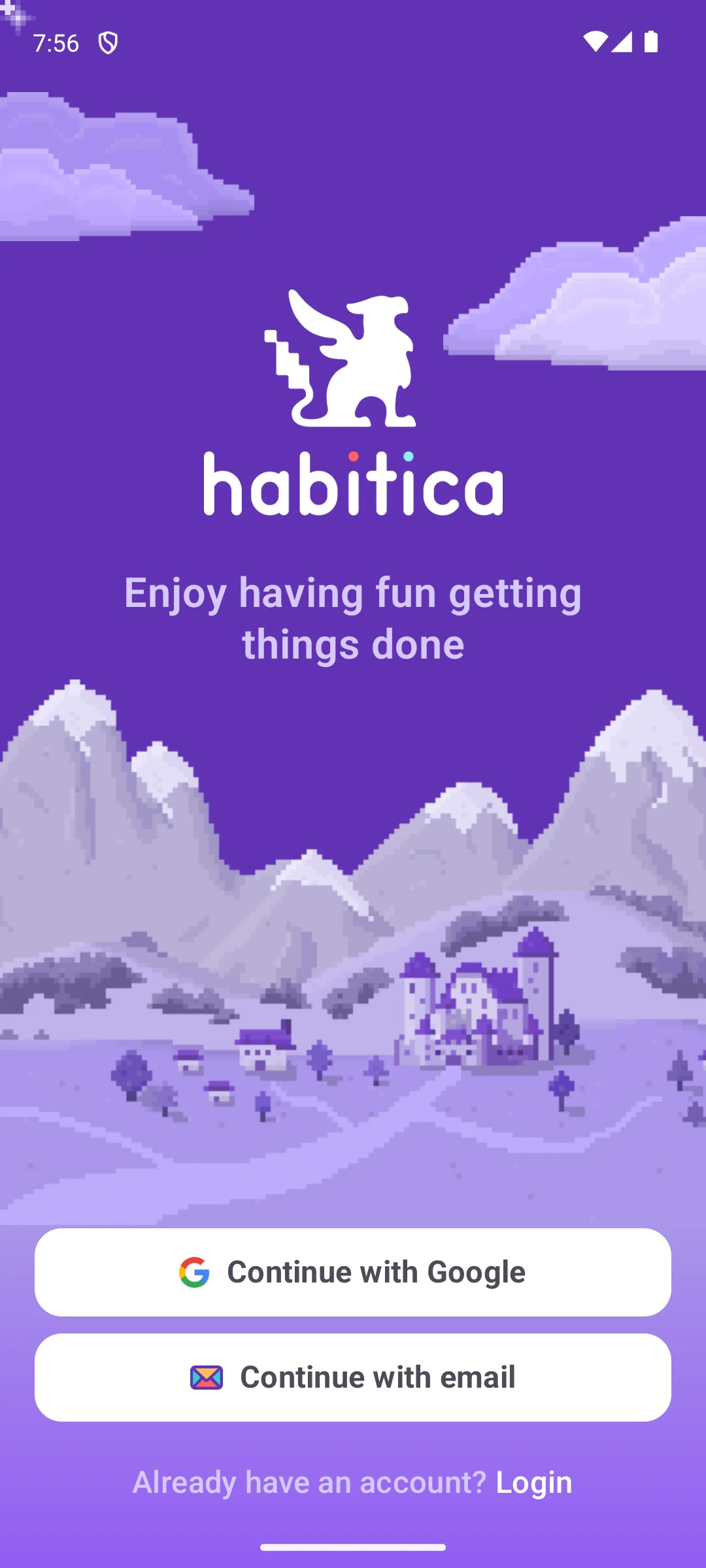
The capture below is of the welcome screen it opens on, taken on our own Android emulator on 18 August 2026. It offers three ways forward, all of them an account: continue with Google, continue with email, or log in to an existing one. There is no way to try the habit list first, which matters for an app whose whole idea is a long running streak.
Skip this if. Skip it if a game layer sounds like more work than the habit, because the game is the point of the app.
Choosing between them. Choose Habitica over Finch when you want a system with rules and rewards, and Finch over Habitica when you want encouragement without a scoreboard.
Gentle, self care led motivation
Rating 4.9 from 616,394 reviews · Installs 10,000,000+ · Free to install, in-app purchases $1.99 to $399.99 per item · Developer Finch Care Public Benefit Corporation · Listing updated 27 August 2026 · Contains ads: No · checked 1 September 2026
Google Play listing · 4.9 (616,394) · read 1 September 2026
Finch is a self care companion first and a habit tracker second, with no advertising label and purchases $1.99 to $399.99 per item. The blunt part is that ceiling, the highest on this page. You look after a bird by looking after yourself, and at 4.9 from 616,394 reviews it is the highest rated app in this table. Nothing on the listing sets a limit on the free tier.
Play files Finch under Health and Fitness rather than Productivity, which is worth knowing before you compare it with the planners here. Its description still lists a habit tracker plainly, alongside a mood journal, guided breathing and mental health quizzes, so it stays on this page. Its Data Safety section declares that it may share data with third parties.
Skip this if. Skip it if you want a plain grid of habits, because the pet and the self care exercises are most of the app.
Choosing between them. Choose Finch over Habitica for encouragement without a scoreboard, and Habitica over Finch when rules and rewards are what keep you going.
A tile grid you read at a glance
Rating 4.7 from 11,657 reviews · Installs 500,000+ · Free to install, in-app purchases $0.99 to $37.99 per item · Developer Sebastian Röhl · Listing updated 23 August 2026 · Contains ads: No · checked 1 September 2026
Google Play listing · 4.7 (11,657) · read 1 September 2026
HabitKit is the tile grid app, free to install with no advertising label and purchases $0.99 to $37.99 per item. The blunt part is a three way disagreement about where your data goes. It sits between its Play description, its Data Safety section and the developer’s own website. Every habit is a block chart that fills in as you keep it up, and it is rated 4.7 from 11,657 reviews.
The Play description carries an absolute: all your data stays on your phone, no sign-in, no servers, no cloud. The Data Safety section on the same listing declares that the app may share data with third parties. The developer’s own website, read on 1 September 2026, is narrower again and says that authentication and cloud backups are optional (habitkit.app). Optional is not absent, and this page reports all three rather than picking the flattering one.
Skip this if. Skip it if you need reminders, schedules and tasks in one app, because this one is deliberately a grid.
Choosing between them. Choose HabitKit over Habitify for the grid, and Habitify over HabitKit when the habits have to follow you across devices.
A full task manager with habits attached
Rating 4.6 from 163,548 reviews · Installs 10,000,000+ · Free to install, in-app purchases $1.99 to $49.99 per item · Developer TickTick Limited · Listing updated 28 August 2026 · Contains ads: No · checked 1 September 2026
Google Play listing · 4.6 (163,548) · read 1 September 2026
TickTick is a full task manager that also tracks habits, with no advertising label and purchases $1.99 to $49.99 per item. The blunt part is scale: the habit view is one tab inside a much larger app. If you want a habit tracker and nothing else, this is a great deal of app to carry. It is rated 4.6 from 163,548 reviews across 10,000,000+ installs.
Its description sets out what Premium raises rather than what the free plan allows, and it does so precisely: control of 299 lists, 999 tasks per list and 199 subtasks per task, up to 5 reminders on each task, and a shared list of up to 29 members. Read the heading above them before you read the numbers, because it says What to enjoy more at TickTick Premium?
(Google Play listing, read 20 August 2026). Those are paid ceilings, not free ones, so this page prints Not published in the free tier column for TickTick: neither the listing nor the developer’s own site states what the free plan itself allows. The habit tracker is described as a tab you switch on rather than as a paid feature.
Skip this if. Skip it if you already have a to-do app you like, because most of what you would be installing duplicates it.
Choosing between them. Choose TickTick over HabitNow when tasks matter more than habits, and HabitNow over TickTick when the habit side is the reason you are installing anything.
A guided thirty day challenge
Rating 4.8 from 134,772 reviews · Installs 10,000,000+ · Free to install, in-app purchases $7.99 to $29.99 per item · Developer Leap Fitness Group · Listing updated 13 October 2025 · Contains ads: Yes · checked 1 September 2026
Google Play listing · 4.8 (134,772) · read 1 September 2026
Habit Diary builds a thirty day challenge rather than an open ended streak. Its listing carries an advertising label, one of two here, and purchases run $7.99 to $29.99 per item. The blunt part is that combination. Advertising is what you meet first, and at $7.99 the cheapest way past it costs more than any other app here asks to begin. It is rated 4.8 from 134,772 reviews across 10,000,000+ installs, and its full store name is Habit Tracker - Habit Diary.
Play files it under Lifestyle rather than Productivity. Its description is built around a preset library and ten or more designed thirty day journeys, with a timer and white noise attached, so it suits someone who wants to be told what to do rather than to design a system. Its Data Safety section declares no data shared with third parties. The listing publishes no limit on the free tier, and the developer publishes none elsewhere.
Skip this if. Skip it if advertising in a habit app would put you off opening it, because the listing says it is there.
Choosing between them. Choose Habit Diary over Productive for a guided challenge, and Productive over Habit Diary when you would rather build the list yourself.
A preset habit library
Rating 3.7 from 20,867 reviews · Installs 1,000,000+ · Free to install, in-app purchases $0.99 to $91.99 per item · Developer Mosaic Srl · Listing updated 14 November 2025 · Contains ads: No · checked 1 September 2026
Google Play listing · 3.7 (20,867) · read 1 September 2026
Productive gives you a library of preset habits to start from, with no advertising label and purchases $0.99 to $91.99 per item. The blunt part is the rating: 3.7 from 20,867 reviews, the second lowest here. It is also one of the apps whose free tier limit comes from its own developer, because the description says Premium adds an unlimited number of habits, so the free plan is capped.
The listing is published by Mosaic Srl under a Bending Spoons privacy policy, while the description still refers readers to an Apalon end user licence agreement and links apalon.com. That description also states that a subscription with a free trial renews into a paid subscription unless it is cancelled first. The listing has not been updated since 14 November 2025, and its Data Safety section declares that it may share data with third parties.
Skip this if. Skip it if you want to design your own habits from scratch, because the presets are the reason to choose it.
Choosing between them. Choose Productive over Habitify for the preset library, and Habitify over Productive when you need the same habits on more than one device.
Syncing across phone, watch and web
Rating 4.2 from 6,558 reviews · Installs 500,000+ · Free to install, in-app purchases $0.99 to $99.99 per item · Developer Unstatic Ltd Co · Listing updated 30 August 2026 · Contains ads: No · checked 1 September 2026
Google Play listing · 4.2 (6,558) · read 1 September 2026
Habitify syncs the same habits across phone, watch and web, with no advertising label and purchases $0.99 to $99.99 per item. The blunt part is the cap: its own pricing page puts the free plan at three habits. That is where most people’s second week begins, and the same page marks five further features as unavailable on the free plan.
Its Play description says Habitify is available for free on all platforms. When you are ready to grow, unlock Habitify Plus to enjoy unlimited habits, smart reminders, and custom group areas to organize your routines
(Google Play listing). The developer’s own pricing page, read on 1 September 2026, puts a number on it: the free plan is listed as 3 habits with cross platform sync, while advanced reminders (habit stacking and location based), off mode for breaks, calendar integrations (Apple and Google), Apple Health integration and API automation (Zapier, IFTTT) are marked unavailable on it and available on Premium (habitify.me/pricing). The two sources do not line up, and this page reports both rather than picking the flattering one: the pricing page shows two tiers, Free and Premium, while the listing names Plus and Pro and puts Apple Health integration and advanced timers behind Pro.
Skip this if. Skip it if you want more than three habits without paying, because its own pricing page sets the free plan at three.
Choosing between them. Choose Habitify over HabitKit for syncing, and HabitKit over Habitify for the grid.
All eleven apps here are free to install. That is exactly why this page prints no price column: a column that reads Free in eleven rows out of eleven looks verified and decides nothing. Two listings carry an advertising label, Habitica and Habit Diary. The other nine carry none: eight are funded by in-app purchases, and Loop Habit Tracker sells nothing at all. One of those nine carries a caveat, because Routinery’s own site lists No Ads as a benefit of its paid tier even though its listing publishes no advertising label. What actually separates them is where the free tier stops.
Five of the eleven publish that boundary themselves, and two of the five put a number on it. Habitify is the plainest: its own pricing page lists the free plan as 3 habits with cross platform sync, and marks advanced reminders, off mode for breaks, calendar integrations, Apple Health and API automation as unavailable on it. Routinery is the other, and its own comparison table gives the free Basic tier unlimited todos and two routines. Productive’s description says Premium adds an unlimited number of habits, so its free plan is capped. Way of Life marks unlimited items and cloud backup with an asterisk and closes with the line that the asterisk requires premium. HabitNow’s own privacy policy makes cloud backup the premium feature and the upgrade a one-time purchase. Loop Habit Tracker has no boundary to publish, because its listing sells nothing at all.
The other five do not publish it. Habitica, Finch, HabitKit, TickTick and Habit Diary all sell in-app purchases without stating, on the listing or on their own sites, how much of the app you get before paying. TickTick is the one to read carefully, because its description is full of numbers and they are the wrong ones: they are the ceilings Premium raises, not the limits the free plan sets. That is a statement about their documentation and not about their apps: a limit may well exist inside any of them, and the absence of a published figure is not evidence that there is no cap. It is worth finding before you build months of history in one, because the ranges these five sell across are wide. Across the whole table the in-app purchase ranges run from nothing at all on Loop Habit Tracker to $1.99 to $399.99 per item on Finch, and a range is not a price list: it is only the cheapest and the dearest single item a developer sells, so it shows the shape of the paywall and nothing about what a year of the app costs.
Spotting trends over months
Rating 3.6 from 1,347 reviews · Installs 500,000+ · Free to install, in-app purchases $4.99 to $6.49 per item · Developer Way of Life ApS · Listing updated 7 August 2025 · Contains ads: No · checked 20 August 2026
Google Play listing · 3.6 (1,347) · read 20 August 2026
Way of Life is a grid built for spotting trends over months, with no advertising label and purchases $4.99 to $6.49 per item. The blunt part is age: this listing has not changed since 7 August 2025. It is also the lowest rated and smallest here at 3.6 from 1,347 reviews, and its own listing marks unlimited items and cloud backup as premium, so the free tier is capped on both.
The boundary is published in an unusual way and is easy to miss. Its feature list marks two entries with an asterisk, unlimited items and backup to any cloud storage provider, and the last line of the description states that the asterisk requires premium. So the free tier is limited in how many things it will track and keeps nothing off the phone, and the developer says so on the listing, which is more than five of the eleven apps here do.
Skip this if. Skip it if you want a maintained app, because this listing is the oldest on the page by some margin.
Choosing between them. Choose Way of Life over Loop for charts and trend lines, and Loop over Way of Life for an app that was updated more recently and sells nothing.
Timed, step by step routines
Rating 4.5 from 18,348 reviews · Installs 1,000,000+ · Free to install, in-app purchases $0.99 to $72.00 per item · Developer Routinery · Listing updated 21 August 2026 · Contains ads: No · checked 1 September 2026
Google Play listing · 4.5 (18,348) · read 1 September 2026
Routinery times each step of a routine instead of counting days. Its Play listing carries no advertising label, with purchases $0.99 to $72.00 per item. The blunt part is that its own site sells No Ads as a Pro benefit. That is a straight disagreement between the two, and the Data Safety section on the same listing is the only one here declaring that data is not encrypted. It is rated 4.5 from 18,348 reviews across 1,000,000+ installs.
Its own site publishes where the free tier stops, which the Play listing does not. A Pro against Basic table, reached from the developer’s home page as 30-Day Free Access and read on 1 September 2026, gives Basic unlimited todos but marks its routines row 2 Free against unlimited on Pro, and lists No Ads, Insight Report, Custom Sound and Archived Routines as Pro only (routinery.app). So the free tier is two routines rather than an unknown, and selling No Ads as a paid benefit sits against a listing that carries no advertising label. This page states both rather than resolving them. Its description addresses people who find starting hard, and says plainly that it is not officially a medical tool. It is also the one entry here whose Data Safety section carries both declarations you would least want together: that the app may share data with third parties, and that data is not encrypted.
Skip this if. Skip it if you track single daily habits, because the app is built around multi step routines on a timer.
Choosing between them. Choose Routinery over HabitNow for timed routines, and HabitNow over Routinery when the Data Safety section decides it.
The best habit tracker is the one you keep opening. An app with beautiful charts is useless if logging a habit feels like a chore by the second week, so before comparing features, picture the moment you will use it: tired, in bed, with ten seconds of attention. What follows is ordered by how much it decides whether that moment happens at all.
Marking a habit done should be a single tap, ideally from a home screen widget or a notification rather than from inside the app. Loop Habit Tracker and HabitKit both describe widgets on their listings, and Loop’s description goes further, offering to check, dismiss or snooze a habit straight from the notification.
Our guidance, rather than anything a listing states: a streak turns into guilt the moment it breaks, and that is the point at which the app usually gets uninstalled. What the listings do state is how they handle it. Loop’s own description sets out a habit strength score, where a few missed days after a long run weaken a habit rather than erasing it. Habit Diary builds a thirty day challenge instead, and Routinery times each step of a routine rather than counting days at all.
Not every habit is daily. HabitNow and Habitify both describe custom schedules on their listings, from a few times a week to monthly, which keeps the app honest about what you actually committed to instead of marking a rest day as a failure.
This is the one most people find out about late. If the boundary is published, weigh it before you start: three habits is a different proposition from an unlimited list, and a cap on cloud backup only matters if you change phones. If it is not published, assume there is one and find it in the first week, while moving is still cheap.
Habit logs are more revealing than they look: exercise, medication, drinking, sleep, mood. Six of the eleven Data Safety sections here declare no data shared with third parties, and they are Loop Habit Tracker, HabitNow, TickTick, Habit Diary, Habitify and Way of Life. Five declare that they may share: Habitica, Finch, HabitKit, Productive and Routinery. Loop goes one step further than any of them and declares no data collected at all.
Two caveats worth carrying. Declaring no data shared is not the same as declaring no data collected, and HabitNow, TickTick, Habit Diary, Habitify and Way of Life all declare collection; Way of Life also sells cloud backup as a premium feature, so its data does not necessarily stay on the phone. And Routinery is the only listing here whose Data Safety section states that data is not encrypted.
Ratings on this page span 4.9 on Finch down to 3.6 on Way of Life. If you are still deciding, the table at the top carries every app with where its free tier stops, what its in-app purchases cost, its advertising label and its rating, each read on 1 September 2026, except Way of Life, read 20 August 2026.
Loop Habit Tracker. Its listing shows no in-app purchases at all, no advertising label, and a Data Safety section declaring no data shared with third parties and no data collected, which no other app on this page matches. The trade is that it offers no account and no syncing between devices, and no cloud backup either. Checked 20 August 2026.
It depends on the app, and five of the eleven publish the answer. Habitify is the clearest: its own pricing page lists the free plan as three habits with cross platform sync. Routinery is the other one that puts a number on it, and its own comparison table gives the free Basic tier two routines and unlimited todos. Productive says Premium adds an unlimited number of habits, so its free plan is capped. Way of Life marks unlimited items as requiring premium. HabitNow puts cloud backup behind the paid tier rather than the habit count, and Loop Habit Tracker sells nothing at all. The other five publish no figure anywhere this page can link, TickTick included, because the numbers in its description are the ceilings Premium raises rather than the limits the free plan sets. Treat those five limits as unknown rather than absent. Checked 20 August 2026.
Two of the eleven listings carry an advertising label: Habitica and Habit Tracker - Habit Diary. The other nine carry none: eight are funded by in-app purchases, and Loop Habit Tracker sells nothing at all. Two wrinkles are worth knowing. Habitica carries the label, and the publisher replied to a review on that same listing on 2 January 2026 saying it is committed to keeping the app free of advertising. Routinery carries no label, and its own site lists No Ads as a benefit of its paid tier. This page reports both sides of each rather than choosing between them. Checked 20 August 2026.
It depends on where the app keeps your data, and the listing is the place to look. Loop states in its own description that it needs no internet connection and no account registration. Apps built around syncing, such as Habitify and TickTick, need a connection to move data between devices. HabitNow says in its own privacy policy that a non-premium user's data is stored only on the device, and Way of Life offers cloud backup as a premium feature rather than as the default. Checked 20 August 2026.
That depends on what the paid tier unlocks, and now that five developers publish it, you can weigh it before installing. The in-app purchase ranges run from nothing at all on Loop Habit Tracker up to the $1.99 to $399.99 per item that Finch lists, and a range is only the cheapest and the dearest single item, not a price list and not a yearly cost. HabitNow's developer documents its premium as a one-time purchase, and Habitify's pricing page lists a lifetime plan billed once alongside an annual one. Read the range in each section above before subscribing. Checked 20 August 2026.
It varies by app, and it is worth knowing before you commit. Loop's description sets out a habit strength score, so a few missed days after a long run weaken a habit rather than wiping it out. Stricter trackers reset the count to zero. If a broken streak is the thing that makes you give up, favour an app that lets you skip or pause a habit. Checked 20 August 2026.
Read the Data Safety section on each listing, because they differ. Six of the eleven declare no data shared with third parties: Loop Habit Tracker, HabitNow, TickTick, Habit Diary, Habitify and Way of Life. Five declare that they may share: Habitica, Finch, HabitKit, Productive and Routinery. Only Loop declares no data collected at all, and only Routinery declares that data is not encrypted. These are developer declarations rather than an independent audit. Checked 20 August 2026.
All of them were read from the United States English Google Play storefront, gl=US and hl=en. Google Play ratings, review counts and prices differ by country, so a listing opened in another storefront can show a different rating with the same review count and a different currency. If you are shopping from elsewhere, treat the figures here as the shape of the thing rather than as your local price. Checked 20 August 2026.
Checked 20 August 2026: all eleven Play listings were re-read on the United States English storefront, and every rating, review count, install band, in-app purchase range, advertising label and Data Safety line now carries the date it was read. Every one of the eleven review counts had moved since the previous pass. The decision table has been rebuilt: it carried a Price column that read Free in eleven rows out of eleven, which separated nothing, and that column is replaced by where each free tier stops and by the in-app purchase range exactly as each listing prints it. The largest correction is to a claim this page made in three places. It said that no listing publishes the size of its free tier, that "What no listing here publishes is the size of the free tier", that "Not one of the eleven states how many habits you can track before paying", that "the free tier is whatever the developer left unlocked this month", and in the FAQ that "No listing here answers that". Read again today, five of the eleven developers publish the boundary: Habitify on its own pricing page, Routinery in the Pro against Basic table on its own site, Productive and Way of Life in their own listing descriptions, and HabitNow in its own privacy policy, while Loop Habit Tracker has none to publish because it sells nothing at all. TickTick is deliberately not in that list: the numbers in its description sit under a heading about Premium, so they are the ceilings the paid plan raises rather than the limits the free plan sets, and its free tier column reads Not published. What Google Play does not have is a listing field for a free tier limit, and the five apps that publish no boundary are described as not publishing one rather than as proof that none exists. The free tier limits withdrawn from HabitNow, Habitify and Way of Life in the previous pass are restored from those sources, with the source linked beside each. The How we verify box carried a tier headed "Installed and examined" describing use of the apps on an emulator; that tier, and the paragraph and the bullet in the Loop section that repeated it, are removed under the standing rule of verified, not tested. The Loop screenshot stays, with its caption and its alt text rewritten to describe only what the screen shows. Habitica’s section now records that the store field states the app contains advertising while the publisher’s own reply on that same listing, dated 2 January 2026, states a commitment to keeping it free of advertising. HabitKit’s section now records a three way disagreement between its description, its Data Safety section and its developer’s own website. Two more disagreements are now stated instead of smoothed. Routinery’s listing carries no advertising label while its own site lists No Ads as a benefit of the paid tier. Habitify’s pricing page and its listing describe different tiers, and that page marks advanced reminders, off mode for breaks, calendar integrations, Apple Health and API automation as unavailable on the free plan alongside the three habit cap, while marking cross platform sync as available on it. The Updated line now carries the wording the page standard sets for it, naming the day the listings were verified. No app was added or cut: all eleven listings answered and all eleven still describe habit tracking, Finch and TickTick included, both of which were re checked against their own descriptions before being kept. The seo title was 62 characters and is now 64.
 Android Phone Won't Turn On? How to Fix ItTools & Utilities