What "utility" actually means on Android
A utility app is a small, single-purpose tool that helps you do something specific with the phone itself rather than with the wider world. Think file managers, document and QR scanners, keyboards, screen recorders, battery and storage helpers, and cleaners. The category is broad and a little vague, which is part of the problem. Because almost anything can be called a utility, the listings are full of apps that promise to speed up, boost, optimize, or protect your phone without explaining what they actually do. The useful ones tend to be the boring ones: a file manager that opens folders quickly, a scanner that makes a clean PDF, a keyboard that types the way you expect. A good rule of thumb is that the more excited a utility's store listing sounds, the less it probably does. Tools that genuinely work rarely need to shout about it.
The honest starting point for this whole category is a question most app store pages will never ask you. Do you need an app at all? On a modern Android phone the answer is often no, and knowing that saves you storage, battery, and the small ongoing risk that comes with every extra app you grant access to your data.
The honest truth: Android already does a lot of this
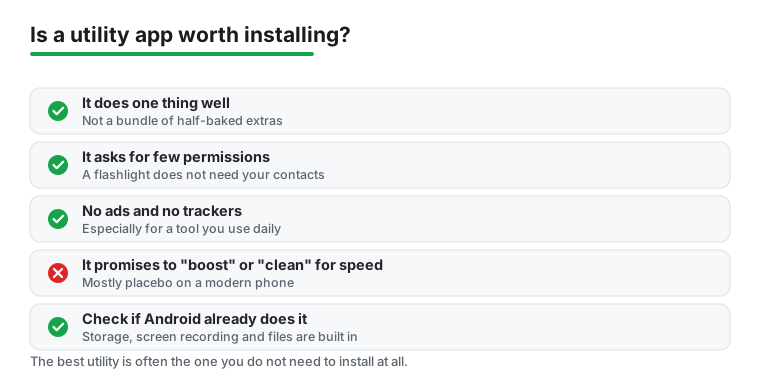
A surprising share of utility-app territory is now built into the operating system, and it has been for several versions. Recent Android releases include native storage management that shows you large files, unused apps, and cached data, then clears them in a couple of taps. Screen recording is built in; you no longer need a separate app to capture your screen. File access is built in through the system files tool, which handles browsing, copying, and basic cleanup. The camera app on most phones reads QR codes directly, so a standalone QR scanner is usually redundant.
This matters most for the loudest part of the category: cleaners, boosters, and speed-up tools. Most of these are placebo, ad delivery vehicles, or both. Android manages its own memory; an app that claims to free up RAM is usually closing background processes the system would have managed anyway, sometimes making things slower because those apps reload from scratch. A "cleaner" that finds gigabytes of junk is often counting your cache, which the phone rebuilds the moment you reopen an app. If your phone feels slow, the real cause is almost always one of three things: an aging battery, a single misbehaving background app, or genuinely full storage. None of those are fixed by a tap-to-boost button, and the apps that sell that button frequently pay for themselves with full-screen ads.
How to pick a utility worth installing
When an app does earn its place, a few plain checks separate the keepers from the clutter. A good utility tends to share these traits.
- It does one thing well. The best file manager just manages files. Be wary of a single app that promises to clean, secure, cool, speed up, and back up your phone all at once. That bundle is a marketing pitch, not a feature set.
- It asks for few permissions. Open the permissions section on the store listing before you install. A tool should only request what its job requires. A scanner needs the camera. A file manager needs storage. Neither needs your contacts, your location, or your microphone.
- It has no ads and no trackers, or as few as possible. Constant ads are not just annoying; they are how many free utilities make money from your attention and sometimes your data. A modest one-time price or a clear, honest subscription is often a better deal than "free" with pop-ups.
- It is maintained. Check when it was last updated and whether the developer replies to reviews. An abandoned utility slowly breaks as Android changes underneath it.
- The bad reviews are boring. Read the one and two star reviews first, not the five star ones. That is where billing complaints, surprise charges, and bait-and-switch ads surface. If the worst reviews are just "I wish it had a dark mode," that is a good sign.
Permissions and privacy: utilities often over-ask
This is the part of the category that deserves the most caution, because utility apps are some of the worst offenders for requesting access they have no business needing. The clearest warning sign is a permission that has nothing to do with the app's job. A flashlight that wants your contacts, a calculator that wants your microphone, or a QR scanner that wants your precise location at all times are all reasons to back out of the install.
Treat permissions as a running checklist rather than a one-time decision. A few habits keep you in control.
- Read the permission list before installing. The store page shows what the app can request. If it does not line up with the stated purpose, that mismatch is your answer.
- Use the Privacy Dashboard after installing. Android keeps a 24 hour timeline of which apps touched your camera, microphone, and location. If a simple tool shows up grabbing your location while you were not using it, that is a problem.
- Revoke anything that looks wrong. You can pull back any permission after install under Settings, then Apps, then Permissions. Many phones also auto-remove permissions from apps you have not opened in a while.
- Prefer the smaller, quieter app. Between two tools that do the same job, the one that asks for less is almost always the safer long-term choice.
The reason this matters is simple. Every permission you grant is a door, and a utility app sits on your phone for years. A free cleaner that asks for accessibility access, for example, can read and act on nearly everything you do. That is an enormous amount of trust to hand a tool whose only job is supposed to be deleting cache files.
Is this utility worth installing? A short check
Before you tap install, run through five quick questions. If you cannot answer yes to most of them, the app probably is not worth the space.
- Does Android already do this in Settings or the camera app? If yes, you likely do not need the app.
- Does it do one clear thing, rather than promising to fix everything?
- Do the permissions it asks for match that one thing?
- Is it free of constant ads, with an honest price if it charges?
- Has it been updated recently, and are the bad reviews about minor gripes rather than billing tricks?
If a tool passes that check, it has earned a spot on your phone. If it does not, you are usually better off with what Android already gives you for free.