
Updated for 2026

Updated 7 August 2026 · ratings, review counts, install bands, prices, in app purchase ranges and ads badges re-read from each app's own Google Play listing.
Nine browsers, every one free to install, each checked against its own Play listing today. The fact line in each section carries the rating, the review count, the install band, the ads and in app purchase reality and the developer name.
Price, ads, blocking, extensions, rating and the store update date for all 9, each read from that app's own Google Play listing, checked 7 August 2026. Brave is the editor's pick.
| App | Price, ads and IAP | Blocks ads by default | Extensions on Android | Rating | Store updated |
|---|---|---|---|---|---|
| Brave | Free, Contains ads badge, IAP $9.99 to $149.99 | Yes, Shields | None listed | 4.7★ | 1 Aug 2026 |
| Firefox | Free, no ads badge, no IAP | Trackers only | Yes | 4.6★ | 3 Aug 2026 |
| Google Chrome | Free, Contains ads badge, no IAP | No | None listed | 4.1★ | 6 Aug 2026 |
| Microsoft Edge | Free, no ads badge, IAP $9.99 to $199.99 | Yes, AdBlock Plus | Yes | 4.7★ | 4 Aug 2026 |
| Vivaldi | Free, no ads badge, no IAP | Yes | None listed | 4.6★ | 30 Jul 2026 |
| DuckDuckGo | Free, no ads badge, IAP $9.99 to $199.99 | Yes | None listed | 4.7★ | 3 Aug 2026 |
| Opera | Free, Contains ads badge, IAP $5.99 to $29.99 | Yes | None listed | 4.8★ | 9 Jul 2026 |
| Samsung Browser | Free, no ads badge, no IAP | Needs a content blocker app | Samsung's own list | 3.6★ | 8 Jul 2026 |
| Firefox Focus | Free, no ads badge, no IAP | Yes | None listed | 4.6★ | 3 Aug 2026 |
Brave is our best overall pick because on 28 August 2026 its listing showed 4.8 stars and free installation, yet still carried a Contains ads badge.
Firefox is our best free pick because on 3 September 2026 its listing carried no ads badge and no in app purchases at all.
Firefox Focus is our throwaway session pick because on 3 September 2026 it was free with no ads badge, and its listing promises that one tap erases history, passwords and cookies.
Data checked: 3 September 2026.
Best overall
Brave is the pick for most people: ad and tracker blocking runs before you touch a setting, and the listing leads with a free built in Adblock. Installing costs nothing, yet the listing carries a Contains ads badge and in app purchases run from $9.99 to $149.99. The bluntest con: Brave lists no extensions on Android, so whatever Shields misses stays on the page. It is still the fastest way to a clean page on a phone, and it is gentle on battery.
Skip it if you depend on one specific extension, because Brave has none. Choose it over Firefox when you want blocking that already works rather than blocking you have to install.
↑ Back to the comparisonBest free
Firefox is the cleanest free deal on this page: its listing carries no ads badge and no in app purchases at all, checked 3 September 2026. It is also one of only two browsers here that list third party extensions on Android, offering "supported extensions like ad blockers and privacy tools", and Total Cookie Protection is on by default. The bluntest con: out of the box it blocks trackers, not ads, so the ad blocking is an extension you have to add yourself.
Skip it if you want blocking with zero setup. Choose it over Chrome when you want extensions at all, since Chrome's listing offers none on Android.
Google sync
Chrome is the one to keep if your laptop already runs it: sync of tabs, bookmarks and passwords is the whole pitch, with Google Lens and translation into 130+ languages named on the listing. It is free with no in app purchases, but the listing carries a Contains ads badge. The bluntest con: 4.1 stars from 49.0M reviews is the second lowest score of the nine, and no extensions are listed for Android.
Skip it if you want ads blocked without installing anything else. Choose it over Edge when your passwords already live in Google Password Manager and you want no AI assistant in the way.
↑ Back to the comparisonExtensions and reading
Edge is the pick when you want extensions and a clean reading view in the same app. Its listing invites you to "customize your experience with extensions for shopping, blocking distractions, and more", and names AdBlock Plus, tracking prevention and Microsoft Defender SmartScreen as built in. It is free to install with no ads badge, but in app purchases run from $9.99 to $199.99, the widest range here alongside DuckDuckGo. The bluntest con: the listing sells Copilot before it sells browsing, and the new tab page is built around it.
Skip it if you do not want an AI assistant inside your browser. Choose it over Chrome when you want extensions on the phone, which Chrome's listing does not offer.
↑ Back to the comparisonMost customizable
Vivaldi is the browser for people who want to arrange everything: two level tab stacks, notes, a reading list and a built in ad and tracker blocker, free with no ads badge and no in app purchases. Vivaldi says on its own Android page that "The Tracker Blocker protects you from web trackers that follow you around the web gathering your personal information" (Vivaldi, checked 3 September 2026). The bluntest con: 5M+ installs is the smallest audience of the nine.
Skip it if you want a browser that is finished the moment you open it. Choose it over Brave when you want to shape the interface rather than accept one.
↑ Back to the comparisonOne tap wipe
DuckDuckGo, now listed on Google Play as DuckDuckGo, optional Duck.ai, is the pick when you want one button that erases the session. Tracker blocking and private search are on from the first launch, and the listing claims its 3rd-Party Tracker Loading Protection blocks most trackers before they load. It is free with no ads badge, and in app purchases run from $9.99 to $199.99. The bluntest con: no extensions, so you take its blocking exactly as it comes.
Skip it if you keep long lived tabs you would hate to lose to a stray tap. Choose it over Brave when wiping the session matters more than tuning the blocker.
↑ Back to the comparisonFree browser VPN
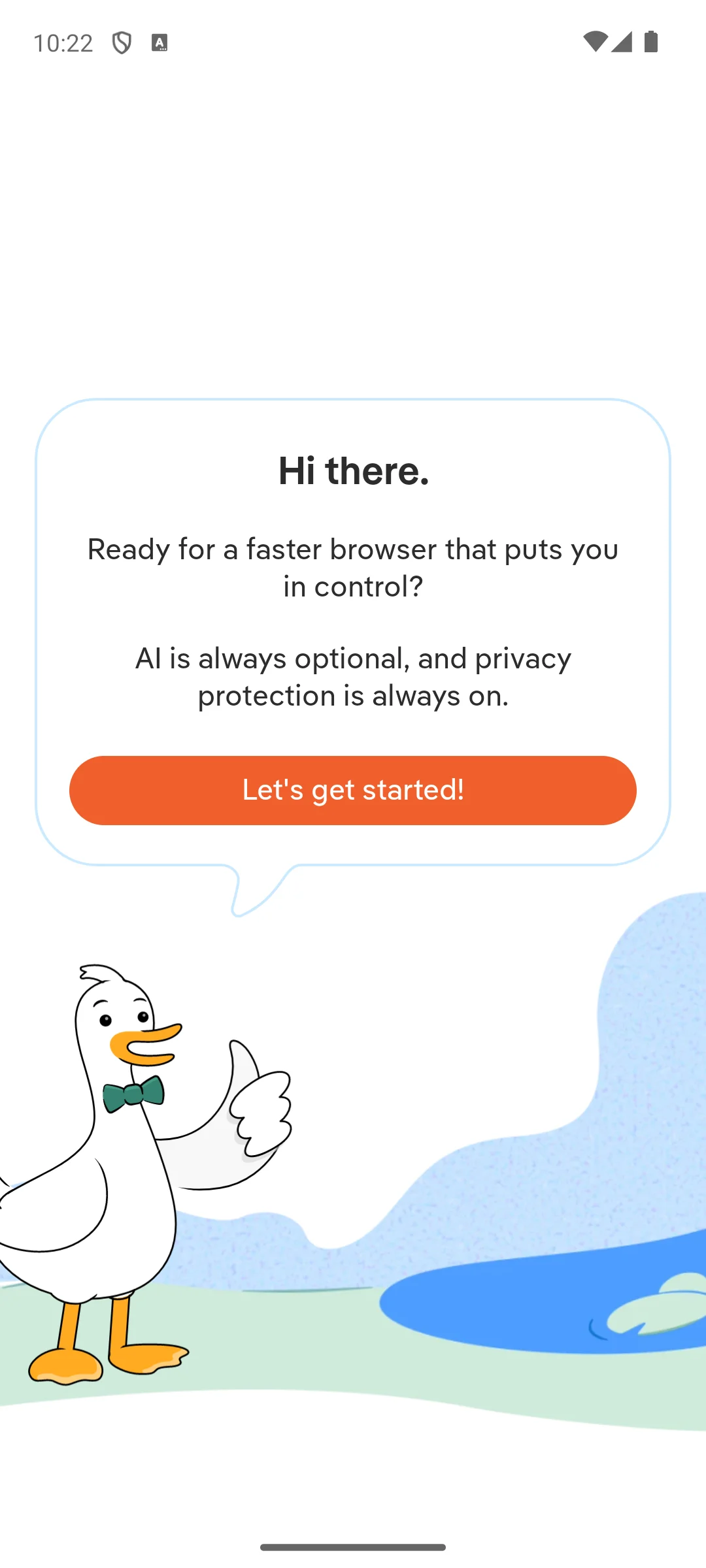
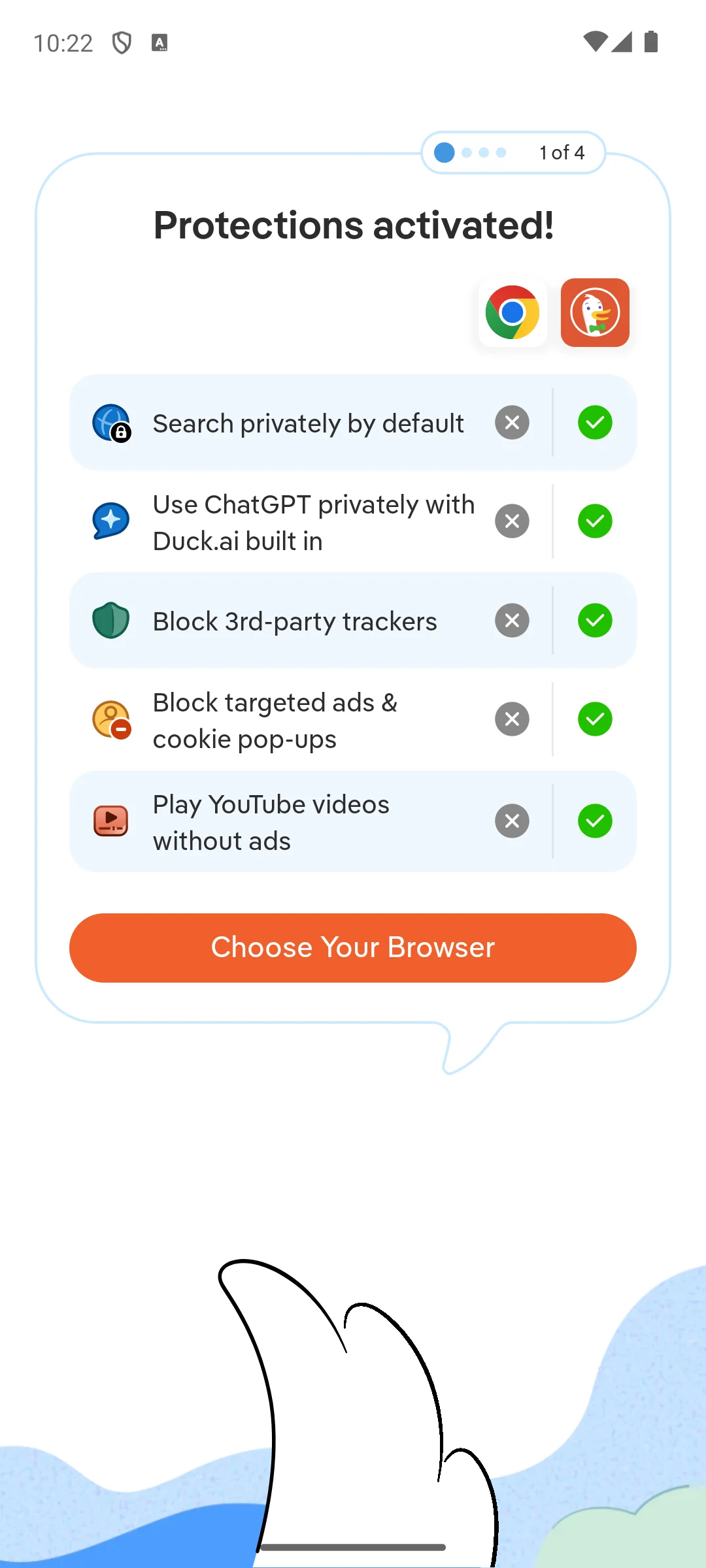
Installed on our own Android emulator on 18 August 2026, it opened on a welcome card that states, in its own words, that AI is always optional and privacy protection is always on. The next screen is a four step setup whose first page lists what it says it turns on by default and marks each one against Chrome: private search, its built in Duck.ai, blocking third party trackers, blocking targeted ads and cookie pop ups, and playing YouTube videos without ads. Those are the maker's own claims, shown here because they are what a new user is told before anything is configured, not because we measured them. No account was asked for and no consent dialog appeared. The screenshots below are ours, taken on 18 August 2026.
Opera is the pick if you want a VPN without installing one, and at 4.8 stars from 5.46M reviews it is the highest rated browser on this page. Opera's own page for the feature says "This Free VPN secures your internet traffic within the Opera browser" (Opera, checked 7 August 2026), so it covers the browser and nothing else on the phone. The bluntest con: the listing carries a Contains ads badge.
Skip it if you expect whole device privacy from the built in VPN; that needs a dedicated VPN app. Choose it over Brave when the region unlock is the feature you actually want.
↑ Back to the comparisonBest on a Galaxy
Samsung Browser, still known to most people as Samsung Internet, is already on your Galaxy and worth keeping there: free, no ads badge, no in app purchases, with Smart Anti-Tracking, Secret mode and support for third party content blocker apps. The bluntest con is the score. At 3.6 stars from 5.90M reviews it is the lowest rated browser on this page by half a star, so a lot of those billion plus installs are unhappy.
Skip it if you are not on a Galaxy, because the best parts are the Samsung ones. Choose it over Chrome on a Galaxy, where it has no ads badge and Chrome does.
↑ Back to the comparisonThrowaway sessions
Firefox Focus, listed as Firefox Focus: No Fuss Browser, is the second browser you keep for one off pages: free, no ads badge, no in app purchases, and its listing promises to erase your history, passwords and cookies with just a tap of the trash button. Tracking protection is on by default and there are no tabs to manage. The bluntest con: it is deliberately not a main browser, with no tab list, no sync and no extensions.
Skip it if you want one browser for everything. Choose it over DuckDuckGo when you would rather the session never existed than have to remember to wipe it.
↑ Back to the comparisonMost Android browsers draw pages with the same engine. Brave, Chrome, Edge, Opera, Vivaldi, Samsung Browser and DuckDuckGo all sit on Chromium; Firefox and Firefox Focus are the holdouts on Mozilla's Gecko. A news page loads much the same in all of them, so the choice is about defaults, not rendering: what each blocks before you change a setting, whether it lists extensions, and what the listing charges for.
This is the widest gap between them. Brave, Vivaldi, DuckDuckGo and Opera all name ad and tracker blocking as built in on their own listings, so it runs the moment you open the app. Firefox blocks trackers by default and leaves ad blocking to an extension. Chrome's listing names neither. That is not only about annoyance: every tracker that loads is more data pulled down and more battery spent drawing it. The wipe tools matter as much. DuckDuckGo's fire button clears tabs and data in one tap, and Firefox Focus erases the session the second you close it. Fingerprinting is the part most people miss: even with cookies blocked, a site can guess who you are from screen size, fonts and settings, so no blocker makes you anonymous.
Two browsers here list third party extensions on Android. Firefox offers "supported extensions like ad blockers and privacy tools", and Microsoft Edge invites you to "customize your experience with extensions for shopping, blocking distractions, and more" (both listings read 7 August 2026). Samsung Browser's listing names only its own extensions, such as Translator, and nothing else on this page lists extension support, Chrome included. If all you want is ads blocked, Brave, Vivaldi, DuckDuckGo and Opera already do it with nothing added. Extensions matter when you rely on a specific password manager or filter list.
Since they share an engine, the real speed difference is how much each browser chooses to load. One that blocks ads renders less on a heavy page, so it feels quicker and draws less power. Two habits help more than switching browser: turn on dark mode, because dark pixels cost less on an OLED screen, and use a data saver on a capped connection. Thirty open tabs sit in RAM whichever browser holds them, so closing the ones you have finished with does more for smoothness than any swap. If the phone is sluggish in general, our battery friendly browsers notes and a good cleaner app are worth a look alongside the browser choice.
All nine install free. What differs is what the listing admits to. On 7 August 2026 the Play listings for Brave, Chrome and Opera carried a Contains ads badge, and Brave, Edge, DuckDuckGo and Opera sold in app purchases, with Edge and DuckDuckGo reaching $199.99 per item. The feature that gets oversold is Opera's free VPN. Opera's own page says "This Free VPN secures your internet traffic within the Opera browser", and its comparison table lists the free tier as protecting the "Opera Browser only" against "Entire device" for the paid VPN Pro (Opera, checked 7 August 2026). For a region locked page that is plenty; for the whole phone you still want a dedicated VPN app.
Pick the browser that matches your laptop and your bookmarks, tabs and passwords follow you around. Chrome, Edge and Firefox all list cross device sync. Samsung Browser is the special case: on a Galaxy it fits the rest of the phone, though its 3.6 star average is the lowest here. After that, four traps come up again and again. Chasing the fastest browser, when they mostly share an engine. Trusting a free in browser VPN as whole device privacy, when the developer's own page limits it to browser traffic. Installing a browser nobody maintains: Kiwi Browser is the example, and its Google Play listing no longer resolves at all (checked 7 August 2026), which is why it is not on this page. And leaving two heavy browsers open at once, which quietly eats memory and battery. Pick one main browser, keep a light second like Firefox Focus for one off pages, and you are set.
Checked 7 August 2026: ratings, review counts, install bands, prices, in app purchase ranges and ads badges re-read on all nine Play listings. Every review count moved, Vivaldi's install band and DuckDuckGo's listing name changed, and Kiwi Browser's listing was confirmed gone.
Brave and DuckDuckGo are the strongest picks because both list tracker blocking that runs by default with no setup. Brave is the better all rounder for daily use, while DuckDuckGo wins for its one tap data wipe. Firefox Focus is excellent for quick sessions when you want nothing saved at all. All three are free to install and none of them charges you to turn blocking on. Checked against their own Play listings on 7 August 2026.
Browsers that block ads use less power because they download and render far less on each page. Brave, Opera, Vivaldi and DuckDuckGo all list ad or tracker blocking as built in, so they pull down less by default. Turning on dark mode helps too, since darker pixels draw less power on an OLED screen over a long day of reading. Closing tabs you have finished with does more for a phone than switching browser.
Only in some browsers. Firefox and Microsoft Edge both list extension support on Android, so you can add blockers and password tools there. Chrome's own Play listing offers no extensions on Android, and neither do the listings for Brave, Opera, Vivaldi or DuckDuckGo. Samsung Browser's listing names only its own extensions, such as Translator. If add ons matter to you, Firefox or Edge is the choice. All nine listings checked 7 August 2026.
We would not rely on it. Kiwi Browser's Google Play listing no longer resolves, checked 7 August 2026, so it is not receiving security updates through the store. An old copy may still run, but an unmaintained browser leaves you exposed over time. If you liked Kiwi for its extensions, Firefox and Microsoft Edge are the two browsers on this page that list third party extension support on Android.
It is fine for casual use such as reaching a region locked page or adding a layer on public Wi-Fi. Opera's own page says the free VPN secures your internet traffic within the Opera browser, and its comparison table lists the free tier as covering the Opera browser only, against the entire device for the paid VPN Pro. So it is not whole phone protection. For serious privacy or streaming, pair it with a dedicated VPN app. Checked 7 August 2026.
On 7 August 2026 the Play listings for Brave, Chrome and Opera carried a Contains ads badge, while Firefox, Edge, Vivaldi, DuckDuckGo, Samsung Browser and Firefox Focus did not. In app purchases are listed for Brave at $9.99 to $149.99 per item, Edge at $9.99 to $199.99, DuckDuckGo at $9.99 to $199.99 and Opera at $5.99 to $29.99. Every browser on this page is free to install.
Often yes, if that is Samsung Browser on a Galaxy: it is free, carries no ads badge and no in app purchases, and it supports third party content blockers. Its 3.6 star average from 5.90 million reviews is the lowest on this page though, checked 7 August 2026. On other Android phones the preinstalled browser is usually Chrome, whose listing carries a Contains ads badge and offers no extensions, so it is worth trying Brave or Firefox beside it.
 How to Block Ads on Android Without Rooting (2026)Security & Privacy
 Best App Lock Apps for AndroidTools & Utilities