
Checked 3 September 2026
Twelve root tools, each checked against its own documentation or its own store listing. Full pass 21 August 2026; the Tasker and 3C All-in-One Toolbox listings re read 26 August 2026.
This page ranks twelve root tools by the question that decides everything else: what each one needs before it does anything. Three need root outright, two need one named root solution, and seven do real work on a phone you never unlock.
If Google Wallet or Samsung Pay is part of your day, stop here. Contactless payment is the first thing root breaks and the workarounds are a moving target.
Unlocking trips the Knox eFuse, a physical one-way switch. Samsung Wallet, Pass and Secure Folder are gone permanently, even after a full unroot.
Many carrier models ship with OEM unlocking greyed out (Verizon Pixels are the classic case). Check Settings, Developer options, OEM unlocking before planning anything.
Ad blocking, debloating and backup all have credible no-root routes now: Private DNS, ADB, Shizuku. Try those first: see what you can do without root, below.
If yes, you are the person rooting is still for. Jump to the apps.
Magisk is the pick, AdAway the free one that needs no root in VPN mode, Tasker the choice that mostly works without root. Our answer, the free pick and the table ↓
Checked 3 September 2026: no pick changed since 21 August; Tasker re-read 26 August, Magisk and AdAway stand as read on 21 August
Full logTwelve Android root apps, compared on what each needs before it does anything, price and the ads label, with every requirement taken from the entry's own documentation.
Magisk is our best overall pick because AdAway and ViPER4Android, read 21 August 2026, route their modules through it, free, open source, no ads label published.
AdAway is our best free pick because adaway.org, read 21 August 2026, says local VPN mode needs no root; it is free, no ads label published.
Tasker is our niche pick because its Play listing, read 26 August 2026, says most functions need no root, at USD 4.49, no ads label.
Data checked: 3 September 2026.
Every entry here is checked against its own source, and the source is named in its section. For the five apps with a Google Play listing that is the listing itself: rating and review count, the install band, price and the in-app purchase range, the Contains ads label and the full Data Safety section. For the other seven it is the project's own GitHub releases, its F-Droid entry or the developer's own site, and those publish no rating, no install band and no ads label, so this page prints none for them. Nothing here rests on our own use of the apps.
Root foundation
free and open source · latest release 30.7, published 23 February 2026 · by topjohnwu · official downloads on GitHub only · GitHub releases and the project README, read 21 August 2026
Magisk releases on GitHub · read 21 August 2026
Magisk is the foundation almost everything else on this page builds on, it is free and open source with no store listing to carry a price or an ads label, and the blunt con is the entry fee: its own installation guide asks for an unlocked bootloader AND your device's own stock boot image, and unlocking is the step that wipes the phone and trips the anti-tamper flag that never resets.
Read this first. Magisk no longer hides root. The project's own FAQ, read 21 August 2026, answers the question "Why is X app detecting root?" with "Magisk no longer handles root hiding." Read that before you plan around a banking app: see the Magisk FAQ.
What it needs first, from the developer's own documentation read 21 August 2026: the installation guide lists "Your device's bootloader has to be unlocked" among the things to have before you start, and it is not the only one: the same list assumes you can use adb and fastboot, and the step after it tells you to get a copy of your device's own boot.img, init_boot.img or recovery.img. The README gives the supported floor as devices higher than Android 6.0. On where to get it, topjohnwu is blunt: "Github is the only source where you can get official Magisk information and downloads," says the official Magisk README, so treat any Play Store listing named Magisk as a clone.
Cleaner root setup
free and open source · latest release 3.2.5, published 23 June 2026 · by tiann · GitHub only · GitHub releases and the project documentation, read 21 August 2026
KernelSU releases on GitHub · read 21 August 2026
KernelSU grants root in kernel space rather than through a patched boot image, it is free and open source with no store listing behind it, and the blunt con is that it simply may not be available to you: its own installation guide says that if the manager app shows Unsupported, you have to compile the kernel yourself, and that the project will never hand you an image to flash.
What it needs first, from the project's own documentation read 21 August 2026: "KernelSU is a root solution for Android GKI devices. It works in kernel mode and grants root permission to userspace apps directly in kernel space," per the KernelSU documentation. The installation page adds the blunt version: "If the app shows Unsupported, it means that you should compile the kernel yourself, KernelSU won't and never provide a boot.img file for you to flash." Choose it over Magisk when your device is on that list; choose Magisk for the widest device support.
Modern backups
3.6 stars from 7,864 reviews · 500K+ installs · free, in-app purchases $0.99 to $29.99 per item · by SwiftApps.org · listing updated 30 July 2026 · Contains ads: No · checked 21 August 2026
Google Play listing · 3.6 (7,864) · read 21 August 2026
Swift Backup is the entry to reach for first if backups are why you are here, and the listing reads free with in-app purchases from $0.99 to $29.99 per item and no Contains ads label. The blunt con is that the parts most people actually want are paid: the developer's own site lists cloud backups, app labels, custom backup configuration and scheduled backups as premium. It also cannot do the one thing root is for unless you have root.
What it needs first, from the developer's own site, read 21 August 2026: apps, messages, call logs and wallpapers back up on any device, while app data, special app data and WiFi network configurations are listed under Additional Features for Rooted Devices. The same page adds a note that batch restoring apps is only supported if you are rooted or have Shizuku service running, which is the one route here that does real work without unlocking anything. Source: the Swift Backup site, read 21 August 2026.
Backup depth
latest version listed by the developer: 8.4.0.2 · no Google Play listing that answers today · by Titanium Track · the developer's own site and changelog, read 21 August 2026
the Titanium Track developer site · read 21 August 2026
Titanium Backup is the legacy entry, kept because it still exists rather than because it is the right answer, and the blunt con was there when this page last read it: its Google Play listing returned HTTP 404 from three storefronts on the day of this read, so no rating, review count or install band can be read there, checked 21 August 2026. Swift Backup, above, is the maintained way to do this now.
Read this first. Nothing on this page can vouch for a file you download outside a store. The developer's own site carries a notice warning about knocked off applications sold under its brand, which is a reason to start from that site rather than from a search result.
What it needs first: root, and a download from off store. The developer's changelog, read 21 August 2026, ends at 8.4.0.2, and the release note two versions earlier describes fixing a crash when restoring apps on Android 10, which places the last real work in that era. The site's own footer carries a copyright line ending in 2015. Treat this as an archive you open to read an old backup, not as software you build a phone around.
System adblock
free and open source, GPL-3.0-only · version 6.1.4, released 27 October 2024 and added to F-Droid 15 November 2024 · no Anti-Feature listed on its F-Droid entry · the F-Droid entry and the developer site, read 21 August 2026
AdAway on F-Droid · read 21 August 2026
AdAway blocks ads with a hosts file across every app at once, it is free and open source, and neither its F-Droid entry nor its own site publishes a price or an ads label. The blunt con is age: version 6.1.4 was released 27 October 2024, and both its F-Droid entry and its own site still named that version on 21 August 2026. AdAway is also one of the seven entries here that need no root to start, because its own site says root is not required in local VPN mode.
What it needs first, from the developer's own site read 21 August 2026: "Root not required with local VPN mode" and "Root support with Systemless Hosts Magisk" are listed side by side under Requirements, along with Android 8 and above for the current major version. The same page explains the missing store listing in its own words: "AdAway is not available on Google Play. It was removed due to a violation of section 4.4 of the Developer Distribution Agreement." Source: adaway.org, read 21 August 2026.
Battery drain
3.5 stars from 320,257 reviews · 10M+ installs · free, no in-app purchases on this listing · by Oasis Feng · listing last updated 31 August 2024 · Contains ads: No · checked 21 August 2026
Google Play listing · 3.5 (320,257) · read 21 August 2026
Greenify hibernates background apps that will not settle, it is free with no Contains ads label on its listing, and the blunt con is age: the listing was last updated 31 August 2024, which is 24 months before this read, and its own release notes say Aggressive Doze was removed due to technical restrictions. The donation tier is real but separate: the free listing itself points at a "donation package" for extra experimental features, and that package is a second Play listing, Greenify (Donation Package) by Oasis Feng at USD 2.99, read 21 August 2026. Treat the app as mature rather than actively developed. Pair it with a maintained tool from our cleaner app picks if standby drain is the problem you are chasing.
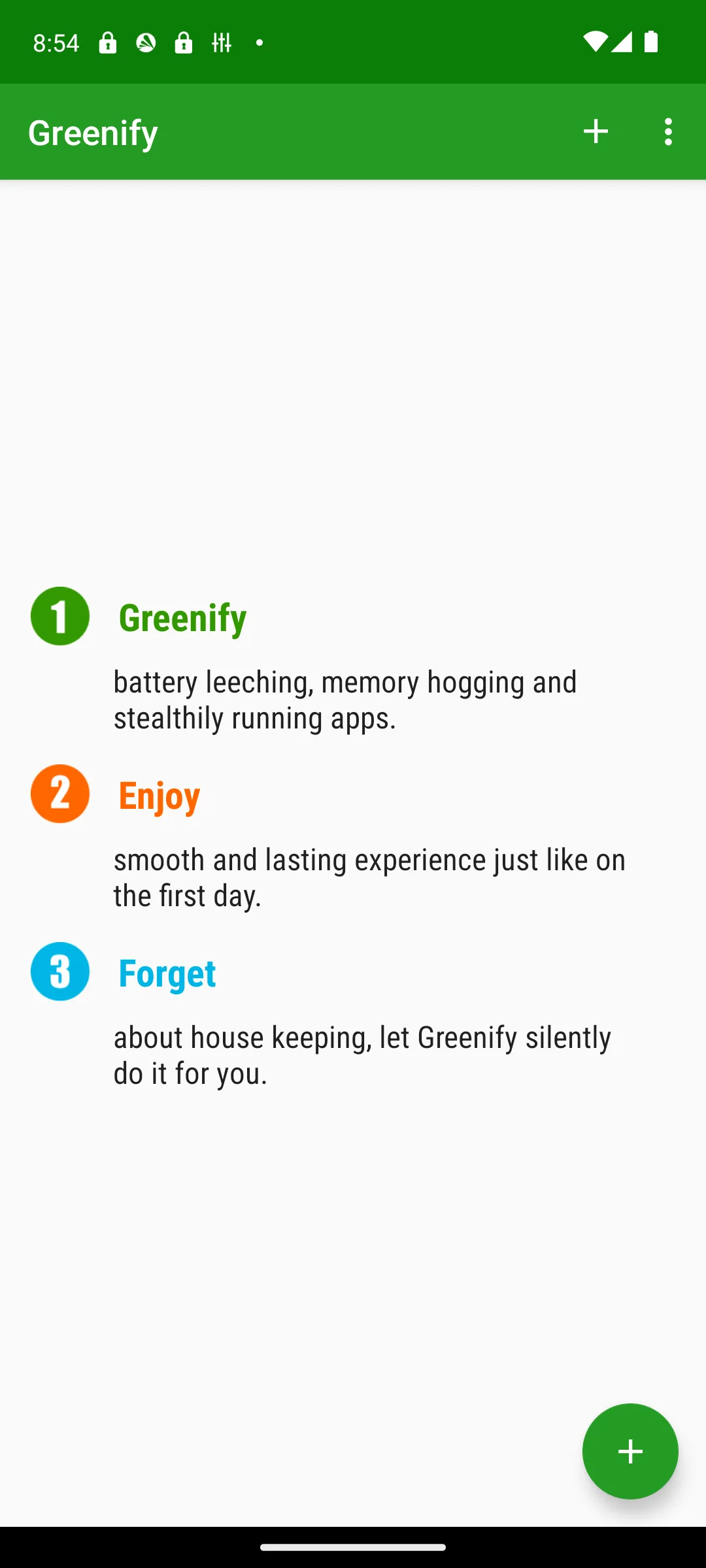
What it needs first: nothing. Its own release notes on the listing, read 21 August 2026, describe accessibility-based non-root hibernation fixed for Android 14 and newer, so the stock phone case is the one the developer maintained last. Root is what lets it hibernate more of what a phone will not otherwise let go of. Know what the non-root route costs before you take it: Google's own documentation says accessibility services "run in the background and communicate with the system to inspect screen content and interact with apps on the user's behalf" (Android developer documentation, read 21 August 2026), which is a broad grant to hand any app.
Power users
4.0 stars from 4,085 reviews · 100K+ installs · USD 6.99 for MiXplorer Silver · by Hootan Parsa · listing updated 16 August 2026 · Contains ads: No · checked 21 August 2026
Google Play listing · 4.0 (4,085) · read 21 August 2026
MiXplorer is the file manager to pair with a rooted phone, the Play route is a separate paid bundle called MiXplorer Silver at USD 6.99 with no Contains ads label, and the blunt con is distribution: the free build is not on Play at all, and the developer's own download link points at an XDA forum post. The price question is the confusing part, because the developer's own site says the app has no ads and is and will always remain free, and that is true of the free build rather than of the Silver listing. A store only reader will be happier in our wider file manager guide.
What it needs first: nothing, to browse. The developer's own site lists "Root access for all advanced operations" and "User and System app management with data backup ability for rooted devices" among the features, and gives the supported floor as Android 2.2 and newer. Source: mixplorer.com, read 21 August 2026.
Deep tweaks
free and open source · maintained fork Vector 2.2, published 4 August 2026 · by JingMatrix · the original LSPosed repository last released 1.9.2 on 11 October 2023 · GitHub releases and the project README, read 21 August 2026
Vector releases on GitHub · read 21 August 2026
LSPosed is the Xposed framework on modern Android, it is free and open source with no store listing behind it, and the blunt con is risk: a bad module can bootloop the phone, so this is the entry that assumes you know the rescue route before you start. The maintained code is now the Vector fork, and the fork is the one to install.
What it needs first, from the fork's own README read 21 August 2026: "This framework requires a recent installation of Magisk or KernelSU with Zygisk enabled," and it states support for "devices running Android 8.1 through Android 17 Beta." On the state of the two repositories, read from GitHub on 21 August 2026: the original LSPosed repository last published a release, 1.9.2, on 11 October 2023, and the last commit on its default branch is dated 7 January 2024; GitHub does not mark it archived. The Vector fork published 2.2 on 4 August 2026 and was building canary releases when this page read it on 21 August 2026.
System audio
free · community maintained repackaged installer 87, published 26 February 2024 · by programminghoch10 · GitHub releases and the installer README, read 21 August 2026
the repackaged installer on GitHub · read 21 August 2026
Viper4Android is the system wide audio engine that a lot of people rooted for in the first place, the repackaged installer is free with no store listing behind it, and the blunt con is that it has stood still: release 87 was published 26 February 2024, read 21 August 2026, and its README says the mod is targeted at LineageOS 21.
What it needs first, from the installer's own README read 21 August 2026: the install section is three steps, and step two is to flash the module ZIP in Magisk or Lygisk. It also says the installer installs the ViPER4Android app for you and that you should not install it yourself. The README lists the LineageOS and device combinations the installer is known to work on and asks people not to submit more, which is a fair signal of how narrow the tested ground is.
Automation
4.0 stars from 56,027 reviews · 1M+ installs · USD 4.49 to buy on Play · by joaomgcd · listing updated 24 February 2026 · Contains ads: No · checked 21 August 2026
Google Play listing · 4.0 (56,027) · read 21 August 2026
Tasker is the automation pick, it is a USD 4.49 purchase on Play with no Contains ads label, and the blunt con is the learning curve: this is a tool you spend an evening on before it does anything for you. It is also one of the seven entries here that need no root to start, and its own listing is where that is stated, which is the honest reason to try it before unlocking anything.
What it needs first: nothing. The listing itself, read 21 August 2026, states "root is NOT (I repeat NOT) required for majority of the functions. However, a few of the actions (like the Kill App and Mobile Data action on some devices) require root." The developer also publishes a trial off Play, and its own page says those versions expire after 7 days unless you purchase the license from Google Play. Source: the Tasker download page, read 21 August 2026.
App auditing
free and open source, GPL-3.0-only · version 4.1.0, released 29 June 2026 and added to F-Droid 30 June 2026 · by Muntashir Al-Islam · no Anti-Feature listed on its F-Droid entry · the F-Droid entry and the project README, read 21 August 2026
App Manager on F-Droid · read 21 August 2026
App Manager is the audit tool of this list, it is free and open source, and neither its F-Droid entry nor its GitHub repository publishes a price or an ads label. The blunt con is that it is built for people who already know what an activity and a broadcast receiver are. Version 4.1.0 was released 29 June 2026, read 21 August 2026.
What it needs first: nothing, to look. The project README, read 21 August 2026, splits its feature list into three tiers by exactly this question. Listing activities, services, permissions and trackers, viewing the manifest and scanning for tracker classes are general features. Revoking runtime permissions, force stopping, clearing app data and freezing apps are listed under Root/ADB-only features. Blocking components, editing another app's shared preferences and backing up apps with their data are listed under Root-only features. Source: the App Manager README, read 21 August 2026.
System dashboard
4.3 stars from 15,649 reviews · 1M+ installs · free, in-app purchases $0.49 to $16.99 per item · by 3c · listing updated 20 June 2026 · Contains ads: Yes · checked 21 August 2026
Google Play listing · 4.3 (15,649) · read 21 August 2026
The 3C toolbox is the single dashboard for a rooted phone, it is the only one of the five Play listings here that carries a Contains ads label, alongside in-app purchases from $0.49 to $16.99 per item, and the blunt con follows from that: the free tier is ad supported and the interface shows everything at once. Its 4.3 star rating, read 21 August 2026, is the highest of the five Play listings here.
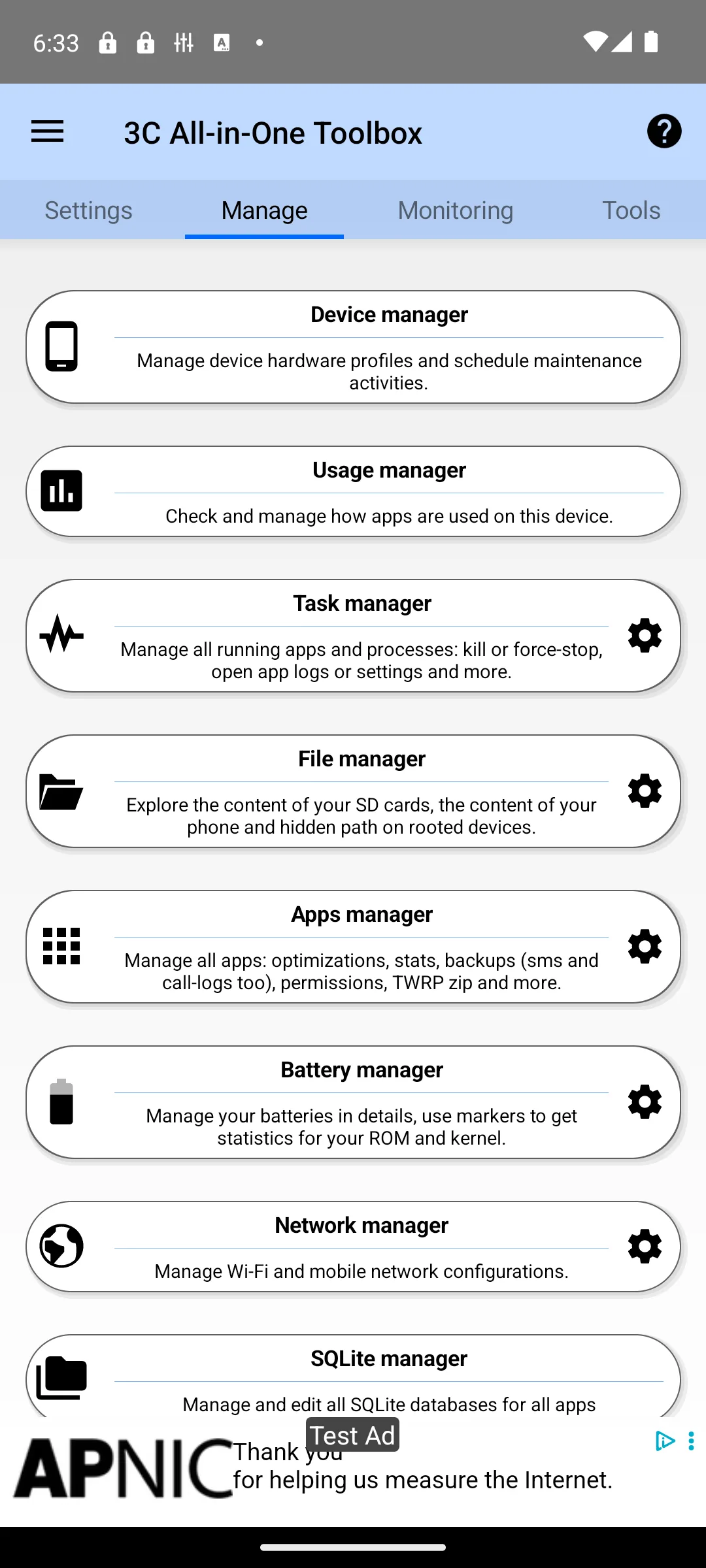
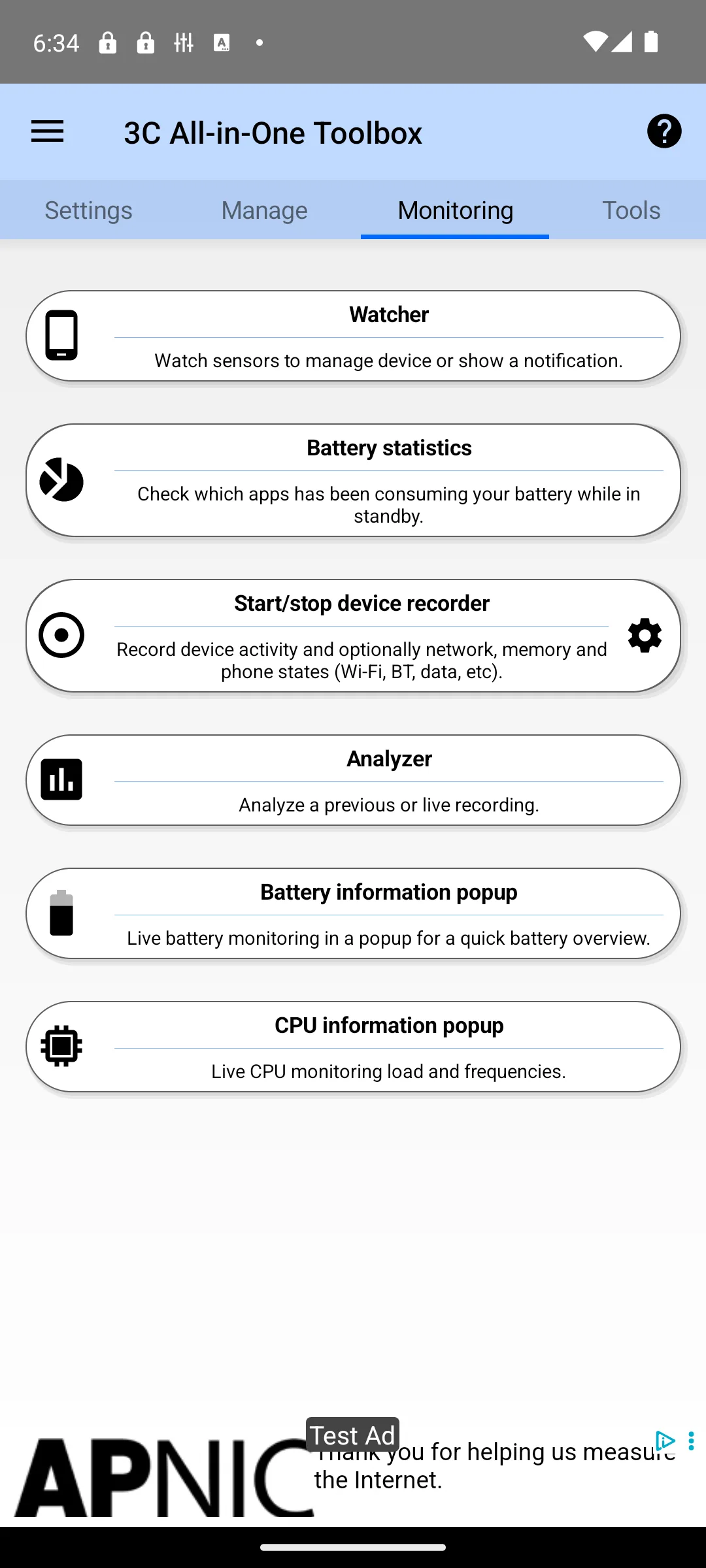
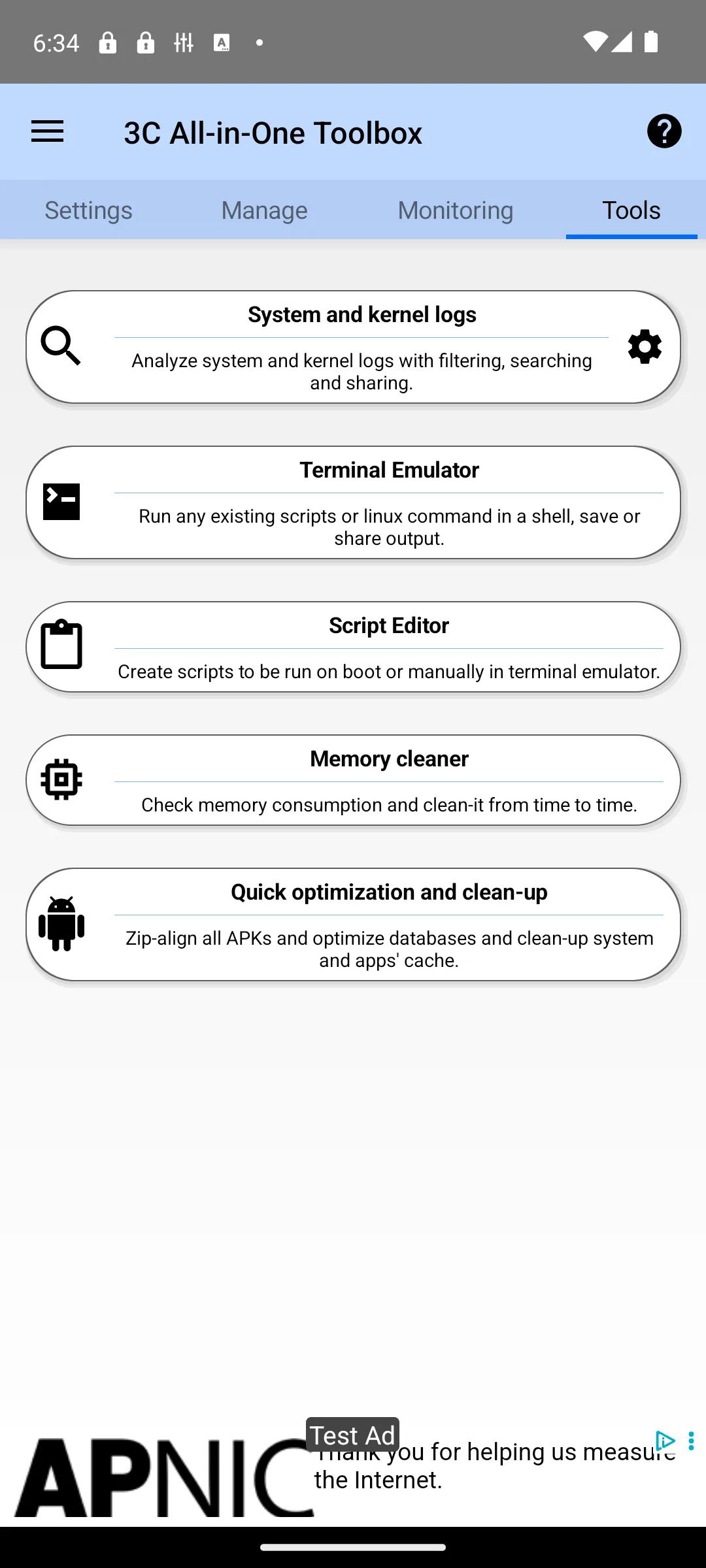
What it needs first: nothing. Its own listing, read 21 August 2026, says some features may require root or using the 3C Companion app for PC starting with Android 6 and newer, so the deep system tools are the part gated behind root rather than the app itself. Its Data Safety section, read 21 August 2026, says the app may share data types with third parties and that data cannot be deleted.
Before you read a single word about root apps, find out whether your phone can be rooted at all. In 2026 every root method starts by unlocking the bootloader, and a large share of phones are blocked before that step. Spend ten minutes on this check and you may save yourself a wasted weekend.
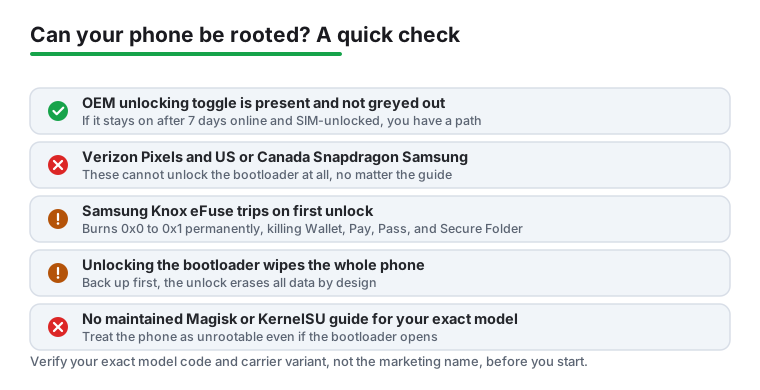
Some phones are a hard no, full stop. Verizon Pixels have never allowed bootloader unlock and never will. US and Canada Samsung models on the Snapdragon chip cannot unlock either, and neither can any carrier-locked AT&T or Verizon Samsung. Any Samsung already updated to One UI 8 has lost the ability for good. The reliable yes is a factory-unlocked Google Pixel that is not the Verizon variant, which is why almost every guide quietly assumes you own one.
Three things decide your fate: the OEM unlocking toggle in Developer options, the manufacturer's own unlock policy, and whether the community ever built a tested root method for your exact model. The toggle is the first gate, since fastboot refuses to unlock until it is on.
Greyed out has two very different meanings. One is a temporary 7-day anti-theft wait that clears on its own if you keep the phone online and signed in. The other is a permanent carrier or CID lock that never clears. On most US carriers Google does not enable the toggle until the phone is SIM-unlocked.
Here is the concrete check. Go to Settings, About phone, and tap Build number seven times to expose Developer options, then look for OEM unlocking. Boot into the bootloader and run fastboot flashing get_unlock_ability; a 1 means unlock is permitted, a 0 means it is not. Then search XDA for your exact model number and carrier suffix, not the marketing name. A code like SM-xxxxU is a locked US variant.
An unlocked bootloader is necessary but not sufficient. A/B slots, dynamic super partitions, and the Android 13 and newer init_boot layout mean you must patch the correct stock image, and a model with no kernel source or active XDA following may never get a stable method.
If no maintained Magisk or KernelSU guide exists for your exact model, treat the phone as unrootable. One more warning: do not update a still-unlockable Samsung to One UI 8 to decide later. That update removes the ability permanently, and no source we read publishes a supported route back to earlier firmware once it is applied.
Unlock policy is set by the manufacturer, and it has tightened across the board. Here is where each major brand stands now.
Read this first. Treat this list as orientation, not as a source. Two of its claims were read at the manufacturer today: Magisk's installation guide says that if no OEM Lock value appears in Download mode "your device is probably not unlockable due to market limitations (USA/Canada devices)", and that installing Magisk on a Samsung "WILL trip your Knox Warranty Bit, this action is not reversible in any way". Xiaomi's own Mi Unlock page confirms the tool and warns that after unlocking "Some features which require high security level (e.g., Find device, added-value services, etc.) will no longer be available", but no source we read today publishes the quota, the waiting period or the approval windows given below. Check your own model with your own manufacturer before you act on any of it. Read 21 August 2026.
The pattern is clear: the door is closing, not opening. If your phone is currently unlockable and you intend to root it one day, do it on the firmware you have rather than gambling that a future update keeps the option.
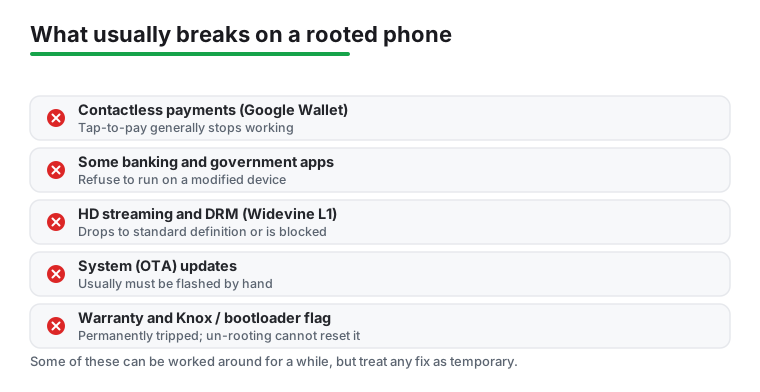
This is the practical, day-to-day list, not the security theory. For why root weakens the phone's defenses, see the security risk multipliers and why hardware attestation is the wall further down. Here are the named things that break the moment you unlock and root.
None of these have a dependable workaround in 2026. If even two items on this list matter to you, that is a strong reason to leave the phone stock.
There are three live root methods now, and the right choice depends mostly on your device rather than your preference.
All three require an unlocked bootloader, so the core trade-off is identical no matter which you use: Verified Boot is broken and the anti-tamper flag is tripped. The security section below applies equally to every method.
Two old habits no longer apply. Xposed died and came back as LSPosed running on Magisk; the original LSPosed repository last published a release, 1.9.2, on 11 October 2023 and last committed to its default branch on 7 January 2024, read from GitHub on 21 August 2026, and the work continues in the Vector fork, whose README gives its range as Android 8.1 through Android 17 Beta, with LSPatch as the no-root option. Custom recovery is mostly history too. A/B and dynamic partitions mean there is no separate recovery partition, so TWRP is often temp-booted rather than installed. Rooting is now a boot-image or kernel job, not a flash-a-recovery job.
If you are choosing between methods, start with Magisk unless a guide for your exact model specifically recommends KernelSU. Mixing methods or following an outdated TWRP-based guide is one of the fastest ways to end up at a bootloop.
The BASIC, DEVICE, STRONG ladder is set out further down this page, under Play Integrity: why banking and payment apps refuse. This section covers what changed in the rules behind it. SafetyNet shut down on 31 January 2025, and the migration to Play Integrity ended on 20 May 2025. Any app that was not updated broke, so every root-detection check that matters now runs through Play Integrity.
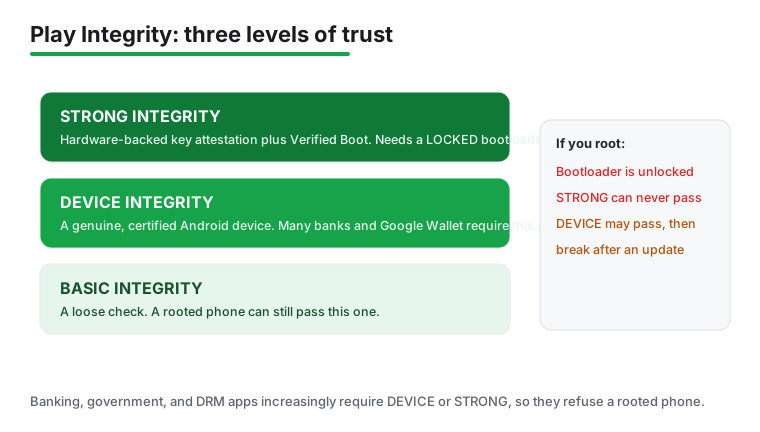
The May 2025 rule change tightened the defaults in plain terms. A rooted or unlocked phone now clears only BASIC by default. DEVICE now requires a locked bootloader. STRONG requires hardware-backed signals plus a security patch installed within the last 12 months on Android 13 and newer. So the patch level you neglected after rooting can now fail you on its own.
The labels translate like this. DEVICE means a genuine certified Android phone running approved software. STRONG means the hardware itself vouches that boot was not tampered with. Most banking and payment apps want DEVICE or STRONG, which is why root-hiding that used to work now falls short.
One honest nuance keeps people from chasing ghosts. Leaked keyboxes and Play Integrity Fix have spoofed even STRONG on some Pixels for a while, but Google revokes leaked keyboxes and the trick dies soon after. Treat STRONG spoofing as not dependable rather than impossible, and never build your daily banking around it.
Apps are also getting better at pushing you to fix the problem. The August 2025 library version 1.5.0 added in-app remediation dialogs through a new showDialog method, so instead of failing silently, more apps now prompt you to restore integrity, which on a rooted phone usually means reflashing stock. The direction of travel is one way: each release makes a modified phone easier to spot, not harder.
Rooting is a trade. You get control that Android normally refuses to give you, and in exchange you take on real risks that did not exist when rooting was at its peak. The short version: if your phone mostly needs to just work, and you bank and pay with it, the answer in 2026 is probably no.
If you keep a spare device or you genuinely enjoy maintaining your setup and accept that things break sometimes, rooting can still be worth it. The rest of this guide explains why, in plain terms, so you can decide for yourself rather than taking our word for it.
The headline benefit is real backups. With root, tools like Swift Backup can save every app together with its data and restore it all on a new phone, something Google's own backup still does only halfway. You also get ad blocking that covers every app and browser at once, debloating that truly removes preinstalled apps instead of just hiding them, and automation that can reach system settings ordinary apps cannot touch.
You can change how audio sounds everywhere, control how the battery is managed, and audit what your apps do behind your back. For tinkerers, that level of control is the whole point. The question is whether it is worth what root does to the phone's defenses, which is the next thing to understand.
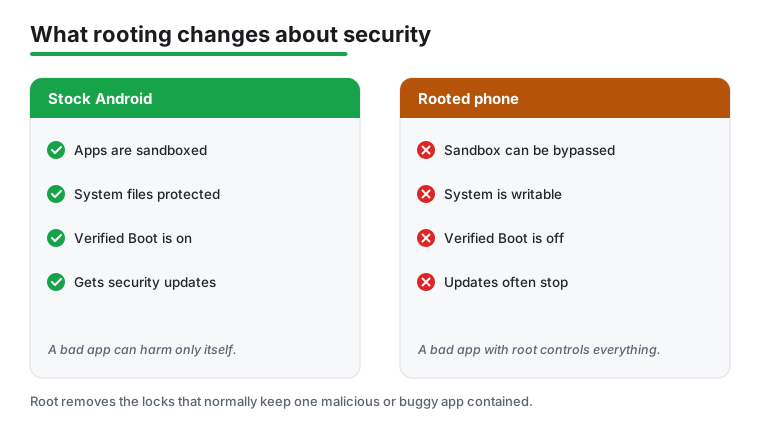
Two protections sit at the heart of Android security, and rooting weakens both. The first is the application sandbox: normally every app runs walled off from the others and from the system, so even a malicious app can only reach its own data. The second is Verified Boot, which checks at every startup that the system has not been altered. Root removes the sandbox walls for any app you grant it to, and unlocking the bootloader breaks or sidesteps Verified Boot.
The practical consequence is blunt. A malicious app that obtains root has total control of the device. It can read or change any file, install a rootkit, hide itself from view, persist across reboots, and depending on the root method even survive a factory reset. On a stock phone the same malware would be trapped in its own corner. On a rooted phone there is no corner.
This is not only theory. Independent analyses of large device populations report that rooted phones encounter trouble far more often than stock ones. The figures cited are sobering: roughly three and a half times more likely to meet malware, about 12 times more likely to carry a compromised app, and serious system compromise incidents around 250 times higher than on unmodified devices.
You can read the underlying writeups at Zimperium and Security Magazine. Treat exact numbers as estimates rather than precise odds, but the direction is not in doubt.
There is a quieter risk too. A rooted phone usually stops receiving official over-the-air security updates, so newly discovered vulnerabilities stay unpatched on your device. Android's monthly security bulletins regularly fix flaws that are already being exploited in the wild, which means the gap between a patched stock phone and an unpatched rooted one widens every month you go without updating by hand. Avast covers the broader picture of why rooting raises exposure.
To make this concrete, consider the "Godless" malware family. It gained root through apps distributed on app stores, then quietly installed a hidden backdoor that was used to push more malicious software onto the device. The point is not that this one threat is common today, but that it shows the pattern: once something gets root, it can entrench itself in ways that ordinary malware cannot. Pindrop documented it in detail at the time, though that writeup is no longer online.
If you have wondered why a banking app simply will not open on a rooted phone, the answer is the Play Integrity API, which replaced the older SafetyNet system. It lets an app ask Google whether it is running on a genuine, Play certified, untampered device. The reply comes back as up to three labels, and they form a ladder of strictness.
STRONG integrity cannot be passed on an unlocked or modified device, because it leans on a hardware root of trust the phone cannot fake. Banking, government, and DRM apps increasingly require DEVICE or STRONG, which is why hiding tricks that once worked now fail. You can see the official label definitions at Google Play Integrity.
Verified Boot builds a chain of trust starting from a hardware root of trust, up through the bootloader, and into the system partitions, so each stage confirms the next has not been tampered with. Rooting disables or sidesteps that chain, which is exactly why hardware backed checks fail on a rooted device.
The mechanism is documented by the Android Open Source Project. Because the attestation is signed by keys baked into the hardware, no software running on top of it can convincingly forge a clean result.
You will see "Play Integrity Fix" style modules that promise to restore passing verdicts. They can sometimes get a device through DEVICE integrity, but it is a losing game. Each time Google updates its checks, the modules break and have to be patched again, and none of them can reliably pass STRONG, because that is the level hardware attestation protects.
If your livelihood or daily payments depend on an app that wants STRONG, no module is a dependable answer. The Google Play Integrity overview explains what app developers are actually checking for.
Beyond the security picture, rooting breaks a handful of everyday things in concrete ways. Knowing them in advance saves a lot of frustration.
That last point deserves emphasis: the Knox or bootloader flag is permanent. You can flash back to stock and relock, but the record that the device was once unlocked does not go away.
If you have weighed all of the above and still want to root, you can at least reduce the odds of disaster. None of this makes rooting as safe as a stock phone, but it narrows the gap.
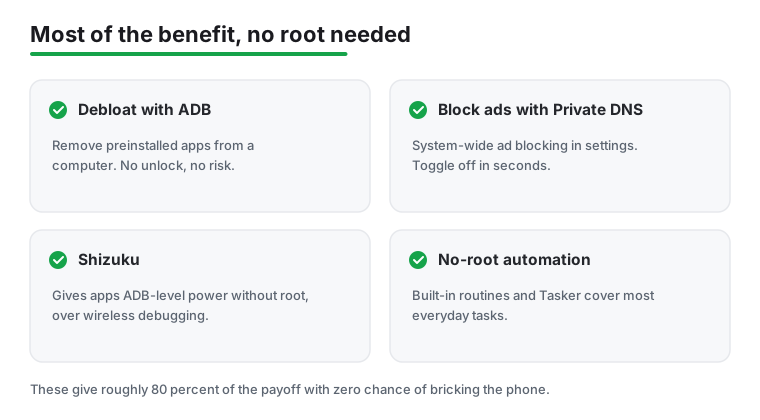
Here is the part many people miss: you can get a large share of the upside while leaving the phone stock, with no unlocking and no bricking risk.
If your worry is mainly junk apps and ads, this route gets you most of the way there with none of the security cost. For tools that help on a stock phone, our antivirus picks and wider tools and utilities guides are a sensible next stop.
If your phone mainly needs to just work, and you bank, pay contactless, and rely on it every day, do not root it. The benefits no longer outweigh the hassle, and the security trade-off is real, which is exactly why far fewer people root now than ten years ago.
Root suits people with a second device, or those who genuinely enjoy maintaining their setup and accept that things break sometimes. If that is not you, leave the bootloader locked and use the no-root alternatives above.
Work out what you actually want first, because stock Android now covers a lot of it. Per-app battery limits, granular permissions, built-in screen recording, scoped file access, system dark mode, and Private DNS all ship without root, so several classic reasons to root are simply gone. For the goals that remain, there is usually a no-root path.
dns.adguard-dns.com (the legacy dns.adguard.com still resolves) or use NextDNS to block most ads in three taps with no app at all. AdAway in non-root VPN mode is an alternative, but it takes the single Android VPN slot and conflicts with any other VPN.Two honest notes. SAI is in maintenance mode now, and Shizuku's setup confuses first-timers, so read the official guide before you give up on it. For most people this list delivers the bulk of what they wanted from root with none of the security cost.
If you have read all of the above and still want to go ahead, this framing narrows the odds of a disaster. It is not a step-by-step how-to, because the steps differ by model and the page's view is that limits matter more than instructions.
Rooting in 2026 is for people who keep a spare phone and enjoy the maintenance. If that is not you, leave the bootloader locked and use the no-root options above.
Install one module at a time from the Magisk app repo, XDA, or the developer's GitHub only. Before experimenting, learn the rescue route. Magisk's own FAQ, read 21 August 2026, gives two: from an ADB shell you can run its remove modules command, and if USB debugging is off you can "boot using the Safe Mode key combo to cause Magisk to create an empty file named ‘disable’ in modules directories which disables modules when next booted with Magisk" (Magisk FAQ).
Not for most of them, and that is the single most useful thing on this page. Seven of the twelve entries do real work on a phone you never unlock: AdAway blocks ads in local VPN mode, Tasker states on its own listing that root is not required for most functions, App Manager inspects apps without it, Greenify hibernates through accessibility, MiXplorer browses everything outside the system partition, Swift Backup can batch restore through Shizuku, and the 3C toolbox gates only its deeper tools. Magisk, KernelSU and Titanium Backup are the ones that genuinely need it, and LSPosed and Viper4Android need one named root solution rather than root in general. Checked 21 August 2026.
It depends on the app, and this is where guides go wrong. LSPosed, in its maintained Vector form, requires Magisk or KernelSU with Zygisk enabled, per its own README. The repackaged ViPER4Android installer says to flash in Magisk or Lygisk. AdAway supports the Systemless Hosts route through Magisk. KernelSU itself needs a supported GKI kernel, and its documentation says that if your device shows Unsupported you have to compile the kernel yourself. Checked 21 August 2026.
Assume it will not. Google Wallet Help, read 21 August 2026, lists having a rooted device, running a custom ROM, having an unlocked bootloader and running uncertified software among the reasons a phone cannot be set up for tap and pay. Magisk itself no longer handles root hiding, per its own FAQ. This page does not tell you how to defeat those checks and cannot tell you what any individual bank permits. If payments matter to you, that alone is a reason not to root. Checked 21 August 2026.
Only as safe as the apps you grant it to. Root is admin power, so an app with root can read or change anything on the phone. Stick to well known, open source or long established tools, and deny anything you do not recognise. Magisk asks for your approval every time a new app requests root, which is the moment to stop and think. Checked 21 August 2026.
Treat it as if it does. The rules vary by country and by brand and this page will not tell you what any manufacturer will accept. What is not in doubt is the mechanism: every current root method needs an unlocked bootloader, unlocking trips a permanent anti-tamper flag such as the Samsung Knox eFuse, and no amount of unrooting or relocking resets it. Decide as if the warranty were gone. Checked 21 August 2026.
Usually. You can remove the root solution or flash the official firmware for your model and relock the bootloader, and the phone behaves like new for updates and most app checks. Permanent flags stay tripped no matter what. Learn the restore steps and download the firmware before you root, not after something breaks, because that is exactly when you will not be able to get them. Checked 21 August 2026.
Magisk, because it provides the root access almost everything else on this page depends on and carries the module system the rest load through. Its latest release is 30.7 of 23 February 2026, free and open source, and the README says GitHub is the only official source. After that, set up a backup tool before you start experimenting rather than after. Checked 21 August 2026.
Magisk documents two routes and one of them needs no computer. Its FAQ, read 21 August 2026, says that if USB debugging is enabled you can remove all modules from an ADB shell, and that if it is not, you can boot using the Safe Mode key combo, which makes Magisk create an empty file named disable in the module directories so modules are off at the next boot. The FAQ warns that the timing many online guides give is too late for Magisk to see the combo. Checked 21 August 2026.
Yes, measurably. Rooting removes the application sandbox for any app you grant root to, and unlocking the bootloader breaks Verified Boot, so the phone can no longer prove its system is untampered. A malicious app with root can read or change anything, hide itself, and persist across reboots. A rooted phone also usually stops receiving official security updates, so known flaws stay unpatched. Checked 21 August 2026.
No, and it never has been. The README states that GitHub is the only source where you can get official Magisk information and downloads, so treat anything named Magisk on the Play Store or on an APK site as a clone. Get it from the official topjohnwu releases page on GitHub and nowhere else. Checked 21 August 2026.
Checked 21 August 2026: every figure on this page was re read on that date and the page gained a column for what each tool needs before it does anything, sourced per entry to that entry's own documentation or store listing. Two columns went to make room for it: Open source, whose content now sits in each entry's own facts line where the source publishes a licence, and The catch, which is now the blunt con inside the first eighty words of every section. The biggest find is a removal. On 21 August 2026 the Titanium Backup Google Play listing returned HTTP 404 from the US, GB and DE storefronts, checked directly as well as through our reader, while a control package answered 200 on the same run; the paid Pro key listing 404s as well. The entry itself stays, because the developer site is still up and still lists the app, but the store link is gone and with it the figures it carried: 3.0 stars, 362,149 reviews and a 10M+ install band can no longer be read anywhere, so this page no longer prints them. Three claims withdrawn. The Magisk section said the app lets you hide root from banking and payment apps; the project FAQ, read 21 August 2026, answers that question with "Magisk no longer handles root hiding". The LSPosed section said the original LSPosed project was archived in March 2025; GitHub does not mark that repository archived on 21 August 2026, and what is true is that its last release was 11 October 2023 and its last commit on the default branch 7 January 2024; the module loadout carried a second copy of the same claim and it is gone too. A Google Wallet sentence claiming The only fix Google offers is reinstalling stock is gone, replaced by what Google's own help page actually says, quoted and linked. Three lines that read as recipes for restoring payments on a rooted phone were replaced by what the sources actually say, and the two integrity-bypass modules in the loadout are now named without being recommended. One price made concrete. The Greenify entry said only "free with a donation tier" and never named the tier. It now names it: a separate Play listing, Greenify (Donation Package) by Oasis Feng at USD 2.99, which the free listing's own description points at as the route to extra experimental features. Two catalogue dates corrected. AdAway 6.1.4 and App Manager 4.1.0 were dated to the day their builds entered F-Droid; both now carry the project's own release date beside it. Ads and price claims scoped. Six entries used to say "no ads, no purchases" on the strength of catalogues that publish no ads label at all; each now says what its source does and does not publish. Ratings and review counts refreshed for all five Play listings. Checked 26 August 2026: the Tasker and 3C All-in-One Toolbox Play listings were re read at gl=US. Price, ads label, install band, rating, in-app purchase range and listing update date all held for both. Only their review counts had drifted, and only slightly, so this page keeps the 21 August 2026 counts rather than print a figure that moves within minutes. The Swift Backup, Greenify and MiXplorer listings, and every source off Google Play, were not re read on 26 August 2026 and keep their 21 August 2026 dates. Rankings withdrawn. Comparatives that ranked all twelve entries by a figure seven of them do not publish, and comparatives that measured Titanium Backup by a release date its changelog has never published, were replaced with the plain figure and its read date.
 How to Block Ads on Android Without Rooting (2026)Security & Privacy
 Google Play Store Not Working or Won't Download AppsTools & Utilities