What counts as a communication app
This category covers the apps that handle the two oldest jobs on your phone: talking and texting. On Android they fall into a few groups. Messaging apps carry one to one texts, group chats, voice notes, and increasingly voice and video calls. They range from plain SMS replacements to fully encrypted private messengers. Caller ID and spam blockers screen incoming calls, label unknown numbers, and silence robocalls before they ring. Call recorders capture conversations for notes, interviews, or your own records. Email apps sit alongside all of these for slower, more formal contact. Most people end up using two or three of these together rather than expecting one app to do everything.
How to choose
Before comparing features, get clear on what you actually need, because the right app for a private conversation is rarely the same as the right app for a quick reminder to a family group.
Start with where people already are
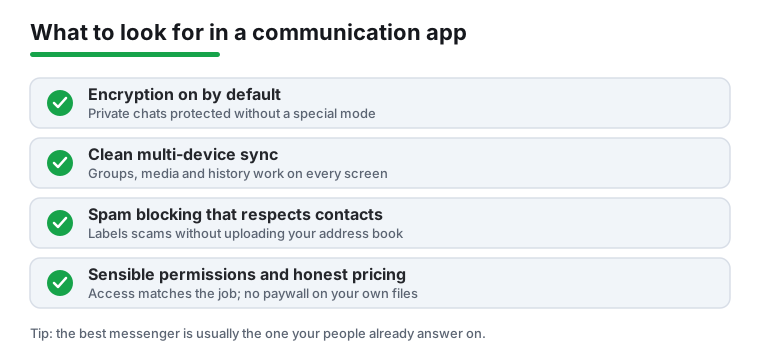
A messenger only works if the other person answers it. The most capable, most private app in the world is useless if your contacts never open it. For everyday chatter, the practical choice is usually the app your circle already uses. Save the more deliberate choices for the conversations that warrant them.
Match the app to the sensitivity of the conversation
Think in layers. A grocery list does not need the same protection as a conversation about your health, your finances, or anything you would not want a stranger reading. It is completely reasonable to keep one mainstream app for ordinary talk and a stricter one for the handful of conversations that matter more.
Check sync, groups, and media handling
The most common daily frustration is not a missing feature, it is slow or unreliable sync. Test how a chat app behaves with a large group, how it handles photos and voice notes, and whether your history shows up cleanly on a second phone, a tablet, or the web. An app that drops messages or shows them out of order will wear on you long after the novelty of any one feature fades.
The privacy angle, explained plainly
Privacy is where communication apps differ the most, and where marketing language is the least helpful. A few concrete distinctions will serve you better than any single brand name.
End to end encryption versus encryption in transit
End to end encryption means only you and the person you are talking to can read the contents of a message. Not the company that makes the app, not your carrier, not someone intercepting the connection. Encryption in transit is weaker: the message is scrambled while it travels to the company's servers, but the company can read it once it arrives, which means it can be handed over, scanned, or exposed in a breach. Both are better than nothing, but only end to end encryption keeps the contents out of the provider's hands.
Two details decide how much that protection is worth in practice. First, is encryption on by default? If a chat is only protected when you switch on a special private or secret mode, then most of your real conversations, the ones you start without thinking, will not be protected. Second, does it cover everything? Some apps encrypt one to one chats but not large group chats, backups, or linked desktop sessions. A backup saved to a cloud account without encryption can quietly undo the protection you thought you had.
What still leaks: metadata
Even with strong end to end encryption, the contents of your messages are protected, but the metadata often is not. Metadata is the information about a message rather than the message itself: who you talked to, when, how often, for how long, your phone number, and sometimes your rough location or device details. This data can be revealing on its own. Knowing that someone messaged a clinic, a lawyer, and a family member within an hour can say a lot without anyone reading a single word. Apps differ sharply in how much metadata they collect and retain, so if this matters to you, look at what the app says it keeps, not just whether messages are encrypted.
Who can read your messages
It helps to be honest about the realistic answer, which varies by app:
- Standard SMS: not encrypted end to end. Your carrier can see the contents, and so can anyone who lawfully or unlawfully gains access to that flow. Fine for a code or a quick logistics text, not for anything sensitive.
- Apps with end to end encryption on by default: the provider cannot read the contents, though it may still hold some metadata.
- Apps that encrypt in transit only: the provider can read the contents on its servers and may use them, scan them, or be compelled to share them.
- Email: almost always readable by your provider unless you take extra steps. Treat it as a postcard, not a sealed letter.
The most private choice depends on who you talk to
There is no single most private app for everyone, because privacy is a property of a conversation, not of a download. If the people you need to reach are all on one encrypted app, that app is your private channel. If they are scattered, your sensitive conversations are only as protected as the weakest app any of them will actually use. Choosing well often means quietly persuading the few people you talk to about serious things to meet you on a better app, rather than chasing the theoretically perfect option alone.
Built in options and the cost of free
Android already ships with capable tools, and they are worth considering before you add anything. The default Phone app on many devices offers call screening and spam labeling, the default Messages app supports RCS chats with end to end encryption between supported devices, and the default email client handles most accounts. For a lot of people these cover the basics without installing a thing.
When you do reach for a third party app, remember that free is rarely free. Some apps are paid for with your data: a caller ID app may keep its spam database current by uploading the contact lists of its users, which means your friends' numbers can end up in a shared database because someone else installed the app. Others show ads, sell aggregated usage data, or paywall the part you actually need, like exporting a recording or removing ads from the dialer. None of this is automatically sinister, but you should know how an app pays its bills before you depend on it. A quick read of the permissions and the data practices tells you more than the feature list does.
Common mistakes to avoid
- Assuming standard SMS is private. Regular texts are not encrypted end to end; use a private messenger for anything sensitive.
- Granting full contact access to every caller ID app. That is how your friends' numbers end up in a shared database.
- Trusting a call recorder without a test call. Android changes recording rules often, and some phones silently capture only your side. Recording laws also vary, and many places require consent from everyone on the call.
- Forgetting backups. End to end encryption does not help if your chat history is backed up unencrypted to a cloud account.
- Switching your whole circle to a niche app no one else uses. The best messenger is usually the one your people already answer on.
How we pick
We install each app on real Android phones, use it for everyday calls and chats, send and block test numbers ourselves, and check every permission against what the app actually does. Nothing here is paid placement. If an app annoyed us or asked for more access than its job required, we say so.