What this category covers
Photo and video apps on Android fall into a few clear buckets, and knowing which one you actually need saves a lot of wasted downloads. Photo editors handle retouching, color, and effects on still images. Camera apps replace or extend the stock camera with manual controls, RAW capture, or better night modes. Video editors trim, splice, and add music or captions to clips. Gallery and organizer apps keep your library tidy and searchable, and drawing and filter tools sit somewhere in the middle for creative work. Most people end up with two: a fast everyday editor and one heavier tool for the occasional bigger project.
What to look for
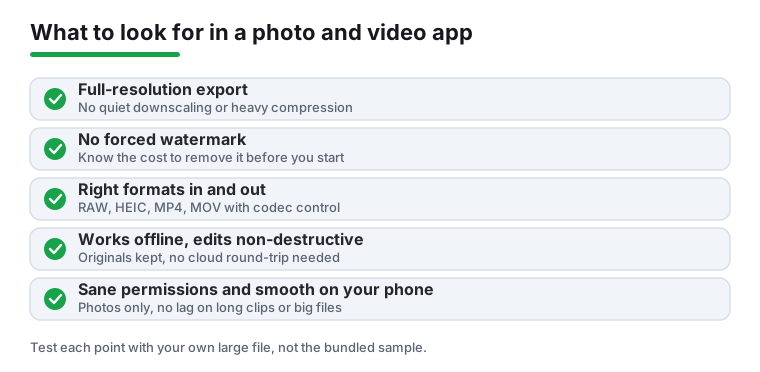
- Export quality and resolution caps. Some free apps quietly downscale your output to 720p or compress photos hard. Check the export screen for a resolution and quality selector, and confirm it can match your phone's native capture size.
- Watermarks. Plenty of editors stamp a logo on free exports. That is fine for testing, but know whether removing it costs a one-time fee or a subscription before you commit.
- Format support. For photos, look for RAW or HEIC handling if your camera produces those. For video, MP4 and MOV in, plus control over codec and frame rate out, so clips actually play everywhere you send them.
- Offline operation. A real editor should work with no connection. If core features stall without internet, your files may be processing on someone else's server, which is slower and a privacy question.
- Performance on your phone. Timeline scrubbing, preview lag, and render times balloon on older or mid-range hardware. Test with a long clip or a large image, not the sample file.
- Non-destructive edits. The best apps keep your original untouched and let you re-edit later. Avoid anything that overwrites the source file by default.
- Sane permissions. A photo app needs storage or photo access. It does not need your contacts, location, or microphone unless you are recording. Decline what does not fit the task.
Common mistakes to avoid
- Judging an app by its filters alone, then discovering the export is watermarked or capped after you have done the work.
- Granting blanket access to all photos when the app supports picking individual files.
- Installing five overlapping editors instead of learning one well. Depth beats variety here.
- Ignoring storage. Video projects and high-res exports eat space fast, so check where renders land and clear old project files.
- Paying for a subscription when a one-time unlock or a free open tool covers what you actually do.
How we pick
Every app here was installed and used hands-on on real Android phones across a range of ages and price points. We check export quality, watermarks, offline behavior, and permissions ourselves. No paid placement, no rankings bought, and nothing recommended that we would not keep on our own devices.