
Checked 27 September 2026
Snapseed is the pick and it is free, Adobe Lightroom the step up when edits must sync, TouchRetouch the one-job remover. Our answer, the free pick and the table ↓
Checked 27 September 2026: no pick changed; all 18 listings read, three ratings and two in-app ceilings moved, Photoshop Express and Polish added
Full logEvery editor here installs free; the Price column shows which carry a Contains ads label, and the standout column shows what each does that the others do not.
Every app on this page is checked against the sources named below, and where a source cannot be reached the entry says so.
Best free overall
4.8★ · 1.83M reviews · 100M+ installs · free, no ads, no in-app purchases · by Google LLC · Play listing · checked 27 September 2026
Snapseed is the first install we recommend: completely free from Google with no ads or purchases, precise Selective and Healing tools, and non-destructive editing since the 4.0 update. The blunt con: no cloud backup and no sync, so every edit stays on the one phone. Its Google Play listing, read 27 September 2026, promises “30+ pro tools and filters - no subscriptions, purchases, ads, or watermarks”.
For: free with no ads and no in-app purchases · one-tap Smart Masking plus Selective and Healing tools · non-destructive re-editing and batch edits since version 4.0. Against: no cloud backup or sync · no templates or social tools · its RAW Develop tool opens only some RAW file types, per the listing. Skip it if you want stickers and one-tap social posts; Picsart is built for that. Choose Snapseed over Lightroom if you want the whole toolset free forever, with no account and no subscription.
↑ Back to the comparisonBest for RAW and color
4.5★ · 3.66M reviews · 100M+ installs · free tier, no ads, in-app purchases $0.49 to $499.99 · by Adobe · Play listing · checked 27 September 2026
Lightroom is the strongest pick for RAW files and consistent color, and its free tier covers curves, selective masking and presets with no ads. The blunt con: AI masking and cloud sync sit behind a Creative Cloud subscription, with in-app prices to $499.99.
For: exposure, color and Quick Actions free with no ads · presets that keep a gallery consistent · calm, deliberate interface. Against: masking and raw files from other cameras need Premium · requires an Adobe account · in-app items reach $499.99. Skip it if you only ever fix the odd JPEG; Snapseed covers that free. Choose Lightroom over Photoshop if you grade whole galleries rather than rebuild single images.
↑ Back to the comparisonLayers and Generative Fill
4.5★ · 4.15K reviews · 1M+ installs · free tier, no ads, in-app purchases $4.99 to $499.99 · by Adobe · Play listing · checked 27 September 2026
Photoshop on Android, listed on Google Play on 27 September 2026 as “Photoshop with AI Assistant”, has real layers on a free tier and names Generative Fill among its tools. The blunt cons: that listing puts the Remove Tool, Content Aware Fill and 100 generative credits in the paid plan, and at 1M+ installs and 4.15K reviews on that read this is still a young listing.
For: real layer editing · Generative Fill for adding and removing content · Tap Select for backgrounds and objects. Against: Remove Tool and generative credits need the paid plan · small review base for a flagship · needs Android 11 or later. Skip it if you never composite images; Photoshop Express handles quick fixes. Choose Photoshop over Lightroom if you think in layers rather than libraries.
↑ Back to the comparisonOne-tap Adobe edits
4.5★ · 2.59M reviews · 100M+ installs · free, no ads label, in-app purchases $2.99 to $99.99 · by Adobe · Play listing · checked 27 September 2026
Photoshop Express is Adobe's one-tap editor for quick fixes, filters, collages and AI object removal, free with no Contains ads label on its Google Play listing read 27 September 2026. The blunt con: Premium holds the extra tools and finer controls, with in-app items to $99.99 on that 27 September 2026 listing.
For: quick fixes, filters and collages in one app · AI object removal and background replacement named on the listing · opens RAW, TIFF and PNG files, per the listing. Against: Premium holds the extra tools and finer controls · in-app items to $99.99 · declares it may share data with third parties. Skip it if you composite in layers; Photoshop has them. Choose Photoshop Express over Photoshop for fast single-photo fixes rather than composites; Free Photoshop Apps for Android: What Each Free Tier Actually Gives You sets the Adobe free tiers side by side.
↑ Back to the comparisonStickers and templates
4.0★ · 12.1M reviews · 1B+ installs · free with ads, in-app purchases $0.99 to $429.99 · by PicsArt, Inc. · Play listing · checked 27 September 2026
Picsart, listed on Google Play on 27 September 2026 as “Picsart AI Photo Editor, Video”, is the playground of the bunch: stickers, cutouts, double-exposure effects and community templates across 1B+ installs. The blunt con: the free version carries a Contains ads label; the listing sells Picsart Plus and Picsart Pro as the paid tiers.
For: templates, stickers and collages · fast, eye-catching social posts · huge community. Against: ads in the free tier · in-app purchases to $429.99 · not built for subtle retouching. Skip it if clean retouching is the goal; Snapseed does that free. Choose Picsart over Canva if you remix photos rather than lay out designs.
↑ Back to the comparisonFilters, collages, cleanup
4.8★ · 4.7M reviews · 100M+ installs · free with ads, in-app purchases $0.99 to $129.99 · by InShot Inc. · Play listing · checked 27 September 2026
Polish, listed on Google Play on 27 September 2026 as “Photo Editor - Polish”, is the all-in-one social editor: 100+ filters, collages of up to 20 photos, object removal and face retouch, and its listing promises high-resolution saves “without watermarks”. The blunt con: that 27 September 2026 listing carries a Contains ads label, with in-app purchases to $129.99.
For: filters, collages and object removal in one app · high-resolution saves without watermarks, per the listing · declares no data shared with third parties. Against: shows ads · in-app purchases to $129.99 · needs Android 9 or later. Skip it if you want an editor with no ads at all; Snapseed has none. Choose Polish over Picsart if you want the lower in-app ceiling of the two ad-supported all-rounders.
↑ Back to the comparisonBuilt into most phones
4.4★ · 54.1M reviews · 10B+ installs · free, no ads · by Google LLC · Play listing · checked 27 September 2026
Google Photos is the editor you already have: free, no ads, with Magic Eraser, Photo Unblur and Color Pop free for everyone. The blunt con: Magic Editor's generative edits cap at 10 saves a month unless you have a Pixel or a Premium Google One plan of 2TB and above, per Google's 10 April 2024 announcement, read 27 September 2026.
For: already on most phones · Magic Eraser and Photo Unblur at no cost · edits happen right where the photo lives. Against: Magic Editor caps without a Pixel or a 2TB Google One plan · manual controls are basic · tied to a Google account. Skip it if you want manual control over every slider. Choose Google Photos over Snapseed for one-tap fixes without installing anything.
↑ Back to the comparisonFilm-style presets
3.6★ · 1.33M reviews · 100M+ installs · free, no ads label, in-app purchases $0.99 to $29.99 · by VSCO · Play listing · checked 27 September 2026
VSCO is the style pick, with film-inspired presets and subtle grain for an editorial look the others do not match. The blunt cons: a 3.6-star rating and a full preset vault that needs the membership.
For: film-style presets · grain and fade for an editorial feel · a consistent signature look. Against: 3.6 stars · full vault behind the membership · weak for precision retouching. Skip it if you fix photos rather than style them. Choose VSCO over Polarr if you want curated looks instead of building your own.
↑ Back to the comparisonLight layer editing
3.5★ · 1.21M reviews · 100M+ installs · free with ads, in-app purchases $0.99 to $99.99 · by Pixlr Pte Ltd · Play listing · checked 27 September 2026
Pixlr is the light middle ground: layers, overlays and one-tap AI cleanup that run comfortably on older hardware. The blunt cons: ads in the free tier and a 3.5-star rating, the lowest on this page on the 27 September 2026 read; the cheaper Plus plan already removes the ads, per Pixlr's pricing page read the same day.
For: layers without the weight · runs well on older phones · quick web-style edits and text graphics. Against: ads in the free tier · 3.5-star rating · shallower than the Adobe apps. Skip it if you have a recent flagship and want depth; Photoshop goes further. Choose Pixlr over Photoshop on older or budget hardware.
↑ Back to the comparisonOne-tap enhance
4.3★ · 732K reviews · 10M+ installs · free with ads, in-app purchases $0.99 to $749.99 · by Everimaging Ltd. · Play listing · checked 27 September 2026
Fotor keeps it simple: clean one-tap enhance, tidy retouch tools and collage layouts at 4.3 stars. The blunt cons: ads in the free version, and one of the steepest in-app ranges here, $0.99 to $749.99 on the 27 September 2026 listing, for the AI features in Pro.
For: one-tap enhance that mostly gets it right · no learning curve · tidy collage layouts. Against: ads in the free tier · in-app purchases to $749.99 · automation over manual control. Skip it if you want to drive the sliders yourself. Choose Fotor over Pixlr if you want results in one tap rather than layers.
↑ Back to the comparisonNo-frills sliders
4.4★ · 499K reviews · 50M+ installs · free with ads, in-app purchases at $3.49 per item · by dev.macgyver · Play listing · checked 27 September 2026
Photo Editor by dev.macgyver is the no-frills workhorse: instant loading on budget phones, plain sliders for exposure and color, and a clone-and-heal tool, at 4.4 stars. The blunt con: its 27 September 2026 listing carries both Contains ads and in-app purchase labels.
For: lightweight and instant to load · manual sliders plus clone and heal · no sign-ups, feeds or templates. Against: shows ads · utilitarian interface · no presets or design tools. Skip it if you want a guided, polished interface; Fotor is gentler. Choose Photo Editor over Fotor if you trust your own sliders more than automation.
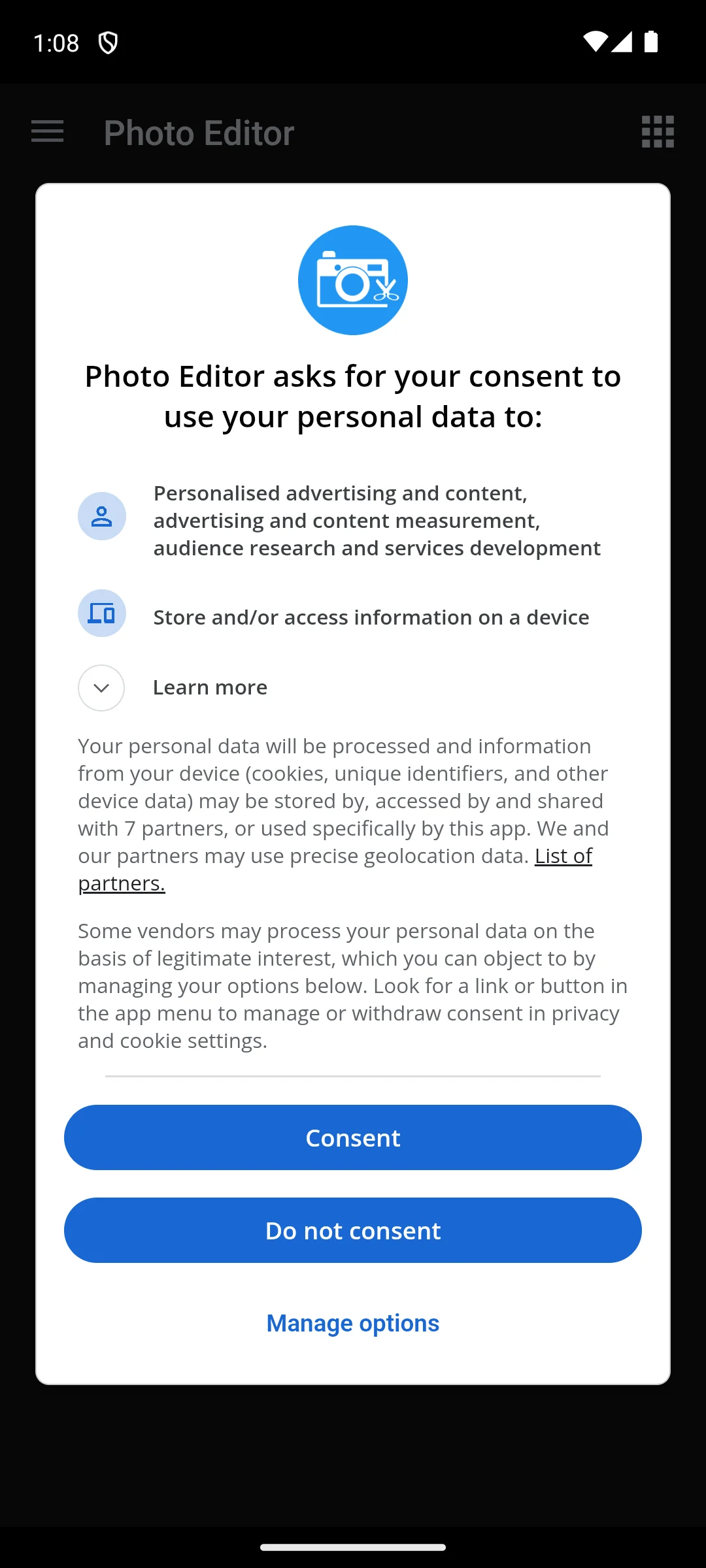
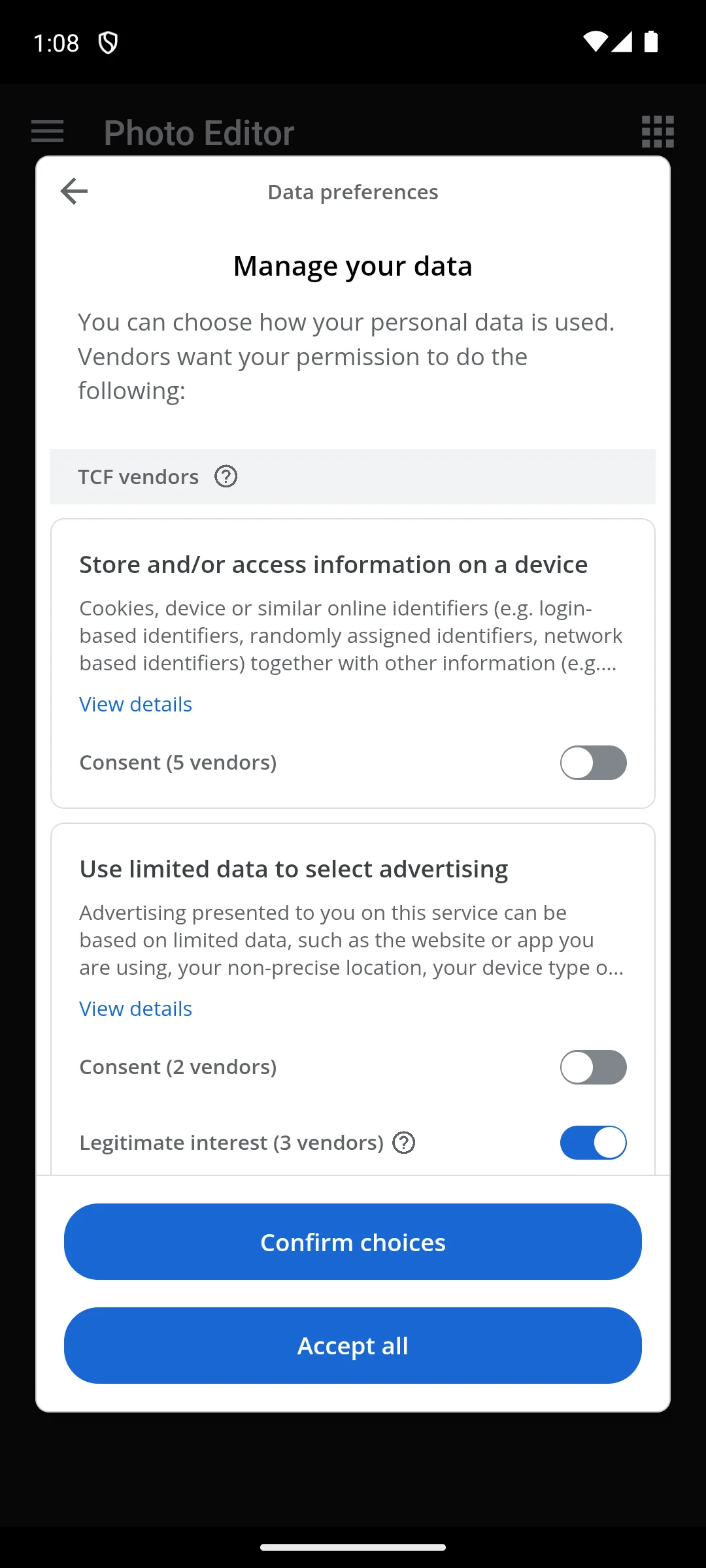
The captures below, taken on our own Android emulator on 18 August 2026, are of the consent dialog it opens on, ahead of the editor. The dialog names 7 partners and says the app and its partners may use precise geolocation data, and it offers a plain Do not consent button next to Consent. Behind Manage options is a data preferences screen listing TCF vendors, where the two consent switches start off and a third, labelled legitimate interest for 3 vendors, starts on.
Design templates
4.8★ · 27.1M reviews · 500M+ installs · free, no ads, in-app purchases $1.49 to $300 · by Canva · Play listing · checked 27 September 2026
Canva turns photos into designs, at 4.8 stars from 27.1M reviews on its 27 September 2026 Play listing, which lists a free content library of 2M+ assets. The blunt con: that same listing puts the one-click Background Remover under Canva Pro, leaving a background eraser in the free editor, and pure photo correction runs shallower than Lightroom.
For: templates for posts, stories and flyers · a 2M+ asset library of royalty-free images, per the listing · no Contains ads label. Against: the one-click Background Remover sits in Canva Pro · photo correction is shallow · many assets are Pro-only · needs an account. Skip it if you never add text or layouts to a photo. Choose Canva over Picsart for clean layouts over playful remixing. For multi-photo grids, Best Photo Collage Apps for Android ranks Canva first.
↑ Back to the comparisonFun art filters
4.5★ · 6.58M reviews · 100M+ installs · free with ads, in-app purchases $0.99 to $99.99 · by PHOTO LAB DMCC · Play listing · checked 27 September 2026
Photo Lab is the fun one: artistic filters, frames and face effects at 4.5 stars. The blunt cons: the free version is ad supported, the full library in higher resolution needs the subscription, and precision editing is not what it does.
For: art filters and face effects · quick, shareable results · 4.5 stars from a big review base. Against: ads in the free version · high-resolution output needs the subscription · no serious correction tools. Skip it if you need real retouching. Choose Photo Lab over Picsart when you want a finished effect in one tap, not an editor.
↑ Back to the comparisonObject removal
4.3★ · 15.4K reviews · 1M+ installs · free to install, no ads, one paid unlock at $14.99 in-app · by ADVA Soft · Play listing · checked 27 September 2026
TouchRetouch is the dedicated remover for objects, power lines and blemishes, and its 27 September 2026 listing is free to install with the toolset behind one paid unlock, no ads. The blunt con: it does only that one job, and its 15.4K reviews on that read are among the smaller counts on this page.
For: dedicated object and line removal · no ads · pairs neatly with a broader editor. Against: single-purpose · small 15.4K review base · needs Android 12 or later. Skip it if Magic Eraser in Google Photos already covers you. Choose TouchRetouch over Google Photos when fence lines and wires need precise removal.
↑ Back to the comparisonPortrait retouch
3.9★ · 2.06M reviews · 100M+ installs · free with ads, $0.69 to $129.99 per item · by Perfect Mobile Corp. · Play listing · checked 27 September 2026
YouCam Perfect leans into selfies and portraits, with smoothing and skin tools that look natural when dialed back. The blunt cons: a 3.9-star rating, ads in the free version, and in-app purchases stretching to $129.99 for the full beauty kit.
For: portrait-first retouching · subtle results at low strength · 100M+ installs. Against: ads in the free version · 3.9 stars · easy to overdo the effects. Skip it if faces are rare in your camera roll. Choose YouCam Perfect over Fotor if most of your photos are portraits.
↑ Back to the comparisonCustom filter codes
3.9★ · 147K reviews · 10M+ installs · free with ads, in-app purchases $0.99 to $34.99 · by Polarrcan · Play listing · listing last updated 3 February 2026 · checked 27 September 2026
Polarr is for filter tinkerers: build your own looks, save them as codes and share them, with masking that is advanced for a mobile app. The blunt cons: ads in the free tier, and no listing update since 3 February 2026, the longest gap on this page.
For: custom filter codes you can share · advanced masking · the subscription also unlocks Polarr 24FPS for video, per the listing. Against: ads in the free tier · slowest update cadence here · rewards patience more than casual use. Skip it if you want ready-made looks; VSCO sells those. Choose Polarr over VSCO to build a signature look instead of buying one.
↑ Back to the comparisonAI restoration
4.1★ · 5.88M reviews · 500M+ installs · free with ads, in-app purchases $0.49 to $189.99 · by Bending Spoons · Play listing · checked 27 September 2026
Remini is the restoration specialist, using AI to unblur faces, sharpen soft scans and enlarge small images. The blunt cons: ads plus a subscription push, in-app purchases to $189.99, and the photo is uploaded for processing rather than edited on the phone.
For: face unblur and scan repair none of the general editors match · one-tap flow · 500M+ installs. Against: ads and in-app purchases to $189.99 · needs a connection to work · little use for everyday edits. Skip it for ordinary photo fixes. Choose Remini over TouchRetouch when the whole photo is damaged, not one object.
↑ Back to the comparisonBackground removal
4.7★ · 4.01M reviews · 100M+ installs · free, no ads, in-app purchases $5.99 to $999.99 · by Photoroom · Play listing · checked 27 September 2026
Photoroom, listed on Google Play on 27 September 2026 as “Photoroom: AI Photo Editor”, cuts a subject out in about a second and handles batch processing and upscaling, at 4.7 stars with no ads. The blunt con: serious use lands on Pro, with in-app items running to $999.99.
For: background removal in about a second · batch tools and upscaling · 4.7 stars, no ads. Against: in-app items to $999.99 · free tier covers single cutouts only · narrow beyond background work. Skip it if you never isolate subjects. Choose Photoroom over Canva when the cutout is the job, not the layout. When the cutout is all you need, 12 Best Background Remover Apps for Android: Background Erasers Without Ads or a Watermark compares what each free export gives and who promises no watermark.
↑ Back to the comparisonPicking a photo editor is mostly about matching the tool to the work you actually do; the four checks below decide most of it.
Your photos are edited, so which camera app captures better raw material next time?
Our answer there: Open Camera, best overall and best free pick because it costs nothing, carries a Contains ads label, and its help page ties manual control to Camera2 support, help page read 21 August 2026.
See it against 10 rivalsFour things separate these apps. Layers, which let one part of an edit change without redoing the rest; slider apps are faster for plain crops. RAW support, if your phone shoots it; Lightroom is strongest there. AI tools, which vary most in quality and in how they handle your photo, so test them before you commit. And export: check for full resolution, format choice and watermarks on free exports by running one real edit through before investing hours.
A photo editor needs access to your photos, and that is normal. On modern Android you can grant access to selected photos only instead of the whole library; many editors work fine with limited access, and you can widen it later.
The bigger question is where the editing happens. Some AI features upload your photo to a server to process it, while on-device editing keeps the image on the phone; if an app is vague about this, that is itself useful information. The listings make some of it explicit: Google’s own Snapseed entry declares “No data shared with third parties” and “Data is encrypted in transit” in its Play Store Data safety section (checked 27 September 2026), while nine of the eighteen editors on this page declare on their listings, read the same day, that they may share data with third parties.
Photos also carry EXIF metadata, which can include GPS coordinates; look for a remove-metadata option on export and check the exported file rather than assuming it was cleaned. Be wary of an editor that asks for more than photo access, and note that Android 12 and later shows a privacy indicator when an app uses the camera or microphone, so if it appears while you only edit a saved photo, ask why. More on these signals from Android and the Android Open Source Project.
Pair it with: a camera app that captures cleaner, higher quality files so your edits have more to work with; a photo filters app for quick, consistent looks when you do not want a full edit; and a gallery app to organize and find the shots you plan to edit; a video editor for the clips you shoot alongside them.
 Best Camera Apps for AndroidPhoto & VideoGoogle Storage Full: How to Free Up Space on Android Without PayingTools & Utilities
We re-verify this category monthly. Get the monthly diff by email (form below the questions)
Snapseed is our top free pick because it has no ads, no subscription, and a deep set of precise tools from Google. For RAW files and color grading, the free tier of Adobe Lightroom is hard to beat. Many people happily get by with both installed and never pay a penny.
Not at all. Snapseed, Google Photos, and the free tiers of Lightroom and Canva cover almost everything a casual editor needs. If you want no subscription at all, Snapseed's Google Play listing showed nothing to buy on 27 September 2026, and TouchRetouch's showed one 14.99 dollar unlock. Paid plans mainly add AI features, cloud sync, premium presets, and the removal of ads. We suggest living with the free versions first to see what you actually miss.
For a dedicated tool, TouchRetouch is the one-job object remover on this page, sold as one 14.99 dollar unlock on its Google Play listing read 27 September 2026. Among apps you may already have, Google Photos offers Magic Eraser, and the Photoshop app lists Generative Fill for removing objects, though its listing puts the Remove Tool and the generative credits in the paid plan.
For most everyday work, yes. Layers, masking, RAW support, and AI cleanup run on a phone, and apps like Lightroom close much of the gap. Heavy composites and very large batches still feel better on a desktop, but the daily stuff rarely needs one. If you also shoot clips, pair your editor with a video editor, and a strong camera app gives you better files to start from.
It depends on the app and the tool. Plenty of basic edits run entirely on-device, but some AI features, such as background removal or generative edits, upload your photo to a server to process it. If you would rather keep a photo on the phone, check whether the app states that editing happens on-device, and lean on tools that do not need a connection.
Three listings on this page say so in their own words. Snapseed's Google Play listing, read on 27 September 2026, promises no subscriptions, purchases, ads, or watermarks. Canva's listing, read the same day, calls its editing app free, with no ads and no watermarks, though Pro templates and assets are sold separately. Polish's listing says edited photos save in high resolution without watermarks, though it carries a Contains ads label. For any other editor, run one real edit through export before you commit.
No. Its Google Play listing, read on the US storefront on 27 September 2026, is free to install, with the full toolset unlocked by a single in-app purchase of 14.99 dollars, and it carries no ads label. That replaces the old pay-once model.
Yes. Its Google Play listing, read on the US storefront on 27 September 2026, shows no Contains ads label and no in-app purchases, and Google's own description promises 30+ pro tools and filters with no subscriptions, purchases, ads, or watermarks.
Photoroom is the pick on this page for cutting out a subject: its Google Play listing, read on 27 September 2026, showed 4.7 stars, no Contains ads label and in-app purchases from 5.99 to 999.99 dollars per item. Canva puts its one-click Background Remover under Canva Pro on its own listing. A separate list on this site, 12 Best Background Remover Apps for Android, compares dedicated background removers on ads and watermarks.
It depends on the job. To add or remove objects, Photoshop offers Generative Fill, though its listing puts the generative credits in the paid plan, and Google Photos offers Magic Editor with a monthly cap on free saves. To restore an old or blurry photo, Remini is the specialist, and it uploads the photo to process it. To cut out a subject, Photoroom is the pick. For a free option, Snapseed's listing describes one-tap Smart Masking with nothing to buy.
Checked 27 September 2026: all sixteen listings were re-read on the Google Play US storefront, and on that read Snapseed moved from 4.5 to 4.8 stars, TouchRetouch from 4.2 to 4.3 and Pixlr from 3.6 to 3.5, while Picsart's in-app ceiling rose from $219.99 to $429.99 and Fotor's from $459.99 to $749.99. Five ratings where the table and an app's own section disagreed now agree. Canva's own listing puts its one-click Background Remover under Canva Pro, Picsart's paid tiers are named Plus and Pro, and Adobe's FAQ lists Lightroom masking and raw editing as Premium, so all three are described that way. Photoshop Express and Polish were added with full entries. No pick changed.
Checked 18 August 2026: the consent dialog Photo Editor by dev.macgyver opens on, and the data preferences screen behind its Manage options button, were captured on our own Android emulator; both screenshots sit in that entry.