
Snapseed is the pick and it is free with nothing to buy, VSCO the choice for film looks, Prisma the painted look that carries ads. Our answer, the free pick and the table ↓
Checked 27 September 2026: two apps added, no pick changed; Snapseed rose to 4.8 stars and three purchase ceilings went up
Full logFourteen Android photo filter apps, compared on the look each one is built for, price, the ads label and the rating; six of the fourteen carry ads (Google Play, read 27 September 2026).
Snapseed is our best overall and best free pick because its listing carries no ads label and sells nothing, at 4.8 stars (Google Play, read 27 September 2026). Proofed 27 September 2026
VSCO is our pick for film looks because its listing describes film emulation presets and carries no ads label (Google Play, read 27 September 2026). Proofed 27 September 2026
Prisma is our niche pick for painted looks because its listing counts more than 500 filters and effects in its art filter library, though it carries ads (Google Play, read 27 September 2026). Proofed 27 September 2026
Data checked: 27 September 2026.
Every app on this page is checked against the sources named below, and where a source cannot be reached the entry says so.
Free without a catch
4.8 stars from 1,830,780 reviews · 100M+ installs · free to install · no in-app purchases at all · no ads · by Google LLC · listing updated 24 September 2026 · Google Play listing · checked 27 September 2026
Snapseed is the strongest free claim on this page, and its listing describes realistic film filters and a camera that shoots with film looks applied; the blunt con is that its Data safety section says data can’t be deleted (Google Play, read 27 September 2026).
The capture below is of the screen it opens on, taken on our own Android emulator on 18 August 2026: the editor start screen that says to start capturing with the camera or import your photos to begin editing, with a Camera button and an Add Photo button. Nothing stands in front of it in that capture: no account to create, no consent dialog, no advertisement and no upgrade offer.
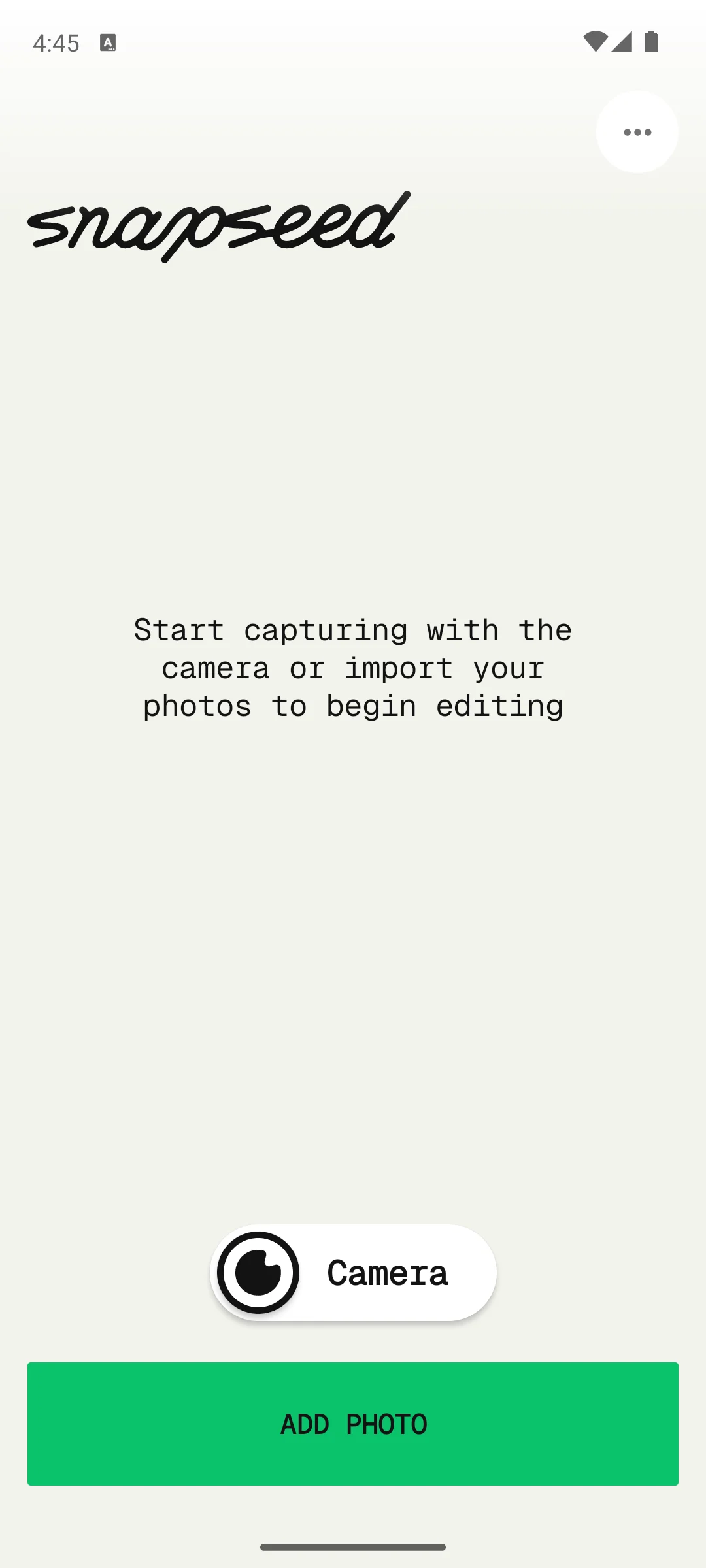
Skip Snapseed if you need data deleted on request. Choose it over Lightroom when paying nothing matters more than presets shared by other creators.
Film-inspired presets
3.6 stars from 1,325,501 reviews · 100M+ installs · free to install · in-app purchases $0.99 to $29.99 per item · no ads · by VSCO · listing updated 21 September 2026 · Google Play listing · checked 27 September 2026
VSCO is the pick when a whole gallery needs one consistent, film-inspired look, but only a small set of its more than 200 presets is free (listing description read 27 September 2026).
Skip VSCO if the free tier must be the whole app. Choose it over Afterlight for film looks on a listing with a far higher rating.
Consistent edits
4.5 stars from 3,663,612 reviews · 100M+ installs · free to install · in-app purchases $0.49 to $499.99 per item · no ads · by Adobe · listing updated 17 September 2026 · Google Play listing · checked 27 September 2026
Lightroom calls them presets, and they behave like filters with the whole editor sitting underneath; the blunt con is a purchase range that reaches $499.99 per item (Google Play, read 27 September 2026).
Skip Lightroom if you want a filter app with nothing to buy. Choose it over Snapseed when you want presets shared by other creators, which its listing describes (listing description read 27 September 2026).
Art-style photos
4.5 stars from 1,023,553 reviews · 50M+ installs · free to install · in-app purchases $0.99 to $49.99 per item · carries ads · by Prisma Labs, Inc. · listing updated 18 August 2026 · Google Play listing · checked 27 September 2026
Prisma is the artsy one, turning an ordinary photo into something that looks hand painted, and the blunt con is the Contains ads label on its listing (Google Play, read 27 September 2026).
Skip Prisma if ads are a dealbreaker. Choose it over Lensa, from the same developer, for painted styles rather than portrait retouching.
Aesthetic and retro looks
4.5 stars from 394,380 reviews · 50M+ installs · free to install · in-app purchases $0.49 to $49.99 per item · no ads · by Prequel Inc. · listing updated 16 September 2026 · Google Play listing · checked 27 September 2026
PREQUEL is the pick for named aesthetics such as Retro, Vintage, VHS and Y2K, and the blunt con is that its listing sells a Prequel Gold subscription billed weekly, monthly or annually (listing description read 27 September 2026).
Skip PREQUEL if you will not subscribe to anything. Choose it over Prisma for retro and film aesthetics rather than painted ones, on a listing with no ads label.
Filters plus AI tools
4.3 stars from 731,522 reviews · 10M+ installs · free to install · in-app purchases $0.99 to $749.99 per item · carries ads · by Everimaging Ltd. · listing updated 22 September 2026 · Google Play listing · checked 27 September 2026
Fotor puts photo filters inside a wider AI editor, and the blunt con sits on its own pricing page: the free Basic plan comes without watermark-free export or an ad-free experience (read 27 September 2026).
Skip Fotor if exports must carry no watermark without paying. Choose it over PicsArt when you want an AI filter remover beside the filters; both carry the Contains ads label.
Faces and selfies
4.0 stars from 7,190,493 reviews · 500M+ installs · free to install · in-app purchases $0.99 to $69.99 per item · no ads · by SNOW Corporation · listing updated 16 September 2026 · Google Play listing · checked 27 September 2026
B612 is a camera app first: its listing describes real-time filters and beauty effects applied while you shoot, and the blunt con is in-app purchases to $69.99 per item (Google Play, read 27 September 2026).
Skip B612 if you do not want beauty effects in the camera. Choose it over Foodie, from the same developer, for faces rather than plates. For Snapchat-style AR lenses, Snapchat is weighed on 11 Best Camera Apps for Android.
Portraits
4.1 stars from 195,532 reviews · 10M+ installs · free to install · in-app purchases $0.99 to $79.99 per item · no ads · by Prisma Labs, Inc. · listing updated 25 September 2026 · Google Play listing · checked 27 September 2026
Lensa is a selfie retouching app first, and the blunt con is a Data safety section that says it may share data types with third parties (Google Play, read 27 September 2026).
Skip Lensa if you want a pure filter app; Prisma, from the same developer, is the filter half.
Quick posts
4.0 stars from 169,439,699 reviews · 5B+ installs · free to install · in-app purchases $0.19 to $10,000.00 per item · carries ads · by Instagram · listing updated 21 September 2026 · Google Play listing · checked 27 September 2026
Instagram belongs here only when the photo is going straight to a post: its listing names filters as one way to customize a post (listing description read 27 September 2026).
Read this first. Instagram is free to install, but its listing carries the Contains ads label and in-app purchases from $0.19 to $10,000.00 per item, the widest range of any app on this page (Google Play, read 27 September 2026). The developer also notes that some features may not be available in your country or region (listing description read 27 September 2026).
Skip Instagram as a filter app if the photo is not going to Instagram; Snapseed covers the edit with nothing to buy.
Bold, busy edits
4.0 stars from 12,135,386 reviews · 1B+ installs · free to install · in-app purchases $0.99 to $429.99 per item · carries ads · by PicsArt, Inc. · listing updated 23 September 2026 · Google Play listing · checked 27 September 2026
PicsArt is an all-in-one AI editor where filters are one tool among many, and the blunt con is the Contains ads label on a listing that sells purchases up to $429.99 per item (Google Play, read 27 September 2026).
Skip PicsArt if you want a clean app without ads; VSCO carries no ads label. To cut a subject out rather than restyle it, see 12 Best Background Remover Apps for Android: Background Erasers Without Ads or a Watermark.
Making your own filters
3.9 stars from 146,625 reviews · 10M+ installs · free to install · in-app purchases $0.99 to $34.99 per item · carries ads · by Polarrcan · listing updated 3 February 2026 · Google Play listing · checked 27 September 2026
Polarr is built for making your own filters and passing them around as QR codes, which its listing describes (listing description read 27 September 2026).
Read this first. Its listing carries the Contains ads label, and it has not been updated since 3 February 2026, seven months and 24 days before this check, the oldest listing date on the page (Google Play, read 27 September 2026). The developer publishes its pricing as $3.99 a month or $19.99 a year, with a free trial (listing description read 27 September 2026).
Skip Polarr if you want an app whose listing has been updated since 3 February 2026. Choose it over VSCO only to build and share your own filter codes.
Food photos
3.6 stars from 131,706 reviews · 10M+ installs · free to install · in-app purchases $6.99 to $34.99 per item · no ads · by SNOW Corporation · listing updated 8 September 2026 · Google Play listing · checked 27 September 2026
Foodie is a camera with live filters built for meals, and the blunt con is the highest entry price on this page, $6.99 (Google Play, read 27 September 2026).
Skip Foodie if food is not the subject; its looks are built for plates. Choose it over B612, from the same developer, for meals rather than faces.
Film camera looks
4.3 stars from 213,241 reviews · 10M+ installs · free to install · in-app purchases $0.49 to $94.99 per item · carries ads · by accordion · listing updated 17 September 2026 · Google Play listing · checked 27 September 2026
OldRoll is a camera that imitates film and disposable cameras, and the blunt con is the Contains ads label beside purchases up to $94.99 per item (Google Play, read 27 September 2026).
Skip OldRoll if ads are a dealbreaker; Afterlight gives film looks without the ads label. Choose it over Afterlight when you want to shoot the look in camera rather than add it afterwards.
Textures and light leaks
2.7 stars from 60,771 reviews · 10M+ installs · free to install · in-app purchases $0.99 to $39.99 per item · no ads · by Afterlight Collective, Inc. · listing updated 2 September 2026 · Google Play listing · checked 27 September 2026
Afterlight is the pick for textures and light leaks over a filter: its listing counts 90+ textures and overlays, including light leaks made with real 35mm film (listing description read 27 September 2026).
Read this first. Afterlight sits at 2.7 stars, nearly a full star below anything else here, and it carries in-app purchases from $0.99 to $39.99 per item (Google Play, read 27 September 2026).
Skip Afterlight if the rating matters most; Snapseed's listing also describes film filters, with nothing to buy.
Your filters are chosen, so which camera app captures better raw material for them?
Our answer there: Open Camera, best overall and best free pick because it costs nothing, carries a Contains ads label, and its help page ties manual control to Camera2 support, help page read 21 August 2026.
See it against 10 rivalsMost filter apps look similar in the store screenshots, so the real question is how you like to work. Some people want a single tap and a finished photo. Others want a filter as a starting point they can shape.
The first fork in the road is how much control you want. A one tap filter app gives you a row of looks, you tap one, and you are basically done. This is perfect when you are posting from your phone in the moment and you just want the colors to sit nicely. Apps that lead with speed tend to keep the toolset small on purpose, which is a feature, not a flaw, when you are in a hurry.
A full editor treats the filter as one layer among many. You still get the quick look, but you can also adjust exposure, contrast, white balance, and color before or after the filter lands. If you often find yourself thinking "that is close, but the shadows are too heavy," you will be happier in an editor. The trade off is a slightly busier screen and a few minutes of learning where the sliders live.
A practical rule: if you mostly share casual shots and rarely revisit them, a light filter app is plenty. If you care about a consistent personal style, or you print and crop, lean toward something with proper editing underneath the filters.
Once you start caring how your photos look as a group, presets become the useful idea. A preset is a saved bundle of adjustments, color, tone, grain, and more, that you can drop onto any photo. Unlike a fixed filter, a good preset is a recipe you can still season to taste.
This matters most when you want a feed, an album, or a set of product shots to feel like they belong together. A few habits help here:
Presets are tuned for a certain kind of light and color. Push one onto a very different scene and skin can turn orange or skies can go grey. If a favorite look suddenly feels wrong, the photo has probably drifted from what the preset expects. Lower the intensity first before you abandon it.
A whole image filter is blunt by nature: it treats the sky and the face the same way. Selective or local adjustments let you change only part of a photo, which is where edits start to look intentional rather than slapped on.
Common uses are brightening a face that fell into shadow, calming a blown out window, or deepening a sky without darkening everything else. Some apps do this with a brush, others drop a control point you can grow or shrink, and a few use subject or depth detection to separate foreground from background. You do not need this for every shot, but for the keepers it is often the difference between fine and genuinely good.
Free tiers pay for themselves somewhere, and it helps to know where before you commit to an app. The usual gates are worth checking on day one:
None of this is a reason to avoid an app. It is simply easier to enjoy a tool when you are not surprised by a paywall halfway through an edit.
The last step is the one people forget, and it quietly undoes good editing. Check what your app actually saves. A few things to look for:
If you plan to print or crop in later, keep the largest, least compressed file you can. For a quick social post, a smaller export is fine and uploads faster.
Many newer effects, especially the heavier AI styles and retouch tools, do their work in the cloud rather than on your phone. That can mean your photo is uploaded to a server to be processed. For everyday scenery this is rarely a concern, but it is worth a moment of thought before you run sensitive or personal shots through an unfamiliar app. Read the prompt the app shows you, and when in doubt, prefer effects that process on the device.
On this page, the Data safety sections of Snapseed, Lightroom, B612, Foodie and Afterlight say no data is shared with third parties; the other nine say data may be shared (Google Play, read 27 September 2026).
If you are still deciding, start free and start simple. Pick one fast filter app for casual posts and one editor with presets and local tools for the photos you care about. Use the same handful of looks for a while so your photos feel consistent, lower the intensity when a filter fights the light, and check your export settings once so you are not losing quality without knowing it. The best app is the one that fits the way you already shoot, not the one with the longest feature list.
Not sure where to start? Run back up to the comparison table and read the Best for column first, then ads and price. If the photo needs more than a look, remove an object or a person next.
Snapseed. Its Google Play listing, read 27 September 2026, shows no in-app purchases and no Contains ads label at 4.8 stars, and its developer lists no subscriptions, purchases, ads or watermarks. Every other app here sells something, and six also carry the Contains ads label.
Free to install, not free of ads or purchases. Its Google Play listing, read 27 September 2026, carries the Contains ads label and in-app purchases from $0.19 to $10,000.00 per item, the widest range here. The filters cost nothing to use, and the developer notes that some features vary by country or region.
Eight of the fourteen carry no Contains ads label on Google Play, read 27 September 2026: Snapseed, VSCO, Lightroom, PREQUEL, B612, Lensa, Foodie and Afterlight. The six that carry it are Prisma, Fotor, Instagram, PicsArt, Polarr and OldRoll. Only Snapseed also sells nothing.
The ranges vary more than you would expect. VSCO stops at $29.99 and Polarr at $34.99, while Fotor reaches $749.99, Lightroom $499.99 and PicsArt $429.99. Foodie has the highest entry price at $6.99, where most start at $0.99. All read on Google Play 27 September 2026.
One listing is old. Polarr's has not been updated since 3 February 2026, seven months and 24 days before this check. Every other listing here was updated between 18 August and 25 September 2026, Prisma's being the oldest of those. Checked on Google Play 27 September 2026.
Two pairs do, and it is worth knowing before you install both halves of a pair expecting different companies. Prisma and Lensa are both made by Prisma Labs. Foodie and B612 are both made by SNOW Corporation, and Foodie’s own listing promotes B612 by name.
Snapseed's Google Play listing, read 27 September 2026, states no watermarks. Fotor's own pricing page, read 27 September 2026, lists watermark-free export on its paid plans and not on the free Basic plan. The other listings say nothing about a watermark on exported photos, so check your first export before you commit.
Its Google Play Data safety section, read 27 September 2026, says no data is shared with third parties, data is encrypted in transit and the app has had an independent security review. It also says data can't be deleted. It is made by Google LLC.
Snapseed, if free means nothing to buy: its Google Play listing, read 27 September 2026, shows no purchases and no ads label, and its description covers film filters with Halation, Bloom and Grain. Afterlight and PREQUEL also lead with film and vintage looks without an ads label, but both sell in-app purchases.
B612 and Lensa are the two built for faces here, and neither listing carries the Contains ads label on Google Play, read 27 September 2026. B612 applies filters and beauty effects live in the camera, while Lensa retouches portraits after the shot. For Snapchat-style AR lenses, see our camera app list.
Checked 27 September 2026: all twelve Google Play listings re-read and two apps added, PREQUEL for aesthetic and retro looks and OldRoll for film camera looks; six of the fourteen carry the Contains ads label. Snapseed moved to 4.8 stars from the 4.5 read on 3 September, a pass that had no entry here and had left the table at 4.1. B612 reads 4.0 and Polarr 3.9 in every place. In-app ceilings rose for Fotor ($459.99 to $749.99), PicsArt ($219.99 to $429.99) and Lensa ($69.99 to $79.99), so Fotor holds the second widest range after Instagram and Lightroom the third. Every listing date in the table was re-read. B612's "second largest audience" line, recorded as fixed on 25 August, was corrected to third. Sentences that described using the apps, among them a first-person line in the Afterlight section, were replaced with facts from the listings, and Lightroom's line that selective masking is free was removed because no listing supports it. Fotor's pricing page and VSCO's plans page were read for the first time: Fotor's free plan comes without watermark-free export, and VSCO's plans page counts 15 free presets where its listing says 16. Considered and not added: Huji Cam, whose Google Play listing, read 27 September 2026, shows no update since 30 January 2026.
Checked 9 August 2026: all twelve listings re-read. Five carry the Contains ads label, Instagram, Prisma, Polarr, PicsArt and Fotor, where this page disclosed it only for PicsArt and called Instagram completely free; Instagram also sells in-app purchases from $0.19 to $10,000.00. B612 was described as ad-supported and its listing carries no ads label at all, so that was wrong in the other direction. Polarr has not been updated since 3 February 2026, six months, which the page never said. Two ratings were wrong: Afterlight was 2.7, not 2.6, and Lightroom had 3.63M reviews, not 3.61M. Five claims that no listing supports were removed: PicsArt's Gold plan, which does not exist under that name, Lensa's trial, which belongs to VSCO, Polarr's depth-based selections, Lightroom's free-tier batch copy-paste, and Instagram's named filters. Every app now carries its price, its installs, its developer and the date its figures were read, where the page previously had a single undated footnote. Two shared owners are disclosed: Prisma and Lensa are both Prisma Labs, Foodie and B612 are both SNOW Corporation. The comparison that used to be an image, which marked four ad-carrying apps as ad-free, is now a real table.
Checked 25 August 2026: Snapseed and Afterlight were re-read against their own Google Play pages. Snapseed moved from 3.6 stars to 4.1, on a listing republished 18 August 2026. Afterlight's in-app ceiling fell from $49.99 to $39.99. The other ten entries stand as read on 9 August 2026. Four comparative claims were corrected against the full set: Adobe Lightroom's purchase range is the second widest here after Instagram rather than the widest, Fotor's is third rather than second, B612 no longer holds the most recent listing date, and the 3.6 star tier is now VSCO and Foodie rather than Snapseed.
 Best Camera Apps for AndroidPhoto & Video
 Best Drawing Apps for AndroidPhoto & Video