
Best Music Downloader Apps for Android (2026)
Saving music for offline listening on Android still saves the day on flights, subway rides, and patchy rural drives. We spent a few weeks loading songs and full albums onto our test phones, checking audio quality, library management, and how cleanly each app handles downloads. Below are the apps we actually keep installed, from polished streaming services with offline modes to lightweight tools for grabbing the odd track. For more of our audio coverage, browse the full Music and Audio apps hub.
1. Spotify
For most people, Spotify Premium is the simplest way to take music offline on Android. Tap the download arrow on any playlist or album and it caches locally for listening without data. In our testing the downloads were reliable and the Very High quality setting sounded great. The catch is you keep songs only while your subscription stays active. See our Spotify Premium guide for details.
2. Apple Music
Apple Music runs surprisingly well on Android, and the offline downloads are a big reason we use it. You can save your whole library or individual albums, and lossless tracks come down cleanly once you enable that option. The interface feels a touch less native than on an iPhone, but playback and sync were rock solid. Our Apple Music on Android walkthrough covers setup.
3. YouTube Music
If you already pay for YouTube Premium, YouTube Music is an easy offline pick. Premium lets you download songs and even audio from regular YouTube videos, which is handy for live sessions and remixes you cannot find elsewhere. We liked the smart downloads feature that quietly refreshes your favorites overnight. Without Premium you only get streaming, so it is more of a bonus than a standalone reason to subscribe.
4. Amazon Music
Amazon Music Unlimited gives you a deep catalog with straightforward offline downloads, and Prime members often already have a foot in the door. During testing the app handled large album downloads without fuss, and the HD and Ultra HD tiers sounded excellent on wired headphones. The layout can feel a little busy with cross promotion, but the core download and playback experience was dependable every time we reached for it.
5. Deezer
Deezer flies a bit under the radar but earns its spot for offline listening. Premium subscribers can download playlists and albums for offline play, and the Flow feature builds a solid personalized mix once it learns your taste. We found the download manager clear about what was stored on the device, which made freeing up space painless. Sound quality on the high setting held up nicely across our test tracks.
6. Tidal
Tidal is our go to when audio quality matters most. The HiRes FLAC streaming is genuinely a step up if you have the headphones to hear it, and offline downloads preserve that fidelity for trips. The difference on well recorded albums was noticeable in our listening. It costs a little more than the mainstream services, but for people who care how their music sounds, Tidal is hard to beat.
7. SoundCloud
SoundCloud is where we go for remixes, DJ sets, and tracks from independent artists you simply will not find on the big platforms. With a SoundCloud Go+ subscription you can save those tracks for offline play, which is great for long workouts. The free tier is mostly streaming only, but the variety of underground and up and coming music makes the upgrade worthwhile if that is your scene.
8. Audiomack
Audiomack is a free, ad supported streaming app with a licensed catalog that leans into hip hop, Afrobeats, and emerging artists, and it lets you download tracks for offline listening at no cost on the free tier. We were impressed by how generous the offline feature is compared to rivals that lock it behind a paywall. The catalog is not as broad as the major services, and a paid Premium tier removes the ads, but for finding new artists and saving their music free, it stands out.
9. Bandcamp
Bandcamp is the spot to support artists directly, and once you buy music you own it outright. The Android app lets you stream your purchases, and you can download high quality FLAC or MP3 files from the website to keep forever. We love that your money goes mostly to the musicians. It is less about endless streaming and more about building a permanent collection you truly care about.
10. Pandora
Pandora is still a comfortable choice in the United States, especially if you enjoy its radio style stations. With a Premium subscription you can download playlists, albums, and stations for offline play, and the recommendation engine remains one of the most relaxed ways to find new songs. We found it best for passive listening when you want a steady stream rather than hand picking every track for a road trip.
11. Qobuz
Qobuz is a treat for audiophiles and collectors. Alongside high resolution streaming and offline downloads, it sells individual albums in studio quality that you can keep even without a subscription. The editorial write ups and digital booklets add real depth for people who like to read about what they are hearing. It is a niche pick, but for serious listeners chasing the best fidelity on Android, it delivers.
12. VLC
VLC for Android rounds out our list as the offline player for music you already own. It is free, plays virtually any audio format, and reads files straight from storage or an SD card with no subscription. We rely on it for FLAC rips and Bandcamp downloads. For more dedicated options, see our best music player apps guide.
How to choose a music downloader app for Android
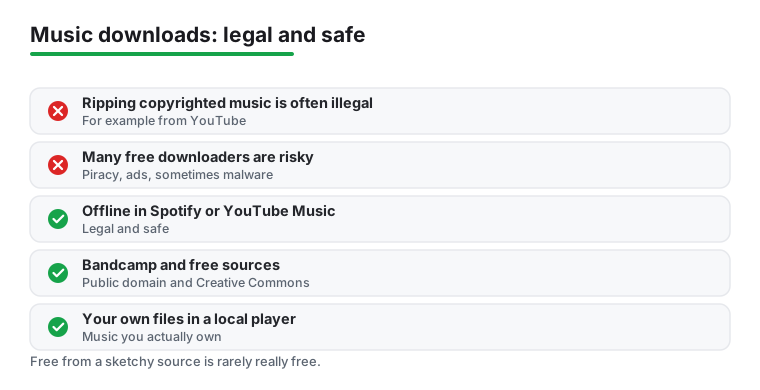
Before picking an app, it helps to be clear about what "downloading music" actually means, because the word covers two very different things. One is saving tracks for offline play inside a licensed app like Spotify or YouTube Music, where the service has the rights and you are simply caching songs on your phone. The other is pulling audio files off the open internet, for example ripping a song from a YouTube video. Those are not the same, and the difference matters a great deal for both legality and safety.
The honest part about the law
Here is the plain version. Downloading copyrighted music without permission, including ripping it from YouTube or grabbing it from a random download site, is in many cases not legal. It does not matter that the track is easy to find or that an app makes it look like a normal feature. The rights still belong to the artist and the label, and licensed services pay for the right to let you save songs. A free tool that lets you keep any song you want, with no subscription and no purchase, is almost always working around those rights rather than respecting them.
We are not here to lecture, and we are not lawyers. The practical takeaway is simple. If you stick to the offline features built into apps you pay for, or to music you have actually bought, you stay on solid ground and you never have to wonder.
Why the "free music downloader" apps are risky
If you search the web for a free music downloader, you will find dozens of apps, many of them outside the Google Play Store as direct APK files. We want to be honest about what those usually are. A lot of them serve pirated content, which is the legal problem above. Beyond that, they tend to be packed with aggressive ads, pop ups, and fake download buttons. Some request strange permissions, and a meaningful share of side loaded music apps have been found to carry malware, from adware that hijacks your browser to worse. Installing an APK from an unknown site means trusting whoever built it with access to your phone.
The rule of thumb we follow is boring but effective. Install apps from the Play Store, check the developer name and reviews, and be skeptical of any app whose main selling point is getting paid music for free. If something promises the entire catalog of a major service at no cost, that is the warning sign, not the feature.
It is worth saying why these apps look so tempting in the first place. They are usually free, the interface mimics a real streaming service, and the songs play right away, so nothing feels wrong in the moment. The cost shows up later, in battery draining background ads, in data spent loading those ads, and in the quiet permissions you granted during setup. We have also seen apps like this disappear from the Play Store overnight once the takedown requests catch up, taking your downloaded library with them. The convenience is real, but it rests on a foundation that can vanish without warning.
The legal and safe routes that actually work
The good news is that taking music offline on Android is genuinely easy when you use the right paths. Here are the ones we trust.
- Offline downloads inside a streaming app. Spotify Premium, YouTube Music with YouTube Premium, Apple Music, Tidal, Deezer, and Amazon Music all let you save songs, albums, and playlists for offline play. The files stay inside the app and work without a connection. You keep them while your subscription is active, which is the trade you are making for access to a huge catalog.
- Buying music you own. Bandcamp is our favorite here. You purchase a track or album, most of the money goes to the artist, and you can download high quality files that are yours to keep forever. Qobuz also sells albums in studio quality that you keep even without a subscription. This is the closest thing to the old idea of owning your music.
- Free, ad supported streaming with offline mode. Some licensed services let you save tracks for offline play without paying. Audiomack is the clearest example. It is a free, ad supported music streaming app with a licensed catalog, and it lets you download tracks for offline listening at no cost, with a paid Premium tier that removes ads.
- Public domain and Creative Commons sources. Plenty of music is free to download legally because the rights have lapsed or the artist chose to share it under a Creative Commons license. These sources are a legitimate way to find music you can keep without paying or pirating.
- Your own files in a local player. If you already have music as files, whether ripped from CDs you own or bought from a store, an app like VLC for Android plays them straight from your storage or SD card. No account, no subscription, no connection required.
Matching the route to how you listen
If you want one big library and do not care about owning files, a streaming subscription with offline mode is the simplest answer, and the only real question is catalog and price. If sound quality is your priority, Tidal and Qobuz are built around higher fidelity. If you want to support artists and keep files permanently, buying from Bandcamp and playing them in a local player gives you a collection that does not vanish when a subscription lapses. Many people, including us, end up using two of these together, for example a streaming app for everyday listening and a small owned library for the albums they care about most. There is no single right answer, only the one that matches your habits and your budget.
One more practical note on storage and quality. Higher fidelity sounds better but takes more space, so if your phone is tight on storage, it is worth choosing a standard quality download setting for everyday listening and saving the lossless files for the albums that really deserve them. Most of the apps above let you store downloads on an SD card, which makes a real difference if you carry a large offline library on a budget phone.
A short checklist before you install
- Get the app from the Play Store, not a random APK site.
- Check that offline downloads are an official feature, not a workaround for paid content.
- Read the permissions. A music app does not need your contacts or your call log.
- If an app promises free access to paid catalogs, walk away.
- Decide whether you want to rent access (streaming) or own files (purchases), then pick accordingly.
Stick to these routes and you get the convenience of offline music without the ads, the malware, or the legal gray area. The picks above are the ones we keep on our own phones for exactly that reason.
Quick comparison
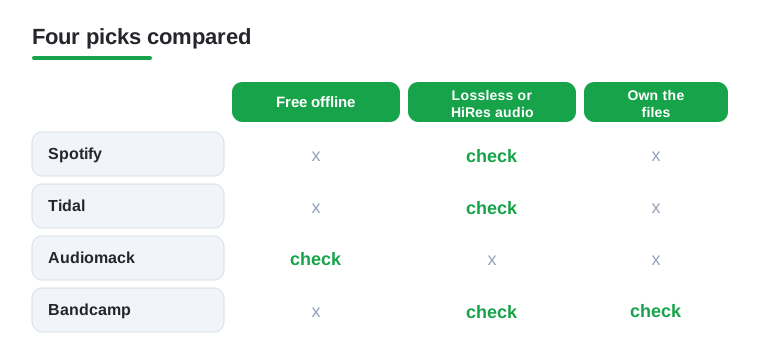
The comparison below lines up four picks from this list against the things we tested most, so you can see at a glance which one fits how you listen.
Frequently asked questions
Is it legal to download music on Android?
It is legal when you use the offline features of licensed services like Spotify, Apple Music, or Tidal, or when you buy and download tracks from stores such as Bandcamp or Qobuz. Downloading copyrighted songs from random third party sites without permission is not legal in most places, so we stick to official apps and purchases.
Can I download music for free on Android?
Yes, a few apps offer genuinely free offline listening. Audiomack lets you download many tracks free with ads, and Bandcamp gives you full downloads of anything you purchase, including some free releases artists choose to share. Most mainstream services, though, require a paid subscription to unlock offline mode.
What is the best app for offline music without internet?
For streaming catalogs, Spotify and Apple Music both handle offline downloads beautifully once you subscribe. If you own your music as files, VLC plays them with no connection and no account needed. The right pick depends on whether you want a streaming library or a personal collection stored on your device.
Do downloaded songs take up a lot of phone storage?
It depends on the quality setting. Standard quality songs run a few megabytes each, while lossless or high resolution files from Tidal and Qobuz can be ten times larger. Most apps let you choose the download quality and store music on an SD card, so you can balance fidelity against the space you have free.
Is it safe to download a free music downloader APK from outside the Play Store?
Usually not. Many of those apps serve pirated content, bury you in ads, and request permissions a music app has no reason to need, and some have been found carrying malware. We recommend installing from the Play Store, checking the developer and reviews, and treating any app that promises free access to paid catalogs as a warning sign.
Is it legal to rip music from YouTube?
In most cases, no. Ripping audio from YouTube videos generally goes against both copyright law and YouTube's own terms, even when a tool makes it look simple. The safe alternative is YouTube Music with a YouTube Premium subscription, which lets you save songs and video audio for offline play through an official, licensed feature.