
Best Cleaner Apps for Android (2026)
Most Android cleaner apps are noisy junk that nag you about problems they invented. A handful actually reclaim real storage, clear caches you cannot reach, and find the giant videos quietly eating your phone. We loaded each of these on our own daily drivers, watched what they deleted, and kept the ones that earned their place. Pair a good cleaner with a solid file manager and your storage worries mostly disappear.
1. Files by Google
If you install one cleaner, make it this. Files by Google is free, totally ad free, and made by the people who build Android, so its suggestions stay conservative and trustworthy. In our testing it reliably surfaced old screenshots, duplicate photos, and large unused apps, then cleared them with a tap. It points you to junk files, duplicates, and large items and waits for you to confirm before anything is removed. The Smart Storage option that automatically deletes already backed up photos when space runs low is a Pixel only feature, not something every phone gets here.
2. SD Maid 2
This is the power user pick, built by a developer who clearly hates bloat. SD Maid 2 digs into leftover folders from apps you uninstalled months ago, dead cache files, and orphaned data that other cleaners miss entirely. It explains exactly what each item is before you delete, which we loved. The basics are free, and a one time unlock adds scheduling and deeper scans.
3. CCleaner
The desktop classic still does a competent job on Android, and the cache cleaning genuinely works. It suits people who already trust the brand and want a familiar one button cleanup. The free version shows ads and pushes its Pro tier hard, so treat the upsells with a healthy eye roll. The storage analyzer and app hibernation tools are useful for a quick monthly sweep.
4. Avast Cleanup
From the well known security maker, Avast Cleanup leans on a clear visual breakdown of what is hogging your storage, which makes it friendly for less technical users. The photo optimizer that shrinks large images without obvious quality loss impressed us most. Core cleaning is free, while auto cleaning and the deeper junk scan need a paid plan. A polished, hand holding option.
5. Norton Clean
Norton Clean keeps things refreshingly simple and, unusually for this category, runs without ads. It targets junk files, residual app data, and cache with no melodrama about your phone being at risk. We found it a calm option for anyone who just wants a tidy cleanup and nothing bolted on. It is completely free. The tradeoff is fewer advanced features, but that simplicity is the point.
6. 1Tap Cleaner
A veteran lightweight tool that does exactly what the name promises. 1Tap Cleaner clears cache, call logs, and browser history fast, and you can drop a home screen shortcut for one tap cleanups. It suits minimalists who want speed over a flashy dashboard. The free version covers the essentials with light ads, and a cheap Pro unlock removes them and adds automation.
7. Avira
Avira is a security app first, with a junk cleaner and system optimizer bundled alongside the malware scanner. If you already run it for protection, the built in cleanup for temporary, duplicate, and cache files saves you adding a second app. We would not install it for cleaning alone, since the storage tools here are basic and the free tier nudges you toward a paid plan. The privacy advisor that flags which apps request sensitive permissions is the part we found genuinely useful.
8. AVG Cleaner
Sister app to Avast Cleanup with a near identical engine, AVG Cleaner is a strong pick if you already lean on AVG for security. The duplicate photo finder and the tool that spots blurry or similar shots cleared a surprising amount of clutter for us. Basic cleaning is free; automation and the photo features need the paid tier. Keeping cleanup in the same family feels tidy.
9. Solid Explorer
Not a cleaner in the traditional sense, but how we actually free space when we want full control. Solid Explorer is a gorgeous dual pane file manager that lets you hunt down the biggest folders and delete with confidence, no guesswork. It costs a few dollars after a generous free trial and is worth every cent. The most pleasant way to clean Android by hand.
10. Phone Master
Phone Master packs junk cleaning, an app manager, and a notification organizer into a polished, beginner friendly package, and it is free. In our testing the storage scan was thorough and the cleanup felt snappy on older hardware. It does push extra features and the occasional ad, so tap through with patience. A solid one stop maintenance app with a friendly face.
11. Zero Cleaner
A focused tool that clears app cache and not much else, which is the point. There is no dashboard theatre and no security scare screens, just a list of apps with the cache each is holding, plus an optional automatic routine. It runs without ads, and we reach for it when a misbehaving app has grown bloated and we want to wipe its cache fast. It leans on the accessibility service to do the clearing, so expect a permission prompt on setup. An honest pick if you distrust all in one cleaners.
Read this before you install any cleaner
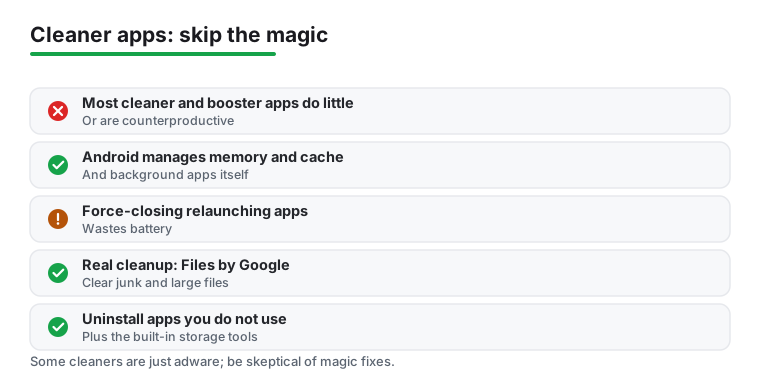
Here is the honest part first, because it saves you time and battery. On a modern Android phone, most cleaner, booster, and RAM apps do very little, and some make things slightly worse. Android already manages memory, cache, and background apps on its own. The system keeps recently used apps in memory on purpose, because reopening an app from memory is far faster than loading it fresh. When an app force closes the things sitting in RAM, Android simply reloads them a moment later, and that extra work can use more battery than it saves.
So the promise of a one tap speed boost is mostly an illusion. The number that jumps on screen looks satisfying, but it rarely changes how your phone feels. Worse, a chunk of this category is built around advertising rather than cleaning. Some of these apps ask for permissions that have nothing to do with storage, run constant background services, and push pop ups designed to make you tap a button you did not need. A storage tool that wants your contacts, location, or call logs is a red flag, not a feature.
It helps to understand why this category exists at all. Years ago, on much older phones with very little memory, aggressively closing apps could occasionally help. That hardware is long gone, but the apps stayed, and many of them now make their money from ads and data rather than from solving a real problem. The dramatic before and after numbers are easy to produce and easy to sell. That does not make them meaningful. If you remember one thing, let it be that a healthy Android phone is supposed to keep memory full, because empty memory is wasted memory.
What actually frees up space
The good news is that the real wins are simple, free, and already on or near your phone. You do not need magic. You need a few habits.
- Use Files by Google for genuine junk. It is made by the team behind Android, it is free, and it has no ads. It finds old screenshots, duplicate photos, downloaded files you forgot about, and large videos, then lets you review each one before deleting. Nothing disappears without your say so.
- Uninstall apps you do not use. This is the single biggest lever most people ignore. An app you have not opened in months is taking storage, and sometimes running in the background too. Long press its icon, choose uninstall, and you have reclaimed more space than any booster ever will.
- Use the storage tools built into Settings. Open Settings, then Storage, and Android shows you exactly what is using space, broken down by photos, videos, apps, and system files. You can clear an individual app cache from its App info page. This is the same cleanup a paid app does, except it is transparent and asks for no extra access.
- Move large media to the cloud or a card. Photos and videos are usually the real culprits. Backing them up and removing the local copies, or moving them to an SD card if your phone supports one, frees more space than clearing cache ever could.
- Clear cache only when an app misbehaves. Cache is not waste. It is data an app keeps so it can load faster next time, and Android trims it automatically when space gets tight. Wiping cache across every app just forces each one to rebuild it, which can slow things down for a while. The one good reason to clear a single app cache is when that app is acting up or has grown unusually large.
None of these steps need a download. They are built into the phone, they cost nothing, and they ask for no permissions beyond what you already grant. That is the quiet truth the cleaner category does not advertise: the best cleaner is mostly already in your hands.
How to choose a cleaner if you still want one
If you would rather have a single app do the looking for you, that is a fair convenience choice. Just pick one with care, because this is a category where trust matters more than features. Here is what we weigh.
- No fake urgency. Skip anything that flashes virus warnings, red exclamation marks, or promises to double your RAM. A good tool shows you real numbers, such as cache size and duplicate count, and lets you decide.
- It explains before it deletes. The best tools name each item and tell you what it is, so you are never wiping something blind. SD Maid 2 is the clearest example of this.
- Sensible permissions. A cleaner needs storage access and little else. If it asks for camera, contacts, microphone, or location, that is a reason to walk away.
- Ads and upsells in check. Free is fine. Constant pop ups and Pro nags are not. Files by Google and Norton Clean run with no ads at all, which is rare and worth a lot here.
- The right depth for you. Casual users want a safe sweep that mirrors what Settings already offers (Files by Google). Power users want orphaned folders and leftover app data tracked down (SD Maid 2). Match the tool to how hands on you want to be.
What to be skeptical of
Treat the following claims as marketing, not facts. A cleaner cannot make a slow processor fast. Clearing RAM does not speed up a phone that is managing memory normally. Closing background apps does not extend battery in any reliable way, and on most phones it does the opposite. And no storage tool needs to scan your phone for viruses to delete a cache file. When an app leans on any of these claims, that tells you what it is really selling.
The bottom line is calm and dull, which is exactly right. Clean out the obvious junk now and then, uninstall what you do not use, lean on Files by Google and the Settings storage page, and ignore the rest. Your phone will be fine, and so will your battery.

Frequently asked questions
Do Android phones actually need a cleaner app?
Not strictly. Modern Android manages cache and memory well on its own, and aggressive RAM boosters can even hurt performance. That said, a good cleaner saves you time finding duplicate photos, huge videos, and leftover files from uninstalled apps. Think of it as a convenience tool, not a fix for a slow phone. If you are happy poking around in Settings yourself, you may not need one at all.
Are free cleaner apps safe to use?
The reputable ones are. We stick to apps from trusted makers like Google, Norton, and Avast, or open and transparent tools like SD Maid. Avoid any cleaner that flashes virus warnings, demands unusual permissions, or promises to double your RAM, since those red flags usually mean ads and tracking. When in doubt, Files by Google is the safest free starting point and asks for very little.
What is the difference between a cleaner and a file manager?
A cleaner scans for junk and suggests what to delete automatically, which is great for hands off maintenance. A file manager gives you full manual control to browse, move, and delete anything yourself. Many people use both. You will find plenty more storage helpers across our tools and utilities guides if you want to dig deeper.
Will a cleaner app improve my battery life?
Indirectly, at best. Clearing junk files does not save battery on its own, but some cleaners include tools that hibernate background apps or flag battery draining culprits, and those can help. For real gains, look at a dedicated tool from our battery saver picks. Cleaning storage and saving power are related goals, but they are not the same job, so set your expectations accordingly.
Do booster and RAM cleaner apps really speed up my phone?
Usually not. Android keeps recently used apps in memory on purpose, because reopening them from RAM is faster than loading them fresh. When a booster force closes those apps, the system often reloads them seconds later, which can use more battery without making your phone feel any quicker. The numbers a booster shows look dramatic, but they rarely change real performance. If your phone feels slow, uninstalling unused apps and freeing storage helps far more than any RAM cleaner.
What permissions should a cleaner app actually need?
Very few. A storage cleaner needs access to files and storage, and not much else. Be cautious if one asks for your contacts, location, microphone, camera, or call logs, since none of those are required to delete junk files. Excessive permission requests are one of the clearest signs an app is more interested in collecting data or showing ads than in cleaning your phone. When in doubt, check the permissions on the app store listing before you install.