
Best Journal Apps for Android (2026)
Keeping a journal on your phone only sticks if the app gets out of your way. Over the past few months we wrote real entries on a range of Android phones, some at night with one thumb, some with a quick photo from the day. Below are the journaling apps that actually earned a spot on our home screens, whether you want a private offline diary, gentle reminders, or a place to track how you feel.
If you are still deciding how you want to capture daily thoughts, it is worth peeking at our wider productivity apps for Android roundup too.
1. Day One
Day One is the polished one, and it shows the moment you open it. We loved how each entry quietly logs the date, weather, and location, so months later an entry has real context. It suits anyone who wants their journal to feel like a keepsake. The free tier covers one journal, while the paid plan unlocks unlimited journals and end to end encryption across devices.
2. Journey
Journey feels like the natural pick if you want your diary on your phone and the web without fuss. In our testing the clean timeline and photo entries synced reliably through Google Drive. It works well for travelers and anyone journaling across a laptop and an Android phone. Core writing is free, and a coach style membership adds prompts, mood insights, and richer export options.
3. Diarium
Diarium quietly pulls in your photos, fitness stats, and calendar events to remind you what a day actually held. We found that automatic context genuinely jogged the memory on slow days. It fits people who want a fuller life log without typing it all manually. The Android app is a one time purchase with no subscription, and it backs up to your own cloud storage of choice.
4. Daylio
Daylio is journaling for people who say they hate journaling. Instead of a blank page you tap your mood and a few activities, and over weeks it draws out patterns you would never spot otherwise. Because it nudges you to log daily, it doubles nicely as one of the better habit tracker apps. It is free to start, and the premium upgrade unlocks unlimited custom moods.
5. Stoic
Stoic blends journaling with a calmer mindset, opening each session with a thoughtful prompt for morning intentions or an evening wind down. We reached for it on stressful days when a blank page felt intimidating. It suits anyone who wants reflection with a bit of guidance. The basics are free, while the paid plan adds deeper prompts, mood trends, and breathing exercises.
6. Journal it!
Journal it! tries to be a diary, planner, and habit tracker in one, and mostly pulls it off. We liked bundling a daily entry next to a mood log and a small to do list without juggling apps. It fits planners who think of journaling as part of organizing life. It is free with generous features, and a Pro membership adds cloud backup, themes, and password locking.
7. Penzu
Penzu keeps things refreshingly simple, a private online diary that feels like writing on real paper. We appreciated that entries lock behind a password and stay personal by default. It suits writers who just want a quiet, distraction free space to think. The free version handles daily journaling nicely, and a paid tier layers on strong encryption and custom themes for the page.
8. Grid Diary
Grid Diary breaks the blank page into a grid of small questions, so instead of staring at nothing you just answer a few boxes. We found it perfect for busy evenings when writing a paragraph felt like too much. It works for anyone who freezes up at open ended journaling. It is free to use, with a subscription that unlocks unlimited custom templates and full export.
9. Obsidian
Obsidian is the power user choice, storing every entry as a plain text file you fully own. Once we set up a daily note template, journaling became a fast, keyboard friendly habit that links ideas together over time. It suits tinkerers and note nerds who want total control. The app is free for personal use, with paid sync and publish add ons if you want them.
10. Microsoft OneNote
OneNote works surprisingly well as a free form journal if you already live in the Microsoft world. We kept a daily section with typed notes, pasted photos, and the odd voice clip, all synced for free. If you want a flexible notebook rather than a strict diary, our best notes apps guide covers it more fully. It is completely free, and entries sync across all your devices.
11. Reflectly
Reflectly leans into mood and gratitude, guiding you with friendly questions and a soft, card based design. We enjoyed the gentle nudge to note one good thing each night. It suits people who want journaling to feel encouraging rather than like homework. There is a free trial, and the experience runs on a subscription that unlocks the full set of prompts and statistics.
12. Easy Journal
Easy Journal lives up to its name with a clean, no nonsense diary that opens straight to a new entry. We liked the simple calendar view and that everything stays offline on the phone by default. It fits anyone who wants a private notebook without accounts or clutter. It is free with optional ads, and a small upgrade removes them and adds passcode protection.
The best journal app is simply the one you will open again tomorrow. That sounds obvious, but it is easy to get pulled toward the app with the longest feature list and then never write in it. Before you compare logos and prices, it helps to be honest about how you actually want to write, how much privacy you need, and whether you can get your words back out later. This guide walks through each of those in plain terms so you can pick once and settle in.
Match the app to how you like to write
Journaling is not one habit. People reach for very different things when they sit down to record a day, and most apps lean toward one style. Knowing your style first saves a lot of trial and error.
Free writing
If you like a blank page and the freedom to ramble, you want an app that opens straight into an empty entry with as little chrome as possible. The risk here is the opposite of writer's block: too many menus and formatting buttons can break your train of thought. Look for something quiet, with the date already filled in and the cursor ready to go.
Guided prompts
A blank page can feel intimidating, especially after a long day. Prompt based apps hand you a question to react to, like what went well today or what is on your mind. This is a gentle way in, and it tends to keep the habit alive on days when you would otherwise skip. If you often stare at the screen and write nothing, prompts are worth trying.
Bullet journaling
Some people think in lists, not paragraphs. A bullet style suits short logged items, tasks, and quick notes rather than long reflection. If your ideal entry is five bullet points about the day, look for an app that makes lists and checkboxes easy and does not push you toward flowing prose.
Photo journaling
For many of us the fastest way to remember a day is a single picture. Photo first journals let an image carry the entry, with a line or two of text underneath. If your camera roll is already your real diary, an app that pulls photos in cleanly will feel natural and lower the effort to almost nothing.
Reminders and media that fit your day
Two practical features decide whether journaling becomes a habit or a forgotten icon.
- Reminders. A single, well timed daily nudge is the difference between a streak and a stalled app. Pick a time that matches your routine, often the evening, and keep it to one reminder. More than that gets ignored fast.
- Media support. Decide whether you want plain text or a richer record. Photos, voice clips, and the odd location tag add context you will appreciate years later, but they also make entries heavier and a little slower to write. Match this to your style rather than grabbing every option.
A quick word on so called battery saving toggles that some lifestyle apps advertise: be skeptical. A text journal that you open for a couple of minutes a day has almost no measurable effect on battery, and any in app power saver is mostly placebo. Choose based on how the app feels to write in, not on claims about saving power.
Keep your words: export and lock in
This is the part people forget until it is too late. Phones get replaced, apps get abandoned by their makers, and subscriptions lapse. Before you pour months of entries into an app, check that you can get them out.
- Look for a real export, ideally to a plain format like text, Markdown, or PDF, not just a backup file only that app can read.
- Test the export once early, while you only have a handful of entries, so you know it works.
- Prefer apps that store entries as files you can see, or that back up to a cloud folder you control, rather than a closed system with no way out.
An app that traps your writing is a poor home for something you may want to keep for years. Portability is not a luxury here, it is insurance.
Privacy: treat your journal as your most personal data
A journal can hold your most private thoughts, the kind of material you would never post anywhere. That makes privacy the single most important thing to get right, more than design or feature count. Take a calm but firm approach.
- Use a lock. Pick an app that supports a PIN, password, or biometric (fingerprint or face) lock, and turn it on from day one. This protects you in the everyday case where someone picks up your unlocked phone.
- Prefer local only or end to end encrypted storage. The most private option is a journal that keeps entries on your device and never uploads them. The next best is true end to end encryption, where the company cannot read your entries even though they sync. Either way, your words stay yours.
- Understand the cloud trade off. A convenient cloud journal that syncs across devices often stores your private thoughts on a company's servers, sometimes in a form their staff could read and that could be exposed in a breach or handed over on request. That convenience is real, but so is the cost. If you sync, strongly favor an app that encrypts before upload.
- Read what the app does with your data. Be wary of free, prompt heavy apps that lean on accounts and analytics. If the privacy policy is vague about what leaves your phone, treat that as a reason to look elsewhere.
None of this requires paranoia. It just means choosing deliberately: a lock you actually use, and storage that keeps your entries private by default rather than as an afterthought.
Putting it together
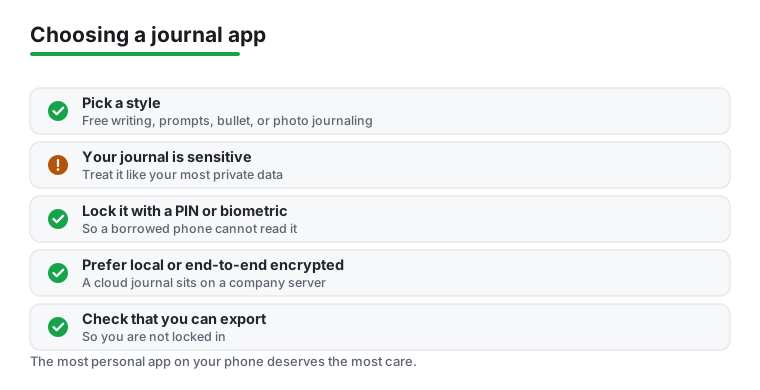
Start by naming your style, free writing, prompts, bullets, or photos, then shortlist apps that do that one thing well. Add a single daily reminder, confirm you can export your entries, and turn on a lock. If your thoughts are sensitive, favor local or end to end encrypted storage over a convenient cloud. Get those basics right and the specific app matters far less than the quiet habit you build with it.
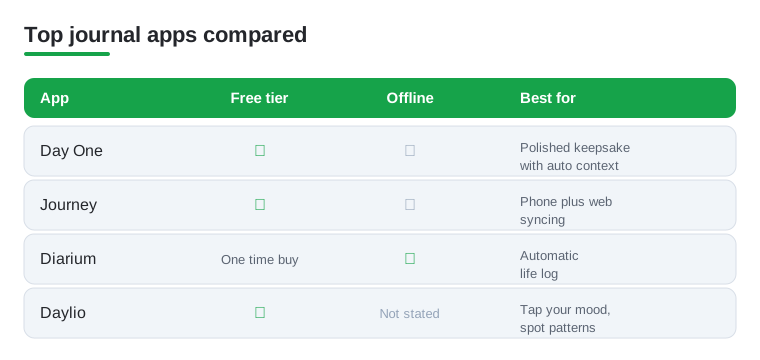
Not sure which to start with? Here is how our top four picks stack up on the things people ask about most: a usable free tier, whether entries can live offline, and what each one does best.
Frequently asked questions
What is the best free journal app for Android?
For a fully free experience we kept coming back to Daylio and Microsoft OneNote. Daylio is great if you prefer tapping moods over writing, while OneNote gives you an unlimited, flexible notebook that syncs everywhere at no cost. Day One and Journey also have solid free tiers if you only need one journal.
Are journaling apps private and secure?
Most are, but it depends on the app. Apps like Day One and Penzu offer end to end or strong encryption on their paid plans, and many let you add a PIN, password, or fingerprint lock. If privacy matters most, pick an app that stores entries offline or encrypts your cloud backup, and always turn on the screen lock.
Can I keep a journal offline without an account?
Yes. Easy Journal and Diarium both work happily offline and store entries on the device, with backup to your own cloud only if you want it. Obsidian also keeps everything as local files. These are good choices if you would rather not create yet another online account just to write a diary.
How do I move my diary entries to a new phone?
Look for an export or backup option, usually in the settings. Cloud based apps like Journey and Day One sync automatically once you sign in on the new device. For offline apps, export to a file or back up to Google Drive first, then restore on the new phone. We always test a backup before switching devices.
How often should I write in my journal?
As often as you will actually keep up, which for most people is a few times a week rather than daily. A short, honest entry beats a long one you dread. Set a single daily reminder at a time that fits your routine, and let yourself write just a line or two on busy days. Consistency matters far more than length.
Is it safe to keep a journal in the cloud?
It can be, but understand the trade off. A cloud journal is convenient and syncs across devices, yet it stores some of your most personal writing on a company's servers, where it could be exposed in a breach or read by staff unless the app uses end to end encryption. If you sync, choose an app that encrypts before upload, or keep sensitive entries in a local only or fully encrypted app instead.