
Best Music Player Apps for Android (2026)
- Best overall streaming: Spotify, with the recommendation engine we keep coming back to.
- Best free for offline files: Musicolet and VLC, both ad free.
- Best for audiophiles: Tidal and Apple Music for lossless streaming; Poweramp or AIMP for local files.
The right music player turns a commute, a workout, or a quiet evening into something better, and Android gives you far more choice here than any other phone. We have spent years swapping between local file players, big streaming names, and tiny open source gems to see which ones actually feel good day to day. Below are the players we keep coming back to, with honest notes on who each one suits and what it costs.
1. Spotify
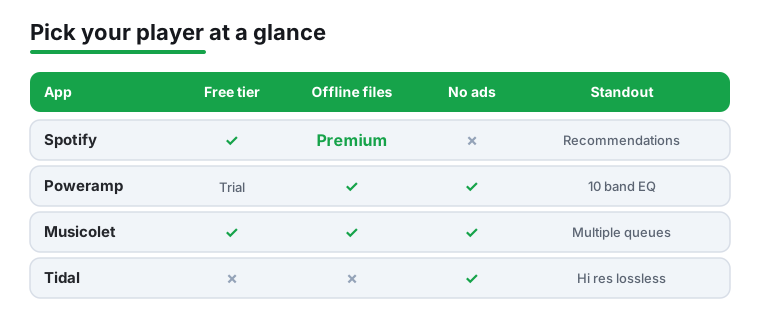
Spotify is still the player most of our friends open without thinking, and on Android it just works. The free tier is genuinely usable if you tolerate ads and shuffle, while Premium unlocks offline downloads and on demand play. What keeps us here is the recommendation engine, which quietly nails our taste. The widget and Android Auto support are rock solid. See our Spotify Premium guide for the upgrade.
2. YouTube Music
If you already live inside Google, YouTube Music is the natural pick, and it comes preinstalled on most Android phones now. The library is enormous because it folds in live versions, remixes, and covers you cannot find elsewhere. The free tier plays with ads and needs the screen on, while Premium adds background play and downloads. In our testing the smart downloads feature kept our offline playlist fresh automatically.
3. Apple Music
Yes, Apple Music runs beautifully on Android, and it suits anyone with an iPad or Mac in the house. Lossless audio and spatial tracks come at no extra cost, which still feels generous in 2026. The interface leans on big editorial playlists and human curation rather than pure algorithms. There is no free tier, only a trial, then a flat monthly fee. Our Apple Music on Android walkthrough covers setup.
4. Poweramp
Poweramp is the local file player Android veterans recommend, and for good reason. If your music lives as MP3 or FLAC files on your phone or SD card, nothing handles a big offline library more smoothly. The standout is its deep ten band equalizer with tone and stereo controls that genuinely change how tracks sound. You get a generous trial, then a small one time unlock. No subscription, no ads, no account.
5. Tidal
Tidal is the one we reach for when sound quality matters most, especially through a decent pair of wired headphones or a DAC. The hi res catalog is huge and the app makes lossless the default rather than a buried setting. Artist payouts also tend to be friendlier, which some listeners care about. There is no permanent free tier, just a trial and a monthly plan, but audiophiles rarely look back.
6. Musicolet
Musicolet is our favorite lightweight offline player, and it is completely free with no ads at all, which feels almost unheard of. It plays local files only, so there is no streaming, no account, and crucially no internet permission. We love that it supports multiple queues at once, so you can pause one list and start another without losing your place. Perfect for older phones or anyone who values privacy.
7. VLC for Android
Most people know VLC as a video tool, but it is a quietly excellent music player too, and it is free and open source. It plays absolutely any file format you throw at it, including obscure ones other players choke on. We keep it installed as a reliable backup that never argues about codecs. It reads files from network shares and USB drives as well, which is handy for big home libraries.
8. Pi Music Player
Pi Music Player hits a nice middle ground for local playback, with a clean Material design that newcomers find friendly. It is free with light ads, and a small purchase removes them. The built in five band equalizer with presets is enough for most ears, and the ringtone cutter is a genuinely useful extra. In our testing the homescreen widgets stayed responsive even with thousands of tracks loaded.
9. Amazon Music
Amazon Music makes the most sense if you already pay for Prime, since a rotating catalog comes bundled at no extra charge. Upgrading to Unlimited unlocks the full library plus hi res and spatial audio. The Android app integrates tightly with Alexa, so voice control across your Echo speakers feels seamless. We found the interface a little busy, but the value for existing Prime members is hard to argue with.
10. Retro Music Player
Retro Music Player is an open source local player that looks far more polished than its free price suggests. It pulls in album art and artist images automatically, and the theming options are a joy if you like customizing your phone. There are no ads in the core experience. We especially like the synced lyrics view and the tasteful Material You colors that match your wallpaper on newer Android versions.
11. SoundCloud
SoundCloud is where you go for music you simply cannot find on the big platforms, from bedroom producers to live DJ sets and early demos. The free tier is generous for discovery, while a paid plan removes ads and adds offline listening. On Android the app feels built for browsing rather than just playing your own files. If you follow underground or emerging artists, nothing else comes close.
12. Deezer
Deezer often gets overlooked, but its Flow feature is one of the best personalized radio streams we have tried, mixing your favorites with fresh picks. The free tier works on Android with ads, and a subscription adds offline downloads and higher quality audio. We appreciate the lyrics that scroll in time with the song. The catalog is broad, and the SongCatcher identifies tracks playing around you in seconds.
13. AIMP
AIMP started life as a beloved desktop player and the Android version carries that same focus on audio fidelity. It is free, ad free, and built for people who keep their music as files. The equalizer and audio effects are detailed without being overwhelming, and gapless playback is flawless for live albums. We found its handling of large folders and cue sheets noticeably better than the stock player on most phones.
14. BlackPlayer
BlackPlayer is a stylish offline player aimed at anyone who wants a dark, minimal look without sacrificing features. The free version covers the basics well, while the paid EX edition adds extra themes, a richer equalizer, and visualizers. We like how customizable the now playing screen is, letting you hide clutter you never use. It stays snappy and reads tags accurately, which keeps a messy local library feeling tidy.
How to choose a music player for Android
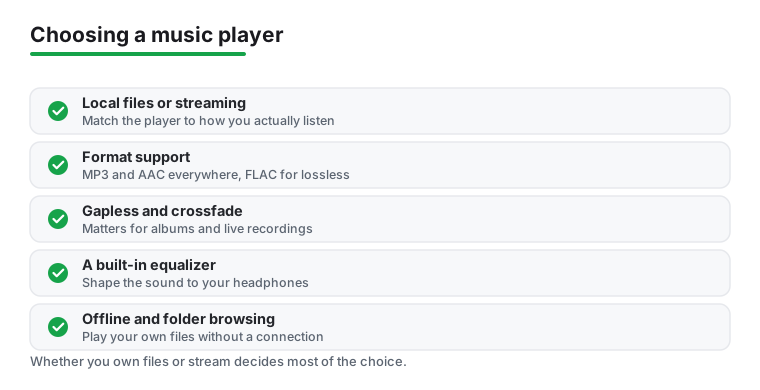
There is no single best music player, only the one that fits how you listen. Before you install anything, it helps to answer one question honestly: do you own your music as files, or do you stream it from a service? Almost every other decision follows from that. Some people sit firmly in one camp, many of us live in both, and the good news is that Android lets you keep a streaming app and a local player side by side without any friction. The sections below walk through the choices that actually change your day to day listening, so you can match a player to your habits rather than to a feature list.
Local files or streaming
A local file player plays music that already lives on your phone or SD card. It works on a plane, in a basement, or anywhere with no signal, it never costs a monthly fee, and it asks nothing of your data plan. The trade is that you have to gather and manage the files yourself, and you only ever hear what you already own.
A streaming app hands you a near endless catalog the moment you sign in. You can follow a whim, discover new artists, and never think about storage. The cost is ongoing, you usually need a connection unless you download for offline use, and you are renting access rather than owning anything. If the service drops an album or you stop paying, it disappears from your library.
Plenty of listeners want both: a streaming service for discovery and a local player for the rare recordings, personal mixes, or files a service simply does not carry. There is no rule that says you must pick a side.
Which audio formats matter
The format your music is stored in affects both sound quality and file size. A few are worth knowing:
- MP3 is the old reliable. It is compressed in a way that throws away some audio detail to save space, but at higher bit rates most people cannot tell the difference. Practically every player on Earth opens it.
- AAC is the format many streaming services and devices use. It is also compressed and lossy, but generally sounds a little better than MP3 at the same file size.
- FLAC is the most common lossless format. It compresses the file without discarding any audio data, so it sounds identical to the original recording. The catch is that files are much larger.
- Other lossless options like ALAC, WAV, and AIFF show up too, especially if you rip your own CDs or buy from download stores.
If you only stream, the service handles formats for you and you rarely need to think about it. If you keep your own files, check that your player handles whatever you have collected. VLC and AIMP are known for opening almost anything, while a few simpler players stick to the common types.
Gapless playback and crossfade
Two playback features change how albums feel. Gapless playback removes the tiny silence between tracks, which matters enormously for live albums, concept records, and any music designed to run continuously. Crossfade blends the end of one song into the start of the next, which suits parties and workout playlists where you never want the room to go quiet. Neither is essential for casual single track listening, but if you play full albums often, a player that does gapless cleanly is worth seeking out.
A built in equalizer
An equalizer lets you shape the sound, lifting the bass, taming harsh treble, or matching the character of your headphones. Some players ship with a basic five band equalizer and a handful of presets, which is plenty for most ears. Others, aimed at people who fuss over sound, offer ten or more bands plus tone and balance controls. If you have a favorite pair of headphones, even a modest equalizer can make a noticeable improvement, so it is a feature worth checking for before you commit.
Offline listening
For local players, everything is offline by nature. For streaming apps, offline listening means downloading tracks to your phone so they play without a connection, which is the feature that saves you on flights, subways, and trips abroad. This almost always sits behind the paid tier, so if a reliable offline library matters to you, factor that into the cost. Be aware that downloaded streaming tracks are tied to your subscription and vanish if you cancel, unlike files you actually own.
Folder and library browsing
People organize music in two broad ways. Some think in terms of a library, browsing by artist, album, and genre using the tags embedded in each file. Others think in folders, navigating the exact directory structure they built on their storage. If you have carefully sorted your music into folders, choose a player with strong folder browsing, since not every app offers it. If your files are well tagged, almost any library based player will present them neatly. A mismatch here is a common reason a player feels frustrating, so it is worth a moment of thought.
Ads versus a paid tier
Most apps follow one of three models. Free with ads lets you listen at no cost in exchange for interruptions and, on some streaming services, limits like shuffle only play. A paid subscription removes ads and unlocks offline downloads and higher quality audio, but it is a recurring cost. A one time purchase, common among local file players, unlocks the full app forever with no account and no monthly bill. There is no wrong answer here. Heavy streamers often find a subscription pays for itself, while people who mostly play their own files are happy with a free or one time unlock player and never look back.
Putting it together
If you stream and value discovery, start with one of the big services and pay for offline only once you know you will use it. If your music lives as files on your phone, pick a capable local player, confirm it handles your formats and your folder layout, and enjoy never seeing an ad. If you are somewhere in the middle, keep both and let each do what it does best. The right setup is simply the one you stop thinking about, because it just plays your music the way you like.
Frequently asked questions
What is the best free music player for offline files on Android?
For playing music stored on your phone, Musicolet and VLC are our top free picks with no ads. Musicolet is wonderfully light and handles multiple queues, while VLC plays literally any file format. If you want a richer equalizer, Poweramp is worth its small one time unlock fee after the trial.
Do I need a paid subscription to listen to music on Android?
Not at all. Spotify, YouTube Music, SoundCloud, and Deezer all have free tiers supported by ads. For local files, players like Musicolet, VLC, and AIMP are completely free. Paid plans mainly add offline downloads, higher audio quality, and the removal of ads, so try the free versions first.
Which music app sounds best for audiophiles?
For streaming, Tidal and Apple Music both offer lossless and hi res audio, with Apple including it at no extra cost. For local files, Poweramp and AIMP give you the most control through detailed equalizers and gapless playback. Pairing any of these with a good DAC or wired headphones makes the biggest difference.
Can I improve the sound on my current music player?
Yes. Many players have a built in equalizer, but you can also add a system wide one that shapes audio across every app. We cover the best options in our guide to the best equalizer apps for Android. If you mostly stream, browse the full Music and Audio hub and our best podcast apps roundup too.
What is the difference between a music player and a streaming app?
A music player plays files you already own, the tracks sitting in your phone storage or on an SD card, and it works without any internet connection. A streaming app pulls songs from a service over the network, so you are renting access to a huge catalog rather than owning the files. Some apps, like Spotify or YouTube Music, are really streaming services with a player attached, while others, like Musicolet or AIMP, only touch your local files. Many people end up using one of each.
Does gapless playback really matter?
It matters most for albums that are meant to flow without pauses, such as live recordings, concept records, or DJ mixes. Without gapless playback you hear a brief silence between tracks that breaks the mood. If you mostly listen to single songs on shuffle you may never notice, but if you play full albums it is worth choosing a player that supports it well, such as AIMP, Poweramp, or most major streaming apps.