
Best Caller Id Apps for Android (2026)
An unknown number lights up your screen and you freeze, scam or school nurse? A good caller ID app answers that question before you ever pick up. We loaded a stack of them onto our daily phones, let the spam roll in, and watched which ones named the caller instantly and which just spun a loading wheel. These are the ones we trust, with a mix of free favorites and paid upgrades worth the money. Before you grant any of them access to your phonebook, it helps to understand how these databases are built from people's contacts, which we explain in the privacy and security section below. Pair any of them with a solid call blocker app and most junk calls never reach your ear.
1. Truecaller
The name everyone reaches for, and for good reason. Its enormous crowd built database meant almost every mystery number we tested came back with a real name in under a second. The free tier shows caller ID and basic spam flags with ads; Premium strips the ads and adds Ghost Call and who viewed your profile. If you want the full feature tour, read our Truecaller review.
2. Hiya
Hiya is the quiet professional of the bunch. It powers the caller ID built into several carrier and phone maker apps, so the spam intelligence behind it is genuinely good. On Android it runs lean, identifies callers without nagging you to share your contacts, and the free version covers most people. We liked how rarely it false flagged a legitimate business, which matters if you take calls for work.
3. Google Phone (Caller ID and spam protection)
If you own a Pixel or many other stock Android phones, you already have this and may not realize how good it is. Turn on caller ID and spam protection and Google quietly labels suspected spam in red, often before the second ring. Call Screen, where the Assistant answers and transcribes live, saved us from countless robocalls. Free, private, and no extra download on supported devices.
4. Whoscall
Whoscall shines if you get a lot of calls from numbers in Asia, where its database is especially deep, though it handles Western numbers well too. We appreciated the offline option that identifies callers without sending each number to a server. The free version is generous; the paid tier adds auto updates and no ads. The suspicious SMS ID is a useful extra.
5. CallApp
CallApp tries to be your whole dialer, and mostly pulls it off. Beyond naming unknown callers it pulls in social photos, reminds you to call people back, and records calls where local law allows. It suits someone who wants one app to replace the stock phone app entirely. Free with ads, with a Premium tier. Just know it asks for a lot of permissions. Note that CallApp asks for broad access and was among the apps that consumer watchdog flagged over contact handling, so weigh the privacy trade-off.
6. Eyecon
Eyecon leans into faces over plain numbers. It matches incoming calls to profile photos so you see who is ringing, not just a string of digits, which makes a packed contact list feel friendlier. Caller ID for unknown numbers works well, and the visual phonebook genuinely helped us recognize regulars at a glance. Free to use with optional upgrades, and lighter on the screen than the all in one dialers.
7. Showcaller
Showcaller is the no fuss pick for people who just want a name and a spam warning without a cluttered interface. It identified unknown callers reliably in our testing and flags likely scams clearly. There is an offline number lookup that works without data, handy on the subway or abroad. Free with ads, and the call recording and block features round it out. A solid, lightweight everyday choice.
8. Should I Answer?
This is the privacy minded reviewer's favorite. Should I Answer leans on a community rated database and, crucially, can work entirely offline without uploading your contacts anywhere. It does not dazzle you with photos or social feeds; it simply tells you whether a number is trouble and lets you block it. Completely free with no real catch. Ideal if you distrust data hungry apps.
9. Samsung Smart Call
Galaxy owners often overlook the caller ID baked right into the Samsung phone app. Powered by Hiya behind the scenes, Smart Call flags suspected spam during an incoming call with no extra install. We found it quietly effective on a Galaxy test device, labeling junk in real time. Toggle it on under Caller ID and spam protection. Free and native if you own a Samsung.
10. Drupe
Drupe reimagines the whole contact and dialer experience around a slick drag to action interface, and bundles caller ID into the package. Unknown numbers get identified, spam gets flagged, and you can fling a contact toward WhatsApp or a call with one gesture. It suits people who love a personalized, themeable phone screen. Free with ads and a Pro tier. A little extra to learn, but fun once it clicks.
11. RoboKiller
RoboKiller is the heavy artillery aimed squarely at robocalls and spam. Its standout trick is Answer Bots that pick up junk calls and waste the scammer's time with comedic recordings, oddly satisfying to listen back to. Caller ID and predictive blocking are strong. This one is subscription based rather than free, so it makes most sense if relentless spam has worn you down.
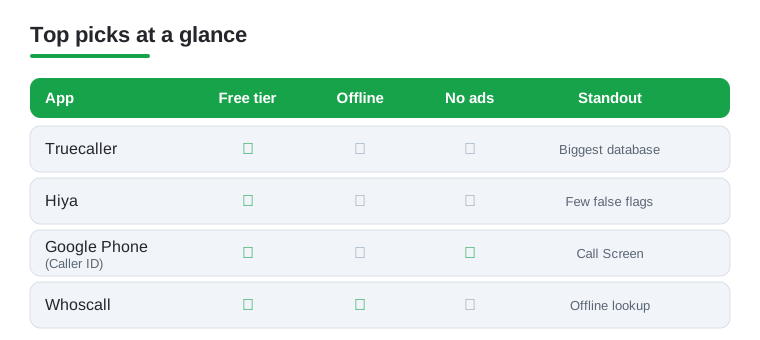
Not sure which to try first? This quick comparison lines up our top four picks across the things that matter most: a usable free tier, offline lookup, an ad free experience, and the one thing each does best.
How caller ID and spam blocking actually work
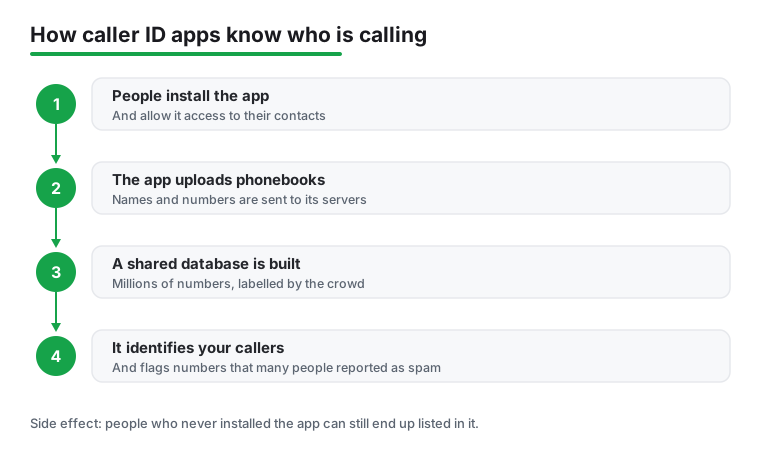
It is worth knowing what happens in the second between a call arriving and a name appearing on your screen, because the mechanism explains both why these apps are useful and why they raise privacy questions. When an unknown number rings, the app checks that number against a large database of numbers other people have already labeled. If enough users have flagged a number as a telemarketer, a scam, or a debt collector, the app shows you that warning before you answer.
The key thing to understand is that this database is built from the crowd. Accuracy does not come from a magic lookup of public records; it comes from millions of people reporting numbers and, in many cases, from the app reading the names and numbers already saved in their phones. A number is identified as Joe's Plumbing because many users have Joe's Plumbing saved under that name, or because people have reported it. The more people contribute, the better the coverage, which is exactly why the biggest databases tend to name the most callers.
To do this, caller ID apps often request access to several sensitive parts of your phone: your phone and call logs, your contacts, your notifications, and sometimes your SMS messages. Some of these permissions are genuinely required for a feature to function. An app cannot label an incoming call without seeing that a call is happening, and it cannot screen an SMS for a suspicious link without reading SMS. That does not make the permissions harmless, only understandable. The question to ask is not just whether a permission is needed for the feature, but what else the app might do with the data once it has it.
How to choose one
For most people, the practical checklist is short. First, decide whether you need offline lookup, useful if you travel or have patchy signal, since offline apps carry a downloaded database instead of querying a server for every call. Second, look at how the app makes money: a free, ad supported app is paying its bills somehow, and sometimes that includes your data. Third, check how aggressively it asks for your contacts, and whether it still works if you decline. Finally, weigh the extras you actually want, such as call recording or a reverse number search, against the permissions they require. A focused app that does one job well is often a calmer choice than a do everything dialer.
Privacy and security: how your contacts build the database
This is the part that surprises people. How these databases get contacts varies. The Truecaller app from the Play Store says it no longer bulk-uploads your address book, and instead builds its database from name suggestions people submit after a call. Bulk contact uploading has mainly been tied to its separate web 'Enhanced Search' feature and to some preinstalled versions. Either way, your number and name can still end up in these databases through other people's phones. From the app's point of view this is what makes identification so good. From a privacy point of view it has an uncomfortable side effect.
The side effect is this: people who never installed the app can end up listed in it. If your friend uploads their contacts and you are saved in their phone as your full name, your name and number can become visible to other users of the service, even though you never agreed to anything. You did not install the app, you did not accept its terms, and yet you are in its database. Non-users often do not even realize they are listed. Some services do offer a way out, for example Truecaller has a public unlisting page where anyone can remove their number, although a number can reappear if another user's phone re-adds it. This is why services that build databases this way have drawn scrutiny under the GDPR in Europe over the years, though in 2025 Sweden's data protection authority dismissed a complaint against Truecaller without a penalty, and similar privacy laws elsewhere generally expect a clear legal basis and a way for people to control data held about them.
The point is not that any single app is malicious. It is that granting contacts access can affect people other than yourself. When you let an app upload your phonebook, you are making a decision on behalf of every person saved in it. The Hong Kong Consumer Council has warned that some spam blocker apps effectively made their users' contact lists public, naming specific apps, which is the same risk seen from the other side: your number sitting in a database you never joined.
What this means in practice
- Read the permission prompts. When an app asks for contacts, that is the moment your phonebook may leave your device. Decline it if the app still works without, and many do.
- Skim the privacy policy for uploading. Look specifically for whether the app sends your contacts to its servers, and whether it offers to delete that data later.
- Remember it is not only about you. Sharing your contacts shares other people's details too, and they never got a say.
The built in alternatives
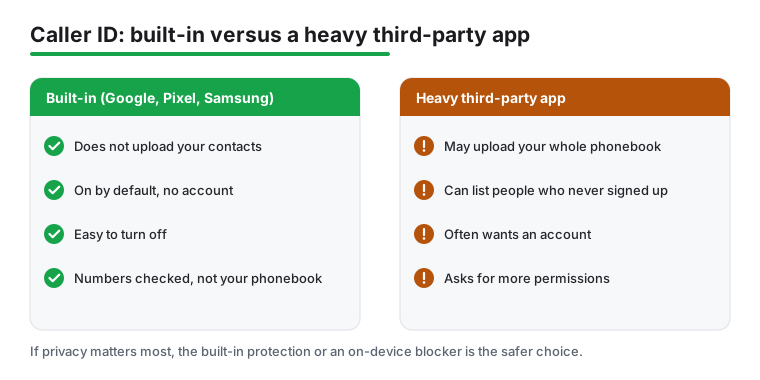
Before installing anything, check what your phone already does, because the answer is often more than enough. Android has caller ID and spam protection built into the Google Phone app. When a number that is not in your contacts calls, the number can be sent to Google to identify a business or flag it as spam. Importantly, this feature does not take numbers from your contact list to build a database, it is on by default, and you can turn it off whenever you like. You can read exactly how it behaves in Google Phone Help, and Android publishes its own guidance on stopping spam calls.
If you own a Pixel, Call Screen lets the Assistant answer suspicious calls and transcribe them live, so you can read what a caller wants without engaging. Samsung Galaxy phones have Smart Call, which flags suspected spam during an incoming call. Both are built in options that flag spam without asking you to hand over your phonebook, which makes them a sensible default for anyone who is privacy conscious.
A privacy first checklist
If privacy matters most to you, you do not have to give up caller ID to protect it. Use this short checklist when deciding what to install or keep.
- Try the built in protection first. The Google Phone app, Pixel Call Screen, and Samsung Smart Call all flag spam without uploading your contacts.
- Prefer on device blocking. Apps that identify and block numbers locally, using a downloaded database, send less of your activity to a server.
- Pick minimal or no account. The less you have to register and sign in, the less is tied to your identity.
- Look for a clear opt out of data sharing. A trustworthy app states plainly whether it shares data and lets you say no.
- Decline contacts access when you can. If the app works without your phonebook, do not hand it over, both for your sake and for everyone saved in your phone.
None of this means caller ID apps are not worth using. It means the most private choice is usually the built in protection, or a focused app that blocks on device, keeps accounts minimal, and lets you opt out of data sharing. Choose with the whole picture in mind, including the people in your contacts who never get asked.
Frequently asked questions
Do caller ID apps work without an internet connection?
Some do. Apps like Whoscall, Showcaller, and Should I Answer offer an offline number database you can download in advance, so they can identify many callers and flag spam even with no signal. Others rely on a live server lookup and will only show a name when you have data or Wi Fi. If offline ID matters to you, check for that feature before you commit.
Are caller ID apps safe for my privacy?
It varies a lot. How these databases get contacts varies. The Truecaller app from the Play Store says it no longer bulk-uploads your address book, and instead builds its database from name suggestions people submit after a call. Bulk contact uploading has mainly been tied to its separate web 'Enhanced Search' feature and to some preinstalled versions. Either way, your number and name can still end up in these databases through other people's phones. If that bothers you, lean toward apps that work offline and do not require contact access, such as Should I Answer. Always read the permissions an app requests, and skim its privacy policy before granting access to your phonebook.
Do I even need a third party app, or is Android's built in caller ID enough?
On Pixels and many stock Android phones, Google's caller ID and spam protection is excellent and free, and Samsung's Smart Call is strong on Galaxy devices. For a lot of people that native option is genuinely enough. A dedicated app makes sense if you want a deeper lookup database, a reverse number search, call recording, or features your phone does not include out of the box.
Can a caller ID app also block spam and record calls?
Most of the bigger apps bundle blocking, and several add call recording where local law permits it. That said, a tool built specifically for one job often does it better, so many readers pair a caller ID app with a dedicated call recorder app. Browse our wider communication apps picks to see how these tools fit together.
How do caller ID apps know the name behind a number I have never called?
They check the number against a large database built from the crowd. That database is assembled from numbers and names that other users have saved in their own phones and from reports people file about spam callers. How these databases get contacts varies. The Truecaller app from the Play Store says it no longer bulk-uploads your address book, and instead builds its database from name suggestions people submit after a call. Bulk contact uploading has mainly been tied to its separate web 'Enhanced Search' feature and to some preinstalled versions. Either way, your number and name can still end up in these databases through other people's phones. So a name often appears because many other people had that contact saved, not because the number is in any public record.
Can my number end up in a caller ID database if I never installed the app?
Yes, it can. If someone who has you saved in their contacts installs an app that uploads phonebooks, your name and number can be added to that database and shown to other users, even though you never installed the app or agreed to its terms. Non-users often do not even realize they are listed. Some services do offer a way out, for example Truecaller has a public unlisting page where anyone can remove their number, although a number can reappear if another user's phone re-adds it. This practice has drawn scrutiny under the GDPR in Europe over the years, though in 2025 Sweden's data protection authority dismissed a complaint against Truecaller without a penalty. Relying on the built in Google Phone protection, which does not take numbers from your contact list to build a database, avoids contributing to this.